ViewSense for CodeIgniter
Your editor knows the variables your controllers pass to your CodeIgniter 3 and 4 views, and
their types. No more hand-written /** @var */ comments, no more "undefined variable" warnings.
Preview: this is the first public version. Feedback and bug reports are welcome on
GitHub.
The problem
A CodeIgniter view gets its variables from a controller:
// application/controllers/Products.php
$data['title'] = 'All products';
$data['products'] = $this->products->get_all(); // @return Product[]
$this->load->view('products/list', $data);
Inside application/views/products/list.php, your editor doesn't know that $title or
$products exist. You get warnings and no autocompletion.
What ViewSense does
It reads your controllers and writes this block at the top of the view:
<?php /* viewsense:start - generated by ViewSense, do not edit */
/** @var \ViewSense_CI3_View $this */
/** @var \Product[] $products */
/** @var string $title */
/* viewsense:end */ ?>
<h1><?= html_escape($title) ?></h1>
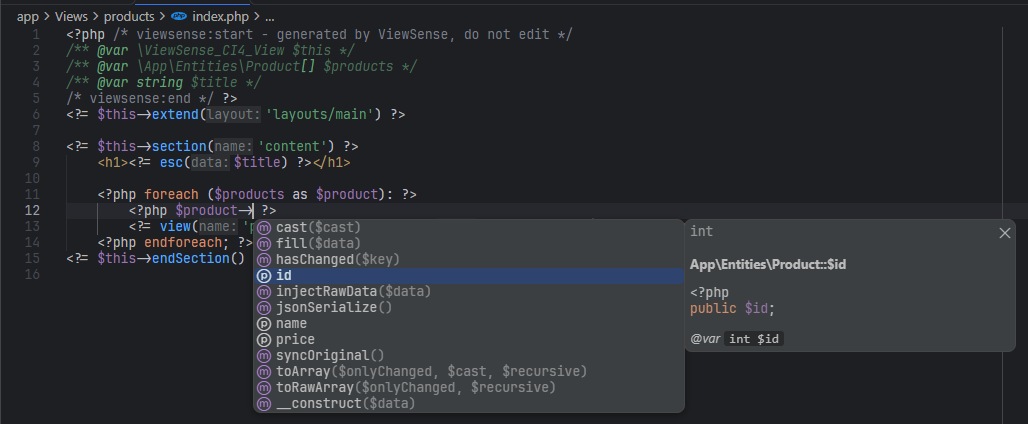
Your PHP extension (Intelephense,
PHP Tools,
Phpactor...) reads these lines: you get autocompletion, hover and go to definition on
$products, and the warnings go away. ViewSense works alongside it and never changes anything
outside the two markers.
Features
- CodeIgniter 3:
$this->load->view(), $this->load->vars(), models and libraries loaded with
$this->load->model() and $this->load->library(), and $this in views.
- CodeIgniter 4:
view(), the renderer service (setVar(), setData(), render()),
$this->include(), model(), model $returnType, and $this in views.
- Types from literals,
new, parameters, local variables, typed properties, @property,
@var, @return, @method and native return types. Unknown types become mixed.
- One view, several controllers: the types are merged, e.g.
string|null.
- Partial views get the variables of the view that includes them, and
foreach items get
the type of the array items.
- Your own render methods and helpers, such as
$this->render('products/form', $data), with
a small .viewsense.json file.
- Always up to date: the blocks are updated when you save a PHP file.
Usage
- Open a CodeIgniter 3 or 4 project folder.
- Save a controller, or run ViewSense: Update View Hints from the Command Palette
(
Ctrl+Shift+P).
When you open a project, ViewSense only checks the blocks and shows a warning on views that are
out of date. It never changes a file on its own at startup.
The details of each run are in the ViewSense output channel.
$this in views
ViewSense describes $this with a class it generates in the .viewsense/ folder. The folder
holds its own .gitignore, so Git ignores it.
- CodeIgniter 4:
ViewSense_CI4_View extends CodeIgniter\View\View, the view renderer.
It lets you write <?= $this->extend('layout') ?> as in the CodeIgniter docs, without a
"void" warning from your PHP extension.
- CodeIgniter 3:
ViewSense_CI3_View extends CI_Loader and lists what your controllers
can reach: $this->input, loaded models and libraries, controller properties.
Class names in the generated blocks start with a backslash (\Product), so tools such as PHP
Namespace Resolver don't report them as "not imported".
Settings
| Setting |
Default |
Description |
viewsense.updateOnSave |
true |
Update the blocks when you save a PHP file or .viewsense.json. When off, ViewSense only shows a warning on out-of-date views, with a quick fix (Ctrl+.) that runs the update. |
Configuration
ViewSense works without configuration. To tell it about your own render methods and helpers, add
a .viewsense.json file at the project root:
{
  "viewCalls": [
    { "method": "render", "view": 0, "data": 1, "layout": "layouts/main" },
    { "function": "include_view" }
  ]
}
You get completion and checks in this file as you type. See the
configuration reference
for every setting, including custom folder names.
Requirements
- VS Code 1.101 or later (or an editor based on it, such as VSCodium or Cursor).
- A PHP extension that reads PHPDoc, such as Intelephense or PHP Tools.
- A project folder on disk: virtual workspaces aren't supported.
Known limitations
- ViewSense only follows calls whose view name is a plain string, such as
'products/list'.
- A method that passes its own
$data parameter to a layout needs a layout entry in
.viewsense.json.
- CodeIgniter 3
config/autoload.php isn't read yet.
License
MIT

