Skip to content
| Marketplace
Sign in
Visual Studio Code>Other>Markdown Image Paste ProNew to Visual Studio Code? Get it now.
Markdown Image Paste Pro

Markdown Image Paste Pro

eyk

|
3 installs
| (1) | Free
Effortlessly define alt-text and filename as you paste
Installation
Launch VS Code Quick Open (Ctrl+P), paste the following command, and press enter.
Copied to clipboard
More Info

Markdown Image Paste Pro

Tests VS Marketplace Version VS Marketplace Installs License: MIT

On paste: prompts for alt-text and auto-suggests kebab-case filename from it.

Tired of generic GUID filenames cluttering your repository after pasting screenshots? This extension intercepts the paste operation before the file is created, prompting once for a descriptive name — the image is saved with the right filename from the start.

This extension follows a minimal-intervention philosophy — it intercepts the image paste flow only to prompt for alt-text and filename, then integrates seamlessly with VS Code's standard behavior. This design ensures maximum stability and implements what should ideally be core functionality.

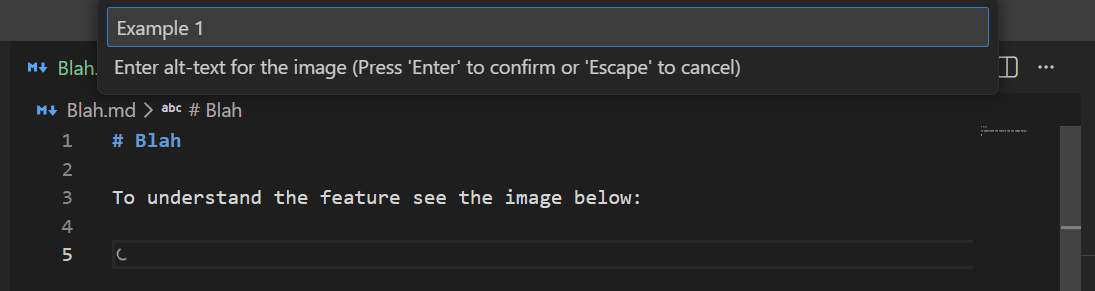
After pasting an image, you're prompted to enter alt-text: Example 1

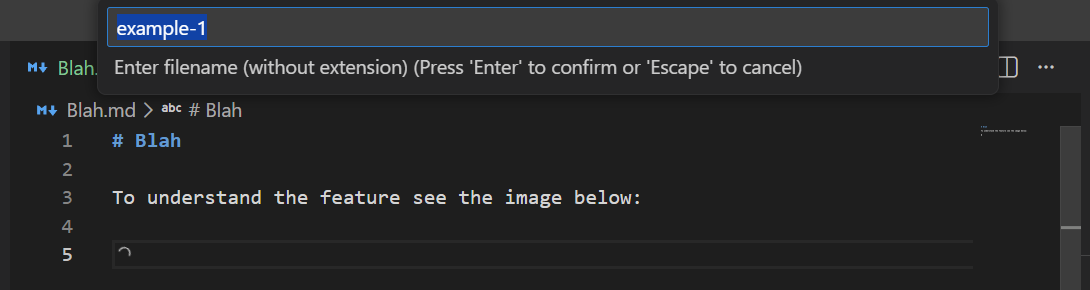
The filename is auto-suggested based on your alt-text: Example 2

The file is saved and the markdown link is inserted: Example 3

Features

  • Single prompt upfront — enter human-friendly alt-text (spaces allowed), auto-generates filename suggestion
  • Filename auto-derived — kebab-case generated from alt-text, confirm with Enter or customize as needed
  • Collision handling — warns on existing files, allows overwrite or jumps back to rename
  • Clean abort — ESC at any prompt cancels entirely (no image inserted), retry paste anytime
  • Zero configuration — works out of the box

Planned Features

Additional image format support (WebP, JPEG) is under consideration. If you'd like to see this feature, show your interest by:

  • ⭐ Starring the project on GitHub
  • ⭐ Rating the extension on the VS Code Marketplace

Preview of planned configuration:

{
  "markdownImagePastePro.defaultFormat": "png",  // png | webp | jpeg
  "markdownImagePastePro.promptForFormat": false  // if true, adds format picker (↑/↓ navigation, default pre-selected)
}

With promptForFormat enabled, workflow becomes: Alt-text → Enter → Filename → Enter → Format (↑/↓) → Enter

Development

See DEVELOPMENT.md for setup, build instructions, and architecture details.

License

The source code and strings are licensed under the MIT License.

  • Contact us
  • Jobs
  • Privacy
  • Manage cookies
  • Terms of use
  • Trademarks
© 2026 Microsoft