
Coda AI
The open, auditable AI coding agent for VS Code.
Ships real changes, with a complete audit trail and a human in control.



Install ·
Marketplace ·
Publisher
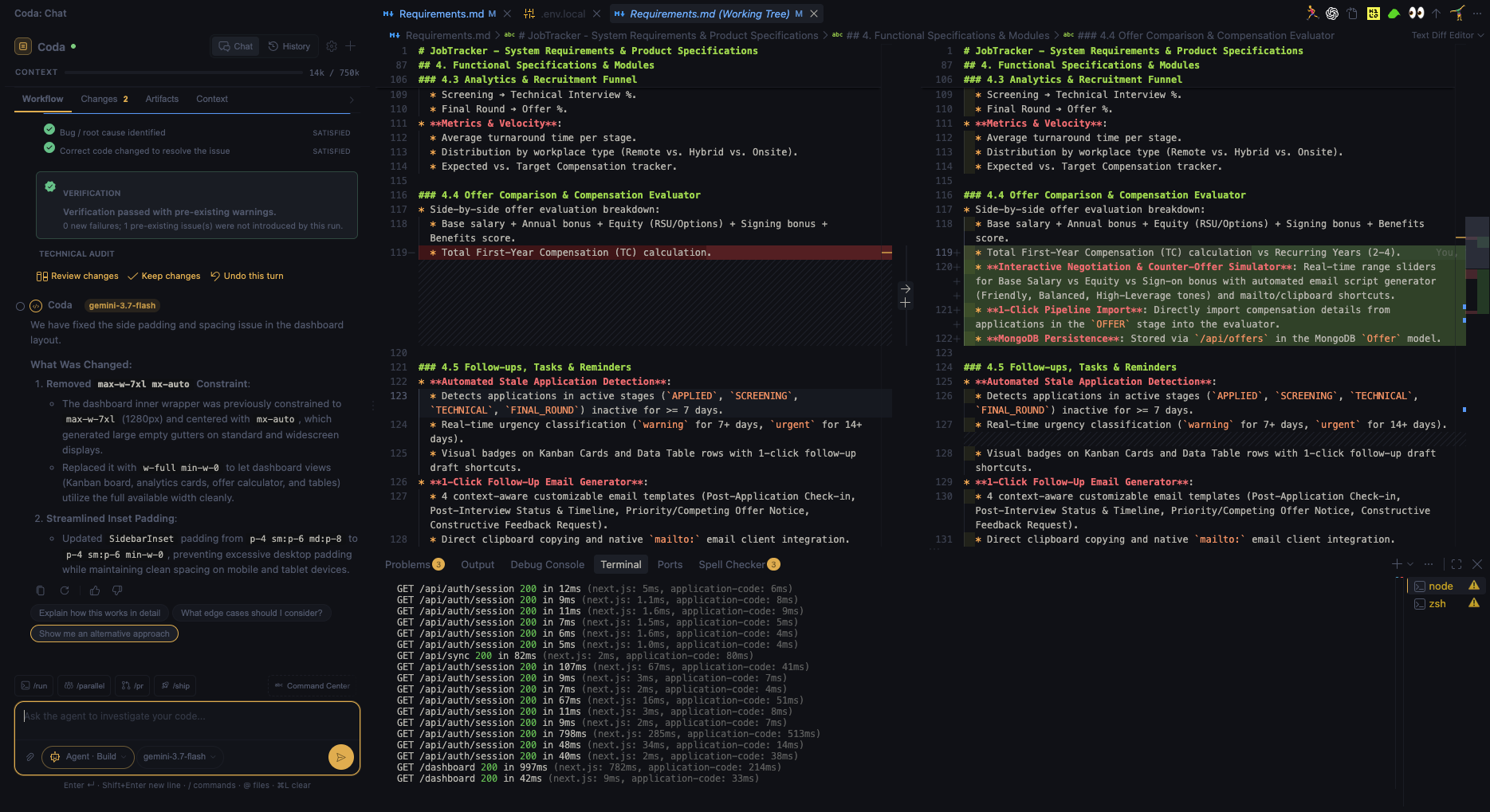
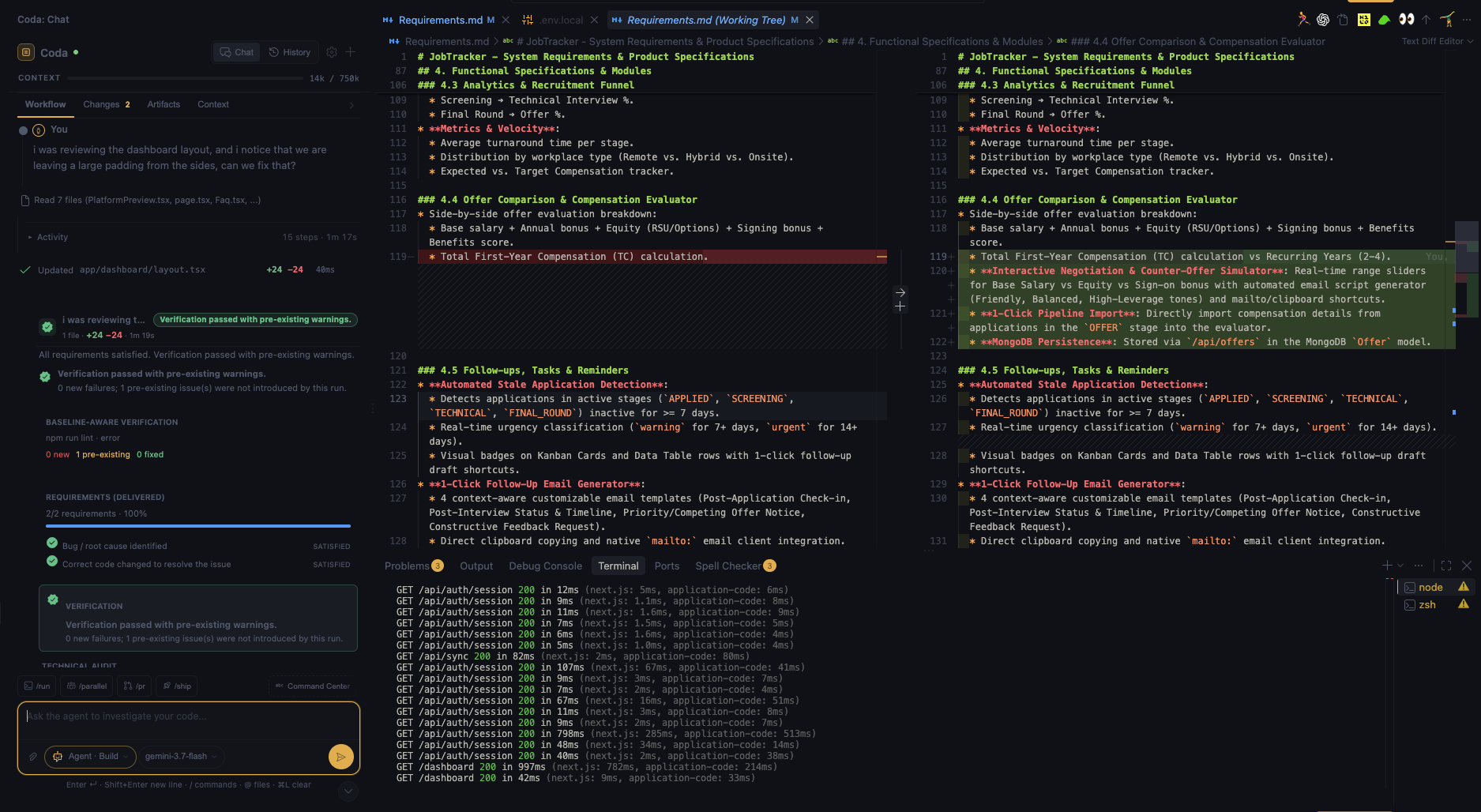
Every tool call, edit, and validation is visible, from the first read to the verified result.
Overview
Coda is a full-loop engineering agent. It reads your codebase, plans the work, edits across files, runs your tests and builds, reviews its own diffs, and leaves a complete, human-approvable record of what it did and why.
You choose the model. Coda supplies the engineering loop, the guardrails, and the audit trail.
|
|
| Best for |
Debugging, refactoring, test generation, branch review, documentation, and shipping governed AI-assisted changes |
| Models |
A broad provider catalog including OpenAI, Anthropic, Google, Azure OpenAI, AWS Bedrock, Mistral, xAI, DeepSeek, OpenRouter, local Ollama, and custom OpenAI-compatible endpoints |
| Control |
Per-hunk diff review, approval gates for risky operations, isolated git worktrees |
| Privacy |
No telemetry. Provider keys in VS Code SecretStorage. Local Ollama is available |
| License |
MIT |
Why teams choose Coda
Real changes, safely applied. Edits are written to disk and shown as live diff cards. Accept or undo per file or per hunk. Nothing is committed without you.
Auditable by design. Every run produces a Run Summary: status, duration, model, files changed with line deltas, tool calls, validations, token usage, and linked artifacts.
Governed autonomy. Deletions and unsafe commands pause for explicit approval. Large tasks can run in an isolated git worktree so your working tree stays untouched.
Your model, your rules. Route chat, agent, inline, and review work to different models. Keep durable rules, architecture notes, and project memory versioned in the repository.
Offline-first retrieval. Local BM25 search plus VS Code language-service navigation. Optional embeddings can improve semantic ranking when configured; the core retrieval path requires no network connection or vector database.
Two ways to work, one engine
| Surface |
Use it for |
| Coda panel (Activity Bar) |
The full agent workspace: diffs, run summaries, artifacts, approvals, recovery actions |
@coda in VS Code Chat |
Quick questions (@coda how does auth work?) and one-shot runs (@coda /agent fix the failing test) |
Both surfaces share the same backend: tools, sessions, approvals, and change tracking. Anything the agent does from @coda can be reviewed and undone in the panel.
Features
| Capability |
What you get |
| Chat and Agent modes |
Ask questions about your codebase, or delegate multi-step implementation work |
| Operator Surface |
Live workflow tree, context controls, artifacts, and recovery actions (pause, resume, replay, fork, rollback) |
| Run Summary cards |
A compact audit trail for every run |
| Granular diff review |
Open VS Code diffs from chat; accept or undo per file or per hunk |
| Delivery artifacts |
Commit messages, PR packages, execution reports, and review notes under .coda/ |
| Smart model routing |
Purpose-specific models for chat, agent work, inline completions, and reviews |
| Inline completions and chat |
Ghost-text suggestions and a floating ⌘I / Ctrl+I editor overlay |
| Structured agent activity |
Shows observable work such as inspection, search, edits, commands, and verification without exposing private model reasoning |
| Background processes and tasks |
Start long-running dev servers, watchers, and test runners and keep working; wait for a port or output pattern; drive VS Code tasks |
| Documentation lookup and HTTP requests |
Query a Context7-compatible docs index pinned to a library version, and make bounded, approval-gated API calls |
| Structural (AST) search and codemods |
Search and rewrite code by syntax, not substrings — every call to a function, rename a symbol, retarget calls, remove imports |
| Repository analysis |
Resolve merge-conflict markers, read LCOV/Istanbul coverage, and scan for hard-coded secrets, all read-only |
| Permission modes and protected paths |
Ask / Auto-edit / Auto-all, switchable from the status bar, with keys, credentials, and .env files gated |
| Network egress policy |
Domain allow/deny lists and proxy routing, enforced on every redirect hop |
| MCP support |
Connect any Model Context Protocol server; its tools become available to the agent |
| Project memory |
Durable rules, architecture notes, task state, and cross-session memory in the workspace |
What the agent can do
- Navigate and understand your project structure
- Read, create, edit, and refactor files across the codebase
- Run shell commands, build scripts, and test suites
- Start and manage long-running processes and VS Code tasks
- Trace code with go-to-definition, find references, and symbol search
- Search and rewrite code structurally (AST), and resolve merge conflicts
- Read LCOV/Istanbul coverage and scan for hard-coded secrets
- Work with Git: commits, diffs, branches, stash
- Read external documentation and APIs
- Keep lightweight session notes across a workflow
- Ask you clarifying questions when the task is ambiguous
Run Summaries and artifacts
Each agent run can produce a durable summary card with status, duration, model, and token usage; files changed with line deltas; tool-call and validation counts; and links to diffs and generated artifacts.
The Artifacts panel collects responses, diffs, logs, execution reports, reviews, PR packages, and commit messages so important output doesn't disappear into chat history.
Delivery workflow
| Command |
Output |
Coda: Generate Commit Message |
Writes .coda/commit-message.md and copies the message |
Coda: Commit Agent Changes |
Previews the message, asks whether to stage all changes, then commits after confirmation |
Coda: Generate PR Package |
Writes .coda/pr-package.md: summary, changed files, risks, rollback plan, release notes, diff stat, and links to recent execution reports |
Coda: Review Current File Changes |
Writes .coda/reviews/<timestamp>.md with findings-first review notes |
Coda: Start Background Worktree |
Creates an isolated git worktree and branch, writes a task brief, and opens it in a new window |
Project rules and memory
Run Coda: Initialize Project Rules to create versioned guidance that Coda injects into Chat and Agent prompts automatically:
.coda/rules.md: coding standards, validation rules, safety constraints.coda/architecture.md: system shape, conventions, risky modules.coda/tasks.md: durable active, backlog, and completed work
Coda also keeps persistent project memory in .coda/memory.json, so decisions, conventions, and known issues carry across sessions. The agent manages it with memoryRead, memorySave, and memorySearch.
Git integration
Coda: Review Staged Git Changes analyzes staged changes for bugs, security risks, and style regressions.Coda: Setup Pre-Commit Hook (PR Reviewer) installs a hook that runs Coda's analysis on every commit.
Built for teams and regulated environments
Coda is designed so that AI-assisted work can be reviewed, reproduced, and governed like any other change.
| Requirement |
How Coda addresses it |
| Traceability |
Run Summaries, execution reports (.coda/execution-reports/), and normalized JSON traces (.coda/eval-traces/) for every run |
| Human approval |
Deletions and non-safe commands require explicit Allow / Skip. Nothing is committed without confirmation |
| Reversibility |
Per-file and per-hunk undo; recovery actions in the Operator Surface; isolated worktrees for delegated work |
| Data control |
Code is sent only to the provider you configure. Use Ollama or a self-hosted OpenAI-compatible endpoint to keep everything on your network |
| Secrets |
API keys are stored in VS Code SecretStorage, never in plaintext settings |
| Consistency |
Team rules and architecture notes live in the repo and apply to every developer's runs |
| Quality gates |
/ship runs typecheck, lint, test, and build; the pre-commit hook reviews staged changes |
| Licensing |
MIT, with source available for inspection |
Quick start
1. Install Coda AI from the Marketplace. The Coda icon appears in the Activity Bar.
2. Open the panel by clicking the icon, or run Coda: Open Chat (⌘⇧P / Ctrl+Shift+P).
3. Configure a provider. Click the ⚙ icon in the panel, or run Coda: Configure AI Provider.
- Provider: choose from the dropdown
- API key: paste it when the provider needs one. It is stored in VS Code SecretStorage
- Model: leave blank for the provider default, or enter a model ID from the selected provider's current catalog. Model IDs and availability change frequently; use the provider's documentation for the current list
Coda asks for a custom base URL only where one is required: Azure OpenAI, OpenAI-compatible APIs, Cloudflare gateways, SAP AI Core, and Snowflake Cortex. Other providers use their standard hosted endpoints automatically.
4. Choose a mode. Chat answers questions about your code. Agent takes on multi-step tasks: reading, editing, running commands, and iterating.
5. Optional: initialize project guidance with Coda: Initialize Project Rules.
6. Optional: delegate safely with Coda: Start Background Worktree. Coda writes a task brief under .coda/background-tasks/ in the new worktree and opens it in a separate window, so the agent never touches your current checkout.
Supported providers
Coda supports a provider catalog through a provider-agnostic architecture in which each provider is a self-contained adapter. Provider catalogs, model IDs, tool support, and availability change frequently. Coda uses live catalogs where an endpoint provides them, and Agent mode admits only models whose tool capability is documented or verified for the selected provider and endpoint.
| Category |
Providers |
| Frontier labs and clouds |
OpenAI · Anthropic · Google Gemini · Google Vertex AI · Azure OpenAI · AWS Bedrock · Snowflake Cortex · GitHub Copilot · GitLab Duo · SAP AI Core · Vercel AI Gateway |
| Open-weight and fast inference |
Mistral · Groq · xAI · DeepSeek · Cohere · OpenRouter · Together AI · Fireworks AI · Perplexity · Cerebras · DeepInfra · NVIDIA NIM · Alibaba (DashScope) · Venice · LLM Gateway |
| Local and free |
Ollama · Ollama Cloud · Pollinations |
| Gateways and custom endpoints |
OpenAI Compatible · Cloudflare AI Gateway · Cloudflare Workers AI · Kilo · ZenMux · Dynamic · OmniRoute |
Note: GitHub Models was retired by GitHub on July 30, 2026 and is not supported by Coda. GitHub Copilot models are a separate provider. See GitHub's current documentation for the retirement status.
Where to get an API key
Running fully local with Ollama
Ollama can keep model requests on your machine, but tool calling is model-dependent. Before selecting a local model for Agent mode, verify that the model exposes the tools capability (ollama show <model>). Configure a context size appropriate for your hardware; larger contexts use more memory, and Ollama recommends a large context for coding tools when the machine permits it. Coda still applies its own context budget so tool calls and results have room to complete.
Set OLLAMA_CONTEXT_LENGTH to a value appropriate for your hardware before starting ollama serve; see Ollama's current context guidance for the trade-off between context size and memory.
Ollama Cloud models run at their maximum context length by default.
OmniRoute
Run OmniRoute locally, create an endpoint API key in its dashboard, and select OmniRoute in Coda. The default endpoint is http://localhost:20128/v1. Use coda.providerBaseUrls.omniroute to point Coda at a hosted or custom instance. Models use OmniRoute's provider-qualified IDs, such as if/kimi-k2-thinking.
Slash workflows
Type / in the input box to browse and autocomplete commands. Most commands start an agent task with the current preset; a few act directly (/mode, /plan-mode, /compact, /undo, /checkpoints, /eval, /help). /run, /parallel, and /resume also provide structured forms, and ⌘K / Ctrl+K opens the Command Center.
| Command |
Description |
/plan <goal> |
Build an execution plan with todo tracking before implementation |
/mode <preset> |
Switch the agent behavior preset (general, plan, build, explore, debug) |
/plan-mode |
Toggle plan mode: blocks file/git edits so the agent can only explore and plan |
/run <command> |
Run a command and summarize the outcome and next action |
/ship |
Run quality gates (typecheck, lint, test, build) and report ship-readiness |
/fix [focus] |
Find and fix workspace errors and diagnostics |
/test <file> |
Generate unit tests for a file |
/review |
Review the current git diff for risks, bugs, and regressions |
/explain |
Explain the selected code or current file |
/commit |
Generate a commit message from staged changes |
/undo |
Revert all file changes the agent made this session |
/pr [focus] |
Generate a PR package: title, body, risks, tests, release notes |
/codebase <q> |
Deep architecture and risk analysis across the workspace |
/parallel [--worktree] <task> |
Split work into parallel sub-agent investigations; --worktree uses an isolated git worktree |
/swarm [--worktree] <task> |
Split work across multiple coordinated sub-agents; --worktree uses an isolated git worktree |
/init <stack> |
Scaffold a new project from requirements |
/preview <req> |
Generate and render a UI prototype in a live webview |
/checkpoints |
List saved agent checkpoints |
/compact |
Summarize and compress this conversation to free context space |
/resume [id] |
Resume from a checkpoint without repeating completed work |
/eval |
Show how to score captured agent traces and compare models |
/help |
List all commands |
Workspace-specific slash-command prompt templates can be placed in
.coda/commands/<command>.md. Templates support {{args}} and
{{command}}; without a template, Coda uses its built-in prompt.
MCP servers
Model Context Protocol servers expose tools the agent can call automatically, such as reading issues, querying a database, or fetching pages. Connected tools appear alongside Coda's built-in tools.
Option 1: workspace file (recommended). Create .coda/mcp.json. It hot-reloads on save.
{
  "mcpServers": {
    "github": {
      "command": "npx",
      "args": ["-y", "@modelcontextprotocol/server-github"],
      "env": { "GITHUB_PERSONAL_ACCESS_TOKEN": "your-token" }
    },
    "filesystem": {
      "command": "npx",
      "args": ["-y", "@modelcontextprotocol/server-filesystem", "."]
    }
  }
}
Option 2: VS Code settings. Add servers under coda.mcpServers for availability across all projects. If a server name appears in both places, the settings entry wins.
Option 3: guided setup. Run Coda: Add MCP Server and follow the prompts.
Verify: run Coda: MCP Server Status to see each server's state and tool count. Use Coda: Restart MCP Server for a stopped server, and open View → Output → MCP Manager for logs.
| Symptom |
Fix |
| Server shows 0 tools |
Check the package name and arguments; run npx -y <package> in a terminal to confirm it installs |
| Server won't start |
Check Output → MCP: server-name for the startup error |
| Tools missing in the agent |
Run Coda: Restart MCP Server, then start a new agent task |
env variable not picked up |
Restart VS Code after editing environment values |
Skills and instruction packages
Coda can load instruction-only skills from SKILL.md files. Run Coda: Import
Skill and choose either a public GitHub repository or a local skill package.
Coda resolves GitHub imports to a commit, previews the discovered skills, and
copies only the selected ones into the workspace's .agents/skills/ directory.
Coda records the package name, version, source metadata, resolved commit, and
content hashes in .coda/skill-imports.json.
Example: import anti-slop
- Open the Command Palette and run Coda: Import Skill.
- Choose GitHub repository.
- Paste
https://github.com/miqdadbadjuber/anti-slop#main.
- Select the skills you want, then approve the import.
- Start a new Coda session and ask Coda to use the relevant anti-slop skill.
The importer downloads GitHub archives over HTTPS only. It copies files as data
only, never runs plugin manifests, installers, scripts, or arbitrary package
code, and rejects unsafe archive paths. MCP remains the integration path for
executable external tools.
Skills are loaded on demand by the agent's skill tool. Start a new Coda session
after importing a package. You can also add trusted skill directories directly
with coda.skills.paths.
Configuration
| Setting |
Description |
coda.provider |
AI provider |
coda.model |
Model name (empty uses the provider default) |
coda.providerBaseUrls.<provider> |
Custom endpoint for a provider |
coda.modelRouting.enabled |
Enable purpose-specific model overrides |
coda.modelRouting.chatModel |
Model for normal chat |
coda.modelRouting.agentModel |
Model for Agent mode |
coda.modelRouting.inlineModel |
Model for inline completions and inline chat |
coda.modelRouting.reviewModel |
Model for review workflows |
coda.temperature |
Response creativity (0-2) |
coda.maxOutputTokens |
Maximum output tokens per response |
coda.systemPrompt |
Custom instructions appended to the system prompt |
coda.inlineCompletions |
Enable or disable ghost-text completions |
coda.permissionMode |
Approval mode: ask, auto-edit, or auto-all (also switchable from the status bar) |
coda.notifyOnFinish |
Notify when a long run finishes while unfocused: unfocused, always, or never |
coda.network.allowedDomains / blockedDomains |
Network egress allow/deny lists for fetchUrl and httpRequest |
coda.network.proxy / noProxy |
Proxy URL and bypass list for outbound requests |
coda.docs.baseUrl |
Base URL for docsLookup (Context7-compatible, defaults to the public instance) |
coda.agent.hooks |
Pre-/post-tool hook scripts matched by tool name |
coda.agent.scheduledTasks |
Recurring agent prompts run on an interval |
coda.mcpServers |
MCP server configuration |
Keyboard shortcuts
| Shortcut |
Action |
Enter / Shift+Enter |
Send / new line |
⌘K / Ctrl+K |
Command Center |
⌘L / Ctrl+L |
Clear chat |
⌘I / Ctrl+I |
Inline chat (rebindable if it conflicts with another extension) |
@filename |
Include a file in context |
Workspace context
In Agent mode, Coda automatically retrieves relevant code, up to 8 chunks (about 30K characters), using BM25 over symbol-boundary chunks plus VS Code language-service lookups. Optional embeddings can improve ranking when enabled; targeted definitions, references, call hierarchy, and type hierarchy are available when the workspace language server supports them.
Coda budgets context to the model in use, reserving headroom for output and tool results and compacting older messages as a session grows. If a workspace is too large for the active model, auto-context is disabled with a warning and everything else keeps working.
If you see the Workspace Too Large warning:
- Use a model with a larger context window.
- Add a
.codaignore file to exclude generated and build directories.
- Work on one module at a time.
To opt out of automatic context, use Chat mode, or include files explicitly with @filename.
Privacy and security
- Provider API keys entered through Coda are stored in VS Code's encrypted SecretStorage, never in plaintext settings. The optional
coda.webSearch.apiKey setting is a plaintext fallback; prefer SecretStorage where available.
- Model requests go to the AI provider you configure. Optional web search, URL fetching, and MCP tools can contact their configured external services when enabled.
- Network egress is policy-controlled.
fetchUrl and httpRequest honor coda.network.allowedDomains / blockedDomains on every redirect hop and route through coda.network.proxy when set; private-network hosts stay blocked.
- No telemetry, analytics, or tracking.
- Local model traffic can stay on your machine with Ollama; separately enabled web search, URL fetching, MCP, or other external tools may still make network requests.
- Approval gates protect against destructive operations.
To report a security concern, contact the publisher through the Coda Marketplace listing.
Agent evaluation (contributors)
Enable the Evals tab with coda.devMode. Every completed run writes a markdown execution report to .coda/execution-reports/ and a normalized JSON trace to .coda/eval-traces/, including the prompt, provider and model, tool calls, edited files, and validation evidence.
npm run build
npm run eval:traces   # score captured runs
npm run eval:bench    # deterministic benchmark scenarios
npm run build:prod    # production build
Run the same task against different models and re-run eval:traces to compare pass, unverified, and failure rates by provider and model.
Support
Built by Express Genix · MIT License

