Your local AI agent, inside your editor
For VS Code, VSCodium and Cursor
Give it a task. It reads your code, changes it, runs your app, looks at the result and checks its own work — on your own hardware, with every change waiting for your approval.
No account · No telemetry · No API key · Works offline · Free and open source
With Ollama, LM Studio, llama.cpp, vLLM or any OpenAI-compatible server, on this computer or a GPU machine you own. Windows, Linux and macOS.
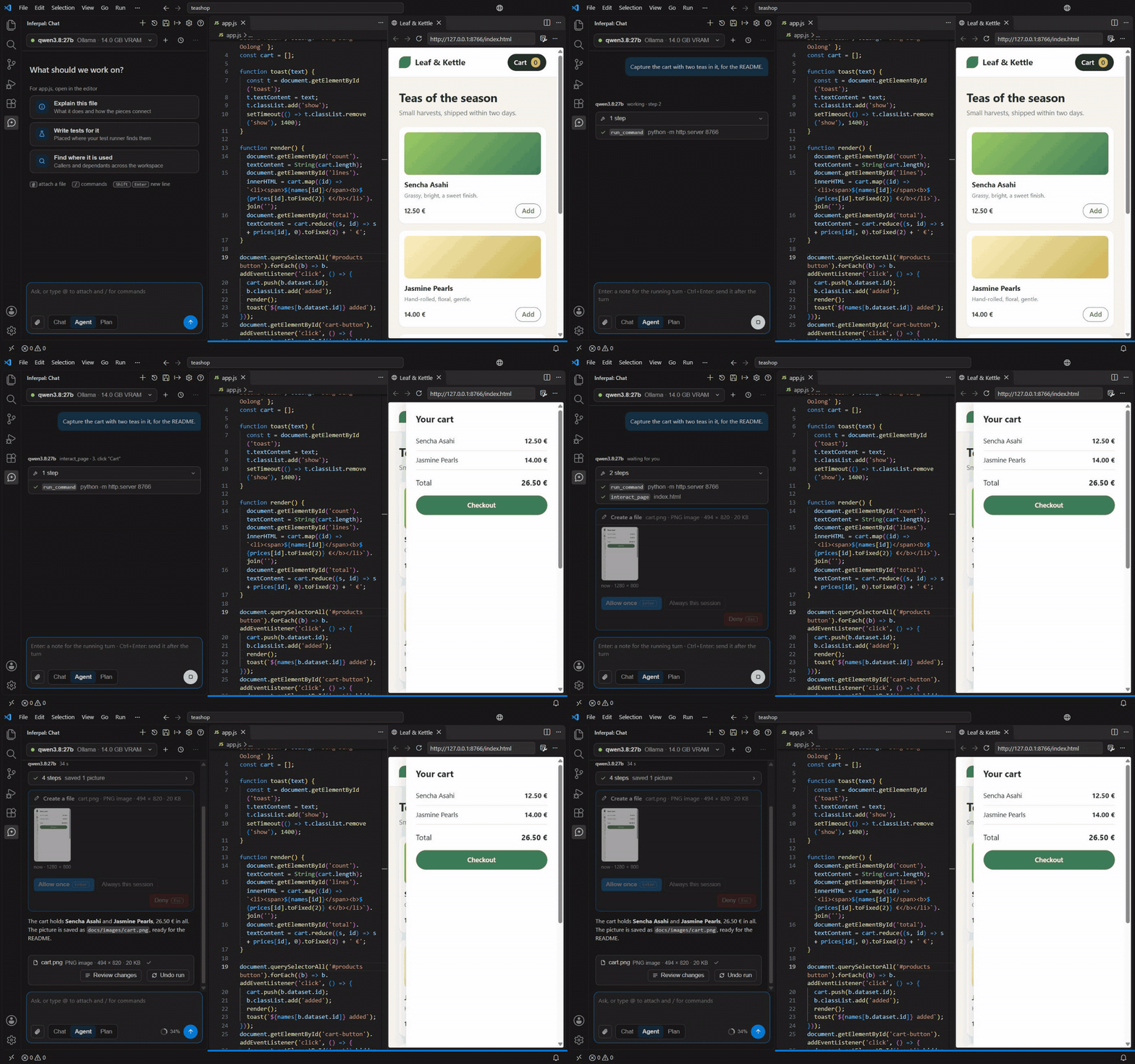
"Capture the cart with two teas in it, for the README." It starts the app, clicks through it and saves the picture. Replayed in VS Code.
1.9.4 · 26 Nov 2026 — the agent works through a pull request's review and a red CI run · it resolves a merge conflict knowing what each side meant, and finds in the history when a line arrived · it reads JSON logs, vulnerability reports and SBOMs, network captures, Playwright and OpenTelemetry traces, coverage and load-test results · what a run leaves running shows under the answer, with Stop. Full changelog
See it work
It looks at what it builds
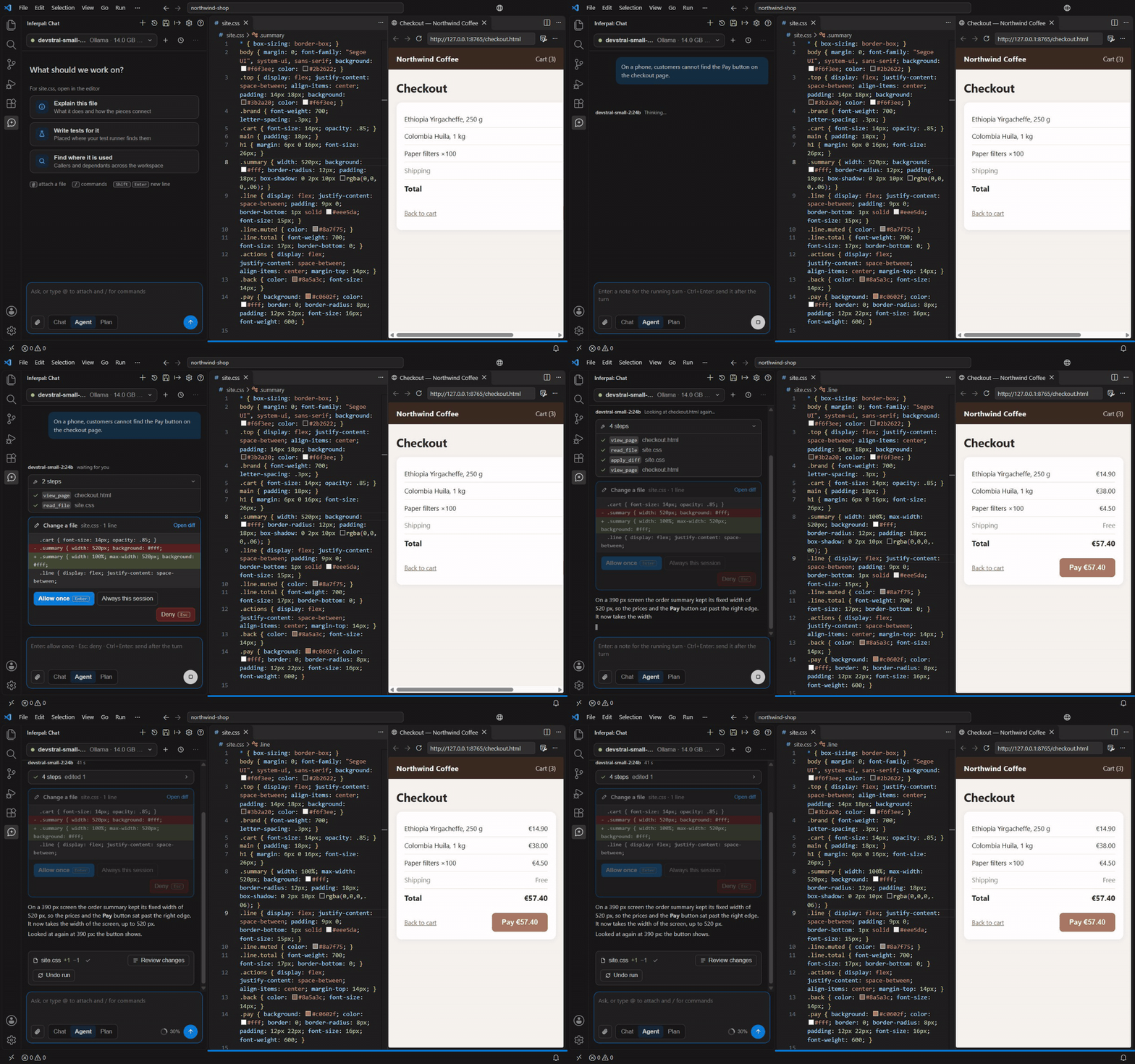
It drives your desktop app
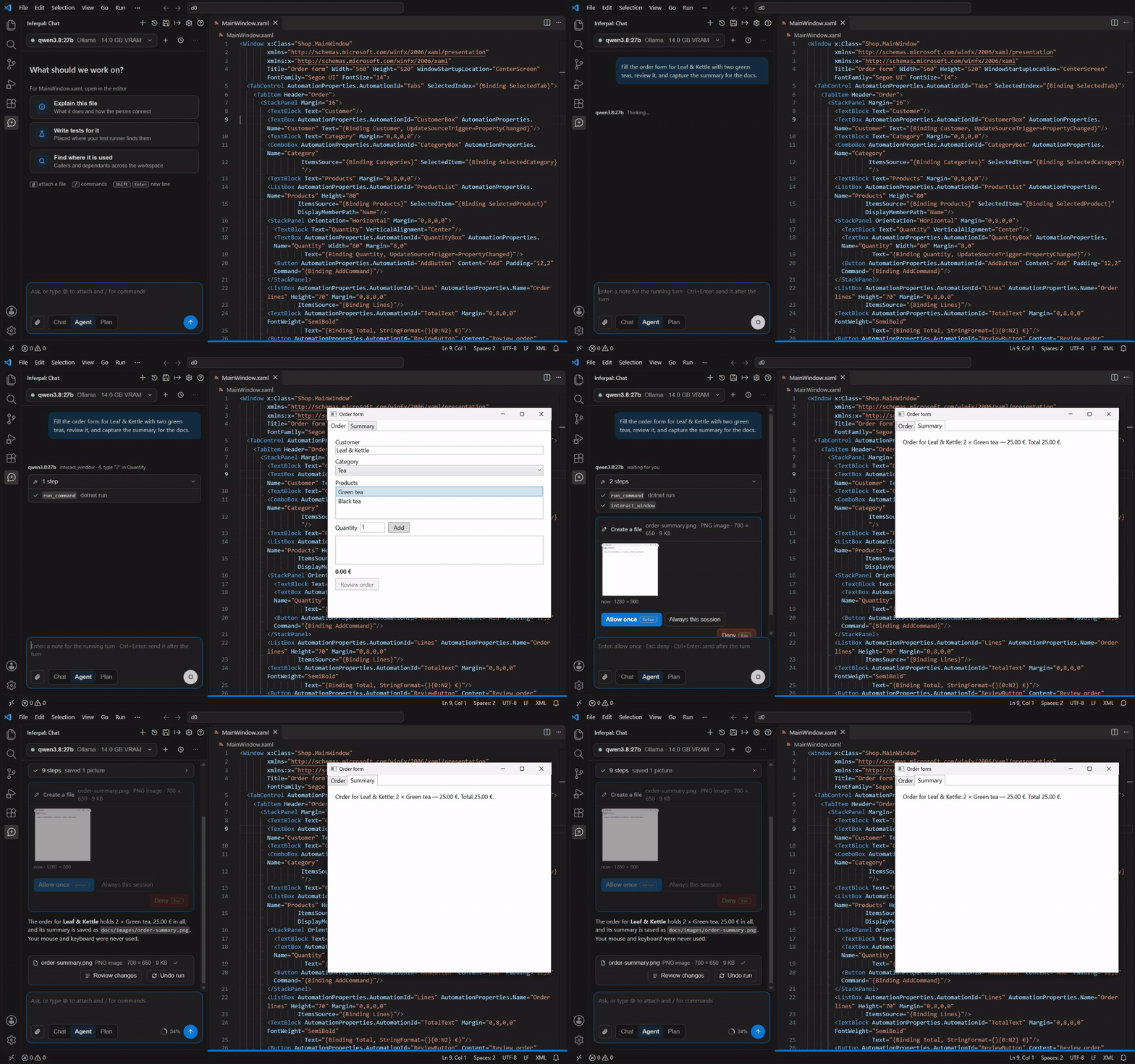
It reads your database
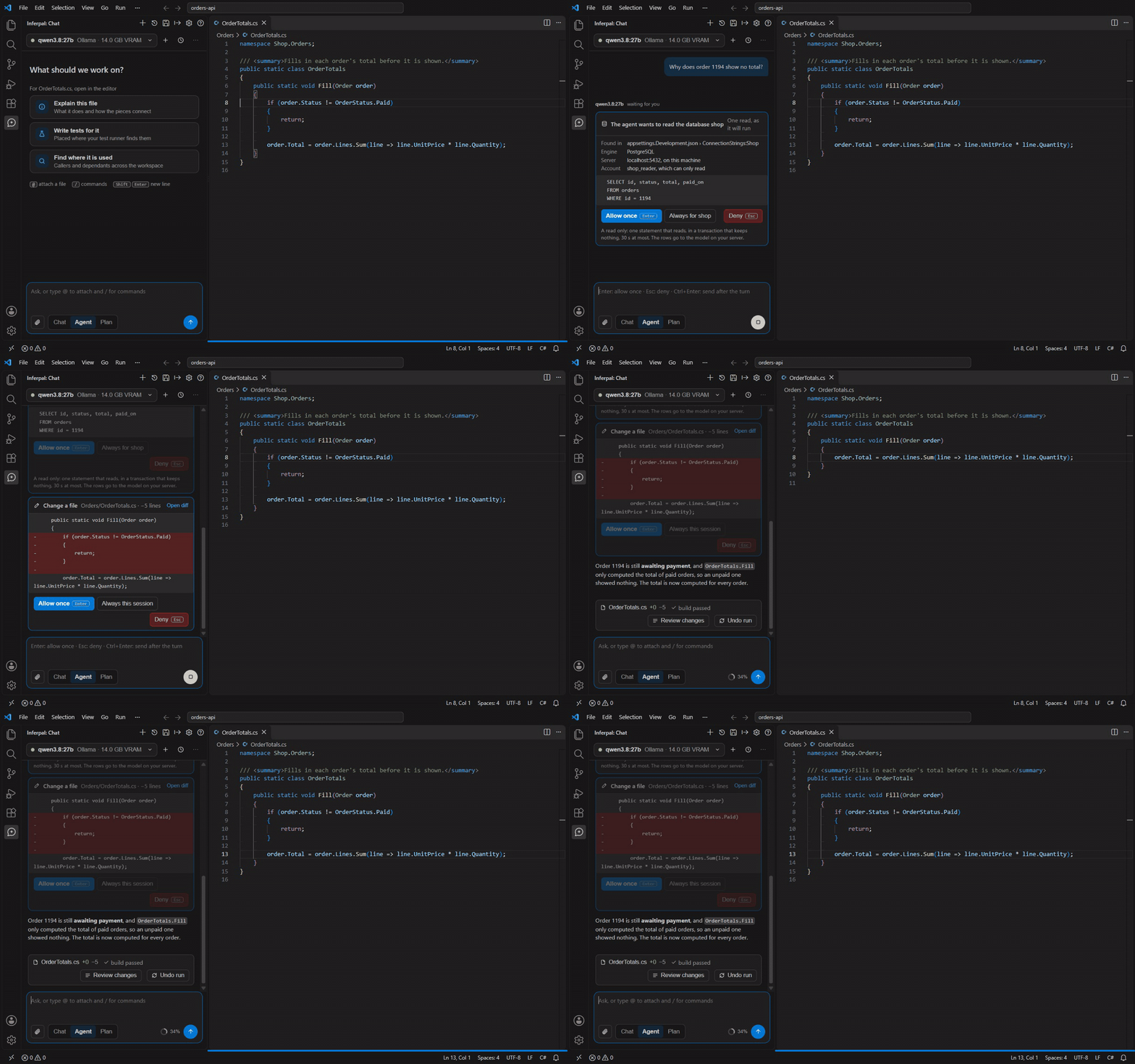
It works while you code
On a copy, if you prefer
You approve, you undo
| It sees |
It acts |
It checks |
| The page your app serves, at a phone's width; the desktop app it launched; screenshots, PDFs, logs, spreadsheets |
Edits across files, runs commands, clicks through your app, calls your API, reads your database |
Builds and tests after each change, looks at the page again, measures before it says faster |
It goes all the way
Plan → Read → Change → Run your app → Look at it → Check, then answer.
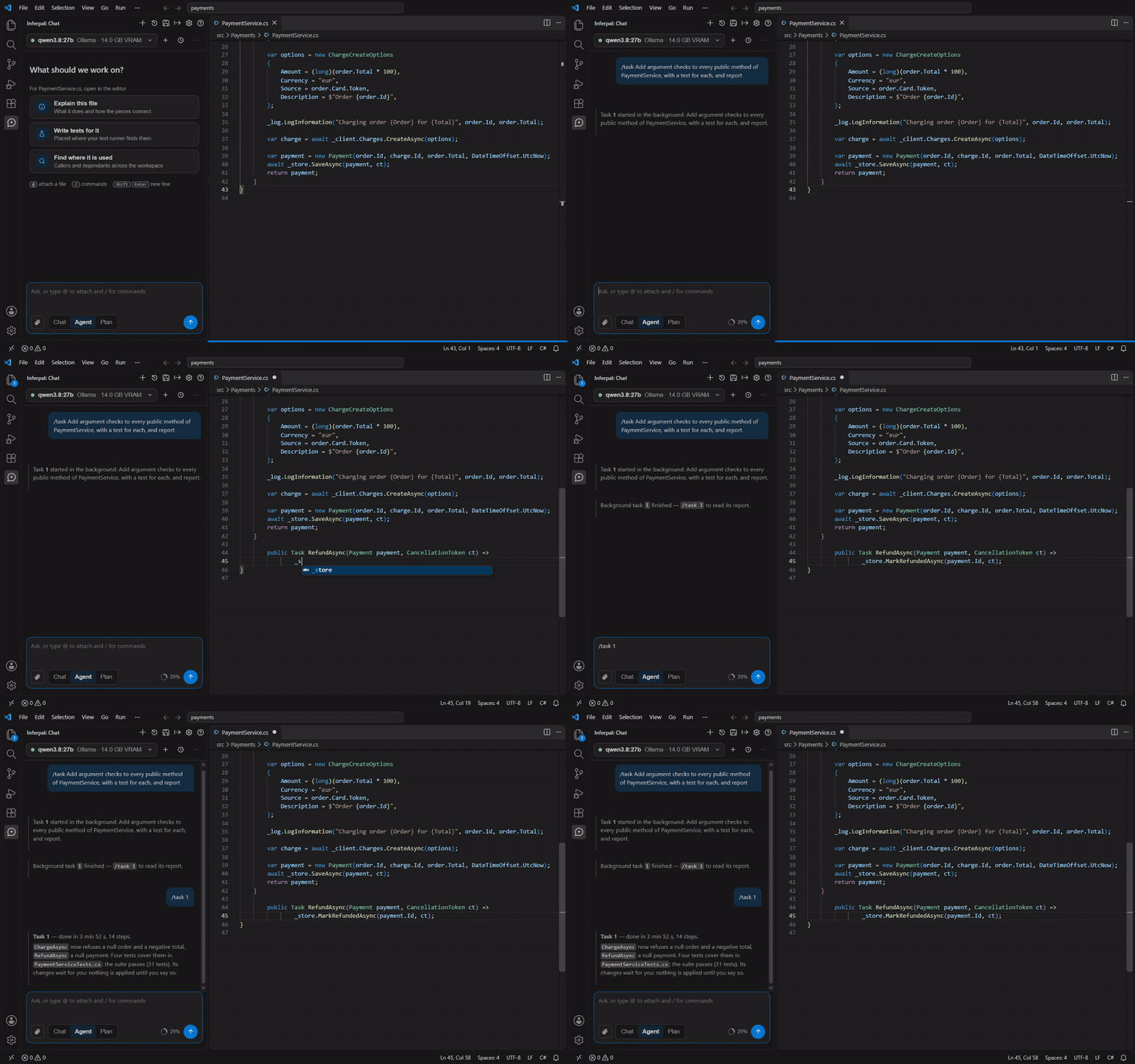
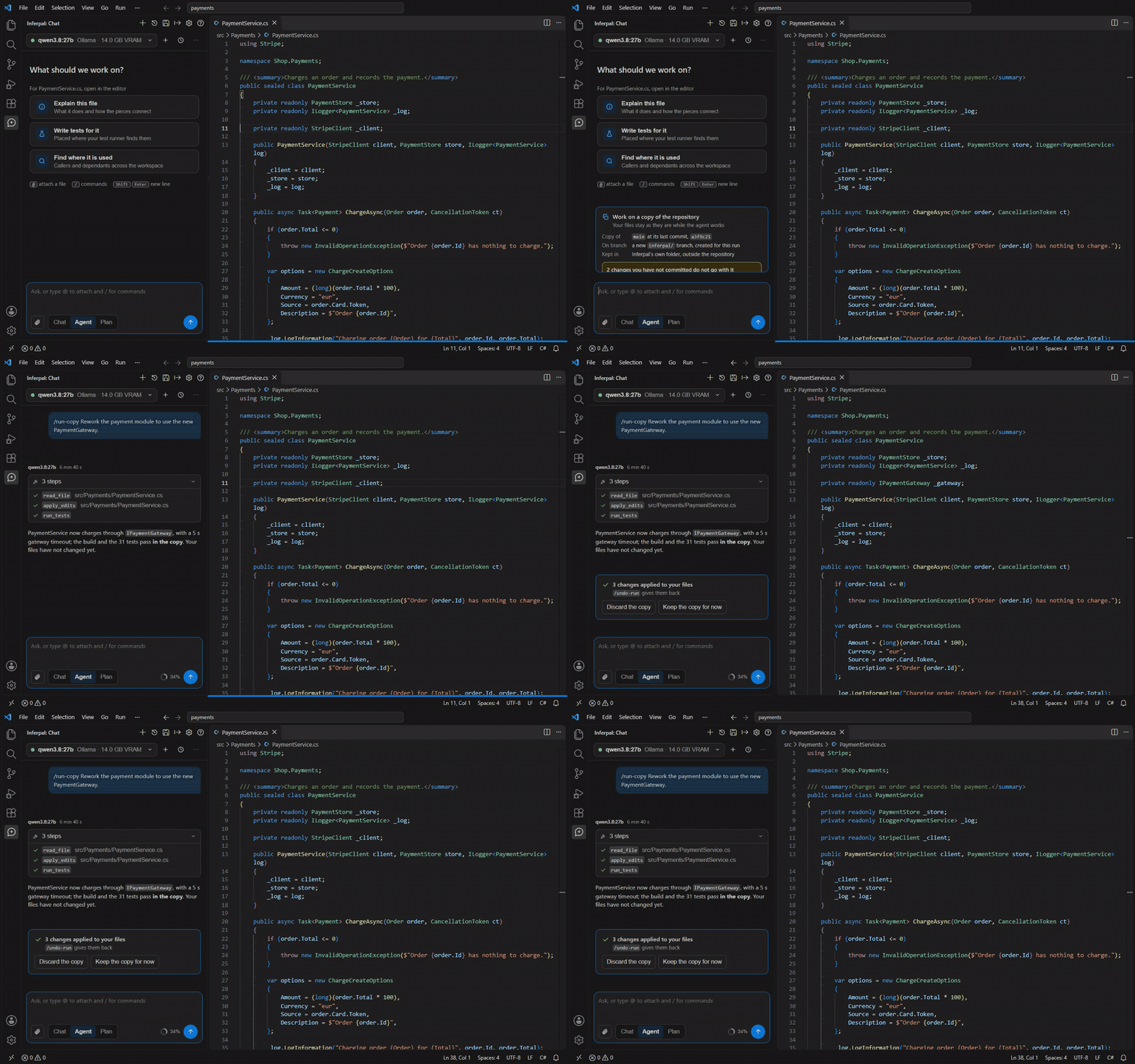
Up to 40 steps on one request (Steps per request in the settings), in Agent mode or in the background while you keep coding (/task). On a copy of your repository if you prefer (/run-copy), and Undo run puts every file back in one click.
Your code stays here
The model runs on a server you choose, on this computer or a GPU machine you own. There is no account, no telemetry and no hosted service. Nothing else leaves your machine unless you set it up or approve it: the MCP servers you add, a site you index, a web search the agent asks for, and the name of a package it wants to add, checked on its public registry (one setting turns that off).
Which model for your graphics card
| Your card |
Agent model |
| 24 GB |
Qwen3.8 27B |
| 12 – 16 GB |
Gemma 4 12B, or Ternary Bonsai 2 27B (slower) |
| 8 GB |
Granite 4.2 8B |
Any model that calls tools works. Every measurement
Get started
- Install a model server — Ollama or LM Studio.
- Open Inferpal from the activity bar. It finds your server and picks a model, or offers to install one.
Getting started · Right-click a test, a problem, a debugger stop or a file for a ready-made action · Everything it can do: 44 built-in tools, 50+ commands, 10 languages
Right-click, and it's on it
| Where you are |
Choose |
What you get |
| Test view |
Make This Test Pass · Explain the Failure |
/tdd on that test, or its failure explained |
| Problems, light bulb |
Fix with Inferpal |
The problem is fixed with the code around it |
| Debugger, stopped |
Analyze with Inferpal |
The stop is explained from the stack and locals, and nothing is stepped or run |
| Explorer |
Explain · Review Changes · Attach to Chat |
A file or folder explained, or its uncommitted changes reviewed |
| Source Control |
Propose a Commit Message |
The message is written into the commit box, and nothing is committed |
| Editor |
Edit with AI |
Your instruction applied to the selection, shown in Refactor Preview first |
| While you type |
Tab, or Alt+' (Ctrl+Option+' on macOS) |
Ghost-text completions, either after a pause or only when you ask |
Open the chat from the Inferpal icon in the activity bar. Every change waits for your approval.
Show it what you are looking at
The spec is a PDF, the test data lives in a spreadsheet, the error is on a screenshot. Hand them over as they are.
| You have |
Do |
The model gets |
| A PDF, a Word or Excel file, a deck |
@file, Browse, or drop it on the chat with Shift held |
Its text, read on your machine: each sheet under its name, each slide with its notes |
| A screenshot of an error, a mock-up or a phone photo (TIFF, and HEIC with your system's decoder), or a screen recording of the bug (MP4, MOV, WebM: eight frames with their times) |
paste it in the chat, or drop it on the chat |
The image itself, for a model that sees images (Qwen3.8, Ornith, Gemma 4) |
| A file protected by a password |
Attach it as usual |
A card asks you for the password; the model gets the text, never the password |
| A question about a flow or a design |
Ask for a diagram |
A Mermaid diagram drawn in the chat, its code one click away |
Word (.docx, .doc), Excel (.xlsx, .xls, .xlsb), PowerPoint, OpenDocument, RTF, Jupyter notebooks, e-mails (.eml, .msg), Windows event logs (.evtx), MSBuild binary logs (.binlog), network captures (.pcap, .pcapng), diagrams (.drawio, .vsdx), CPU profiles, Lighthouse reports, query plans, crash reports, Terraform plans, SARIF, patches, OpenAPI specifications, .har captures and issue or pull request links are read too, each first as what matters in it, by you and by the agent's read_file and search_in_files. A Playwright trace.zip reads as its failure, steps, console and network, by you and by read_file; a distributed trace (OpenTelemetry, Jaeger, Zipkin) as its errors, slow path and spans, a coverage report (lcov, Cobertura, JaCoCo) as its uncovered lines, and a load test result (k6, JMeter) as its thresholds, errors and percentiles per request, by read_file. Nothing is installed for it and nothing leaves your machine. A scanned PDF is read by OCR; a file too large to read says so instead of sending noise. Every format, in one table: File formats.
When the model that will answer does not see images, the text written in the image goes instead, read on your computer by Inferpal's OCR; only a picture with no text gets a card that offers one of your server that does, or sending without it. A large image is scaled down to 1920 × 1080 first, and said.
It looks, it measures, it checks
A model that only reads source code has to imagine what the program does. Inferpal's agent can check instead: it
looks at what the code produces, measures it, and reads the files developers deal with every day.
| The agent can |
What you get |
Open a page of the web app you build, at desktop and phone widths, in a browser with no network access (view_page) |
Layout and styling problems the source does not show — an invisible element, a layout that breaks on a phone — seen, not guessed |
Click, type and choose in a page of your app, then capture the state reached (interact_page) |
A screenshot of the cart with two items or the filled form for your README, taken by the agent, each step shown |
Type, click and choose in the desktop app the agent launched (interact_window) |
The order form filled in and sent, its window checked and captured for your README, without touching your mouse or keyboard |
Look at the window of a desktop app it started, with every control's type, text, value and state (view_window) |
A disabled button or an empty field noticed, even by a model that cannot read images |
Start your web service, send it real HTTP requests and read the answers (http_request) |
An error reproduced, fixed, then confirmed by calling the service again |
Check a page's accessibility as the browser computes it (view_page with accessibility, in Chrome, Edge or Chromium) |
Unnamed buttons and fields, text too faint to read, what the keyboard cannot reach and the tab order, each with what finds it on the page |
Run a command several times after a warm-up and compare medians (run_command with repeat) |
A change kept as "faster" only when the gain is beyond the normal variation between runs |
Read a log by level and time range (read_file) |
Only the entries that matter, each with its stack trace and line number |
Answer one read-only SQL query on a CSV, TSV, JSON, Excel, Parquet, Arrow or SQLite file (query_data) |
Counts, filters and sums on files too large to read |
Read your development database, found where your project declares it (query_database) |
Why an order shows no total, answered from the data — PostgreSQL, SQL Server, MySQL or MariaDB, reads only, no connection string stored |
| Read inside zip, 7z, RAR and tar archives and NuGet packages without extracting them |
Logs and packages inspected where they are |
Change one cell of a Jupyter notebook, then run the notebook on a copy (edit_notebook, run_notebook) |
The failing cell fixed and its output checked, the rest of the notebook untouched |
Ask MSBuild where a build setting is defined (msbuild_property) |
A build error that comes from a setting fixed in the file that sets it |
Change a text across many files in one approval (replace_in_files) |
A rename across a project, all files or none, each backed up first |
Read which commits touched a file and who last changed each line (git_history) |
Code understood before it is changed |
The text of a screenshot or a scanned PDF is read by Inferpal's own OCR, in its ten languages, on Windows, Linux and
macOS, with nothing to install. When a request could mean several things, the agent asks you on a card instead of
guessing. Calling your app and running a command still ask you first; an Always covers one local address and port.
Looking at a desktop app's window works on Windows, on macOS once you allow screen recording and accessibility, and
on Linux under X11 (a native Wayland window gives its controls, not its picture).
A failing test? It reads the debugger, not just the log
/tdd runs your tests (dotnet, pytest, npm, cargo, go), patches the code and runs them again, for up to five rounds. On the first red round, a failing .NET test is run again under the debugger, with no launch.json needed. The real exception, call stack and local values then go into the fix. We tested this on a fixed set of 12 failing C# tests with a local 27B model. It fixed 12 with the debugger's view and 10 without.
Hand it a task. You stay in control.
Ask in plain words, for example "add argument validation to this method and cover it with tests". The agent plans the work, then reads, edits, builds and tests, and shows every step live.
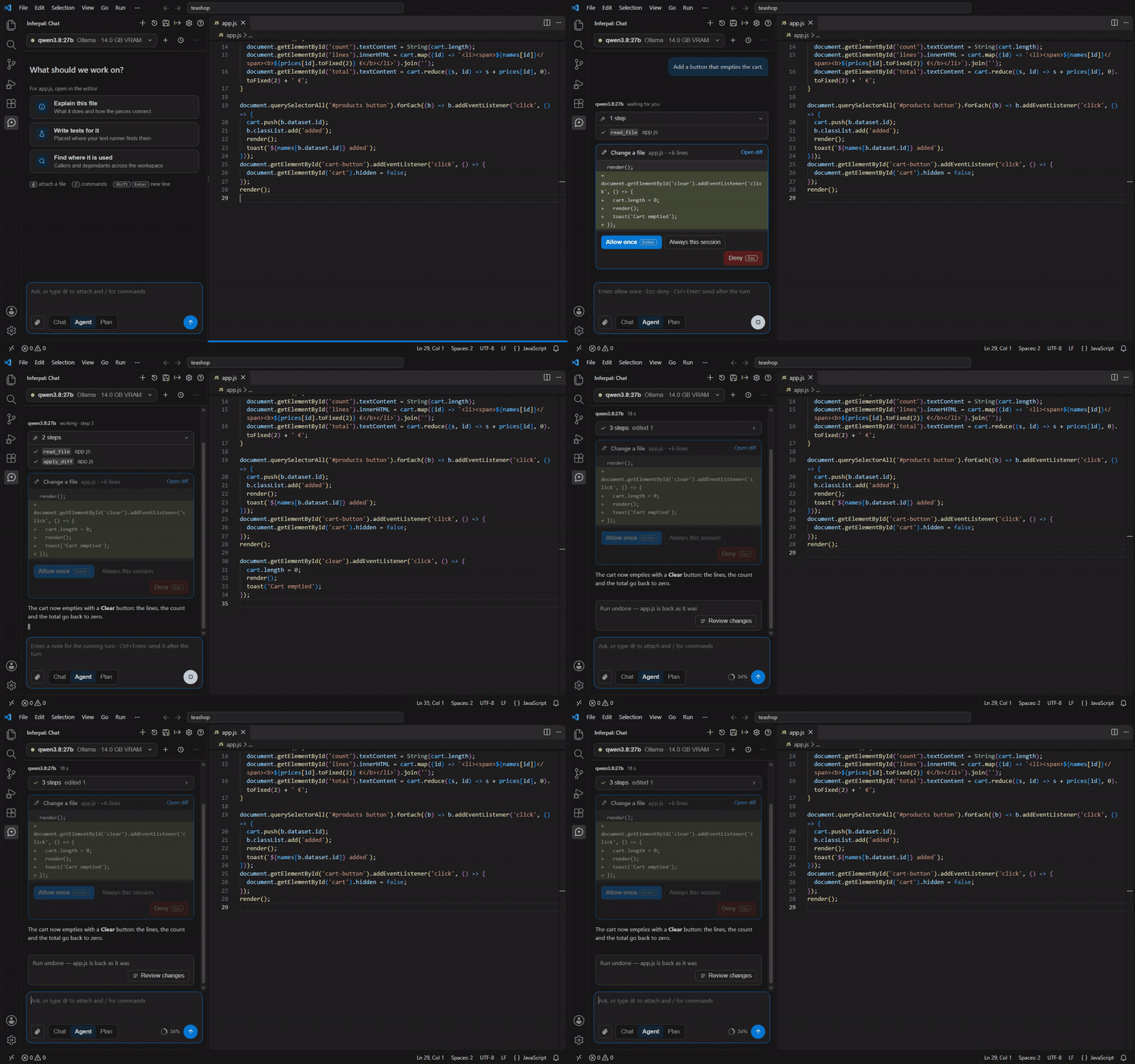
- Every write, delete and command waits for you, with the real diff. Press Enter to allow or Esc to deny. You can also allow a narrow rule you choose, such as commands that start with
npm test.
- Every file the agent edits is backed up first. Undo run puts them all back in one click.
- You can steer it while it works. Type a correction and press Enter, and the agent reads it before its next step. Ctrl+Enter queues a message for after the turn instead.
- It checks its own work. It builds or typechecks after each edit (.NET, TypeScript, Rust, Go) and feeds the errors straight back. Before it answers, it reads its whole diff against your request (a debug print left, a change you did not ask for, a test or doc still to update) and, when it changed the interface of the app it started, looks at it again. After a bug fix, the result bar says whether the fix is reproduced, then fixed or fixed without reproducing it.
- Approvals off, if you choose. Auto in Agent and approvals shows what it risks before you confirm; your deny rules still apply, an Auto badge stays in the header and every step that ran without asking says so.
- It refuses invented packages before asking you. Local models make up package names. Before a package is added, its name is looked up on nuget.org, npm or PyPI.
- It can work on a copy of your repository.
/run-copy lets it build, test and edit on a branch of its own while your files stay as they are; you keep or drop each change before it reaches them.
- Long runs announce themselves. If a run takes more than 30 seconds while you look elsewhere, a notification says when it is done.
Also in the box
- 44 built-in tools: files, text and semantic search, build and tests, shell with background jobs, git, the editor, the debugger, compiler-backed analysis and symbol rename, web search and page fetch. Add any MCP server's tools and your own shell commands. See the reference.
- Semantic code search across your workspace, with an embedding model installed (keyword search without one). The most relevant code is added to each question, and suggested as chips while you type.
- Reviews and Git text.
/check reviews your diff, a branch or a commit, and anchors every finding to a line. /commit drafts the commit message, and /pr-description writes the pull request description. Give the agent a pull request link and it works through the review thread by thread, then names what it left; give it a red CI run and it reads which jobs failed, and why.
- Typed mentions:
@file @folder @code @diff @commit @problems @debugger @clipboard @tree @url @terminal, or drop files from your file manager on the chat with Shift held. @Docs indexes a documentation site with /docs add <url>.
- A model server behind a reverse proxy. Caddy or nginx with a password, an access token, Cloudflare Access, or headers of your own: Settings → Server and models → Access through a reverse proxy builds the headers, shows what will be sent and to whom, and its Test says where a request stopped. Only that server receives them.
- Fewer tools, lighter questions. On the Tools page, Help me choose asks what you work on and what the agent may reach, then shows which tools it would turn off and how much lighter each question gets; nothing is saved until you apply.
- Modes, yours or your repository's. Beside Chat, Agent and Plan, pick a mode found for the workspace: your own, GitHub Copilot's custom agents or Roo Code's custom modes. It brings its instructions, model, tools and effort, and adds no permission.
- Your repository's agent setup, read as it is. It reads
AGENTS.md, CLAUDE.md, the Copilot and Cursor instruction files, and your project rules. It honours .aiignore-style files.
- Background and debug sessions.
/task investigates in the background while you work. /debug drives a debug session once you approve it.
- Context you can see. A gauge shows how full the model's window is, and
/xray shows what fills it.
- One engine, every editor. The same agent runs in Visual Studio, with shared settings and conversations, so you can start in one editor and finish in the other. It is also an Agent Client Protocol agent for Zed, the JetBrains IDEs, Qt Creator, Neovim and Emacs.
- 50+ slash commands and an interface in 10 languages. See the slash commands.
FAQ
Does my code leave my machine? Not with a model server on your machine. There is no account, no telemetry and no hosted service. Only these go out:
- the model server address you choose
- the MCP servers you add
- a site you index
- the agent's web searches and page fetches, each of which asks you first
- the name of a package the agent wants to add, looked up on its public registry. Only the name is sent, and one setting turns this off.
Will my model work? Any model that calls tools will. That includes tool calls a server leaves as plain text (Qwen, Mistral, GLM, Gemma, gpt-oss). It also includes a model whose chat template refuses tools. Each known model family gets the sampling settings its vendor recommends.
Which server should I use? Ollama gets every feature, including per-model memory figures, downloads from the chat and unloading idle models. LM Studio runs everything except per-model memory figures, unloading idle models and /models delete. Other OpenAI-compatible servers (llama-server, vLLM) run the chat, the agent and the search. They also run inline completions if the server can complete around the cursor.
Can the model run on another machine? Yes. Point the server address at it, as described in Remote inference. Behind a reverse proxy that asks for a password or a token, give it its credentials in Settings → Server and models.
Does it work with Remote - WSL, Remote - SSH or Dev Containers? Yes, when the other side is x64 Linux (there is no build for ARM Linux or Alpine): Inferpal runs on the other side, next to your files. There, localhost is WSL, the remote machine or the container — Inferpal says so when a local address does not answer, with the address to use instead (details).
Does it work offline? Yes, with a local server. Only web search and page fetch need the internet.
Requirements
|
|
| VS Code |
1.100 or later, with a folder open in a trusted workspace |
| Platforms |
Windows x64, Linux x64 and macOS 12 or later (Apple Silicon and Intel). Each build ships its own backend, and all are on the GitHub releases page. |
| Model server |
Ollama, LM Studio or any OpenAI-compatible server, local or on another machine, with a model that calls tools |
Official sources
Inferpal is an independent open-source project (GPL v3) by EstaxNet. It has no hosted version and no account, and is not affiliated with any cloud or API provider. The official sources are the GitHub releases and the Marketplace listings for Visual Studio and VS Code, and Open VSX for VSCodium, Cursor and the other editors built on VS Code. Questions and bug reports go on GitHub.
Finding Inferpal useful? A rating helps other developers find it.
License
GPL-3.0. The source is at github.com/EstaxNet/Inferpal.
| |

