Inferpal — Local AI Agent for VS Code
A coding agent that runs on your own models — on this computer or on a GPU machine you own. Connect Ollama, LM Studio or any OpenAI-compatible server (llama.cpp, vLLM…): Inferpal plans, reads and edits your code, builds it, runs your tests (dotnet, pytest, npm, cargo, go) and fixes what fails. On a failing .NET test it also reads the debugger: the real exception, call stack and local values.
No account. No telemetry. No API key. With a local model server your code never leaves your machine. Every write waits for your approval, with the real diff, and every run ends with Undo run.
Better with bigger models. On our 24 GB test card, the largest model it could hold scored best: Qwen3.8 27B completed 14 of 14 real coding tasks. Larger machines were beyond our test budget — see Which model for my GPU.
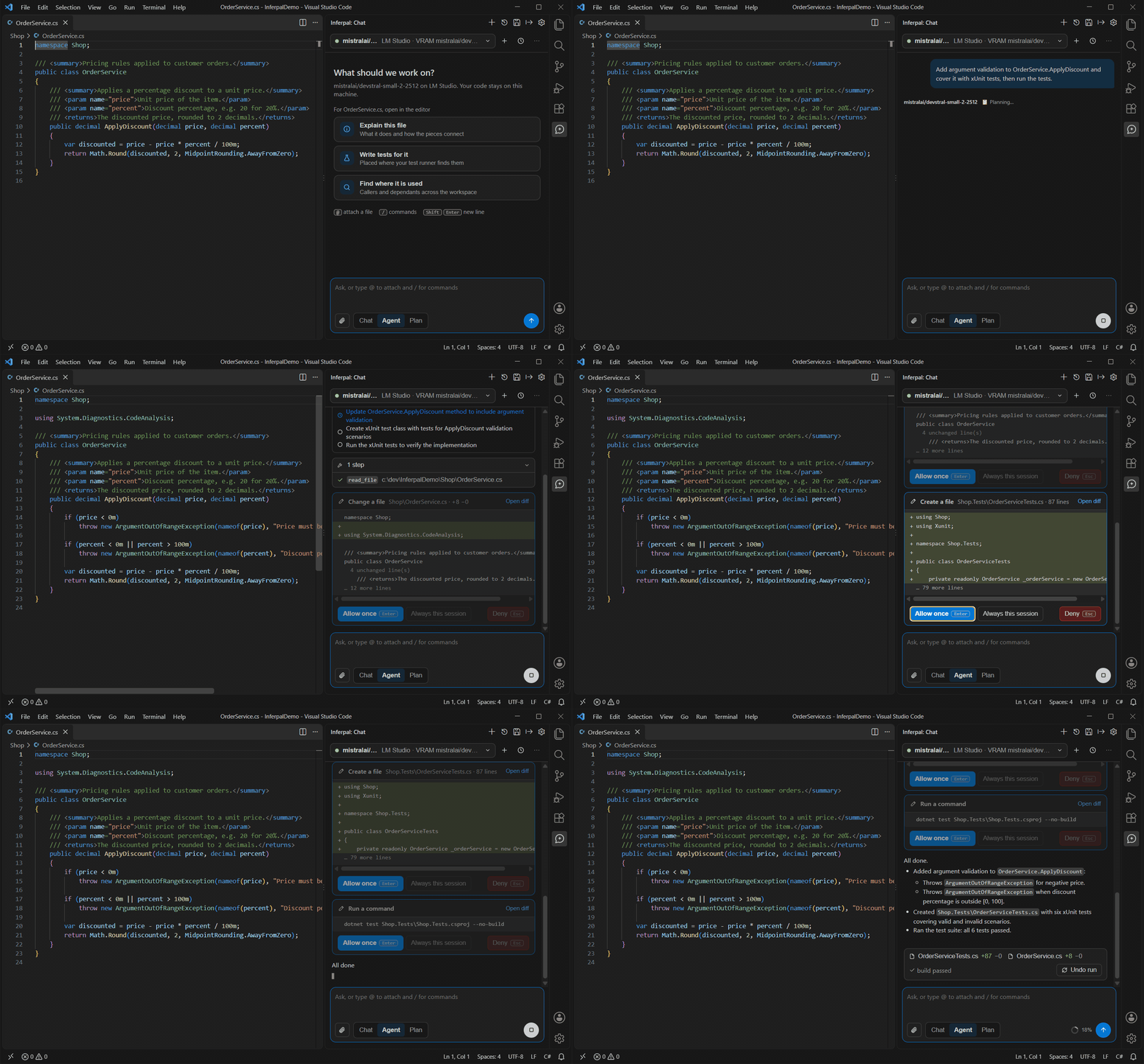
A real run, sped up: Devstral Small 2 on a self-hosted LM Studio server, every write and command approved in the chat.
Free and open source (GPL v3). The backend is bundled — no .NET to install.
Why Inferpal
- Your models, your hardware. Ollama, LM Studio or any OpenAI-compatible server (llama.cpp, vLLM…), on this machine or a GPU box on your network. Tool calls a server leaves as plain text — Qwen's XML, Mistral's
[TOOL_CALLS], GLM, Gemma, gpt-oss — are read anyway, and a model whose chat template refuses tools still works as an agent.
- Private by construction. No account, no telemetry, no API key, no hosted service. Nothing leaves your machine unless you set it up (a remote model server, an MCP server, a documentation site to index) or approve it (a web search, a page fetch).
- You approve, you can undo. Every write, delete and command waits for your OK with the real diff — unless a rule you wrote allows it. Changed files are snapshotted, and a run ends with Undo run.
- It checks its own work. A quick build or typecheck after each edit (.NET, TypeScript, Rust, Go).
/tdd reruns your tests and fixes what fails, up to five rounds; on a failing .NET test it reads the debugger. On a fixed bench of 12 failing C# tests with a local 27B model: 12 fixed with the debugger's view, 10 without.
- Measured, not guessed. Model advice comes from a battery of real tasks in C#, JavaScript and Python, judged by the project's own tests passing — and each known model family gets the sampling settings its vendor recommends.
- Two editors, one engine. The same agent runs in Visual Studio 2026; settings and saved conversations are shared — start in one editor, finish in the other.
Get started
- Run a model server — Ollama or LM Studio, both free — on this computer or a machine you own, with a model that calls tools, sized to your card (table below). Ollama on a 24 GB card:
ollama pull qwen3.8 (the 27B).
- Open your project folder — Inferpal starts with a folder open, in a trusted workspace.
- Open Inferpal — its icon in the activity bar, or Ctrl+Alt+I (Cmd+Alt+I on macOS). It finds Ollama at its default address and, the first time, picks the best tool-calling model you have installed. For LM Studio or another server, enter its address in Settings → Server and models and click Test.
- Ask — "add argument validation to this method and cover it with tests", or
/tdd on a failing suite.
Which model for my GPU
Measured on our test server — one 24 GB card, LM Studio, 32K context — with its free memory cut to about 11 and 15 GB to stand in for the smaller cards. Scores are real coding tasks out of 14 (C#, JavaScript, Python), judged by the project's tests passing; one run each, so a task or two apart means nothing.
| Your card |
Agent |
Autocomplete beside it |
| 12 GB |
Gemma 4 12B (12/14, fast) — or Bonsai 27B, a 1-bit Qwen (13/14, about 3× slower) |
none measured fits |
| 16 GB |
same as 12 GB |
Mellum2 fits only beside a weaker agent |
| 24 GB |
Qwen3.8 27B (14/14), which also autocompletes — or Gemma 4 12B with Mellum2 |
see the agent column |
| More than 24 GB |
not tested |
— |
A better machine makes Inferpal better. The best scores came from the largest models our card could hold (Qwen3.8 27B: 14/14; the small models we measured: 6 and 7) — though size alone does not decide (Gemma 4 26B scored below Gemma 4 12B). More memory also buys a longer context before older turns are summarised, and room for a separate autocomplete model. Larger cards, multi-GPU machines and 70B-class models could not be tested — for lack of budget and infrastructure, not of interest — so nothing is recommended above 24 GB. Every figure: Models.
What it does
- Agent loop — plans, then reads, edits, builds and tests, step by step, every step shown live;
/agent-step pauses after each tool call.
- Steer it while it works — type a correction and press Enter: the run reads it before its next step, without being stopped; Ctrl+Enter sends a message after the turn instead.
- 30 built-in tools — files (read, write, find-and-replace, atomic multi-file edits, delete, restore), search (text and regex, semantic code search, documentation search, project map), build and tests, shell commands (with background jobs), git, the editor (active file, open files, insert at cursor, replace selection), the debugger (breakpoints, stepping, state, expression evaluation), code analysis (call graph, impact, cross-language bridges), symbol rename, web search and page fetch, and the agent's project memory — plus any MCP server's tools and your own shell commands. Reference.
/tdd — fix until green: run the tests, patch, run again, up to five rounds; on the first red round a failing .NET test is re-run under the debugger (no launch.json needed) and its real state goes into the fix./debug — the agent sets breakpoints, starts the program once you approve, and reads the call stack, locals and expressions it needs.- Semantic code search — a background index of your code (meaning and exact names together); the most relevant code is added to each question, and the index pauses while you chat.
- @Docs —
/docs add <url> indexes a documentation site, so answers about a library cite its pages.
- Typed mentions —
@file @folder @code @diff @problems @debugger @clipboard @tree attach exactly what you mean.
- Inline completions — ghost text as you type (needs Ollama or LM Studio); Tab to accept.
- Code actions — Fix, Refactor and Add docstring on a selection, shown in VS Code's Refactor Preview before anything is applied.
- MCP servers — any stdio or Streamable HTTP server, of the 2026-07-28 revision or an earlier one (with OAuth), every call behind an approval.
- Project rules and AI checks — markdown rules scoped to the files you edit, and
/check to review your git diff for bugs and against your own criteria.
- Background tasks —
/task investigates in the background while you keep working; with /task propose, the edits it suggests wait for your review.
- Your models at a glance —
/models, /hardware, /bench (measure your installed models) and /arena (compare two answers blind).
- Context you can see — a gauge of how full the model's window is, and
/xray to see what fills it.
- 50+ slash commands, settings shared with Visual Studio, and an interface in 10 languages. Slash commands.
FAQ
Does my code leave my machine? Not with a model server on your machine. There is no account, no telemetry, no hosted service. The only outbound traffic is what you set up or approve: the model server address you choose, MCP servers you add, a site you index with /docs add, and the agent's web searches and page fetches — each of which asks you first.
Which server should I use? Ollama gets every feature (per-model memory in the header, model downloads from the chat, idle models unloaded). LM Studio runs everything — chat, agent, autocomplete, semantic search, model loading — without per-model memory figures. Other OpenAI-compatible servers (llama.cpp's llama-server, vLLM…) run the chat, the agent and semantic search; inline completions need Ollama or LM Studio.
I have more than 24 GB, several GPUs, or a Mac with lots of memory. Nothing in Inferpal caps the model size, but we could not test above 24 GB, so we recommend nothing there. Use the room: a larger model, a longer context — raise Context window in Settings → Server and models (default 8,192 tokens; our battery ran at 32K) — and a separate autocomplete model. /hardware shows your budget; /bench measures your installed models on your machine.
My card has less than 12 GB. We did not measure smaller cards. The lightest model that did well, Bonsai 27B (1-bit, 4.7 GB), scored 13/14, about three times slower than Gemma 4 12B; the small models we measured scored 6 and 7.
Can the model run on another machine? Yes — point the server address at it. See Remote inference.
Does it work offline? Yes, with a local server: only web search and page fetch need the internet.
Requirements
|
|
| VS Code |
1.100 or later, with a folder open in a trusted workspace |
| Platforms |
Windows x64, Linux x64 and Apple Silicon builds — each ships its own backend (all on the GitHub releases page) |
| Model server |
Ollama, LM Studio or any OpenAI-compatible server, local or on another machine, with a model that calls tools |
Official sources
Inferpal is an independent open-source project by EstaxNet — no hosted version, no account, not affiliated with any cloud or API provider. Official sources: the GitHub releases and the Marketplace listings for Visual Studio and VS Code.
License
GPL-3.0 — source at github.com/EstaxNet/Inferpal.
| |

