Drag And Drop Import Relative Path






Never type an import path again.
Angular · React · Vue · Svelte · Astro · LaTeX · JS · TS · CSS · SCSS · HTML · Markdown
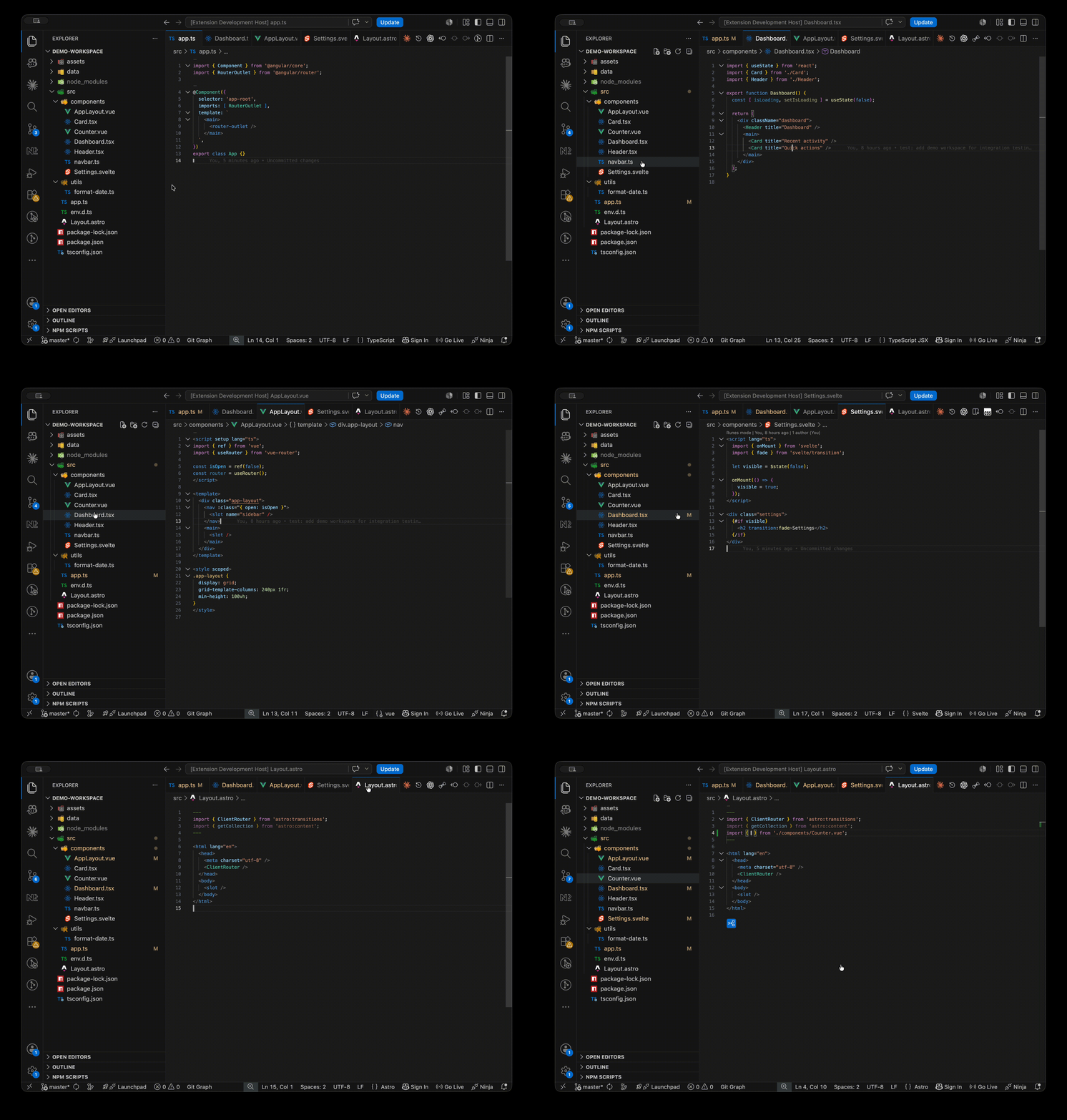
Drag a file from the Explorer into your editor — the right import lands where you drop it. Path, syntax, and placement handled automatically.
Quick Start
- Install the extension (see below).
- Drag a file — or a whole multi-selection — from the Explorer into an open editor.
- Drop it — the imports land on their own lines at the drop point, one per file.
- Your cursor is on the identifier — name it and Tab out.
Several files at once: drag an Explorer multi-selection — the imports land as one stacked block, one per file, each with its own independent placeholder.
See the full specification
Highlights
- Built for every major framework — Angular, React, Vue, Svelte, Astro — plus vanilla JS/TS, CSS/SCSS, HTML, Markdown, and LaTeX (drag an image in → a
figure float; drop a .tex → \input; a .bib → \addbibresource)
- Drag-and-drop from Explorer — drag any supported file into an editor and the import lands on its own line at the drop point, no keyboard required
- Framework-aware placement — imports land inside Astro
--- frontmatter and Vue / Svelte <script> blocks automatically; a stylesheet dropped in a <style> block becomes an @import / @use right there
- Smart identifiers — default imports auto-named from the filename (
logo.svg → import logo), PascalCase component naming for Vue/Svelte/Astro (my-button.vue → import MyButton), plus exported-class detection for TypeScript, Angular PascalCase auto-fill, and CSS Modules styles binding
- Multi-file import in one gesture — drag several files at once; every file gets its own statement in one stacked block, placeholders kept independent
- 45 configurable import styles — ES modules, CommonJS, dynamic
import(), @use, @forward, @import, HTML tags, Markdown syntax, LaTeX figure / \includegraphics / \input / \addbibresource
- 38 source extensions — scripts, stylesheets, images, fonts, video, audio, text tracks, data, documents, components, LaTeX graphics (plus extensionless files like
LICENSE into Markdown)
- Four Command Palette commands — Set Default Import Style, Set Import Placement, Toggle Preserve Script File Extension, and Reset All Import Styles to Defaults
- ~12 KB gzipped, zero dependencies, no telemetry
Commands
All four commands live in the Command Palette (Cmd/Ctrl+Shift+P → Drag Import).
| Command |
What it does |
| Drag Import: Set Default Import Style |
Shows a picker of every style for the current source/destination pair and persists the chosen style to your global settings. The current default is marked with a checkmark. |
| Drag Import: Set Import Placement |
Shows a picker of Top / Bottom / Cursor and persists where imports are inserted. The current choice is marked with a checkmark. |
| Drag Import: Toggle Preserve Script File Extension |
Flips whether the source .js / .ts extension is kept on generated import paths, and shows the new state in a toast. |
| Drag Import: Reset All Import Styles to Defaults |
Clears every customized import-style override back to its default; shows a toast with an Undo action, or an info toast if nothing was customized. |
Drag-and-Drop
Drag a file from the Explorer into any supported editor. The import snippet is generated with your configured styles and placement setting, and inserted on its own line at the drop point — never spliced into the middle of the line it lands on. No keyboard needed.
- Follows your Top / Bottom / Cursor placement setting — the drop line is used as the Cursor input, and the dropped import always takes its own line; in HTML, Markdown, and LaTeX it matches the target line's indentation and a drop onto a blank line reuses it (the mouse column is ignored).
- Drag several files at once — every supported file becomes one statement in a single stacked block; same-file and unsupported members are skipped (an all-image drop into CSS inserts the first
url() only, since inline values can't stack).
- Unsupported pairs show a "Cannot import" warning; the provider suppresses the drop, so nothing is inserted — no stray path text.
Supported Languages
The extension is destination-driven — the file open in your editor decides which sources it accepts.
| Destination |
Accepted sources |
What gets generated |
.js |
.js, .vue, .svelte, .astro |
JavaScript import style (7 configurable); fixed PascalCase default import for components |
.ts |
.ts, .vue, .svelte, .astro |
TypeScript import style (7 configurable); fixed PascalCase default import for components |
.jsx |
All except .ts, .tsx |
JS style for scripts; per-category dispatch for others |
.tsx |
All asset & script extensions |
TS style for .ts/.tsx; JS style for .js/.jsx; per-category for others |
.mdx |
All asset & script extensions |
Same as .tsx |
.css |
.css, images |
@import style (configurable) or inline url() for images |
.scss |
.scss, .css, images |
@use / @forward / @import (configurable) or inline url() for images |
.html |
.js, .css, images, video, audio, .vtt |
<script>, <link>, <img>, <video>, <audio>, <track> |
.md |
.md, images, extensionless files (LICENSE, Dockerfile, Makefile) |
[text](https://github.com/ElecTreeFrying/drag-import-relative-path/blob/HEAD/path) link · Markdown image syntax · [text](https://github.com/ElecTreeFrying/drag-import-relative-path/blob/HEAD/path) link for extensionless |
.vue |
.vue, scripts, styles (.css/.scss), images, media, data, .md, .mdx |
TS style for scripts; @import/@use inside a <style> block (side-effect import elsewhere) for stylesheets; PascalCase component import for .vue; import name/import url for assets |
.svelte |
.svelte, scripts, styles (.css/.scss), images, media, data, .md, .mdx |
TS style for scripts; @import/@use inside a <style> block (side-effect import elsewhere) for stylesheets; PascalCase component import for .svelte; import name/import url for assets |
.astro |
.astro, .vue, .svelte, scripts, styles (.css/.scss), images, media, data, .md, .mdx |
TS style for scripts; @import/@use inside a <style> block (side-effect import elsewhere) for stylesheets; PascalCase component import for .vue/.svelte/.astro; import name/import url for assets |
.tex |
.tex, .bib, graphics (.pdf/.png/.jpg/.jpeg/.eps) |
\input/\include · \addbibresource/\bibliography · figure/\includegraphics |
LaTeX sources (.tex / .bib / .eps) import only into .tex, and extensionless files only into .md — the "All …" rows above exclude them.
Extension groups
| Group |
Extensions |
| Scripts |
.ts, .tsx, .mdx, .js, .jsx |
| Images |
.gif, .jpeg, .jpg, .png, .svg, .avif, .webp |
| Fonts |
.woff, .woff2, .ttf, .eot |
| Video |
.mp4, .webm, .mov |
| Audio |
.mp3, .ogg, .wav, .m4a |
| Text track |
.vtt |
| Data |
.json, .yaml, .yml |
| Document |
.pdf |
| Stylesheets |
.css, .scss |
| Markup |
.html, .md |
| Components |
.vue, .svelte, .astro |
| LaTeX |
.tex (document) · .bib (bibliography) · .eps (graphics) |
Rejection rules:
- Same file — a file cannot import itself (case-insensitive path comparison).
- Unsupported pair — source extension not in the destination's accepted list.
.js and .ts accept their own extension plus framework components — .vue/.svelte/.astro sources import as a fixed PascalCase default; every other cross-language source is rejected. Use .jsx or .tsx destinations for asset imports.- Extensionless sources import only into
.md — LICENSE/Dockerfile/Makefile link into Markdown; every other destination rejects them.
Import Styles
Every destination language has its own set of import shapes, most of them configurable — Script (JavaScript/TypeScript), Stylesheet (CSS/SCSS), HTML, Markdown, JSX/TSX/MDX, Vue/Svelte/Astro, and LaTeX. Each shape can be set as your default with Drag Import: Set Default Import Style.
Placement
Setting: drag-import.preferences.importStatementPlacement — default "Bottom"
| Mode |
Behavior |
| Top |
Insert before the first line (line 0). |
| Bottom |
Insert after the last recognized import line. Falls back to line 0 if none found. |
| Cursor |
Insert at the drop point. |
Some destinations override this automatically: HTML / Markdown / LaTeX and images-into-stylesheets force Cursor; Astro constrains imports to the --- frontmatter, Vue/Svelte to the <script> block, and a stylesheet dropped in a <style> block lands there as an @import / @use.
Configuration
All settings live under the drag-import namespace. Open VS Code Settings (Cmd/Ctrl+,) and search drag-import.
Preferences
| Setting |
Type |
Default |
drag-import.preferences.importStatementPlacement |
string |
Bottom |
drag-import.preferences.requestReview |
boolean |
true |
Values for importStatementPlacement: Top, Bottom, Cursor. See Placement.
requestReview shows a single notification asking for a Marketplace review once you have generated a number of imports. It never repeats — answering or dismissing it retires the prompt permanently. Set it to false to suppress it entirely.
Import-style defaults — Script · Stylesheet · Markup · LaTeX
Script
| Setting |
Type |
Default |
drag-import.importStatement.script.preserveScriptFileExtension |
boolean |
false |
drag-import.importStatement.script.javascriptImportStyle |
string |
import name from '_relativePath_'; |
drag-import.importStatement.script.typescriptImportStyle |
string |
import { name } from '_relativePath_'; |
preserveScriptFileExtension keeps the .js / .ts / .jsx / .tsx extension on the import path. Most module systems resolve without it.
Stylesheet
| Setting |
Type |
Default |
drag-import.importStatement.styleSheet.preserveStylesheetFileExtension |
boolean |
false |
drag-import.importStatement.styleSheet.cssImportStyle |
string |
@import '_relativePath_'; |
drag-import.importStatement.styleSheet.cssImageImportStyle |
string |
url('_relativePath_') |
drag-import.importStatement.styleSheet.scssImportStyle |
string |
@use '_relativePath_'; |
drag-import.importStatement.styleSheet.scssImageImportStyle |
string |
url('_relativePath_') |
preserveStylesheetFileExtension keeps .css / .scss on the import path. Exception: .css is always preserved in .scss imports — Sass requires it for foreign-language imports.
cssImageImportStyle and scssImageImportStyle have a single shape and are not configurable at runtime.
Markup
| Setting |
Type |
Default |
drag-import.importStatement.markup.htmlScriptImportStyle |
string |
<script src="_relativePath_"></script> |
drag-import.importStatement.markup.htmlImageImportStyle |
string |
<img src="https://github.com/ElecTreeFrying/drag-import-relative-path/raw/HEAD/_relativePath_" alt="sample"> |
drag-import.importStatement.markup.htmlVideoImportStyle |
string |
<video src="https://github.com/ElecTreeFrying/drag-import-relative-path/raw/HEAD/_relativePath_" controls></video> |
drag-import.importStatement.markup.htmlAudioImportStyle |
string |
<audio src="_relativePath_" controls></audio> |
drag-import.importStatement.markup.htmlStyleSheetImportStyle |
string |
<link href="_relativePath_" rel="stylesheet"> |
drag-import.importStatement.markup.markdownImportStyle |
string |
[text](https://github.com/ElecTreeFrying/drag-import-relative-path/blob/HEAD/_relativePath_) |
drag-import.importStatement.markup.markdownImageImportStyle |
string |
 |
htmlStyleSheetImportStyle and markdownImportStyle have a single shape and are not configurable at runtime.
LaTeX
| Setting |
Type |
Default |
drag-import.importStatement.latex.preserveGraphicsFileExtension |
boolean |
true |
drag-import.importStatement.latex.graphicsImportStyle |
string |
figure float (multi-line) |
drag-import.importStatement.latex.inputImportStyle |
string |
\input{_relativePath_} |
drag-import.importStatement.latex.bibliographyImportStyle |
string |
\addbibresource{_relativePath_} |
preserveGraphicsFileExtension keeps the source extension on \includegraphics paths and defaults to on — inverted from the two script/stylesheet preserve booleans (both false).
Path Computation
Relative paths are computed from the destination's directory to the source, always forward-slashed (including on Windows), with a ./ prefix for ES-module compatibility. Script and stylesheet extensions are stripped by default (togglable); images, media, data, documents, and components keep theirs; LaTeX graphics keep theirs by default. Identifiers are auto-derived — SCSS partial _ stripping, Angular PascalCase, exported-class detection, and Vue/Svelte/Astro component PascalCase.
Tips & Tricks
- Snippet placeholders. After insertion, your cursor lands on the identifier — type the name and Tab to the next stop. No need to click or arrow around.
- CSS Modules are detected automatically. Files named
*.module.css or *.module.scss dropped into JSX/TSX/MDX produce import styles from '...' instead of a side-effect import '...'.
- Same-directory imports always get
./. You'll never see a bare Button — it's always ./Button, which ES modules and bundlers require.
- Drag from Explorer for zero-keystroke imports. Drag a file from the sidebar directly into your editor — the import lands on its own line at the drop point. Great for quickly pulling in components or assets without touching the keyboard.
- Mixing CSS into SCSS just works. The
.css extension is preserved even when preserveStylesheetFileExtension is off, because Sass needs it.
- HTML, Markdown, and LaTeX ignore your placement setting. Insertion is always at the drop point for these languages (for LaTeX, in the document body — never the preamble). Leave
importStatementPlacement set to Bottom for scripts — it won't affect your markup.
Installation
Requires VS Code 1.97.0 or later.
- Marketplace: Extensions view (Cmd/Ctrl+Shift+X) → search Drag And Drop Import Relative Path by ElecTreeFrying → Install.
- CLI:
code --install-extension ElecTreeFrying.drag-import-relative-path
- Direct: VS Code Marketplace listing
- Cursor / Windsurf / VSCodium / Gitpod: Search Drag And Drop Import Relative Path in the Extensions panel — served via Open VSX.
Compatibility
- VS Code: 1.97.0 or later.
- Registries: Available on both the VS Code Marketplace and Open VSX.
- Compatible hosts: Cursor, Windsurf, VSCodium, Gitpod, Code Server, and other forks that implement the VS Code API at the same engine version — installable directly from their Extensions panel via Open VSX.
- Platforms: macOS, Windows, Linux. Paths are normalized to forward slashes on all platforms.
- Footprint: ~12 KB gzipped (~44 KB minified). Zero runtime dependencies.
- Telemetry: None. Everything runs locally.
Troubleshooting
If a drop does nothing, an import looks wrong, or you see an unexpected warning — see SUPPORT.md for symptom → cause → fix.
See SPEC — §Notification Reference for a complete list of all warning and info messages.
Still stuck? Please open an issue on GitHub Issues.
Changelog
See CHANGELOG.md for full release notes.
Contributing
Contributions, bug reports, and feature requests are welcome in GitHub Issues. See SUPPORT.md for build commands and the architecture overview.
See SPEC.md for the full behavior contract — behavior changes belong there too.
Support
This extension is free and always will be. If it's become part of your workflow, here are a few ways to give back:
| Network |
Address |
| Bitcoin |
bc1q4j2uewfphjmca83905qv37vcl4jh8va5yupl7w |
| Solana |
EHtTGyRoDAK44KBGrEoypAWyPpResHUqwufKnuLs7Tyy |
| Sui |
0xcaf8ff4a65d7e35d961abd0203180013b7fe974d4fa0313e880c39c45ada2b09 |
| ERC-20 (Ethereum / Base / Monad / Polygon / HyperEVM) |
0xd25f84Ed2F76dF2F0C8f1207402eF9e15b5d7855 |
License
MIT
| |

