Claude Code Agents Monitor




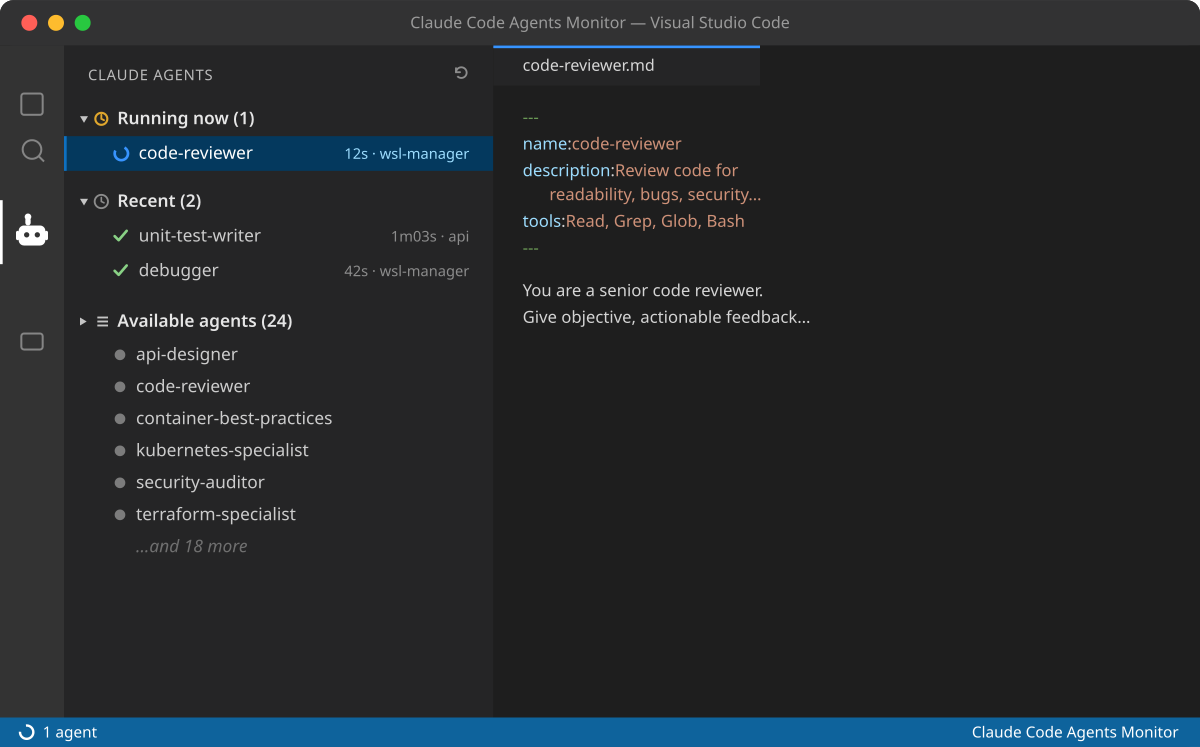
See your Claude Code subagents — and which ones are working right now — from a dedicated VS Code sidebar.
Claude Code lets you define subagents (specialized agents in ~/.claude/agents). This
extension lists them and, when paired with a small hook, shows live execution state: which
subagent is running, for how long, and what ran recently.
Features
- Dedicated sidebar view with three sections:
- Running now — active subagents with a live elapsed timer.
- Recent — the last runs, marked completed or failed.
- Available agents — every
.md in ~/.claude/agents; click to open its definition.
- Status bar indicator with the number of running agents.
- Live updates — watches the status file and agents folder; no manual refresh needed.
- Zero telemetry — everything is read from local files on your machine.
Requirements
- VS Code
1.85.0 or newer.
- Claude Code with subagents in
~/.claude/agents.
- Node.js on your
PATH (used by the optional status hook).
Getting started
- Install the extension.
- Open the Claude Agents view from the activity bar (robot icon). The
Available agents section lists your subagents immediately.
- To populate Running now / Recent, enable the status hook below.
Enabling live execution (status hook)
The extension reads ~/.claude/agent-status.json. That file is produced by a Claude Code
hook on the Task tool (the tool Claude uses to launch subagents). Add this to
~/.claude/settings.json:
{
  "hooks": {
    "PreToolUse": [
      {
        "matcher": "Task",
        "hooks": [
          { "type": "command", "command": "node ~/.vscode/extensions/edtroleis.claude-code-agents-monitor-*/hooks/agent-status-hook.js pre 2>/dev/null || true" }
        ]
      }
    ],
    "PostToolUse": [
      {
        "matcher": "Task",
        "hooks": [
          { "type": "command", "command": "node ~/.vscode/extensions/edtroleis.claude-code-agents-monitor-*/hooks/agent-status-hook.js post 2>/dev/null || true" }
        ]
      }
    ]
  }
}
The hook script is bundled with the extension. If you prefer, copy hooks/agent-status-hook.js
anywhere stable and point the commands at that path instead. After editing settings, open
the /hooks menu once (or restart Claude Code) so the config reloads.
The hook is deliberately defensive: it never fails the tool call and writes the status file
atomically.
Settings
| Setting |
Default |
Description |
claudeAgentsMonitor.agentsDir |
~/.claude/agents |
Folder scanned for subagent .md files. |
claudeAgentsMonitor.statusFile |
~/.claude/agent-status.json |
Status file written by the hook. |
How it works
Claude Code (Task tool)
        │  PreToolUse / PostToolUse hook
        ▼
~/.claude/agent-status.json  ◄── written atomically by agent-status-hook.js
        │  fs.watch + light poll
        ▼
VS Code view + status bar
Privacy & security
- No network calls, no telemetry. The extension only reads local files.
- The hook only records the subagent type, a short description, the project folder name,
and timestamps — no prompt contents or secrets.
See SECURITY.md for the threat model and how to report issues.
Development
npm install
npm run compile     # or: npm run watch
npm run lint
npm test
npm run package     # builds the .vsix
Press F5 in VS Code to launch the Extension Development Host.
Limitations
- There is no official Claude Code API for "currently running agent"; state comes from the
hook on the
Task tool.
- Parallel subagents of the same type in the same session may pair start/stop out of
order (best-effort matching).
License
MIT © Edtroleis

