GitHub Copilot Chat Model Provider for Amazon Bedrock




A VS Code extension that registers Amazon Bedrock as a model provider for GitHub Copilot Chat (the built-in VS Code chat), so you can drive Copilot Chat with Amazon Bedrock–hosted models — Claude, Llama, Mistral, Qwen, and more.
It contributes two separate Copilot Chat model providers, because the native and Mantle access paths are genuinely different Amazon Bedrock endpoints — different regions, different auth details, and different model coverage:
- Amazon Bedrock (native Converse API) — the full Amazon Bedrock foundation model catalog, including all Anthropic Claude models, across 18 AWS regions.
- Amazon Bedrock Mantle (OpenAI-compatible + Anthropic Messages API) — open-weight models (DeepSeek, Mistral, Qwen, GLM, Nemotron, MiniMax, Kimi, Gemma, gpt-oss) plus the subset of current Claude models Mantle supports, across 13 AWS regions.
Both show up together in the Copilot Chat model picker; enable either or both independently.
- Keep code and prompts in your AWS account for stronger governance
- Choose your AWS region to align with residency and compliance requirements
- Streaming + tool calling for responsive coding workflows
- Multi-region support across 18 AWS regions (native) / 13 AWS regions (Mantle)
Why This Extension
- Compliance-first architecture: prompts, code context, and responses stay within your AWS account boundary.
- Data residency control: select the AWS region your team is allowed to use and keep traffic there.
- Enterprise-ready access model: works with existing AWS credentials, profiles, and IAM controls.
- No model lock-in: use multiple Amazon Bedrock model families from one Copilot Chat workflow.
- Built for developer UX: streaming responses, tool calling, and model switching in the standard chat UI.
Supported Model Families
OpenAI
gpt-oss-20b, gpt-oss-120b- Safeguard variants:
gpt-oss-safeguard-20b/120b
Google
- Gemma 3:
4b, 12b, 27b variants
Mistral
magistral-small-2509mistral-large-3-675b-instruct- Ministral:
3b, 8b, 14b variants
- Voxtral:
mini-3b, small-24b variants
Qwen
- General:
qwen3-32b, qwen3-235b, qwen3-next-80b
- Vision:
qwen3-vl-235b (multimodal)
- Coding:
qwen3-coder-30b/480b
DeepSeek
Nvidia
nemotron-nano-9b-v2, nemotron-nano-12b-v2
Others
- MoonshotAI:
kimi-k2-thinking
- Minimax:
minimax-m2
- ZAI:
glm-4.6
Prerequisites
Authentication options:
- API key mode (optional):
- AWS credentials mode (optional):
- Use AWS credentials/profile available to VS Code (env vars,
~/.aws/credentials, SSO, etc)
- You can also set
aws-bedrock.awsProfile
- VS Code: Version 1.104.0 or later
The extension includes a built-in profile picker, status headers, and connection test to help you debug authentication setup.
Installation
From VS Code Marketplace
- Open VS Code
- Go to Extensions (Cmd+Shift+X)
- Search for "GitHub Copilot Chat Model Provider for Amazon Bedrock"
- Click Install
From Source
Clone this repository:
git clone https://github.com/easytocloud/bedrock-vscode-chat.git
cd bedrock-vscode-chat
Install dependencies:
npm install
Compile the extension:
npm run compile
Press F5 to open a new VS Code window with the extension loaded
Setup & Quick Start
Native Amazon Bedrock and Mantle each have their own settings, since they're independent providers with independent AWS endpoints, regions, and authentication details — but both are configured from one place.
Click the Amazon Bedrock (Copilot Chat) icon in the Activity Bar to open the configuration panel — an accordion with a section per provider (and one for chat behavior / model metadata), showing live status, "Test Connection" actions, and real-time AWS profile discovery from ~/.aws/config, all in one drawer instead of a chain of Command Palette menus.
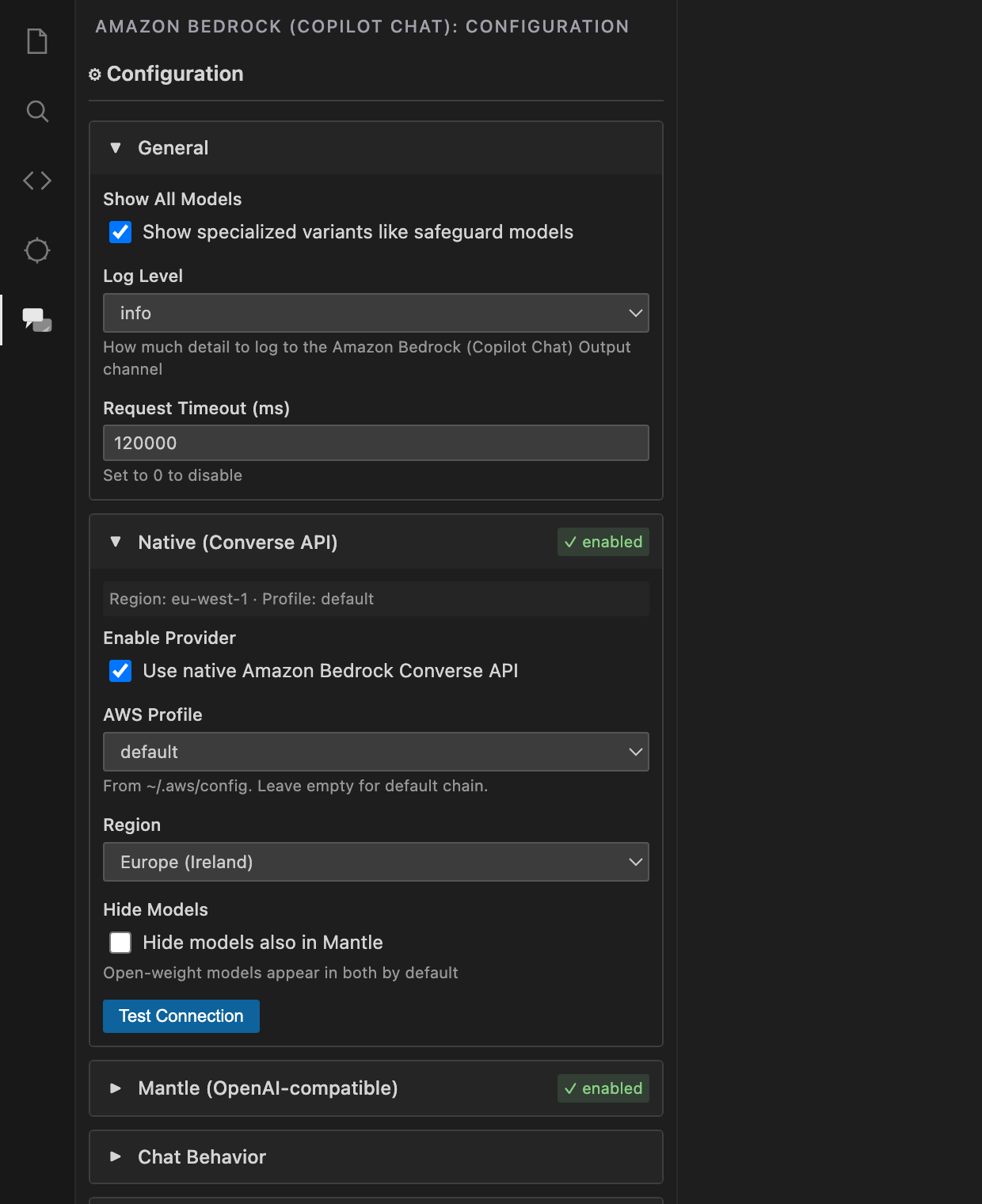
The same panel opens via the gear icon next to the model picker in the Copilot Chat panel, or via the Show Configuration command from the Command Palette (Cmd+Shift+P / Ctrl+Shift+P).
1. Native Amazon Bedrock (Converse API)
In the Native (Converse API) section:
- AWS Profile — optional named profile (leave blank for the default AWS credential chain). The dropdown auto-discovers profiles from
~/.aws/config and ~/.aws/credentials.
- Region — choose from native Amazon Bedrock's 18 supported regions (default
us-east-1)
- Test Connection — run a real credential check to verify your setup works
Native Amazon Bedrock always authenticates with AWS credentials (env vars, ~/.aws/credentials, SSO, etc.) — there's no API key option here.
2. Mantle (OpenAI-compatible + Anthropic Messages)
In the Mantle (OpenAI-compatible) section:
- Authentication Method — choose API Key (simpler) or AWS Credentials
- API Key: paste your key from the Amazon Bedrock console directly into the panel. You'll also be prompted automatically on first use. Keys are stored in VS Code's SecretStorage.
- AWS Credentials: uses AWS Signature V4 with your existing credentials; optionally set a specific profile (auto-discovered from
~/.aws/config)
- Region — choose from Mantle's 13 supported regions (a strict subset of native Amazon Bedrock's — default
us-east-1)
- Test Connection — run a real credential check to verify your setup works
Both providers' settings can also be set directly:
{
  "aws-bedrock.region": "us-west-2",               // native Amazon Bedrock region
  "aws-bedrock.awsProfile": "my-profile",          // native Amazon Bedrock AWS profile

  "aws-bedrock.mantleRegion": "us-east-1",         // Mantle region (smaller region list than native)
  "aws-bedrock.mantleAuthMethod": "awsCredentials", // or "apiKey"
  "aws-bedrock.mantleAwsProfile": "my-profile"      // optional
}
Show/hide specialized models (like safeguard variants), and optionally hide open-weight models from the native picker when they're also available via Mantle:
{
  "aws-bedrock.showAllModels": true,               // default: true
  "aws-bedrock.hideMantleModelsFromNative": false  // default: false
}
Usage
Using in Chat
- Open GitHub Copilot Chat (
Cmd+Shift+I / Ctrl+Shift+I)
- Click the model picker (top of chat panel)
- Select an Amazon Bedrock model (e.g., "OpenAI GPT OSS 120B")
- Start chatting!
Using with Copilot Chat
- In any editor, use
@workspace or other chat participants
- The model picker will include Amazon Bedrock models
- Select an Amazon Bedrock model for your conversation
Example Chat
You: What are the key features of Rust's ownership system?

Assistant (via Amazon Bedrock): [Streams response in real-time...]
Configuration
Settings
Settings are grouped into sections in VS Code's Settings UI (search aws-bedrock): Amazon Bedrock (Copilot Chat), › Native (Converse API), › Mantle (OpenAI-compatible), › Chat Behavior, and › Model Metadata.
| Setting |
Type |
Default |
Description |
aws-bedrock.showAllModels |
boolean |
true |
Show all models including specialized variants (applies to both providers) |
aws-bedrock.logLevel |
string |
info |
Output channel verbosity: verbose, info, warning, error, or none (applies to both providers) |
aws-bedrock.requestTimeout |
number |
120000 |
Max time (ms) to wait for a response before aborting; 0 disables. Streaming requests only time out waiting for the first response (applies to both providers) |
aws-bedrock.enableNative |
boolean |
true |
Register the native Amazon Bedrock (Converse API) provider |
aws-bedrock.awsProfile |
string |
empty |
Optional AWS profile for native Amazon Bedrock |
aws-bedrock.region |
string |
us-east-1 |
AWS region for native Amazon Bedrock (18 supported regions) |
aws-bedrock.hideMantleModelsFromNative |
boolean |
false |
Hide open-weight models from the native list when also available via Mantle |
aws-bedrock.enableMantle |
boolean |
true |
Register the Mantle provider |
aws-bedrock.mantleAuthMethod |
string |
apiKey |
Mantle auth mode: apiKey or awsCredentials |
aws-bedrock.mantleAwsProfile |
string |
empty |
Optional AWS profile for Mantle when using AWS credentials |
aws-bedrock.mantleRegion |
string |
us-east-1 |
AWS region for Mantle (13 supported regions — a subset of native's) |
aws-bedrock.sendTools |
boolean |
true |
Send tool definitions to the model |
aws-bedrock.emitPlaceholders |
boolean |
true |
Emit placeholder text while waiting |
aws-bedrock.enablePromptCaching |
boolean |
true |
Insert Amazon Bedrock cachePoint checkpoints for native Converse requests to Claude/Nova models |
aws-bedrock.assumeLongContextClaudeModels |
boolean |
true |
Report a 1M-token context window for Claude models known to support it (Sonnet 4, Sonnet 4.6, Sonnet 5, Opus 4.6+) |
aws-bedrock.modelMetadataSource |
string |
none |
Metadata source for token/capability info: none (built-in heuristics only, no network calls) or litellm |
aws-bedrock.modelMetadataUrl |
string |
default URL |
External metadata registry URL (used when source is litellm) |
aws-bedrock.modelMetadataCacheHours |
number |
24 |
Cache duration for external metadata (used when source is litellm) |
Supported Regions
Native Amazon Bedrock (aws-bedrock.region) — 18 regions:
us-east-1 (default), us-east-2, us-west-1, us-west-2, ca-central-1, eu-west-1, eu-west-2, eu-west-3, eu-central-1, eu-north-1, eu-south-1, ap-south-1, ap-northeast-1, ap-northeast-2, ap-southeast-1, ap-southeast-2, ap-southeast-3, sa-east-1
Mantle (aws-bedrock.mantleRegion) — 13 regions, a strict subset of native's (missing us-west-1, ca-central-1, eu-west-3, ap-northeast-2, ap-southeast-1):
us-east-1 (default), us-east-2, us-west-2, eu-west-1, eu-west-2, eu-central-1, eu-north-1, eu-south-1, ap-south-1, ap-northeast-1, ap-southeast-2, ap-southeast-3, sa-east-1
Commands
All commands appear in the Command Palette under the Amazon Bedrock (Copilot Chat) category.
| Command |
Description |
Show Configuration |
Open the Amazon Bedrock (Copilot Chat) configuration drawer (same panel as the Activity Bar icon) |
Manage Native Provider (Converse API) |
Opens the same configuration drawer for the native provider |
Manage Mantle Provider (OpenAI-compatible) |
Opens the same configuration drawer for the Mantle provider |
Clear Mantle API Key |
Remove the stored Amazon Bedrock API key used by Mantle |
Show Logs |
Open the extension output channel |
Architecture
This extension registers two VS Code LanguageModelChatProvider implementations, because the native and Mantle access paths are genuinely different Amazon Bedrock endpoints with different region footprints, auth details, and model coverage.
Key Components
- NativeBedrockProvider (
src/provider.ts): Native Bedrock (Converse API) provider, using @aws-sdk/client-bedrock-runtime
- MantleProvider (
src/mantleProvider.ts): Mantle provider — dispatches to Chat Completions (OpenAI-compatible) for most models, and to the Anthropic Messages API for the subset of Claude models Mantle supports
- Mantle Messages API client (
src/mantleMessages.ts): Request/response conversion and SSE streaming for Mantle's /anthropic/v1/messages
- Dynamic Model Discovery: Fetches available model catalogs from Amazon Bedrock APIs for both providers
- Streaming Support: Processes SSE (Server-Sent Events) for real-time responses on all three API paths
- Tool Calling: Buffers and parses streaming tool calls for function calling support
https://bedrock-mantle.<region>.api.aws/v1                    # Mantle: models list, Chat Completions
https://bedrock-mantle.<region>.api.aws/anthropic/v1/messages # Mantle: Anthropic Messages API (Claude)
Native Bedrock uses the AWS SDK (@aws-sdk/client-bedrock / @aws-sdk/client-bedrock-runtime) rather than a raw HTTP endpoint.
Model Capabilities
Models with function calling capabilities:
gpt-oss-120bmistral-large-3-675b-instructmagistral-small-2509deepseek.v3.1qwen3-235b and larger modelsqwen3-vl-235b (vision + tools)- All Anthropic Claude models (native Amazon Bedrock)
- Amazon Nova, Cohere Command R/R+, AI21 Jamba (native Amazon Bedrock)
VS Code's Agent mode only shows models that report tool-calling support in the model picker — a model without it is hidden there entirely (though still usable in plain Ask-mode chat). If a model you expect to see is missing from Agent mode, it's most likely a tool-calling capability gap; please open an issue.
Vision Support
Models with multimodal (image) input:
- Models from API-key mode: based on model naming and API behavior
- Models from Converse API mode: based on Amazon Bedrock's reported input modalities
- Token limits + initial capabilities: By default the extension uses built-in heuristics only, with no external network calls. It can optionally use an external model metadata registry (litellm's public JSON) for more accurate limits on non-Claude Mantle models — set
aws-bedrock.modelMetadataSource to litellm to enable it (also configurable via aws-bedrock.modelMetadataUrl and aws-bedrock.modelMetadataCacheHours). For Claude specifically, aws-bedrock.assumeLongContextClaudeModels (on by default) reports the correct 1M-token window for the specific models that support it, without needing the external registry.
- Native Amazon Bedrock models: vision is derived from
ListFoundationModels input modalities (reliable). Tool support is verified on-demand by attempting a tool-enabled request and caching whether the model accepts tool config (this overrides external metadata if runtime behavior differs).
- Mantle models:
/v1/models does not include full tool/vision/token metadata, so the extension uses external metadata when enabled, plus runtime probing (tools) as a safety net. Claude models on Mantle are routed to the Anthropic Messages API automatically; models with zero Mantle support (neither Chat Completions nor Messages) are excluded from the Mantle picker entirely.
- Duplicate names: if two models in the same provider's list would otherwise show an identical label, the extension appends the raw technical model ID to keep every entry uniquely selectable.
Code Specialization
Models optimized for coding:
qwen3-coder-30b-a3b-instructqwen3-coder-480b-a35b-instruct
Reasoning/Thinking
Models with enhanced reasoning:
Troubleshooting
API Key Issues
Problem: "Invalid API key" error
Solution:
- Verify your API key in the Amazon Bedrock console
- Open the Amazon Bedrock (Copilot Chat) configuration drawer → Mantle section → "Clear API Key"
- Re-enter your API key
Model Not Available
Problem: "Model not available in region" error
Solution:
Rate Limiting
Problem: "Rate limit exceeded" error
Solution:
- Wait a few moments and try again
- Consider using smaller models for testing
- Check your Amazon Bedrock quotas in the AWS console
Connection Issues
Problem: Network or timeout errors
Solution:
- Check your internet connection
- Verify firewall/proxy settings allow access to
*.api.aws
- Ensure the selected region is accessible from your location
Development
Building from Source
# Install dependencies
npm install

# Compile TypeScript
npm run compile

# Watch mode for development
npm run watch

# Run linting
npm run lint
Or use the Makefile shortcuts:
make install
make compile
make watch
make lint
Debugging
- Open the project in VS Code
- Press
F5 to launch Extension Development Host
- Set breakpoints in source files
- Test the extension in the new window
Project Structure
bedrock-vscode-chat/
├── src/
│   ├── extension.ts           # Extension entry point; registers both providers
│   ├── provider.ts             # NativeBedrockProvider (Converse API)
│   ├── bedrockNative.ts        # Native Amazon Bedrock Converse API client
│   ├── mantleProvider.ts        # MantleProvider (Chat Completions + Messages dispatch)
│   ├── mantleMessages.ts        # Mantle Anthropic Messages API client
│   ├── externalModelMetadata.ts # External model metadata loader
│   ├── regions.ts               # AWS region lists (native + Mantle, single source of truth)
│   ├── types.ts                # TypeScript type definitions
│   └── utils.ts                # Utility functions
├── package.json                # Extension manifest
├── tsconfig.json               # TypeScript configuration
├── assets/
│   ├── icon.svg                # Source icon (editable)
│   └── icon.png                # Extension icon (128x128)
├── docs/
│   ├── CONTRIBUTING.md         # Development guide
│   ├── QUICKSTART.md           # Quick start for developers
│   ├── TESTING.md              # Testing guide
│   └── dev/
│       └── MODEL_STRATEGIES.md # Model capability detection strategy
├── config/
│   ├── Makefile                # Build automation
│   ├── esbuild.js              # Bundler configuration
│   ├── eslint.config.js        # Linter configuration
│   └── tsconfig.json           # TypeScript configuration
├── README.md                   # This file
Contributing
Contributions are welcome! See CONTRIBUTING.md for detailed development guidelines.
Quick start for contributors:
- Fork and clone the repository
- Install dependencies:
npm install
- Compile:
npm run compile
- Press F5 to launch Extension Development Host
- See docs/CONTRIBUTING.md for testing, logging, and publishing guidelines
Key development notes:
- Publisher name:
easytocloud (lowercase)
- Use Output Channel for logging, not console.log
- The extension is bundled with esbuild (
out/extension.js) — node_modules is excluded from the VSIX
- Test in both F5 mode and installed VSIX
- Use
rsvg-convert for icon generation
Resources
License
MIT License - See LICENSE file for details
Credits
- Project Lead: easytocloud
- Development Assistant: GitHub Copilot
Acknowledgments
Inspired by the HuggingFace extension for GitHub Copilot Chat.
Support
Amazon Bedrock, AWS, and Amazon Web Services are trademarks of Amazon.com, Inc. or its affiliates. This extension is an independent, community-built GitHub Copilot Chat model provider and is not affiliated with, endorsed by, or sponsored by Amazon.com, Inc. or its affiliates.
Version: 0.6.0
Status: Production
Last Updated: July 11, 2026

