Task Trail
A task list that is just Markdown files — and that writes itself down.
Your tasks live in a plain tasks/ folder next to your code: one .md file per task, with
YAML frontmatter and three sections. You can read them in Obsidian, grep them, and commit them.
Task Trail puts a tree and a details panel on top of that folder, and — the part that matters —
records every Claude Code session back into the task it belonged to, so a week later you can
still see what you actually did.
Requires the Claude Code CLI for the chat, the automatic
session recording and the scheduled runs. The task list itself works without it.
変更履歴は同梱の CHANGELOG.md にあります。
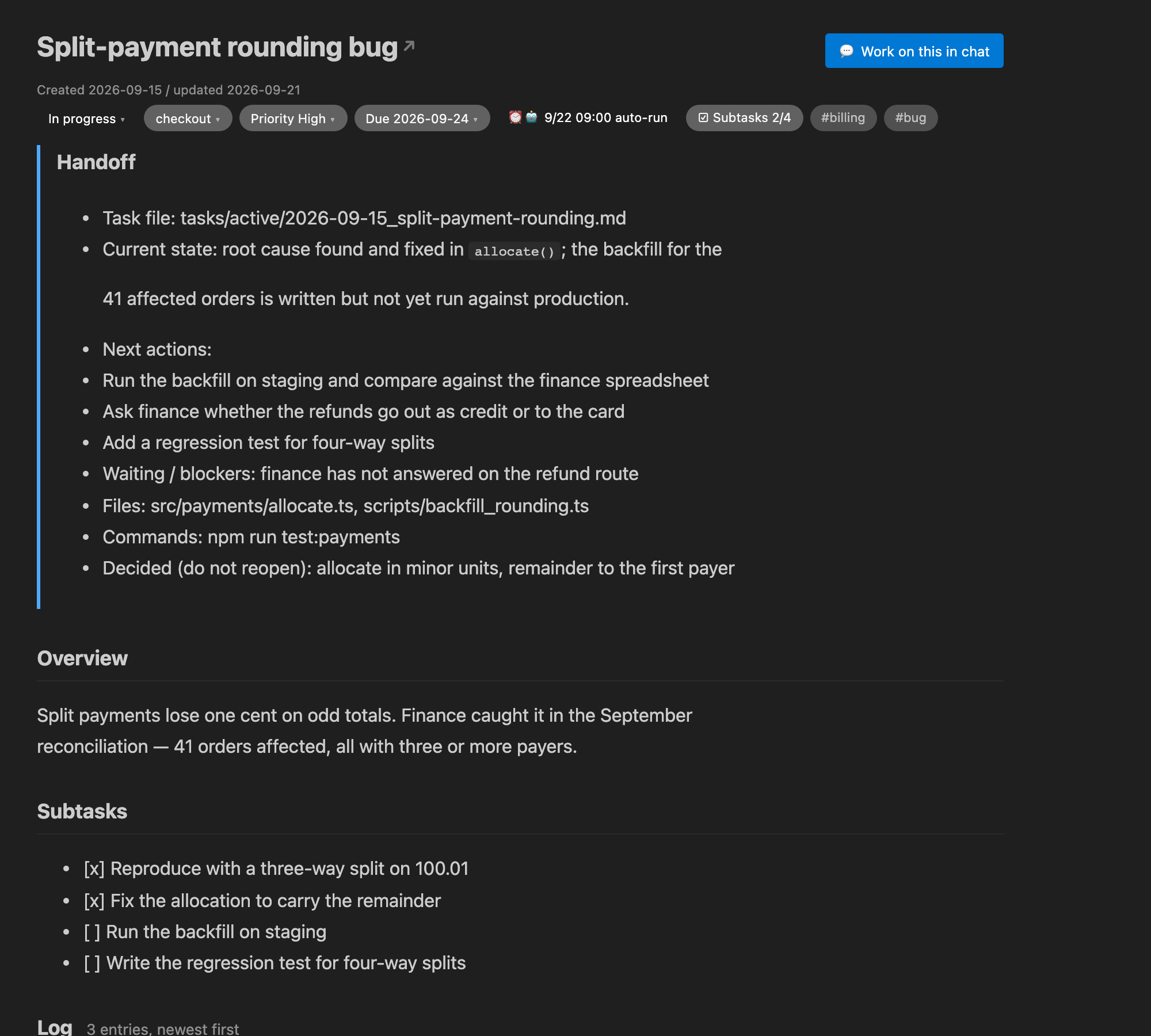
One task: what it is, where it stands, what is next — and a log that Claude Code writes itself.
What you get
|
|
| Tasks as files |
tasks/active/2026-09-04_rewrite-readme.md. No database, no sync, no lock-in. Move the folder, keep your tasks. |
| Sessions record themselves |
A Stop hook matches each finished Claude Code session to a task and appends what you asked for and what came back — with a marker that links back to the conversation. |
| A chat that manages the ledger |
Ask for a breakdown, a schedule, a handoff rewrite. It can only touch your tasks through a small MCP tool layer — no free-hand file editing. |
| Nothing is a one-way door |
Finishing a task archives it — and you can bring it straight back if it turns out there was more to do. |
| Handoff, not history |
Each task carries one section that is always the current state. Pick the work back up months later without reading the whole log. |
| Scheduling and unattended runs |
Remind me at 9:00 — or work through the unchecked subtasks by yourself. |
| Several ledgers at once |
Work and personal open in the same window stay separate ledgers, and nothing crosses over. |
Quick start
- Install the extension. The Task Trail icon appears in the activity bar.
- Point it at a ledger. Put a
tasks/active/ folder anywhere in your workspace (or above it)
and Task Trail finds it. With no folder, it falls back to ~/tasks — change it with
taskTrail.rootPath.
- Turn on session recording: run Task Trail: Set up the Claude Code integration from the
command palette. It shows you exactly what it will add to
~/.claude/settings.json, backs the
file up, and only writes after you press Register. From the next session on, finished work
lands in the task's log.
- Make a task: the
+ button at the top of the tree. Then click the title in the details
panel to open the Markdown, or press 💬 Work on this in chat.
What a task file looks like
---
title: Rewrite the setup guide
status: doing          # todo | doing | waiting | done
project: docs
priority: high         # high | mid | low
created: 2026-09-01
updated: 2026-09-04
due: 2026-09-10
tags: []
keywords: [setup guide, onboarding]   # help the hook recognise this work
paths: [docs-site]                    # folder-name fragments; matched against the session cwd
artifacts: []
---

## Overview
Why this task exists. Written once, left alone.

## Handoff
- **Task file**: [/…/tasks/active/2026-09-04_rewrite-setup-guide.md](file:///…)
- **Current state**: the first three steps are rewritten; screenshots are stale
- **Next actions**:
  1. Retake the screenshots at 2x
  2. Check the Windows path examples
- **Waiting / blockers**: none
- **Files**: docs-site/setup.md
- **Commands**: npm run docs:dev
- **Decided (do not reopen)**: we keep the CLI-first ordering
- **Pitfalls**: the old guide had two "step 3"s

## Subtasks
- [x] Rewrite steps 1–3
- [ ] Retake the screenshots

## Log

### 2026-09-04 14:20 (auto-recorded) <!-- tt:9a8b7c6d -->
- Request: rewrite the setup guide so it starts from the CLI
- Response: rewrote steps 1-3 and left the screenshots for later

### 2026-09-01 09:00
Task created
Three rules make the format work:
- Overview is fixed. It says why the task exists.
- Handoff is overwritten in full, every session. It is the one section you read to resume.
- The log is append-only and newest first. New entries go directly under the
## Log
heading. Nothing that a person wrote is ever removed.
Headings can be English or Japanese (## Overview / ## 概要) — Task Trail reads both, and
writes new files in whichever language you set with taskTrail.language.
The task chat
The second view in the sidebar is a chat whose only job is your ledger. It runs the claude CLI
and reaches your tasks through a bundled MCP server (tasktrail), with Edit, Write and Bash
switched off. Things it can do:
Which three tasks should I start with today?
Break this one into subtasks I can run separately.
Schedule it for tomorrow at 9 and run the subtasks automatically.
Review everything past its due date and give me a new date for each.
Rewrite the handoff to match where I actually got to.
It looks before it answers, reuses your existing project names instead of inventing near
duplicates, and never finishes a task without asking you first — completing is not
reversible from there.
One resident process per window. It stops itself after 10 idle minutes
(taskTrail.chat.idleMinutes) and picks the same conversation back up on your next message.
Ledgers
A ledger is a folder with active/ and archive/ inside it:
your-workspace/
  tasks/
    active/      2026-09-04_rewrite-readme.md
    archive/     2026-08/…
    _templates/  task.md          (optional; task.en.md for English)
    README.md    (your own conventions; ignored by the extension)
Task Trail looks upward from every open workspace folder for the first tasks/active. Open two
projects in one window and you get two ledgers: the tree splits by ledger, new tasks ask where to
go, and archiving always stays inside the same ledger. Turn the search off with
taskTrail.discoverWorkspaceLedgers to use taskTrail.rootPath alone.
Automatic session recording
When a Claude Code session ends, the hook works out which of your tasks it belonged to and adds an
entry to that task's log: what you asked for, what came back, and any Google Docs/Drive links as
artifacts. When it is not confident, it writes nothing — a wrong entry is worse than no
entry. Fill in keywords and paths in a task's frontmatter to make it more certain.
You get one entry per piece of work, not one per time you stopped: finishing the same session
again updates its entry instead of adding another.
Entries carry a <!-- tt:… --> marker, which the details panel and VS Code's built-in Markdown
preview turn into Open the conversation.
The hook is plain Node (no Python needed) and lives at ~/.task-trail/hooks/ so extension updates
do not move it.
Scheduling
Give a task a time and pick what happens:
- Remind me — a notification when the time comes (also a Slack DM if you configured one).
- Run automatically — Claude works through the unchecked subtasks one at a time, in a single
conversation, checking each one off as it goes and quoting what it did into the log.
Schedules fire while the IDE is open. If the time passed before you opened it, you are asked
before anything runs. A failed run keeps its schedule so it comes back to you instead of
disappearing.
Free and Pro
Everything that makes a task list a task list is free, and stays free: the Markdown files, the
tree, the details panel, the automatic session recording, the task chat, and opening a
conversation from a task. If you write a time into a task's frontmatter yourself, the reminder
still shows up.
Pro buys the automation around it.
|
Free |
Pro |
| Markdown tasks, tree, details panel |
✓ |
✓ |
| Automatic session recording |
✓ |
✓ |
| Task chat, opening conversations |
✓ |
✓ |
| Sorting, priority summary, due dates |
✓ |
✓ |
| ⏰ Scheduling from the UI and the chat |
|
✓ |
| 🤖 Automatic subtask runs |
|
✓ |
| Slack notifications |
|
✓ |
Try every Pro feature free for 7 days — it starts automatically, no key or card.
|
Price |
Unlocks |
| Task Trail Pro |
$12 |
this extension |
| Workbench |
$15 |
this and Session Trail Pro |
Get Task Trail Pro — one payment, no subscription, all future Pro features included.
Works offline after activation.
Already bought? Run Task Trail: Enter Pro license key from the Command Palette.
Settings
| Setting |
Default |
What it does |
taskTrail.language |
auto |
UI language and the headings of new tasks (auto follows VS Code) |
taskTrail.rootPath |
~/tasks |
Fallback ledger when none is found in the workspace |
taskTrail.discoverWorkspaceLedgers |
true |
Find tasks/active by looking upward from workspace folders |
taskTrail.sortMode |
priority |
Sort order in the tree (finished tasks are always last) |
taskTrail.projectOrder |
[] |
Pinned project order (the ▲▼ buttons write this) |
taskTrail.prioritySummaryLimit |
5 |
Size of the ★ Priority summary at the top; 0 hides it |
taskTrail.claudePath |
"" |
Path to the claude CLI (empty = search PATH and the usual places) |
taskTrail.chat.model |
"" |
Model for the task chat |
taskTrail.chat.idleMinutes |
10 |
Idle time before the chat process is stopped |
taskTrail.autoRunPermissionMode |
acceptEdits |
Permission mode for unattended subtask runs |
taskTrail.autoRunModel / autoRunTimeoutMin |
"" / 20 |
Model and per-subtask timeout for those runs |
taskTrail.slackConfigPath |
~/.secrets/task_trail_slack.json |
Where the Slack credentials live |
taskTrail.slackNotifyOnReminder |
true |
Also send a Slack DM when a schedule fires |
Privacy
Task Trail reads and writes files on your machine and starts the claude CLI you already have.
The only network call it ever makes is the Slack notification, and only if you created the
credentials file yourself. Nothing is sent anywhere else, and there is no telemetry.
Secrets stay out of your settings: the Slack file is referenced by path, created with 0600, and
never synced.
Requirements and limits
- Claude Code CLI for the chat, session recording and scheduled runs. The task list, the tree,
the details panel and every edit work without it.
- Schedules only fire while the IDE is open. Anything that came due meanwhile is offered to
you at the next start.
- Unattended runs cost money. They run with
acceptEdits by default, stop at the first
failure, and keep their schedule so a silent failure cannot go unnoticed.
- Session recording deliberately stays quiet when it is not confident which task a conversation
belongs to.
Works with
Session Trail (formerly Claude Code History) —
conversation history for Claude Code. If it is installed, "Work on this in chat" opens your conversations there with the full history
replayed, and the tt: markers link both ways. Task Trail does not need it.
Feedback
There is no public issue tracker yet. If something is broken or missing, leave a review on the
Marketplace listing, or reach the publisher through it.
License
MIT © Ryoma Shigeta

