Session Trail
Session Trail was published as “Claude Code History” until 0.29.x. Same extension, same ID; existing installs update in place.
日本語版は同梱の README.ja.md にあります。
Conversation history for Claude Code. Browse, search and continue every Claude Code conversation directly inside VS Code.
Claude Code stores conversations locally but offers no built-in UI to browse them. This extension fills that gap.
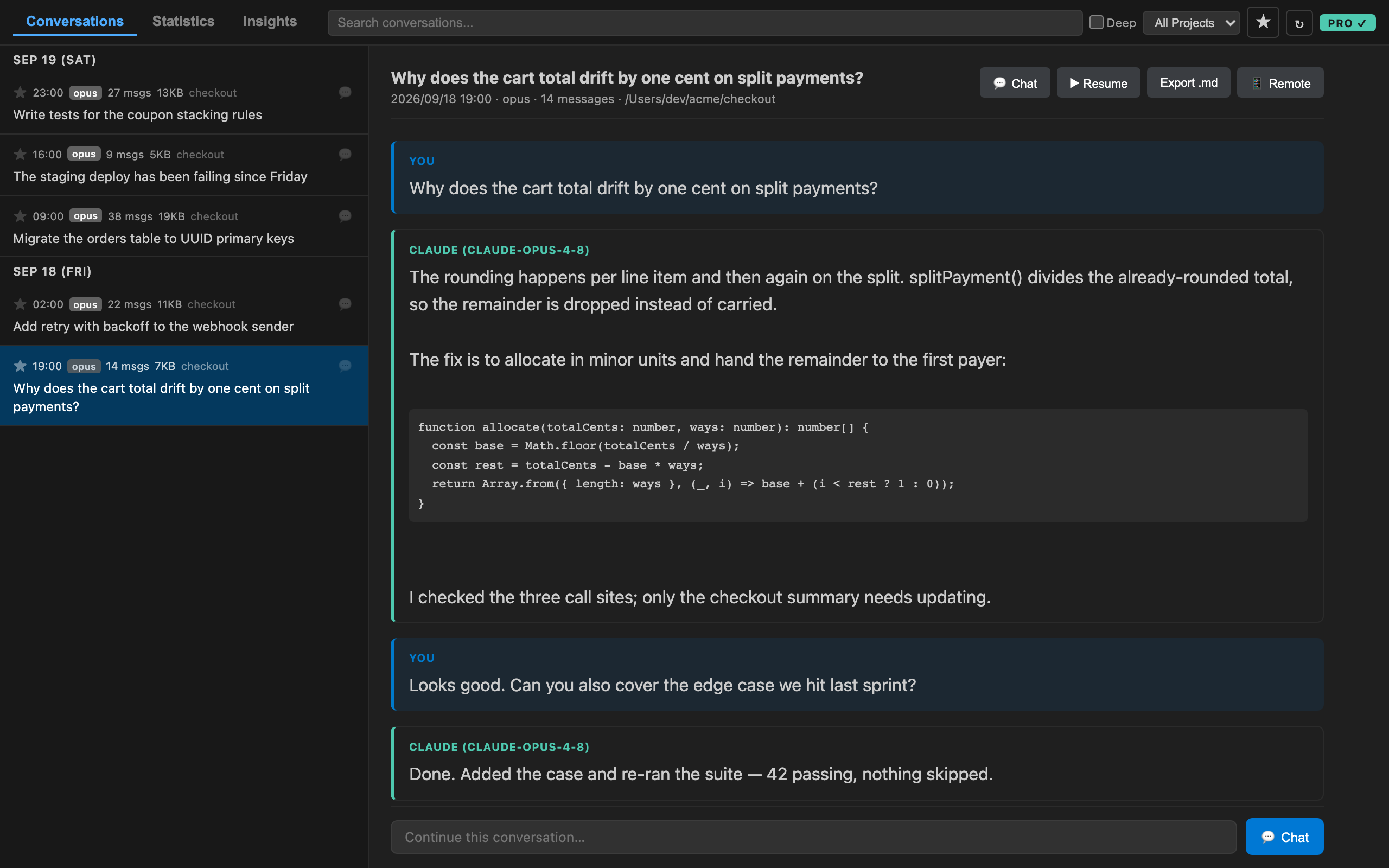
Every conversation, however far back, with the chat composer waiting at the bottom.
Features
- Conversation Browser — View all past Claude Code conversations sorted by date
- Full Conversation View — Read user/assistant messages, tool calls, and thinking blocks
- Artifact Cards — Artifacts created in a session appear as cards: open the published claude.ai page in your browser, or preview the local file right in VS Code
- Markdown File Cards — Markdown files written during a session (reports, notes) appear as cards with instant preview and open-in-editor buttons
- Clickable Links — URLs in messages open in your browser
- Chat View — continue any conversation right inside VS Code: the panel replays the transcript, then talks to a resident
claude CLI process (streaming output, tool-call chips, thinking blocks, Esc to interrupt, a send queue while a turn is running). Open it from the 💬 button on a conversation, the composer at the bottom of a thread, or the claudeHistory.openChat command
- Language Switch — chat view and messages in English or Japanese (
claudeHistory.language: auto follows your VS Code display language)
- Resume Session (Pro) — reopen any conversation in a terminal with
claude --resume
- Copy Buttons — hover any code block to copy it
- Task Trail Integration — conversations recorded to a Task Trail task show a clickable task chip, and chats opened from a task keep recording to it; other extensions can deep-link via the
claudeHistory.openSession / claudeHistory.openChat commands
- Fast Startup — metadata is cached on disk; only changed logs are rescanned
- Search — Real-time filtering by keywords
- Project Filter — Switch between multiple projects
- Dark/Light Theme — Automatically adapts to your VS Code theme
- Zero Config — Just install and press
Cmd+Shift+H (or Ctrl+Shift+H)
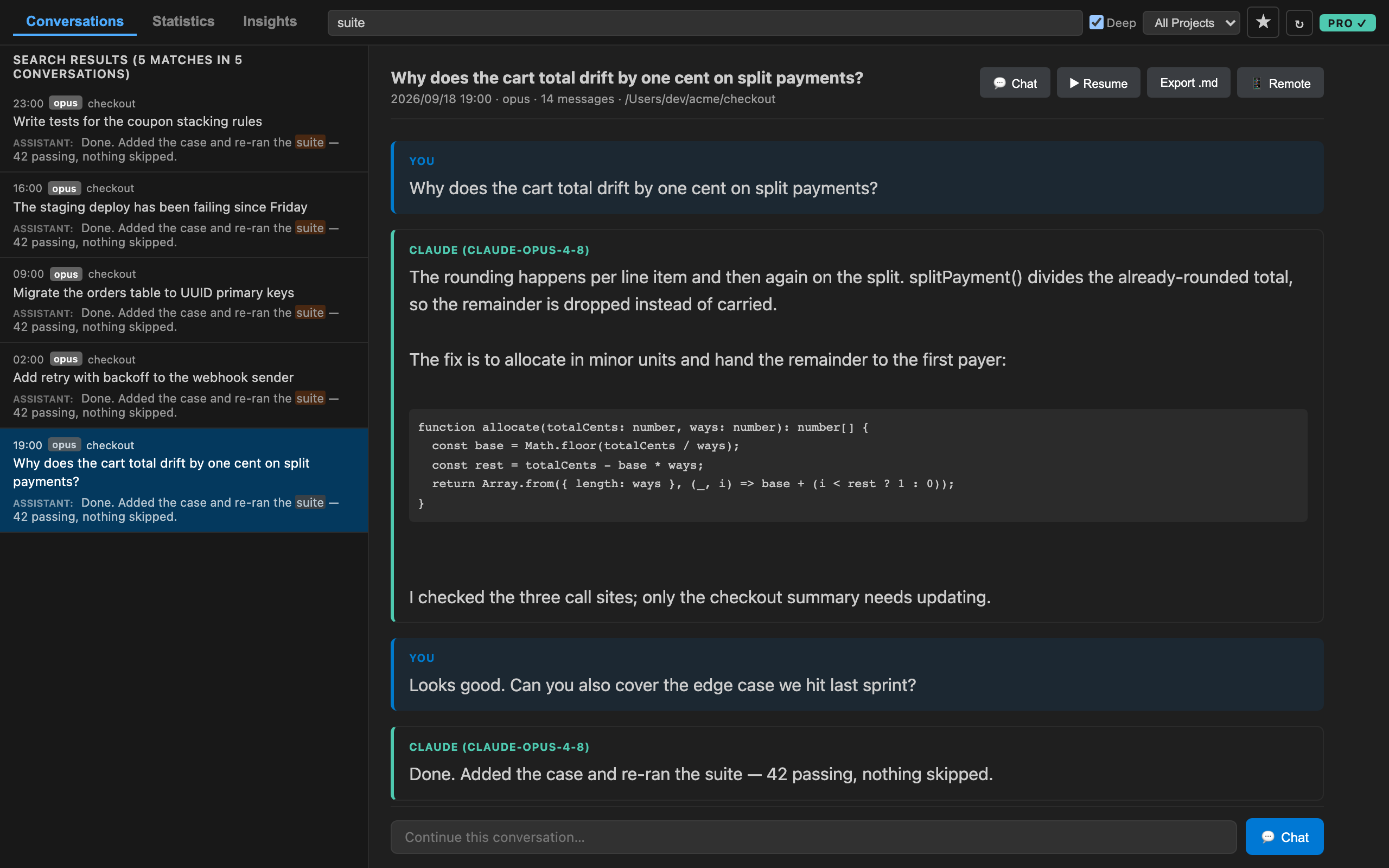
Deep Search (Pro) looks inside the full text of every message, not just titles.
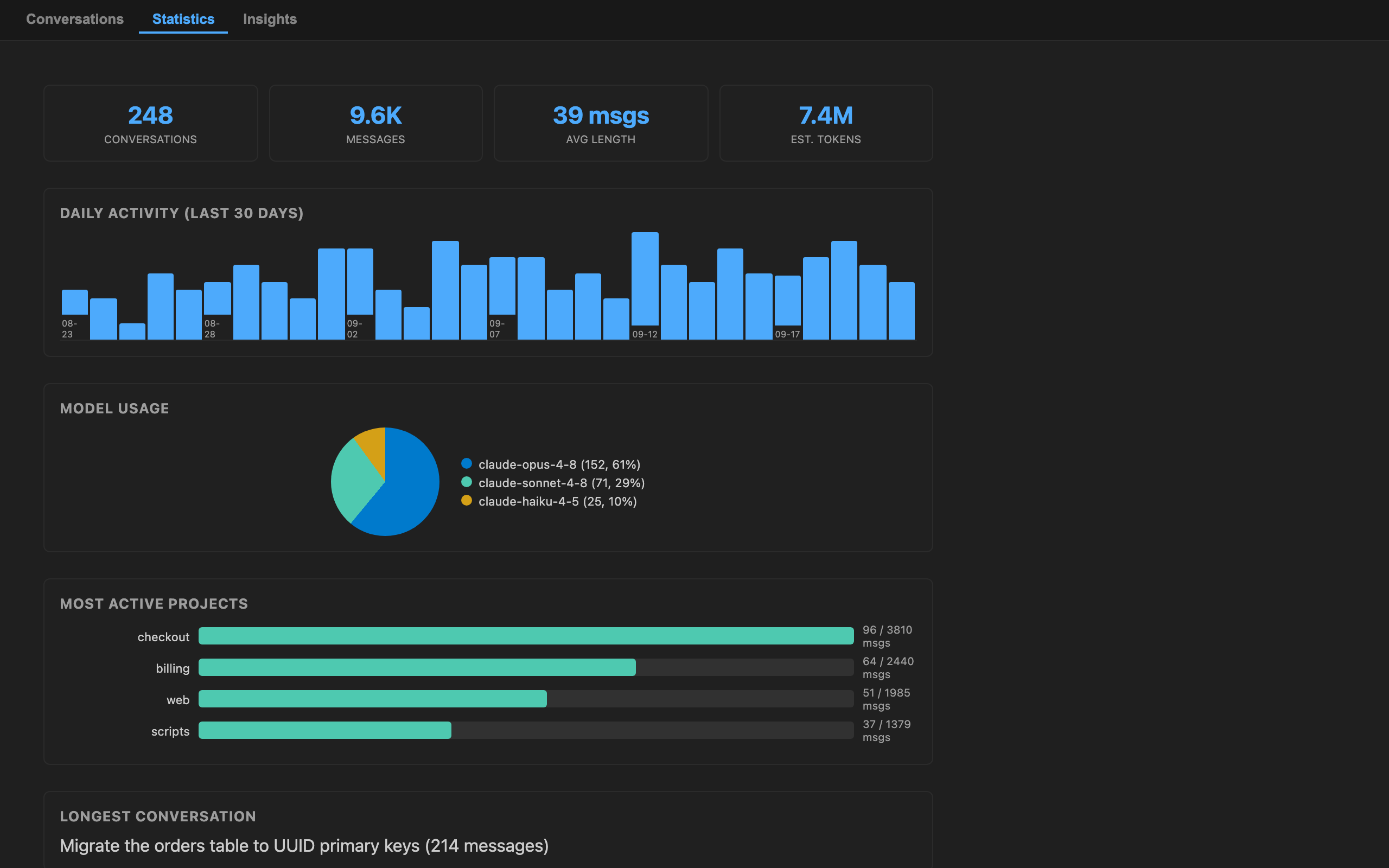
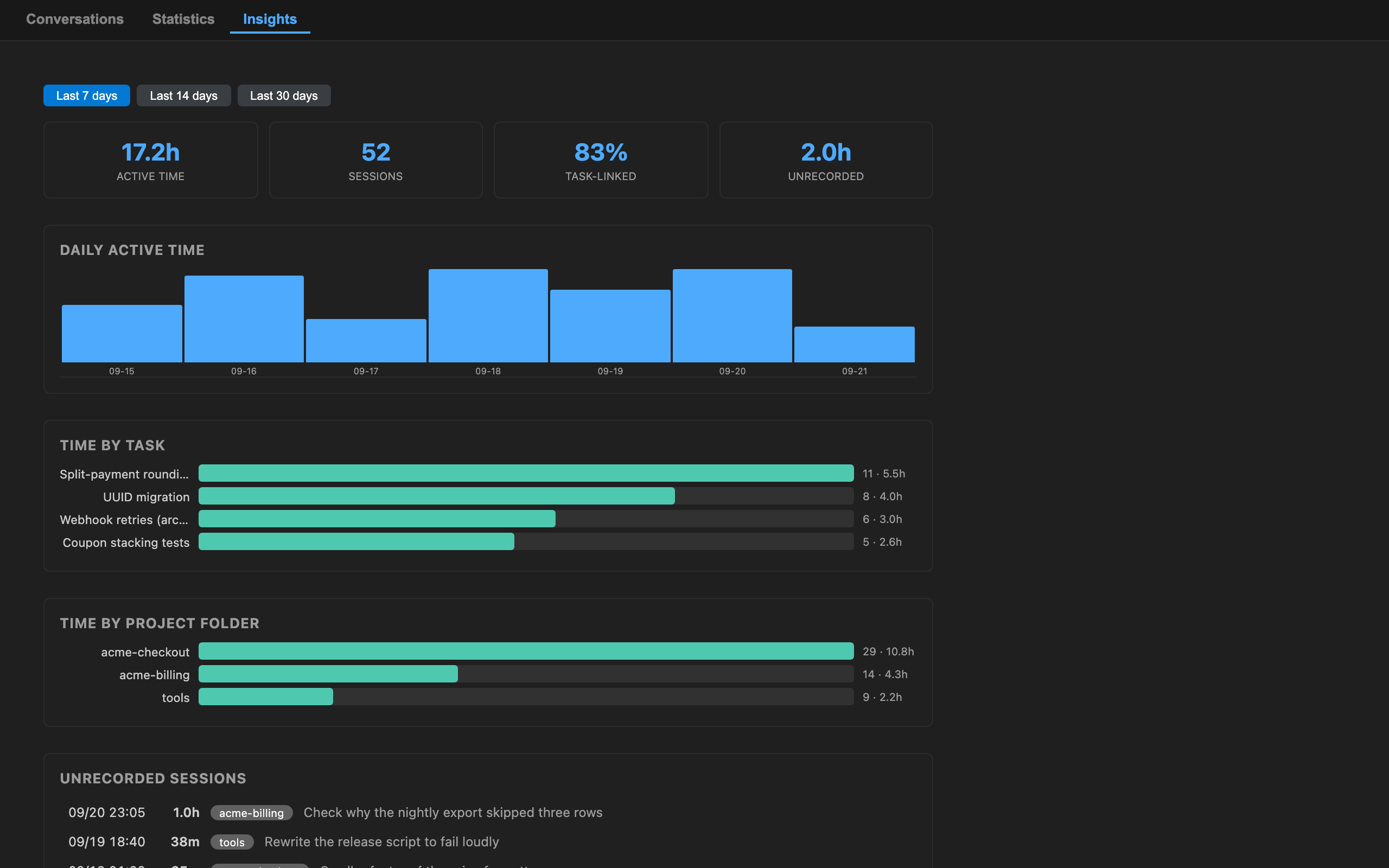
Statistics and Insights (Pro): how you actually spent the week, and which sessions never made it into a task.
Free and Pro
Reading your history is free, and stays free — every conversation, however far back, with no
7-day wall and no device limit. The chat view is free too: you can continue any conversation,
fork it, and switch models without paying anything.
Pro adds the tools for working across hundreds of conversations at once.
|
Free |
Pro |
| Browse and read every conversation |
✓ |
✓ |
| Chat view — continue, fork, switch model |
✓ |
✓ |
| Search titles and previews |
✓ |
✓ |
| Artifact and Markdown cards |
✓ |
✓ |
| English / Japanese UI |
✓ |
✓ |
| 🔍 Deep Search — full text of every message |
|
✓ |
| 🔖 Bookmarks |
|
✓ |
| 📊 Statistics dashboard |
|
✓ |
| 📈 Insights — working time per task |
|
✓ |
| 📝 Markdown export |
|
✓ |
| ▶ Resume in a terminal |
|
✓ |
| 🗂 File History — every conversation that touched a file |
|
✓ |
|
Price |
Unlocks |
| Session Trail Pro |
$5 |
this extension |
| Workbench |
$15 |
this and Task Trail Pro |
Get Session Trail Pro — one payment, no subscription, all future Pro features included.
Works offline after activation.
Already bought? Click the PRO badge in the panel's toolbar and paste your key.
Usage
- Install the extension
- Press
Cmd+Shift+H (macOS) or Ctrl+Shift+H (Windows/Linux)
- Browse your conversations in the sidebar, click to view details
You can also open it via Command Palette: Session Trail: Open Chat Browser
How It Works
Claude Code stores conversation data as JSONL files in ~/.claude/projects/. This extension reads those files locally — no data is sent anywhere. Everything stays on your machine.
FAQ
The Preview button on an artifact is greyed out.
Preview renders the artifact's original file, which Claude Code writes to a temporary folder. That folder is cleared when your machine restarts, so for older artifacts the file is usually gone. Use Open in Browser instead — it opens the published artifact on claude.ai (you need to be signed in to Claude).
What's the difference between the Chat View and Resume Session?
The Chat View (💬) continues the session in a panel inside VS Code — good for quick follow-ups and reading with context. Resume Session runs claude --resume in a terminal — use it when you need interactive permission prompts, image paste, or slash-command UI, which the headless chat panel can't provide.
Requirements
- Claude Code CLI installed and used at least once
- VS Code 1.85.0 or later
Privacy
This extension:
- Reads only local files from
~/.claude/projects/
- Sends zero data to any server
- Has no telemetry
- Requires no authentication
Keybindings
| Command |
macOS |
Windows/Linux |
| Open Chat Browser |
Cmd+Shift+H |
Ctrl+Shift+H |
License
MIT

