Bauhaus Theme
Primary colors on warm black and paper, for VS Code. Dark and light themes where every syntax color passes WCAG AA.




Features
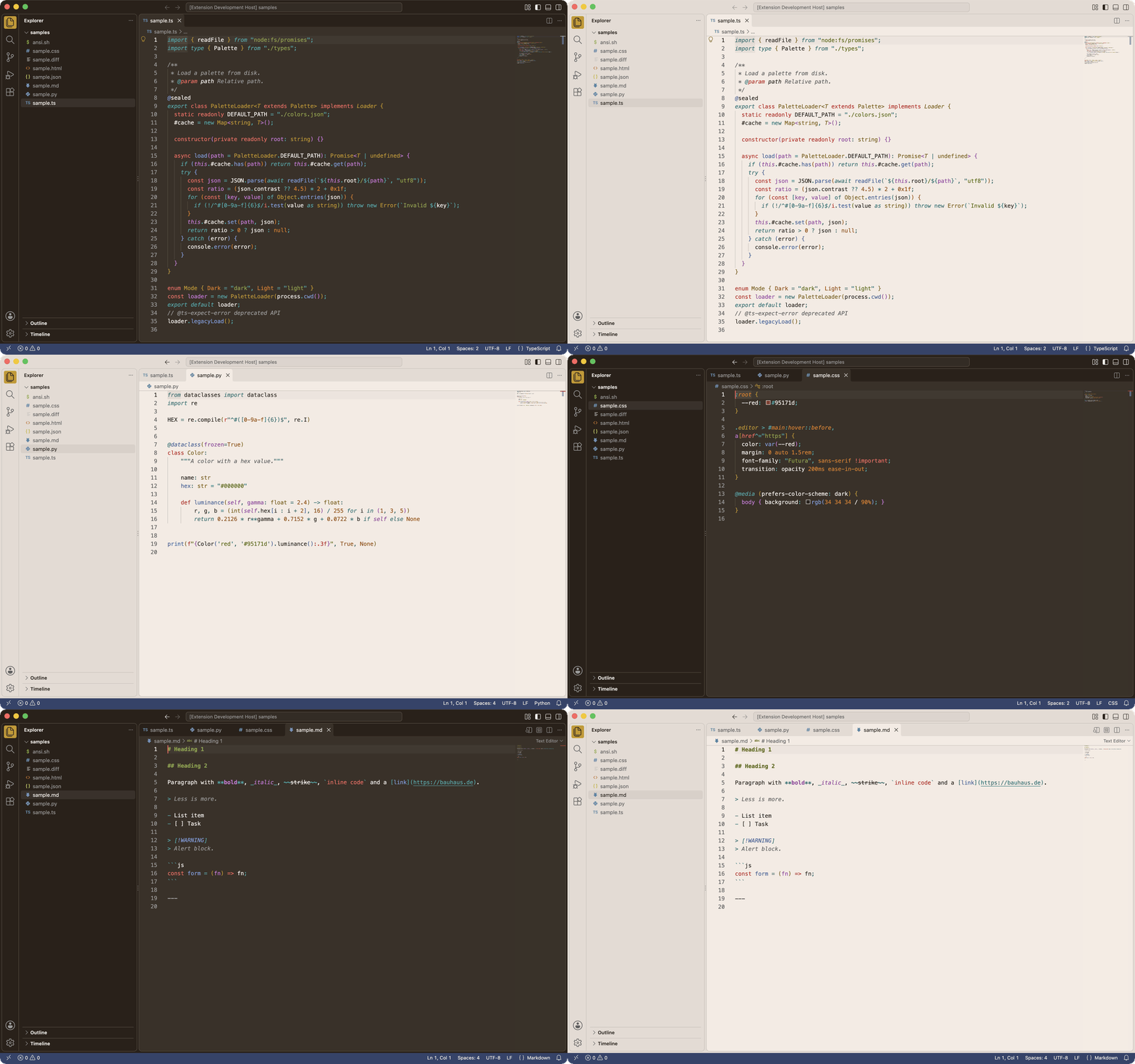
- Bauhaus palette: red, blue and yellow primaries on warm black or paper.
- Readable by design: every syntax color is tuned in OKLCH to reach 4.5:1 against the editor (WCAG AA).
- Dark and Light: same hues, same roles.
- Color blocks: flat primary fills for the status bar, active items and badges, with three accent styles to dial them up or down.
Install
Install from the Visual Studio Marketplace, or run in Quick Open (Cmd/Ctrl+P):
ext install dmnsgn.vscode-bauhaus-theme
Then pick Bauhaus Dark or Bauhaus Light with Preferences: Color Theme.
Accent styles
- Tricolor (default): red focus, badges and buttons, blue status bar and panel tab, yellow activity bar item, red when debugging.
- Blocks: red status bar and active items, yellow when debugging, blue when no folder is open.
- Restrained: neutral status bar, red active items, red when debugging.
To switch, add the matching snippet to your settings.json.
Blocks and Restrained settings
Blocks
{
  "workbench.colorCustomizations": {
    "[Bauhaus Dark]": {
      "modernActivityBarItem.activeBackground": "#95171d",
      "modernActivityBarItem.activeForeground": "#f2f2f2",
      "modernTab.activeBackground": "#95171d",
      "activityBar.activeBorder": "#95171d",
      "activityBarTop.activeBorder": "#95171d",
      "panelTitle.activeBorder": "#95171d",
      "statusBar.background": "#95171d",
      "statusBar.border": "#95171d",
      "statusBar.debuggingBackground": "#cb9820",
      "statusBar.debuggingForeground": "#2b2119",
      "statusBar.debuggingBorder": "#cb9820",
      "statusBar.noFolderBackground": "#30436a",
      "statusBarItem.remoteBackground": "#30436a",
      "statusBarItem.remoteForeground": "#f2f2f2",
      "statusBarItem.remoteHoverBackground": "#45567a",
      "terminal.tab.activeBorder": "#95171d"
    },
    "[Bauhaus Light]": {
      "modernActivityBarItem.activeBackground": "#95171d",
      "modernActivityBarItem.activeForeground": "#f2f2f2",
      "modernTab.activeBackground": "#95171d",
      "activityBar.activeBorder": "#95171d",
      "activityBarTop.activeBorder": "#95171d",
      "panelTitle.activeBorder": "#95171d",
      "statusBar.background": "#95171d",
      "statusBar.border": "#95171d",
      "statusBar.debuggingBackground": "#cb9820",
      "statusBar.debuggingForeground": "#2b2119",
      "statusBar.debuggingBorder": "#cb9820",
      "statusBar.noFolderBackground": "#30436a",
      "statusBarItem.remoteBackground": "#30436a",
      "statusBarItem.remoteForeground": "#f2f2f2",
      "statusBarItem.remoteHoverBackground": "#303f60",
      "terminal.tab.activeBorder": "#95171d"
    }
  }
}
Restrained
{
  "workbench.colorCustomizations": {
    "[Bauhaus Dark]": {
      "modernActivityBarItem.activeBackground": "#95171d",
      "modernActivityBarItem.activeForeground": "#f2f2f2",
      "modernTab.activeBackground": "#95171d",
      "activityBar.activeBorder": "#95171d",
      "activityBarTop.activeBorder": "#95171d",
      "panelTitle.activeBorder": "#95171d",
      "statusBar.background": "#2b2119",
      "statusBar.foreground": "#9a9a9a",
      "statusBar.border": "#574d43",
      "statusBar.noFolderBackground": "#2b2119",
      "statusBar.noFolderForeground": "#9a9a9a",
      "statusBarItem.remoteBackground": "#95171d",
      "statusBarItem.remoteForeground": "#f2f2f2",
      "statusBarItem.remoteHoverBackground": "#a33936",
      "statusBarItem.hoverBackground": "#9a9a9a1f",
      "statusBarItem.activeBackground": "#9a9a9a33",
      "statusBarItem.prominentBackground": "#9a9a9a26",
      "terminal.tab.activeBorder": "#95171d"
    },
    "[Bauhaus Light]": {
      "modernActivityBarItem.activeBackground": "#95171d",
      "modernActivityBarItem.activeForeground": "#f2f2f2",
      "modernTab.activeBackground": "#95171d",
      "activityBar.activeBorder": "#95171d",
      "activityBarTop.activeBorder": "#95171d",
      "panelTitle.activeBorder": "#95171d",
      "statusBar.background": "#e5dbd3",
      "statusBar.foreground": "#616161",
      "statusBar.border": "#c9bfb8",
      "statusBar.noFolderBackground": "#e5dbd3",
      "statusBar.noFolderForeground": "#616161",
      "statusBarItem.remoteBackground": "#95171d",
      "statusBarItem.remoteForeground": "#f2f2f2",
      "statusBarItem.remoteHoverBackground": "#881c1d",
      "statusBarItem.hoverBackground": "#6161611f",
      "statusBarItem.activeBackground": "#61616133",
      "statusBarItem.prominentBackground": "#61616126",
      "terminal.tab.activeBorder": "#95171d"
    }
  }
}
Palettes
Contrast is WCAG 2.0 against the editor background.
Colors and contrast ratios
Dark
| Surface |
Color |
| editor |
#3b3128 |
| chrome |
#2b2119 |
| line |
#574d43 |
| fg.default |
#f2f2f2 |
| fg.muted |
#9a9a9a |
| Hue |
Ink |
Bright (terminal) |
| red |
#ff6963 |
#ffaba3 |
| orange |
#ef7a04 |
#feaf7b |
| yellow |
#c59208 |
#f6b606 |
| green |
#8aa441 |
#afcc69 |
| cyan |
#15acaa |
#52d3d1 |
| blue |
#769ae2 |
#a2c1fe |
| violet |
#d873e1 |
#f8a2ff |
| Syntax role |
Color |
Contrast on editor |
WCAG 2.0 |
| text |
#f2f2f2 |
11.33:1 |
AAA |
| comment |
#9a9a9a |
4.51:1 |
AA |
| keyword |
#ff6963 |
4.5:1 |
AA |
| operator |
#15acaa |
4.54:1 |
AA |
| function |
#769ae2 |
4.52:1 |
AA |
| type |
#c59208 |
4.52:1 |
AA |
| string |
#8aa441 |
4.51:1 |
AA |
| constant |
#ef7a04 |
4.5:1 |
AA |
| variable |
#d873e1 |
4.5:1 |
AA |
| invalid |
#ff6963 |
4.5:1 |
AA |
| Fill |
Text |
Contrast |
WCAG 2.0 |
red #95171d |
#f2f2f2 |
7.76:1 |
AAA |
blue #30436a |
#f2f2f2 |
8.78:1 |
AAA |
green #495821 |
#f2f2f2 |
6.94:1 |
AA |
yellow #cb9820 |
#2b2119 |
6.03:1 |
AA |
Light
| Surface |
Color |
| editor |
#f5ebe3 |
| chrome |
#e5dbd3 |
| line |
#c9bfb8 |
| fg.default |
#2b2119 |
| fg.muted |
#616161 |
| Hue |
Ink |
Bright (terminal) |
| red |
#c5031e |
#8f0113 |
| orange |
#9a4c00 |
#703500 |
| yellow |
#7e5c05 |
#5a4100 |
| green |
#546903 |
#3b4b01 |
| cyan |
#036d6c |
#034d4c |
| blue |
#4060a3 |
#254283 |
| violet |
#9935a3 |
#790d83 |
| Syntax role |
Color |
Contrast on editor |
WCAG 2.0 |
| text |
#2b2119 |
13.4:1 |
AAA |
| comment |
#616161 |
5.27:1 |
AA |
| keyword |
#c5031e |
5.25:1 |
AA |
| operator |
#036d6c |
5.25:1 |
AA |
| function |
#4060a3 |
5.23:1 |
AA |
| type |
#7e5c05 |
5.23:1 |
AA |
| string |
#546903 |
5.26:1 |
AA |
| constant |
#9a4c00 |
5.25:1 |
AA |
| variable |
#9935a3 |
5.27:1 |
AA |
| invalid |
#c5031e |
5.25:1 |
AA |
| Fill |
Text |
Contrast |
WCAG 2.0 |
red #95171d |
#f2f2f2 |
7.76:1 |
AAA |
blue #30436a |
#f2f2f2 |
8.78:1 |
AAA |
green #495821 |
#f2f2f2 |
6.94:1 |
AA |
yellow #cb9820 |
#2b2119 |
6.03:1 |
AA |
License
MIT. See license file.
| |

