

|
 Wildcard Project Manager 1.0.4



| Field | Description |
|---|---|
name |
Group name in the sidebar |
paths |
List of URIs or plain paths. A * may appear in any segment; every matching subdirectory is listed as a project. Without a wildcard the path itself becomes a single project. |
hidden |
Optional. Directory names (* allowed) to exclude from the scan result. With multi-level patterns an entry may name any level: domain.com hides that whole expandable node, domain.com/logs a single entry, and the bare logs every folder of that name under any domain. |
order |
Optional. Can also be reordered by drag & drop. |
collapsed |
Optional. Group starts expanded or collapsed. |
settings |
Optional. Settings per directory name (* allowed): icon-image = codicon ID, icon-color = theme color ID. |
Local and remote path formats
/var/www/*C:\Projects\*file:///var/www/*vscode-remote://ssh-remote+<host>/…vscode-remote://wsl+…vscode-remote://dev-container+…
Wildcards
* matches any number of characters and is the only wildcard. It never crosses a directory level, but may sit in every segment – the path is then walked level by level.
Several levels
Typical for Plesk servers, where each domain holds its subdomains:
{ "name": "Server", "paths": ["/var/www/*/*"], "hidden": ["logs", "conf", "httpdocs", ".*"] }
▾ Server
  ▾ domain1.com
      sub1.domain1.com
      sub2.domain1.com
  ▸ domain2.com
- Expandable node: every wildcard level except the last. Clicking only expands and collapses, the directory opens from the context menu.
Hide Projecton it hides everything below. - Project name: every level from the first wildcard onwards (
domain1.com/sub1.domain1.com) – the key forhiddenandsettings, and unambiguous when two domains share a subdirectory name. - Fixed segments after a wildcard work too:
/var/www/*/httpdocsfinds the document root of every domain. - Unreadable directories are skipped and counted as a note at the end of the group.
Cache projects-cache.json
The cache is refreshed on every successful load.
Features
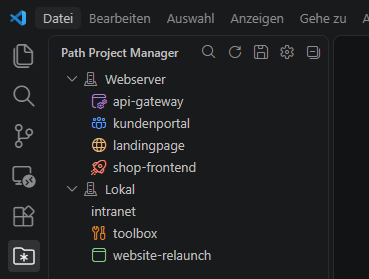
- Sidebar: the Wildcard Project Manager icon in the activity bar.
- Configuration: gear icon in the view, or
Wildcard Project Manager: Edit Configuration. The file sits in the extension's global storage. - Open: click an entry, confirm, opens in the current window.
- New window: context menu or inline action, without a prompt.
- Hide: right-click →
Hide Project, the message offersUndo. - Show hidden: eye icon on the group;
Show Projecttakes an entry out ofhiddenagain. - Order: drag & drop groups, which rewrites
order. Projects follow from the patterns. - Collapsed: right-click a group →
Collapse Group by Default, stored ascollapsed. - Icon: right-click a project or folder →
Iconfor colour and codicon, stored undersettings. - Search: magnifier in the view filters groups and projects by name or path.
- Cache: an unreachable path falls back to
projects-cache.json, markedfrom cache. - Refresh: refresh icon, for directories created elsewhere. The configuration itself reloads on save.
Languages
- Chinese (Simplified)
- Chinese (Traditional)
- Czech
- English (default)
- French
- German
- Hungarian
- Italian
- Japanese
- Korean
- Polish
- Portuguese (Brazil)
- Russian
- Spanish
- Turkish
Development
Building, running the extension in the Extension Development Host, the translation workflow and the release steps are described in CONTRIBUTING.md.