Diffline for VS Code
Review GitHub pull requests in VS Code or Cursor with agents that run on your computer. When a pull request asks for your review, Diffline's agents check its description, set a reading order, draw the flow it changes and look for problems. You review in the Diffline page, add comments or adopt the agents' wording, and post your review to GitHub. Nothing reaches GitHub until you press Post now.
This is a preview. Expect rough edges, and check the log (Diffline: Show Agent Log) when something looks wrong.
Website and docs: diffline.dev. Every feature is described in Features.
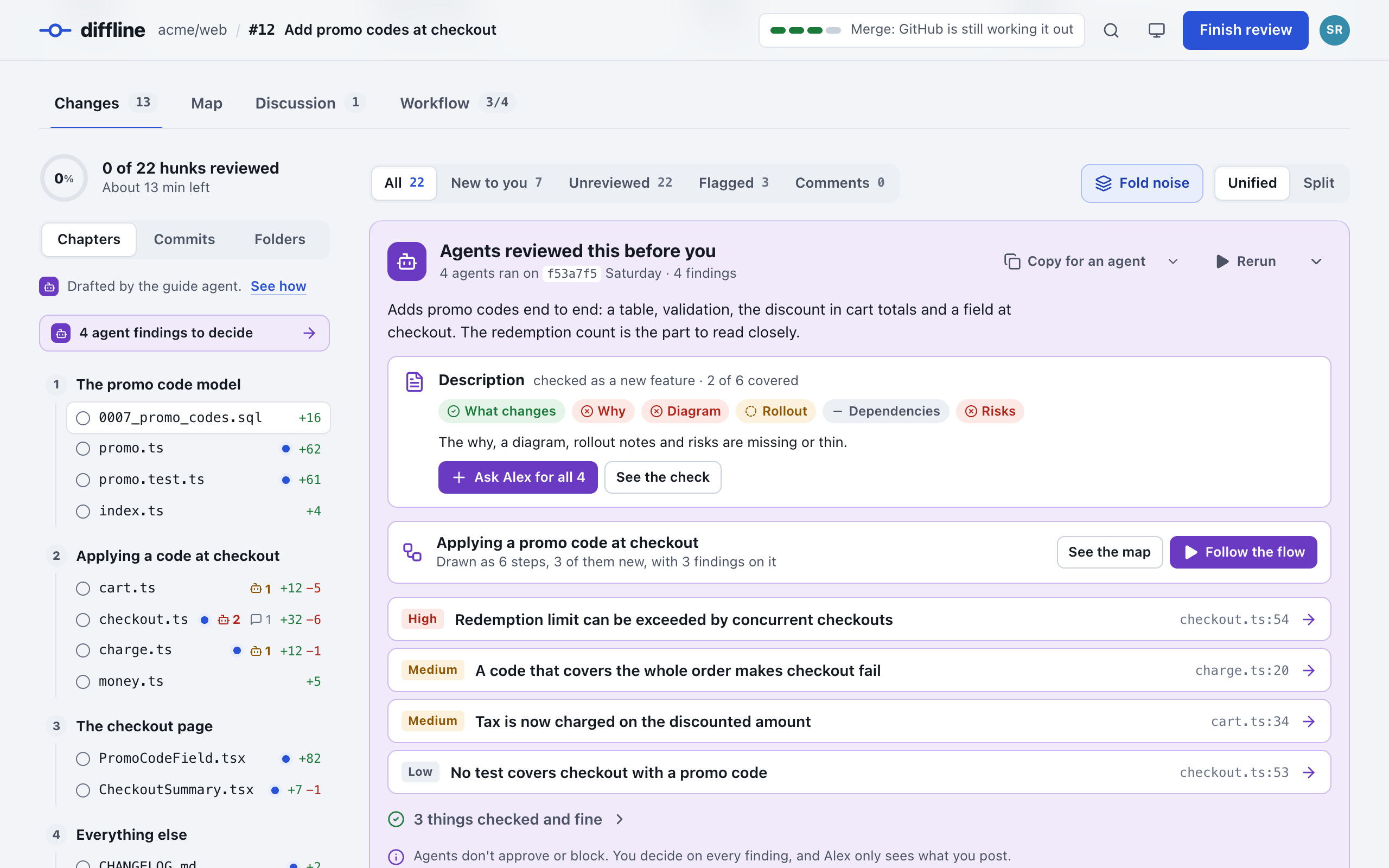
The agents' briefing. The opening line, the description check, the flow and the findings to decide, before you read the diff.
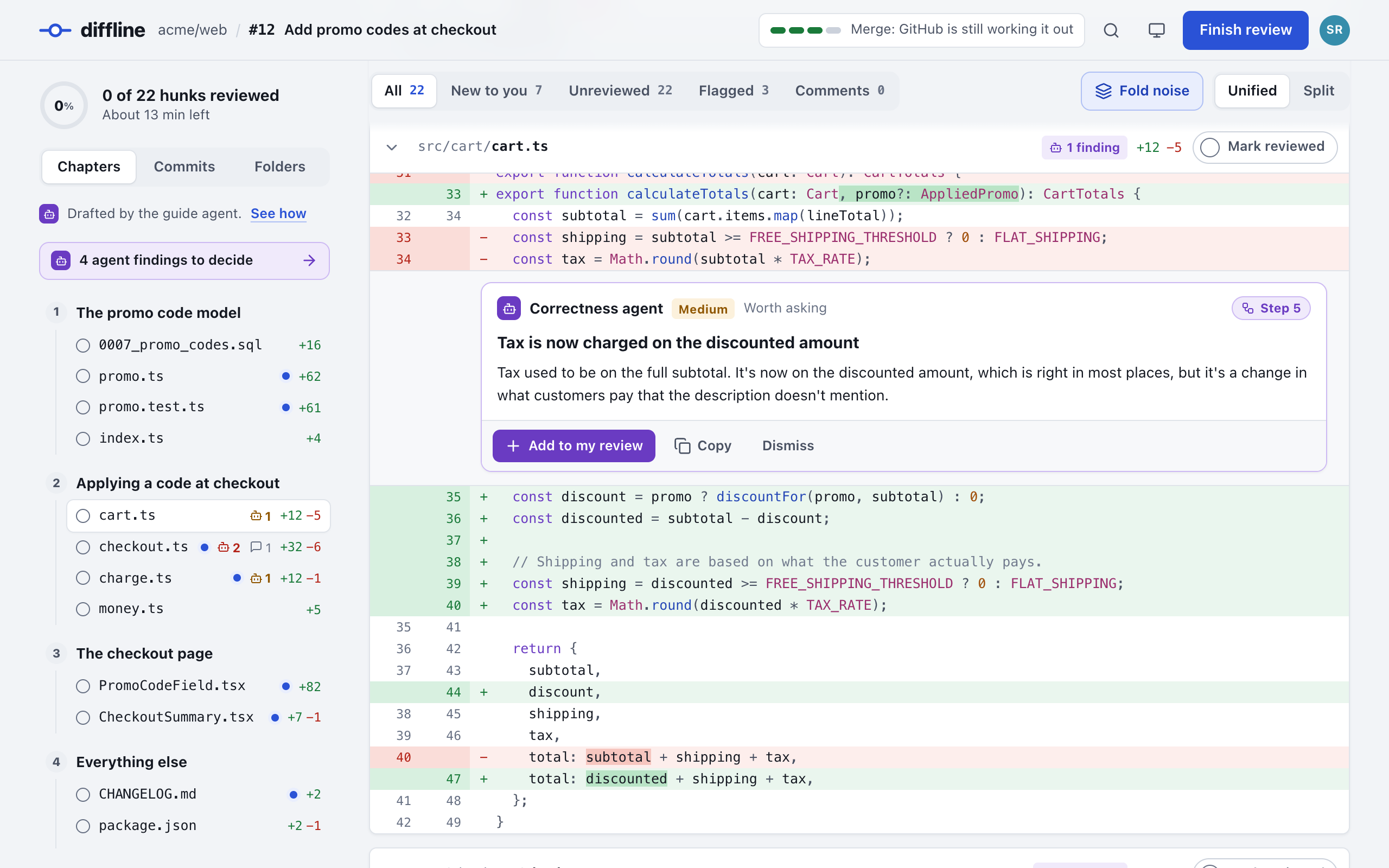
Findings in the diff. Each finding sits on its line. Add it to your review, copy it or dismiss it.
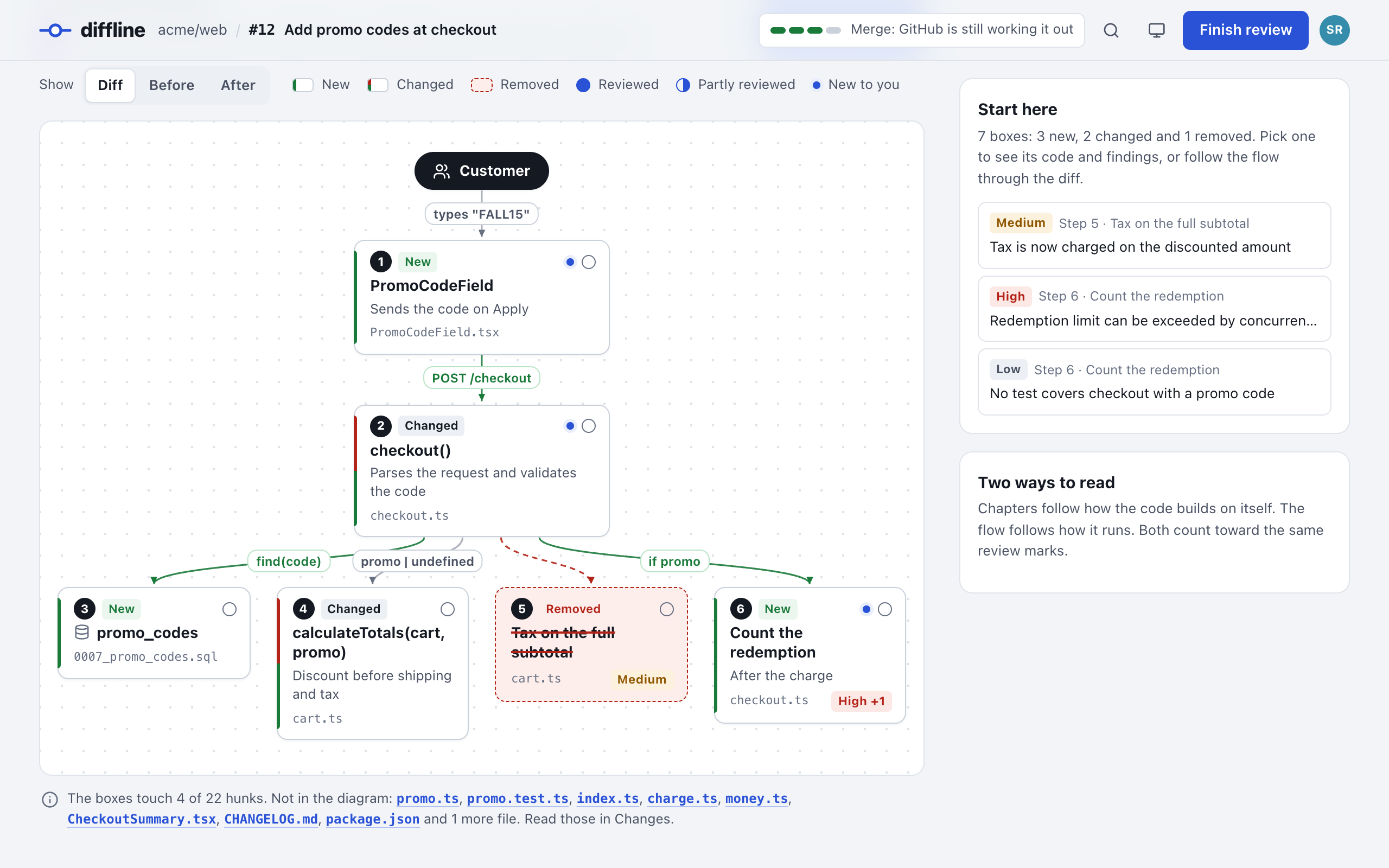
The Map. The flow the change touches, drawn by the guide agent. Every numbered box links to the lines it stands for.
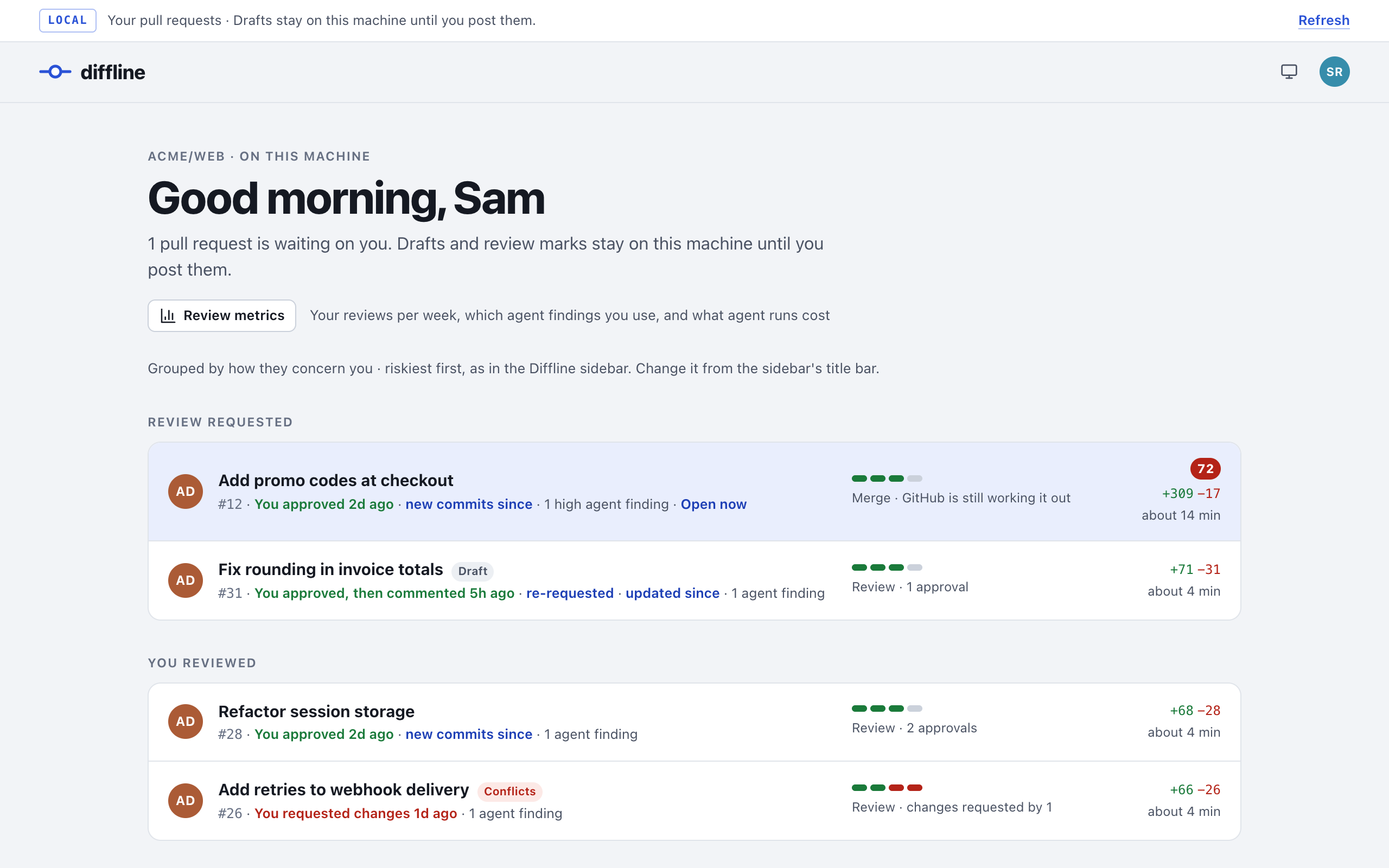
Home. Your pull requests grouped like the sidebar, with the risk score, your last review and what changed since.
What you need
- VS Code 1.95 or later, or Cursor. Everything here works the same in both; where this README says VS Code, read Cursor if that's your editor.
- GitHub CLI (cli.github.com), signed in:
gh auth login. Diffline reads pull requests and posts reviews through it.
- git.
- An agent harness: the Claude Code CLI (
claude), the Codex CLI (codex) or Pi (pi), installed and signed in. Pi works with many model providers: sign in by running pi, then /login, or set your provider's API key. Use one or more: Diffline: Choose Agent Harnesses… sets the default and, if you like, a different one per agent.
Install
Diffline is on the Visual Studio Marketplace and on Open VSX.
- VS Code: search for Diffline in the Extensions view and press Install. Or open Quick Open (⌘P on macOS, Ctrl+P on Windows and Linux), enter
ext install diffline.diffline and press Enter. Or in a terminal: code --install-extension diffline.diffline.
- Cursor, VSCodium, Windsurf and other editors that install from Open VSX: search for Diffline in the Extensions view and install it. In Cursor you can also run
cursor --install-extension diffline.diffline in a terminal; if cursor isn't found, run Shell Command: Install 'cursor' command from the Command Palette first.
- From a
.vsix file: download diffline-<version>.vsix from a release, or build it with npm run package (see Development). Then run Extensions: Install from VSIX… from the Command Palette and pick the file, or in a terminal code --install-extension diffline-<version>.vsix (cursor --install-extension in Cursor).
Reload the window if your editor asks. Installed from a store, Diffline updates like your other extensions; to update a .vsix install, install the newer file the same way. To remove Diffline, uninstall it from the Extensions view; ~/.diffline stays until you delete it.
First run
- Click the Diffline icon in the activity bar. The sidebar lists your open pull requests within a few seconds. If it stays empty, see Troubleshooting.
- Diffline writes its default agent settings to
~/.diffline and says so. Customize opens them; you can leave them as they are.
- Run Diffline: Choose Agent Harnesses…. It shows which CLIs it found and their versions. Pick Claude Code, Codex or Pi as the default. After you pick Pi, Choose Pi model… lists the models you're signed in to and then the thinking levels; keep Pi's default for both if you like.
- Pick a pull request to open its review. Press Run (the sparkle button on its row) to start the agents on it.
Automatic runs are on by default. About two minutes after Diffline first starts, the agents begin on every open pull request that requests your review by name. If you'd rather start each run yourself, turn off diffline.agents.autoRun in those two minutes, or before you install.
How it works
The sidebar (the Diffline icon in the activity bar) lists open pull requests, and for a while the ones you reviewed or wrote that were merged or closed. By default they're grouped by how they concern you, each pull request in the first group it fits:
| Group |
What's in it |
| Review requested from you |
Your review is requested by name |
| Assigned to you |
You're an assignee |
| You reviewed |
Still open, not yours, and you've reviewed it. GitHub takes you off the requested reviewers once you review, so this is where a pull request goes after your review until it merges, or until your review is requested again |
| You're a code owner |
It changes files that you or one of your teams own in the repository's CODEOWNERS (read from the default branch) |
| Your teams' requests |
A review is requested from one of your teams. Collapsed when it's long |
| Your pull requests |
You opened it |
| Watched |
Every open pull request in the repositories in diffline.watch.repositories |
| Opened here |
Ones you opened with Open a Pull Request… or a link |
| Others you could review |
The top 10 open, ready pull requests in your repositories that aren't yours, weren't requested from you or your teams, and aren't approved yet. Your repositories are the ones in the groups above |
| Recently merged or closed |
Last: pull requests you reviewed or wrote that were merged or closed in the last 3 days (diffline.watch.recentlyClosedDays), and ones you opened here that aren't open any more. Most recently updated first, and collapsed when it's long |
Home, the house button in the title bar, opens the review page on its list of pull requests, with the same groups, order and Others you could review as the sidebar. With a review already open, the page switches to its list at once. Pick a row to open that review; the back arrow returns to the list.
The title bar also has two buttons. Group switches between this and one group per repository, where each row says why it's listed (requested, assigned, code owner, team, yours, watched) and merged or closed ones stay in their repository. Sort orders each group by risk (riskiest first, the default), newest created, or most recently updated. The view's subtitle shows the current choice. Each row shows the risk score (the same 0–100 score as the page), the agent status, and a Run or Stop button. Hover for the risk factors and the last agent review. The icon's color is the risk; its shape says whether the agents reviewed the pull request:
| Icon |
Meaning |
Row text |
| filled check |
The agents reviewed the latest commit |
✓ agents: 3 findings |
| outline check |
The agents reviewed an older commit; commits landed since the agents ran |
agents: 3 findings, behind |
| empty circle |
No agent review yet |
|
| spinner |
Agents are running, here or in another window |
agents 2/5, agents running in another window |
A row also says how you reviewed the pull request, when, and what changed since: you approved 2d ago · new commits, you commented 5h ago · updated since (comments, reviews or the description changed on GitHub), re-requested · you requested changes 1d ago, your review was dismissed 3d ago. Nothing when you haven't reviewed it, or on your own pull requests. Rows say draft and conflicts while open, and merged or closed after; a merged or closed row drops the risk score and findings, since there's nothing left to review. The hover adds your review's commit, the pull request's state, its approvals ("2 approvals · changes requested by 1") and the agents' review, which says "since the agents ran" so it isn't read as since your review. For pull requests listed only as a team request, a watched repository's or one you could review, the list doesn't fetch your review (it would slow those larger searches), so the row says only you approved or you requested changes.
Watching GitHub. Diffline checks GitHub every minute (diffline.watch.pollSeconds) with one GraphQL search through gh: review requests, assignments, pull requests you've reviewed, your pull requests, watched repositories. The list shows as soon as it answers, and the last list shows at startup while it refreshes. The other groups load in the background, each from a request of its own, and keep their rows and counts while they reload. Recently merged or closed (the pull requests you reviewed or wrote that were merged or closed in the last diffline.watch.recentlyClosedDays days) loads after the list shows, then every 10 minutes, and right away when a pull request leaves the list, since it may have just merged. Your teams' requests and Others you could review load about 5 seconds after the list first shows, then every 5 minutes. As open pull requests come in, Diffline loads their changed files for the risk scores (cached by commit, so only new pushes are fetched again) and checks CODEOWNERS against your teams (both cached for an hour). Refresh, in the sidebar's title bar, checks everything at once, and so does changing a diffline.watch setting.
Agents run automatically only on pull requests that request your review by name (not team requests, assignments, code-owner matches or others you could review: press Run on those), when they open and after each push: a 2-minute quiet period lets a burst of pushes count once, drafts are skipped, and each pull request gets at most 5 automatic runs. Pull requests over 100 files or 5,000 changed lines wait for you to press Run. On a pull request that's already approved (someone's latest review approves it and nobody's requests changes), the run waits too, and Diffline asks once per push whether to spend tokens on it: Skip this PR, Run anyway or Always skip approved. The first two are remembered for the pull request, so later pushes don't ask again; dismissing the notification leaves the run waiting. When several wait at once, one notification covers them, and Review them lets you pick which to run. diffline.agents.approvedPullRequests set to skip skips them without asking, and run runs them like any other. Unless it's run, Run on an approved pull request asks to confirm, and a run that's going when the pull request gets approved offers Stop. Any pull request can be run by hand from the sidebar or the review page. When there's something new since the last agent review (new commits, or a description, comment or review update on GitHub), Run starts right away. When the agents already reviewed the latest commit and nothing has changed since, Run asks before reviewing again, since a second run would mostly repeat the first. Automatic runs only follow new commits. When a run finishes, Diffline tells you and can reload the review. With several VS Code windows open, one window starts the automatic runs and a pull request's agents run in one window at a time; the others show the run as "running in another window".
The agents run in parallel: the guide (description check, chapters, flow diagram) and the reviewers, by default architecture, correctness, tests and security, plus any you add. Each runs the harness headless on a checkout of the pull request's head that Diffline makes for the run (and deletes after), with the changed files as they were before beside it. Claude Code agents get file tools only (read, search, list), limited to those folders: no shell, no repository settings or hooks, no MCP servers. Codex agents run in its read-only sandbox. Pi agents get only Pi's read, grep, find and ls tools: no shell, no extensions, skills or context files, no saved session, and offline mode (no update checks, telemetry or package installs). Pi runs in an empty folder of Diffline's own, never inside the checkout, because Pi always loads a repository's .pi/settings.json (which can install packages and run commands) and .pi/SYSTEM.md; the agent reads the checkout by its full path. Like Codex's sandbox, Pi's read tools aren't limited to one folder. All of them get a minimal environment, without your other tokens and keys; Pi also gets your model providers' credentials and its own PI_ settings, never GitHub tokens. Every line an agent points at is checked against the diff; anchors that don't resolve are dropped rather than posted on the wrong line.
The review page is the Diffline page from packages/review-ui, in a VS Code panel: the briefing, chapters, Map, description check, Discussion, drafts, the finish sheet and posting. Its list (Home, or the back arrow) shows the same pull requests in the same groups and order as the sidebar. A line under the title says where you stand: "You approved this 2 days ago at abc1234 · 3 new commits and 2 new comments since", "You haven't reviewed this yet", or "Merged by Alex Doe 3 days ago". When the sidebar's next check sees the open pull request merged, closed, pushed to or updated on GitHub, a bar on the page says so with Refresh; the page doesn't reload by itself, so you keep your place. Posting a review on a merged or closed pull request asks first.
Open a review from a link
Diffline: Open a Pull Request… (⌥⇧⌘P on macOS, Ctrl+Shift+Alt+P on Windows and Linux) takes a GitHub link or owner/name#123. When the clipboard holds a pull request (a GitHub link, owner/name#123 or a Diffline link), the box starts with its GitHub link, selected: press Enter to open it, or type to replace it.
A Diffline link opens a review from outside the editor, such as a browser, a chat or a terminal:
vscode://diffline.diffline/open?url=https://github.com/acme/web/pull/123
vscode://diffline.diffline/open?pr=acme/web%23123
In Cursor the link starts with cursor://, in VS Code Insiders with vscode-insiders://. ?url= takes a GitHub pull request link, encoded or not, tabs like /files included. ?pr= takes owner/name#number with the # written %23 (a plain # works too). Diffline: Copy Link to This Review, in the Command Palette or a sidebar row's menu, copies the link for the open review or that row. Chat apps often don't make vscode:// links clickable; pasting the GitHub link into Open a Pull Request… works everywhere.
The first time a link opens from outside the editor, VS Code asks "Allow 'Diffline' extension to open this URI?". Choose Open. Ticking Do not ask me again for this extension skips the question from then on, and Extensions: Manage Authorized Extension URIs... undoes that.
A link only opens a review. It adds the pull request to the sidebar, as Open a Pull Request… does, and never runs the agents or posts anything. A link that doesn't name a GitHub pull request shows a warning and opens nothing.
The review opens in two parts. Opening a pull request doesn't refresh the sidebar or wait for it: the row shows at once and fills in from the pull request's own details, and the next regular check replaces it. The page shows as soon as GitHub answers (title, description, Discussion, Workflow, checks and the agent briefing), with "Loading the changes…" on the Changes and Map tabs while Diffline gets the commits and builds the diff. Meanwhile Finish review, Next, Guide, Comments and jumps to files and findings say "The changes are still loading. This works once they're in."; the keys 1 to 4 and ? work. Then the changes fill in without a reload, on the same tab and scroll, and nothing you saved is lost. A diff that's ready right away goes in at once, so small pull requests open in one go; pull requests with 2,000 or more changed lines always open in two parts. If the diff doesn't load, the Changes tab says why, with Try again.
Fast by design
- Diffs are built from a local clone, not fetched file by file (about 0.2 s for a 30-file pull request), and cached by head commit.
- Commits are only fetched when missing. Diffline uses the clone in your workspace or the
diffline.clones setting, and otherwise keeps its own partial clone (no file contents until needed). While GitHub answers, Diffline already fetches the pull request's head into the clone.
- Pull requests that ask for your review are prepared in the background, so opening one is mostly the GitHub detail request (about 1 s).
- The page shows before the diff is drawn. On a large pull request it shows in about 1 s instead of 4 to 8; drawing a large diff still takes about 3 s after that.
- Large pull requests (over 40 files or 4,000 diff lines) stay responsive: files off screen skip layout and paint until you scroll near them, and jumps to a finding, draft or flow step land exactly. A 383-file pull request opens in about 1.2 s instead of 3, and a relayout takes milliseconds instead of a second.
Customizing the agents
On first run Diffline writes its defaults to ~/.diffline:
agents.yml lists the agents, in the order they run. Each has a name (what the page calls it), a focus (one line on what it looks at, which the agent also reads), and its options: whether it's enabled, how many findings it may report, minimum confidence, files to skip, runs-when patterns, and a harness and model. The file also says what each severity means and holds the description rules for features and fixes.agents/<id>.md holds each agent's instructions, under Look for and Leave alone. HTML comments are notes for you; agents don't see them.
Diffline ships five agents. The guide is special: it checks the description, sets the reading order and draws the flow, and the lede (the briefing's opening line) runs on its harness. The architecture, correctness, test and security agents are reviewers: they report findings and checked notes.
Your own agents. Diffline: New Agent… (or New agent… in Customize Agents…) asks for a name and a focus, adds the agent to agents.yml, and opens agents/<id>.md for its instructions. It's a reviewer like the built-in ones, with the same options, and it runs once its file has instructions. You can also add a block to agents.yml and the file by hand. Remove an Agent… takes one out of agents.yml (its instructions stay); any agent but the guide can go, and Reset Agent Settings brings back the built-in ones. Ids are 2 to 32 lowercase letters, digits or dashes. Problems, such as a bad id or an agent without instructions, are listed in Diffline: Show Agent Log.
Agents run lean. Claude Code agents start without your MCP servers, plugins' skills and slash commands. Codex agents start with --ignore-user-config, so your ~/.codex/config.toml (MCP servers, plugins, hooks, the default model and effort, the service tier) doesn't apply, and connectors, plugins, memories, sub-agents, goals, image generation and browser use are off. Set the Codex model in diffline.codex.model and anything else in diffline.codex.extraArgs, such as ["-c", "model_reasoning_effort=\"high\""]. Pi agents start without extensions, skills, prompt templates, themes or context files (AGENTS.md, CLAUDE.md).
Pi's model and thinking level. By default Pi agents use the model and thinking level set in Pi. diffline.pi.model takes Pi's model syntax, provider/id with an optional :level, and diffline.pi.thinking sets the thinking level: off, minimal, low, medium, high or xhigh. Pi lowers a level the model doesn't support. For a single agent, set model: in agents.yml the same way, such as model: openai/gpt-6.1-sol:high; a :level there wins over diffline.pi.thinking. Diffline: Choose Agent Harnesses… offers Choose Pi model… with the models you're signed in to, for the default or for one agent.
Open the files with Diffline: Customize Agents…, and restore the defaults with Diffline: Reset Agent Settings. Changes apply to the next run.
What it costs
Diffline adds no charges of its own. The agents use your Claude Code or Codex account, or the provider account you signed in to Pi with, so their usage counts against your plan's limits or, with an API key, is billed to it.
- One run starts one CLI process per enabled agent (five by default), plus a short one for the briefing's opening line. Each reads the diff and the files it needs.
- Automatic runs follow each push to pull requests that request your review, at most 5 per pull request. Large pull requests wait for you to press Run, and approved ones ask first.
diffline.claude.model defaults to sonnet. Pi uses the model set in Pi unless diffline.pi.model says otherwise. Larger models and higher thinking levels cost more.- Diffline: Show Agent Log shows each run's tokens and, for Claude Code and Pi, its cost. Codex doesn't report cost. Pi works its cost out from the model's API prices, so when you've signed in to Pi with a subscription (Claude Pro or Max, ChatGPT, GitHub Copilot) it's an estimate, not a charge.
To spend less: turn off diffline.agents.autoRun, lower diffline.agents.maxAutomaticRuns, set diffline.agents.approvedPullRequests to skip, turn agents off in agents.yml, or list only the ones you want in diffline.agents.enabled.
Copy an agent review for another agent
To hand the agents' findings to another agent (Claude Code, Codex, Pi or a chat), press Copy for an agent in the review page's agent briefing, next to Rerun. The button copies every finding; its menu has three choices:
- Copy all findings, the same as the button.
- Copy open findings only leaves out the ones you dismissed and the ones already in your review.
- Save as Markdown… saves the same Markdown to a file you pick.
Diffline: Copy Agent Review as Markdown does the same from the command palette, for the open review or one you pick from the pull requests the agents reviewed. It's also on a sidebar row's context menu when that pull request has an agent review. The command copies every finding, and its notification offers Save as Markdown….
The Markdown starts with the git references the other agent needs: the repository and pull request with their URLs, the author, the base and head branches, the full SHAs of the commit the agents reviewed and of the merge base, and the commands to fetch and check out that commit. If the pull request moved on since, it names the current head and says everything refers to the reviewed commit. Then come the summary, the description check with your ask or skip decisions, and the findings in the page's order. Each finding has its severity, agent, confidence and status (open, added to my review, posted, or dismissed and why), its path:line in the reviewed commit with a GitHub permalink and the line itself, the reasoning, steps, suggested fix, draft comment and follow-ups. A finding on a removed line says so and is numbered and linked at the merge base; one whose line isn't in the diff keeps its path and the agent's quote, without a number. Last: the checked notes, the reading order and the flows as Mermaid charts.
Diffline builds it on your computer from the saved agent review and your decisions, and puts it only on the clipboard or in the file you pick (readable by your account only). It holds lines of code and the agents' text about them, so paste it only where that code may go.
Review metrics
Diffline: Show Review Metrics, or Review metrics on Home, opens a report on the review page for the last 7, 30 or 90 days, or all time:
- Your reviews: reviews per week by decision, the time the page was in use per review, how much of each diff you marked reviewed, later rounds and reviews after a new push, and your own comments next to those that came from agent findings.
- Agent findings: for each agent, how many of its findings you used (added to your review, posted or copied), dismissed (and the most common reason) or left open when you posted. With fewer than 10 decided findings it says "too few to tell" instead of percentages. Also severity by confidence, how much you reworded findings before posting, the description rules you asked about or skipped, and the numbers before and after an agent's instructions or model changed.
- Agent runs: failures, duration, tokens, cost, and cost per useful finding, for automatic and manual runs, and how many automatic runs were skipped because the pull request was already approved.
Group the agent tables by agent, harness, model or Pi's thinking level. Export CSV saves one row per finding and its outcome; Export JSON saves the raw events.
The report is built from a log Diffline keeps on your computer. Privacy says what's in it and how to turn it off.
Privacy
What stays on your computer:
- Your drafts, reviewed marks and decisions, agent results, cached diffs and run logs, in VS Code's global storage for the extension. Run folders keep each agent's prompt, raw output and log, and
usage.json with each agent's harness, model, time, tokens and (for Claude Code and Pi) cost.
- Review metrics, in
metrics/events.jsonl in the same global storage, readable by your account only (file mode 0600). Each line is one event: what you did with an agent finding (added to your review, dismissed and why, copied, undone, posted and how much you reworded it, or left open when you posted), a description rule you asked about or skipped, a review you posted (its decision, how many comments and how many came from findings, hunks marked reviewed, the time the page was in use), or an agent run (each agent's harness, model, time, tokens, cost, findings and failures, or that an automatic run was skipped because the pull request was approved). A finding is recorded by its id, agent, severity, confidence, label, file path and title. The title is the only text from a review in the log: no code, diff, finding body or comment text. The log is on by default. Turn off diffline.metrics.enabled to stop recording, and run Diffline: Delete Review Metrics to delete the file. It's never sent anywhere.
- Agent settings in
~/.diffline.
- Clones: the one in your workspace, the ones in
diffline.clones, or Diffline's own partial clone in its global storage.
What leaves it:
- GitHub, through
gh and git: Diffline reads pull requests, reviews, comments, checks, changed files, CODEOWNERS and your teams, and fetches commits. It writes to GitHub only when you press Post now: one review with your comments and decision, then your replies and the thread resolutions you queued. Finish review → Preview what's sent shows the exact requests first.
- Your model provider, through the agent CLI: the agents send the diff, the pull request's title, description and review threads, and the files they read to Anthropic (Claude Code), OpenAI (Codex) or the provider of the model Pi uses, under your account's terms. Agents only read: a checkout of the pull request made for the run, never your own clone.
- Nothing else. The review page uses VS Code's fonts and loads no remote images, fonts or scripts, and Diffline has no telemetry. The review metrics are a file on your computer that only you read.
Pull requests can contain text written to steer the agents (prompt injection). Claude Code agents can't run commands or read outside the run's folders; Codex agents run commands only inside its read-only sandbox; Pi agents can't run commands, and only read, search and list files. None can change files, and their findings are only suggestions: nothing reaches GitHub unless you add it to your review and post it. Before posting, Diffline refuses a review that contains what looks like a private key or token. Settings that choose which programs run (diffline.claude.path, diffline.codex.path, diffline.pi.path, their extraArgs, diffline.clones) are user settings only, so a repository's .vscode/settings.json can't change them. The architecture notes describe the security model in full.
Settings
| Setting |
Default |
What it does |
diffline.harness |
claude |
The default harness, claude, codex or pi; an agent can set its own in agents.yml |
diffline.claude.path |
claude |
The Claude Code CLI, or the full path to it |
diffline.claude.model |
sonnet |
Model for agents on Claude Code; empty uses the CLI's default |
diffline.claude.extraArgs |
none |
Extra arguments for every claude run |
diffline.codex.path |
codex |
The Codex CLI, or the full path to it |
diffline.codex.model |
empty |
Model for agents on Codex; empty uses the CLI's default |
diffline.codex.extraArgs |
none |
Extra arguments for every codex exec run |
diffline.pi.path |
pi |
Pi, or the full path to it |
diffline.pi.model |
empty |
Model for agents on Pi, as provider/id with an optional :level; empty uses Pi's default |
diffline.pi.thinking |
empty |
Thinking level for agents on Pi: off, minimal, low, medium, high or xhigh; empty uses Pi's default |
diffline.pi.extraArgs |
none |
Extra arguments for every pi run |
diffline.agents.autoRun |
on |
Run automatically on pull requests that request your review by name |
diffline.agents.enabled |
empty |
Run only these agent ids; empty runs every agent agents.yml turns on |
diffline.agents.maxParallel |
5 |
Agent processes at once |
diffline.agents.quietPeriodSeconds |
120 |
Wait after a push before an automatic run |
diffline.agents.maxAutomaticRuns |
5 |
Automatic runs per pull request |
diffline.agents.skipDrafts |
on |
No automatic runs on drafts |
diffline.agents.autoRunMaxFiles / autoRunMaxLines |
100 / 5000 |
Larger pull requests wait for you to press Run |
diffline.agents.approvedPullRequests |
ask |
Approved pull requests: ask holds automatic runs and asks once per push, skip holds them without asking, run runs them like any other. Unless run, Run asks to confirm |
diffline.agents.timeoutMinutes |
20 |
Stop an agent that runs longer |
diffline.watch.reviewRequested |
on |
Watch pull requests that request your review by name |
diffline.watch.teamRequests |
on |
List team review requests. They load a few seconds after the rest of the list, then every 5 minutes |
diffline.watch.assigned |
on |
List pull requests assigned to you |
diffline.watch.reviewed |
on |
List open pull requests you've reviewed |
diffline.watch.codeOwners |
on |
Find pull requests that change files you or your teams own |
diffline.watch.authored |
on |
List pull requests you opened |
diffline.watch.othersToReview |
on |
Show Others you could review. They load a few seconds after the rest of the list, then every 5 minutes |
diffline.watch.repositories |
none |
Also list every open pull request in these repositories (owner/name) |
diffline.watch.recentlyClosedDays |
3 |
Keep pull requests you reviewed or wrote listed this many days after they're merged or closed, under Recently merged or closed; 0 turns it off. They load after the rest of the list, then every 10 minutes |
diffline.watch.pollSeconds |
60 |
How often to check GitHub, at least 15. Team requests and others refresh every 5 minutes, recently merged or closed every 10; Refresh checks everything at once |
diffline.sidebar.groupBy |
relationship |
relationship or repository |
diffline.sidebar.sortBy |
risk |
risk, created or updated |
diffline.sidebar.othersLimit |
10 |
How many to show under Others you could review; 0 hides it |
diffline.metrics.enabled |
on |
Keep the local review metrics log (see Privacy); off writes nothing new |
diffline.clones |
none |
"owner/name": "/path/to/clone" |
Troubleshooting
- The sidebar is empty, or the status bar shows a warning. Run
gh auth status in a terminal, and gh auth login if you're signed out. Hover the warning for GitHub's error. Team requests and code-owner matches need the read:org scope: gh auth refresh -s read:org.
- "The GitHub CLI (gh) isn't installed or isn't on the PATH." Install it, then restart VS Code.
- An agent harness isn't found, or agents fail with a sign-in error. Diffline: Choose Agent Harnesses… shows "not found" next to a CLI it can't run. Install it, or set
diffline.claude.path, diffline.codex.path or diffline.pi.path to the full path (which claude, which codex, which pi). Run the CLI once in a terminal to sign in. A missing or signed-out CLI fails only the agents that use it.
- Pi agents fail with "No API key found" or "No models available". Pi isn't signed in to a model provider. Run
pi in a terminal, then /login, or set your provider's API key. If the log says a model isn't found, check diffline.pi.model or the agent's model:.
- Pi agents can't search (grep or find fail). Pi's grep and find tools use ripgrep (
rg) and fd. Pi normally downloads them, but Diffline runs it offline, so it won't. Install both, or run pi once in a terminal so it downloads them. Without them, the agents can still read and list files.
- Agents fail or find nothing. Diffline: Show Agent Log has each run's agents, errors, tokens and cost. Problems in
agents.yml, like a bad id or an agent without instructions, are listed there too. For more, each run keeps every agent's prompt, raw output and log in the extension's global storage, under runs/ (on macOS, ~/Library/Application Support/Code/User/globalStorage/diffline.diffline/runs).
- Agents say they're running in another window. Another VS Code window is running them. Stop them there, or wait.
- A Diffline link does nothing. The link's scheme must be your editor's:
vscode:// for VS Code, cursor:// for Cursor. Or paste the GitHub link into Open a Pull Request…. A link Diffline can't read shows a warning, such as "Diffline: That link doesn't name a GitHub pull request.", with the formats it takes.
- Opening a pull request is slow. Diffline: Show Agent Log has a line for each open, such as
Opened [acme/web#123](https://github.com/acme/web/issues/123) in 1210 ms (data 1150 ms, page 20 ms, rendered 40 ms), or for one that opened in two parts Opened [acme/web#123](https://github.com/acme/web/issues/123) in 4210 ms: the page in 980 ms (detail 870 ms, page 20 ms, rendered 90 ms), the changes in 4210 ms (diff 1900 ms, rendered 2300 ms). detail is when GitHub answered and diff when the commits were in and the diff built, both counted from the open (data is both, in one part); page is building the page and rendered drawing it. A slow detail is GitHub; a slow rendered is a large diff. (from cache) at the end means it opened from details fetched earlier.
- Installing from a terminal prints
DeprecationWarning: url.parse() …. That comes from VS Code's own command-line tool, not Diffline. It's harmless; the install still works.
- Remote windows (SSH, WSL, containers). Diffline runs where the workspace is, so
gh, git and the agent CLI need to be installed and signed in there.
Development
From the repository root:
npm install
npm run build       # bundles to dist/ and copies packages/review-ui into media/ui
npm test            # unit tests (Node 26 runs them as TypeScript)
npm run typecheck
npm run package     # writes apps/vscode/diffline-<version>.vsix
npm run install-local   # packages it and installs it into VS Code; reload the window after
Open apps/vscode in VS Code and press F5 to run the extension. From apps/vscode, with a pull request your gh account can read:
node scripts/smoke-github.ts [owner/name#123](https://github.com/owner/name/issues/123)                          # read-only GitHub checks
node scripts/e2e-agents.ts [owner/name#123](https://github.com/owner/name/issues/123) --clone /path/to/clone     # run the agents end to end (costs money)
DIFFLINE_SMOKE_PR=owner/name#123 ./scripts/vscode-smoke.sh           # an isolated VS Code opens it and checks the basics
DIFFLINE_SMOKE_PR=owner/name#123 ./scripts/open-timing.sh            # times opening it, cold and cached (build first)
CONTRIBUTING.md has the details, and docs/architecture.md explains how the extension works.
Not supported yet: comments that span several lines, file-level comments, and editing or deleting posted comments.
License
MIT. The full text is in the LICENSE file that comes with the extension.
| |

