AppDNA Model Builder


A professional VS Code extension for building application models and automatically generating source code for multiple platforms and languages.
Transform your development workflow: design your application model once, then generate complete source code for .NET, Python, Web applications, Mobile Apps, AR/VR applications (planned), and more. Pull the generated code into your repositories and accelerate your development process.
Why AppDNA?
Software development should focus on business logic, complex services, and design-intensive UI. Less time should be spent on straightforward structured boilerplate software code. AppDNA enables this principle by:
- Automating Boilerplate: Generate complete data access layers, CRUD operations, and standard UI components automatically
- Focusing on Business Value: Spend your development time on complex business rules, innovative features, and exceptional user experiences
- Reducing Repetitive Coding: Eliminate hours of writing similar database queries, form validations, and standard API endpoints
- Accelerating Delivery: Get from concept to working application faster by focusing on what makes your application unique
Features
🏗️ Model Builder
- Dynamic UI Generation: All forms and controls are automatically generated from your JSON structure
- Real-time Validation: Instant feedback as you edit with built-in validation
- Professional Interface: Clean, VS Code-integrated design with hierarchical tree view navigation
📝 Intelligent Model Editing
- Tree View Navigation: Navigate your project structure with organized sections:
- PROJECT: Configuration settings, lexicon management, MCP servers (both stdio and HTTP)
- DATA OBJECTS: Business entities with hierarchical organization, filtering, and list views
- USER STORIES: Comprehensive story management with 8 specialized views
- PAGES: Forms and reports for UI design (advanced feature)
- FLOWS: Workflow and flow management including page init, general, DynaFlow workflows (advanced feature)
- APIS: API site management from all namespaces (advanced feature)
- ANALYSIS: Analytics dashboard with 9 analysis tools (advanced feature)
- MODEL SERVICES: AI-powered processing, validation, and code generation services
- Form-Based Editor: Edit JSON properties using intuitive, dynamically generated forms
- Right-Click Context Menus: Add, edit, and manage items with convenient context menus
- Advanced Filtering: Filter objects, reports, and forms independently for focused navigation
📱 Page Preview & UI Design
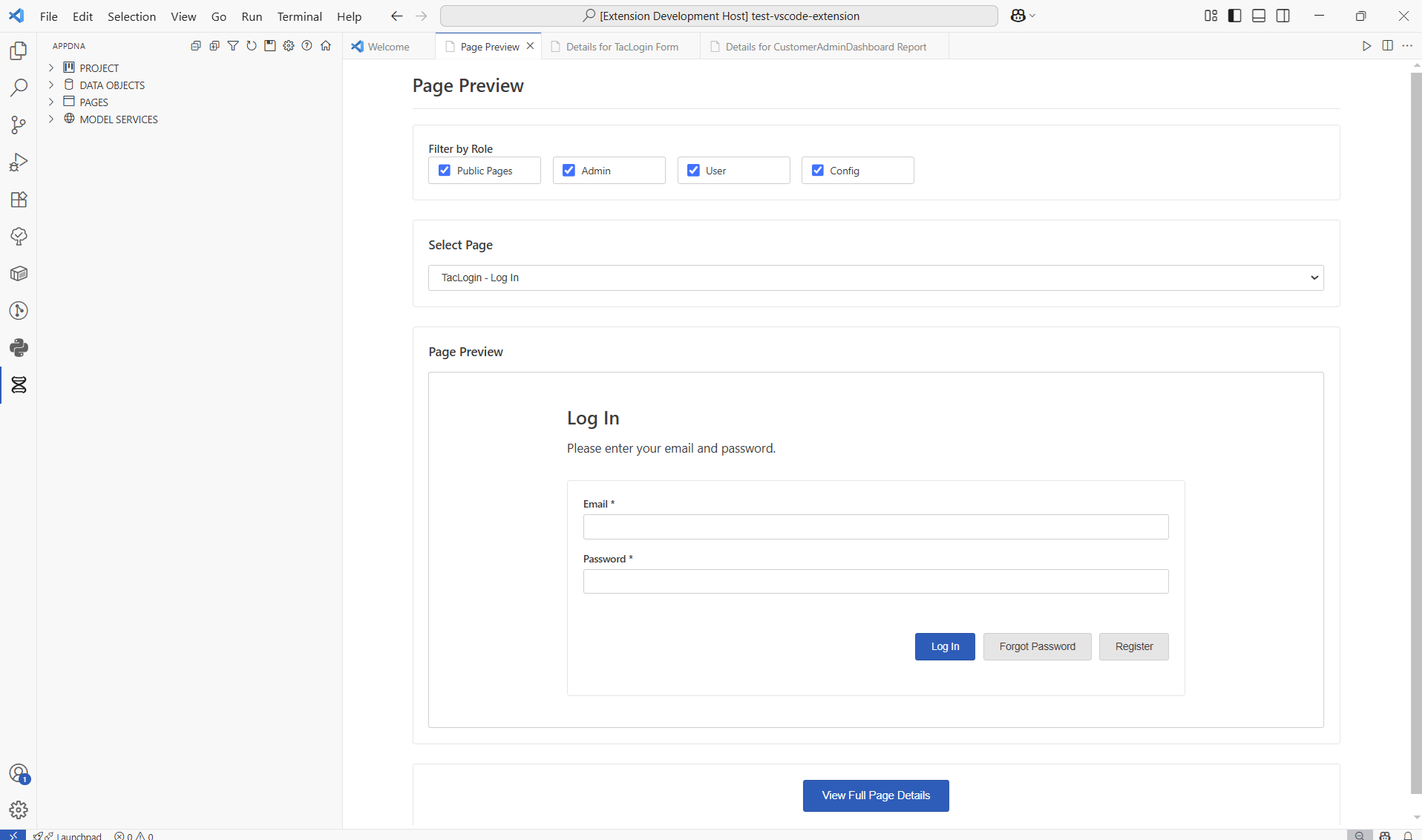
- Page Preview: Interactive preview of forms and reports before full implementation
- Role-Based Filtering: Filter page previews by user roles and access requirements
- Form Preview: See how forms will appear to users with parameter fields and buttons
- Real-Time Updates: Preview updates automatically as you modify your model
- Navigation Integration: Seamlessly switch between preview and detailed editing
🎯 User Story Development Management
A complete agile project management solution with 8 comprehensive tabs for managing user stories from planning through completion:
- Details Tab: 13-column sortable table with 6 filter types, bulk operations (status, priority, points, assignment, sprint), inline editing, and CSV export
- Dev Queue Tab: Visual priority queue management with drag-and-drop reordering and data object dependency ranking for optimal development sequencing
- Analysis Tab: 6 real-time KPI metrics (total stories, completion %, velocity, cycle time) plus 5 interactive D3.js charts (status distribution, priority breakdown, sprint velocity trends, cycle time analysis, developer workload)
- Board Tab: Full Kanban board with 5 status columns (On Hold, Ready, In Progress, Blocked, Completed), drag-and-drop workflow, and visual priority indicators
- Sprint Tab: Dual sub-tabs for Sprint Planning (with backlog drag-and-drop assignment and capacity tracking) and Burndown Charts (with ideal vs. actual velocity visualization)
- Developers Tab: Developer resource management including CRUD operations, capacity planning (story points per sprint), hourly rate tracking, and assignment analytics
- Forecast Tab: Advanced Gantt chart timeline with configurable working hours per weekday, holiday calendar, risk assessment, bottleneck detection, and PNG/CSV export
- Cost Tab: Monthly cost analysis by developer with hourly rate calculations, past/present/future filtering, budget projections, and financial reporting
Key Features: Fibonacci story points, configurable working hours (per weekday), holiday management, sprint velocity tracking, cycle time analysis, developer workload distribution, risk assessment algorithms, comprehensive data exports (CSV, PNG), VS Code theme integration (light/dark mode), and real-time validation.
📊 Analytics & Analysis Dashboard
- Comprehensive Metrics: Project-wide metrics dashboard tracking model complexity and statistics
- Data Object Analysis: Storage size requirements, usage tracking, and relationship hierarchy visualization
- Database Forecasting: Configurable database growth predictions based on data object sizes and usage patterns
- User Story Analytics: Role distribution analysis, user journey mapping, and page distance tracking
- Page Complexity Analysis: Detailed page metrics with treemap visualizations showing element distributions
- User Story QA Management: 4-tab interface (Details, Analysis, Board, Forecast) for comprehensive quality assurance tracking with visual analytics, Kanban workflow, forecasting, and export capabilities
🔄 Workflow & Flow Management
- PAGE_INIT Flows: Manage page initialization workflows for application startup logic
- GENERAL Flows: Create and edit custom general workflow definitions for business logic
- DynaFlow Workflows: Advanced workflow management with DynaFlow-based conditional workflows
- Workflow Tasks: Granular workflow task management for complex business processes
- Independent Filtering: Filter each flow type independently with dedicated filter controls
🌐 API Site Management
- Centralized API View: Browse all API sites from all namespaces in one location
- API Site Details: View and manage API site configurations including name, title, description, and version
- Quick Access: Direct navigation to API site settings and configurations
📋 List & Table Views
- Page List: Comprehensive tabular view of all pages with complexity analysis, sorting, and filtering
- Data Object List: Detailed data object listing with search and filter capabilities
- Page Init List: Overview of all page initialization configurations
- Workflow List: DynaFlow workflow overview with status and details
- General List: Complete listing of general flow definitions
⚡ AI-Powered Code Generation
- Model Services Integration: Connect to cloud-based AI services for intelligent processing
- Model Feature Catalog: Browse and select from a library of pre-built model features
- Model AI Processing: Submit models for AI-assisted enhancement and validation
- Model Validation: Automated model validation with improvement suggestions and best practice recommendations
- Fabrication Blueprint Catalog: Select from fabrication templates for different application types
- Model Fabrication: Generate complete source code for .NET, Python, Web, Mobile, AR/VR (planned) applications
- Authentication: Secure login/logout/register functionality for accessing Model Services
🔧 Advanced Development Features
- File Watching: Automatic detection of external file changes
- In-Memory Editing: Changes are made in-memory and saved only when you choose
- Property Control: Toggle property existence with checkboxes - unchecked means the property is omitted from JSON
- Tooltips & Descriptions: Property descriptions shown as helpful tooltips
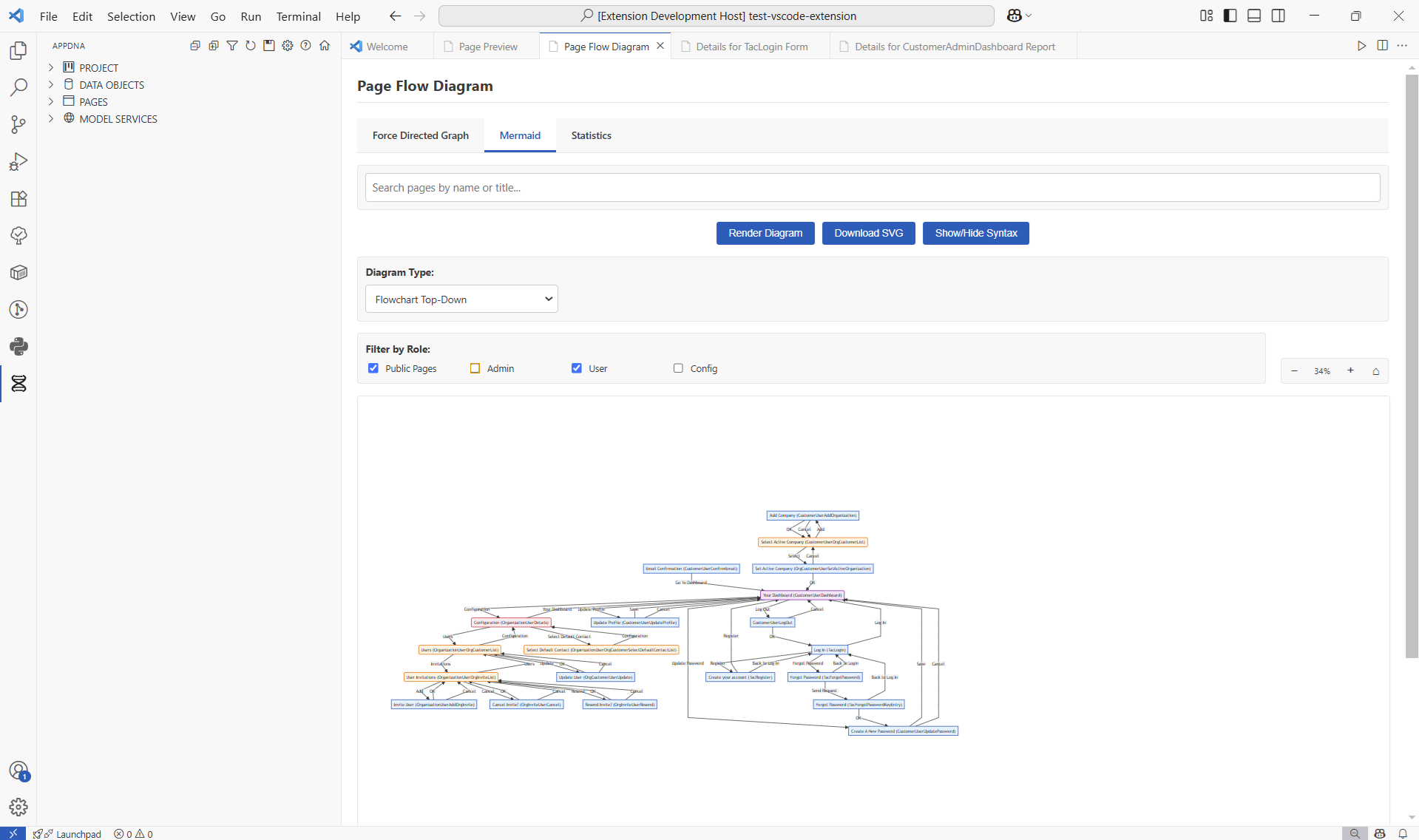
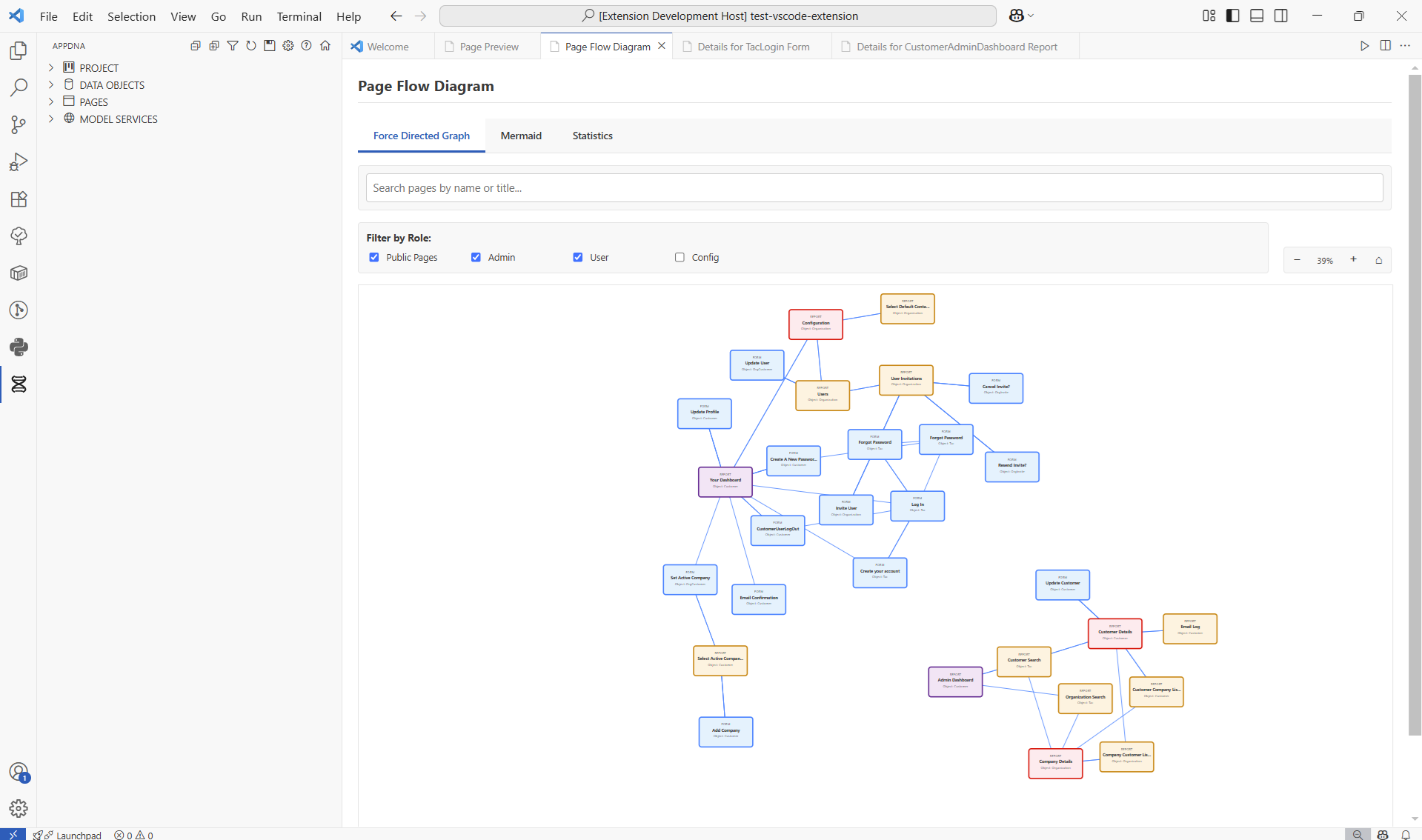
- Visual Diagrams: Hierarchy diagrams and page flow visualizations
- Professional Design: VS Code-native UI with comprehensive keyboard navigation and accessibility features
- Live Updates: Real-time synchronization between AI conversations and extension state
- MCP Integration: Production-ready Model Context Protocol server with 112 tools for GitHub Copilot integration
- HTTP Bridge: Support for both stdio and HTTP-based MCP communication for maximum compatibility
- Keyboard Shortcuts: Quick access to common actions with Alt+A combinations
Getting Started
Quick Start
- Install the Extension: Search for "AppDNA Model Builder" in the VS Code marketplace
- Open Your Project: Open a folder where you want to create your AppDNA model
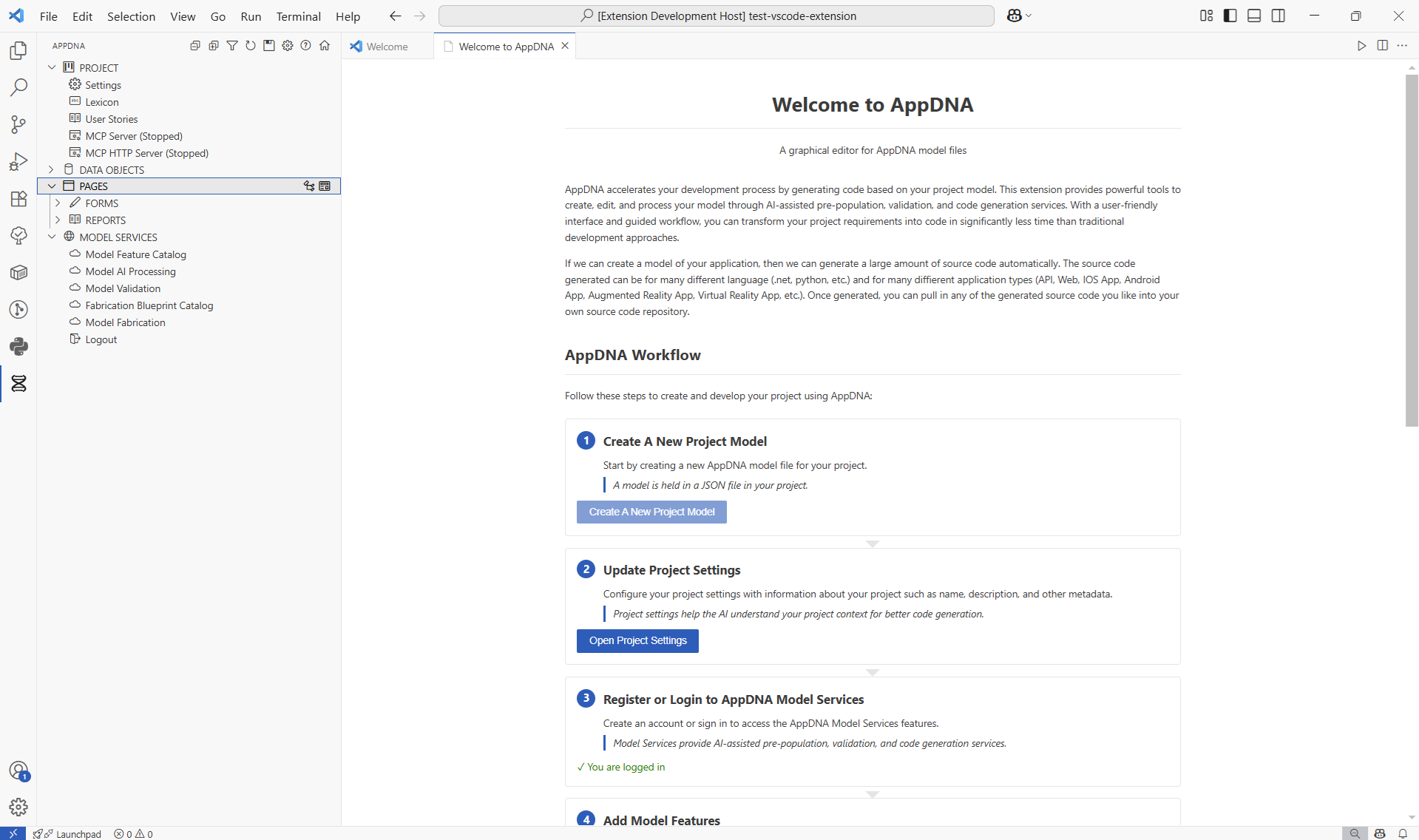
- Follow the Welcome Workflow: The extension provides a guided 9-step workflow:
AppDNA Development Workflow
The extension provides a comprehensive workflow for model-driven development:
- Create New Project Model - Start with a new AppDNA JSON model file
- Update Project Settings - Configure project metadata and context information
- Register/Login to Model Services - Access AI-powered cloud services
- Add Model Features - Browse and select features from the feature catalog
- Request Model AI Processing - Enhance your model with AI assistance
- Request Model Validation - Validate and improve your model structure
- Select Fabrication Blueprints - Choose templates for code generation
- Request Model Fabrication - Generate source code for multiple platforms
- Manual Model Editing - Fine-tune your model and iterate
Quick Actions
Keyboard Shortcuts
All shortcuts use the simple Alt+A [key] format to avoid conflicts with standard VS Code shortcuts:
File Operations
Alt+A N - Create new AppDNA model fileAlt+A S - Save model to file
Add Items
Alt+A O - Add new data objectAlt+A R - Add new reportAlt+A F - Add new form
View Controls
Alt+A E - Expand all top level itemsAlt+A C - Collapse all top level itemsAlt+A T - Refresh view (reTresh)Alt+A I - Show filter (fIlter)Alt+A X - Clear filter (clear = X)
Diagrams & Views
Alt+A H - Show hierarchy diagramAlt+A P - Show page flow diagramAlt+A V - Show page preview
Settings & Help
Alt+A G - Show AppDNA settings (confiG)Alt+A W - Show welcome screenAlt+A Q - Show help (Question)- Welcome View - Access the guided workflow anytime
- Tree View - Navigate and manage your model structure
Extension Interface
Page Preview Feature
Page Flow Diagrams
User Stories Management
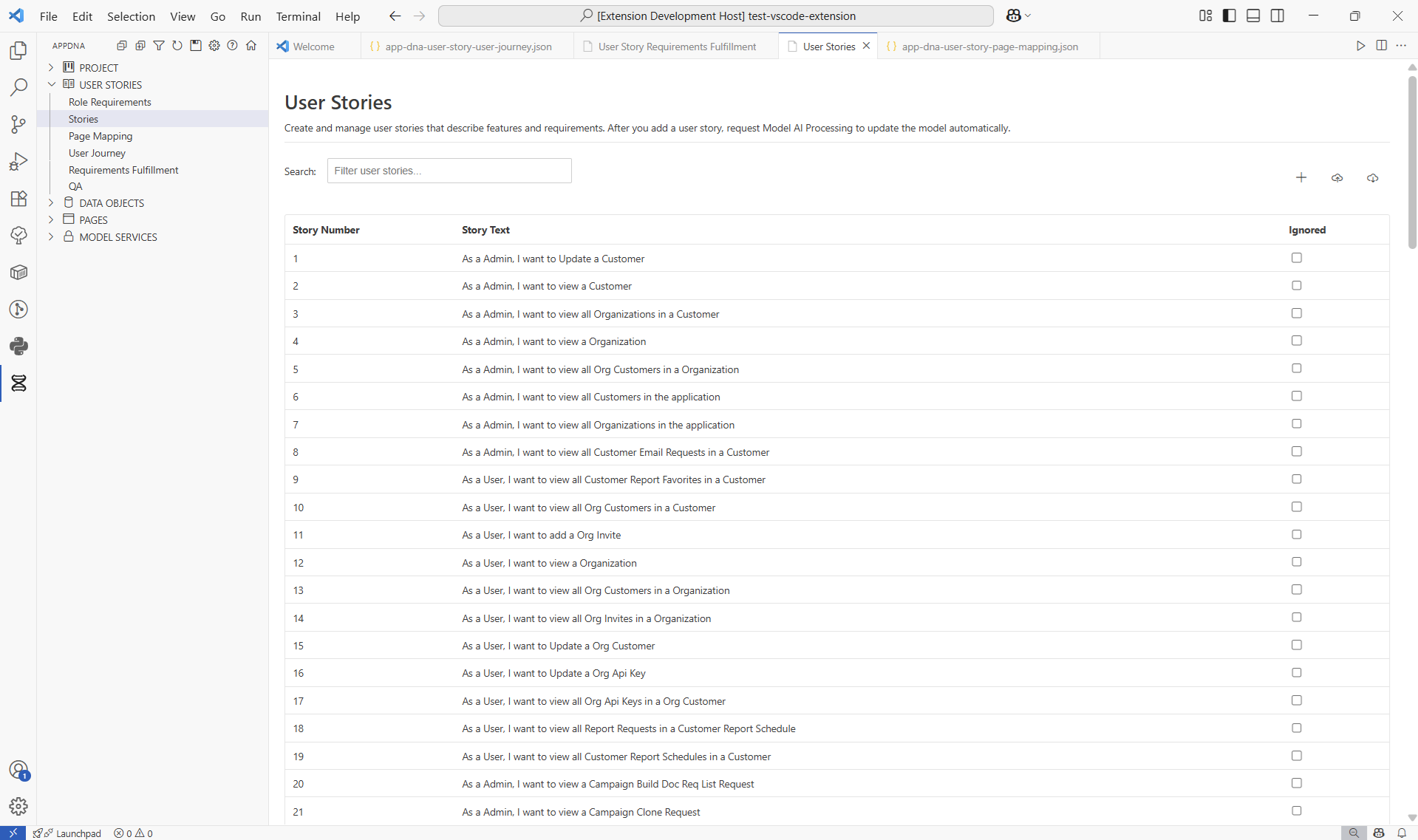
User Stories has evolved into its own dedicated section with comprehensive management capabilities across multiple specialized views:
User Stories Views
Roles: Direct access to the Role data object with lookup items. Manage and configure all user roles for your application.
Role Requirements: Manage role requirements and permissions for data objects. Define what roles can access which data objects and configure security constraints for your application.
Stories: Create and manage user stories with proper formatting and validation. Add, edit, and organize user stories that define your application's functionality.
Development: Professional agile project management with 8 comprehensive tabs:
- Details Tab: 13-column table with 6 filters, bulk operations, and inline editing
- Dev Queue Tab: Drag-and-drop priority ordering with data object ranking
- Analysis Tab: 6 KPI metrics + 5 D3.js charts (status, priority, velocity, cycle time, workload)
- Board Tab: Kanban board with 5 status columns and drag-and-drop workflow
- Sprint Tab: Sprint planning with backlog management + burndown chart visualization
- Developers Tab: Developer resource management, capacity planning, and hourly rate tracking
- Forecast Tab: Gantt chart timeline with configurable working hours, holidays, and risk assessment
- Cost Tab: Monthly cost analysis and projections by developer with budget tracking
Features include story points (Fibonacci scale), developer assignments, sprint velocity tracking, cycle time analysis, configurable working hours, holiday calendar, CSV/PNG exports, and comprehensive forecast algorithms.
Page Mapping: Map user stories to specific pages and requirements. Visualize which pages fulfill each user story and ensure comprehensive coverage of your application's functionality.
User Journey: Track and visualize the user journey showing which pages fulfill each story. Follow the flow of user interactions across your application with navigation pattern analysis.
Requirements Fulfillment: Monitor required and restricted role requirements across user stories. Ensure that role-based access controls are properly implemented and validated.
QA: Comprehensive quality assurance tracking and management with 4-tab interface for processed user stories:
- Details Tab: Sortable QA status table with advanced filtering (story number, story text, QA status), bulk status updates with multi-select, inline editing (status dropdown: Pending→Ready to Test→Started→Success/Failure), QA notes textarea with auto-save, auto-calculated Date Verified, and CSV export to user_story_reports/
- Analysis Tab: Visual analytics with chart type toggle (bar/pie), D3.js visualizations (color-coded status distribution, interactive tooltips showing count/percentage, hover effects), summary statistics (total stories, success rate, completion rate), and PNG export with 2x resolution
- Board Tab: Interactive Kanban board with 5 status columns, drag-and-drop cards for visual workflow management, card counts per column, modal detail view for editing, and real-time status updates
- Forecast Tab: QA project planning with Gantt chart timeline, configurable QA resources and working hours per weekday, holiday calendar integration, risk assessment algorithms, bottleneck detection, and CSV/PNG export capabilities
Features include smart status workflow (Pending→Ready→Started→Success/Failure), automatic date verification on completion, preserved notes during bulk updates, in-memory updates for responsive UI, separate QA data file (app-dna-user-story-qa.json), and comprehensive data export options.
- PROJECT: Configuration settings, lexicon management, MCP servers (both stdio and HTTP)
- DATA OBJECTS: Business entities with hierarchical organization, filtering, and list views
- USER STORIES: Comprehensive story management with 8 specialized views (see User Stories Management above)
- PAGES: Forms and reports for user interface design (advanced feature)
- FLOWS: Workflow and flow management including PAGE_INIT, GENERAL, WORKFLOWS, and WORKFLOW_TASKS (advanced feature)
- APIS: API site management from all namespaces with quick access to configurations (advanced feature)
- ANALYSIS: Analytics dashboard with 9 analysis tools including metrics, forecasting, and visualizations (advanced feature)
- MODEL SERVICES: AI-powered processing, validation, and code generation services with authentication
Detail Panels
- Dynamic Forms: Property editors generated from JSON structure
- Tabbed Interface: Organized editing for complex objects (Settings, Parameters, Buttons, etc.)
- Property Toggles: Checkbox controls to include/exclude properties from JSON output
- Validation Feedback: Real-time validation with helpful error messages
Additional Views
- Welcome View: Guided workflow with 9 development steps
- Page Preview View: Interactive preview of forms and reports with role-based filtering
- Help View: Documentation links and support resources
- Settings View: Extension configuration and preferences
- Command Palette: Access all extension features via
Ctrl+Shift+P
- Hierarchy Diagrams: Visualize object relationships and dependencies
- Page Flow Diagrams: Map user interface navigation and workflows
- Page Preview: Interactive preview of forms and reports with role-based filtering
- Search & Filter: Find and organize models efficiently across all object types
A Windows app version of this extension is available here.
Page Preview Feature
The Page Preview feature provides an interactive way to preview your forms and reports before full implementation, helping you visualize the user experience during the design phase.
Key Features
- Role-Based Filtering: Filter pages by user roles to see what different user types can access
- Interactive Form Preview: See how forms will appear with parameter fields, buttons, and layout
- Real-Time Updates: Preview updates automatically when you modify your model
- Navigation Integration: Switch seamlessly between preview and detailed form/report editing
- Professional Styling: Preview uses VS Code theme for consistent, professional appearance
How to Use
- Access the Preview: Click the eye icon next to "PAGES" in the tree view, or use
Alt+A V
- Filter by Role: Use checkboxes to filter pages by required user roles
- Select a Page: Choose from the dropdown of available forms and reports
- Preview Content: View the page layout, fields, and available actions
- Open Details: Click "View Full Page Details" to open the complete form/report editor
Requirements
- Enable "Show Advanced Properties" in AppDNA settings to see the PAGES section
- Forms and reports must have
isPage="true" property to appear in preview
- Role requirements are determined by
roleRequired property on forms/reports
The Page Preview feature is particularly useful for:
- UI/UX Design: Visualizing user interfaces before implementation
- Role Planning: Understanding access patterns and user workflows
- Client Demos: Showing stakeholders how the application will look and function
- Development Planning: Identifying form requirements and user interactions
Analytics & Analysis Dashboard
The ANALYSIS section provides comprehensive analytics and forecasting tools to help you understand your application model's complexity, structure, and growth patterns. Access these tools from the ANALYSIS tree section (requires "Show Advanced Properties" setting enabled).
Metrics Analysis
View project-wide metrics and statistics including:
- Total count of data objects, pages, forms, reports, and workflows
- Property and relationship counts across the model
- Complexity metrics and model structure insights
- Historical metric tracking with trend visualization
Data Object Analysis
- Data Object Hierarchy: Interactive diagram showing parent-child relationships between data objects with visual hierarchy representation
- Data Object Size: Calculate storage requirements for each data object based on property types (int, string, datetime, etc.) with detailed breakdowns
- Data Object Usage: Comprehensive cross-reference analysis showing where each data object is used across forms, reports, flows, and other components
- Database Size Forecast: Configure expected record counts and growth rates for each data object, then predict total database storage requirements over time with detailed projections
- User Story QA Forecast: Access comprehensive QA tracking from the User Stories QA view (4-tab interface with Details, Analysis, Board, and Forecast tabs). Features include Gantt chart timeline visualization, configurable QA resources and working hours, holiday calendar integration, risk assessment, bottleneck detection, and export capabilities. See User Stories Management section for complete feature details.
User Story Analytics
- User Stories Role Distribution: Analyze how roles are distributed across user stories with charts showing role usage patterns
- User Story Journey: Visualize user journeys through the application with page distance analysis and navigation pattern tracking
Page Analysis
- Page Complexity: Detailed page metrics showing element counts (fields, buttons, parameters) with treemap visualizations displaying complexity distributions across all pages
How to Access
- Expand the ANALYSIS section in the tree view
- Click on any analysis tool to open its interactive view
- Most tools include charts, graphs, and exportable data
- Analysis results update automatically when your model changes
Workflow & Flow Management
The FLOWS section provides comprehensive workflow and business logic management capabilities. Access this section from the FLOWS tree item (requires "Show Advanced Properties" setting enabled).
Flow Types
PAGE_INIT Flows
Page initialization workflows that execute when pages load:
- Configure startup logic for forms and reports
- Set initial parameter values and state
- Define data loading and validation logic
- Manage page-level security and access control
- Use the Page Init List for tabular overview with filtering
GENERAL Flows
Custom general workflow definitions for business logic:
- Create reusable workflow patterns
- Define multi-step business processes
- Configure conditional logic and branching
- Add new general flows with
Alt+A + general flow command
- Use the General List for comprehensive flow overview
WORKFLOWS (DynaFlow-based)
Advanced workflow management for dynamic business processes:
- Conditional feature requiring DynaFlow data object in your model
- Define complex, stateful workflows with multiple stages
- Configure workflow transitions and validations
- Track workflow execution and history
- Use the Workflow List for workflow overview and management
WORKFLOW_TASKS (DynaFlowTask-based)
Granular workflow task management:
- Conditional feature requiring both DynaFlow and DynaFlowTask data objects
- Break workflows into individual tasks
- Assign and track task completion
- Configure task dependencies and sequencing
- Monitor task execution status
Flow Management Features
- Independent Filtering: Each flow type has dedicated filter controls for focused navigation
- List Views: Tabular views available for Page Init, General, and Workflows
- Right-Click Menus: Quick access to add, edit, and manage flows
- Visual Indicators: Icons and status indicators show flow types and states
- Search & Filter: Find flows quickly with built-in search and filter capabilities
API Site Management
The APIS section provides centralized management of API sites across all namespaces in your model. Access this section from the APIS tree item (requires "Show Advanced Properties" setting enabled).
Features
- Centralized View: Browse all API sites from all namespaces in one location
- API Site Details: View comprehensive information including:
- API site name and title
- Description and purpose
- Version number
- Configuration settings
- Quick Access: Click any API site to open its configuration details
- Alphabetical Sorting: API sites are automatically sorted alphabetically for easy navigation
- Cross-Namespace Support: See API sites from all namespaces without navigating through individual namespace trees
How to Use
- Expand the APIS section in the tree view
- Browse the list of available API sites
- Click on any API site to view or edit its configuration
- Hover over an API site to see its tooltip with full details
List & Table Views
The extension provides comprehensive list and table views for various model elements, offering alternative ways to view and manage your model data beyond the tree view.
Available List Views
Page List
Comprehensive tabular view of all pages (forms and reports):
- Complexity Analysis: View element counts for each page (fields, buttons, parameters)
- Sorting: Sort by name, complexity, type, or other attributes
- Filtering: Filter pages by type, role requirements, or other criteria
- Treemap Visualization: Visual representation of page complexity distribution
- Quick Navigation: Click any page to open its detailed editor
- Access via the table icon next to PAGES in the tree view
Data Object List
Detailed listing of all data objects:
- Comprehensive View: See all data objects in a sortable, filterable table
- Property Counts: View property and relationship counts for each object
- Search: Quick search across object names and descriptions
- Parent-Child Display: See object hierarchy relationships
- Access via the table icon next to DATA OBJECTS in the tree view
Page Init List
Overview of all page initialization configurations:
- Tabular Format: View all page init flows in a structured table
- Flow Details: See configuration details for each page init flow
- Filtering: Filter by page or flow characteristics
- Access via the table icon next to PAGE_INIT in the FLOWS section
Workflow List
DynaFlow workflow overview:
- Workflow Status: View status and configuration of all workflows
- Details View: See workflow stages, transitions, and logic
- Management: Edit and manage workflows from the list view
- Access via the table icon next to WORKFLOWS in the FLOWS section
General List
Complete listing of general flow definitions:
- Flow Overview: View all general flows in a structured format
- Configuration Details: See flow names, descriptions, and configurations
- Quick Access: Jump to flow editors directly from the list
- Access via the table icon next to GENERAL in the FLOWS section
List View Benefits
- Alternative Navigation: Different perspective on model structure beyond tree view
- Bulk Operations: Easier to compare and analyze multiple items simultaneously
- Data Export: Many list views support data export for reporting
- Quick Search: Find items faster with built-in search and filter capabilities
Model Context Protocol (MCP) Integration
The extension includes comprehensive MCP server capabilities for seamless integration with GitHub Copilot and other AI assistants. Production Ready with 112 tools covering the entire AppDNA model.
MCP Server Features
- 112 Comprehensive Tools: Complete coverage of user stories, data objects, forms, pages, reports, workflows, APIs, flows, and more
- Three Transport Options: Stdio (default), HTTP server, and VS Code API integration
- Real-time Status: Visual indicators show server running/stopped states in the tree view
- GitHub Copilot Integration: Natural language queries to explore and modify your AppDNA model
- HTTP Bridge Architecture: Dual HTTP bridges on ports 3001 (data) and 3002 (commands) for seamless communication
User Story Management (5 tools)
- Create, list, and search user stories with format validation
- Role-based story filtering
- Full-text search with case sensitivity options
- List, create, update, and get data objects with advanced filtering
- Add and update data object properties with schema validation
- Role and lookup value management (add, update, list)
- Data object usage analysis - Find where objects are referenced across forms, reports, flows, and user stories
- Property schema definitions and validation
- Get form schema and retrieve complete form details with all parameters, buttons, output variables
- Suggest form name and title based on context (owner object, role, action, target)
- Create new forms with automatic page init flow creation, default buttons, role-based authorization
- Update form properties (16 updatable properties)
- Add and update form parameters with 34 configurable properties (data types, validation, foreign keys, display settings)
- Add and update form buttons with 10 configurable properties (buttonText, buttonType, visibility, navigation targets, access keys)
- Add and update form output variables with 20 configurable properties (displays results/data after submission, data types, labels, buttons, links, FK relationships)
- Support for all input types: text, dropdown, FK lookup, radio buttons, file upload, address autocomplete
- Get workflow schema with complete property definitions, task properties, validation rules, and examples
- List all workflows with summary data (name, owner object, title, authorization, role, task count)
- Get complete workflow details including all tasks (dynaFlowTask array)
- Update workflow properties (titleText, codeDescription, isAuthorizationRequired, roleRequired, isCustomLogicOverwritten)
- Create new workflows in data objects with PascalCase validation
- Add tasks to workflows with contextObjectName and isDynaFlowRequest support
- Move/reorder workflow tasks with 0-based position indexing
- Open any view in the extension via natural language commands
- User story views (development, QA, journey, page mapping, role requirements)
- Data object views (details, list, usage analysis, size analysis, database forecast)
- Page views (list, details, hierarchy, preview, usage analysis)
- Form and report management views
- API and flow management views
- Analytics and metrics dashboards
Advanced Features
- Test and verification tools
- Schema introspection for all object types
- Bulk operations support
- Real-time validation and feedback
Server Management
- Tree View Control: Start/stop servers directly from the PROJECT section
- Command Palette: Access server commands via
Ctrl+Shift+P
- "AppDNA: Start MCP Server" - Standard stdio transport
- "AppDNA: Stop MCP Server"
- "AppDNA: Start MCP HTTP Server" - HTTP transport alternative
- "AppDNA: Stop MCP HTTP Server"
- Status Monitoring: Visual feedback in tree view showing running/stopped states
- Automatic Configuration: Settings are automatically written to
.vscode/settings.json
Using with GitHub Copilot
Once the MCP server is running, ask GitHub Copilot natural language questions:
User Story Examples:
- "Create a user story: As a Project Manager, I want to view all tasks"
- "Show me all user stories for the Admin role"
- "Search for user stories containing 'invoice'"
Data Object Examples:
- "List all data objects"
- "Show me where the Customer data object is used"
- "Which forms use the Order data object?"
- "Create a new data object called Invoice"
View Navigation Examples:
- "Open the user stories development view"
- "Show me the data object usage analysis"
- "Display the page preview"
Note: After installing extension updates with new MCP tools, you may need to run "MCP: Reset Cached Tools" from the VS Code Command Palette to refresh the tool cache.
AppDNA Chat Mode
The AppDNA extension automatically creates a specialized GitHub Copilot Chat mode called "AppDNA" in your workspace. When you install and activate the extension, it will create:
.github/
  chatmodes/
    appdna.chatmode.md  ← Contains the AppDNA chat mode configuration
To use the AppDNA chat mode:
- Open GitHub Copilot Chat (Ctrl+Alt+I or Cmd+Alt+I)
- Click the chat mode selector (looks like a sparkles icon) in the chat input
- Select "AppDNA" from the available modes
The AppDNA chat mode is pre-configured with knowledge of:
- AppDNA schema structure and validation rules
- Extension architecture and coding guidelines
- Model-driven development patterns
- Multi-platform code generation capabilities
- Best practices for building application models
Important: The AppDNA chat mode prioritizes using MCP tools for all model modifications and code generation. Instead of directly editing files, it will guide Copilot to use the extension's MCP tools for safe, validated changes through the AppDNA API.
Use this mode for questions about AppDNA model design, schema compliance, extension features, and development workflows.
MCP Architecture
- Port 3000: MCP Server (main protocol endpoint)
- Port 3001: Data Bridge (read extension data)
- Port 3002: Command Bridge (execute VS Code commands)
- MCP SDK Version: 1.20.0
- JSON-RPC 2.0: Standard protocol over stdio or HTTP transports
For complete MCP documentation including all 105 tools, examples, and configuration details, see MCP_README.md.
Requirements
- Visual Studio Code 1.99.0 or higher
Extension Settings
This extension provides comprehensive configuration through both VS Code settings and AppDNA-specific configuration:
VS Code Settings
AppDNA Configuration (app-dna.config.json)
The extension creates and manages an app-dna.config.json file in your workspace with these configurable options:
- Output Path: Directory where generated code files will be saved (relative to workspace root)
- Show Advanced Properties: Controls visibility of advanced tree view items (Lexicon, User Stories, MCP Servers, Pages)
- Expand Nodes on Load: Automatically expands all tree view sections when a model is loaded
- Model File Name: Specify custom name for your AppDNA model file (default: app-dna.json)
Configuration Access
- Settings Gear Icon: Click the gear icon in the AppDNA tree view title bar
- AppDNA Settings View: User-friendly interface for editing configuration properties
- Automatic Configuration: Extension creates default configuration on first use
Known Issues
User Story QA View
- Summary Statistics Display (Analysis Tab): Statistics may not update correctly due to an ID mismatch bug. This is scheduled for immediate fix.
- Workaround: Refresh the view by switching tabs
- Status: Known bug, fix planned (5 minute fix)
- Impact: Visual only - data and functionality are not affected
- Large Datasets: Views with 100+ user stories may experience slight delays during filtering and sorting operations
- Recommendation: Use filters to narrow down the dataset for better performance
- Status: Performance optimizations planned for future release
Code Quality Notes
- The User Story QA View is feature-complete and fully functional
- A comprehensive code review (October 2025) identified opportunities for code modularization and performance improvements
- These improvements are planned for a future maintenance release and do not affect current functionality
- See
docs/reviews/user-story-qa-view-code-review.md for detailed analysis
Please report issues on our GitHub repository.
Release Notes
1.0.0
Initial release of AppDNA Model Builder featuring:
- Dynamic UI generation
- Real-time model editing and validation
- Professional tree view and form-based editing interface
- Code generation capabilities
Contributing
We welcome contributions! Please see our Contributing Guide for details.
For Developers
Code Reviews & Documentation
Comprehensive code reviews and architecture documentation are available for major components:
Current Code Quality Status (October 2025)
- User Story QA View: Feature Grade A- (90/100), Code Quality B+ (87/100)
- Known issue: Summary stats display bug (fix planned)
- Technical debt: File size optimization planned (3,457 lines → modular structure)
- No impact on functionality - all features working as expected
Development Workflow
- Review relevant architecture documentation before making changes
- Run
npm run watch for development with auto-compilation
- Test changes with the Extension Development Host (F5)
- Follow the code review guidelines for quality standards
- Update documentation when adding/modifying features
License
This project is licensed under the MIT License - see the LICENSE file for details.
Support
Enjoy building with AppDNA! 🚀
| |

