Manifest Lens
Understand, maintain and safely upgrade your dependencies without leaving the manifest: version updates, peer dependency conflicts, OSV security advisories and a dependency dashboard.
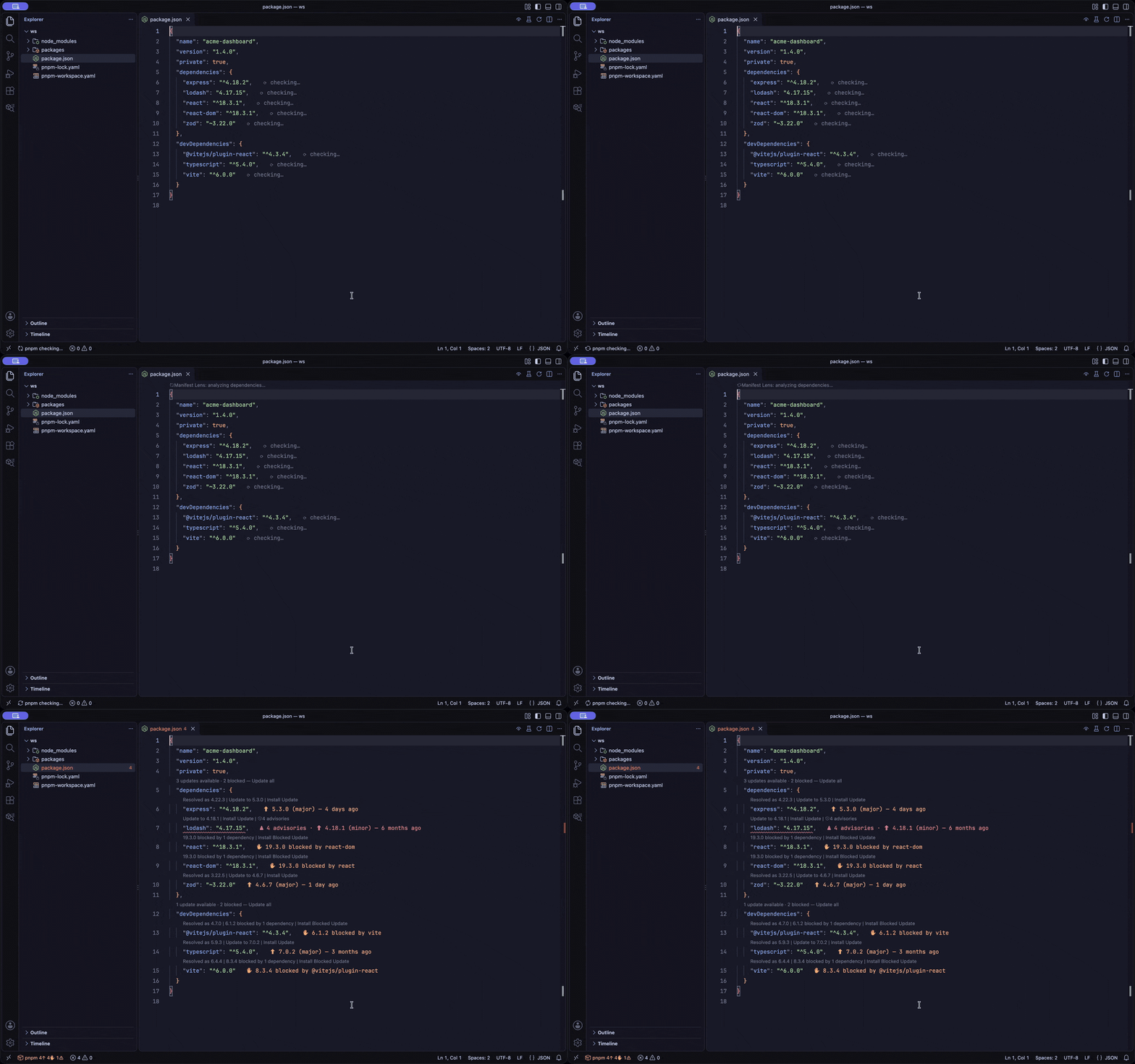
Table of Contents
About
Manifest Lens brings dependency intelligence directly into package.json and workspace catalog files. It shows available updates, detects peer dependency conflicts, flags known vulnerabilities and applies upgrades through a coordinated, transaction-style workflow, all without leaving the editor.
It never changes a manifest or runs an install silently: every write and every package manager invocation is the result of an explicit action. Data that could not be fetched is always shown as unavailable, never as "up to date" or "no vulnerabilities".
(back to top)
Features
Color-Coded Inline Annotations
Each dependency line ends with a short status. Its color follows the most severe finding on that line and comes from your theme, so the squares below show the intent rather than exact shades:
| Color |
Annotation |
Meaning |
| Green |
🟩 ✓ up to date |
The resolved version is the latest compatible release. |
| Blue |
🟦 ⬆ 4.18.1 (minor) — 6 months ago |
A minor or patch update is available, with its severity and age. |
| Yellow |
🟨 ⬆ 5.3.0 (major) · ✋ 19.3.0 blocked by react-dom · ⊘ deprecated |
A major update, an update blocked by a peer dependency, or a deprecated package. |
| Red |
🟥 ⚠ 4 advisories · ⬆ 4.18.1 (minor) |
Known vulnerabilities affect the resolved version. |
| Grey |
⬜ ⟳ checking… |
Analysis is still in progress, or the file type is unsupported. |
Annotations below the configured severity can be hidden with manifestLens.annotations.minimumUpdateSeverity.
Peer Dependency Conflict Detection
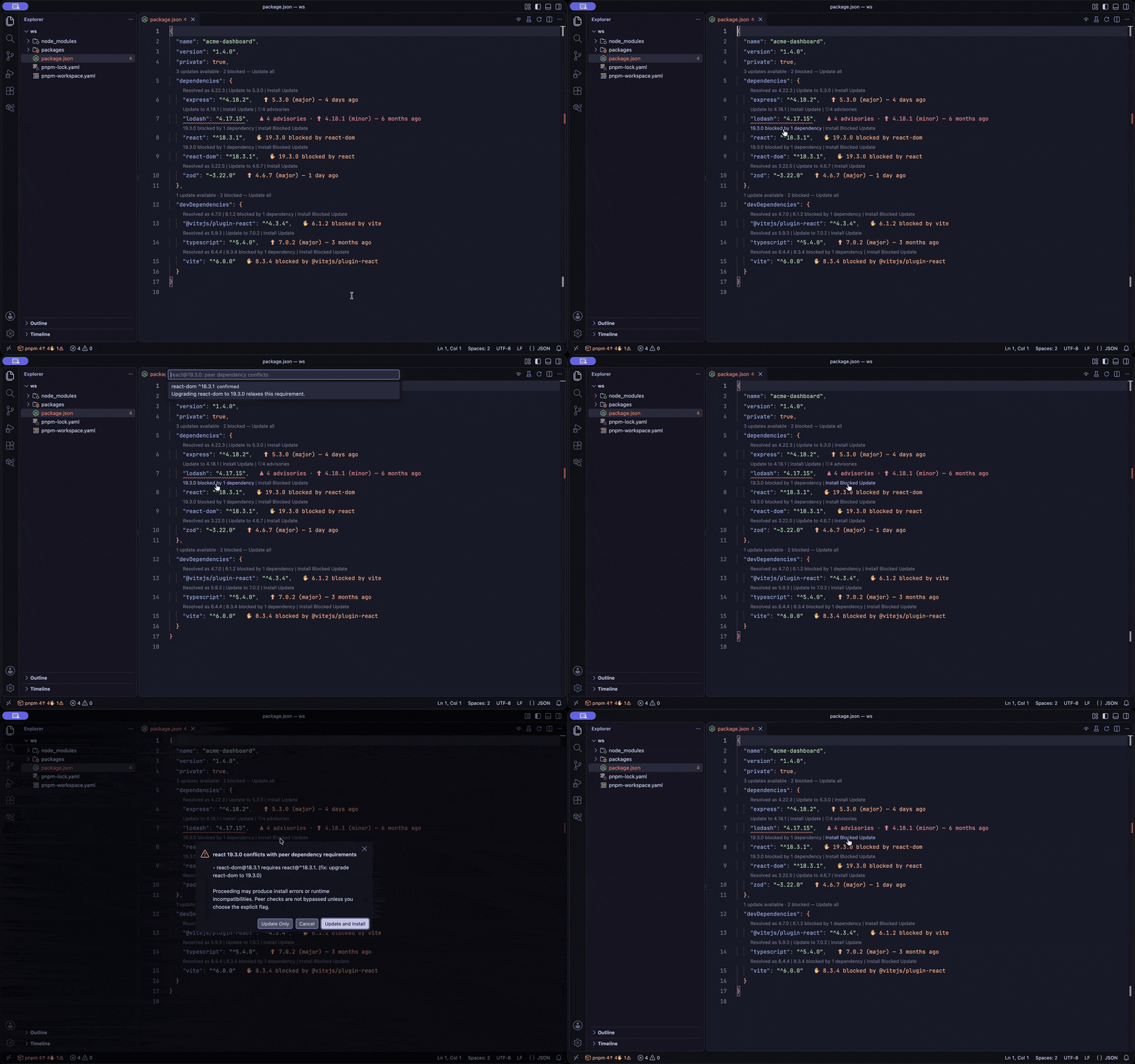
Manifest Lens checks the installed dependents of a package, the candidate version's own peers and newer releases of the blocking packages. When a coordinated upgrade exists it proposes it, for example "upgrade react-dom to 19.3.0 to unblock react 19.3.0". Confidence is lowered, and reported as unknown or potential, when a lockfile or node_modules is missing.
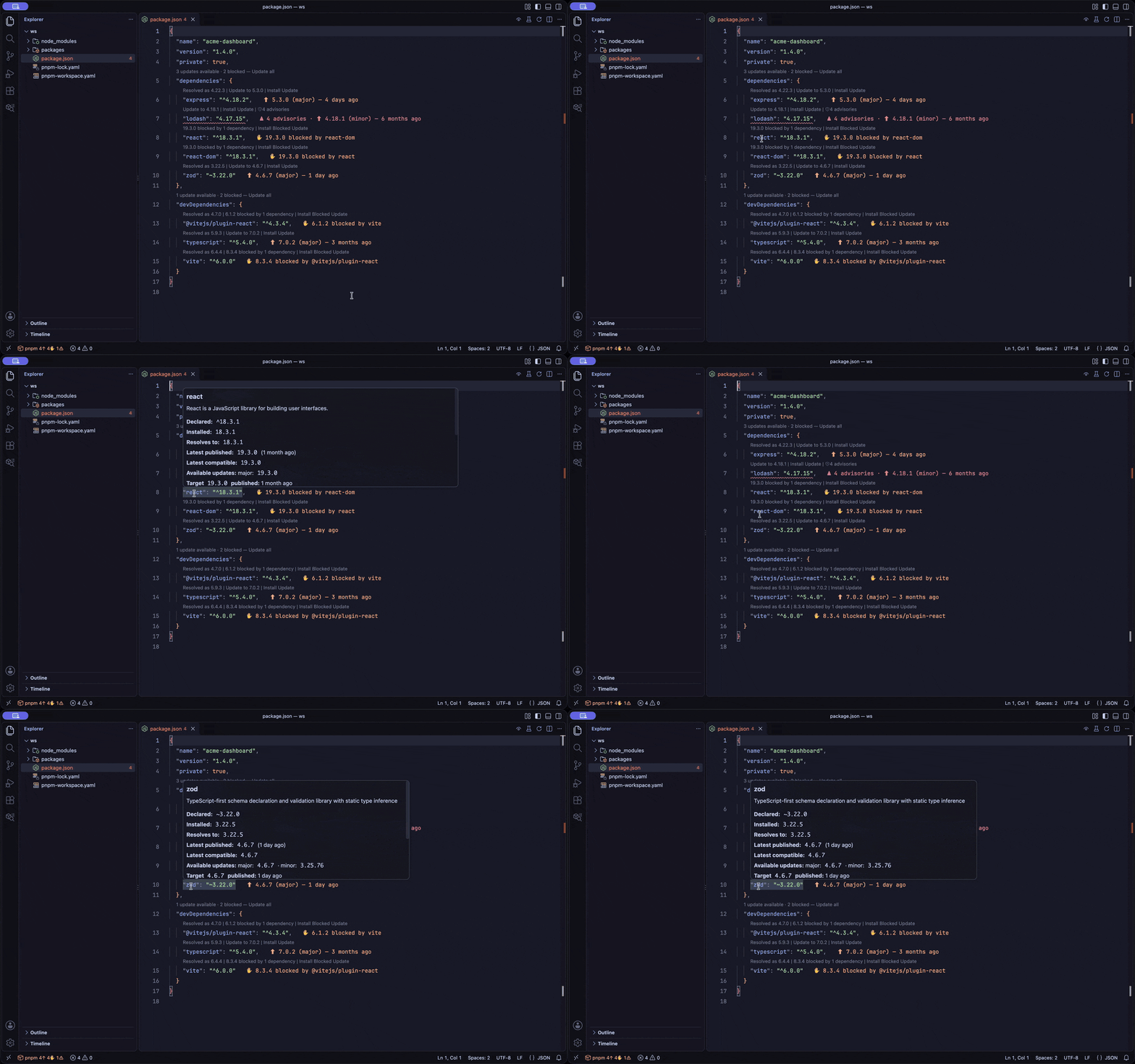
Hover a dependency to see the declared, installed, resolved, latest and latest-compatible versions, the available updates by severity, the release age, monthly downloads, the license, deprecation notices, advisories with fixed versions and references, blockers and links to the package pages (npm, its versions tab and the repository releases). An update is flagged when it changes the license or needs a newer Node than your engines.node declares.
CodeLens Summaries and Actions
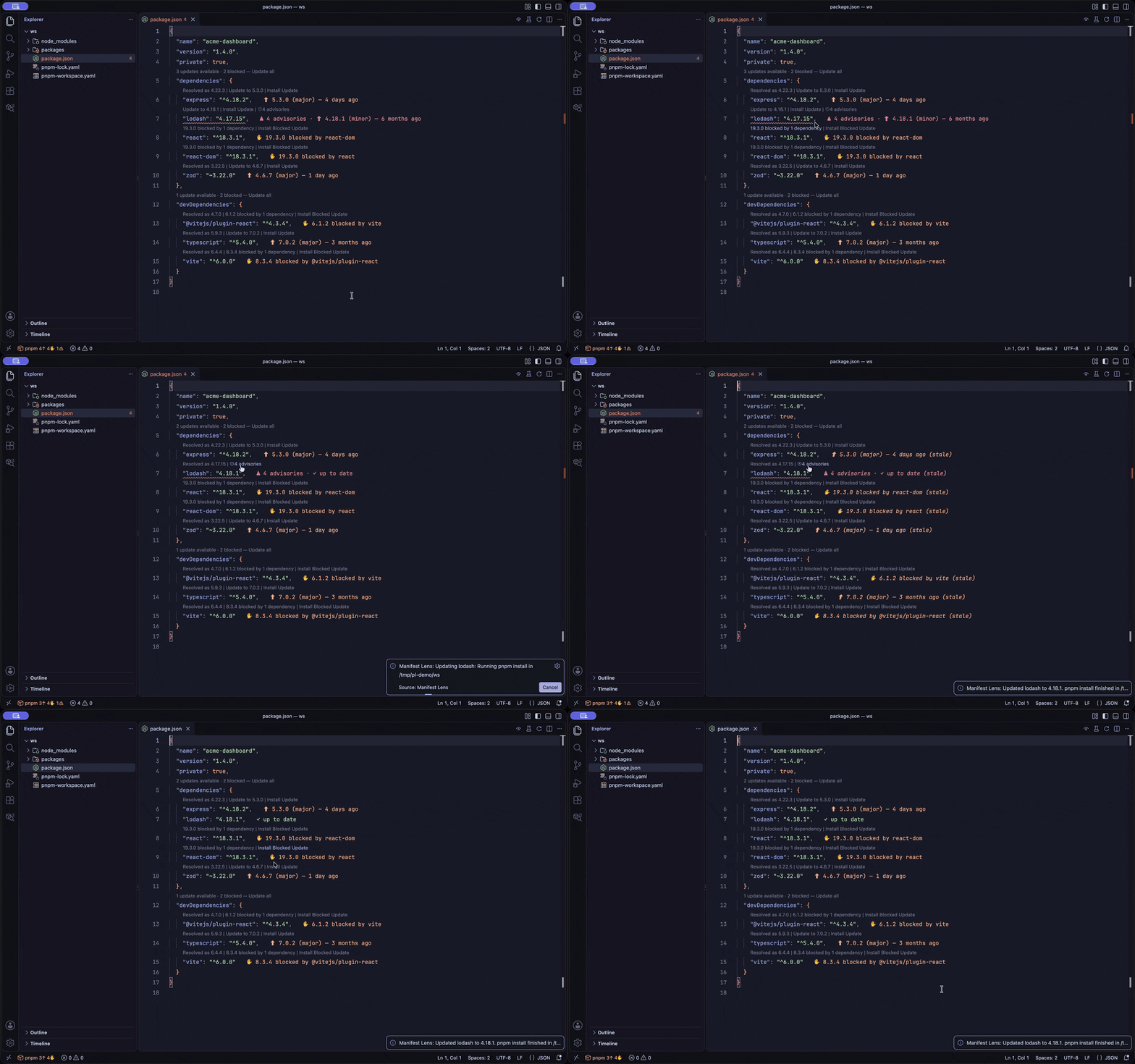
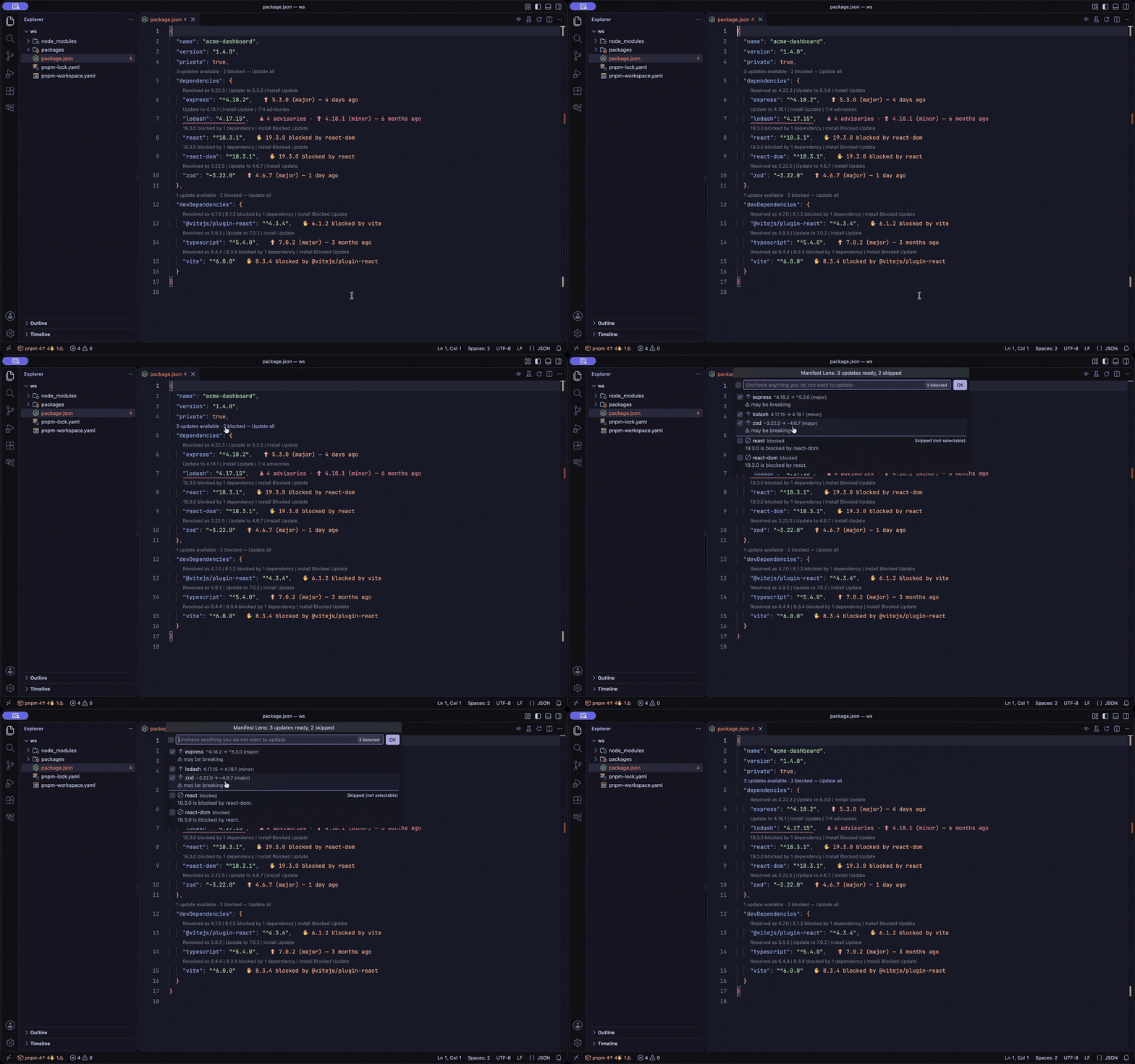
Above each dependency: Resolved as 18.3.1 | Update to 19.3.0 | Install Update. For conflicts: 19.3.0 blocked by 1 dependency | Install Blocked Update. Above each section, a summary lens such as 3 updates available · 2 blocked — Update all updates every eligible dependency at once, after a review step in which you can uncheck anything.
The same updates are available as lightbulb quick fixes (Ctrl+. / Cmd+.) on a dependency line, for example Update react to 19.3.0 and Update react to 19.3.0 and install, even when the CodeLens is turned off.
Vulnerability Detection
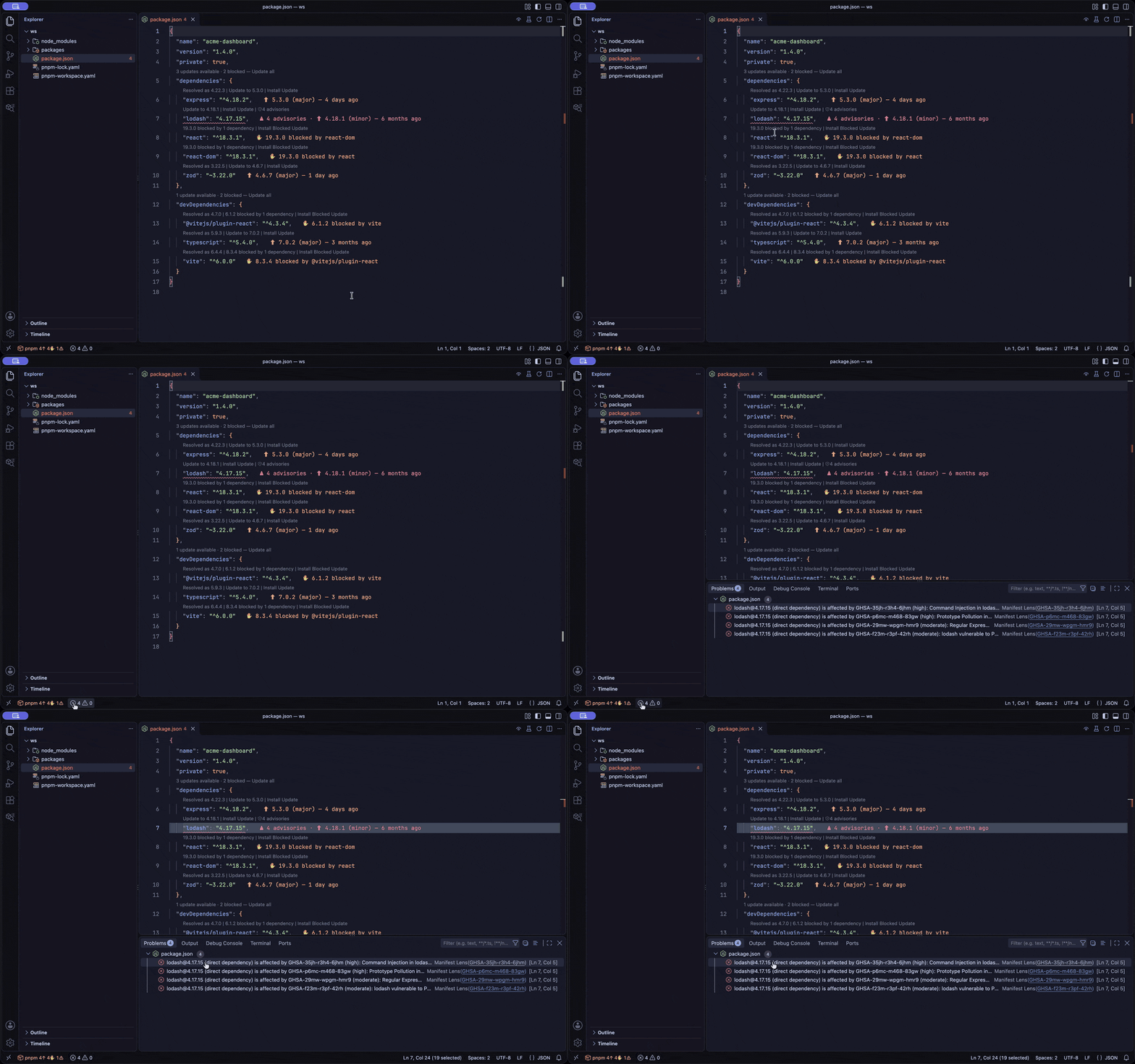
Advisories come from OSV and are published as Problems-panel diagnostics linked to the declaration. Manifest Lens asks for confirmation before applying an update that would introduce an advisory.
Minimum Release Age
A freshly published version can be a malicious one. Set manifestLens.minimumReleaseAge (in minutes, 1440 is one day) and versions younger than that are not suggested; the hover says how many newer versions are held back. The minimum release age already configured for the project's package manager is honoured too (pnpm, Bun, npm and Yarn), and the stricter of the two applies. See docs/configuration.md.
Status Bar
A compact summary of the active manifest, for example npm 5↑ 1✋ 2⚠: the detected package manager, available updates, blocked updates and advisories.
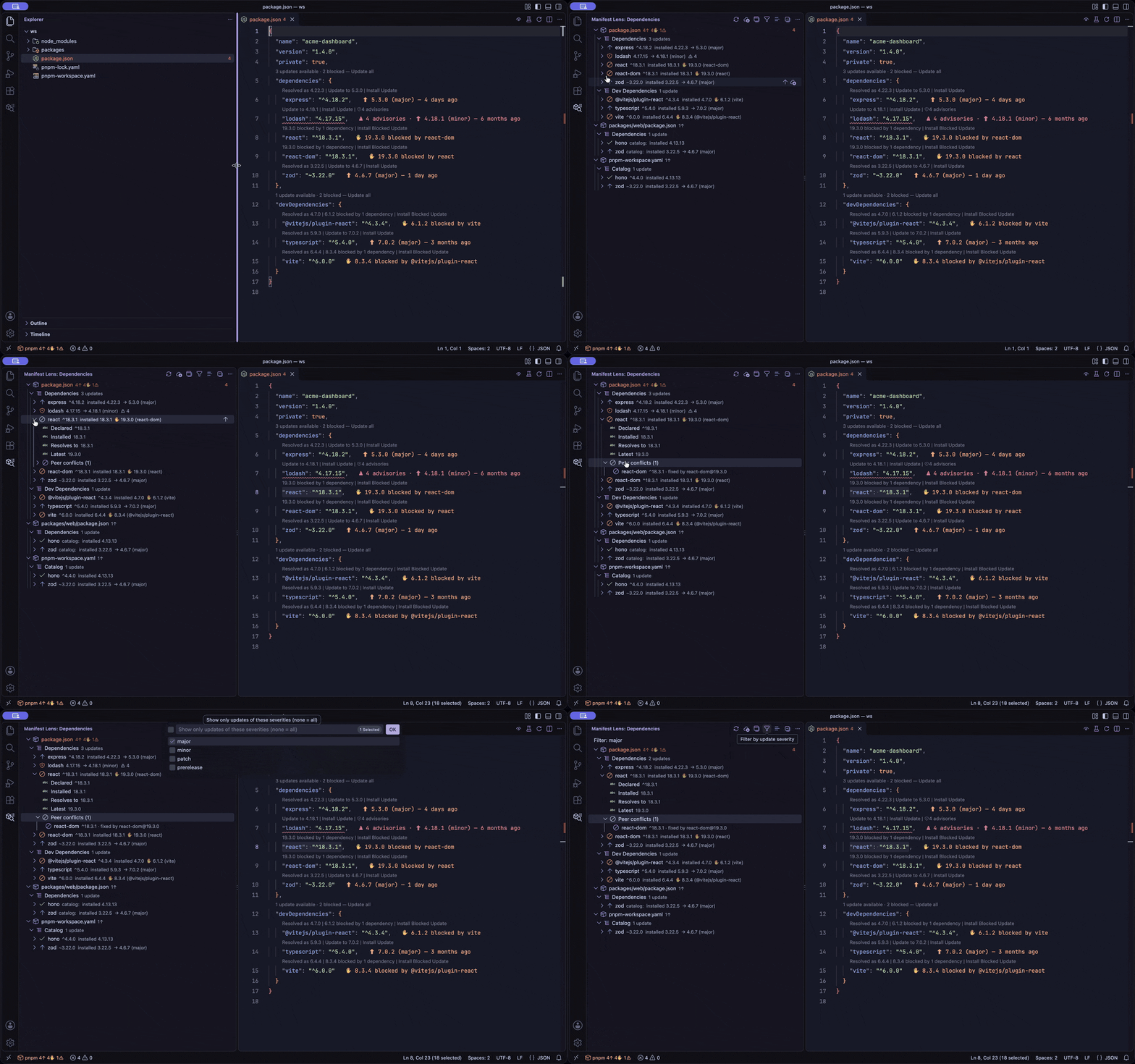
A tree in the activity bar that lists manifests → sections → dependencies → details. It has per-package actions, bulk updates, patch-only, minor-only and major-only updates, and filters by update severity, vulnerability and blocked status.
Safe, Workspace-Aware Edits
- Minimal text edits that preserve formatting, comments and range operators (
^, ~, 1.x, aliases).
- Every edit is validated against the analyzed text, so concurrent changes are never overwritten.
- Monorepos,
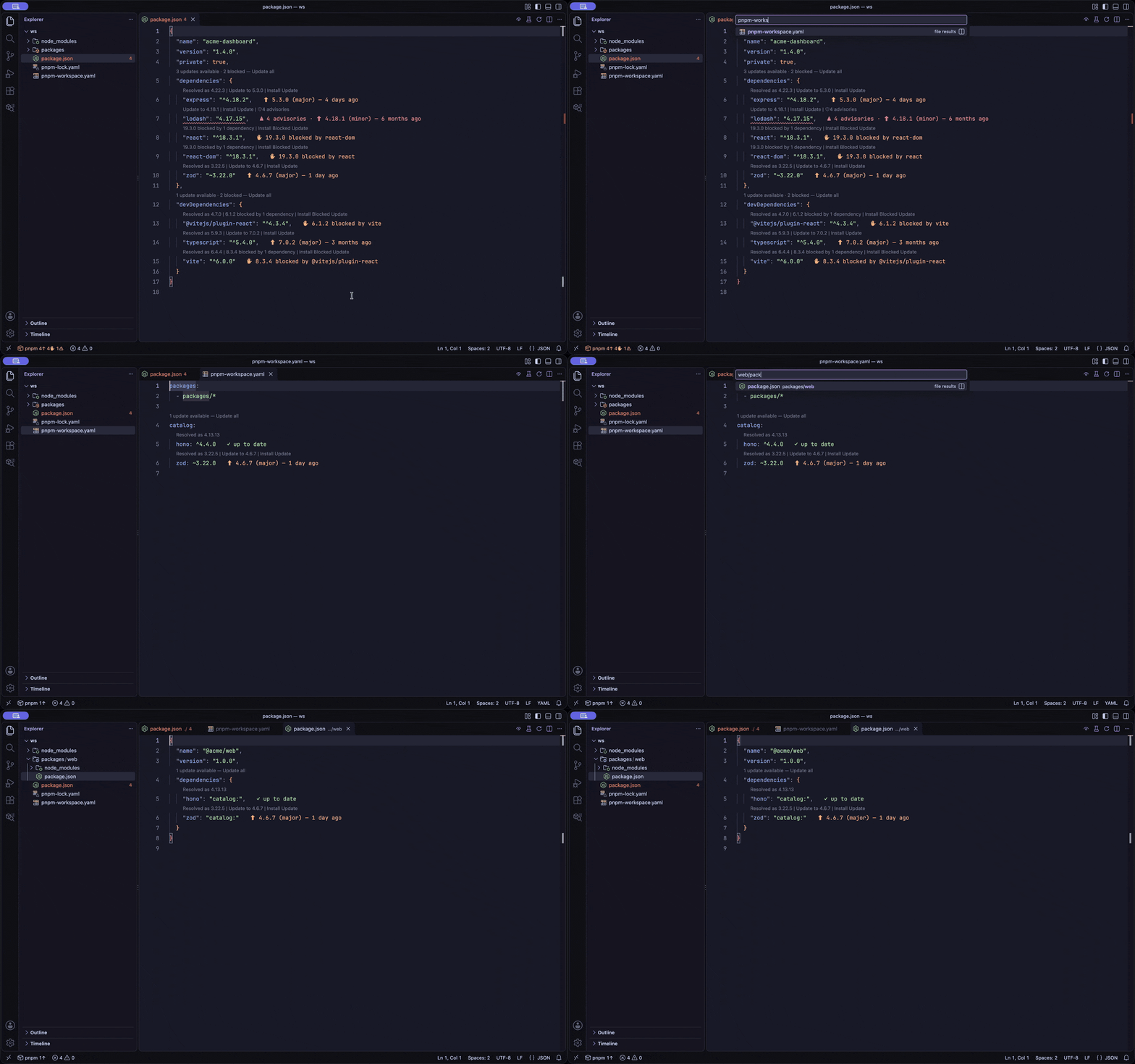
workspace: packages, npm aliases, pnpm-workspace.yaml and Yarn (.yarnrc.yml, Yarn 4.10+) catalogs, catalog: references and Bun catalogs are understood.
- npm, pnpm, Yarn and Bun are detected from the lockfile, and installs run from the lockfile's root.
(back to top)
Demo
| Hover Details |
Safe Updates |
 |
 |
| Peer Dependency Conflicts |
Security Advisories |
 |
 |
| Bulk Updates |
Workspace Catalogs |
 |
 |
| Sidebar Dashboard |
|
 |
|
(back to top)
Getting Started
Install Manifest Lens from the VS Code Marketplace (or Open VSX), or install a .vsix from the releases page:
code --install-extension demartini.manifest-lens
Open a folder that contains a package.json (or a pnpm-workspace.yaml). The extension activates automatically.
Open the manifest. Every dependency line gets an inline annotation, and CodeLens actions appear above it.
Hover a dependency for the full picture, or click a CodeLens to update it. Open the Manifest Lens view in the activity bar for a workspace-wide dashboard.
(back to top)
How It Works
- Discover. Manifest Lens indexes the manifests in the workspace (
package.json, pnpm-workspace.yaml), ignoring node_modules, and parses each one without losing its formatting or comments.
- Resolve. For every declaration it determines the declared range, the installed version (from
node_modules) and the version the range resolves to.
- Fetch. Registry metadata comes from your npm-compatible registry and advisories from OSV. Results are cached, requests run with limited concurrency and a timeout, and failures are reported as unavailable.
- Analyze. Updates are classified by severity, peer requirements are checked against installed dependents and candidate peers, and advisories are matched against the resolved version.
- Present. The same analysis feeds the inline annotations, CodeLens, hover, Problems panel, status bar and dashboard, so they never disagree.
- Apply. When you choose an update, Manifest Lens edits only the version text, optionally runs your package manager's install from the lockfile's root, and re-analyzes. Edits are verified against the analyzed text first, so a concurrent change aborts the update instead of being overwritten.
(back to top)
Supported Dependency Sections
| Source |
Sections |
package.json |
dependencies, devDependencies, peerDependencies, optionalDependencies |
package.json |
overrides (npm), resolutions (Yarn), pnpm.overrides |
package.json (Bun) |
catalog, catalogs and workspaces.catalog, plus catalog: references |
pnpm-workspace.yaml |
catalog and named catalogs, plus catalog: references from member packages |
.yarnrc.yml (Yarn 4.10+) |
catalog and named catalogs, plus catalog: and catalog:name references from member packages |
Manifest Lens also understands workspace: packages and npm aliases (npm:pkg@^1.0.0). Complex ranges are widened just enough to admit an update: comparator sets (>=1 <2 becomes >=1 <3), hyphen ranges (1 - 2 becomes 1 - 3.1.0) and unions (^1 || ^2 becomes ^1 || ^3, or gains an alternative in peerDependencies). Dist-tags and protocol specifiers are analyzed but not rewritten automatically.
(back to top)
Commands
All commands are in the Manifest Lens category.
| Command |
Description |
| Check for dependency updates |
Re-analyze the active manifest. |
| Refresh dependency data |
Clear caches and re-fetch everything. |
| Show / Hide version suggestions |
Toggle CodeLens suggestions (editor toolbar). |
| Show / Hide prerelease versions |
Toggle prerelease suggestions (editor toolbar). |
| Update all dependencies to latest |
Plan, review and apply every eligible update. Confirmed blockers are skipped by default. |
| Update dependencies (major / minor / patch only) |
Apply only updates of the chosen severity. |
| Sort dependencies alphabetically |
Sort dependency sections without touching comments or formatting. |
| Run install for this package.json |
Run the detected package manager's install from the project root. |
| Open Manifest Lens dashboard |
Focus the dashboard view. |
| Analyze workspace dependencies |
Analyze every manifest in the workspace. |
| Check vulnerabilities |
Analyze the workspace and summarize advisories. |
| Upgrade selected dependency / and install |
Update one dependency, optionally followed by an install. |
| Resolve to installed version |
Rewrite a specifier to the installed version without installing. |
| Upgrade blocked dependency |
Review the conflicts and update after explicit confirmation. |
| Cancel active analysis or installation |
Abort running work. |
| Show extension diagnostics and cache status |
Print the state, a settings summary and cache sizes to the output channel. |
| Clear caches |
Drop all cached registry, advisory and installed-package data. |
(back to top)
Settings
| Setting |
Default |
Description |
manifestLens.registry |
https://registry.npmjs.org/ |
npm-compatible registry (HTTPS). Ignored in untrusted workspaces. |
manifestLens.cacheTimeout |
300000 |
Registry metadata cache TTL in ms. |
manifestLens.showVersionStatus |
true |
Show inline annotations. |
manifestLens.annotations.minimumUpdateSeverity |
patch |
Hide update annotations below this severity. |
manifestLens.showLatestVersionHint |
true |
Show the latest versions in the hover. |
manifestLens.codeLens.enabled |
true |
Show CodeLens entries. |
manifestLens.codeLens.showUpToDate |
false |
Show lenses for up-to-date dependencies. |
manifestLens.codeLens.showOnStartup |
true |
Show suggestions on startup. |
manifestLens.minimumReleaseAge |
0 |
Do not suggest versions published less than this many minutes ago. The pnpm, Bun, npm and Yarn settings of the project are honoured too (see docs/configuration.md). |
manifestLens.prerelease.enabled |
false |
Suggest prereleases. |
manifestLens.prerelease.tags |
[] |
Restrict prereleases to these tags. |
manifestLens.security.enabled |
true |
Check advisories with OSV. |
manifestLens.security.warnBeforeAdvisoryUpgrade |
true |
Confirm updates that introduce advisories. |
manifestLens.peerDependencies.enabled |
true |
Analyze peer dependency conflicts. |
manifestLens.packageManager |
auto |
auto, npm, pnpm, yarn or bun. Ignored in untrusted workspaces. |
manifestLens.updatePolicy |
conservative |
conservative skips confirmed blockers in bulk updates; force includes them after a warning. |
manifestLens.analysis.concurrency |
4 |
Number of concurrent lookups. |
manifestLens.analysis.timeout |
10000 |
Per-request timeout in ms. |
manifestLens.workspace.enabled |
true |
Enable workspace-wide analysis and the dashboard. |
manifestLens.logging.level |
warn |
Output channel verbosity. |
See docs/configuration.md for details.
(back to top)
Privacy and Security
- No telemetry. Package names (and, for advisories, versions) are sent to your registry and to
api.osv.dev. Manifest contents and source code never leave your machine, and no credentials are sent.
- Explicit actions only. Package manager commands run only after you ask for them, never in an untrusted workspace, with an argument array and no shell (Windows
.cmd shims excepted, with constant arguments).
- No silent flags.
--legacy-peer-deps is never added automatically; it is an explicit opt-in for npm.
Details: docs/security.md.
(back to top)
Known Limitations
- Peer analysis uses package metadata and cannot prove runtime compatibility. A missing lockfile or an incomplete
node_modules lowers confidence (reported as unknown or potential, never as compatible).
- Vulnerability analysis covers the direct dependencies declared in the manifests; it is not a full transitive-dependency audit.
- Yarn Plug'n'Play installs have no
node_modules, so installed versions are unknown and the declared minimum is used (and labeled as such).
- Private registries that require authentication are not supported, because credentials are deliberately never sent.
- Complex ranges whose upper bound has no obvious widening (for example
>=1 <1.5), tags and protocol specifiers are analyzed but not rewritten automatically.
(back to top)
Contributing
If you'd like to contribute, review our contribution guidelines and open an issue or pull request.
(back to top)
Changelog
See CHANGELOG for a complete and human-readable history of changes.
(back to top)
License
Distributed under the MIT License. See LICENSE for details.
(back to top)