
strudel-boxLive code music patterns in VS Code. Create algorithmic beats with real-time audio, stunning visuals, and zero setup. Installation Launch VS Code Quick Open ( Ctrl+P), paste the following command, and press enter.Copied to clipboard |

🎵 strudel-box
Code your beats. Visualize your sound. Share your vibe. strudel-box is a VS Code extension that brings the power of Strudel live coding directly into your editor. Create algorithmic music patterns, experiment with sounds, and perform live — all without leaving VS Code.
🤖 Works in VS Code — Built for Kirostrudel-box is fully compatible with VS Code and works out of the box. However, it was developed for and with Kiro, AWS's agentic IDE. When used with Kiro, you unlock powerful AI-assisted features:
✨ Features🎹 Live Coding REPL
📁 Strudel Explorer (Sidebar Player)
🎨 Visual ThemesThree stunning visual themes with animated particle backgrounds:
Each theme includes:
🎛️ Custom Editor for
|



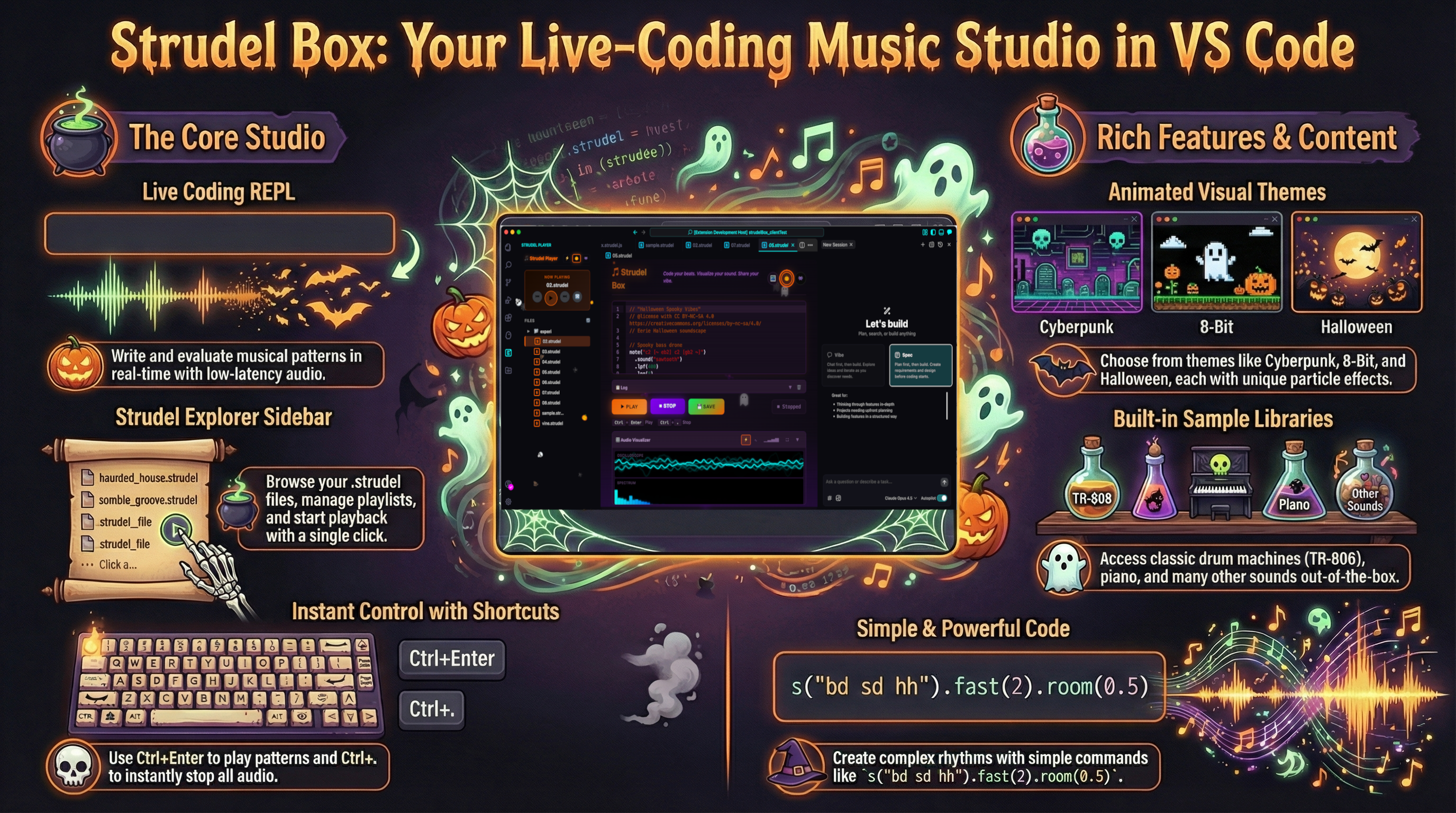
| Library | Description |
|---|---|
| Tidal Drum Machines | Roland TR-808, TR-909, TR-707, and more |
| Piano | Acoustic piano samples |
| Dirt Samples | Classic TidalCycles sample collection |
| Emu SP12 | Legendary sampler sounds |
| VCSL | Versilian Community Sample Library |
📋 Log Panel
- Real-time Feedback — See sample loading status and errors
- Collapsible Panel — Expand/collapse to save space
- Clear Function — Reset logs when needed
- Color-coded Messages — Info, warnings, errors, and success states
🚀 Getting Started
Installation
- Install the extension from the VS Code Marketplace
- Open a workspace with
.strudelfiles (or create new ones) - Click the Strudel Player icon in the Activity Bar
Your First Pattern
- Open Strudel Box (
Ctrl+Shift+P→ "Strudel Box: Open Player") - Type a simple pattern:
s("bd sd hh*4") - Press
Ctrl+Enter(orCmd+Enteron Mac) to play - Press
Ctrl+.(orCmd+.) to stop
Creating Pattern Files
Create files with the .strudel extension:
// my-pattern.strudel
note("c3 e3 g3 c4")
  .sound("sawtooth")
  .lpf(800)
  .room(0.3)
⌨️ Keyboard Shortcuts
| Shortcut | Action |
|---|---|
Ctrl+Enter / Cmd+Enter |
Evaluate and play pattern |
Ctrl+. / Cmd+. |
Stop all audio (Hush) |
Ctrl+S / Cmd+S |
Save pattern to file |
📝 Commands
Access via Command Palette (Ctrl+Shift+P / Cmd+Shift+P):
| Command | Description |
|---|---|
Strudel Box: Open Player |
Open the main Strudel Box panel |
Strudel Box: Hush (Stop Audio) |
Stop all audio playback |
Strudel Box: Load File |
Open file picker to load a pattern |
Strudel Box: Set Theme |
Choose between Cyberpunk, Halloween, or 8-Bit |
Strudel Box: Save Pattern |
Save current pattern to file |
Strudel Box: Open File Explorer |
Focus the Strudel Explorer sidebar |
Open in Strudel Box |
Open selected file in the REPL (context menu) |
🎵 Strudel Pattern Reference
Sound Sources
// Built-in synthesizers
sound("sawtooth")   // Sawtooth wave
sound("square")     // Square wave
sound("triangle")   // Triangle wave
sound("sine")       // Sine wave

// Sample-based sounds
sound("bd sd hh")   // Drums
sound("piano")      // Piano
sound("casio")      // Casio keyboard
Notes & Melodies
// Note patterns
note("c3 e3 g3 c4")
n("0 2 4 7")

// Mini-notation
"c3 e3 g3".note()
Audio Effects
// Filters
.lpf(800)      // Low-pass filter frequency
.hpf(200)      // High-pass filter frequency
.lpq(5)        // Filter resonance

// Space
.room(0.5)     // Reverb amount
.delay(0.25)   // Delay time

// Dynamics
.gain(0.8)     // Volume (0-1)
.velocity(0.7) // Note velocity
Pattern Modifiers
// Timing
.fast(2)       // Double speed
.slow(2)       // Half speed
.rev()         // Reverse pattern

// Structure
.stack()       // Layer patterns
.cat()         // Sequence patterns
.seq()         // Sequential playback

// Rhythm
.euclid(3, 8)  // Euclidean rhythm
Scales & Chords
.scale("C:minor")
.chord("Am7")
.voicing()
Drum Machines
// Use specific drum machines
sound("bd sd hh cp")
  .bank("RolandTR909")

// Available banks include:
// RolandTR808, RolandTR909, RolandTR707, and many more
📂 Example Patterns
Simple Drum Beat
s("bd sd [~ bd] sd, hh*8")
  .room(0.2)
Melodic Synth
note("c3 e3 g3 c4")
  .sound("sawtooth")
  .lpf(sine.range(200, 2000).slow(4))
  .lpq(5)
  .room(0.3)
Chord Progression
chord("<C^7 Am7 Dm7 G7>")
  .voicing()
  .sound("piano")
  .room(0.5)
Euclidean Rhythm
note("c2 e2 g2 b2")
  .euclid(5, 8)
  .sound("sawtooth")
  .lpf(600)
Layered Composition
stack(
  note("c3 e3 g3").sound("piano"),
  s("bd*4, hh*8"),
  note("c2").sound("sawtooth").lpf(200)
)
🎨 VS Code Themes
Strudel Box includes three matching VS Code color themes:
- Strudel Box - Cyberpunk — Dark theme with cyan/magenta accents
- Strudel Box - Halloween — Dark theme with orange/purple accents
- Strudel Box - 8-Bit — Dark theme with retro green accents
To activate: Ctrl+K Ctrl+T → Select a Strudel Box theme
⚠️ Known Limitations
The following Strudel features are not available in Strudel Box:
| Feature | Reason |
|---|---|
| CSound Integration | @strudel/csound not loaded |
| Hydra Visuals | @strudel/hydra not loaded |
| Tidal Syntax | @strudel/tidal not loaded |
| Advanced MIDI | May have limited functionality |
| Device Motion | Only relevant on mobile devices |
For these advanced features, use the official Strudel REPL.
🔧 Technical Details
Architecture
- Extension Host — Node.js/CommonJS for VS Code integration
- Webview — Browser/ESM for audio engine and UI
- Audio Engine —
@strudel/webloaded from CDN - Editor — CodeMirror 6 with JavaScript syntax
Requirements
- VS Code 1.74.0 or higher
- Internet connection (for loading Strudel from CDN)
- Audio output device
File Association
Files with .strudel extension are automatically:
- Recognized as Strudel language
- Opened with the Strudel Box custom editor
- Displayed with custom file icons
🐛 Troubleshooting
No Sound
- Check that your system audio is not muted
- Ensure you've clicked Play or pressed
Ctrl+Enter(audio requires user gesture) - Check the Log panel for errors
- Try a simple pattern:
s("bd")
Samples Not Loading
- Check your internet connection
- Look at the Log panel for loading status
- Some sample banks may not be available — try built-in synths instead
Pattern Errors
- Check the Log panel for error messages
- Verify your pattern syntax
- Try the pattern on strudel.cc to compare
📚 Resources
- Kiro IDE — AI-powered IDE for spec-driven development
- strudel-box-template — Kiro template for music creation
- Strudel Documentation
- Strudel Pattern Reference
- TidalCycles (inspiration)
- Dirt-Samples Repository
📄 License
MIT License — See LICENSE for details.
🙏 Acknowledgments
- Strudel by Felix Roos and contributors
- TidalCycles by Alex McLean
- CodeMirror by Marijn Haverbeke
Happy live coding! 🎶