
Mermaid Studio
A Mermaid toolkit for VS Code with preview, snippets, export, examples, and a Builder for supported diagram families.
VS Code Marketplace
·
GitHub Repository
·
Learn Mermaid
Quick start
- Open a
.mmd, .mermaid, or Markdown file.
- Type
/flow, /sequence, or /snippet.
- Run Mermaid Studio: Open Preview.
- Use Mermaid Studio: Open Diagram Canvas when you want canvas-based editing for supported canvas families.
- Use the Builder sidebar when you want structured editing for flowcharts or sequence diagrams.
Features
| Feature |
What it gives you |
Available in |
| Authoring |
Mermaid support for .mmd, .mermaid, .md, and .markdown, plus formatting and diagnostics |
Mermaid + Markdown |
| Snippets & slash insertion |
Fast insertion with slash commands, snippet browser, favorites, and recent snippets |
Mermaid + Markdown |
| Preview & export |
Mermaid file preview, Markdown block preview, mixed .mmd support, and SVG export |
Preview workflows |
| Diagram Canvas |
Canvas-based editing with a family-aware shell, generated Mermaid output, and direct node/edge manipulation for supported canvas families |
Class Diagram + Flowchart |
| Builder sidebar |
Structured editing for supported diagram families with presets, forms, import support, and a visual overview |
Flowchart + Sequence |
| References & learning |
Rich hover help, bundled examples, and command-driven reference/example navigation |
Mermaid + Markdown |
Diagram support
✅ = targeted/strong support in Mermaid Studio
◐ = source-first or lighter assist coverage
— = no dedicated feature beyond general Mermaid editing/runtime support
| Diagram family |
Snippets / insertion |
Preview |
SVG export |
Builder |
Diagram Canvas |
| Flowchart |
✅ |
✅ |
✅ |
✅ |
✅ |
| Sequence |
✅ |
✅ |
✅ |
✅ |
— |
| Class |
✅ |
✅ |
✅ |
— |
✅ |
| State |
✅ |
✅ |
✅ |
— |
— |
| ER |
✅ |
✅ |
✅ |
— |
— |
| Gantt |
✅ |
✅ |
✅ |
— |
— |
| GitGraph |
✅ |
✅ |
✅ |
— |
— |
| Architecture |
✅ |
✅ |
✅ |
— |
— |
| Mindmap |
✅ |
✅ |
✅ |
— |
— |
| Journey |
◐ |
✅ |
✅ |
— |
— |
| Pie |
◐ |
✅ |
✅ |
— |
— |
| Requirement |
◐ |
✅ |
✅ |
— |
— |
| Timeline |
◐ |
✅ |
✅ |
— |
— |
| Kanban |
◐ |
✅ |
✅ |
— |
— |
| Quadrant chart |
◐ |
✅ |
✅ |
— |
— |
| XY chart |
◐ |
✅ |
✅ |
— |
— |
| Sankey |
◐ |
✅ |
✅ |
— |
— |
| Block |
◐ |
✅ |
✅ |
— |
— |
| Packet |
◐ |
✅ |
✅ |
— |
— |
| Treemap |
◐ |
✅ |
✅ |
— |
— |
| ZenUML |
◐ |
✅ |
✅ |
— |
— |
| C4 |
◐ |
✅ |
✅ |
— |
— |
Screenshots
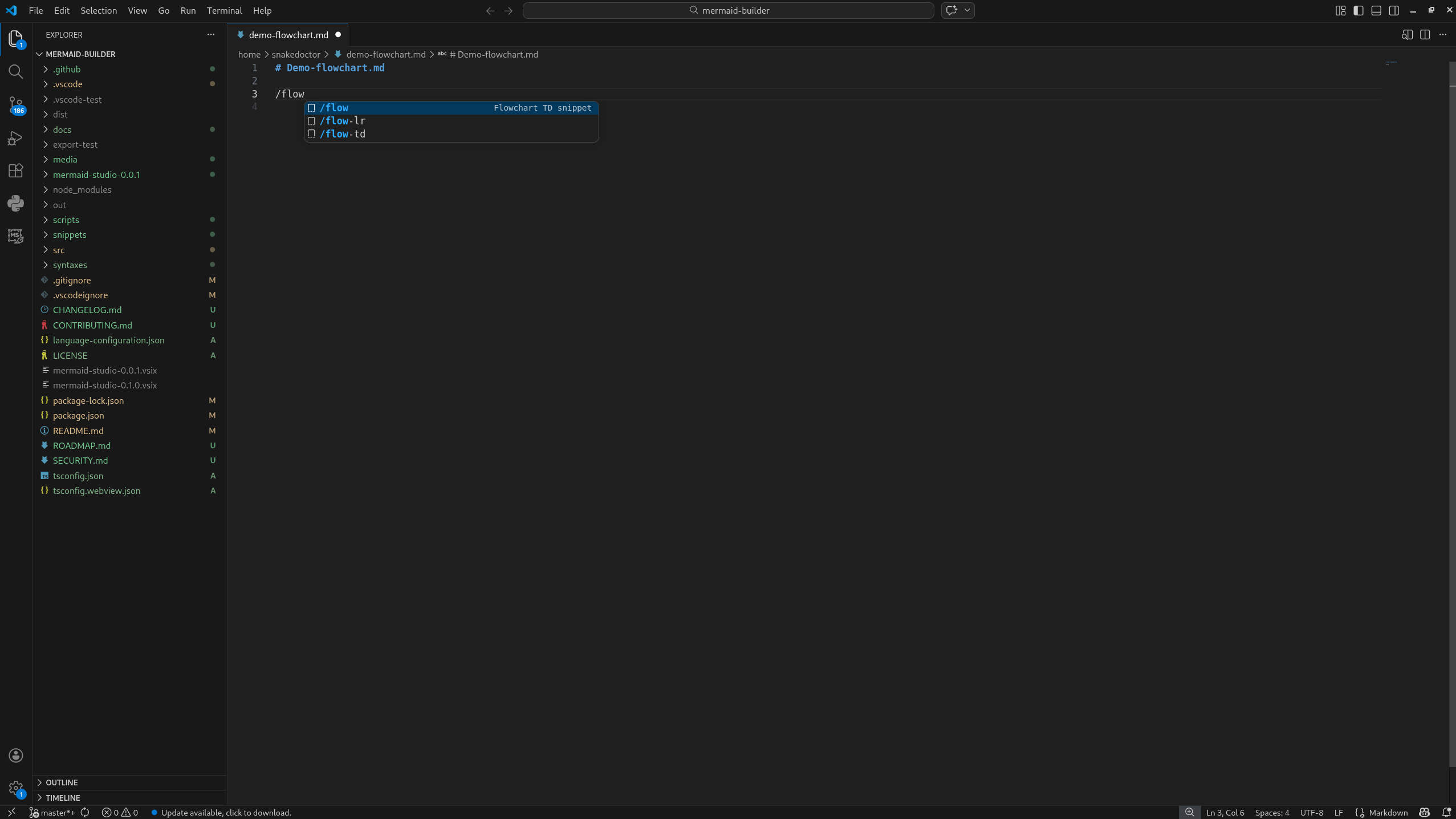
Slash snippets
Quick insertion for common Mermaid starters and patterns.
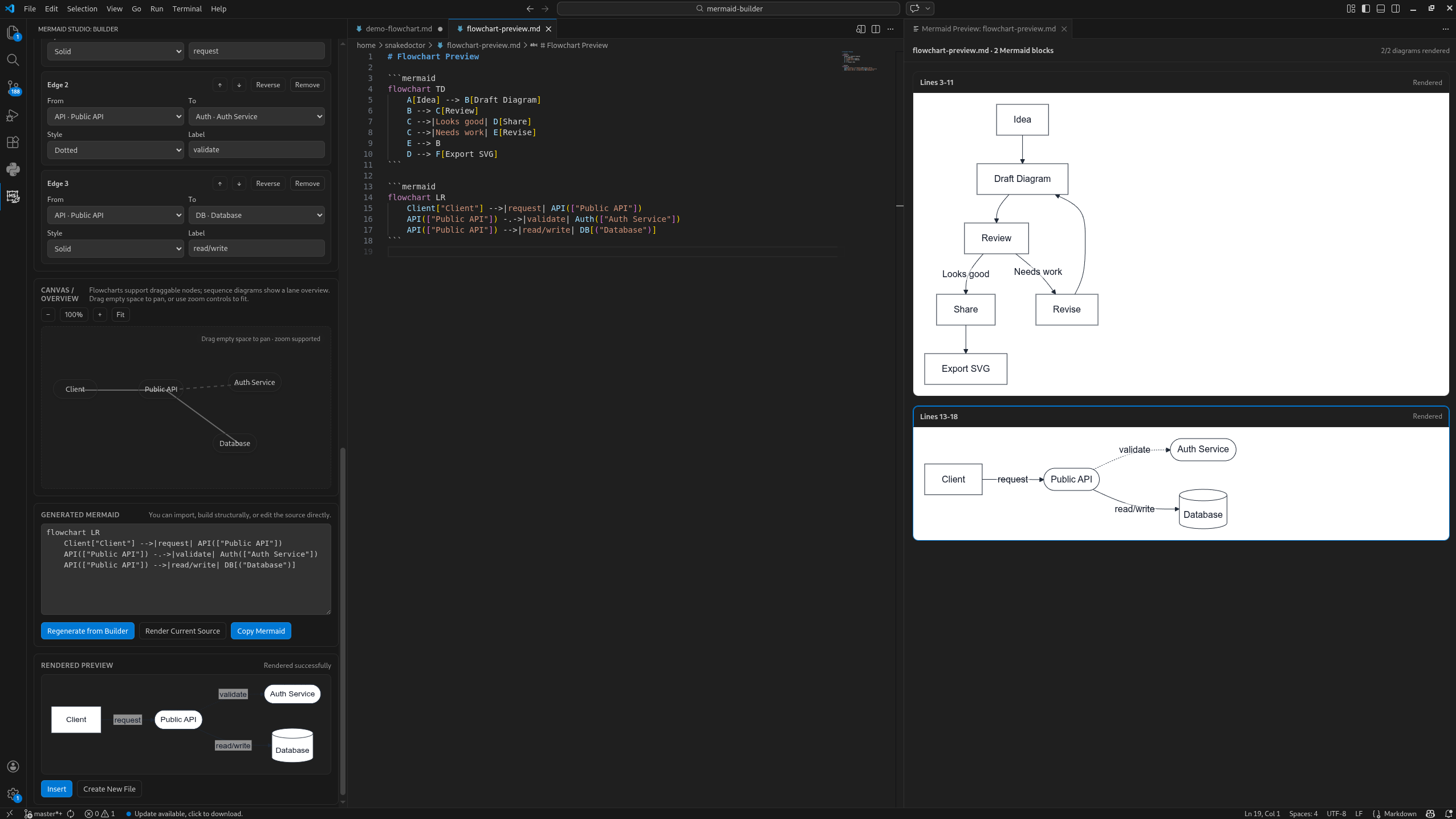
Structured flowchart and sequence editing in a side panel with presets, quick-add forms, import support, and a visual overview, alongside live preview.
Commands
Common commands
- Mermaid Studio: New Diagram
- Mermaid Studio: Open Preview
- Mermaid Studio: Preview Mermaid Block in Markdown
- Mermaid Studio: Open Builder
- Mermaid Studio: Open Diagram Canvas
- Mermaid Studio: Insert Mermaid Snippet
- Mermaid Studio: Export Preview as SVG
Additional commands
- Mermaid Studio: Format Mermaid Document
- Mermaid Studio: Extract Mermaid Block to File
- Mermaid Studio: Open Reference for Symbol Under Cursor
- Mermaid Studio: Open Example for Current Diagram Type
Settings
| Setting |
Purpose |
Default |
mermaidstudio.markdownFenceLanguage |
Fence language used when Mermaid is inserted into Markdown |
mermaid |
mermaidstudio.insertMarkdownFencesByDefault |
Wrap Mermaid output in Markdown fenced blocks when working in Markdown files |
true |
mermaidstudio.preview.autoRefresh |
Automatically refresh Mermaid previews when source text changes |
true |
mermaidstudio.preview.debounceMs |
Debounce delay for live preview refreshes |
250 |
Known limitations
- Builder import support is intentionally scoped and is not a full Mermaid parser.
- Visual editing depth is strongest for flowcharts and sequence diagrams.
- Mermaid family behavior can still vary, especially for advanced syntax.
- TextMate grammar highlighting is broad, but Mermaid syntax is large and evolving, so some constructs may still receive lighter highlighting than others.
Local development
If you want to build or test Mermaid Studio locally, you will need a standard Node.js / npm workflow.
Recommended development loop
For active feature work, prefer the Extension Development Host loop:
npm install
npm run compile
# then press F5 in VS Code
For package validation or release prep:
npm test
npm run package
Canvas debug build
The Diagram Canvas has temporary viewport/debug instrumentation available behind a simple build-time flag:
DEBUG=1 npm run compile
A normal build does not include the debug panel.
Webview guardrail
The Diagram Canvas HTML is currently generated from a large embedded webview template string. Because browser-side script escaping bugs can slip past TypeScript and only fail at runtime, the test suite includes a source guard:
src/test/suite/canvasWebviewGuards.test.ts
That guard is intended to catch fragile embedded-script patterns early (for example raw regex/script snippets that tend to break once interpolated into the webview HTML string).
Useful commands
npm run compile
npm test
npm run package
If those commands are unfamiliar, learn the basics of:
- cloning a Git repository
- installing Node.js and npm dependencies
- running npm scripts from a terminal
For security-sensitive issues, please see:
License
MIT

