Iris Code - Score every file. Block what falls below.
Catch secrets, duplicate code, security smells, and maintainability regressions before they reach human review.
Iris Code is a deterministic, local-first quality gate for JavaScript, TypeScript, Vue, Svelte, Go, Python, Ruby, ERB, C#, Java, and Rust. Source analysis runs directly in VS Code, JetBrains IDEs, and the iris CLI, hooks, and CI without sending your source to an AI model or analysis backend.
Iris Code does not guess whether code was written by AI. It independently checks the result against explicit rules, whether it was written by a person, an AI assistant, or both.
Install for VS Code · Read the docs · Security · Support
Also available on Open VSX
for Cursor, Windsurf, VSCodium, and Trae, and on the JetBrains Marketplace for
IntelliJ IDEA, WebStorm, PyCharm, GoLand, and other IntelliJ-based IDEs - all
served by the same analysis engine. See Supported editors.
Local file analysis, interactive change reviews, and one complete workspace scan are free and require no account. Pro adds fresh project-wide scans, automation, and enforcement.
Review your changes before someone else does
When Git reports local changes, Iris Code shows a Git-changed files detected strip above the five sidebar tabs. Select it to check every supported staged, unstaged, and untracked Git file. The result opens in a dedicated Change Review editor tab with blockers first, filterable findings, file health, and click-to-open source locations.
This interactive workflow is free. It does not alter full-workspace trend history or pretend a partial scan can identify unused dependencies. Pro adds automated changed-file checks in the CLI, hooks, and CI.
One signal, then the evidence
Iris Code gives you a clear health score and shows exactly what changed it:
- Health score — a 0–100 score for the active file, updated whenever you open or save it
- Duplicate code — structural matching catches copied blocks even after identifiers, literals, comments, or formatting change
- Secrets and security smells — catch exposed credentials, unsafe
eval, SQL concatenation, weak hashing, unsafe regexes, disabled TLS checks, and more
- Maintainability signals — complexity, long functions, deep nesting, debug prints, magic numbers, unused code, and TODO load
- TypeScript quality — track
any, @ts-ignore, non-null assertions, and missing return types
- Dependency risk — inspect installed versions, outdated packages, and version-matched OSV advisories
Findings stay connected to the code. Click a result to open its source location, use inline diagnostics when you want editor squiggles, or detach Iris Code into a full editor panel for a wider view.
Start in under a minute
- Install Iris Code.
- Open a Git project in VS Code.
- Select the Iris Code icon in the Activity Bar.
- Select Review my changes, then open any blocker or warning directly from the review.
- Open WS and run your one free workspace scan for a saved whole-project snapshot.
No configuration, account, or AI key is required for local file analysis or interactive change reviews. The free workspace scan is stored locally for that workspace; Pro is only required when you refresh it or use enforcement features.
To set a project up properly - a config matched to the project, rules for your coding agent, and the pre-push hook where your licence allows it - run npx -y @iris-code/cli init. It asks three short questions, recommends a preset and explains why, and reports what it did or skipped at each step. Running it again preserves an existing config.
See the gate in action
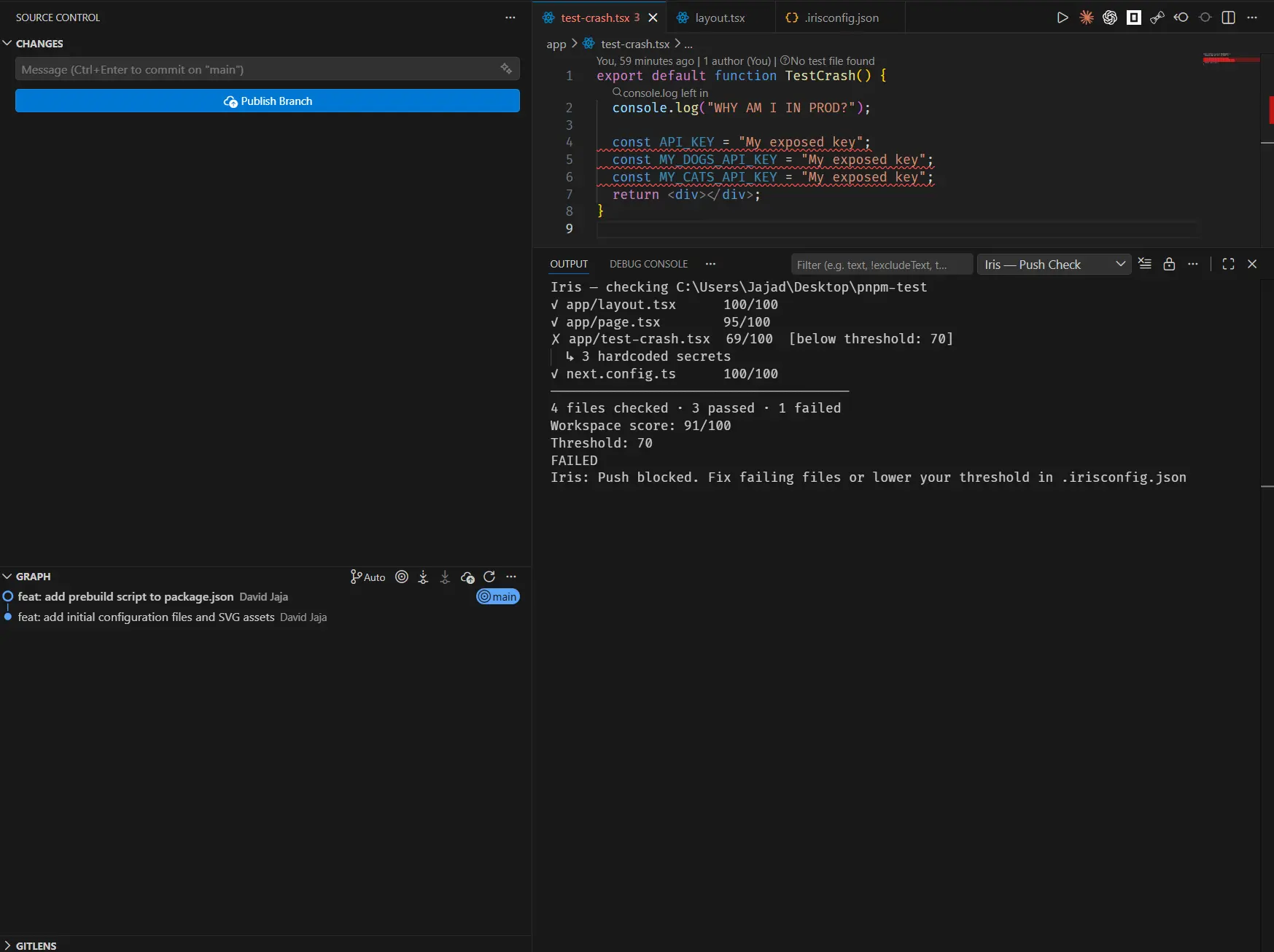
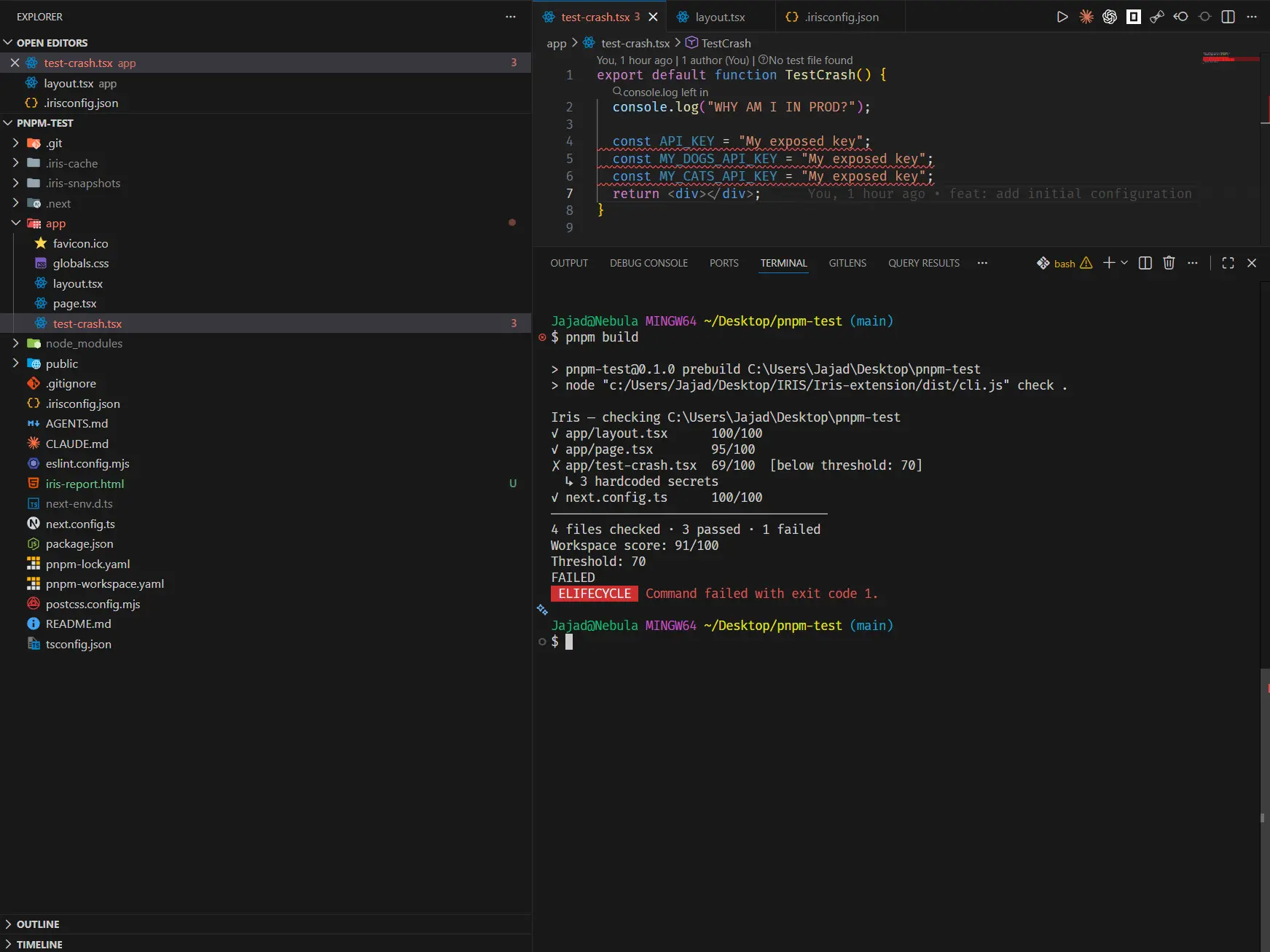
Iris Code uses the same local analysis engine in the editor, the iris CLI, hooks, and CI. When a configured rule fails, the action stops with the evidence instead of a generic red status.
Block a push before the regression leaves the machine
Apply the same gate before a build
Duplicate code that survives cosmetic changes
Iris Code 1.12 detects copy-pasted structure within and across files. Rename variables, change string or number literals, reformat the block, or edit comments—the structural match remains visible.
- Detection and duplication percentage are free.
- Import headers, re-export blocks, uniform data tables, oversized files, and minified-looking files are filtered to reduce noise.
// iris-ignore: duplicate-code -- <reason> records an intentional exception without silently hiding it.- Pro opens either side in an editable diff and can enforce a repository-wide duplicate-block cap with
gateMaxDuplicateBlocks.
Read how duplicate detection works
Remove what can be proved safe to remove
Iris Code fixes only the findings that need no judgement: a line holding nothing but a debug statement, a variable that is unused and assigned a literal, and a standalone unused Java import. Everything else refuses with a reason, per finding rather than per run, so one unfixable finding does not stop the provable ones.
A hardcoded secret is never auto-fixed - the value has to move to the environment and the credential has to be rotated, and neither is a mechanical edit. A debug statement sharing its line with real code is left alone, because deleting the line would take the code with it.
It is a Quick Fix on the lightbulb in VS Code, iris fix --safe in the terminal, and iris_fix_safe over MCP. All three share one planner, so they agree on what is safe. Free.
Free for analysis. Pro for enforcement.
| Capability |
Free |
Pro |
| File health score, complexity, functions, and imports |
Yes |
Yes |
| Code smells, security smells, and hardcoded secrets |
Yes |
Yes |
| Duplicate code detection |
Yes |
Yes |
| Inline diagnostics, Code Lens, status bar, and detached panel |
Yes |
Yes |
Reasoned iris-ignore suppressions |
Yes |
Yes |
| Open findings at the affected code |
Yes |
Yes |
| One saved whole-project scan |
Yes |
Yes |
| Gate Preview across six presets, including AI-assisted |
Yes |
Yes |
| Ranked Quality Signals with raw counts |
Yes |
Yes |
One-command project setup (iris init) |
Yes |
Yes |
Safe mechanical fixes on one file (Quick Fix, iris fix --safe) |
Yes |
Yes |
| Safe mechanical fixes across a folder or workspace |
— |
Yes |
| Finding explanations: measured value, configured limit, and overage |
— |
Yes |
| Project rules written where your AI agent reads them |
Yes |
Yes |
| MCP server for AI agents: findings, config, and safe fixes on one file |
Yes |
Yes |
| MCP folder and workspace scope, gate status, and dependency risk |
— |
Yes |
| Per-language file naming conventions |
Yes |
Yes |
| One-click rename a file to its convention (with undo) |
Yes |
Yes |
| Batch rename every naming violation |
— |
Yes |
| Interactive Review my changes |
Yes |
Yes |
| Issues and TODOs from reviewed changes |
Yes |
Yes |
| HTML report export |
Yes |
Yes |
| Two rolling trend snapshots |
Yes |
Yes |
| Fresh workspace reviews and folder analysis |
— |
Yes |
| Fresh full-workspace Issues and TODO aggregation |
— |
Yes |
| Editable duplicate diff |
— |
Yes |
| Dependency version and CVE audit |
— |
Yes |
Git history secrets scan (sidebar action + iris secrets --history) |
— |
Yes |
| Unlimited trend history and locked baselines |
— |
Yes |
| Custom thresholds, gate limits, and scoring weights |
— |
Yes |
| Pre-push, pre-build, and CI enforcement |
— |
Yes |
| Full directory, staged-file, dependency, CVE, and gate CLI commands |
— |
Yes |
A 14-day Pro trial is available by request with no credit card required. Request a trial or compare plans.
Preview before you block anything
Gate Preview scans the project against six built-in policies without installing a hook or blocking a file:
| Preset |
Minimum score |
Intended use |
| Legacy |
60 |
Existing codebases with accumulated debt |
| Balanced |
70 |
A practical starting point for most projects |
| TypeScript |
76 |
Stronger type-safety expectations |
| AI-assisted |
82 |
High-volume review of AI-assisted changes |
| Strict |
82 |
Greenfield applications and shared libraries |
| Security |
85 |
Secrets and security-sensitive projects |
Start with a preset, see how many files would fail, and only enable enforcement when the threshold is realistic for the repository.
Enforce the same standard everywhere
Pro uses the same analysis engine in the editor, CLI, hooks, and CI:
- Pre-push hook — blocks a push when the configured gate fails; a hung analysis is stopped after 120 s (
IRIS_HOOK_TIMEOUT env var to adjust) so a push is never stuck forever
- Build hook — runs before Node builds, or Makefile-based Go, Python, Ruby, .NET, Java, and Rust builds
- GitHub Actions — emits inline annotations and a job summary with
--format github
- Other CI systems — use the exit code plus JSON output in GitLab CI, Bitbucket Pipelines, or any shell runner
- Slack — set
IRIS_SLACK_WEBHOOK and gate results post to a channel from your own CI; the message is built locally and never passes through Iris servers (iris slack setup walks you through it)
Commit one .irisconfig.json so the team shares the same preset and limits:
{
  "$schema": "https://www.iriscode.co/schema/v1/irisconfig.schema.json",

  "presetId": "balanced",
  "minHealthScore": 75,
  "gateMaxSecrets": 0,
  "gateMaxDuplicateBlocks": 2,
  "gateMaxNamingViolations": 0,
  "gateMaxSecuritySmells": 0
}
Generated configs include that $schema line, and it is what gives you key
completion, hover docs, and a warning on typos - in VS Code, JetBrains, Neovim, or
anything else that reads JSON schema, with no editor-specific setup. Iris Code
ignores the key itself, so removing it changes nothing but the editor help.
File naming is Free. You don't have to configure it by hand: after a workspace scan, if no policy is set, Iris Code detects the convention your files already follow and offers to adopt it in one click. Or set a workspace fallback and add ordered path rules for components, hooks, composables, routes, or any other project role. Pro additionally unlocks per-file thresholds:
{
  "fileNaming": {
    "convention": "kebab-case",
    "ignore": ["src/generated/**"],
    "overrides": [
      { "files": ["**/components/**"], "convention": "PascalCase" },
      { "files": ["**/hooks/**", "**/composables/**"], "convention": "camelCase" }
    ]
  },
  "fileNamingScope": "new-files",
  "fileLengthThreshold": 300,
  "languages": {
    "typescript": {
      "fileNaming": { "convention": "camelCase", "scope": "all", "ignore": [] },
      "functionLengthThreshold": 30
    },
    "python": { "fileLengthThreshold": 500, "complexityThreshold": 8 },
    "ruby": { "fileNaming": { "convention": "snake_case", "ignore": [] } }
  }
}
Language keys are typescript, javascript, go, python, ruby, csharp, java, and rust (.tsx counts as TypeScript, .jsx as JavaScript, ERB uses Ruby, .csproj uses C#, .properties uses Java, and .rs uses Rust). Top-level ignore globs always exclude matching files. Path rules are evaluated in order and the last match wins. When no path rule matches, a nested language naming policy is used as a backward-compatible fallback; otherwise the top-level convention applies. A matching path rule or language fallback may override fileNamingScope. Blocks may also carry Pro per-file thresholds, healthScoreWeights, severityOverrides, and gate caps; scan-total gates and enable* toggles stay top-level.
Naming warnings are on by default once a naming policy is configured: violations color the Explorer entry through VS Code's Problems decorations and show a rename hint at the top of an open file. Set inlineDiagnostics.fileNaming to false to opt out of the diagnostic while keeping scan findings.
Fixing names. A violation's CodeLens, its Quick Fix (lightbulb), and the Explorer right-click menu all rename the file to its suggested convention through an editable prompt. Iris Code renames through a workspace edit so TypeScript and JavaScript imports are rewritten automatically, and every rename can be undone from the toast or the "Iris Code: Undo Last Rename" command. Pro adds a File Naming panel (from the sidebar's File Naming section) that lists every violation with an editable target name so you can rename selected files, or all of them, in one import-updating pass. Renaming Python, Ruby, or C# files does not rewrite import/require_relative statements or type and namespace names - Iris Code warns when one of those is renamed. Committing before a large batch is recommended.
Preset configuration and per-language file naming are free. Custom thresholds and enforcement fields require Pro.
Set up GitHub Actions · Configure .irisconfig.json
Use Iris Code from the terminal
The extension includes the iris CLI used by its hooks. You can also install the standalone package:
npm install -g @iris-code/cli
Common commands:
iris init                   # free: set the project up - config, rules, hook
iris check src/app.ts       # free single-file health check
iris fix --safe src/app.ts  # free: preview the removals Iris Code can prove safe
iris secrets .              # free secrets scan
iris security .             # free security-smell scan
iris report .               # free HTML report
iris rules                  # free: write project rules for your AI agent
iris mcp                    # free: serve Iris Code to your AI agent over MCP

iris check .                # Pro directory scan
iris gate .                 # Pro quality gate
iris deps .                 # Pro dependency and CVE audit
iris cve . --severity high  # Pro CVE severity gate
iris sbom .                 # Pro CycloneDX 1.5 SBOM
The CLI supports pretty, JSON, and GitHub Actions output. Set IRIS_SLACK_WEBHOOK and iris check / iris gate also post the result to Slack from your own CI — file paths and scores only, built and sent locally; run iris slack setup for a guided walkthrough. Read the CLI guide.
Hand your AI agent the same rules the gate uses
Coding agents guess at a project's standards. Iris Code can tell them instead - over the Model
Context Protocol, so it works in Claude Code, Codex, Cursor, Windsurf, Copilot agent mode, Zed and
JetBrains AI Assistant rather than one editor's assistant:
npx -y @iris-code/mcp
The agent can then ask what a file's findings are, what the project actually enforces, whether a
change would pass the gate, and whether a dependency is safe - and it gets the same numbers your
pre-push hook uses, not an approximation. Safe fixes are preview-first: Iris applies only a change
set it has already shown, refuses per finding anything it cannot prove, and never auto-fixes a
secret. Analysis stays on your machine.
In JetBrains IDEs, open a project and choose Tools | Iris Code | Set Up MCP Server. Iris Code
copies the ready-to-paste configuration for its bundled server, so Node.js is not required and the
server is pinned to the open project.
Single-file findings, project config and single-file safe fixes are Free. Folder and workspace scope,
gate status, rule explanations and dependency risk are Pro. Read the MCP guide.
Supported languages
| Language |
Extensions |
Language-aware analysis |
| TypeScript |
.ts, .tsx, .mts, .cts |
Type-safety metrics, imports, functions, smells, security, and duplicates |
| JavaScript |
.js, .jsx, .mjs, .cjs |
Imports, functions, smells, security, JSX-aware duplicate filtering |
| Vue SFC |
.vue |
JavaScript/TypeScript from <script> and <script setup>; native line numbers; template/style excluded |
| Svelte SFC |
.svelte |
JavaScript/TypeScript from instance and module <script> blocks; native line numbers; markup/style excluded |
| Go |
.go |
Functions and methods, imports, smells, security, and duplicates |
| Python |
.py, .pyw |
Functions and methods, imports, smells, security, and duplicates |
| Ruby / Rails |
.rb, .rbw, .rake, .gemspec, .ru, .thor, .builder, .jbuilder, .rabl, .arb, .podspec and conventional files such as Gemfile, Rakefile, Fastfile, and Vagrantfile |
Methods, keyword/splat parameters, requires/gems, nesting, Ruby and Rails smells, security, secrets, suppressions, naming, scoring, gates, and duplicates |
| ERB |
.erb, .rhtml (including compound names such as .html.erb) |
Ruby inside executable ERB tags with native line numbers; HTML and ERB comment tags excluded |
| C# / .NET |
.cs, .csproj |
Methods and constructors, using namespaces and PackageReference entries, nesting, C# smells and security idioms, async void, catch-all exceptions, LINQ chain length, large types, secrets, suppressions, naming, scoring, gates, and duplicates. A .csproj is read as a manifest: its dependencies and secrets, not its build numbers |
| Java |
.java, .properties |
Methods and imports, Javadoc-aware unused import checks, Java security idioms, secrets, suppressions, naming, scoring, gates, and duplicates. .properties files are scanned for secrets as Java-adjacent config |
| Rust |
.rs |
Functions, modules, use import counting, test-aware unwrap/panic! handling (exempt inside #[cfg(test)]), Rust security and smell checks, secrets, suppressions, naming, scoring, gates, and duplicates. Unused imports are not reported: a Rust trait is imported so its methods become callable and its name then never appears, so the verdict cannot be stood behind |
Dependency audits understand npm/yarn/pnpm workspaces, go.mod, requirements.txt, pyproject.toml, RubyGems (Gemfile.lock, Gemfile, .gemspec), NuGet (.csproj, Directory.Packages.props, packages.lock.json, packages.config), Cargo (Cargo.toml, Cargo.lock), and Maven/Gradle (pom.xml, build.gradle, version catalogues). Lockfiles are used when available so advisory checks reflect installed versions rather than manifest ranges. RubyGems and Cargo lockfiles include the resolved transitive tree; NuGet without packages.lock.json and Maven/Gradle manifests scan direct package declarations only. Unpinned or conflicting versions are reported as not checked rather than clean.
Supported editors
One analysis engine backs every editor, so a finding in one is a finding in all of them. There is no "lite" edition with quieter rules.
| Editor |
Status |
How it runs |
| VS Code |
Available on the Visual Studio Marketplace |
Full extension: sidebar, panels, trends, change review |
| Cursor, Windsurf, VSCodium, and other Open VSX editors |
Available on Open VSX |
The byte-identical VSIX - one artifact is published to both marketplaces, so the listings cannot drift |
| IntelliJ IDEA, WebStorm, PyCharm, GoLand, and other IntelliJ-based IDEs |
Available on the JetBrains Marketplace |
A plugin built on the shared Iris language server |
| Any editor with a terminal |
Available |
The iris CLI, git and build hooks, and CI |
In JetBrains IDEs, Iris Code runs as a local language server and provides inline diagnostics, one-click iris-ignore suppressions that scaffold the required reason, per-file health scores on hover, code lenses, filename-convention renames, and a local workspace dashboard under Tools > Iris Code. Configuration comes from the same .irisconfig.json, and a single sign-in in ~/.iris/credentials is shared with the CLI - sign in or out from Tools > Iris Code, and analysis and the panel refresh in place without an IDE restart. A config built in the dashboard Config Studio can be pulled in from Tools > Iris Code > Sync Config from Dashboard - paste the one-time code the dashboard shows, review a real diff, and confirm before anything is written. The panel follows the IDE's own theme, and its text scales with your IDE interface font rather than staying at a fixed size. Analysis stays on the machine in every host. The same pasted-code route works in any VS Code-compatible editor whose own URI scheme the dashboard cannot deep-link into (Trae, Positron): run Iris Code: Sync Config from Dashboard from the command palette.
Install the LSP4IJ plugin first, and use a full IDE restart after installing - JetBrains registers file-type associations at startup. If .irisconfig.json reports "JSON standard does not allow comments", the IDE is holding a user-level override that cancels the JSON5 association Iris Code ships; reinstalling the plugin will not clear it. Fix it under Settings > Editor > File Types: select JSON5 and add .irisconfig.json back to its file-name patterns. Full explanation in docs.iriscode.co/installation and hosts/jetbrains/README.md.
Workspaces with several folders
Iris Code scans one root folder at a time. In a single-folder window, including a monorepo with
many packages, that is the whole workspace and nothing changes: config resolution walks up from each
file, so every package keeps its own .irisconfig.json rules.
In a multi-root window - several separate folders added to one VS Code window and saved as a
.code-workspace - Iris scans the folder containing the file you are working in, names it in the
progress notification, and says afterwards how many folders it did not scan. Run Iris Code: Select
Workspace Folder to Scan to switch; the choice is remembered for that workspace.
Roots are not merged on purpose. Those folders are usually unrelated projects, so one blended health
score across two codebases would not mean anything, and a locked baseline, a trend history and a
pre-push hook each belong to one project rather than to the window.
Accuracy you can check
Every analysis rule is measured against a labelled corpus of real code and reported as per-rule, per-language precision and recall - no single global accuracy figure that averages away the detail that matters. The measured baseline is checked in, and Iris Code's own test suite fails the build if any rule regresses, so no release ships a quality regression unnoticed. Every finding in the sidebar carries a 👍 / 👎 control; the feedback is count-only (rule id, language, verdict) and never leaves source code behind.
Read the accuracy methodology
Local analysis and network boundaries
Source analysis runs locally. Iris Code does not send source code, file contents, or project structure to an analysis backend or AI model.
Network requests are limited to:
- sign-in, licence validation, billing, and config sync
- product-use events, which can be disabled in account settings outside required trial operation
- dependency version and advisory lookups; only package ecosystem, name, and version are sent after consent
Dependency results are cached locally for 24 hours. CLI network consent can be revoked with --revoke-network.
Read the privacy policy
Documentation and support
Iris Code is built and maintained by David Jaja. Questions, bugs, or security concerns can be sent to hello@iriscode.co.
Already using Iris Code? An honest Marketplace review helps other developers decide whether it belongs in their workflow.

