MusicBee Remote
A Visual Studio Code extension to control MusicBee remotely.
Table of Contents
Installation
From Visual Studio Code Marketplace
- Open Visual Studio Code
- Go to the Extensions view (
Ctrl+Shift+X / Cmd+Shift+X)
- Search for "MusicBee Remote"
- Click Install
→ Visual Studio Marketplace
From Open VSX Registry
For editors that use the Open VSX Registry (e.g., Cursor, VSCodium):
- Open your editor
- Go to the Extensions view (
Ctrl+Shift+X / Cmd+Shift+X)
- Search for "MusicBee Remote"
- Click Install
→ Open VSX Registry
From Command Line
Choose the command based on your editor
code --install-extension darthminos.musicbee-remote
cursor --install-extension darthminos.musicbee-remote
codium --install-extension darthminos.musicbee-remote
antigravity --install-extension darthminos.musicbee-remote
kiro --install-extension darthminos.musicbee-remote
windsurf --install-extension darthminos.musicbee-remote
Requirements
Features
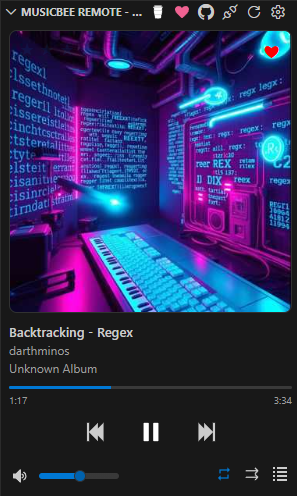
- View the currently playing track
- Control playback (play, pause, next, previous)
- Toggle repeat mode
- Toggle shuffle mode (off, on, Auto DJ)
- Toggle playlist panel indicator
- Mute and unmute audio
- Adjust volume
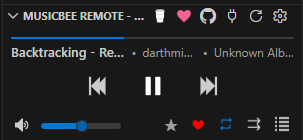
- View and set track rating
- Mark tracks as favorite
- In mini view, hover the rating star to expand all 5 stars; mini action buttons slide out while rating and return on mouse-out or rating click
- Display album art and track information
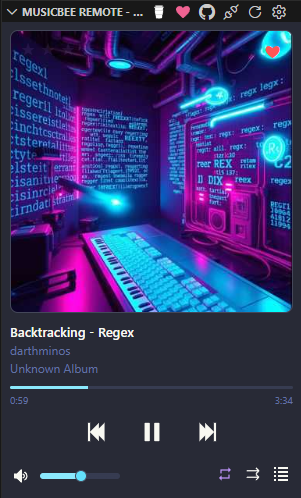
- Independent theme support
- Built-in themes including Ubuntu, Gogh, Dracula, Breeze, Hotdog, Grayscale, Cyberpunk2077, Tron, Matrix, Fairy Floss Dark, Grass, Harper, Horizon Bright, Horizon Dark, and Material
Extension Settings
If you do not use the default host and port, you can configure them in your VS Code settings:
musicBeeRemote.host: The host address of the MusicBee Remote API.musicBeeRemote.port: The port of the MusicBee Remote API.musicBeeRemote.clientName: The name of the client connecting to the MusicBee Remote API.musicBeeRemote.theme: The theme to use for the MusicBee Remote view.
Credits

Made with contrib.rocks.
Made with ❤️ for the Visual Studio Code community

