AWS IAM Service Principal Snippets for VS Code
This VS Code extension completes documented AWS service principals in IAM trust policies and AWS CDK roles. Requires VS Code 1.85 or newer.
[!TIP]
Stop AWS bill surprises before they ship.
Most infrastructure changes look harmless until next month's AWS bill lands. CloudBurn analyzes the cost impact of your AWS CDK changes right in the GitHub pull request, so expensive mistakes get caught during code review, while a fix is still a one-line change.

💰 Set it up once, then never be surprised by AWS costs again
- Install the free CDK Diff PR Commenter GitHub Action in the repository where you build your AWS CDK infrastructure
- Then install the CloudBurn GitHub App on the same repository
From then on, every PR with infrastructure changes gets a comment with your CDK diff analysis, and CloudBurn adds a cost report next to it:
- Monthly cost impact: whether this change raises or lowers your AWS bill, and by how much
- Per-resource breakdown: which resources drive the change, old versus new monthly cost
- Region-aware pricing: rates match the region your infrastructure actually deploys to
Cost review happens inside code review, so you optimize as you code, while the context is still fresh.
CloudBurn is free during beta. After launch, a free Community plan (1 repository, unlimited users) stays available.
Features
- Context-aware completion: Suggestions appear in
Principal.Service, Terraform principals blocks with type = "Service", and the first argument of CDK ServicePrincipal constructors.
- Correct insertion: Arrays, multiline constructors, incomplete quotes, and partially typed hostnames are supported. Selecting a principal replaces the entire hostname and preserves existing quotes.
- Language support: JSON, JSONC, YAML, Terraform, TypeScript, TSX, Python, and JSON/YAML CloudFormation
.template files.
Usage
- Install the "AWS IAM Service Principal Snippets" extension in VS Code.
- Open or create a new file (
.json, .yml, .tf, .ts, or .py) where you're defining IAM policies or roles.
- When you reach a point where you need to specify a Service Principal (e.g.,
Principal key in JSON/YAML policies, assumed_by parameter in Python roles, etc.), start typing the name of the AWS service.
- The extension will provide auto-completion suggestions for matching AWS Service Principals.
- Select the desired Service Principal to insert it into your code.
Example of auto-completion in action:
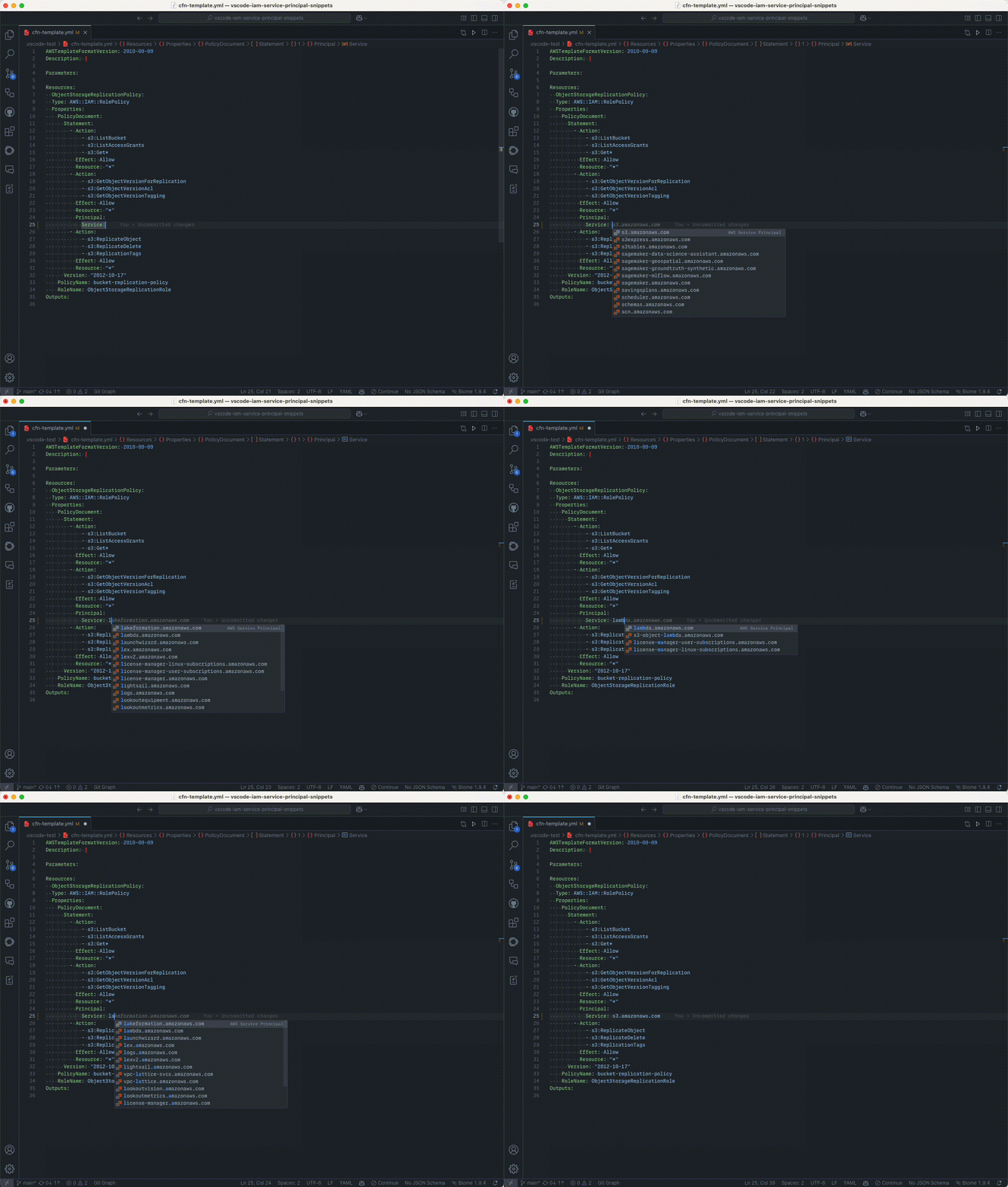
Note: If auto-completion doesn't trigger automatically, press Ctrl+Space (or Cmd+Space on macOS) to manually invoke IntelliSense.
Catalog accuracy
The catalog contains literal principal names from AWS service-linked role documentation and curated service-role references in src/principal-sources.json. Each record retains its AWS documentation URLs. Full hostnames remain distinct: ec2.amazonaws.com and ec2.application-autoscaling.amazonaws.com are separate entries.
Coverage depends on these sources and is not exhaustive. IAM action prefixes and service endpoint names are not reliable evidence of a service principal. The catalog excludes inferred names and documentation placeholders. Completion inserts the selected hostname; it does not rewrite or validate the rest of your IAM policy.
Development
Use Node 24 from .nvmrc and Python 3.14.8, matching CI. Install the pinned dependencies:
fnm use
npm ci
uv venv --python $(python --version 2>&1 | sed "s/Python //")
uv pip install -r src/requirements.txt
Run the checks sequentially:
npm run test:python
npm run validate:catalog
npm test
VSCODE_VERSION=stable npm test
npm run package -- --out extension.vsix
The extension tests launch real VS Code instances, request completions through the editor API, and apply the returned edits. The suite covers insertion, excluded contexts, failed catalog loading, cache invalidation, and a 1 MiB template benchmark. Reports are written to test-results/vscode.json. On headless Linux, use xvfb-run -a npm test.
The loader recovery test temporarily removes and corrupts the catalog, then restores its bytes in a finally block. Run extension tests sequentially and avoid refreshing the catalog during a test run.
To refresh the catalog:
.venv/bin/python src/update_service_principals.py
Requests have bounded timeouts and retries. A failed source or missing required principal aborts the update; successful results are sorted and written atomically. Removals stop the update until reviewed and explicitly accepted with --allow-removals. Retired service guides are excluded explicitly, and the stale Lightsail link is mapped to its current AWS documentation page.
Edit src/requirements.in when changing Python dependencies, then regenerate the lock with uv pip compile src/requirements.in -o src/requirements.txt --no-header --no-annotate.
The VS Code type definitions match the minimum supported editor version, and Node type definitions match its Node 18 extension host. Keep these compatibility constraints when updating build tools and dependencies. GitHub Actions use explicit release version tags.
Updates and releases
The weekly update workflow fetches documentation and runs the catalog checks, updater tests, both VS Code test versions, and packaging before opening a catalog PR. It waits while an earlier update proposal is open. Fetching documentation no longer publishes a release.
PRs and changes to main run the validation workflow. For a release, update the version in package.json and package-lock.json, merge the reviewed changes into main, and push the matching v<version> tag. The release workflow checks the tag/version and main ancestry, validates and packages the tagged source, then publishes the same VSIX independently to Visual Studio Marketplace and Open VSX. A failed registry job can be rerun without repeating the successful registry job.
Publishing uses the existing VSCE_TOKEN and OPEN_VSX_TOKEN repository secrets. Automated update proposals require the repository setting that allows GitHub Actions to create pull requests.
Support
If you have a feature request or an issue, please let me know on Github
Author
Danny Steenman



