C# API Explorer
🔍 可视化探索、搜索与管理 ASP.NET Core API 路由
A powerful VS Code extension for navigating, analyzing, and managing C# Web API endpoints.



✨ 功能特性 | Features
🎯 核心能力 | Core Capabilities
⚡ 一键跳转到代码:点击路由即可跳转到对应的控制器和 Action
One-click navigation: Instantly jump to the controller and action method behind any API route
🔍 自动解析路由:扫描工作区 C# 文件,提取 ASP.NET Core 路由信息
Automatic route parsing: Scans your workspace and extracts ASP.NET Core route definitions
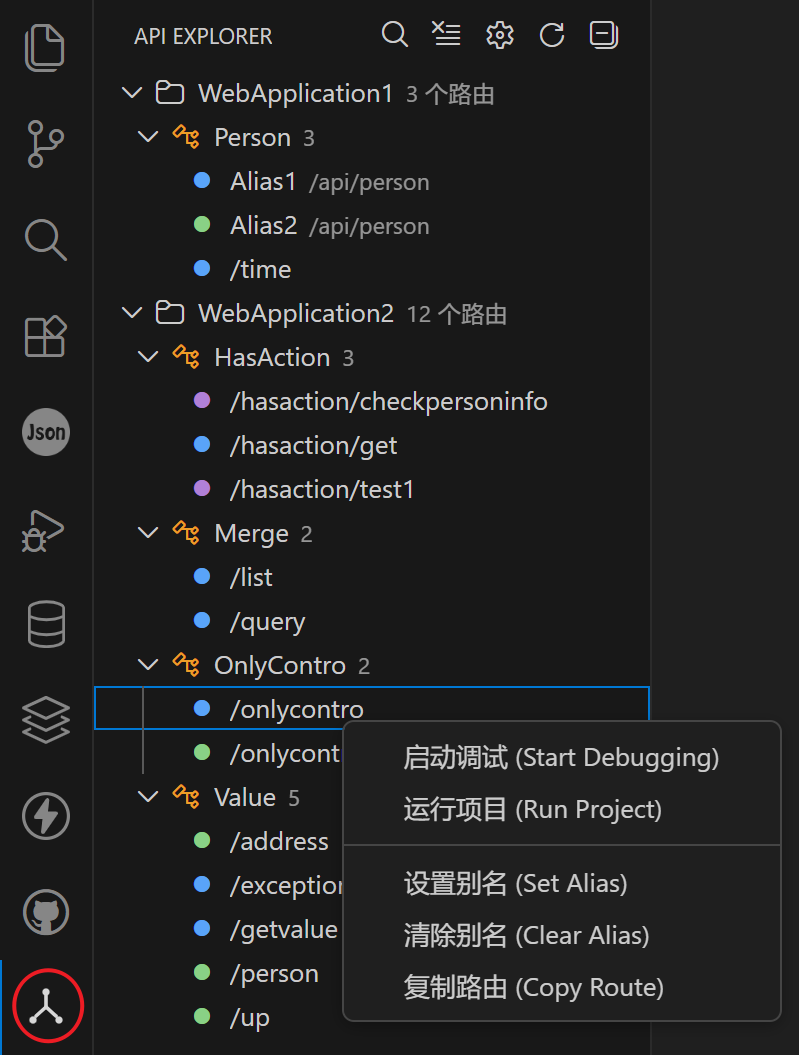
🏷️ 别名管理:为常用路由设置别名,便于识别与跳转
Alias management: Assign custom aliases to frequently used routes for quick access
🌳 可视化导航:以树形结构展示所有路由,清晰明了
Visual route tree: Explore all routes in a structured, collapsible tree view
🔎 搜索过滤:支持按路径、控制器、Action 名、别名搜索
Search & filter: Find routes by path, controller, action, or alias
🎨 HTTP 方法着色:GET / POST / PUT / DELETE 自动高亮
HTTP method coloring: Automatically color-code routes by method
📂 项目分组:按项目和控制器分组展示路由结构
Project grouping: Organize routes by project and controller
🚀 项目启动(仅 C# Dev Kit):通过 C# Dev Kit 的 dotnet 调试器启动调试或无调试运行,自动注入 launchSettings.json 环境变量
Project launch (C# Dev Kit only): Start debugging or run without debugging via C# Dev Kit dotnet debugger, with automatic environment variable injection from launchSettings.json
📦 依赖说明:使用“启动调试 / 运行项目”前,请先安装并启用 C# Dev Kit 扩展
Requirement: Install and enable C# Dev Kit before using “Start Debugging / Run Project”
🔧 API 版本自动解析:自动识别 [ApiVersion] 特性,替换路由中带 :apiVersion 约束的占位符(变量名任意,如 {version:apiVersion}, {v:apiVersion})
API version auto-parsing: Automatically recognizes [ApiVersion] attributes and replaces placeholders with :apiVersion constraint (variable name can be anything, e.g., {version:apiVersion}, {v:apiVersion})
🎨 UI 特性 | UI Highlights
🧭 Activity Bar 集成:独立图标与视图,快速访问
Activity Bar integration: Dedicated icon and view in the VS Code sidebar
🧾 清晰结构:项目 → 控制器 → 路由,层级分明
Tree structure: Clean hierarchy from project to controller to route
🧰 工具栏操作:搜索、刷新按钮一应俱全
Toolbar actions: Quick access to search and refresh
📷 截图 | Screenshots
⚙️ 配置 | Configuration
排除模式 | Exclude Patterns
配置扫描时需要排除的目录模式:
Configure directory patterns to exclude during route scanning:
{
  "csharpApiExplorer.excludePatterns": [
    "**/bin/**",
    "**/obj/**",
    "**/node_modules/**",
    "**/.vs/**",
    "**/.git/**",
    "**/.github/**",
    "**/.idea/**",
    "**/.vscode/**",
    "**/dist/**",
    "**/out/**",
    "**/build/**",
    "**/wwwroot/lib/**"
  ]
}
路由排序 | Route Sorting
csharpApiExplorer.sortAliasFirst:有别名的路由是否置顶显示(默认 false)
csharpApiExplorer.sortAliasFirst: Place routes with aliases at the top (default: false)
csharpApiExplorer.sortByRoutePath:是否按路由路径字母顺序排序,否则按文件中定义顺序(默认 false)
csharpApiExplorer.sortByRoutePath: Sort routes alphabetically by path, otherwise by file order (default: false)
API 版本配置 | API Version Configuration
csharpApiExplorer.defaultApiVersion:当控制器没有 [ApiVersion] 特性时使用的默认版本号(默认 1.0,与 ASP.NET Core 官方默认值一致),设置为空字符串则保持占位符不替换
csharpApiExplorer.defaultApiVersion: Default API version when controller has no [ApiVersion] attribute (default: 1.0, same as ASP.NET Core official default), set to empty string to keep placeholder
🔍 功能说明 | How It Works
API 版本自动解析 | API Version Auto-Parsing
插件自动识别 ASP.NET Core 的 API 版本管理特性,无需手动配置。
The extension automatically recognizes ASP.NET Core API versioning attributes without manual configuration.
示例 | Example:
假设你的控制器定义如下:
Suppose your controller is defined as:
[ApiVersion("1.0")]
[Route("api/v{version:apiVersion}/[controller]")]
public class UsersController : ControllerBase
{
    [HttpGet]
    public IActionResult GetAll() => Ok();
}
自动解析结果 | Auto-parsed Result:
插件自动提取 [ApiVersion("1.0")] 中的版本号
The extension automatically extracts the version from [ApiVersion("1.0")]
替换路由中的 {version:apiVersion} 占位符
Replaces the {version:apiVersion} placeholder in the route
最终路由 | Final route: /api/v1.0/users
支持的占位符格式 | Supported Placeholder Formats:
{version:apiVersion} ✓{v:apiVersion} ✓{任意名称:apiVersion} ✓
{anyName:apiVersion} ✓
关键说明 | Key Point:
重要的是 :apiVersion 约束,而不是前面的变量名。变量名(version、v 等)可以任意定义。
The :apiVersion constraint is what matters, not the variable name. The variable name (version, v, etc.) can be anything you choose.
默认版本配置 | Default Version Configuration:
如果控制器没有 [ApiVersion] 特性,插件会使用默认版本 1.0(与 ASP.NET Core 官方默认值一致):
If a controller has no [ApiVersion] attribute, the extension uses default version 1.0 (same as ASP.NET Core official default):
{
  "csharpApiExplorer.defaultApiVersion": "1.0"  // 默认值 (default value)
}
✅ 有 [ApiVersion("2.0")] 特性 → 使用 2.0(优先)
Has [ApiVersion("2.0")] attribute → Use 2.0 (priority)
✅ 无特性,使用配置的默认版本 → 使用 1.0(默认)
No attribute, use configured default → Use 1.0 (default)
✅ 无特性,配置设为空字符串 "" → 保持 {version:apiVersion} 不替换
No attribute, config set to empty "" → Keep {version:apiVersion} placeholder
💡 提示 | Tip: 这是 ASP.NET Core 官方的 API 版本管理方式(需要 Microsoft.AspNetCore.Mvc.Versioning 包),插件自动支持,无需额外配置。
This is the official ASP.NET Core API versioning approach (requires Microsoft.AspNetCore.Mvc.Versioning package). The extension automatically supports it without additional configuration.
📦 仓库地址 | Repository
📝 许可证 | License
MIT License
🎉 享受编码! | Happy Coding!
如果这个扩展对你有帮助,请给我们一个 ⭐ Star!
If you find this extension helpful, please give us a ⭐ Star!

