🧳 Sync Pack
Sync your IDE configurations across devices using local files or cloud storage







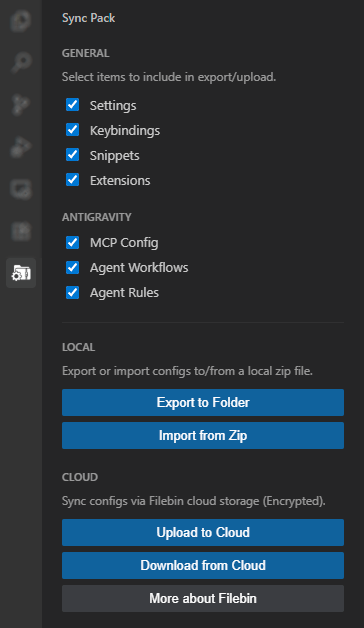
✨ Features
- Local Sync: Export and import configs to/from a
.zip file
- Cloud Sync: Upload and download encrypted configs via Filebin
- Multi-IDE Support: Automatically detects your IDE and shows relevant config options
🖥️ Supported IDEs
| IDE |
General Configs |
IDE-Specific Configs |
| VS Code |
Settings, Keybindings, Snippets, Extensions |
Copilot Instructions |
| Antigravity |
Settings, Keybindings, Snippets, Extensions |
MCP Config, Agent Workflows, Agent Rules |
| Cursor |
Settings, Keybindings, Snippets, Extensions |
Cursor Rules, MCP Config |
| Windsurf |
Settings, Keybindings, Snippets, Extensions |
Windsurf Rules, MCP Config, Cascade Memories |
📁 Content Synced
General
settings.json - User settingskeybindings.json - Keyboard shortcutssnippets/ - Code snippets folderextensions.json - List of installed extensions
VS Code
instructions/ - Copilot custom instructions
Antigravity
mcp_config.json - MCP server configurationglobal_workflows/ - Agent workflowsGEMINI.md - Agent rules
Cursor
.cursorrules - Global cursor rulesrules/ - Cursor rules foldermcp.json - MCP configuration
Windsurf
global_rules.md - Windsurf rulesmcp_config.json - MCP configurationmemories/ - Cascade memories folder
📍 Local Sync
Sync Pack can export your configs to a .zip file that you can store locally or manually transfer to another device.
☁️ Cloud Sync
Sync Pack uses Filebin for cloud synchronization:
- 60-Character Bin ID: A secure, random 60-character hexadecimal Bin ID is generated for every upload.
- AES-256-GCM Encryption: Configurations are encrypted locally with a unique random password before being uploaded.
- Post-Import Cleanup: After a successful import, the extension prompts you to delete the bin from Filebin.
- 6-Day Retention: Any files not deleted are cleared by Filebin after 6 days.
- Cross-Device Sync: Simply share or enter your Bin ID and Password on another device to sync your environment.
⚠️ Note: Even with encryption, Filebin is a public service. Always keep your Bin ID and Password private.
| |

