
Buddy - IDE CompanionA pixel IDE companion with family, playful interactions, guided tours, focus tools, and an optional community leaderboard. Installation Launch VS Code Quick Open ( Ctrl+P), paste the following command, and press enter.Copied to clipboard |

BuddyAn animated IDE companion for VS Code that reacts to your coding flow from the Activity Bar.
Preview
Buddy is local-first, lightweight, and built to add a little personality to focused work. Table of ContentsFeatures
See the Feature Guide for the full behavior reference. InstallationInstall from VS Code MarketplaceInstall Buddy from the VS Code Marketplace. Install manuallyDownload the latest
Using BuddyOn a fresh installation, Buddy offers Show Me Around (20 steps) or Just the Basics (clicking Buddy, treats, health, the ball, and the panel’s Buddy starts at the smaller size; Toggle Size switches to the larger size and remembers your choice. Buddy opens automatically when VS Code starts or reloads. Disable To open Buddy manually, open the Command Palette: Run Buddy tracks health, attention, XP, daily quests, care streaks, milestones, focus mode, and the current life across sessions without telemetry or source upload. For the full behavior reference, see the Feature Guide. Care difficulty is configurable in VS Code settings. You can tune active VS Code heart drain timing, break prompt timing, XP gain multiplier, death penalty, and whether Buddy can die. Use the Manage Family icon in the panel toolbar: Spawn partner, then Have a kid to add up to four mini Buddys. The family is saved across reloads. Click a family member for a love animation; Buddy: Clear Family in the Command Palette removes the partner and kids. Family members independently look around, fidget, celebrate, and nap on different schedules. Clicking one wakes it for a love reaction. Focus Mode settles everyone down; family members stay on the floor. Awake companions can pass through each other; before sleeping, each walks to a spot with an 8 px gap from other sleepers. If no spot fits, it stays awake until space is available. Buddy can cross the full panel to reach treats. Cookie drops and Buddy’s feeding animations do not reposition the family. There is no separate health or XP to maintain. Use the ball icon in the panel toolbar to give Buddy a toy that gradually bounces and rolls to a stop. Buddy takes turns watching it settle, stalking and pouncing on it, nudging it, or catching it in his mouth and spitting it into the air. Click it again to remove the ball. Feeding, breaks, death, and Focus Mode end ball play so those actions can take over. Use Buddy: Choose Background in the panel’s … menu or Command Palette to select adaptive pixel scenes—meadow, night, cherry blossom garden, Japanese temple, space station, neon city, underwater reef, and mushroom forest—or your own PNG/JPEG/WebP/GIF image (up to 10 MB). Custom images are copied into Buddy’s local extension storage and saved across reloads. Choose Change image scaling… for Fill panel, Fit whole image, or Tile pixels. Fill preserves proportions and crops edges; Fit shows the whole image; Tile repeats it at 4× pixel scale. Select Theme background to restore the default. In an SSH window, the image picker and storage use the extension’s host filesystem. Personalized Level-Up CardsEach local Buddy profile gets a saved random design seed. Levels 1–100 have distinct combinations of pixel scenery, palettes, constellations, and decorations. Cards show your Buddy’s color, life day, care streak, today’s completed quests, total XP, and date. A partner and kids appear only if you have spawned them, in their saved colors. Newly earned cards appear in a dismissible overlay inside Buddy’s panel. Press Escape or X to return to Buddy. Use Gallery to browse thumbnails, Prev/Next to move between cards, and Open Image for the full-size PNG. You can reopen the gallery from the panel’s … menu or Buddy: Open Level-Up Gallery. Cards earned while the panel is closed are queued locally and rendered when it next opens, using the original snapshot. Saved PNGs and their snapshot metadata stay in Buddy’s extension storage; later color, family, or progress changes do not alter them. Existing cards remain viewable. Designs are local to each VS Code profile/extension host, with no account or network service required. Reset All State preserves the collection and its design seed. Level 1 has a design, but earning cards starts with your next level-up; previous levels are not backfilled. Actions
The toolbar contains Cookie, Revive, Ball, and Manage Family. Death and break-prompt actions remain available through the Command Palette. Use Buddy: Change Colors in the Command Palette or the panel’s … menu to recolor Buddy, his partner, all kids, or everyone together. Choose from nine sprite tints; choices persist across reloads and apply to future family members. Restore default colors brings back green Buddy/kids and the blue partner. Focus timer and decorationsChoose Buddy: Focus Timer from the panel menu or Command Palette for 15, 25, 45, 60, or a custom 1–180 minute session. Buddy naps quietly with a countdown, then stretches and invites a break. Cancel from the same menu. The deadline survives reloads and includes time while the computer is asleep or VS Code is closed. Completing or cancelling restores your previous Focus Mode setting; if it was already enabled, Buddy stays settled and the completion notification still appears. Toggle Focus Mode also cancels an active timer. Choose Buddy: Arrange Decorations to view unlock requirements, place an earned item, move it between five horizontal positions, or remove it. Positions adapt to the panel width. Unlock a plant at level 2, cushion at 5, lamp at 10, and yarn toy at 15; earn a bonsai with a 3-day care streak and a star mobile with 7 days. Unlocks and placement persist locally, including across Reset All State. Existing progress counts immediately. Care streak unlocks use the existing milestone system, so milestone reactions must be enabled to earn new streak days. Decorations are cosmetic. Awake family neighbors occasionally greet, chase smoothly along the floor within available space, or curl up nearby. Floor-level family members can nudge the ball back into play. Sleeping members keep their own schedules; crowded panels limit travel, and Focus Mode pauses social play. Family chatterFamily members occasionally exchange playful pixel speech when they meet nearby, wake up, or share the ball. New pairs are curious; after encounters on two different days they become familiar, and after five they use closer, affectionate lines. Familiar family pairs can give tiny grounded nudges and heart reactions. Relationship history is saved locally; clearing the family resets those relationships. Chatter is triggered by scenarios, never by a repeating speaking timer. The whole family shares a maximum of three short exchanges per day and a varied 45–150 minute quiet period after each. It stays silent during Focus Mode, feeding, break prompts, card viewing, and while the panel is hidden. The small speech bubble follows the speaker inside the scene; there are no extra buttons or notifications. Commands
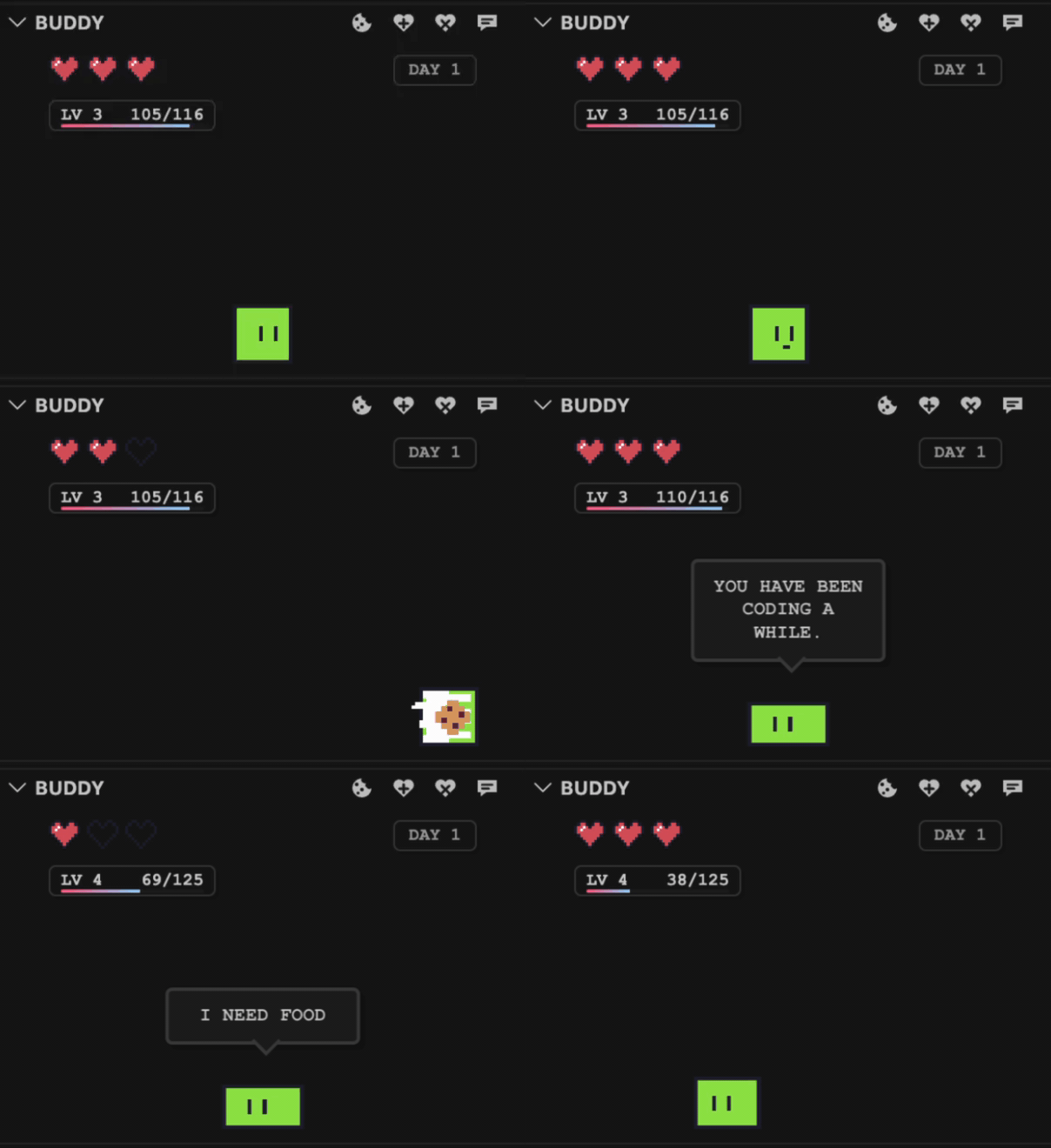
DevelopmentInstall dependencies: Run Buddy in an Extension Development Host: Keep TypeScript compiling in the background: Before sharing a build, compile and package a VSIX: Install or update that VSIX locally with the VS Code CLI: To record Buddy's core feature loop, start recording the Extension Development Host window, then run this from the repo terminal: The demo opens the Buddy sidebar and automatically runs through state changes, one-heart loss, cookie recovery, the break prompt, XP bursts, death, and revive. Keep the Extension Development Host open while it plays. Release without GitHub ActionsBuild and validate locally with the commands above. Push the release commit, then create a GitHub release and attach the generated VSIX. GitHub Actions workflows are manual-only; no Actions run is needed to build or publish a release. To update the Marketplace, sign in to Manage Publishers, open Buddy’s … → Update, and upload the same VSIX. The package includes this README, feature guide, changelog, and preview GIF. A manual upload needs no API token. For CLI publishing, use The release preview is rendered from the compiled panel, with temporary demo state. Run LicenseGNU Lesser General Public License v2.0 Optional community leaderboardOpen Buddy: Leaderboard from the Command Palette or Buddy’s Participation is optional. Before joining, Buddy makes no automatic leaderboard requests. View rankings works without joining: it fetches only public rankings, sends no Buddy stats or installation token, and creates no entry. After joining, a random installation token is stored in VS Code SecretStorage; Supabase stores only its SHA-256 hash. No email, code, repository names, or family details are uploaded. Supabase receives normal network metadata such as your IP address. This identity does not automatically follow you to another computer or SSH host, and losing its secret loses access to that entry. Scores update at most once per 24 hours, only when changed, while VS Code is running. Rankings refresh only when opened, at most every six hours, with saved results available offline. Rankings reflect the last submitted state, including deaths on the next eligible upload, and entries inactive for 30 days are hidden. Scores and care settings are local and editable, so this is friendly, self-reported competition rather than cheat-proof verification. Use Leave / remove my entry to stop uploads and delete the public record. If deletion fails offline, uploads still stop immediately; retry the same menu action when connected. Buddy’s local progress is unaffected. The backend admits at most 100,000 requests per UTC calendar month, 50 new registrations per UTC day, and 5,000 stored entries. These are conservative application limits, not a guarantee against all Supabase quota usage or abuse. Supabase organization allowances are shared with other projects, and its billing cycle can differ from the application’s calendar month. See backend setup and operations. |



 icon in the Buddy panel title bar to feed Buddy.
 icon in the Buddy panel title bar to revive Buddy.