What's New 🚀
📸 Screenshots
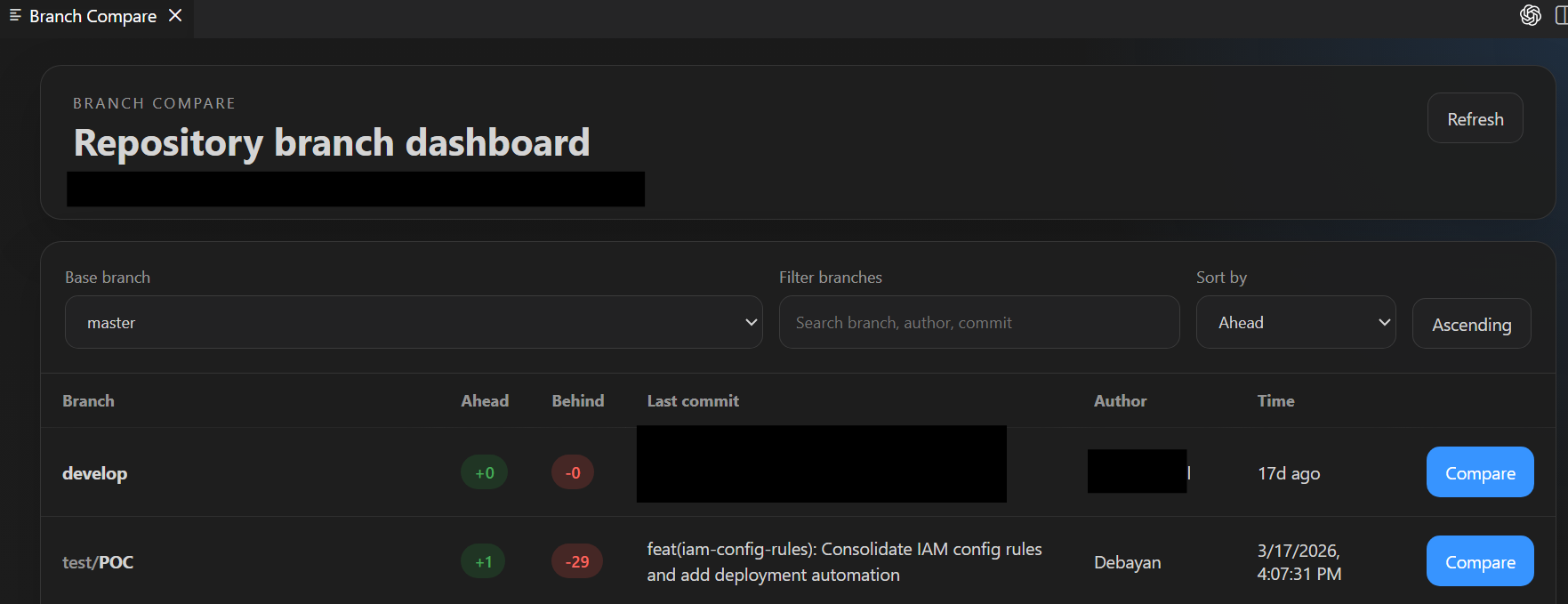
Dashboard View
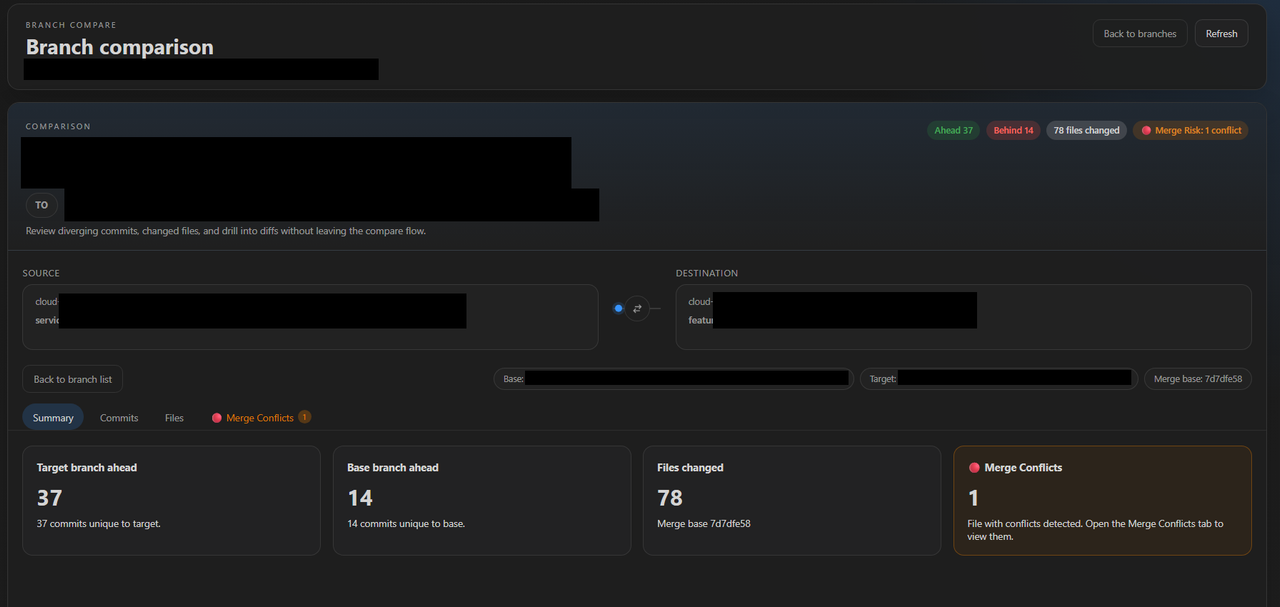
Branch Comparison View
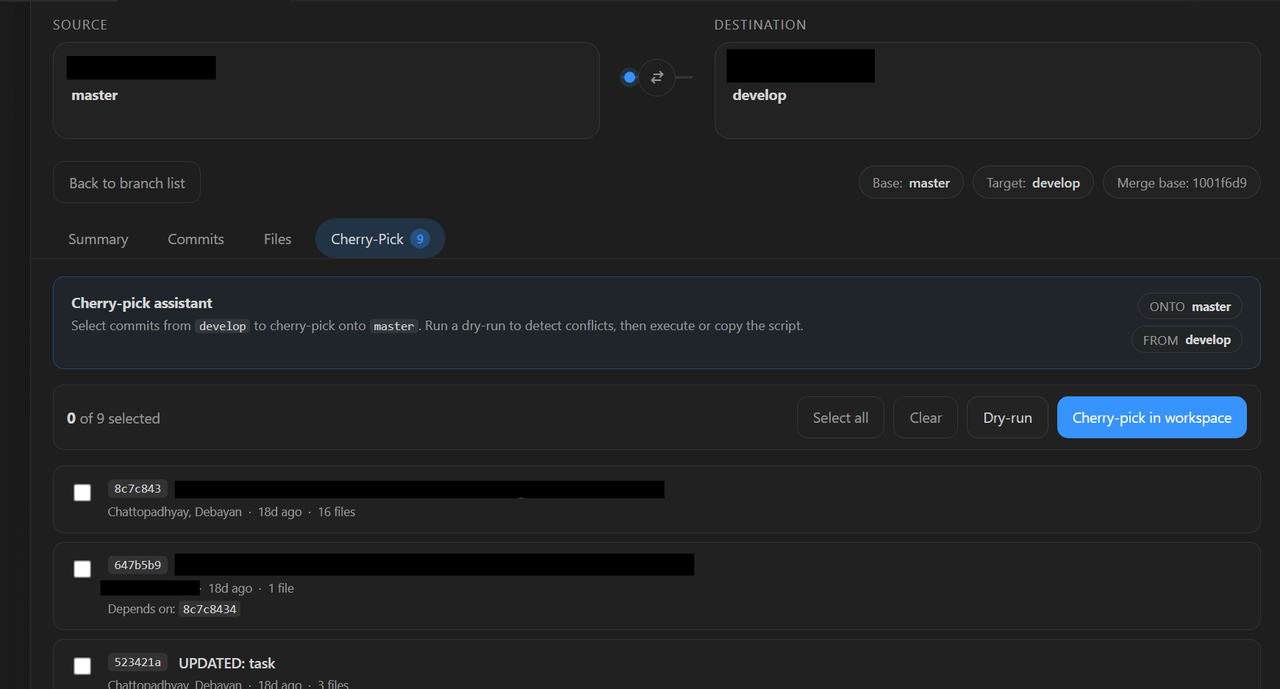
Cherry-Pick Assistant
✨ Features
|
|
| 🔀 Branch Overview |
Compare all local branches against a selected base — including remote branches when fetched |
| 🌐 Remote Branch Support |
Fetch and compare remote branches even if they don't exist locally |
| 📊 Ahead / Behind |
See commit counts at a glance for every branch |
| 🕐 Commit Info |
View the latest commit author, message, and timestamp |
| 🔍 Search & Sort |
Find branches fast with built-in filtering |
| 📂 File Diffs |
Inspect changed files between branches or specific commits |
| 🔎 Commit Drill-down |
Explore file-level changes per commit from the dashboard |
| 🔀 Merge Conflicts |
Detect, start, and resolve merge conflicts in your workspace — powered by VS Code's built-in merge editor |
| 🎯 Cherry-Pick Assistant |
Bulk-select commits, auto-detect dependencies, dry-run for conflicts, and execute or copy the generated script |
📦 Install
Available on both registries — pick the one that matches your editor.
| Editor |
Registry |
Link |
| VS Code |
VS Code Marketplace |
Install → |
| VSCodium / Gitpod / Theia |
Open VSX Registry |
Install → |
Via VS Code UI: Open Extensions Ctrl+Shift+X / Cmd+Shift+X, search Branch Compare, and click Install.
Via CLI:
# VS Code
code --install-extension codexdebayan.branch-compare

# VSCodium
codium --install-extension codexdebayan.branch-compare
🚀 Getting Started
Open the Dashboard
| Method |
Action |
| Command Palette |
Branch Compare: Open Dashboard |
| Keyboard shortcut |
Ctrl+Alt+B (Windows/Linux) · Cmd+Alt+B (macOS) |
The command is available when a folder or workspace with a Git repository is open.
Workflow:
- Open a Git repository in VS Code
- Launch Branch Compare: Open Dashboard
- Select a base branch to compare against (local or remote)
- Browse the branch list — ahead/behind counts and latest commit info are shown inline
- Click any branch to open the detailed comparison view
- Explore changed files and launch VS Code diff views directly from the panel
Remote Branches
Branch Compare automatically fetches and includes remote branches in comparisons:
- Automatic Fetching: Remote branches are fetched from your configured remotes (typically
origin)
- Local-Only Not Required: You don't need to check out or create local tracking branches — compare directly with remote refs
- Full Comparison: Remote branches are treated as first-class comparisons alongside your local branches
- Latest State: Remote branch references reflect the most recent fetch — sync your remotes to see the latest branch state
Note: Ensure your remotes are configured (git remote -v) and run git fetch to update remote tracking information before opening the dashboard for the latest results.
🔀 Merge Conflicts
When a comparison has conflicts, a Merge Conflicts tab appears (with a count badge) beside Summary, Commits, and Files.
- Start merge in workspace — runs
git checkout <base> && git merge <target> (clean tree + confirm required).
- Click any file → opens it from your working tree; resolve with VS Code's merge editor (Accept Current / Incoming / Both).
- Stage & commit via Source Control, or Abort merge to back out.
⚠️ The merge action mutates your working tree. It's gated by a confirmation and refuses on a dirty tree.
🎯 Cherry-Pick Assistant
A Cherry-Pick tab inside any comparison turns backporting into a checklist:
- Bulk-select commits unique to the target branch.
- Auto-detected dependencies — warns when a selected commit touches files also changed by an unselected ancestor, with one-click "include dependencies".
- Dry-run in a sandboxed detached HEAD to predict per-commit
clean / conflict / skipped results without touching your branch.
- Execute in workspace to apply the cherry-picks for real, or Copy script to grab a ready-to-run bash sequence.
- Pause-on-conflict with Continue / Abort controls when a real cherry-pick hits a snag.
⚠️ The execute action mutates your working tree. It's gated by a confirmation and refuses on a dirty tree or while another merge/cherry-pick is in progress.
📋 Requirements
- Git must be installed and available on your
PATH
- A folder or workspace with at least one Git repository must be open
- Diff views use temporary snapshots — your working tree is only modified if you explicitly Start merge in workspace from the Merge Conflicts tab





