Skip to content
| Marketplace
Sign in
Visual Studio Code>Programming Languages>Laravel Playground Pro (Code Runner)New to Visual Studio Code? Get it now.
Laravel Playground Pro (Code Runner)

Laravel Playground Pro (Code Runner)

Deepak M S

|
47 installs
| (0) | Free
Run Laravel code quickly. Run Laravel code directly from editor.
Installation
Launch VS Code Quick Open (Ctrl+P), paste the following command, and press enter.
Copied to clipboard
More Info

Laravel Playground Pro 🚀

Laravel Playground Pro (Code Runner) is a VS Code extension that lets you run Laravel code instantly inside Visual Studio Code.

☕ Buy me a coffee

💡 Download and install from the VS Code Marketplace:

🔗 Install Laravel Playground Pro from Marketplace


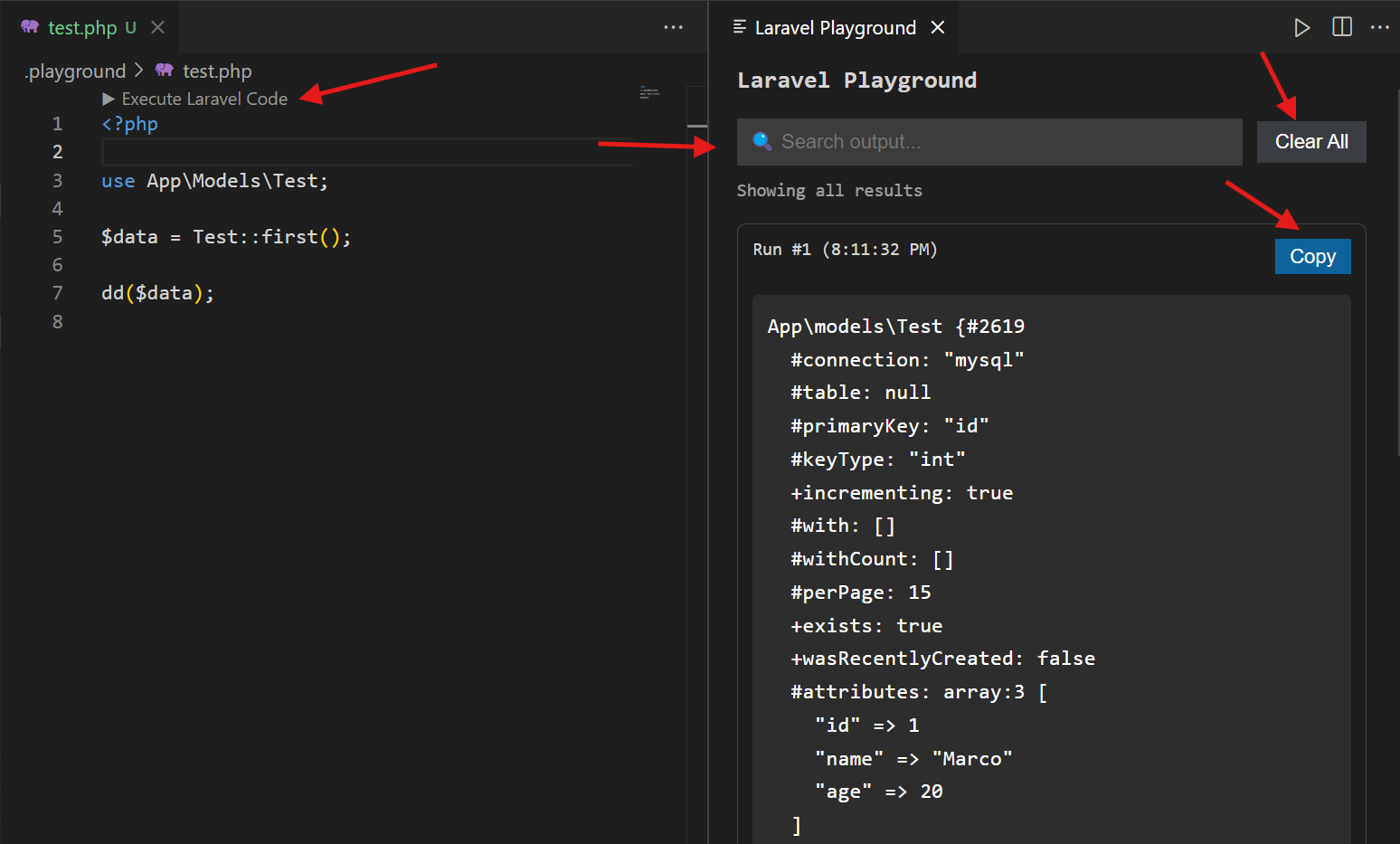
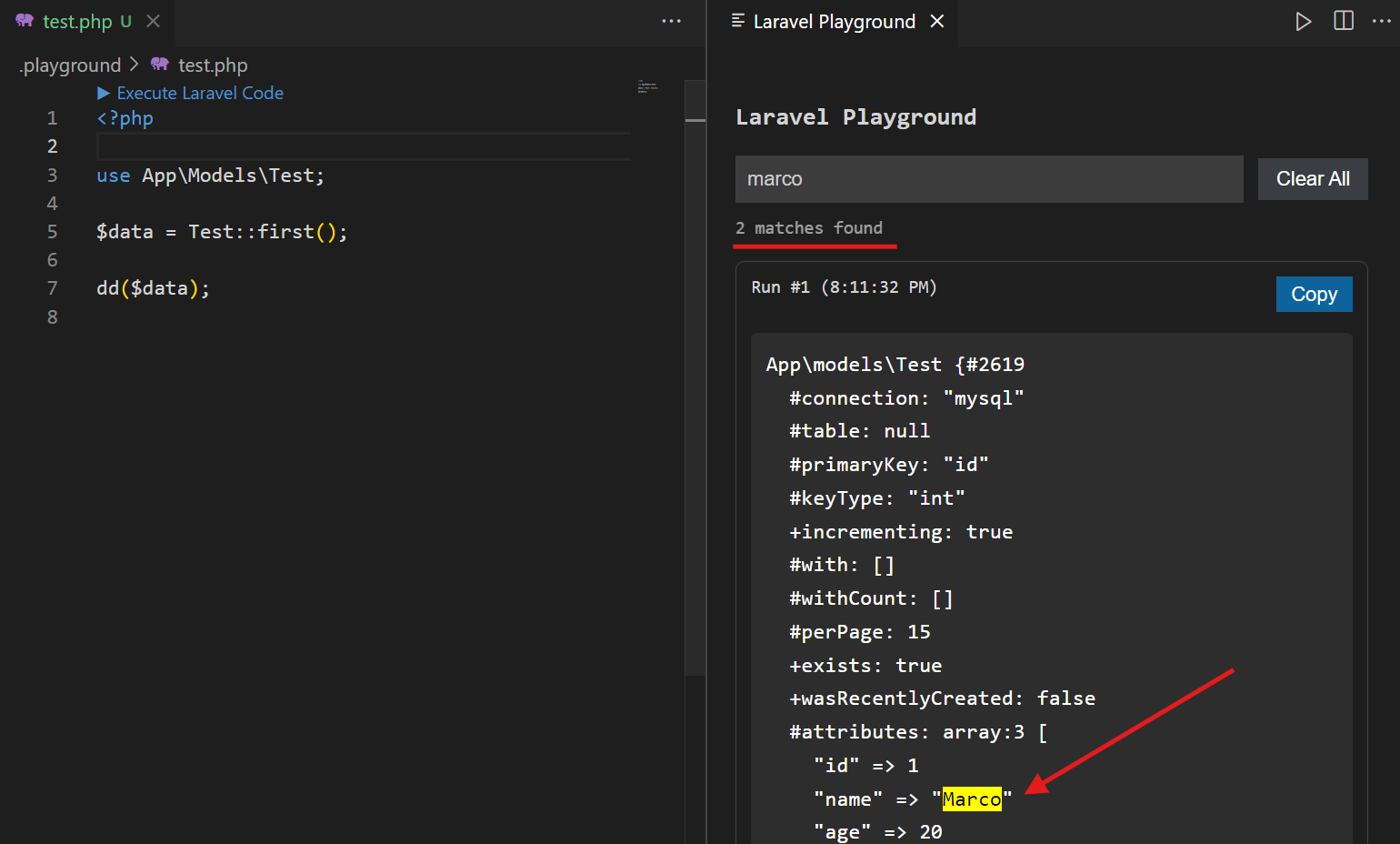
screenshot

screenshot


✨ Features

  • ▶ Run Laravel code directly from the editor

  • ⌨️ Run code quickly with Ctrl + Enter

  • 📂 Auto creates .playground/test.php for experiments

  • ⚡ Instant execution using PHP CLI

  • 🧠 Full Laravel boot (Models, DB, Facades)

  • 📊 Output panel with:

    • JSON viewer
    • HTML preview
    • Error display
  • 🔍 Global search with highlight

  • 📋 Copy output

  • 🧹 Clear all results

  • 🕘 Output history tracking


📦 Local Installation

From VSIX

To create VSIX file follow these steps

  1. Step 1: Install packaging tool

    npm install -g vsce
    
  2. Step 2: Package extension

    vsce package
    

This will create a .vsix file, for example:

laravel-playground-code-runner-pro-0.0.4.vsix

After that:

  1. Open VS Code
  2. Press Ctrl + Shift + P
  3. Select Install from VSIX
  4. Choose the .vsix file

🚀 Usage

1. Open Playground

Open the Laravel Playground using the Command Palette:

Ctrl + Shift + P → Open Laravel Playground Pro

screenshot

This will create and open:

.playground/test.php

2. Run Laravel Code

Write your Laravel code inside:

.playground/test.php

Then press:

Ctrl + Enter

Or

▶ Run Laravel code by clicking the "▶ Execute Laravel Code Or Ctrl + Enter" button in .playground/test.php

screenshot

Your Laravel code will be executed immediately and the result will be displayed in the output panel.

3. Run Again Quickly

You can edit your code and press:

Ctrl + Enter

again to execute it.

The shortcut is designed specifically for the Laravel Playground file:

.playground/test.php

so it does not run accidentally from your other PHP files.


🧪 Example

Inside .playground/test.php:

<?php

use App\Models\User;

$users = User::latest()->take(10)->get();

return $users;

Press:

Ctrl + Enter

and the result will appear in the Laravel Playground output panel.


⚡ Quick Workflow

Open Laravel Playground Pro
        ↓
.playground/test.php
        ↓
Write Laravel code
        ↓
Ctrl + Enter
        ↓
View output
        ↓
Edit code
        ↓
Ctrl + Enter
        ↓
Run again

📋 Requirements

  • VS Code
  • PHP CLI
  • A Laravel project

The extension runs the playground code using the Laravel application's environment and PHP CLI.


🐛 Issues & Feedback

If you find a bug, have a feature request, or want to contribute, please open an issue on GitHub.

GitHub Repository

  • Contact us
  • Jobs
  • Privacy
  • Manage cookies
  • Terms of use
  • Trademarks
  • Your Privacy Choices
  • Consumer Health Privacy
© 2026 Microsoft