
Citry for Visual Studio Code
The Citry extension adds syntax highlight, linting, diagnostics, variable lookup, hints (and more) to Citry components.
The inlined HTML/CSS/JS/FLT code blocks automatically detect available variables,
errors, Python and Alpine expressions inside HTML, and more.
What you get
- Syntax highlight for HTML, CSS, JavaScript component code blocks.
- Diagnostics, completion, hover, signatures, references, and navigation for
components, inputs, slots, template data, browser data, events, and i18n.
- Standard HTML/CSS/JavaScript editor help inside code blocks.
- Pretty-print HTML/JS/CSS inside Python files.
- Standalone Citry Template
.citry-html and Fluent .ftl language modes.
See it in action
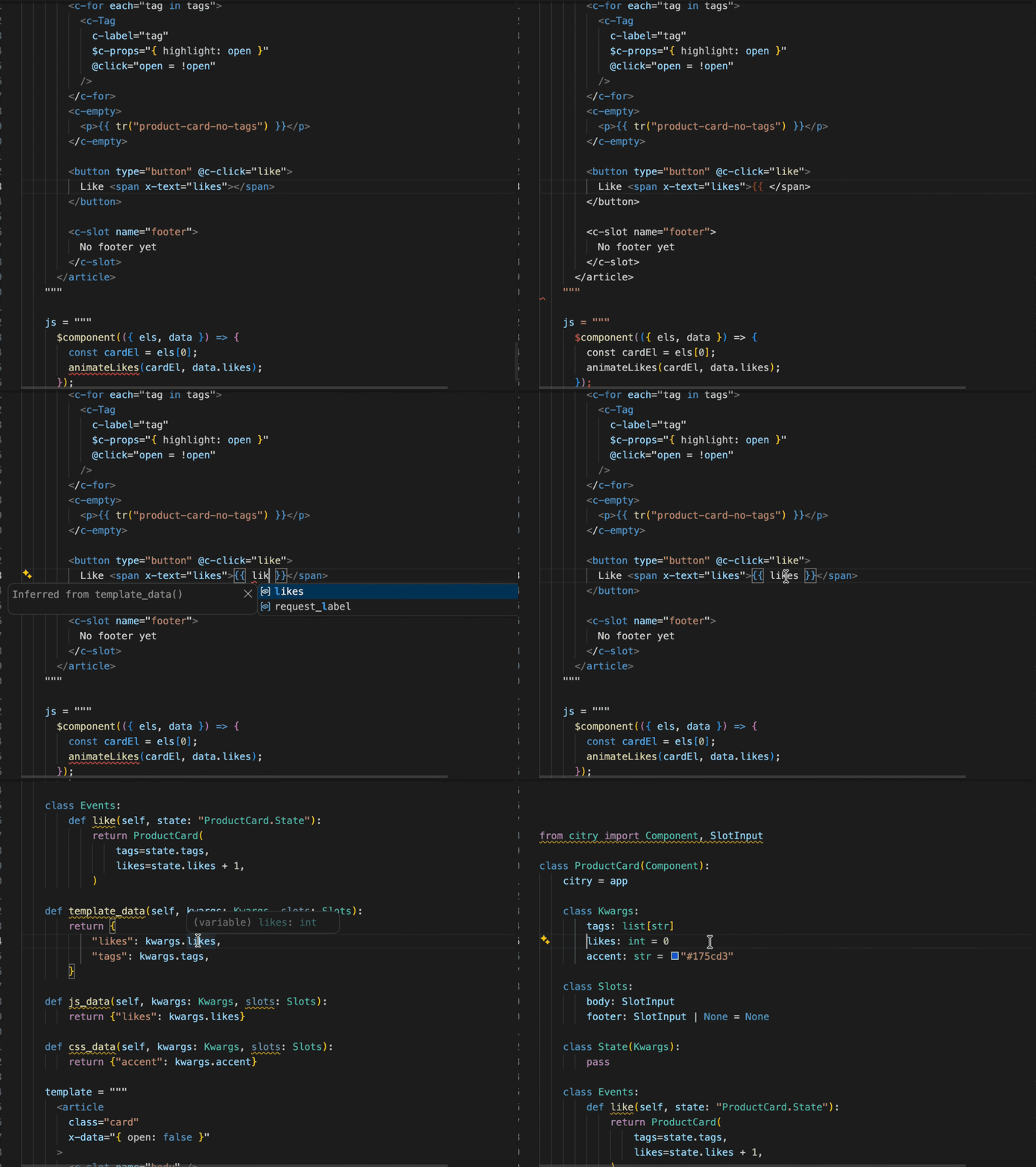
Citry completes components and their inputs directly inside the Python file,
using the application registry selected for the workspace:
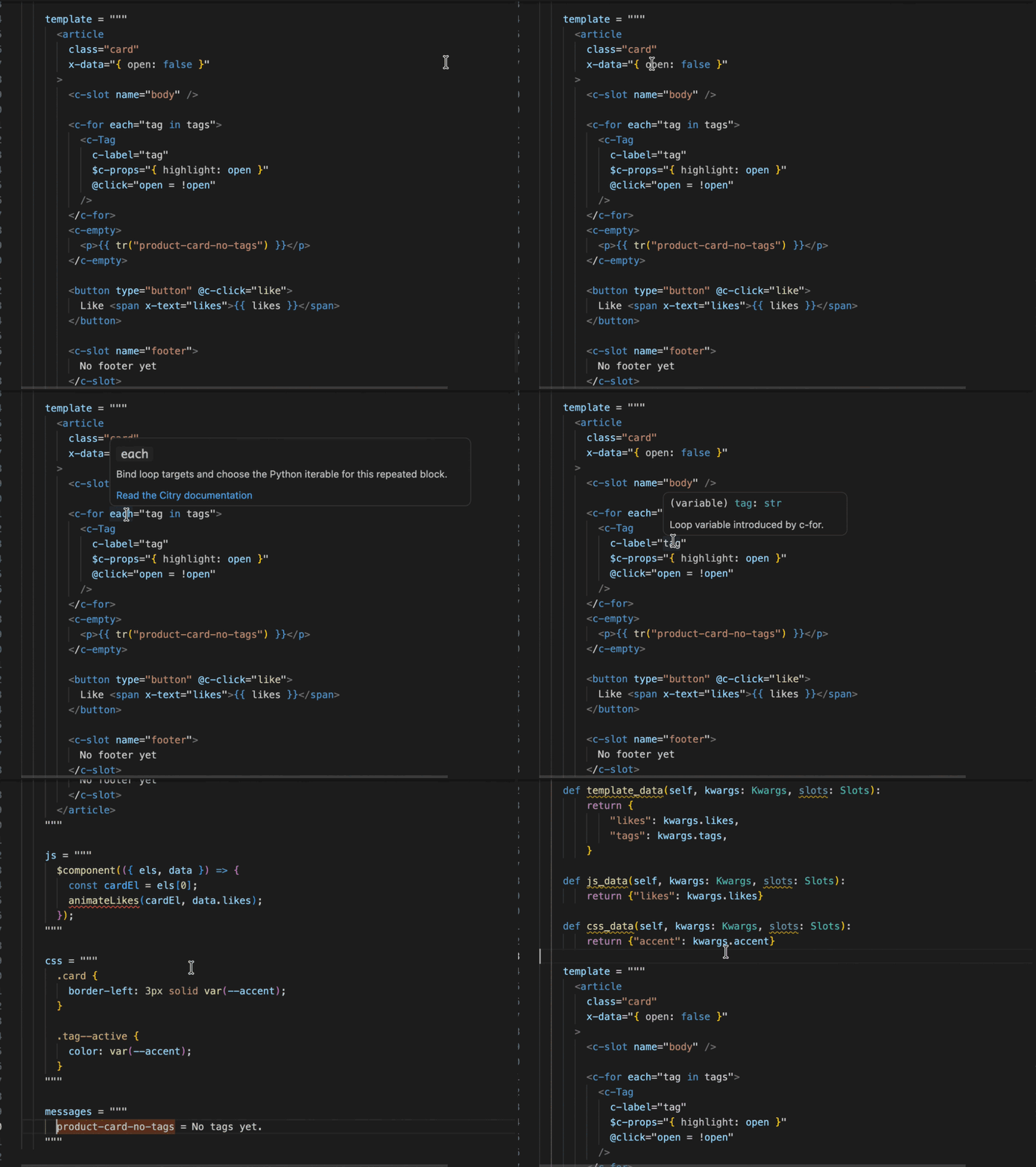
Hover hints explain the value under the cursor, while references and navigation
connect template and browser expressions back to their Python definitions:
Install
Install Citry from the
Visual Studio Marketplace
or Open VSX. Then install the
companion language server in the Python environment used by your project:
python -m pip install citry-lsp
The extension normally follows the interpreter selected by Microsoft's Python
extension. Compatible editor forks can instead set an explicit executable:
{
  "citry.python": "/path/to/project/.venv/bin/python"
}
After installation, the status bar reports whether Citry is running with a
project registry or in syntax-only mode.

Connect your project
The extension needs to know the path to the Citry instance your project uses.
Use the citry.app setting for this. The value is a Python module import path in the format path.to.module:attribute:
{
  "citry.app": "myproject.app:citry_app"
}
With citry.app, the extension provides richer diagnostics, autocomplete, and more, because it knows about all components.
Without citry.app, Citry still checks syntax and
provides help for built-in syntax like <c-if>, but it doesn't know about
other components.
Use Citry: Show Language Server Status to see the active interpreter,
application target, Citry version, and server mode. Use Citry: Restart
Language Server after changing an imported registry dynamically.
If importing the app requires environment variables, configure a dotenv file:
{
  "citry.app": "myproject.app:citry_app",
  "citry.envFile": "${workspaceFolder}/.env"
}
Citry resolves relative paths from the workspace, applies file values only to
its isolated app-discovery worker, and reloads the registry when the file is
created, changed, or deleted. The setting does not modify terminals, tests, or
the application server. A missing or malformed configured file leaves
syntax-only analysis available and appears in the language-server status.
Edit components in place
Citry recognizes direct template, js, css, and messages multiline
assignments inside Python components. Template data and loop/fill variables get
completion, readable type hover, and navigation back to their Python field or
lexical declaration. Alpine directive names and common @event and
:attribute shorthands complete in the same templates, with hover links to the
Alpine documentation and native HTML help for bound attributes. Shared and
inherited templates expose only facts that are safe for every proven component
owner.
Citry event and State bindings are linked too. Handler values in @c-* and
two-way :c-* attributes complete, hover, and navigate to the Python Events
method. A :c-* key navigates to its public Component.State field, while
completion after . offers only modifiers accepted by that binding channel.
For example, Citry carries the Python type of results into the template and
then into each result loop variable. Hovering result.url shows its type,
and navigation takes you back to SearchResult:
from dataclasses import dataclass

from citry import Component

@dataclass
class SearchResult:
    label: str
    url: str

class SearchResults(Component):
    class Kwargs:
        results: list[SearchResult]

    template = """
      <nav>
        <a
          c-for="result in results"
          c-href="result.url"
        >
          {{ result.label }}
        </a>
      </nav>
    """
The same connection extends into the browser layer:
JsData or inferred js_data() keys type Alpine expressions
and component JavaScript.- Callback
data members complete through the JavaScript provider; unknown
fields are errors when the component's data schema is known and closed.
- Callback parameters navigate to their declarations in the JavaScript source.
- Typing
:c- offers public State fields and unknown binding fields are errors
when the owning State schema is known.
- Events state and literal server-handler names complete and navigate to
Python.
CssData/css_data() keys complete inside var(--...) and navigate to their producer.- Static child props are checked against the child's JavaScript declaration.
- Literal i18n message IDs and formatter/parser profiles complete and navigate
across Python, templates, Fluent, Alpine, and component JavaScript.
Browser values work the same way. query completes inside Alpine expressions,
hover shows a JavaScript string, and navigation returns to JsData.query:
class SearchBox(Component):
    class Kwargs:
        initial_query: str

    class JsData:
        query: str

    def js_data(self, kwargs, slots):
        return {"query": kwargs.initial_query}

    template = """
      <label>
        Search
        <input x-model="query" />
      </label>
      <output x-text="query.toUpperCase()"></output>
    """
VS Code's installed HTML, CSS, and JavaScript providers continue to supply
ordinary web-language help. Citry maps their results back into the authored
component without exposing generated files in navigation.
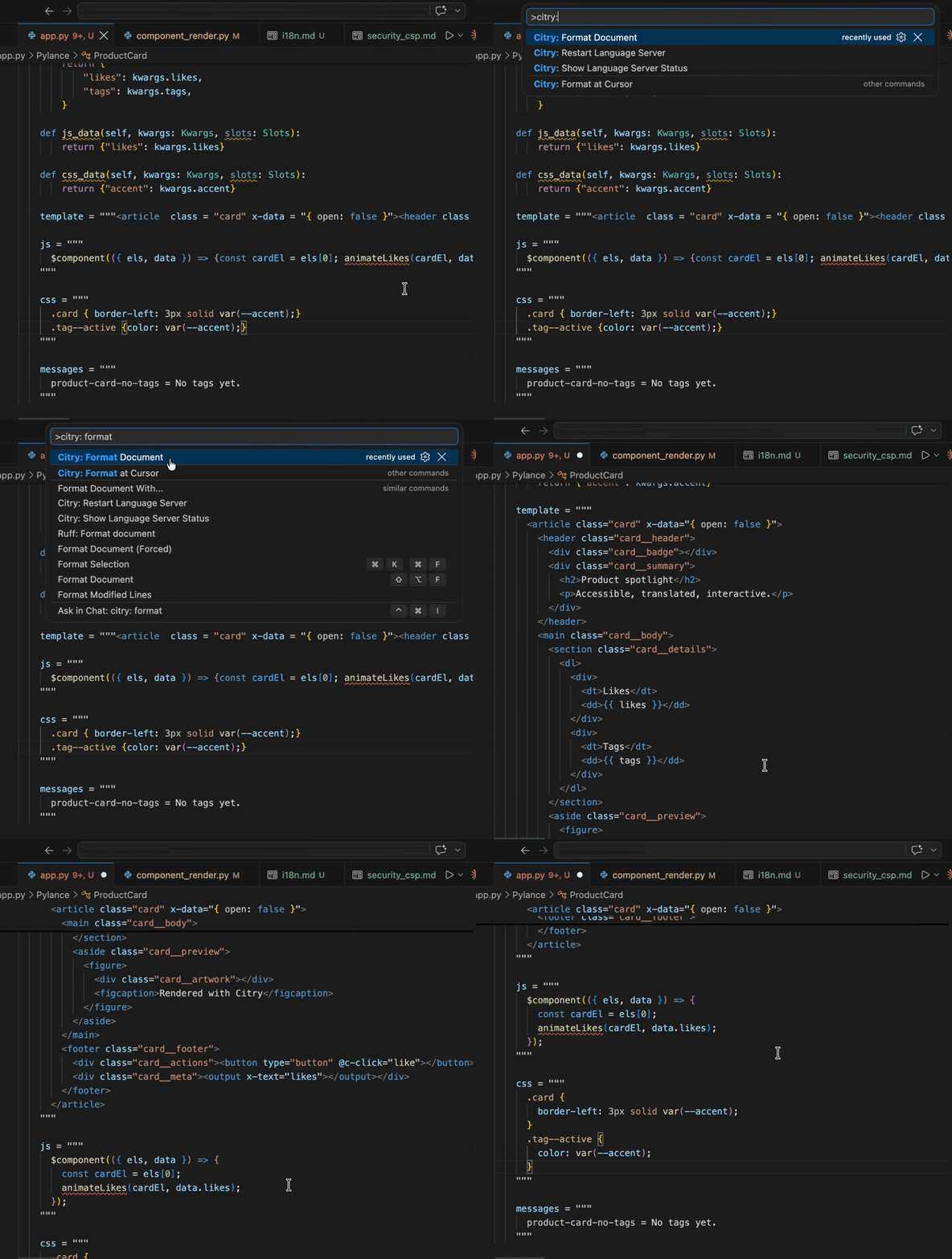
The command palette provides:
- Citry: Format Document - format every definite
template, js, and
css region in the current Python file, or the whole standalone template.
- Citry: Format at Cursor - format only the direct component region under
the cursor.
Formatting expands Citry/HTML structure and formats embedded JavaScript and
CSS while preserving readable Python triple-quoted strings:
The extension leaves Python and Fluent formatting to their selected tools. A
standalone Citry Template can use normal format-on-save:
{
  "[citry-html]": {
    "editor.defaultFormatter": "citry-dev.citry",
    "editor.formatOnSave": true
  }
}
For Python files, run Citry formatting as a source action alongside the normal
Python formatter:
{
  "[python]": {
    "editor.codeActionsOnSave": {
      "source.format.citry": "explicit"
    }
  }
}
Citry includes Prettier for deterministic embedded JavaScript and CSS
formatting. If
Prettier for VS Code
is installed and selected for that language, Citry uses its dedicated action so
your Prettier configuration applies. Otherwise it uses its bundled Prettier
3.9.6 adapter with Citry's canonical two-space indentation. Multiline Python
assets keep readable triple-quote framing instead of escaping ordinary HTML
quotes or placing provider output against the opening delimiter. Your default
formatters for standalone JavaScript and CSS files remain unchanged.
Highlighting and editor intelligence do not require the Prettier extension.
Standalone templates
Citry accepts any filename for template_file, so the extension does not claim
every .html file. Select Citry Template from the language picker or add an
association that fits your project:
{
  "files.associations": {
    "templates/components/**/*.html": "citry-html"
  }
}
Standalone .ftl files use the bundled Fluent grammar automatically.
Troubleshooting
If the status bar says Citry unavailable, run Citry: Show Language Server
Status and check these first:
citry-lsp is installed in the selected project environment.citry.python, when set, points to an executable that can run
python -m citry_lsp.citry.app, when set, imports successfully from the workspace.citry.envFile, when set, exists and supplies any variables required before
importing citry.app.- Citry 0.5.1 or newer and
citry-lsp 0.1.7 or newer are installed together.
Pylance can turn a string into an f-string when { is typed if
python.analysis.autoFormatStrings is enabled. Citry never reverses deliberate
editor changes, so disable that setting if it interferes with template strings:
{
  "python.analysis.autoFormatStrings": false
}
For server protocol logs, set citry.trace.server to messages or verbose.
For slow embedded-language requests, enable citry.trace.performance and open
the Citry Performance output channel.
Requirements and support
Citry requires desktop VS Code 1.101 or newer. It also supports remote
workspaces and compatible desktop forks where the workspace extension host can
start the selected Python executable. This release is not a VS Code for the Web
extension because citry-lsp runs as a local or remote workspace process.
TextMate coloring is best effort while deeply nested syntax is unfinished, and
parser diagnostics stop after the first syntax error. Python analysis remains
the responsibility of Pylance, Pyright, or another Python language server.
Visit the Citry website, read the complete
VS Code guide, browse the
source,
or report a problem.
Questions and ideas are welcome in
GitHub Discussions. If Citry
saves you time, you can also sponsor its development.
License
MIT

