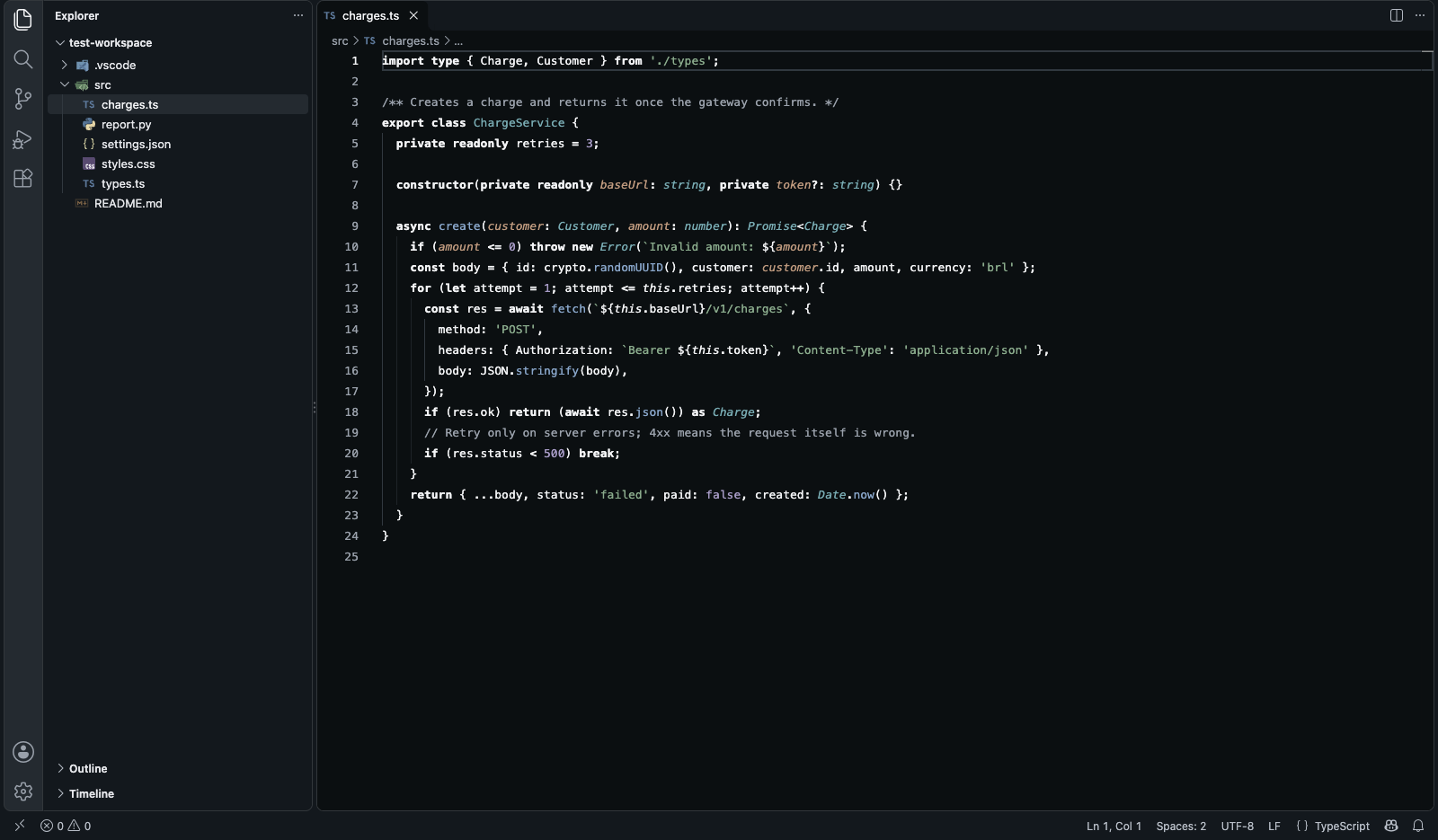
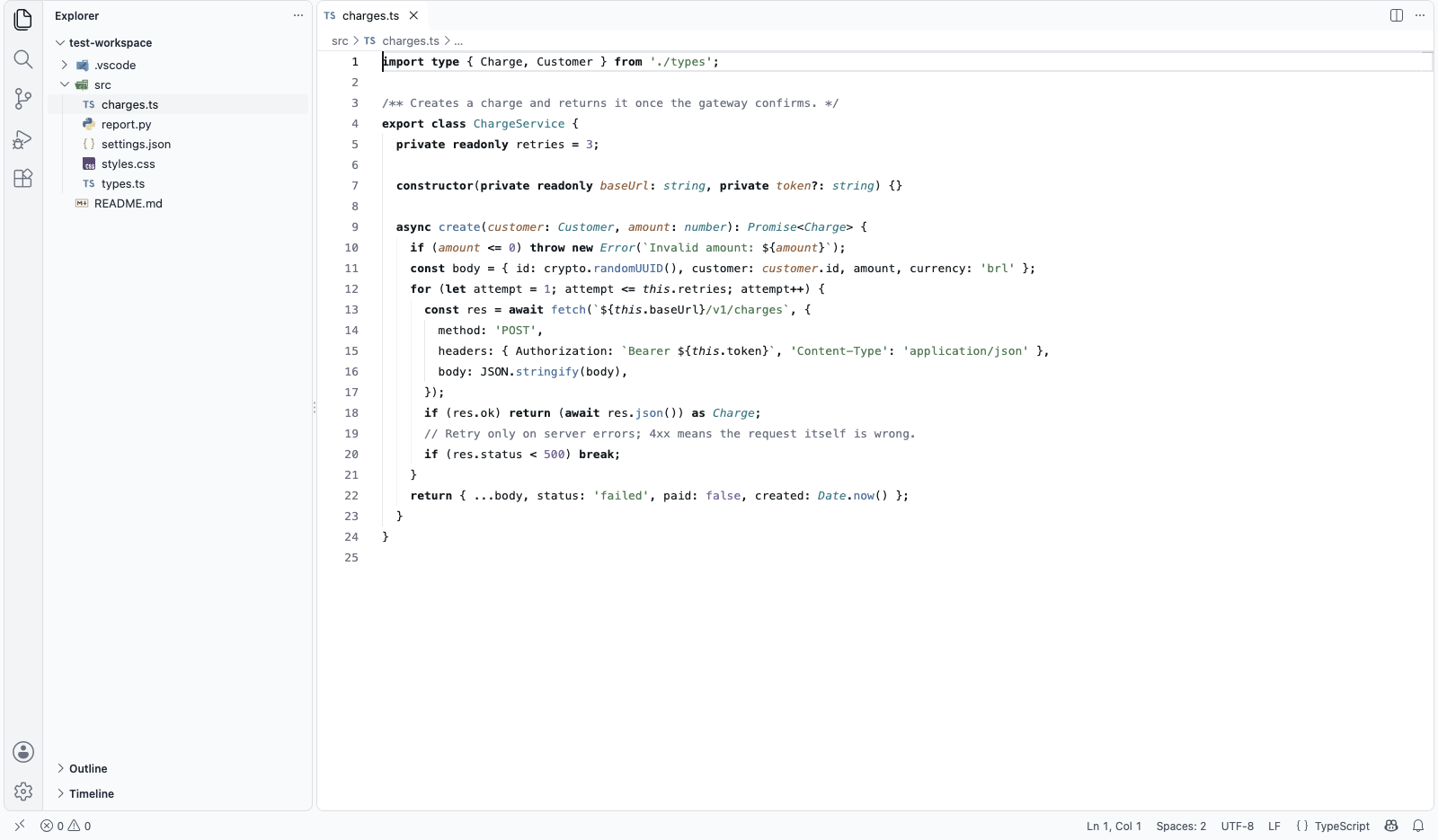
Zen Theme — Calm Light & Dark Color Theme with Pastel SyntaxA calm color theme and file icon theme for VS Code, Cursor, VSCodium and Windsurf: a gray workbench, pastel file icons, bold keywords, five soft pastel syntax colors tuned to a measured contrast, and red, green and yellow only for errors, additions and warnings. Light and dark, free. A quiet alterna Installation Launch VS Code Quick Open ( Ctrl+P), paste the following command, and press enter.Copied to clipboard |

Zen Theme — Calm Light & Dark Color Theme for VS Code, Cursor and VSCodiumTen grays around the code, five soft pastels in it, and red, green and yellow only when something happened. Readable for a full day of work, in light and in dark. Built by Ciro Cesar Maciel — because my editor was the loudest thing on my screen.
I spend ten hours a day in an editor. Every popular theme I tried painted the whole screen: purple keywords, pink operators, green strings, orange parameters, a blue-tinted background. After a few hours I stopped seeing the code and started seeing confetti. So I designed the theme I wanted to look at all day, on the design system of my own products. Everything around the code is gray: side bar, tabs, panels, diff markers. Keywords are bold, not colored. Color goes to three places only: five soft pastels in the code itself — strings, functions, types, parameters and literal values — the same soft key in the file icons, and three states, red for an error or a removed line, green for an addition, yellow for a warning. Install →
Why this one?
How it compares
Measured from each theme's own files (Dracula 2.25.1, One Dark Pro 3.20.2, Monokai Pro 2.0.15, GitHub Theme 6.3.5 — default dark variants) in October 2026. "Distinct colors in code" counts the different foreground colors in the token rules, grays included. Contrast is WCAG 2 against the editor background. Something changed? Tell me at ciromaciel.click and I'll fix the table. The paletteThe same ten grays and the same state colors as the design system of ciromaciel.click. The five pastels are picked in OKLCH, so they look equally bright to the eye, then each one is darkened or lightened until it hits its exact contrast target.
In Zen Dark, what rises gets lighter: the editor is the base, the side bar one step up, and menus, suggestions and the command palette one more, so they read as a layer above the code. Zen IconsZen Icons is vscode-icons, the icon set with the widest coverage, in pastel. Each color keeps its hue and its lightness, so TypeScript stays blue, JavaScript yellow and Git orange, but its chroma is capped at the same low level as the syntax colors (OKLCH 0.07). The file tree is in the same soft key as the code. Softened, a yellow JS file or a cyan React logo would turn nearly white and get lost on Zen Light. So each icon is checked against each side bar. When none of its colors reaches 3 : 1, the WCAG target for graphics, the whole icon is darkened on Zen Light or lightened on Zen Dark, in lightness only, until its strongest color does. Use it
The screenshots use JetBrains Mono at 13 px, but Zen works with any font. Bold keywords look best with a font that has a real bold weight. FAQIs it free? Yes. Both themes, every editor, commercial use included. Does it work with semantic highlighting?
Yes. Semantic tokens are on, and Why bold instead of a keyword color?
Weight is the strongest signal that doesn't add color. Your eye finds About meI'm a developer building tools I want to use. More of my stuff at ciromaciel.click. If Zen made your screen quieter, send it to a teammate whose editor still looks like a fruit salad. Proprietary — see LICENSE. The icons are the exception: they are vscode-icons by the vscode-icons contributors, under CC BY-SA 4.0, and so is the pastel set — see icons/LICENSE.md. Branded icons remain under their owners' copyright. Keywords: vscode theme, color theme, light theme, dark theme, minimal theme, pastel theme, calm theme, gray workbench, readable, accessible, wcag contrast, bold keywords, file icon theme, pastel icons, vscode-icons, dracula alternative, one dark pro alternative, monokai pro alternative, github theme alternative, cursor theme, vscodium theme, windsurf theme. |