AI Stack Trace Triage — Diagnose Errors from the Code in Your Frames
Select a stack trace, press one key, get the root cause and the fix. It opens the files in the frames before it answers, so the diagnosis quotes your code, not a guess of it.
Built by Ciro Cesar Maciel — because pasting errors into ChatGPT and re-pasting code is slow.






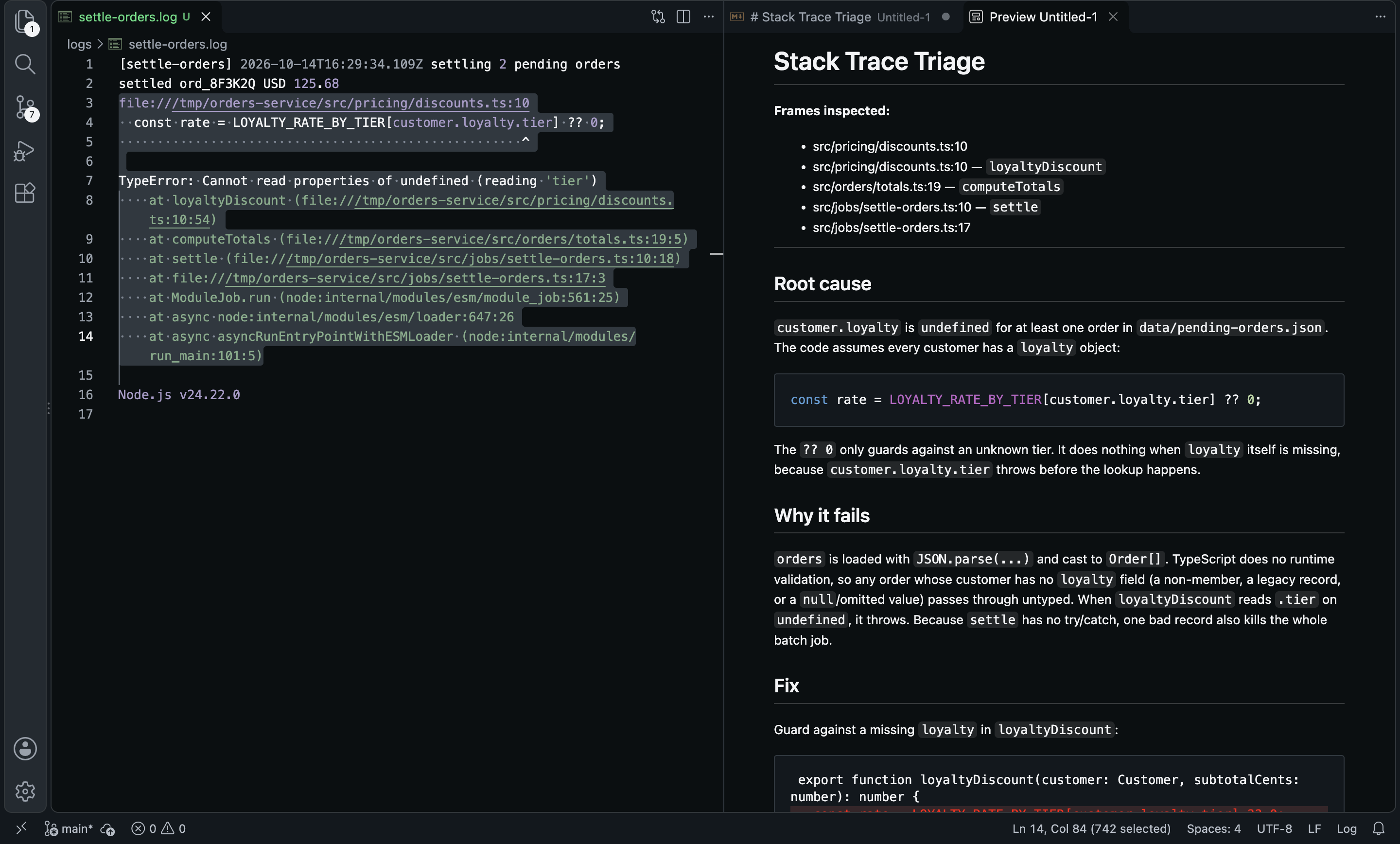
Every error message looks scary. Most are trivial — once you read three lines of context. The problem isn't the AI, it's the workflow: paste the trace, alt-tab to each file, copy the code, paste it, re-prompt. I built this extension to run that loop for me.
You select the trace and press Cmd+Alt+T. The extension parses the frames, opens the actual files at the line numbers from the trace, sends the source around each one together with the error to a model on OpenRouter, and opens a diagnosis: root cause, why it fails, and the fix as a diff.
The model reads the code your stack trace points at, so it answers about what is on your disk.
See it in action
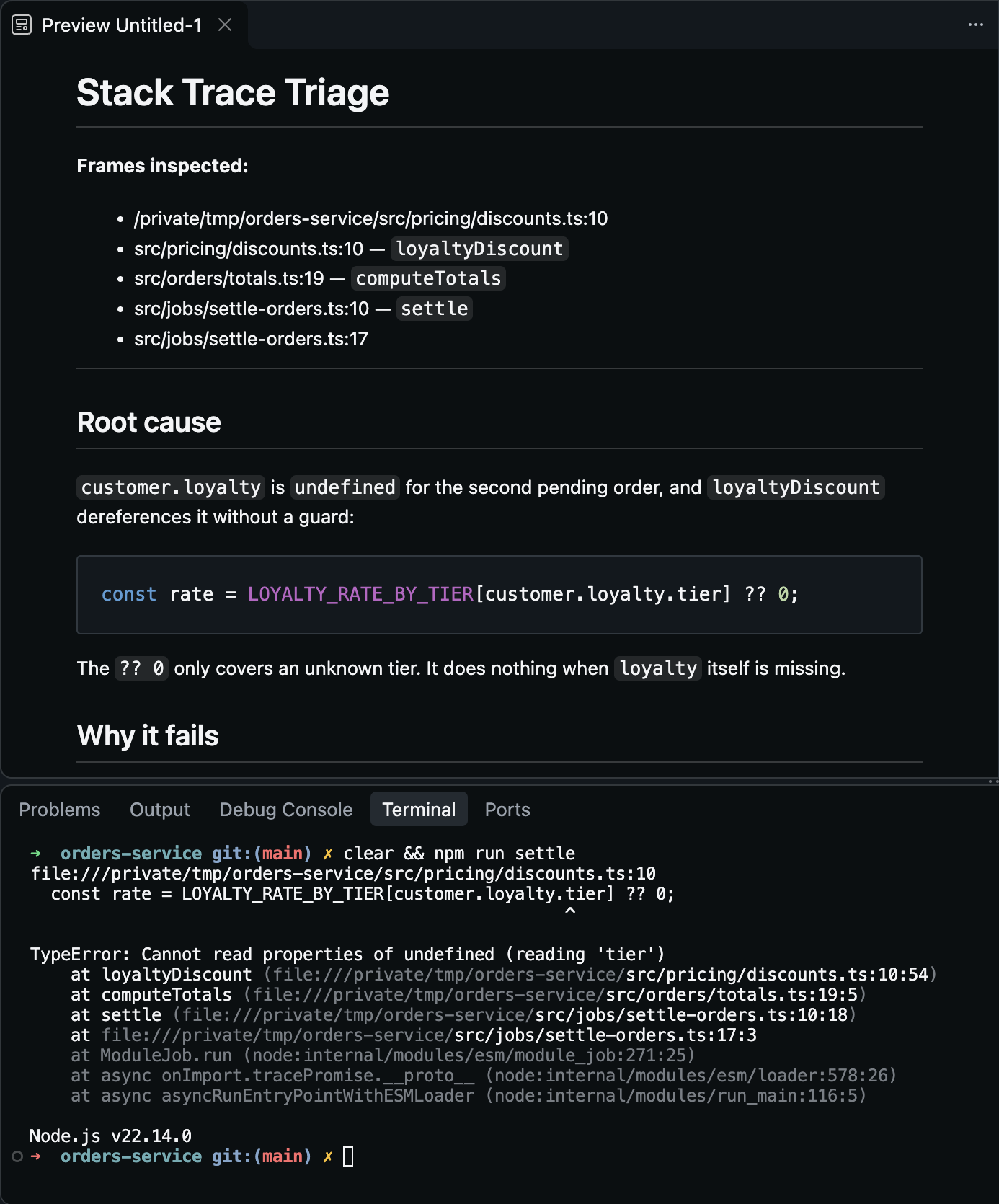
From the terminal: copy the error, run "Triage Stack Trace from Clipboard", and the frames are resolved to files in your workspace.
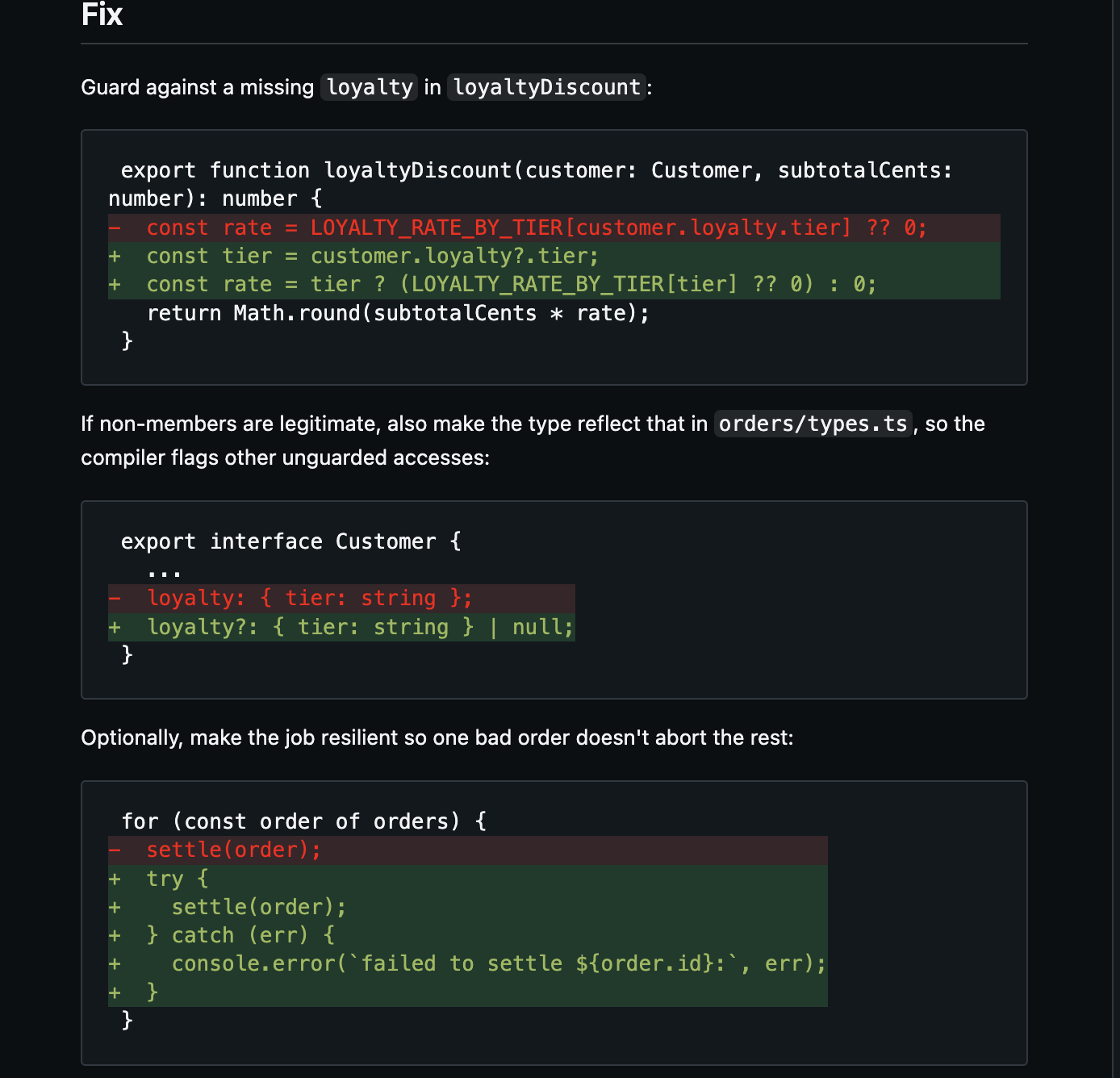
The fix comes as a diff against the lines it read, not a rewrite of a file it never saw.
The trace that went in, from a real run of a small orders service:
TypeError: Cannot read properties of undefined (reading 'tier')
    at loyaltyDiscount (file:///tmp/orders-service/src/pricing/discounts.ts:10:54)
    at computeTotals (file:///tmp/orders-service/src/orders/totals.ts:19:5)
    at settle (file:///tmp/orders-service/src/jobs/settle-orders.ts:10:18)
    at file:///tmp/orders-service/src/jobs/settle-orders.ts:17:3
What came out (Claude Sonnet 5.5, excerpt):
Root cause — customer.loyalty is undefined for at least one order in data/pending-orders.json. The code assumes every customer has a loyalty object:
const rate = LOYALTY_RATE_BY_TIER[customer.loyalty.tier] ?? 0;
The ?? 0 only guards against an unknown tier. It does nothing when loyalty itself is missing, because customer.loyalty.tier throws before the lookup happens.
Why it fails — orders is loaded with JSON.parse(...) and cast to Order[]. TypeScript does no runtime validation [...] Because settle has no try/catch, one bad record also kills the whole batch job.
Why this one?
- Grounded in your code. Each frame is resolved against your workspace (absolute path, path relative to a workspace folder, then a search by file name for compiled or
file:// paths), and the source around the failing line goes to the model.
- Seven runtimes, plus a fallback. Node/V8, Python, Java/Kotlin/Scala, Go, Rust, Ruby and PHP frames, and a generic
path:line[:col] pattern for anything else.
- Skips the noise. Frames in
node_modules, site-packages, .cargo, vendor, dist and build are left out, so the model reads your code, not the framework's.
- Editor, log file or terminal. Select a trace in any editor and press
Cmd+Alt+T, or copy it from the terminal and triage it from the clipboard.
- A fixed shape. Root cause, why it fails, fix, and what it would need to see to be sure. Environmental errors (wrong Node version, missing dependency) are called out as such.
- Bring your own model. Any of the 350+ models on OpenRouter; pay per token, no subscription. The diagnosis can be written in your language.
How it compares
|
AI Stack Trace Triage |
Copilot Chat / ChatGPT |
Rubberduck |
Stack Trace Formatter |
| Reads the files from the trace automatically |
Yes |
Partial: you attach them |
No |
No |
| Diagnosis and fix |
Yes |
Yes |
Yes |
No: formatting only |
| Node, Python, Java, Go, Rust, Ruby, PHP |
Yes |
Yes |
Yes |
Partial: C# and Java |
| Any model, pay per token |
Yes: OpenRouter |
No: subscription |
Partial: OpenAI |
— |
| Works in Cursor, VSCodium (Open VSX) |
Yes |
No |
Yes |
No |
From each extension's public listing, September 2026. Something changed? Tell me at ciromaciel.click.
Setup
- Install the extension.
- Get an OpenRouter API key (
sk-or-...). Pay per token, no subscription.
- On first use it asks for the key — or run Stack Trace Triage: Set OpenRouter API Key from the Command Palette.
- Optional: pick a model with Stack Trace Triage: Select Model, which lists every OpenRouter model with its context size and price. The default is Claude Sonnet 4.6 — debugging needs real reasoning.
Use it
From an editor or a log file: select the error or stack trace → Cmd+Alt+T (Mac) / Ctrl+Alt+T (Windows, Linux), or right-click → Triage Selected Error / Stack Trace with AI. The diagnosis opens as a Markdown document with a rendered preview.
From the terminal: copy the error → run Stack Trace Triage: Triage Stack Trace from Clipboard from the Command Palette, or right-click in the terminal.
| Runtime |
Frame patterns detected |
| Node / JS / TS |
at funcName (/abs/file.ts:12:34) |
| Python |
File "/abs/file.py", line 42, in funcName |
| Java / Kotlin / Scala |
at com.shop.Billing.charge(Billing.java:42) |
| Go |
/abs/file.go:42 +0x12 |
| Rust |
at /abs/file.rs:42:7 |
| Ruby |
/abs/file.rb:42:in `funcName' |
| PHP |
/abs/file.php(42): funcName() |
| Anything else |
generic path:line[:col] fallback |
Configuration
| Setting |
Default |
What it does |
stackTraceTriage.openRouterApiKey |
— |
Your sk-or-... key. |
stackTraceTriage.model |
anthropic/claude-sonnet-4.6 |
Any OpenRouter slug. |
stackTraceTriage.maxFramesToFetch |
5 |
How many top frames to open and send. |
stackTraceTriage.contextLinesPerFrame |
20 |
Lines of source per frame, centered on the failing line. |
stackTraceTriage.skipNodeModules |
true |
Skip frames in node_modules, site-packages, .cargo, vendor, dist, build. |
stackTraceTriage.language |
english |
Language of the diagnosis. |
FAQ
What is sent to the model?
The trace you selected or copied, and the source around the resolved frames. It goes to OpenRouter and then to the provider behind your chosen model. Nothing else.
Does it need the code locally?
Yes — that is the point. Frames that don't resolve to a file in your workspace are still sent as text, without code, and the diagnosis marks them as "source not found".
Can it read a trace from production logs?
Yes, as long as the files exist in your workspace. When the paths in the trace don't match your machine (a container, a CI runner, compiled output), it falls back to finding the file by name.
About me
I'm a developer building tools I want to use. More of my stuff at ciromaciel.click.
If this saved you an hour of alt-tabbing, send it to the teammate who pastes traces into chat all day.
Proprietary — see LICENSE.
Keywords: stack trace, stacktrace, error explain ai, debug ai, ai debugger, exception analyzer, traceback, root cause, node error, typescript error, python traceback, java exception, go panic, rust panic, ruby error, php error, openrouter, chatgpt debug, claude debug, gemini, copilot alternative, cursor, vscodium.

