AI SQLite Editor — Ask Your SQLite Database in Plain English, Inside VS Code
Open a .db file, read what's in it, ask a question in plain English and get SQL you can run. When a query fails, the editor tells you why and hands you the fix.
Built by Ciro Cesar Maciel — because every other SQLite editor still makes you write SQL by hand.






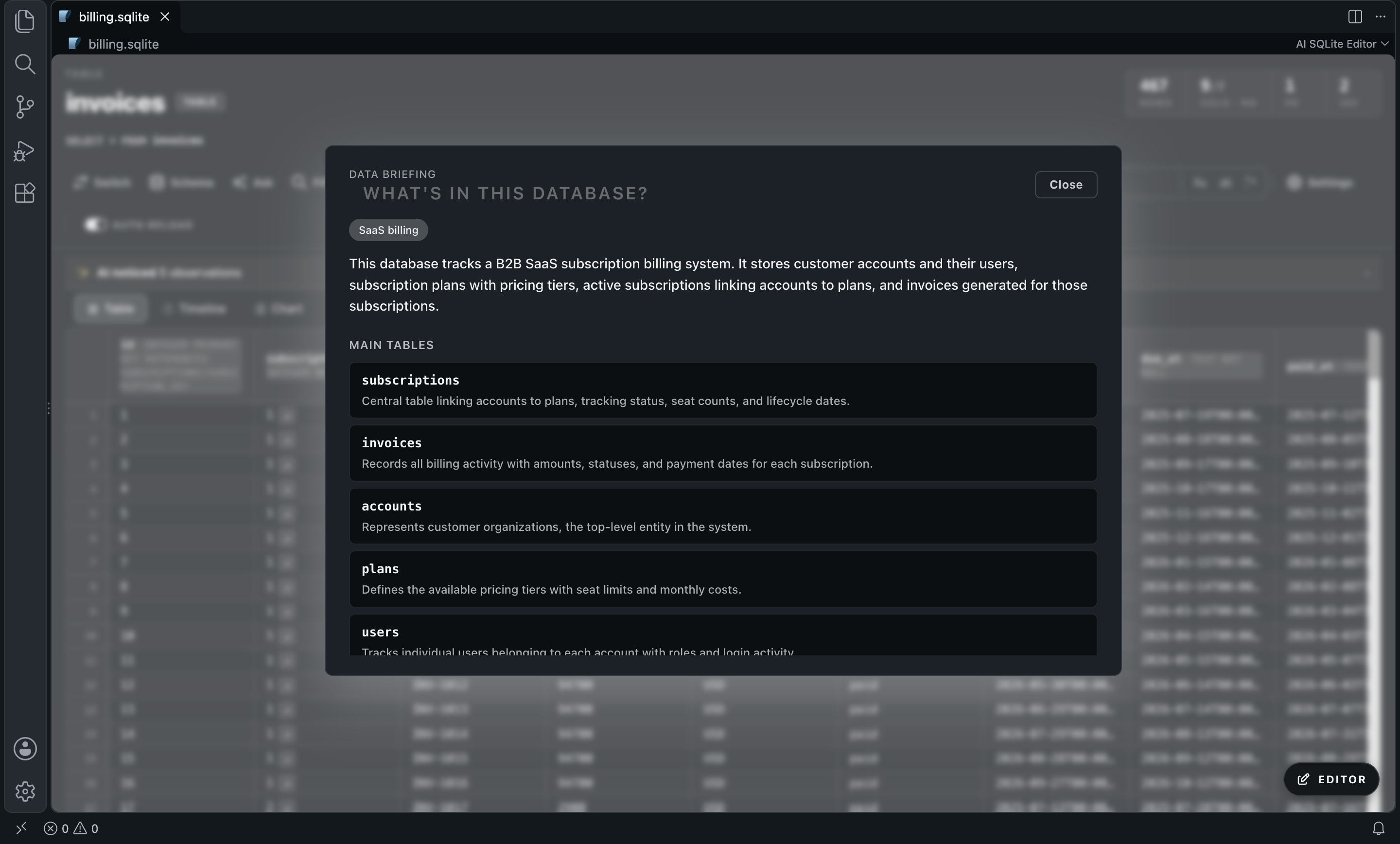
I work with SQLite databases every day. Every time I wanted to ask a simple question of my own data, I bounced between a read-only browser and a SQL prompt. The viewers had no idea what the data meant. The query consoles had no idea what schema was in front of them.
So I built the database editor I wanted to use. It opens the file inside VS Code as a grid you can edit, and on top of that it reads the schema and a few sample rows, so the model you pick can talk about your tables.
Open a .db file → read the briefing → ask in plain English → review the SQL → run it.
See it in action
A question in plain English becomes SQL, and one click runs it against the file.
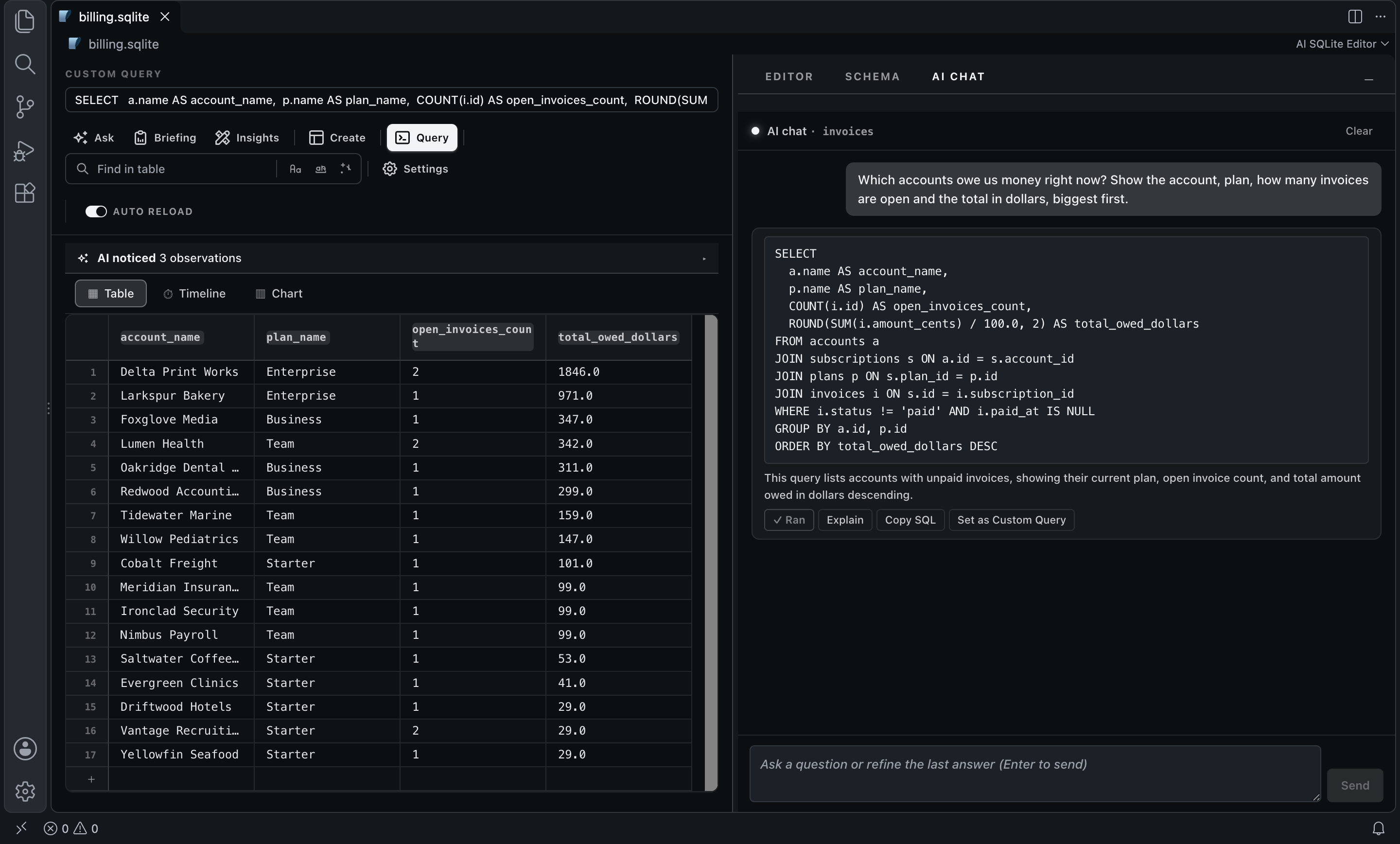
The question I typed, and the SQL that came back (google/gemini-3.8-flash, real output):
Which accounts owe us money right now? Show the account, plan, how many
invoices are open and the total in dollars, biggest first.
SELECT
  a.name AS account_name,
  p.name AS plan_name,
  COUNT(i.id) AS open_invoices_count,
  ROUND(SUM(i.amount_cents) / 100.0, 2) AS total_owed_dollars
FROM accounts a
JOIN subscriptions s ON a.id = s.account_id
JOIN plans p ON s.plan_id = p.id
JOIN invoices i ON s.id = i.subscription_id
WHERE i.status != 'paid' AND i.paid_at IS NULL
GROUP BY a.id, p.id
ORDER BY total_owed_dollars DESC
It knew the amount lives in amount_cents, that you need two joins to get from an invoice to an account, and that dollars means dividing by 100. Nothing runs until you press Run.
A failed query, the reason in one sentence, and the corrected SQL ready to run.
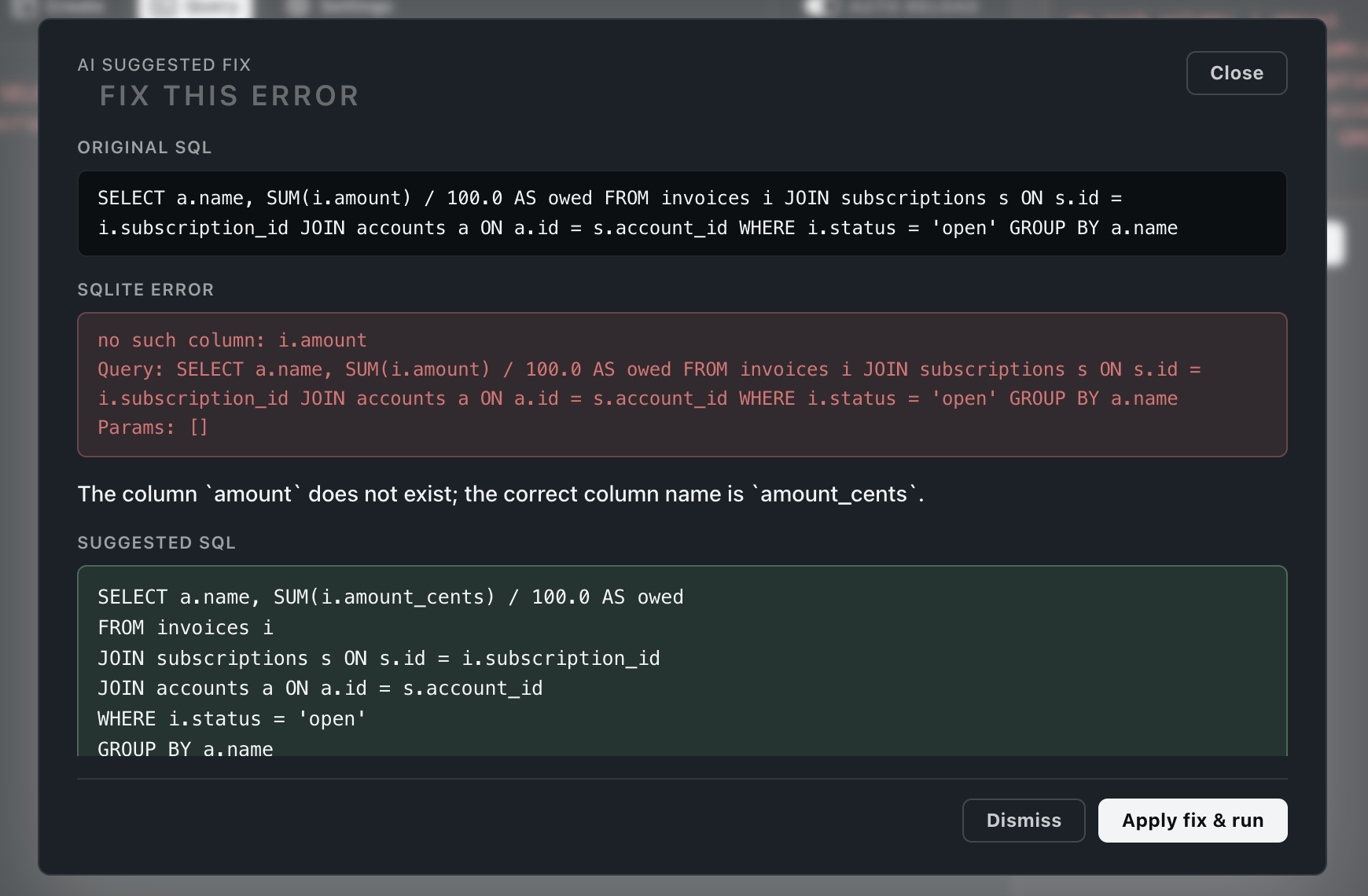
Before   no such column: i.amount

After    The column `amount` does not exist; the correct column name is `amount_cents`.
         SELECT a.name, SUM(i.amount_cents) / 100.0 AS owed FROM invoices i ...
Why this one?
- A full SQLite client and an AI layer in one. Browse tables, edit cells, insert and delete rows, alter tables, create indexes, run custom queries. The AI features sit one click away from all of it.
- Data Briefing. One click and the model tells you what the database is for, which tables matter and why, what looks odd in the samples, and which questions you might want to ask. Click a question and it goes straight to the chat.
- Ask in plain English. The AI chat writes SQL against your real schema, explains it in one sentence, and keeps the thread so you can refine with follow-ups. Run, Explain, Copy SQL or Set as Custom Query.
- Errors explained and fixed. When a query fails, Ask AI to fix names the problem and proposes corrected SQL. Apply fix & run runs it.
- Insights on every table. When you open a table, one AI scan flags anomalies, data-quality issues and patterns above the grid. You can turn it off.
- Filter and edit by intent. AI Filter filters a table with a plain-English predicate. AI Edit transforms a column with an instruction ("trim whitespace", "translate to English"), and you can undo it.
- Schema Insights. Finds missing indexes on foreign-key columns, CHECK candidates and other structure smells, with Apply or Copy for the DDL.
- Bring your own model. Any model on OpenRouter: Gemini, Claude, GPT, DeepSeek, Llama, Mistral, Qwen. One key, pay per token, no subscription.
- Opens
.db, .sqlite and .sqlite3 directly. No import, no separate app.
How it compares
|
AI SQLite Editor |
DB Browser for SQLite |
DBeaver |
SQLTools |
Open a .db inside VS Code |
Yes |
No: separate app |
No: separate app |
Partial: via driver |
| Inline row editing |
Yes |
Yes |
Yes |
No |
| Schema and structure management |
Yes |
Yes |
Yes |
Partial: limited |
| Natural language → SQL |
Yes: your own key |
No |
No |
Partial: paid AI add-on |
| Schema-aware AI briefing |
Yes |
No |
No |
No |
| AI explanation of SQL errors |
Yes |
No |
No |
No |
| Model choice |
Any OpenRouter model |
— |
— |
Partial: single provider |
| Price |
Pay per token (your key) |
Free |
Free / Pro |
Free / paid add-on |
Setup
- Python 3.6 or newer with SQLite 3.8 or newer must be installed. The SQLite engine runs on it. The editor finds it on its own; if not, set
sqlite3-editor.pythonPath.
- Get an API key at openrouter.ai/keys.
- Open Settings (
Cmd+,), search SQLite Editor, and paste the key into sqlite3-editor.openrouter.apiKey. The Settings button in the editor toolbar opens the same page.
- Optional: run
SQLite Editor: Select AI Model from the Command Palette to browse the live OpenRouter list with prices and context sizes.
Use it
- Click a
.db, .sqlite or .sqlite3 file in the Explorer. It opens in the editor by default.
- Click Briefing for the overview of the whole database.
- Click Ask (or press
Cmd+K / Ctrl+K inside the editor) to open the AI chat. Type the question and press Enter.
- Review the SQL, then Run. The result replaces the grid as a custom query.
- Something failed? Open the Errors tab and click Ask AI to fix.
- Edit cells in the grid, or use Alter, Create, Index and Query in the toolbar. Changes are written to the file.
Configuration
| Setting |
Default |
What it does |
sqlite3-editor.openrouter.apiKey |
"" |
Your OpenRouter key (sk-or-...). Powers every AI feature. |
sqlite3-editor.openrouter.modelId |
google/gemini-2.5-flash |
Any OpenRouter model slug. The dropdown lists a few; you can paste any other. |
sqlite3-editor.openrouter.baseUrl |
https://openrouter.ai/api/v1 |
Change only if you proxy through your own gateway. |
sqlite3-editor.proactiveInsights |
true |
One AI scan per table you open, shown as insights above the grid. |
sqlite3-editor.pythonPath |
"" |
Python binary for the SQLite engine. Empty auto-detects. |
FAQ
Does it work offline?
Opening, browsing, editing and querying run locally through Python and SQLite. Only the AI features need the internet: they call OpenRouter with your key.
What does it send to the model?
Your question, the schema (tables, columns, types, foreign keys, row counts) and up to 3 sample rows per table, with long values cut at 120 characters. Insights also send per-column stats and a few rows of that table. AI Filter and AI Edit, when a predicate needs real understanding, send the values of the rows they classify or rewrite. The .db file itself never leaves your machine.
Which model should I pick?
The default is google/gemini-2.5-flash. The screenshots above use google/gemini-3.8-flash for the question and anthropic/claude-sonnet-4.6 for the fix. Bump to a bigger model when the schema gets large or the questions get gnarly.
What about encrypted (SQLCipher) databases?
Not supported. Standard .db, .sqlite and .sqlite3 files only.
Why OpenRouter and not a direct OpenAI or Anthropic key?
One key for every provider, one bill, pay per token. You switch from Gemini to Claude to GPT by changing one setting.
Can I turn off the insights scan?
Yes: set sqlite3-editor.proactiveInsights to false.
About me
I'm a developer building tools I want to use. More of my stuff at ciromaciel.click.
If this saved you time, send it to a friend who still copy-pastes SELECT * FROM from Stack Overflow.
Credits
Forked from vscode-sqlite3-editor by yy0931. The AI layer, the redesign and the direction are mine.
Proprietary — see LICENSE.
Keywords: sqlite editor, sqlite viewer, sqlite browser for vscode, ai sqlite, sqlite ai assistant, natural language to sql, nl2sql, text-to-sql, ai database client, ai database editor, sql copilot, gpt for sqlite, claude for sql, gemini sql, openrouter sql, database editor vscode, .db editor, .sqlite editor, sqlite3 viewer, llm sql, ai data exploration, explain sql error, fix sql error.

