REST Studio — REST & API Client for VS Code, Cursor and VSCodium
Free, lightweight REST & API client. Collections are YAML files in your repo — no account, no request limits, commercial use allowed.
Built by Ciro Cesar Maciel — because the API client I used every day started locking my own requests behind a paywall.





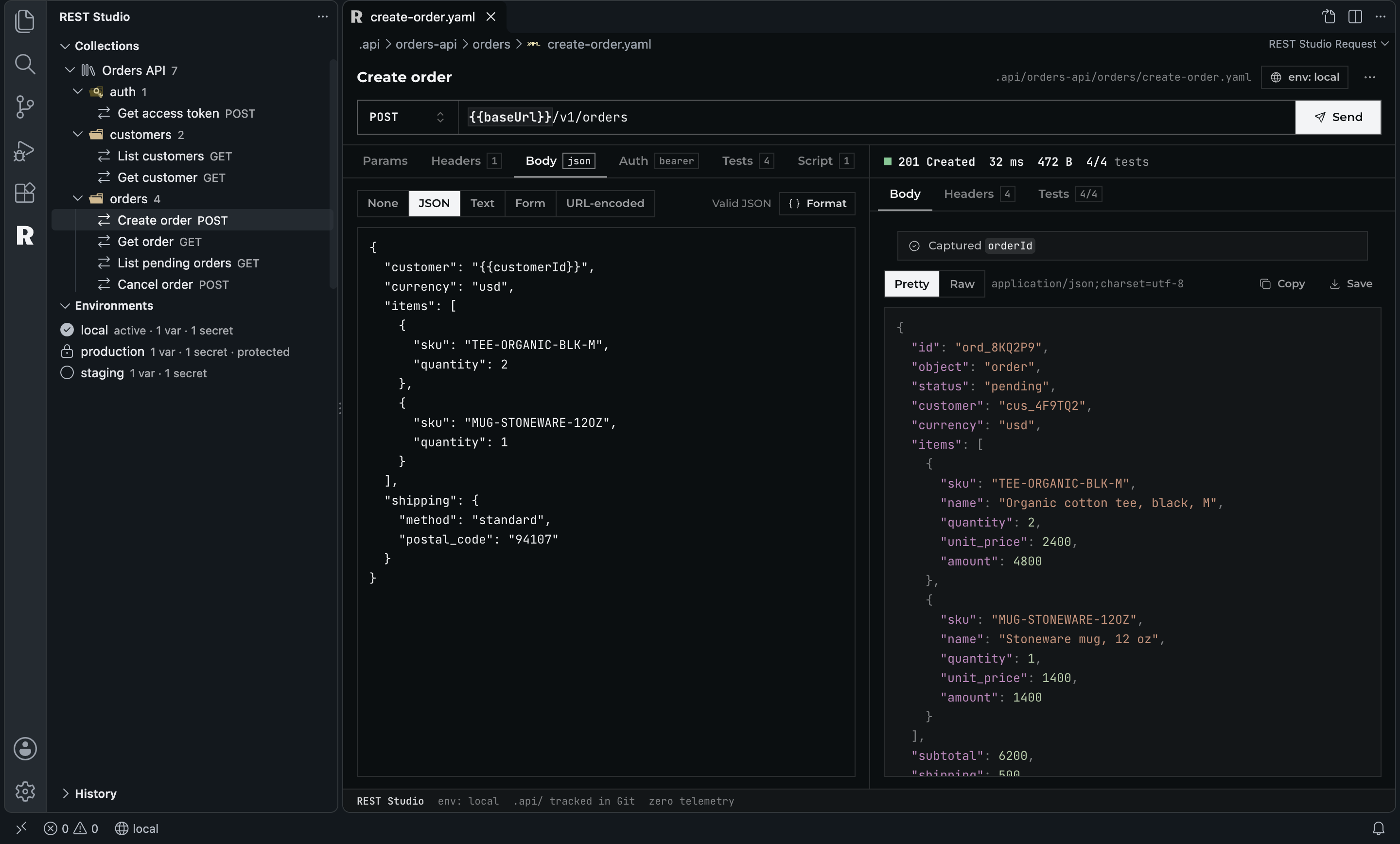
I test APIs all day. The extension I used for it was fast and simple — until collections got capped, Git sync went behind a subscription, and the free version stopped working in Cursor. My requests were suddenly somebody else's product.
So I built the API client I wanted: everything that runs on your machine is free, in any editor. Your requests are plain YAML files in a .api/ folder of your project, so they live in Git next to the code they test.
Open the REST Studio side bar → New Request → type a URL → ⌘ Enter (Ctrl+Enter).
See it in action
Collections and environments are files. The side bar is just a view of .api/.
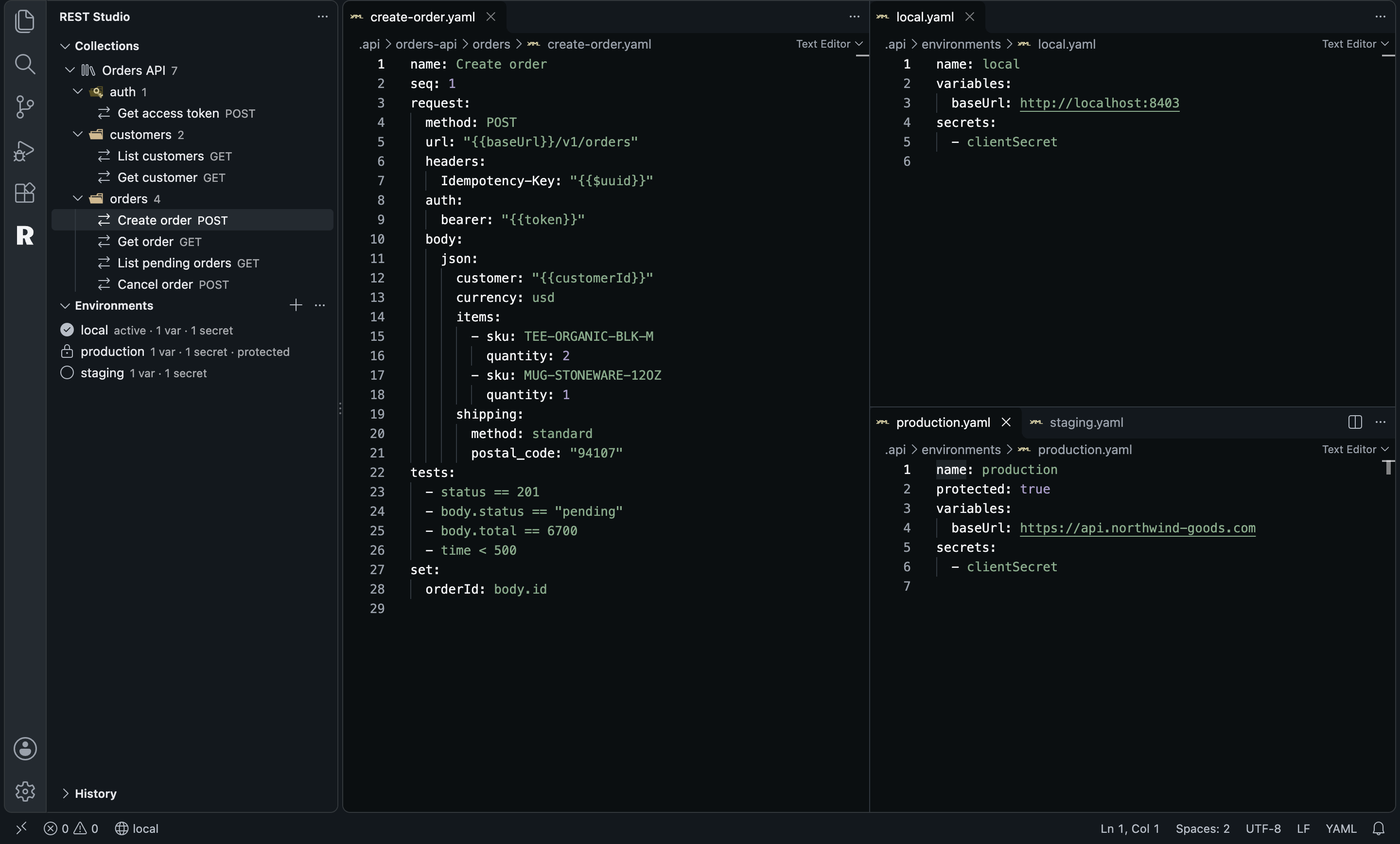
This is the request from the screenshot above, exactly as it sits in the repo:
# .api/orders-api/orders/create-order.yaml
name: Create order
seq: 1
request:
  method: POST
  url: "{{baseUrl}}/v1/orders"
  headers:
    Idempotency-Key: "{{$uuid}}"
  auth:
    bearer: "{{token}}"
  body:
    json:
      customer: "{{customerId}}"
      currency: usd
      items:
        - sku: TEE-ORGANIC-BLK-M
          quantity: 2
        - sku: MUG-STONEWARE-12OZ
          quantity: 1
tests:
  - status == 201
  - body.status == "pending"
  - body.total == 6700
  - time < 500
set:
  orderId: body.id
# .api/environments/production.yaml
name: production
protected: true          # asks before sending
variables:
  baseUrl: https://api.northwind-goods.com
secrets:
  - clientSecret         # only the name; the value is encrypted on your machine
Run a whole collection: log in, create, read, cancel, with every test checked.
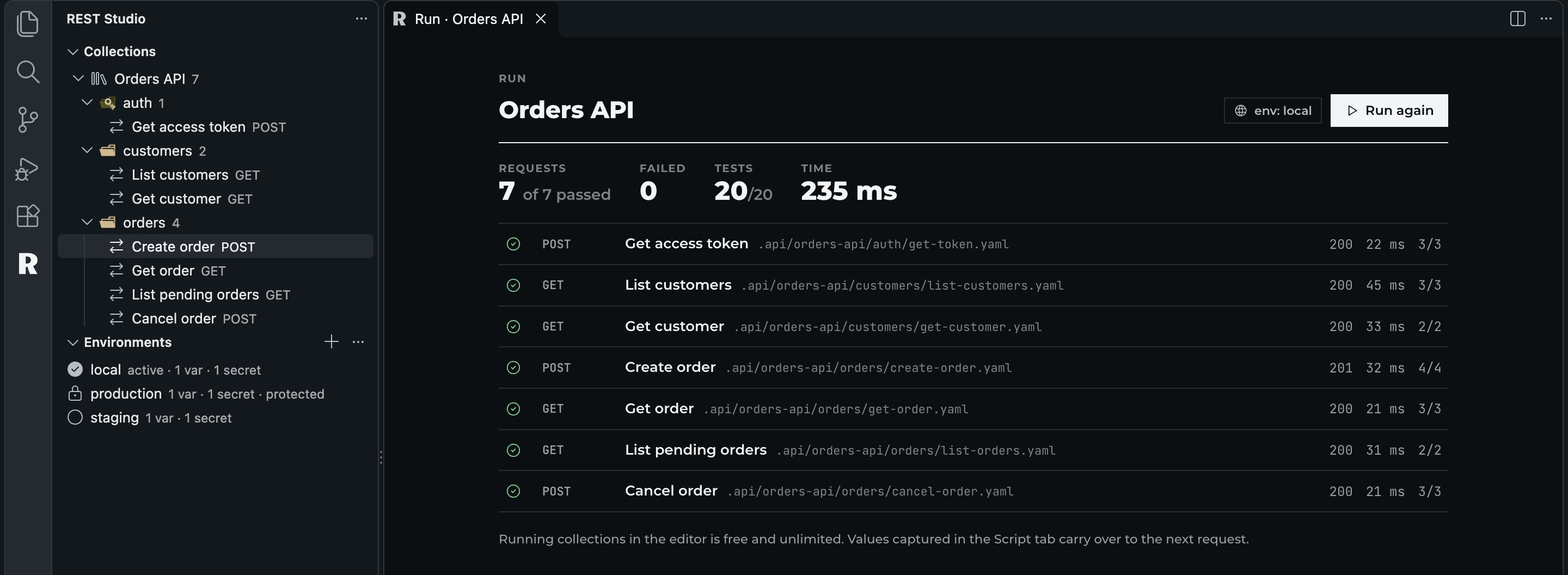
Get access token saves token, List customers saves customerId, Create order saves orderId, and every request after that uses them. No script, no code.
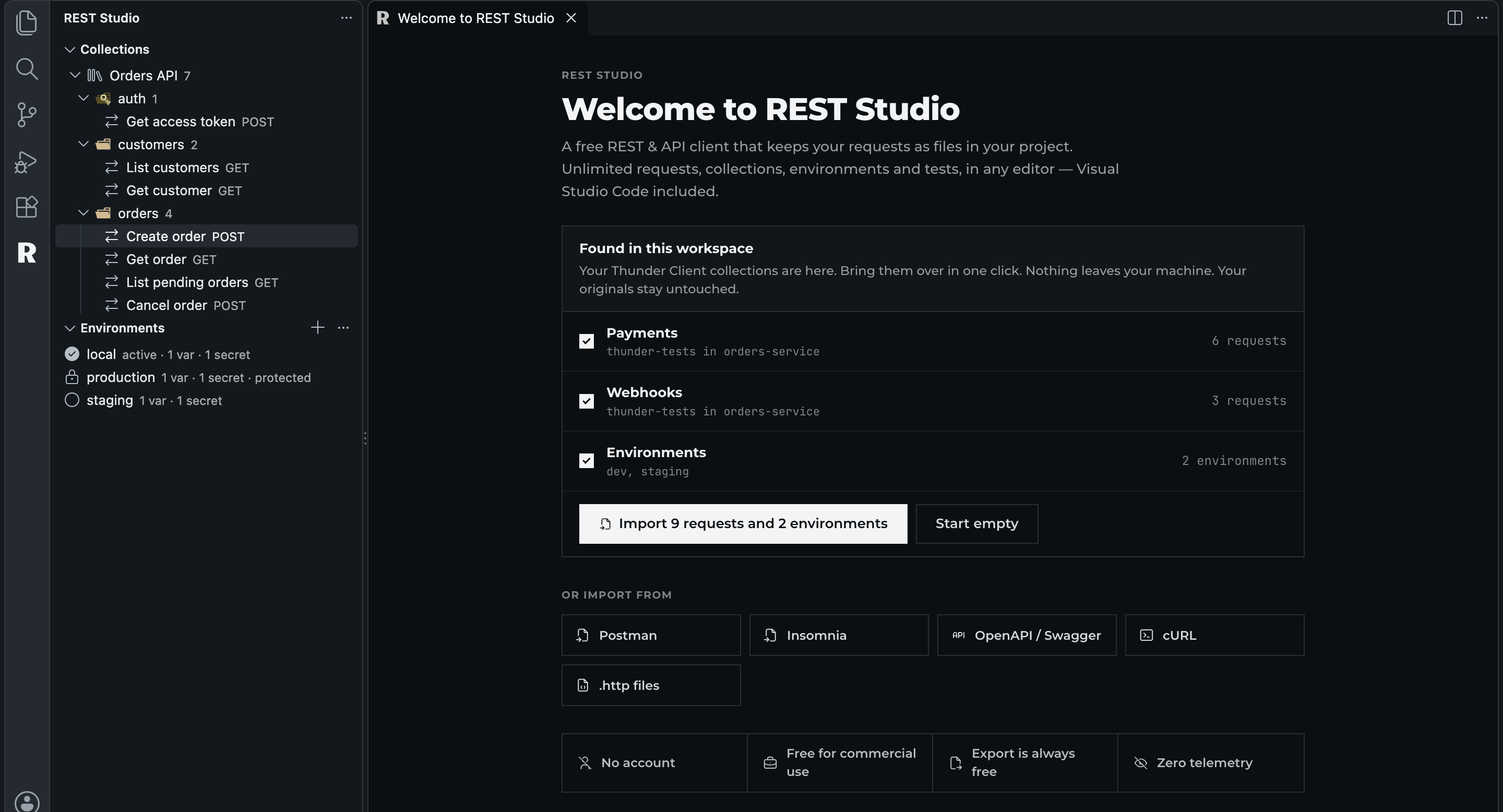
Already on Thunder Client? REST Studio finds your thunder-tests folder and brings it over in one click.
Why this one?
- Free for real. Unlimited requests, collections, folders, environments, history, tests and collection runs. Commercial use allowed. No account, no sign-in, no trial.
- Any editor. VS Code, Cursor, VSCodium and Windsurf, also over Remote SSH and WSL. Published on the Marketplace and on Open VSX.
- Your data, in files. Collections live in
.api/ as readable YAML. Review them in a pull request, edit them by hand, share them with git push. No proprietary database, no cloud sync.
- Secrets stay secret. Write
{{secret.clientSecret}} in a request; the value is encrypted by the editor's SecretStorage on your machine. Only the name goes into the repo.
- Bring everything with you. Import from Thunder Client (found automatically), Postman collections and environments, Insomnia, OpenAPI / Swagger,
.http files and cURL. Export back to Postman format any time.
- Tests without code.
status == 201, body.items.length > 0, header.content-type contains json, time < 500. They run on every send and in the collection runner.
- Chained requests. Capture values from a response (
token = body.access_token) and use {{token}} in the next request. Log in once, then every call is authenticated.
- Safe by default. Mark an environment
protected: true and REST Studio asks before sending to it. Requests are only sent from trusted workspaces. Nothing in a collection file can run code on your machine.
- Zero telemetry. No analytics, no phoning home, fonts bundled. The only network traffic is the requests you send.
How it compares
|
REST Studio |
Thunder Client |
Postman for VS Code |
Bruno |
REST Client |
| Free for commercial use |
Yes |
No: free tier is non-commercial |
Partial: free plan is 1 user |
Yes |
Yes |
| Unlimited collections and requests, free |
Yes |
No: capped |
Yes |
Yes |
Yes |
| No account or sign-in |
Yes |
Yes |
No |
Yes |
Yes |
| Collections as files in your repo |
Yes: YAML |
Partial: Git sync is paid |
No: cloud workspaces |
Yes: .bru |
Yes: .http |
| Visual request editor |
Yes |
Yes |
Yes |
Yes |
No: text only |
| Free in Cursor, VSCodium, Windsurf |
Yes |
No: paid outside VS Code |
Yes |
Yes |
Yes |
| Tests without writing code |
Yes |
Yes |
No: JavaScript |
Yes |
No |
| Import from Thunder, Postman, Insomnia, OpenAPI, cURL |
Yes: all five |
Partial: some |
Partial: some |
Partial: no Thunder |
No |
| Secrets encrypted outside the repo |
Yes |
Partial: paid |
Yes |
Yes |
No |
| Paid plans |
Pro, optional |
from US$ 3/mo, yearly only |
from US$ 9/mo |
from US$ 6/mo, yearly only |
— |
| Marketplace rating |
new |
2.4 / 5 (753 reviews) |
3.0 / 5 |
3.9 / 5 |
4.9 / 5, last update 2022 |
From each product's public listing and pricing page, September 2026. Something changed? Tell me at ciromaciel.click and I'll fix the table.
Coming from another client?
| You use |
What happens |
| Thunder Client |
REST Studio detects thunder-tests/ (and Thunder's own storage) and offers to import collections, folders, environments and tests in one click. Your originals stay untouched. |
| Postman |
Import Collections… → Postman: collections v2.0/v2.1 with folders, auth, bodies and variables; environments too (secret values go to SecretStorage). Common pm.test snippets become no-code tests. |
| Insomnia |
v4 JSON and v5 YAML exports, including folders and environments. |
| REST Client / JetBrains |
.http and .rest files, with @variables and # @name. |
| OpenAPI / Swagger |
One request per operation, grouped by tag, with {{baseUrl}}. |
| A terminal |
Paste a curl command into the URL bar, or use Import cURL. Copy as cURL does the reverse. |
Use it
- Open the REST Studio icon in the Activity Bar.
- New Request (
+), or Import your existing collections.
- Type a URL — or paste a cURL command — and press
⌘ Enter (Ctrl+Enter).
- Pick an environment in the status bar (
local, staging, production) to fill {{variables}}.
- Set secrets with REST Studio: Set Secret… (key icon on an environment).
- Right-click a collection or folder → Run Collection to run every request and its tests in order.
Test syntax: subject operator value. Subjects: status, time, size, header.<name>, body.<path> (like body.items[0].id). Operators: == != < <= > >= contains in matches exists, plus !contains !in !exists.
Dynamic values: {{$uuid}}, {{$timestamp}}, {{$isoTimestamp}}, {{$randomInt}}.
Configuration
| Setting |
Default |
What it does |
restStudio.timeout |
30000 |
Request timeout in milliseconds (0 waits forever). |
restStudio.followRedirects |
true |
Follow HTTP redirects (up to 10). Credentials are never forwarded to another origin. |
restStudio.verifyTls |
true |
Verify TLS certificates. Turn off only for local self-signed certificates. |
restStudio.historyLimit |
100 |
Sent requests kept in History, on this machine only. |
Requests go through the editor's HTTP stack, so your http.proxy settings apply.
FAQ
Is it really free for commercial use?
Yes. Everything that runs on your machine — requests, collections, environments, secrets, tests, the runner, import and export, Git — is free, with no limits, at work too. A future Pro plan will add things that cost money to run (CI runs with pull-request reports, sync between machines), never features taken away from the free version.
Where is my data stored?
Requests and environments: in .api/ inside your project. Secret values: in the editor's encrypted SecretStorage. History and runtime variables: in local workspace storage. Nothing is uploaded anywhere.
Does it work in Cursor, VSCodium and Windsurf?
Yes. It is published on Open VSX and works the same in every editor based on VS Code.
Can a teammate's branch run code on my machine?
No. Tests and captures are parsed, never evaluated, and requests are only sent from trusted workspaces.
About me
I'm a developer building tools I want to use. More of my stuff at ciromaciel.click.
If REST Studio saved you from a paywall, send it to a teammate who's still stuck behind one.
Proprietary — see LICENSE.
Keywords: rest client, api client, http client, rest api, http request, api testing, postman alternative, thunder client alternative, insomnia alternative, bruno alternative, curl, openapi, swagger, collections, environment variables, collection runner, cursor, vscodium, windsurf.

