AI Regex Whisperer — Explain & Build Regex in VS Code, Cursor and VSCodium
Select a regex, get it back in plain English. Describe a regex, get the pattern, with its examples checked by the JavaScript engine before you paste it.
Built by Ciro Cesar Maciel — because regex is the canonical write-only code.






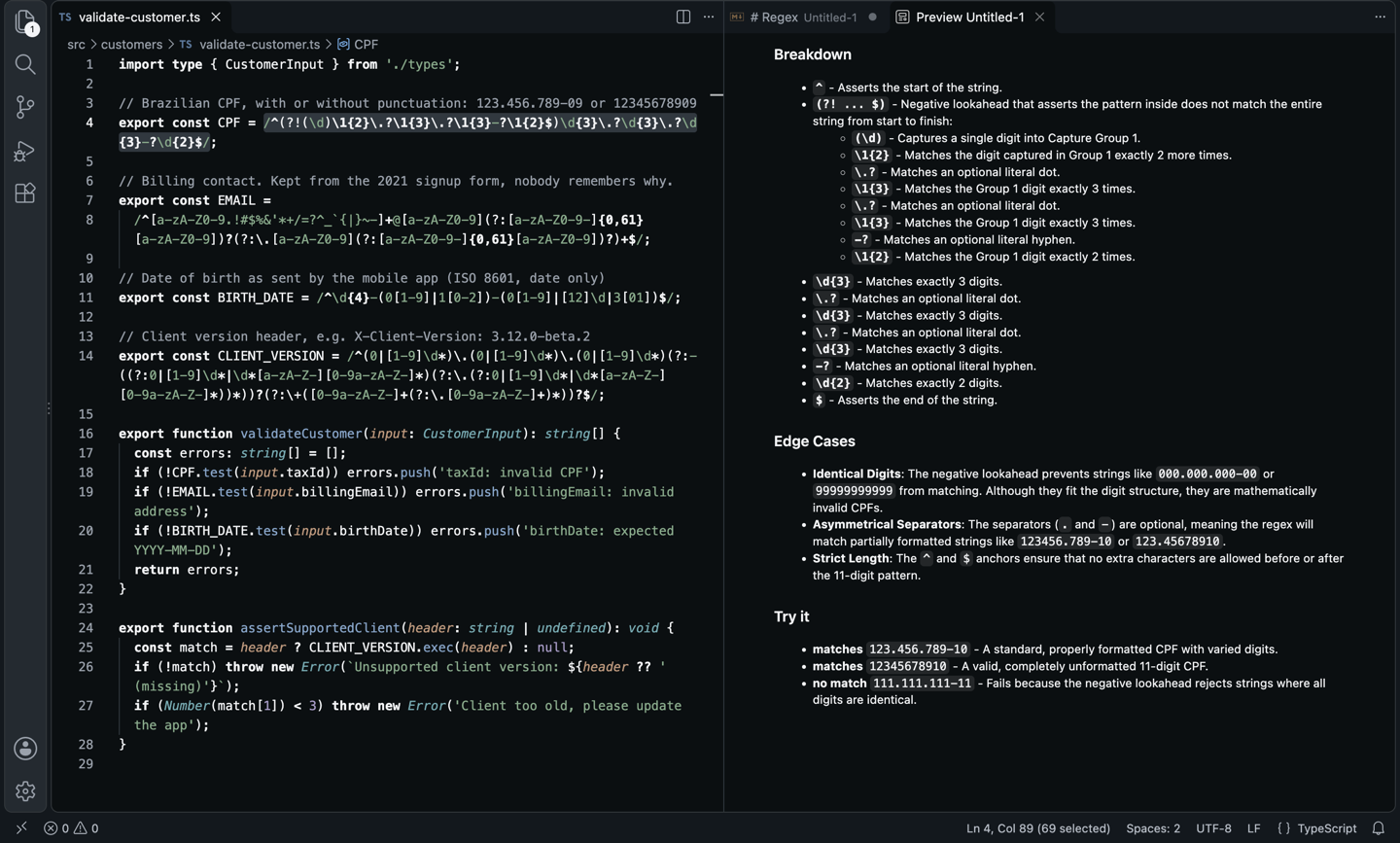
Six months later I read my own pattern and had no idea what it did. (?!(\d)\1{2}\.?\1{3}...) is not documentation. And when I needed a new one, I lost twenty minutes on regex101 in another tab, pasting test strings by hand.
Both ends are easy for a language model. What I wanted was to do them without leaving the file. So Regex Whisperer does exactly two things:
- Explain. Select a regex, press
Cmd+Alt+R (Ctrl+Alt+R), and read a summary, a token-by-token breakdown, the edge cases, and strings that match and don't.
- Build. Press
Cmd+Alt+Shift+R (Ctrl+Alt+Shift+R), describe what you need, and get a pattern in your flavor. In JavaScript, every example the model gave is run through the real engine before you see it.
Select → Cmd+Alt+R → understand it. Describe → Cmd+Alt+Shift+R → paste it.
See it in action
Explain: a CPF validator nobody on the team wanted to touch, read back in plain English.
The hero above is the real output for this line:
export const CPF = /^(?!(\d)\1{2}\.?\1{3}\.?\1{3}-?\1{2}$)\d{3}\.?\d{3}\.?\d{3}-?\d{2}$/;
What came back (Gemini 3.5 Flash, trimmed to the summary, edge cases and examples):
Summary
This regular expression matches Brazilian CPF numbers (an 11-digit tax ID formatted
as 000.000.000-00 or unformatted as 00000000000 with optional separators), while
explicitly rejecting invalid CPFs made up of all identical digits (such as
111.111.111-11).

Edge Cases
- Identical Digits: The negative lookahead prevents strings like 000.000.000-00 or
  99999999999 from matching. Although they fit the digit structure, they are
  mathematically invalid CPFs.
- Asymmetrical Separators: The separators (. and -) are optional, meaning the regex
  will match partially formatted strings like 123456.789-10 or 123.45678910.
- Strict Length: The ^ and $ anchors ensure that no extra characters are allowed
  before or after the 11-digit pattern.

Try it
- matches 123.456.789-10 - A standard, properly formatted CPF with varied digits.
- matches 12345678910 - A valid, completely unformatted 11-digit CPF.
- no match 111.111.111-11 - Fails because the negative lookahead rejects strings
  where all digits are identical.
One keystroke, and a real finding: the pattern happily accepts half-punctuated input like 123456.789-10.
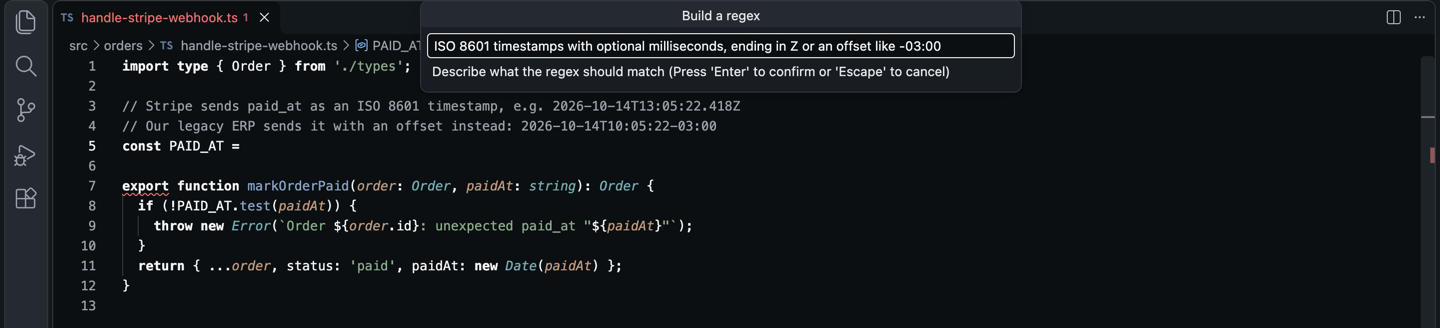
Build: describe the timestamp format a Stripe webhook sends, right where the constant goes.
The result: pattern, examples, and a local check by the JavaScript engine.
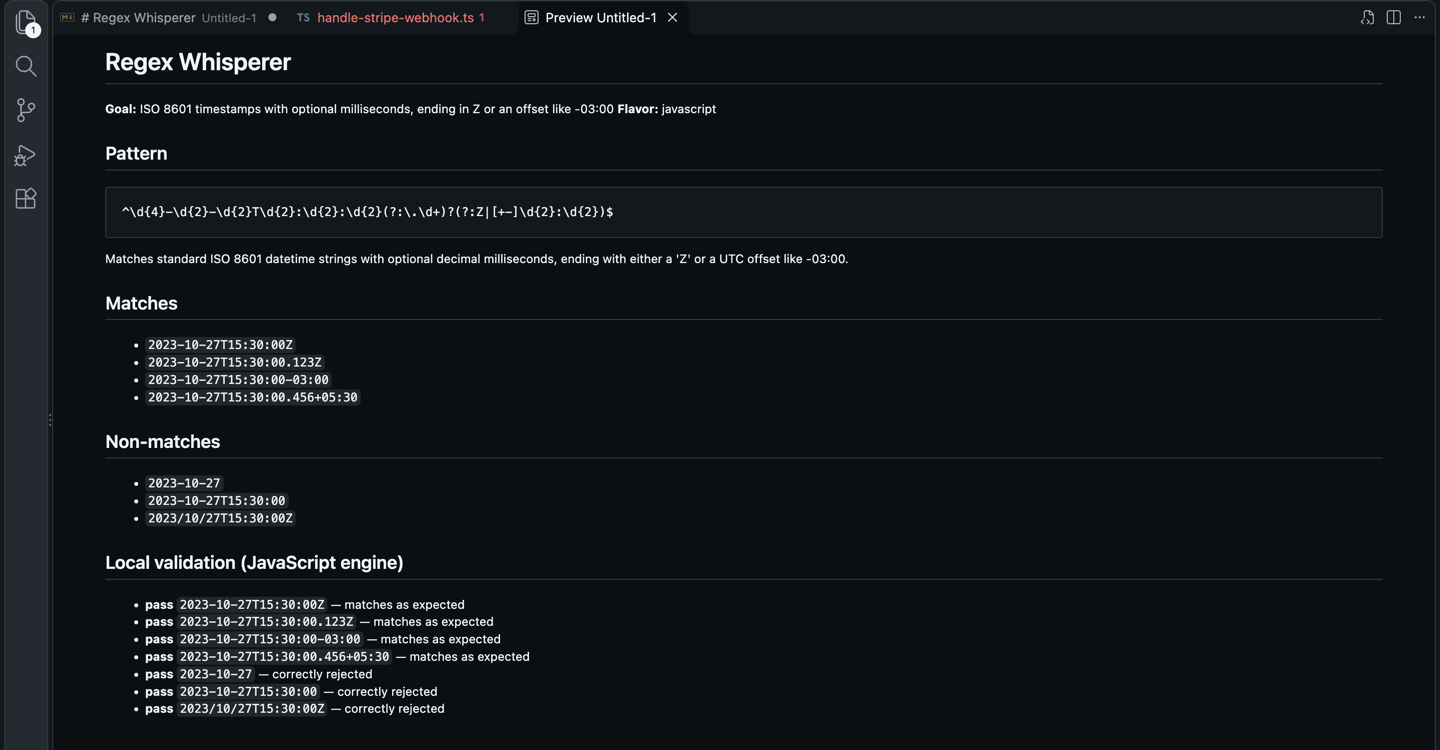
Goal: ISO 8601 timestamps with optional milliseconds, ending in Z or an offset like -03:00
Flavor: javascript

Pattern
^\d{4}-\d{2}-\d{2}T\d{2}:\d{2}:\d{2}(?:\.\d+)?(?:Z|[+-]\d{2}:\d{2})$

Matches standard ISO 8601 datetime strings with optional decimal milliseconds,
ending with either a 'Z' or a UTC offset like -03:00.

Local validation (JavaScript engine)
- pass 2023-10-27T15:30:00Z — matches as expected
- pass 2023-10-27T15:30:00.123Z — matches as expected
- pass 2023-10-27T15:30:00-03:00 — matches as expected
- pass 2023-10-27T15:30:00.456+05:30 — matches as expected
- pass 2023-10-27 — correctly rejected
- pass 2023-10-27T15:30:00 — correctly rejected
- pass 2023/10/27T15:30:00Z — correctly rejected
Before the details open, a notification shows the pattern with three buttons: Insert at cursor, Copy to clipboard, Show details. If an example fails, the line starts with fail and says why: DID NOT match (regex may be wrong) or UNEXPECTEDLY matched (regex too loose).
Why this one?
- Both directions. Most regex extensions only generate or only explain. This does both, one keybinding each.
- Checked, not just generated. For JavaScript, the extension compiles the pattern with
new RegExp and runs it against every match and non-match the model proposed. A wrong regex shows up before it reaches your code.
- Flavor-aware. Generation targets your flavor: JavaScript, PCRE, Python, Go, Java, Rust or .NET.
- Explains in your language. English by default; set
regexWhisperer.language to portuguese, spanish or any other.
- Bring your own model. Any of the 350+ models on OpenRouter, pay per token, no subscription.
- Nothing else leaves your machine. The only network calls go to OpenRouter. No telemetry, no account with me.
How it compares
|
AI Regex Whisperer |
Regex Previewer |
Regexp Explain |
regex101 (website) |
| Explains a regex in plain English |
Yes |
No |
Yes |
Yes |
| Builds a regex from a description |
Yes |
No |
No |
No |
| Tests against examples |
Partial: the model's examples, run locally for JS |
Yes: your text |
No |
Yes: your text |
| Flavors: JS, PCRE, Python, Go, Java, Rust, .NET |
Yes |
Partial: JS, TS, PHP, Haxe |
Partial |
Yes |
| Inside the editor, one keybinding |
Yes |
Yes |
Yes |
No: browser tab |
| Works in Cursor, VSCodium (Open VSX) |
Yes |
No |
No |
— |
From each tool's public listing, September 2026. Something changed? Tell me at ciromaciel.click and I'll fix the table.
Setup
- Install the extension.
- Get an OpenRouter API key (
sk-or-...). Pay per token, no subscription.
- On first use it asks for the key, or run Regex Whisperer: Set OpenRouter API Key.
- Optional: pick a model with Regex Whisperer: Select Model (live list with context size and prices). The default is Gemini 3.5 Flash; regex is short, a Flash model is plenty.
Use it
| Command |
Keybinding |
What it does |
Regex Whisperer: Explain Selected Regex |
Cmd+Alt+R / Ctrl+Alt+R |
Explains the selection in a Markdown preview |
Regex Whisperer: Build Regex from Description… |
Cmd+Alt+Shift+R / Ctrl+Alt+Shift+R |
Asks for a description, returns a pattern to insert, copy or inspect |
Regex Whisperer: Open Regex Playground |
— |
Opens the same Build prompt |
Regex Whisperer: Select Model |
— |
Picks an OpenRouter model from the live list |
Regex Whisperer: Set OpenRouter API Key |
— |
Stores your key |
Explain and Build are also in the editor's right-click menu.
Configuration
| Setting |
Default |
What it does |
regexWhisperer.openRouterApiKey |
— |
Your sk-or-... key. |
regexWhisperer.model |
google/gemini-3.5-flash |
Any OpenRouter slug. |
regexWhisperer.flavor |
javascript |
Target flavor for Build, and the context for Explain. |
regexWhisperer.language |
english |
Natural language for explanations. |
Good picks: Gemini 3.5 Flash (default), GPT-5 Mini / GPT-5.4 Mini, Claude Haiku 4.5, DeepSeek V3.2 for the cheapest runs.
FAQ
What is sent to the model?
The selected regex (Explain) or your typed description (Build), plus a short instruction. It goes to OpenRouter and the provider behind the model you chose. Nothing else from your file or workspace.
Why is only JavaScript validated locally?
The editor runs JavaScript's regex engine. Other flavors are generated and explained, but not executed.
Does Insert at cursor add the slashes?
No. It inserts the bare pattern, so it fits new RegExp('...'), a config file or a non-JS language. Wrap it in /.../ yourself for a JS literal; the flags are shown in the details.
About me
I'm a developer building tools I want to use. More of my stuff at ciromaciel.click.
If this decoded a regex nobody on your team dared to touch, pass it on.
Proprietary — see LICENSE.
Keywords: regex, regular expression, regex generator, regex explainer, explain regex, regex tester, regex builder, regex101 alternative, pcre, javascript regex, python regex, go regex, rust regex, ai regex, openrouter, chatgpt regex, gemini, claude, cursor, vscodium.

