AI Error Message Humanizer for VS Code
Stop shipping throw new Error('invalid'). Click the lightbulb, and a model reads the code around it and rewrites the message into something your on-call self can act on.
Built by Ciro Cesar Maciel — because I read too many stack traces that ended in Error: invalid input.






I spent too many 20-minute sessions figuring out which input, where, and why it was rejected — when the answer was right there in the code, three lines above the throw. A model that reads those three lines and rewrites the message saves the next reader (often you, six months later) those 20 minutes.
Error Message Humanizer finds the throw / raise / panic sites in your file. On the one you pick — lightbulb, context menu or one keystroke — it sends the surrounding code to a model on OpenRouter and proposes a message a reader can act on. Nothing changes in your file until you click Apply.
See it in action
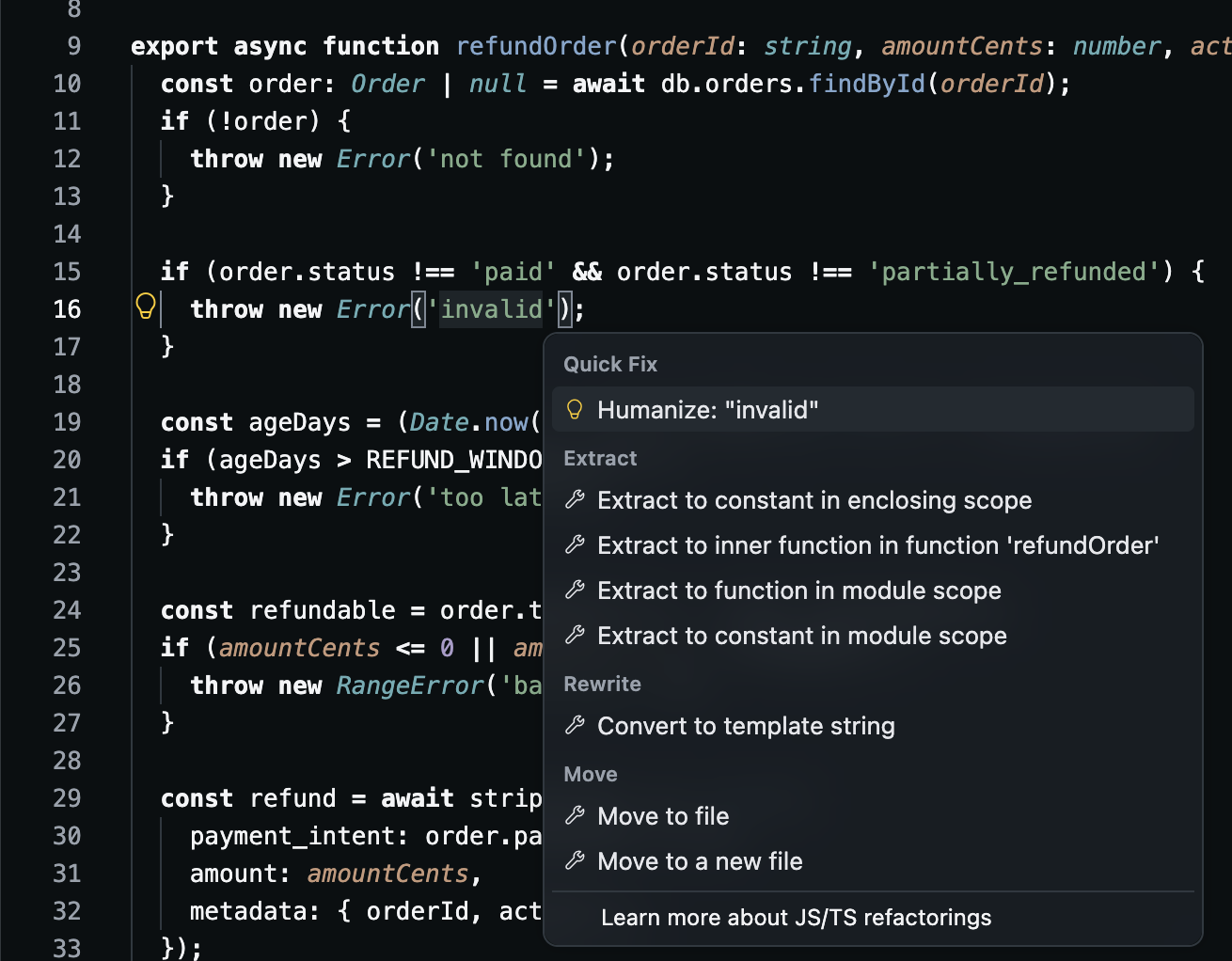
A lightbulb on every detected error site: Humanize: "invalid" sits next to the built-in refactorings.
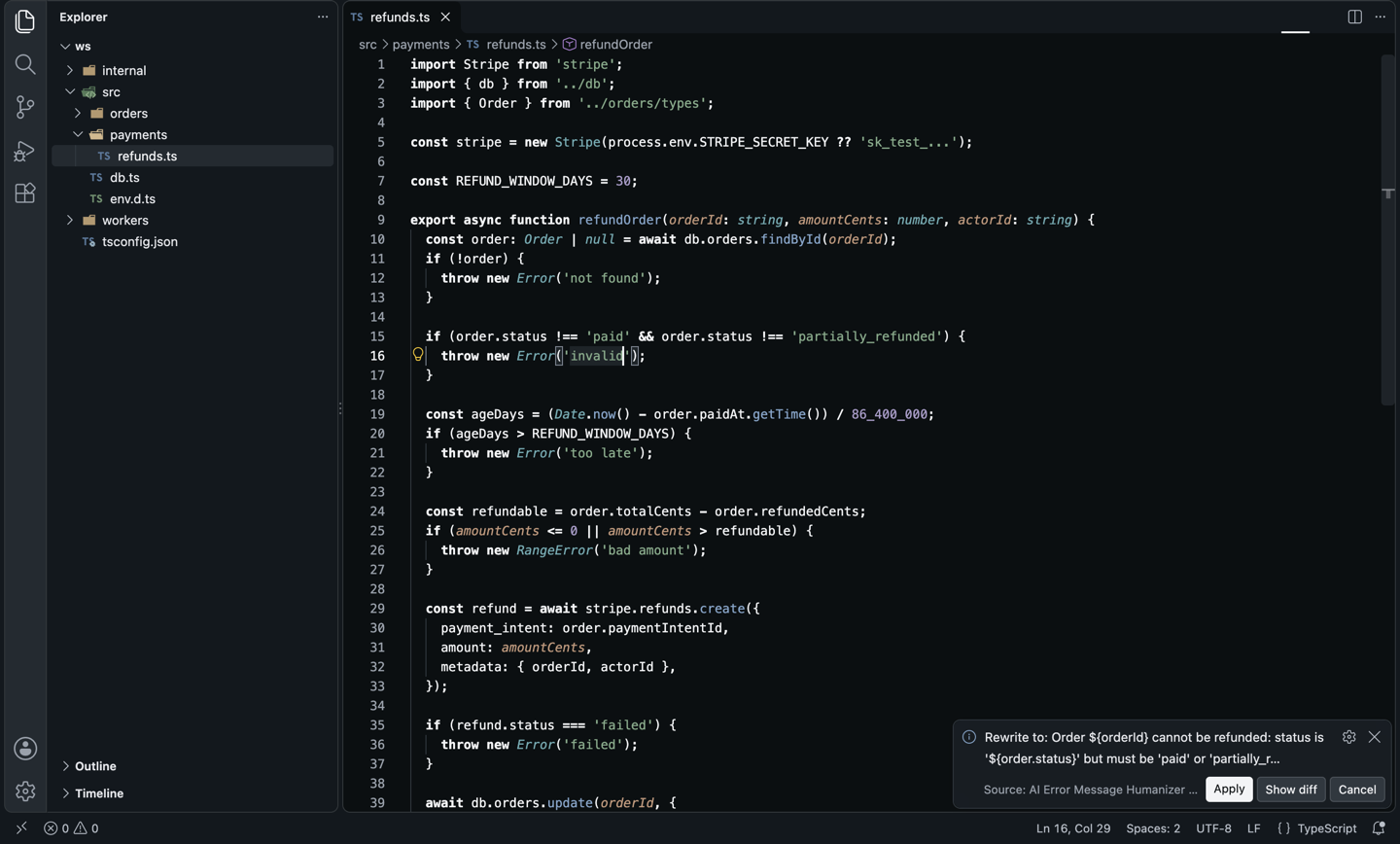
The rewrite for that line, from the run in the screenshots (Claude Sonnet 4.6, actionable style). The message now names the order and its status, so the single-quoted string becomes a template literal:
- throw new Error('invalid')
+ throw new Error(`Order ${orderId} cannot be refunded: status is '${order.status}' but must be 'paid' or 'partially_refunded'`)
The whole file in one call: every message, before and after, next to the code.
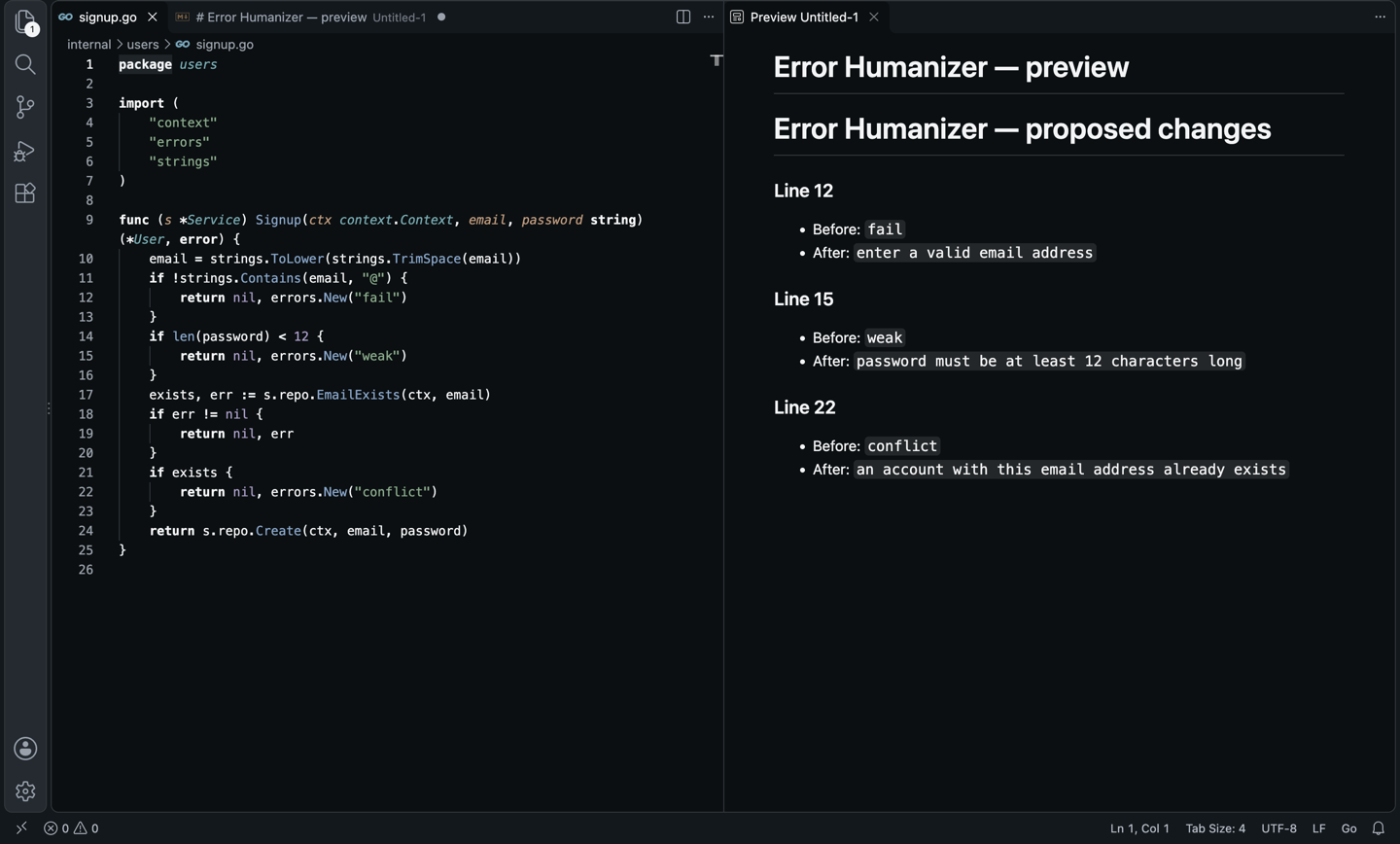
The Go signup handler from that preview, and a Python invoice worker after Apply all, where a message that gained a variable became an f-string:
- errors.New("fail")
+ errors.New("enter a valid email address")
- errors.New("weak")
+ errors.New("password must be at least 12 characters long")
- errors.New("conflict")
+ errors.New("an account with this email address already exists")
- raise LookupError("missing")
+ raise LookupError(f"Customer with ID '{customer_id}' was not found. Verify the customer ID and try again.")
- raise ValueError("invalid")
+ raise ValueError("Item quantity must be greater than zero. Remove or correct any items with a zero or negative quantity.")
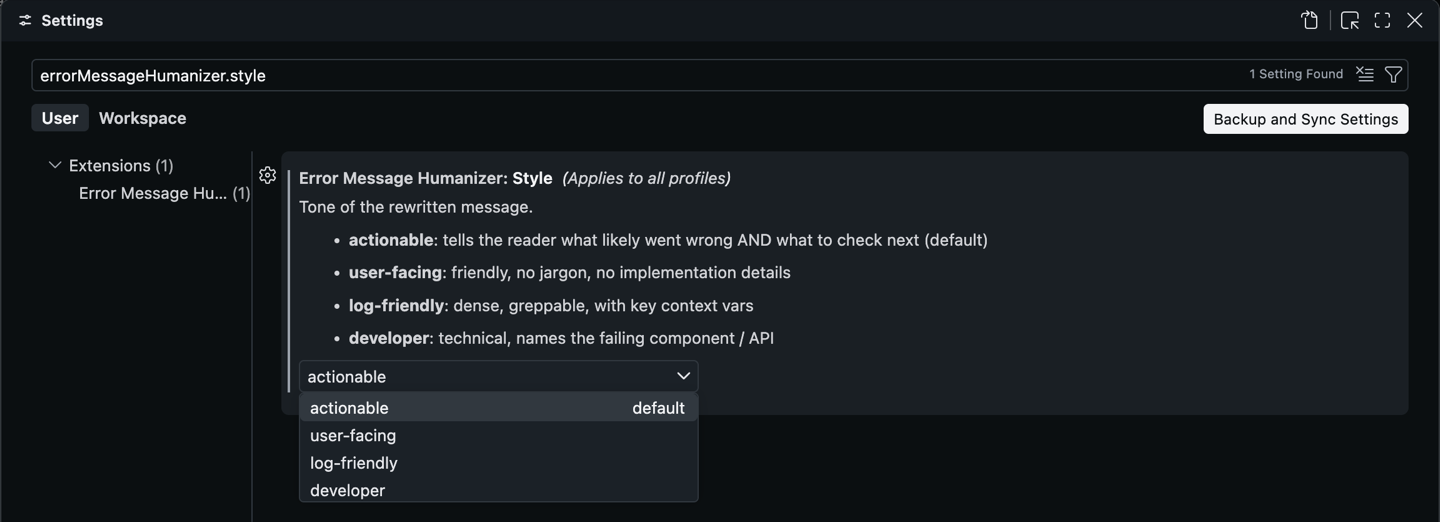
Four tones, one setting: actionable, user-facing, log-friendly or developer.
Why this one?
- Detects error sites in 8 languages. JS/TS (
throw new Error(...) and its built-in subclasses, bare throw "..."), Python (raise X("...")), Go (errors.New, fmt.Errorf), Rust (panic!, anyhow!, bail!), Java and C# (throw new XException("...")), Ruby (raise X, "...") and PHP.
- Reads the code, not just the string. The model gets 40 lines around the site by default, so it can name the order, the status or the limit that actually failed.
- A lightbulb on every site.
Humanize: "<message>" → a proposal in a notification → Apply, Show diff or Cancel.
- Whole-file rewrite.
Humanize All Error Messages in File sends every site in one model call, then asks Apply all, Show preview or Cancel.
- You approve every change. Nothing is written until you click Apply. If a message is already clear, it says so and leaves it alone.
- Four tones. actionable (what broke and what to check), user-facing (friendly, no jargon), log-friendly (dense, greppable), developer (names the failing API or component).
- Any natural language. Set
errorMessageHumanizer.language to portuguese, spanish or any other, and the prose follows.
- Bring your own model. Any of the 350+ models on OpenRouter; pay per token, no subscription.
How it compares
|
AI Error Message Humanizer |
Error Lens |
Copilot Chat / ChatGPT |
| Improves the messages your code throws |
Yes |
No: shows diagnostics inline |
Partial: one at a time, by hand |
| Reads the surrounding code for context |
Yes, automatically |
Not applicable |
Partial: you paste it |
| Lightbulb on every throw / raise / panic |
Yes |
No |
No |
| Whole-file rewrite with before/after preview |
Yes |
No |
No |
| Tone presets (user-facing, log-friendly…) |
Yes |
No |
Partial: via prompt |
| Any model, pay per token |
Yes: OpenRouter |
Not applicable |
No: subscription |
| Works in Cursor, VSCodium (Open VSX) |
Yes |
Yes |
No |
From each tool's public listing, September 2026. Something changed? Tell me at ciromaciel.click.
Setup
- Install the extension.
- Get an OpenRouter API key (
sk-or-...). Pay per token, no subscription.
- Run
Error Humanizer: Set OpenRouter API Key, or just use the lightbulb: it asks for the key the first time.
- Optional: pick a model with
Error Humanizer: Select Model, which lists every OpenRouter model with its context size and prices. The default is Claude Sonnet 4.6.
Use it
| Command |
Default keybinding |
What it does |
Error Humanizer: Humanize Error Message |
Cmd+Alt+E / Ctrl+Alt+E |
Rewrites the message at the cursor |
Error Humanizer: Humanize All Error Messages in File |
— |
Rewrites every detected site in the active file |
Error Humanizer: Select Model |
— |
Picks an OpenRouter model from the live list |
Error Humanizer: Set OpenRouter API Key |
— |
Prompts for your key |
The first two are also in the editor's right-click menu, and the lightbulb (Cmd+. / Ctrl+.) appears on every detected site.
Configuration
| Setting |
Default |
What it does |
errorMessageHumanizer.openRouterApiKey |
— |
Your sk-or-... key. |
errorMessageHumanizer.model |
anthropic/claude-sonnet-4.6 |
Any OpenRouter slug. |
errorMessageHumanizer.style |
actionable |
actionable / user-facing / log-friendly / developer. |
errorMessageHumanizer.language |
english |
Natural language of the rewritten message. |
errorMessageHumanizer.contextLines |
40 |
Surrounding lines sent to the model for a single rewrite (half that per site in a whole-file run). |
FAQ
What is sent to the model?
Detection is 100% local. The file's relative path and the code around each message are sent to OpenRouter (and on to the model's provider) only when you run a humanize command.
Can the model invent causes?
The prompt tells it never to claim a failure cause the visible code doesn't support, and you see every rewrite before it lands.
What if the new message uses a variable and my string is in plain quotes?
The string is converted for you: in JS/TS a 'quoted' message that gains ${orderId} becomes a template literal, and in Python a message that gains {order_id} becomes an f-string. Elsewhere the model is told to keep plain text, except for format verbs in Go's fmt.Errorf.
Which lines does it skip?
Messages split across several lines, and lines that start with // or #. It stays conservative on purpose.
About me
I'm a developer building tools I want to use. More of my stuff at ciromaciel.click.
If this turned one Error: failed into a message someone could act on at 3 a.m., pass it on.
Proprietary — see LICENSE.
Keywords: error message, exception message, throw new error, raise, panic, errors.new, error handling, better errors, code action, quick fix, lightbulb, refactor, logging, observability, on-call, developer experience, openrouter, claude, gpt, gemini, deepseek, cursor, vscodium.

