Env Var Detective — Find Undocumented Env Vars and Write .env.example with AI
Every process.env.X and os.getenv("X") in your code, checked against your .env files, grouped by what is wrong with it. One click and a model writes the missing .env.example entries.
Built by Ciro Cesar Maciel — because every new repo crashed on a missing env var nobody documented.






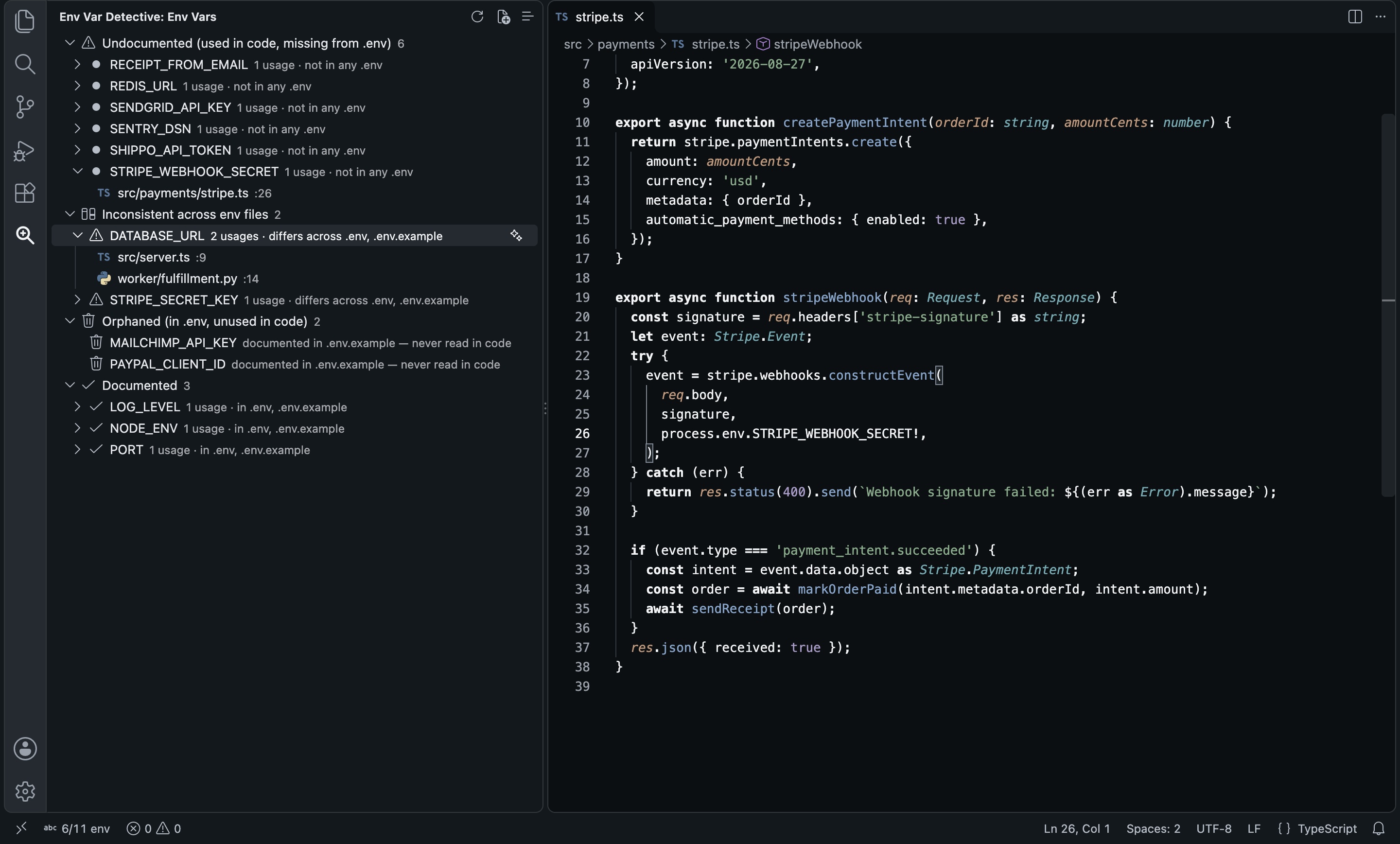
Every time I joined a new repo, the same dance: clone, install, run, crash on a missing STRIPE_WEBHOOK_SECRET, grep for process.env, ask in Slack, repeat. The .env.example was always a year behind the code: half the keys it listed were dead, and the ones that mattered were missing.
So I built the side bar I wanted. It reads every env var your code actually reads, in TypeScript, Python, Rust, Java and more, and puts each one in a bucket: used but documented nowhere, defined with different values across files, defined but never read, or fine. Click a variable to see every line that reads it. When you want, a model on OpenRouter writes the missing .env.example entries from those lines.
Install → open the Env Var Detective icon in the Activity Bar → the scan is already done. No key needed for the scan.
See it in action
One Generate .env.example with AI click: six undocumented vars become six commented entries, appended to the stale file, and the side bar moves them to Documented.
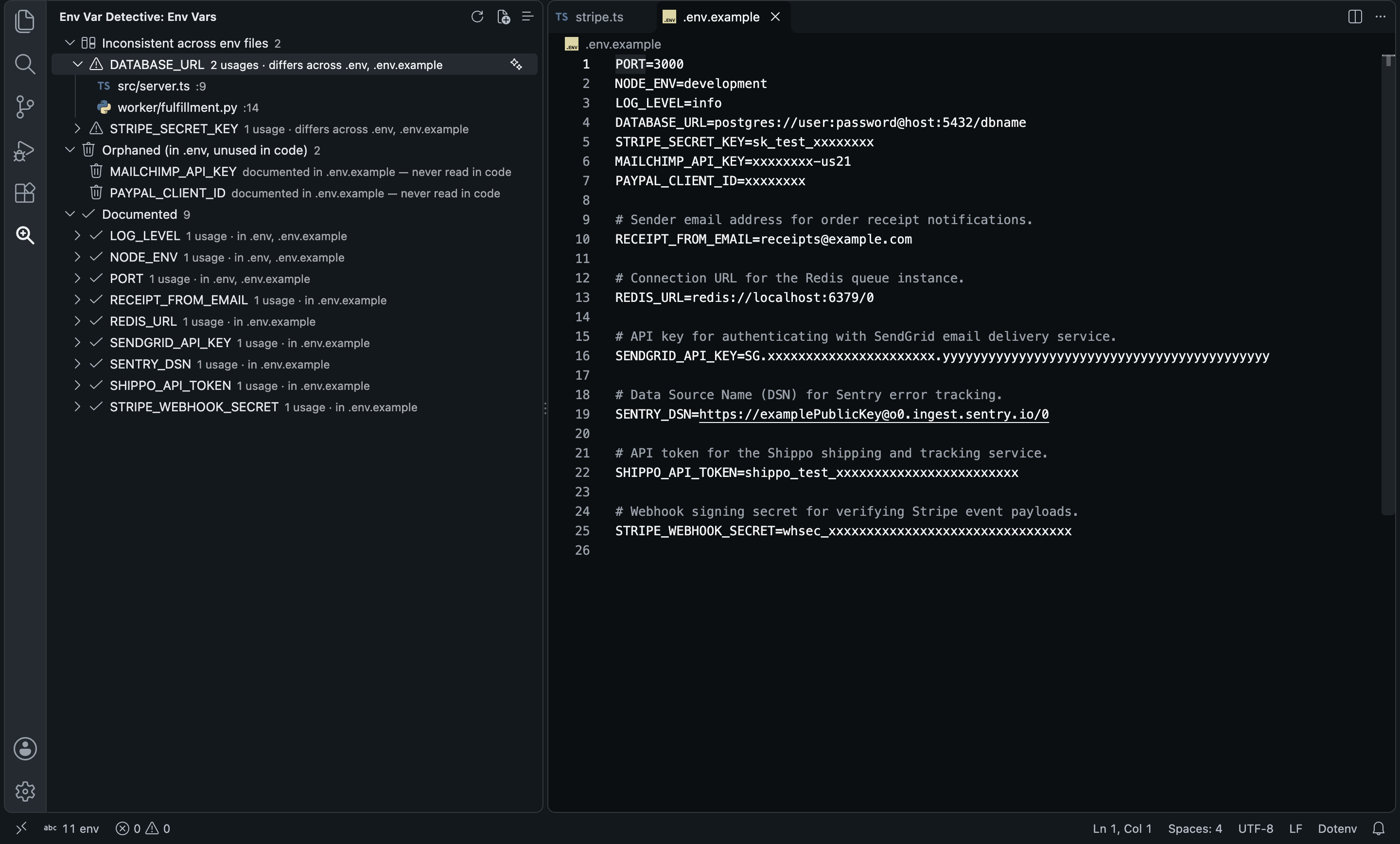
Four of the six entries the model appended, word for word, from the usage sites in a TypeScript API and a Python worker (Gemini 3.8 Flash):
# before: .env.example ended here
PAYPAL_CLIENT_ID=xxxxxxxx

# after: appended by Env Var Detective
# Sender email address for order receipt notifications.
RECEIPT_FROM_EMAIL=receipts@example.com

# Connection URL for the Redis queue instance.
REDIS_URL=redis://localhost:6379/0

# API token for the Shippo shipping and tracking service.
SHIPPO_API_TOKEN=shippo_test_xxxxxxxxxxxxxxxxxxxxxxxx

# Webhook signing secret for verifying Stripe event payloads.
STRIPE_WEBHOOK_SECRET=whsec_xxxxxxxxxxxxxxxxxxxxxxxxxxxxxxxx
Existing lines are never rewritten: new entries go at the end of the file, and only after you click Append.
Why this one?
- Reads the code, not just the
.env. process.env.X, process.env["X"], import.meta.env.X, Bun.env.X, Deno.env.get, os.environ, os.getenv, Go's os.Getenv and os.LookupEnv, getenv, ENV[], System.getenv, std::env::var, Environment.GetEnvironmentVariable and ${X} in shell. That covers TS, JS, Python, Go, Ruby, PHP, Java, Kotlin, Scala, Rust, C#, C, C++ and shell scripts.
- Cross-checks every env file.
.env, .env.example, .env.sample, .env.local, .env.development, .env.production, .env.staging, .env.test, at the workspace root (configurable).
- Groups what matters. Undocumented: read in code, in no env file. Inconsistent: in two or more env files with different values. Orphaned: in an env file, never read. Documented: the rest.
- Every usage one click away. Expand a variable, click a file, land on the line that reads it.
- Writes the docs for you. The sparkle button on a variable drafts one entry; the title bar button drafts every undocumented var in one call. Keys, tokens, secrets and passwords get obviously fake placeholders.
- A count in the status bar.
6/11 env means 6 of 11 vars read in code are undocumented. Click it to rescan.
- The scan is free and local. An OpenRouter key is only needed for the AI-written entries.
How it compares
|
Env Var Detective |
DotENV |
Dotenv Official |
ENV |
.env syntax highlighting |
No |
Yes |
Yes |
Yes |
| Finds env vars read in your code |
Yes: TS, Python, Rust, Java, C# and more |
No |
— |
No |
| Undocumented / orphaned / inconsistent report |
Yes |
No |
No |
No |
Generates .env.example with descriptions |
Yes: AI |
No |
No |
No |
| Works in Cursor, VSCodium (Open VSX) |
Yes |
Yes |
Yes |
— |
They work well together: keep DotENV for syntax highlighting, and use Env Var Detective to keep code and .env files in sync.
From each extension's public listing, September 2026; — means the listing doesn't say. Something changed? Tell me at ciromaciel.click.
Setup
- Install Env Var Detective from the Extensions view.
- Open the Env Var Detective icon in the Activity Bar. The workspace is scanned on startup; no key needed.
- Optional, for AI-written entries: get an OpenRouter API key (
sk-or-...) and run Env Var Detective: Set OpenRouter API Key.
- Optional: pick a model with Env Var Detective: Select Model (the live OpenRouter list, with prices). The default is Gemini 3.5 Flash. This is a small task.
Use it
| Command |
What it does |
Env Var Detective: Scan Workspace for Env Vars |
Rescans source files and every env file (also the refresh button and the status bar item) |
Env Var Detective: Document Var with AI |
Sparkle button on a variable: drafts its comment and placeholder, then Append, Copy snippet or Show details |
Env Var Detective: Generate .env.example with AI |
Drafts every undocumented var in one call, then Append or Show preview |
Env Var Detective: Select Model |
Picks an OpenRouter model from the live list |
Env Var Detective: Set OpenRouter API Key |
Prompts for your key |
Configuration
| Setting |
Default |
What it does |
envVarDetective.openRouterApiKey |
— |
Your sk-or-... key (only needed for AI entries). |
envVarDetective.model |
google/gemini-3.5-flash |
Any OpenRouter slug. |
envVarDetective.includeGlobs |
common code extensions |
Source files to scan. |
envVarDetective.excludeGlobs |
node_modules, dist, build, target, … |
Folders to skip. |
envVarDetective.envFiles |
.env, .env.example, .env.local, … |
Env files to cross-check, at the workspace root. |
envVarDetective.exampleFile |
.env.example |
File the AI entries are appended to. |
envVarDetective.contextLines |
30 |
Lines of code around each usage sent to the model. |
Recommended models: Gemini 3.5 Flash (default), DeepSeek V3.2 for the cheapest runs, Claude Sonnet 4.6 for descriptions worth keeping.
FAQ
Are my secrets sent anywhere?
The scan is local. Code goes to OpenRouter only when you click Document Var with AI or Generate .env.example with AI: the lines around a few usages of each variable. When documenting one variable that already has a value in an env file, that value is sent as a format hint, and the prompt tells the model to replace anything that looks like a real secret with a placeholder.
Does it change my .env?
No. It only appends to the example file (.env.example by default), and only when you click Append.
Where is my OpenRouter key stored?
In your user settings, as envVarDetective.openRouterApiKey.
Why is a var "Inconsistent" when my .env.example just has a placeholder?
Because the values differ. That is the point: it is how you spot a DATABASE_URL that means one thing locally and another in the file your teammates copy.
About me
I'm a developer building tools I want to use. More of my stuff at ciromaciel.click.
If this saved your next teammate an afternoon of "what does this service need to boot?", pass it on.
Proprietary — see LICENSE.
Keywords: env, dotenv, .env, .env.example, environment variables, env validator, dotenv validator, missing env vars, undocumented env vars, process.env, import.meta.env, os.getenv, os.Getenv, os.environ, std::env, config documentation, secrets, 12factor, openrouter, ai docs, cursor, vscodium.

