Font Browser
Browse and preview fonts for your VS Code editor and terminal from a convenient sidebar.
Install from VS Code Marketplace | Install via CLI: code --install-extension chadthornton.font-browser
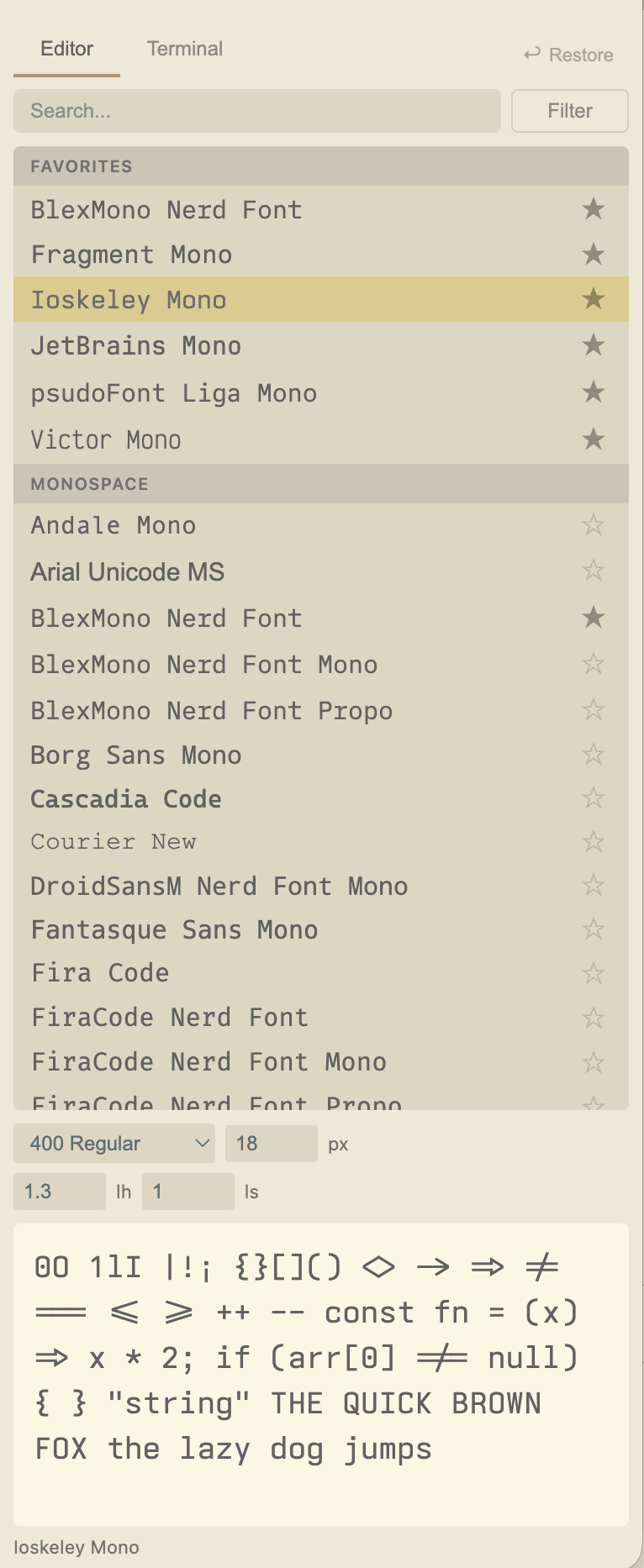
Features
- Try Fonts Live — Click any font to apply it instantly to your editor or terminal
- Editor & Terminal Tabs — Configure fonts separately, with smart filtering per context
- Preview Pane — See a specimen preview of the selected font below the font list
- Smart Filtering — Filter by category and features (Variable, Ligatures, Icons, Latin)
- Favorites — Star fonts with optional settings (size, weight, spacing) that restore on click
- Typography Controls — Size, weight, line height, letter spacing, ligatures, and terminal bold weight
- Restore / Copy / Reset — Revert to previous settings, copy between editor and terminal, or reset to VS Code defaults
How It Works
Font Detection
On macOS and Linux, Font Browser uses fontconfig (fc-list) to discover installed fonts with rich metadata — weight variants, variable font detection, language support, and monospace classification. On Windows, it falls back to PowerShell's InstalledFontCollection (font names only, limited metadata).
Smart Categorization
Monospace detection uses a two-tier approach:
- fontconfig spacing data (primary) —
spacing=100 (monospace) or spacing=90 (dual-width) are classified as monospace
- Keyword heuristics (fallback) — When fontconfig lacks spacing data, font names are matched against known patterns (
mono, consol, courier, terminal, fixed, etc.) with care to avoid false positives (code matched as whole word only to exclude "Unicode"; "Propo" suffix excluded for Nerd Font proportional variants)
A curated list of popular coding fonts ensures correct categorization even when system metadata is incomplete.
Terminal-Safe Filtering
The terminal tab only shows monospace fonts — proportional fonts are filtered out because xterm.js renders a fixed-width character grid where every glyph gets the same cell width regardless of its natural width.
Fonts with texture healing (0xProto, Monaspace family) are also hidden from the terminal tab. Texture healing dynamically adjusts glyph widths based on neighboring characters — a clever feature for editors, but incompatible with xterm.js's rigid grid, causing garbled rendering.
Latin Script Detection
Parsed from fontconfig's lang= field to identify fonts that support Latin characters. The "Latin" filter defaults to ON, hiding CJK, Arabic, and symbol fonts. Hidden on Windows where language metadata isn't available.
Terminal Race Condition Workaround
VS Code's terminal has a race condition where onDidChangeConfiguration fires before a config write is fully committed, causing the terminal to read stale values. Font Browser works around this by triggering a font zoom cycle after each terminal setting change, forcing xterm.js to rebuild its font atlas with the committed values.
Usage
- Click the Font Browser icon in the Activity Bar (left sidebar)
- Switch between Editor and Terminal tabs
- Click any font to apply it instantly
- Adjust typography settings (weight, size, line height, letter spacing)
- Use the search box and filter toggles to find fonts
- Star your favorites — settings are saved if you've customized them
- Use the ⋯ menu to restore previous settings, copy settings between tabs, or reset to defaults
| Platform |
Font Detection |
Weight/Style |
Variable Fonts |
Latin Filter |
Monospace Detection |
| macOS |
fontconfig |
Full |
Yes |
Yes |
fontconfig + heuristics |
| Linux |
fontconfig |
Full |
Yes |
Yes |
fontconfig + heuristics |
| Windows |
PowerShell |
Basic |
No |
No |
Heuristics only |
Settings Modified
This extension reads and writes these VS Code settings when you interact with it:
| Setting |
Editor |
Terminal |
| Font family |
editor.fontFamily |
terminal.integrated.fontFamily |
| Font size |
editor.fontSize |
terminal.integrated.fontSize |
| Font weight |
editor.fontWeight |
terminal.integrated.fontWeight |
| Line height |
editor.lineHeight |
terminal.integrated.lineHeight |
| Letter spacing |
editor.letterSpacing |
terminal.integrated.letterSpacing |
| Bold weight |
— |
terminal.integrated.fontWeightBold |
| Ligatures |
editor.fontLigatures |
terminal.integrated.fontLigatures.enabled |
License
MIT


