Stop alt-tabbing to babysit agents. Every agent is a tmux session shown as a native
editor terminal, and one can orchestrate the rest through an embedded MCP Bridge —
spawn sub-agents, read each other's output, run your curated commands, notify you when they
need you. Sessions survive VSCode restarts (tmux owns the processes). 100% local:
no cloud component, no telemetry, no token proxying — on the subscriptions you already pay for.
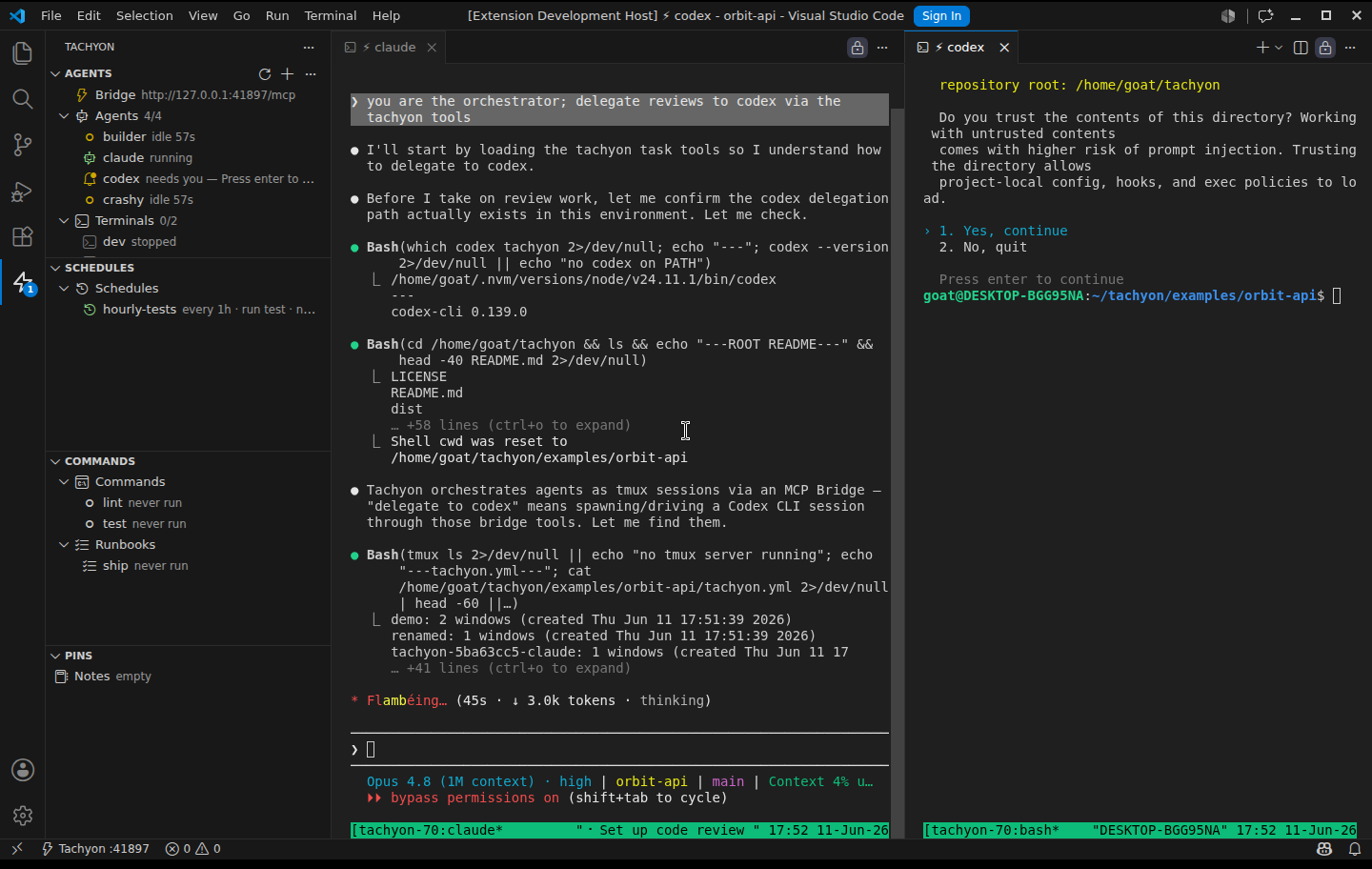
Real capture: Claude (left) asked Codex (right) to review a route via write_input —
Codex is reading the code and running lint, audit and tests on its own.
Works with the CLIs you already use
Claude Code · Codex · Gemini · OpenCode · Copilot CLI · Aider · any CLI —
plus any dev server, watcher or build command. No lock-in, no reselling your tokens.
Three steps, no magic
- Open a project — run Tachyon: Init: it auto-detects Node, Laravel, Rust, Go,
Python & Rails and writes a commented starter
tachyon.yml.
- Set up your agents — agents, terminals, commands and runbooks, in the Agent Studio UI
or by editing the yml (your comments survive UI edits).
- Start your fleet — auto-start agents boot when the workspace opens, coordinate via MCP,
and notify you when they need you.
Fresh install? The Get Started with Tachyon walkthrough opens automatically
(also via Tachyon: Get Started) and the sidebar offers Initialize Tachyon on an
unconfigured folder. Tachyon stays inert until you opt in — no Bridge or tmux server
boots just from installing or opening a folder.
Try it now: clone the repo and open examples/orbit-api (or
examples/orbit.code-workspace for the multi-root demo) —
the same workspaces used for the screenshots.
Requirements
| Platform |
Supported |
| Linux |
✅ tmux ≥ 3.2 (3.6 recommended — instant exit-code capture for one-shot commands) |
| macOS |
✅ (brew install tmux) |
| Windows + WSL |
✅ (VSCode Remote - WSL; tmux inside the distro) |
| Windows native |
❌ by design — use WSL |
The tachyon.yml
Generated by Tachyon: Init (also offered right in the empty sidebar) or written by hand
(see examples/orbit-api/tachyon.yml — a real runnable demo) — your whole fleet, versioned in git:
agents:
  claude:
    cmd: claude
    autostart: true
  dev:
    cmd: npm run dev
    autostart: true
    watch: "package.json"   # restarts when the file changes

commands:                    # one-shot, curated — humans click ▶, agents call run_command
  test: {cmd: npm test}
  lint: {cmd: npm run lint}

runbooks:                    # sequential procedures with an exit-code gate
  ship:
    steps: [lint, test, ./deploy.sh]
Open the workspace — Tachyon activates, spawns the autostart entries in tmux, and opens
their terminals in the editor area. Split/resize panes with VSCode's normal editor-group
gestures; closing a tab never kills the agent (the tmux session lives on).
Connecting an agent runtime to the Bridge
The Bridge listens on a stable per-workspace port (derived from the workspace path,
range 41000–42999 — same workspace, same port, forever), so a registration is a one-time
step that survives editor restarts. Pin a specific port with settings.bridgePort in
tachyon.yml; if the preferred port is ever busy, Tachyon falls back to an ephemeral one
and warns you. The current port shows in the $(zap) Tachyon :PORT status-bar item.
Run Tachyon: Connect Agent Runtime and pick your runtime. Registration is idempotent
and merge-safe: pre-existing MCP config files are preserved (only the tachyon key is
written), and re-running the command when the file is already correct is a no-op.
| Runtime |
Mechanism |
| Claude Code |
writes/merges .mcp.json ({"type": "http", "url": ...}) in the workspace |
| OpenCode |
writes/merges opencode.json ({"type": "remote", ...}) |
| Codex CLI |
copy-paste snippet for ~/.codex/config.toml (Tachyon never writes outside the workspace) |
| Anything else |
generic URL; stdio-only clients: npx -y mcp-remote <url> |
Runtime MCP client support evolves quickly — if a registration shape fails, check the runtime's
official MCP docs and fall back to the mcp-remote stdio proxy.
| Tool |
What it does |
spawn_agent |
start a declared agent, or an ad-hoc sub-agent with cmd + optional instructions (role prompt) and parent (lineage — the sidebar nests children under who spawned them) |
kill_agent |
stop an agent (kills its tmux session) |
restart_agent |
kill + respawn with the same definition |
list_agents |
declared + running agents for this workspace, with attention/crash state |
read_output |
another agent's terminal: visible pane by default, lines reaches scrollback¹ |
write_input |
type into another agent's terminal (submit: true presses Enter) |
wait_for_agent |
block until an agent reaches idle / needs-input / dead (event-driven long-poll — the delegation primitive: spawn → wait → read → kill) |
notify |
show the human a VSCode notification |
run_command |
run a curated one-shot from commands: and block until it exits — returns {passed, exitCode, durationMs, tail}; a finished result is reported, not re-run (rerun: true forces) |
list_commands |
the curated commands and their last results |
run_runbook |
run a runbooks: procedure (sequential, exit-code gated); on timeout it keeps running and reports progress on re-call |
propose_schedule |
propose a scheduled action — inert until the human approves it in the sidebar (approval writes it into tachyon.yml) |
list_schedules |
active schedules (next/last run) + pending proposals awaiting approval |
create_pin |
pin a finding to the shared checklist |
list_pins |
read the checklist (do this before starting work) |
complete_pin |
mark a pin done / reopen it |
get_notes / set_notes |
read / replace the shared whiteboard (.tachyon/notes.md) |
¹ Full-screen TUI agents (e.g. Claude Code) render an alternate screen with no scrollback history —
lines silently behaves like the visible capture for them; it works normally for plain CLI/server agents.
Sub-agents — agents that spawn agents
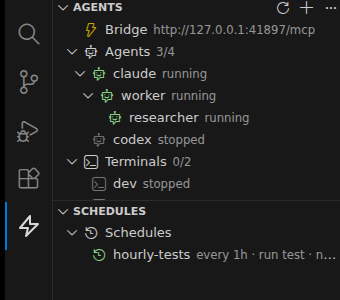
Any connected agent can spawn another with spawn_agent — a declared entry by name, or an
ad-hoc child with its own cmd, an instructions role prompt (delivered as the child's
startup prompt), and parent for lineage. The sidebar nests children under who spawned
them; when a parent dies, orphans are promoted to the root — children are never
cascade-killed. Children are full agents: each spawned session gets
TACHYON_BRIDGE_URL/TACHYON_BRIDGE_TOKEN injected, so a child can call the Bridge too —
including spawning its own children (nested lineage).
How agents talk to each other
There is no message bus to learn — communication happens through three concrete channels,
all mediated by the Bridge:
- The terminals themselves.
read_output captures another agent's pane (exactly what a
human sees in its tab); write_input types into it (submit: true presses Enter). An
orchestrator can answer a child's [y/n] prompt, or paste a task straight into a sibling.
- Synchronization.
wait_for_agent blocks until a sibling reaches idle /
needs-input / dead — event-driven (no polling), the primitive that makes delegation
deterministic. list_agents exposes everyone's attention and crash state for
fire-and-check styles.
- Shared memory.
set_notes/get_notes (the whiteboard) and pins are the durable
handoff: a child writes its result where scrollback can't lose it, the parent collects it,
and notify toasts the human when something needs eyes.
The full cycle, as an orchestrating agent runs it:
spawn_agent  name=worker cmd=claude parent=claude
             instructions="research X; save findings with set_notes; then notify"
wait_for_agent  name=worker until=idle timeoutSec=120   ← blocks, event-driven
get_notes                                               ← collect the result
kill_agent   name=worker                                ← tidy up
Delegation patterns
Three ways for a parent agent to delegate to a spawned child — all available today:
| Pattern |
Parent while waiting |
Use when |
Blocking — wait_for_agent(until=idle) |
busy until resolved/timeout |
short task, parent wants the result next |
Fire-and-check — spawn, keep working, get_notes/list_agents later |
free |
parent has its own work in parallel |
| Child announces — instructions end with "save your result with set_notes and call notify when done" |
free, human gets a toast |
the cleanest: push instead of pull, nobody waits |
A blocked turn is the tool model's nature (a 2-minute bash call blocks the same way) — the
human can still queue messages or press Esc to interrupt, and can always talk to the child
directly in its own terminal tab.
Attention detection — "this agent needs you"
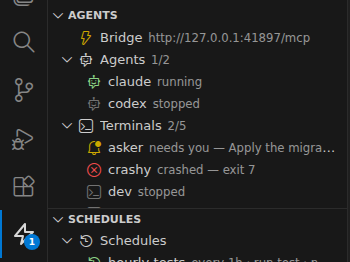
With several agents running, the expensive part is noticing which one stopped to ask you
something. Tachyon watches each agent's pane and signals:
needs-input (strong, high-precision): the pane tail ends in a recognizable prompt
([y/n], Enter to confirm, password prompts, numbered selectors, …) and is stable →
yellow bell in the sidebar, a counter badge on the ⚡ Activity Bar icon, and a one-time
toast with an Open button.idle (weak, informational): no output for silenceSec (default 8s) and the process
subtree's CPU is flat (busy CPU = thinking, suppresses) → dim outline icon + "idle 2m".
Never toasts.
Per-agent config (defaults by kind: on for agents, off for terminals — a quiet
server is normal):
agents:
  claude:
    cmd: claude            # attention on by default
  dev:
    cmd: npm run dev
    watch: "package.json"  # attention off by default
  legacy-repl:
    cmd: ./repl
    attention:
      silenceSec: 30
      patterns: ["AGUARDANDO COMANDO"]   # extra regexes (case-insensitive)
The state is also visible to other agents via the Bridge's list_agents (attention field) —
an orchestrating agent can spot a stuck sibling and write_input the answer or notify you.
On macOS there is no /proc, so the CPU check degrades gracefully: pane stability alone
drives idle; needs-input is unaffected.
Crash lifecycle — exit codes, postmortem, auto-restart
When an agent's process dies on its own, the session doesn't vanish: the dead pane is
kept (last output + stack trace visible in its terminal) and the sidebar shows
crashed — exit N in red, with ↻ restart / ■ dismiss actions. You get a notification
with the exit code; clean exits (code 0) are just informational. Intentional kills
(Stop All, ■, kill_agent) stay silent — Tachyon distinguishes them structurally.
Opt into auto-restart per agent:
agents:
  dev:
    cmd: npm run dev
    restart: on-crash   # default: never
on-crash restarts only non-zero exits, with backoff (2s/4s/8s) and a crash-loop guard:
3 restarts within a minute → Tachyon gives up, keeps the postmortem, and tells you.
A manual restart clears the guard. Crash state (crashed, exitCode) is visible to
other agents via list_agents.
Commands & runbooks — curated one-shots and gated procedures
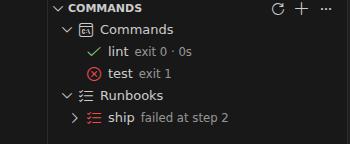
Agents and terminals run forever; commands run once and exit — and exiting IS the result:
exit 0 = ✓ passed, non-zero = ✗ failed with the dead pane kept so you (or an agent) can
inspect exactly what happened. They live in their own tmux namespace — no crash toasts, no
restart policies, no agent slot used.
- You: the Commands sidebar section — ▶ runs, the icon shows pass/fail + duration,
clicking a finished item reopens its frozen output.
- Agents:
run_command blocks until the exit and returns {passed, exitCode, durationMs, tail} — a vetted way to run project procedures instead of typing arbitrary shell.
Runbooks chain commands (or inline shell) sequentially with an exit-code gate: the
first failure stops the procedure, keeps the failing pane for postmortem, and marks the rest
skipped. One click for you (▶), one blocking call for agents (run_runbook).
commands:
  lint: {cmd: npm run lint}
  test: {cmd: npm test, cwd: web}
runbooks:
  ship:
    steps: [lint, test, ./deploy.sh]   # names reference commands; strings run as shell
Schedules — runtime-neutral cron, human-gated
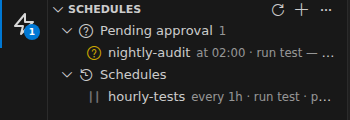
Claude has /schedule; Codex, Gemini and OpenCode have nothing. A schedules: map
gives any runtime cron-like timers over the executors you already have:
schedules:
  hourly-tests:        # every / at  +  run (command|runbook) / spawn (agent)
    every: 1h
    run: test
  morning-standup:
    at: "09:00"
    spawn: claude
    instructions: summarize yesterday's commits into the notes
    catchUp: true      # at-only: fire on activation if the time already passed today
Honest scope: schedules fire only while the workspace is open — the
extension isn't a daemon (same semantics as watch-restart, and you don't want
unsupervised AI agents waking at 3am). every re-anchors from the last fire;
at fires once per day when the clock crosses it.
Agents can propose, you approve. An agent that notices something should run
regularly calls propose_schedule — the proposal lands inert in the
Schedules sidebar under Pending approval (it never fires). Approving writes it
into tachyon.yml (config-as-code); rejecting discards it. Agents can never
schedule themselves into action without your sign-off.
Create and manage them in the Schedules sidebar view: the + opens the Agent
Studio's Schedule tab (when/every-or-at, run-or-spawn, target), and each entry
has ‖ pause, edit and delete; pending agent proposals show with ✓ approve / ✗ reject
and a badge for the count.
Pins & notes — shared human↔agent memory
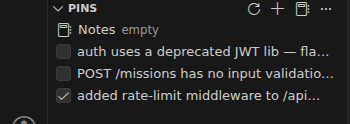
Findings shouldn't die in scrollback. Each workspace gets a shared checklist and a
whiteboard, living as plain files so every consumer has a door:
.tachyon/pins.json   # the checklist (sidebar checkboxes, agent tools)
.tachyon/notes.md    # free-form whiteboard
- You: the Pins sidebar section — checkboxes, ✚ add, 🗑 delete, and a Notes
shortcut that opens the markdown.
- Agents (MCP):
create_pin ("pin what you discovered"), list_pins ("check before
re-discovering"), complete_pin, get_notes/set_notes (coordination state: work
division, do-not-touch zones).
- Agents without MCP / the team: the files themselves — readable by anything,
committable if the project wants shared findings in git (your call; gitignore them for
personal scratch).
All doors stay coherent: a file watcher refreshes the sidebar on manual edits, and tool
mutations land in the files immediately.
Agents vs terminals — the kind taxonomy
Entries in tachyon.yml have a kind: agent (an AI CLI) or terminal (server, shell,
build). You almost never declare it — Tachyon infers it from the command (claude, codex,
opencode, gemini, aider, … → agent; anything else → terminal; launchers like npx are
seen through). Explicit kind: wins when the inference is wrong:
agents:
  frontend: {cmd: claude}              # inferred: agent
  dev: {cmd: npm run dev}              # inferred: terminal
  meu-bot: {cmd: ./bot.sh, kind: agent}  # override
Kind drives the sidebar grouping, the attention default (agents on, terminals off — a quiet
dev server is normal, a quiet AI may need you), and is exposed in list_agents so an
orchestrating agent can address only its AI siblings.
Agent Studio — manage everything from the UI
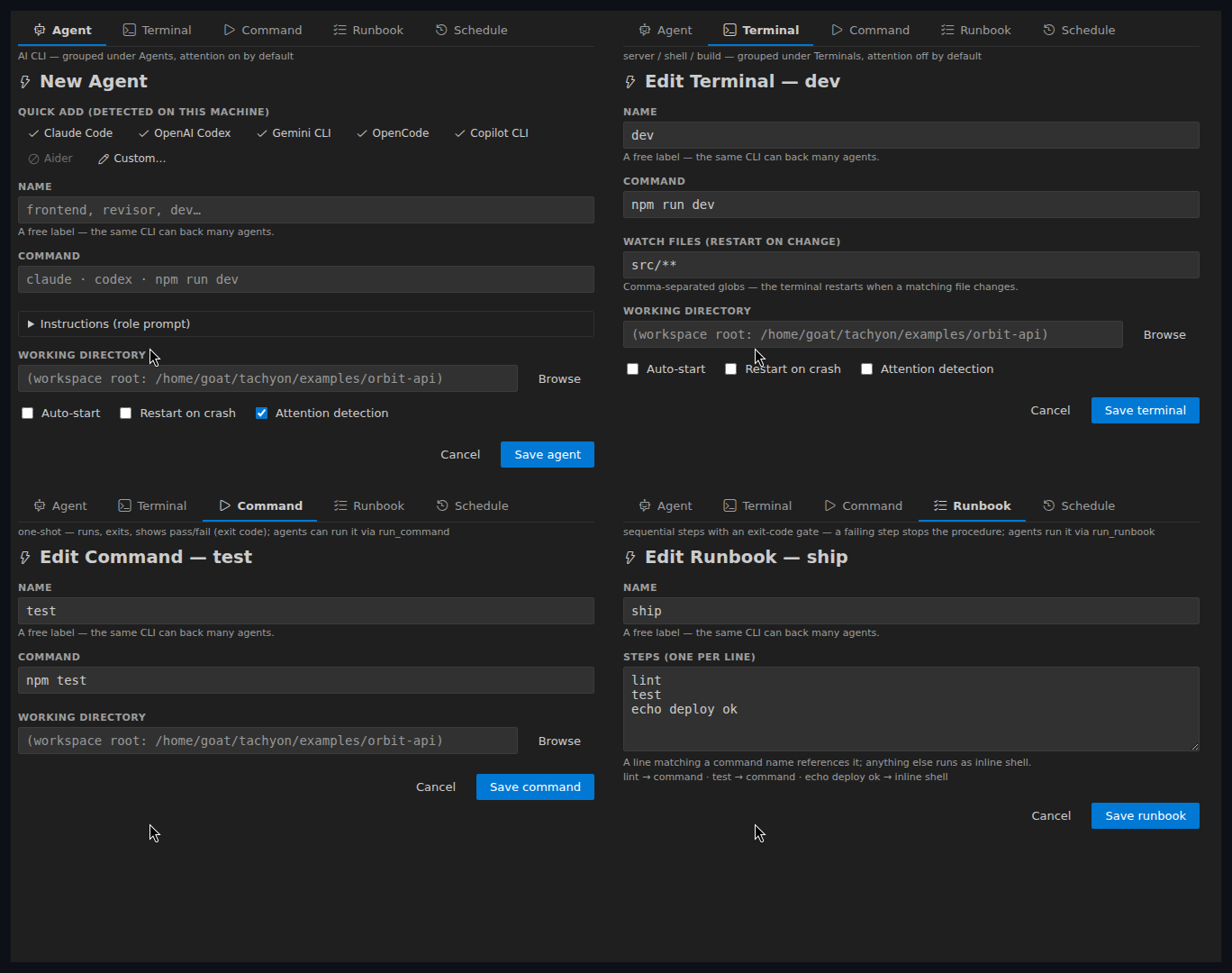
You never have to hand-edit tachyon.yml (but always can — the file stays the source of
truth and your comments survive UI edits). The Studio is one form with four tabs — the
tab IS the kind:
- Agent — quick-add chips for the AI CLIs detected on your machine (undetected majors
show disabled with an install hint), per-runtime flag chips (
--model …,
--permission-mode plan, --yolo…), an Instructions role prompt, working directory,
autostart/restart/attention.
- Terminal — command + watch globs (restart-on-change).
- Command — name + command + cwd (one-shots have no lifecycle).
- Runbook — name + steps (one per line, with a live hint showing whether each line
references a command or runs as inline shell).
Right-click any sidebar item for Edit (Studio), Edit in tachyon.yml (cursor lands on
the entry, schema-validated), Clone, Rename, Delete — with guardrails (rename/delete
refuse while running where it matters; deleting the last agent is refused).
Instructions — agents as roles
agents:
  revisor:
    cmd: claude --permission-mode plan
    instructions: you are a code reviewer; read the diff, flag correctness issues
On spawn, the instructions are delivered as a startup prompt for CLIs that accept one
(claude, codex, gemini — per-runtime arg map); for other commands the field is kept but
not auto-delivered (the form tells you).
Multi-root workspaces
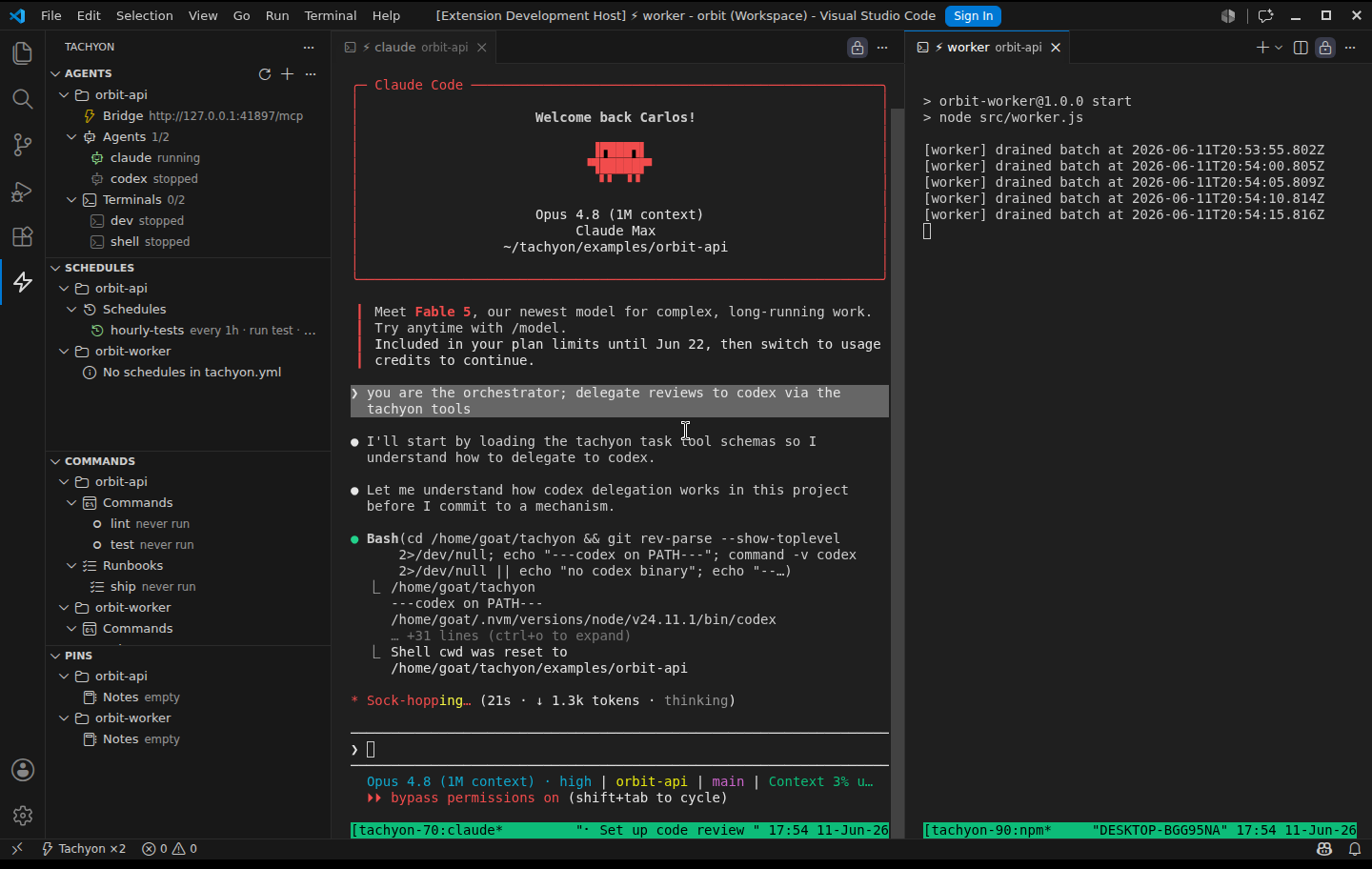
Each folder in a multi-root workspace that carries a tachyon.yml gets its own isolated
world: its own tmux namespace, its own Bridge (own port, own token), its own pins and
commands. The sidebar grows per-folder sections only when you have more than one (a single
folder renders exactly as before); palette commands ask which folder first; the status bar
aggregates (⚡ Tachyon ×2). Folders added/removed live are picked up without a reload —
and tmux sessions survive a folder's removal.
tmux Server Inspector
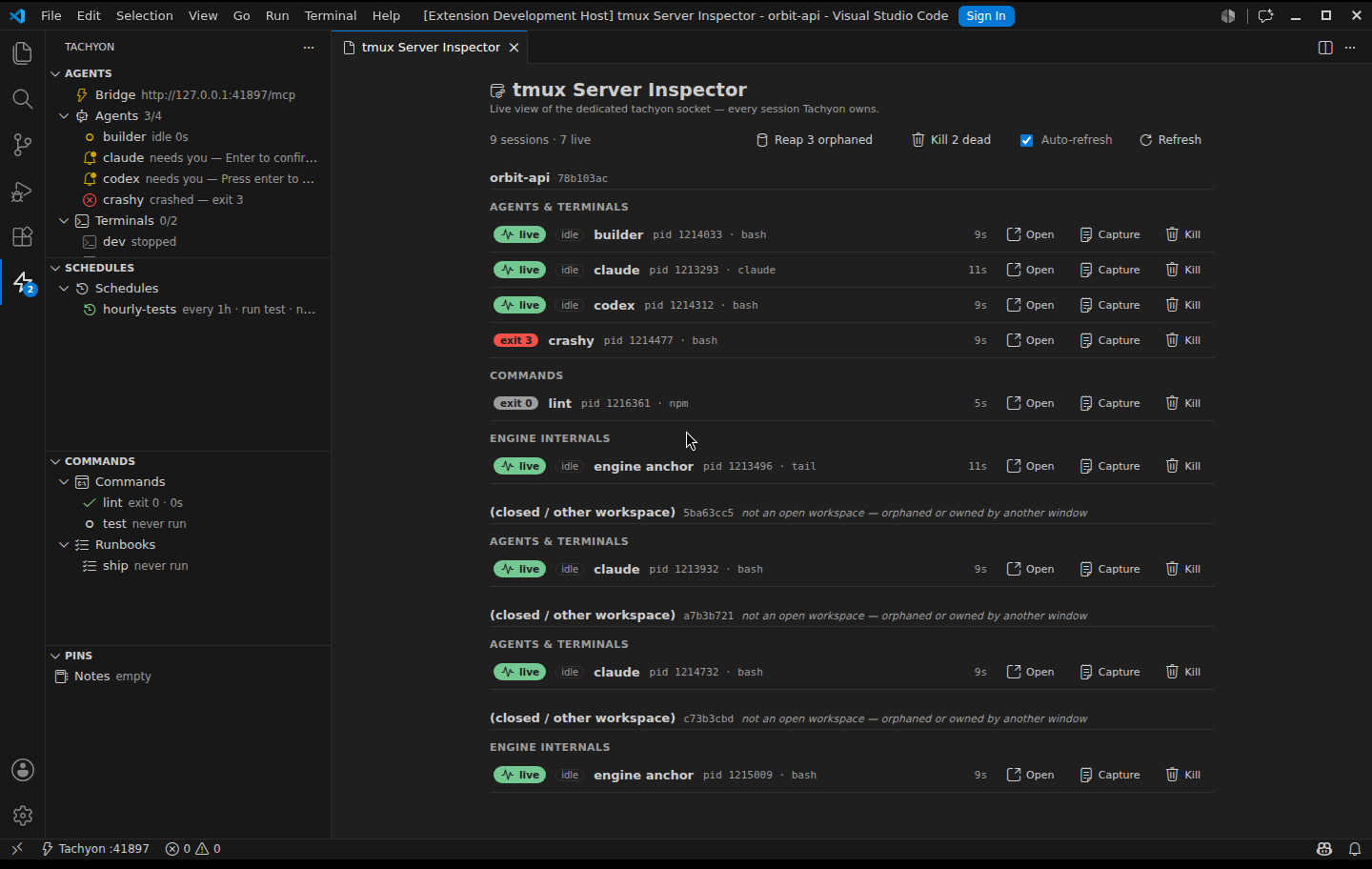
The sidebar shows the sessions this folder owns. The inspector (⚙ Inspect tmux Server
on the Bridge row, or the palette) opens an editor webview over the whole dedicated
tmux -L tachyon socket — every session Tachyon owns, across every open folder and
orphans left by closed windows. Each session is grouped by workspace then kind (agents &
terminals, commands, runbook steps, the engine anchor), with its live / exit-N badge,
a busy/idle CPU tag (Linux), uptime, pid, and running command.
Per session: Open (attach it in an editor terminal), Capture (last lines of pane
output, inline), Kill. For hygiene, the toolbar offers one-click Kill N dead (reap
every dead pane) and Reap N orphaned (kill every session owned by a closed/foreign
workspace) — both confirm first. It auto-refreshes while open.
Scope is deliberate: the inspector covers only Tachyon's dedicated socket, never your
own tmux server. That isolation is the whole point — Kill stays safe (you can't reach a
real working session), exit-code badges work (Tachyon sets remain-on-exit on its socket),
and the orphans worth reaping are Tachyon's own, which is exactly what this surfaces.
The ⚡ Tachyon icon in the Activity Bar opens three sections:
- Agents — Bridge status (click to copy the MCP URL) + every entry grouped by kind:
Agents (🤖 AI CLIs) and Terminals (▣ servers, shells, builds), each with running
counts, inline ▶ start / ■ stop / ↻ restart actions; clicking a running one opens its terminal.
Agents spawned by other agents nest under their parent (lineage via
spawn_agent's
parent param; orphans are promoted to the root when the parent dies — children are never
cascade-killed).
- Schedules — active timers (next/last run) and any agent proposals awaiting
your approval (inline ✓ / ✗).
- Commands — one-shot commands (state icons, exit codes, durations) and runbooks
(expandable: each step ✓/✗/skipped; the failing step reopens its pane).
- Pins — the shared checklist (+ Notes shortcut); checkboxes sync to
.tachyon/pins.json.
All refresh on lifecycle events and tachyon.yml edits (or via the ↻ title button).
Tachyon talks to tmux through a single persistent control-mode client (tmux -C): all
queries ride one pipe (zero subprocess churn in steady state) and lifecycle changes arrive
as events — a crash or kill is detected in ~1s, not on the next poll. If the control
client ever drops, every call transparently falls back to one-shot tmux subprocesses while
it reconnects; the engine failing never fails an operation. (A 3s heartbeat remains as
backstop; CPU sampling for attention stays polled — tmux has no events for that.)
Security
- Local only. The Bridge binds to
127.0.0.1 — never the network. No cloud component,
no telemetry, no account; your agent CLIs run under your user like any terminal.
- Bearer auth by default. Every Bridge request needs
Authorization: Bearer <token>
(disable with settings: {auth: false}). The token is stable per workspace and lives in
the extension's private storage (0600) — never in a committable file: registered
configs reference the TACHYON_BRIDGE_TOKEN env var (${VAR} in .mcp.json,
bearer_token_env_var in Codex, {env:VAR} in OpenCode), and Tachyon injects that
variable into every session it spawns — agents authenticate automatically, zero manual
steps. External sessions: Tachyon: Copy Bridge Token → export TACHYON_BRIDGE_TOKEN=….
- Per-workspace isolation. Sessions, Bridge port, token, pins — all namespaced by a
hash of the workspace path; one folder's agents can't address another folder's Bridge
(multi-root included). Tachyon runs its own tmux server (
tmux -L tachyon); your personal
tmux and ~/.tmux.conf are never touched.
- Guardrails.
maxAgents (default 8) caps concurrent sessions per workspace — an agent
spawning agents can't fork-bomb you. Deleting/renaming running entries is refused where
it would lie to you.
- Honest threat model. Loopback blocks the network; the token raises the bar against
generic local port scanners and accidents (notably
write_input reaching your shells).
Same-user targeted malware that reads extension storage is out of scope — that's the
platform's trust boundary, not ours.
Commands (palette)
Tachyon: Init (generate tachyon.yml) · Tachyon: Start · Tachyon: Stop All ·
Tachyon: Restart Agent · Tachyon: Open Agent Terminal · Tachyon: New Agent (quick) ·
Tachyon: Agent Studio · Tachyon: Connect Agent Runtime · Tachyon: Copy Bridge URL ·
Tachyon: Copy Bridge Token · Tachyon: Refresh Views
Settings
tachyon.maxAgents (default 8) — concurrent-agent guardrail; settings.maxAgents in
tachyon.yml takes precedence.- In
tachyon.yml → settings:: maxAgents, bridgePort, auth.
How it works
VSCode editor area                      tmux server (socket "tachyon")
┌──────────────┬──────────────┐
│ ⚡ claude     │ ⚡ dev        │  attach   tachyon-<ws>-claude
│ (native      │ (native      │ ────────▶ tachyon-<ws>-dev
│  terminal)   │  terminal)   │           (processes live here — and
└──────────────┴──────────────┘            survive editor restarts)
        ▲                                        ▲
        │ display                                │ one persistent control-mode
        │                                        │ client (events + commands)
   Bridge (MCP over HTTP, 127.0.0.1:<port>) ─────┘
        ▲
        │ spawn_agent / read_output / write_input / run_command / notify …
   your agents (Claude Code, Codex, OpenCode, …)
Language & theming
Tachyon follows your editor: every human-facing string is localized via VS Code's l10n
(currently English and Português (Brasil) — switch with Configure Display Language),
and all UI (sidebar + Agent Studio) renders with your theme's tokens and the official
codicon font, including light and high-contrast themes. Bridge tool descriptions stay in
English on purpose — their audience is the models reading the MCP schema.
Development
npm ci
npm run build          # esbuild bundle -> dist/
npm test               # vitest: unit + real-tmux integration (auto-skips without tmux)
npm run test:integration   # @vscode/test-cli host suites (single-root + multi-root; downloads VSCode once)
npm run typecheck
CI runs the portable core (typecheck + build + unit, including a real-tmux subset). The xvfb
editor-host integration suites are a local gate — run them on tmux ≥ 3.6.
License
MIT. Built in the open with a spec-driven loop — see docs/specs for the full
history (specs 186–205: every feature landed with its own spec, plan, validation record and
dogfood).



