Overview Version History Q & A Rating & Review
APE
Analyze. Plan. Execute.
Select @ape as your GitHub Copilot custom agent.
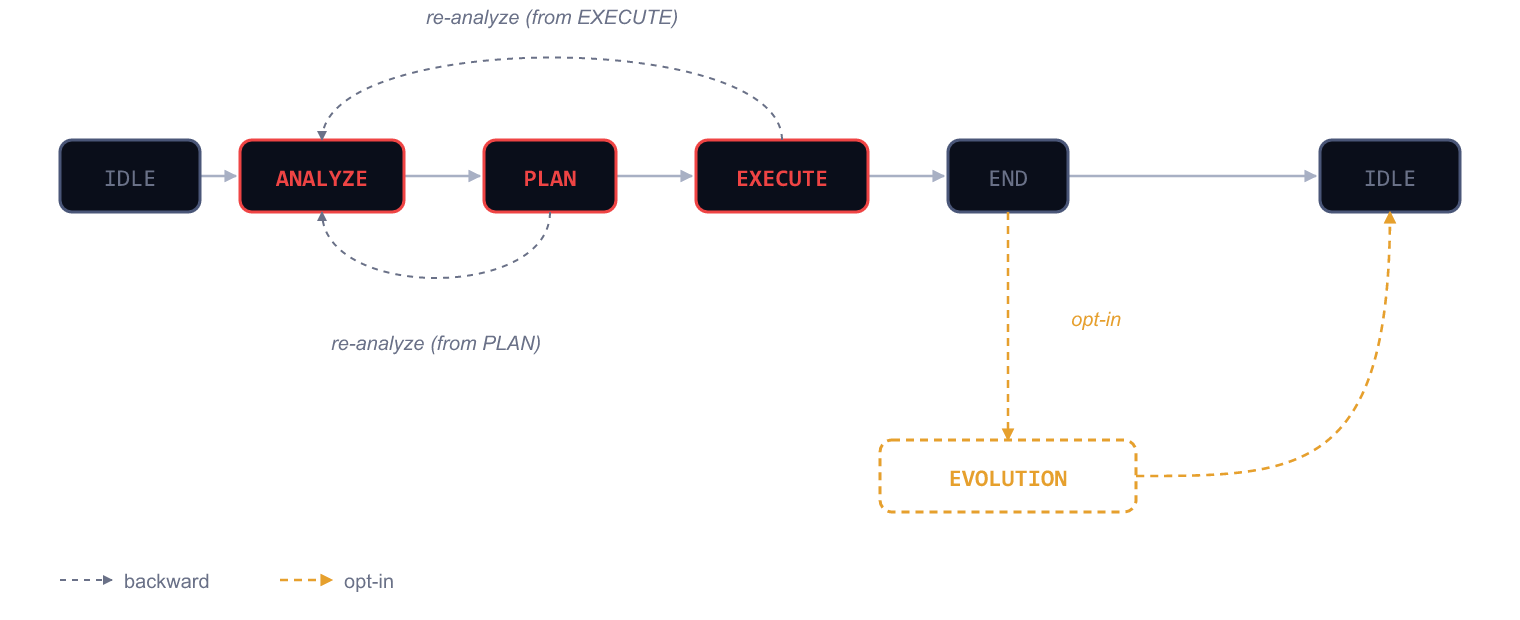
Every task follows a strict cycle: ANALYZE → PLAN → EXECUTE .
No freestyling. No hallucinated plans. Structure from analysis to PR.
How it works
Phase
What happens
Output
ANALYZE Questions, challenges assumptions, clarifies scope
diagnosis.md
PLAN Decomposes into checkable steps with tests
plan.md
EXECUTE Implements exactly what the plan says
code + commits
Each phase has a dedicated agent. Transitions are enforced — no skipping steps.
Quick start
Install from the Marketplace
Ctrl+Shift+P → APE: Init The extension installs the CLI if missing, runs ape init, creates .ape/
Open Copilot Chat → select @ape → describe your task
That's it. APE takes over: analysis first, then plan, then execute.
Commands
Command
What it does
APE: InitInstall CLI + scaffold .ape/ in your workspace
APE: Toggle EvolutionEnable/disable DARWIN's process improvement cycle
APE: Add Mutation NoteRecord an observation for DARWIN to evaluate
Status bar
The status bar shows the current FSM phase in real time:
IDLE · ANALYZE · PLAN · EXECUTE · END · EVOLUTION
Requirements
VS Code ≥ 1.85
Windows or Linux
GitHub Copilot (required) — APE ships as a custom agent
Links
For the full methodology, see ccisne.dev/finite_ape_machine .
MIT © 2026 Cristian Cisneros