@ Path Complete

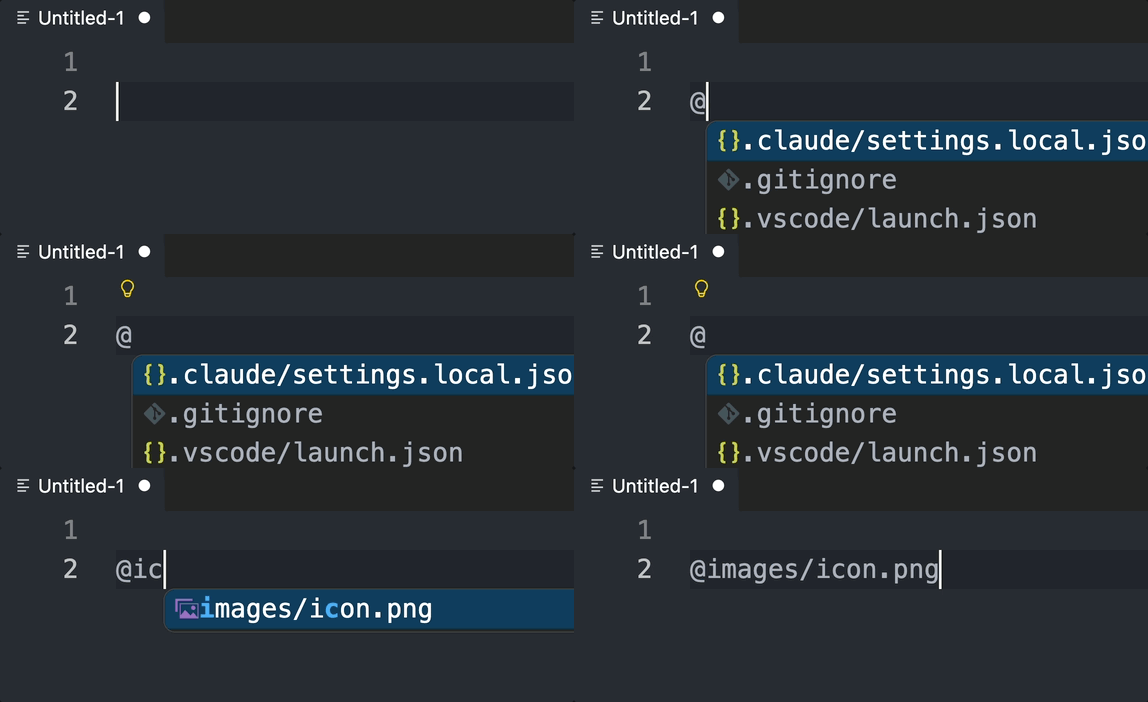
Autocomplete file paths in any file by typing @. Works in all file types, including unsaved/untitled files.
Install from VS Code Marketplace
Demo
Features
- Type
@ to trigger file path suggestions from your workspace
- Works in any file type — code, markdown, plain text, untitled files
- Smart caching with automatic refresh when files are added/deleted/renamed
- Configurable trigger character, path style, and exclusion patterns
Usage
- Open any file in a workspace
- Type
@
- Select a file path from the autocomplete list
The @ character is automatically removed when you accept a completion.
Settings
| Setting |
Default |
Description |
pathComplete.triggerCharacter |
@ |
Character that triggers autocomplete |
pathComplete.ignoredPatterns |
node_modules, .git, dist, build, .DS_Store |
Glob patterns to exclude |
pathComplete.maxResults |
200 |
Maximum number of suggestions |
pathComplete.pathStyle |
relative-to-workspace |
Path style: relative-to-workspace, relative-to-file, or absolute |
pathComplete.removeTriggerCharacter |
true |
Remove trigger character on completion |
pathComplete.showFileIcons |
true |
Show file icons in completion list |
pathComplete.includeDirectories |
false |
Include directory paths in suggestions |
pathComplete.respectGitignore |
true |
Exclude .gitignore matched files |
License
MIT
| |

