
Mermaid Preview Offline
A fast, private Mermaid preview built into VS Code.
No account. No required connection. No telemetry.




Install from the Marketplace
·
User guide
·
Browse 44 examples
·
Compatibility matrix
·
Roadmap
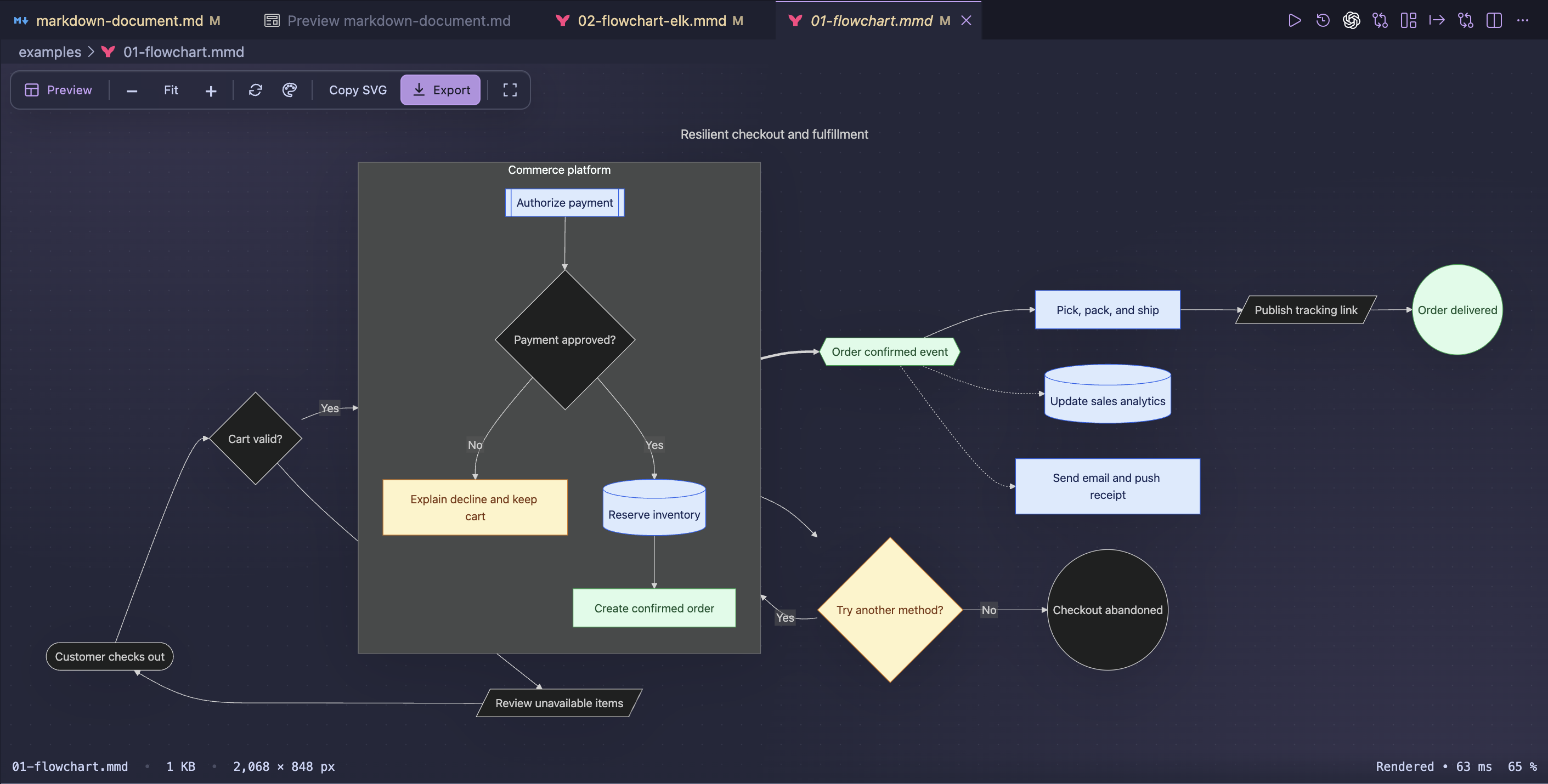
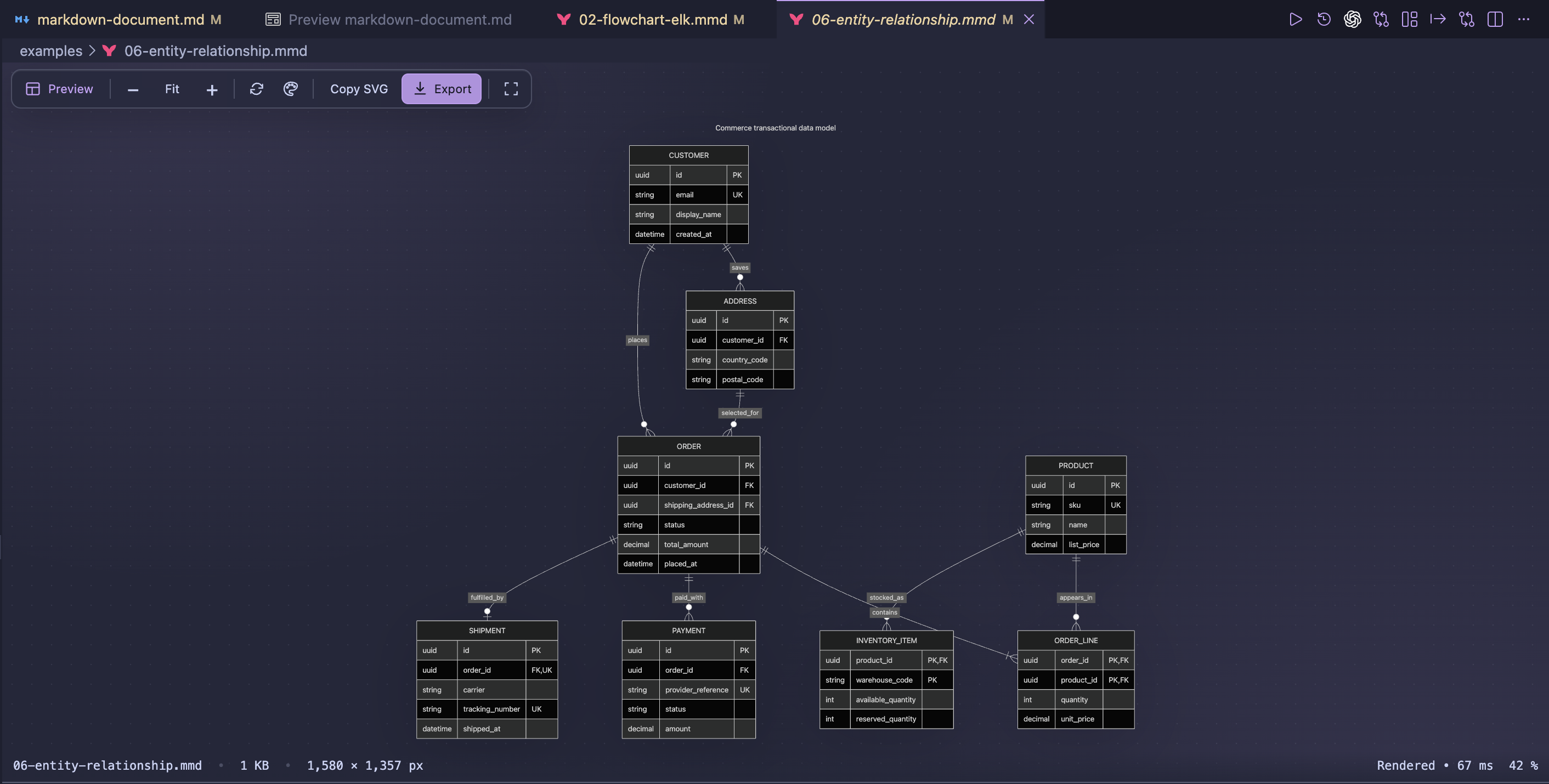
Render complete Mermaid diagrams locally with native VS Code controls, themes, and export tools.
Open any .mmd or .mermaid file and the diagram appears immediately in a
native VS Code editor. Use the layout control to switch between preview-only,
source-only, source beside preview, and source above preview. The renderer,
plug-ins, icons, and supported local assets all ship inside the extension.
Mermaid blocks embedded in Markdown, MDX, and AsciiDoc can be previewed one at
a time or together in a live document view.
What's new in 1.3.1
Edit directly in Beside or Above with local syntax coloring,
indentation, keyword and identifier suggestions, and source-linked render
errors. Visual Git comparisons now identify node and link changes for supported
flowcharts. Documentation previews render visible and nearby diagrams first,
while presentation renders the active slide on demand.
Save reusable personal or project templates and mark favorites in Diagram
Studio. For documentation builds, use the CLI's --incremental option to reuse
current exports or --watch to update them as their inputs change. The
English
and French
guides cover the workflows and their limits.
Earlier 1.3.0 improvements
Version 1.3.0 keeps rendering local and offline by default while adding explicit
opt-ins for images stored outside the workspace or below allowlisted HTTPS base
URLs. Remote bytes are downloaded by the extension, validated, bounded, cached,
and converted to data: before Mermaid sees them; preview webviews and the CLI
renderer still have no direct network access. Private-network destinations need
a separate opt-in, and remote SVG is deliberately excluded.
Resource budgets can now use a bounded custom profile. The standard 10 MiB
source, 64-image, 8 MiB per-image, 24 MiB aggregate-image, and 32-megapixel
limits remain the defaults. Custom values can raise those budgets only up to
internal ceilings, and all external-resource permissions are machine-scoped and
disabled in untrusted workspaces. The same policy is used by file previews,
documentation previews, folder exports, VS Code tasks, and the CLI.
The “100% Offline” name means that creating, editing, previewing, and exporting
diagrams requires no account, cloud renderer, or network connection. Network
image loading is an optional capability that is off by default.
Earlier 1.2 improvements
Version 1.2.8 refines the Custom canvas background control. Its circle now
shows a light/dark gray checkerboard while Custom is inactive, then fills with
the exact color selected in the color picker when Custom becomes active. The
canvas background follows color-picker dragging live without rerendering the
diagram for every intermediate color; Mermaid is recalculated only after the
gesture is committed. The same behavior is used in the main preview and
presentation Appearance panels.
Version 1.2.7 works with the Mermaid Markdown Features renderer built into VS
Code 1.121 and newer instead of adding a competing Markdown renderer. Mermaid
blocks in the normal Markdown preview keep VS Code's native resize handle.
After resizing a block, the fourth navigation action is now Fit Diagram:
the selected height remains unchanged while the diagram is scaled and centered
inside it. Resized heights are remembered per Markdown document and diagram
when navigating away and back.
The dedicated one-block and all-block document views now show only ordered
diagram canvases with a unified Zoom/Fit/source toolbar. Their presentation mode
adds the complete inherited workspace Appearance picker, explicit pagination
buttons, and an Esc exit action without the former documentation Pop out
control. Floating controls use the same translucent treatment as the main
preview toolbar.
Standalone Mermaid previews retain the stable single-tab Preview, Beside, and
Above layouts introduced in 1.2.6, including the icon-only toolbar default,
responsive labels, synchronized workspace layout, and full-editor Source only
mode.
Why use it?
|
Capability |
What it gives you |
| ⚡ |
Instant preview |
Mermaid files open directly in a polished live preview. |
| ✎ |
Advanced editing |
Problems, quick fixes, completion, snippets, formatting, and safe refactors. |
| 🔒 |
Private by design |
Diagram source never leaves your machine. |
| 📴 |
Offline by default |
No account, sign-in, cloud renderer, or required network connection; allowlisted HTTPS images are optional. |
| 🔍 |
Comfortable navigation |
Fit, zoom, and drag across large diagrams. |
| ⇩ |
Professional export |
Preview and export PNG, WebP, PDF, or portable SVG files. |
| ▤ |
Documentation workflows |
Render embedded Mermaid blocks and export documents with local images. |
| ◇ |
Broad Mermaid coverage |
Core diagrams, experimental families, ZenUML, icons, and local images. |
Made for VS Code workflows
Keep several Mermaid previews open in normal VS Code editor groups. Each view
has its own zoom level and exposes file size, natural diagram dimensions,
rendering time, and zoom percentage in the footer. Zoom and scroll position are
restored per preview after VS Code restarts, while the selected diagram theme
and Preview/Beside/Above mode stay shared across the workspace. Choose
Preview only, Source only, Beside, or Above from the preview toolbar.
When another Mermaid file is opened from the Explorer, it immediately inherits
the current preview mode.
Preview, Beside, and Above are surfaces of the same custom-editor tab, so
changing among them cannot create, resize, move, or close unrelated editor
groups. Source only opens VS Code's full text editor in the preview column.
The layout picker also shows the existing cycle shortcuts: P in the preview
and Alt+P (Option+P on macOS) in the source editor. The source-editor
binding can be changed in VS Code's Keyboard Shortcuts settings.
Drag the internal separator in Beside or Above; the split ratio is restored per
file.
The integrated source surface supports local syntax coloring, indentation,
keyword and identifier suggestions, source-linked render errors, line navigation,
conflict-safe synchronization, and save. Select Source only or Full
editor for the full VS Code language tools, including formatting, snippets,
hover help, quick fixes, and rename. Every
preview stays pinned to its file, and a preview copied to another
VS Code window keeps an independent mode without disturbing the original.
Press P with the preview focused to cycle Preview only, Beside, and Above.
Use Alt+P (Option+P on macOS) while editing source.
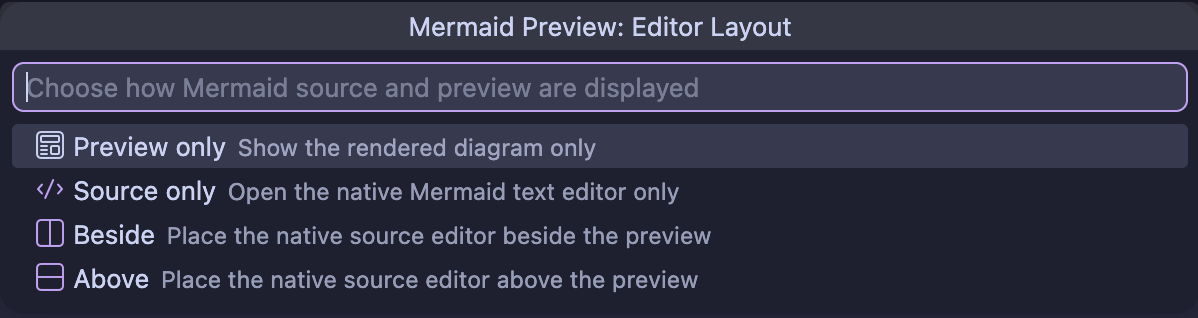
Keep split previews internal, or hand Source only to VS Code’s full editor.
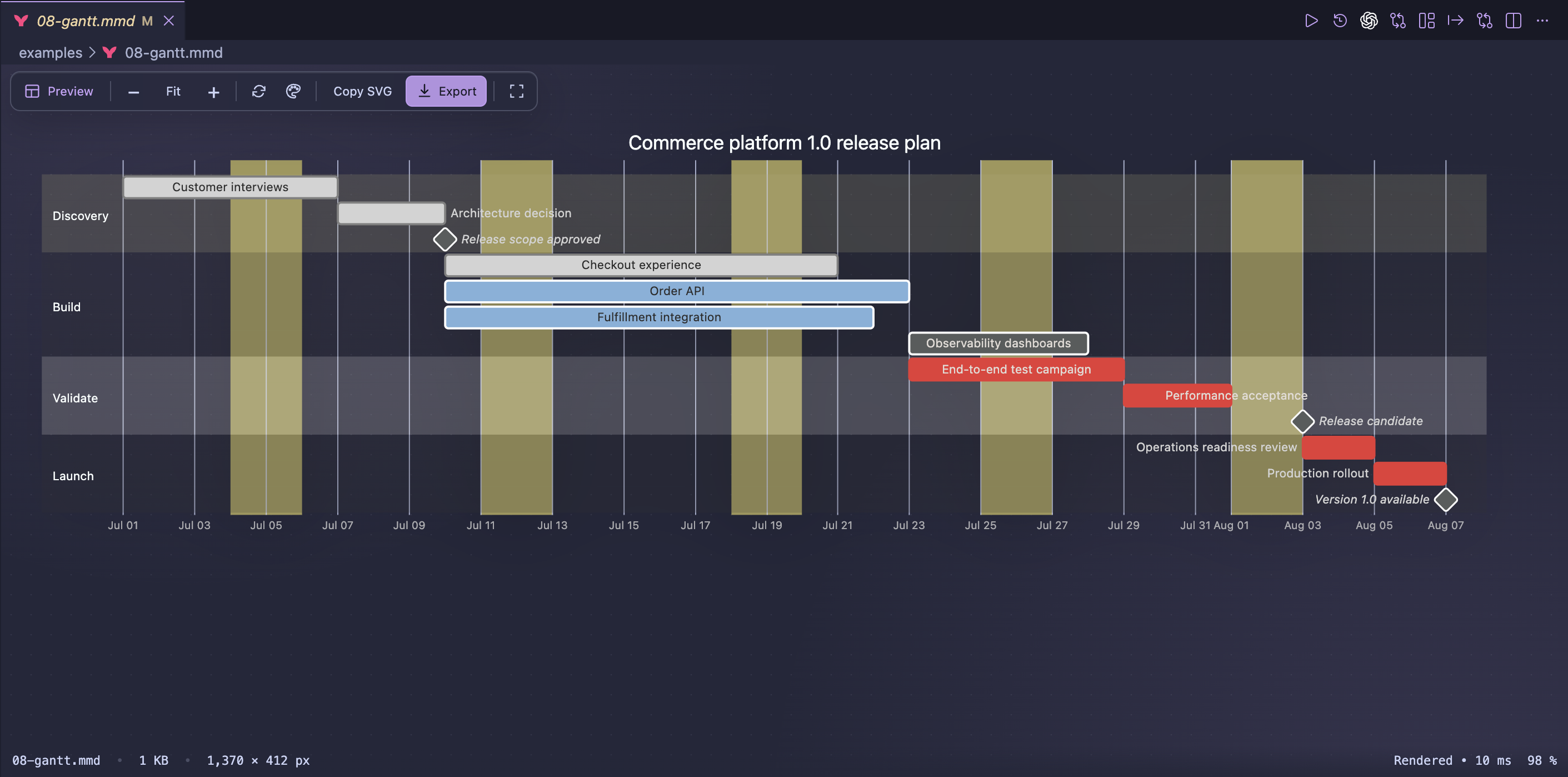
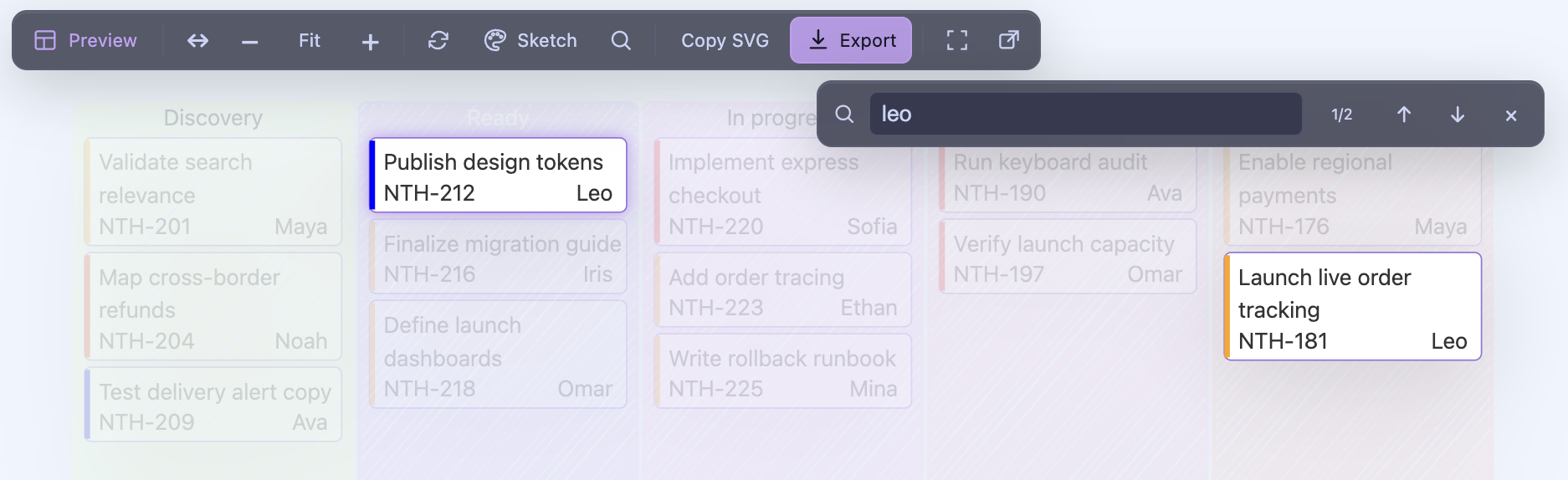
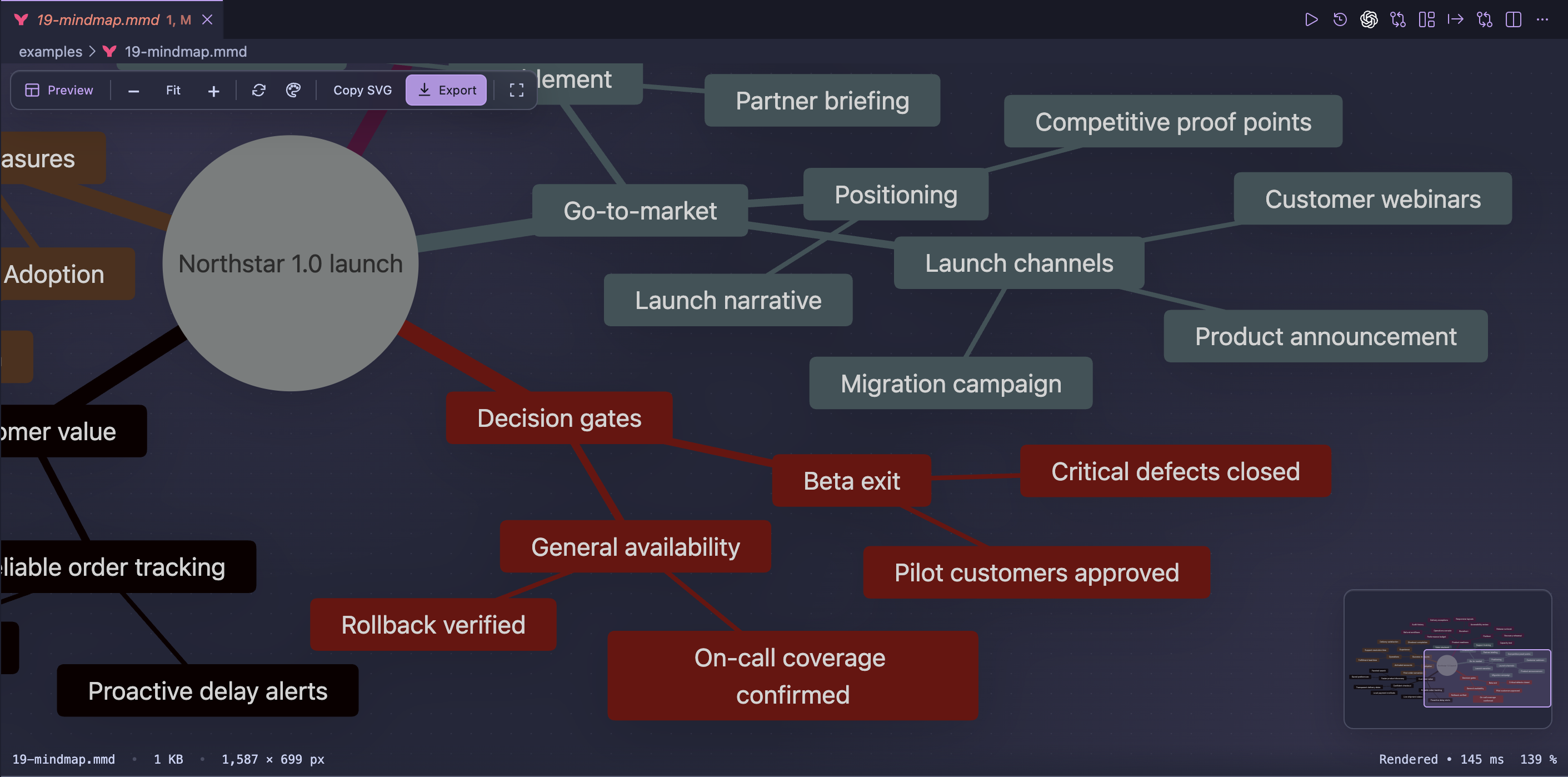
Large diagrams remain easy to inspect with fit-to-window, incremental zoom,
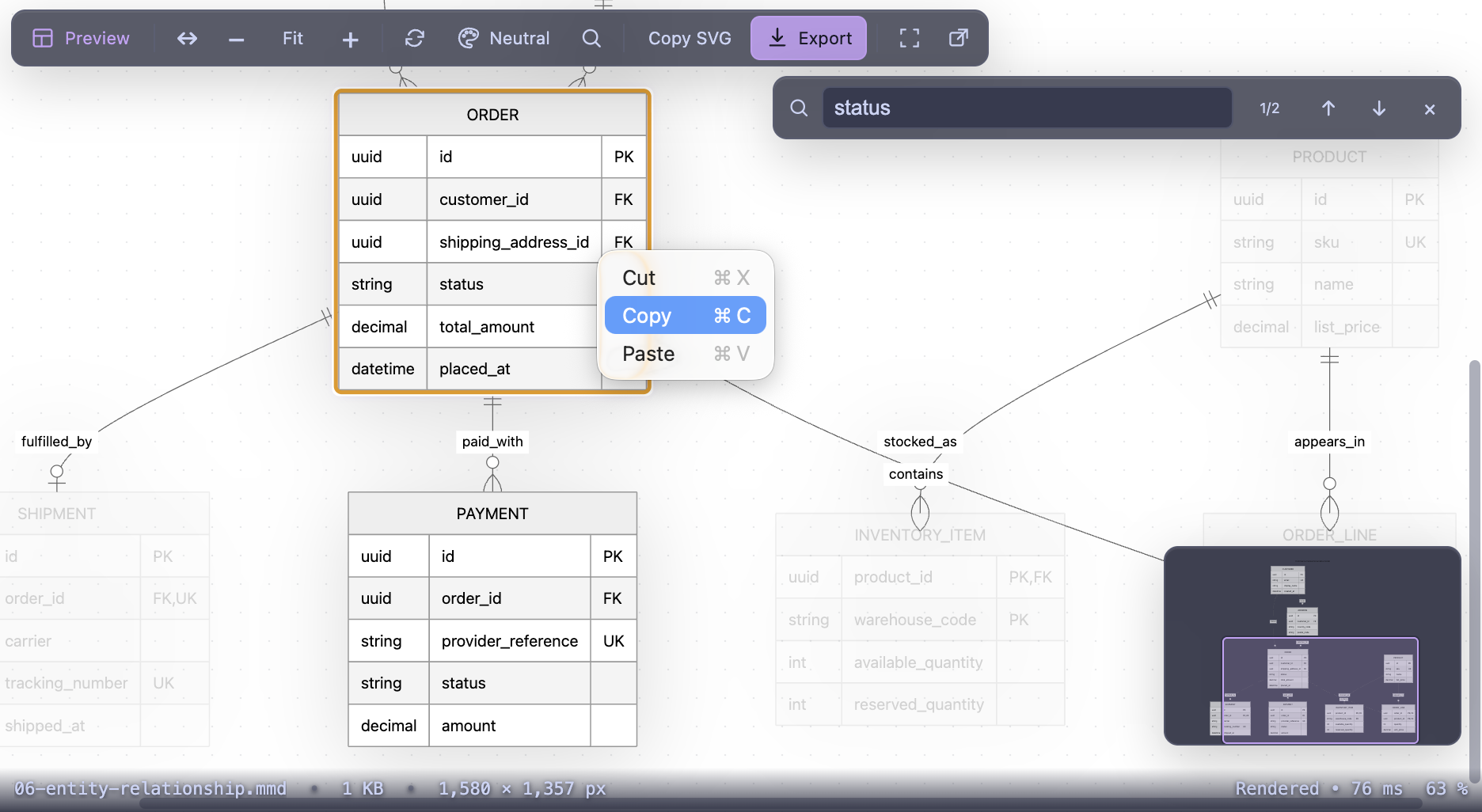
drag-to-pan navigation, and a draggable minimap that appears only when the
diagram exceeds the viewport. The active editor group can be maximized without
losing the selected layout. Press / or Ctrl/Cmd+F to find labels inside the
rendered diagram, click a rendered node to reveal its source line, or use the
pop-out button to copy the live preview into a separate VS Code window while
keeping the original visible.
Bundled assets work offline too
The official ZenUML and tidy-tree layout plug-ins and the Iconify logos,
mdi, and material-icon-theme collections are bundled locally and loaded
only when a diagram uses them. Together, the three packs provide 10,903 offline
icons: 2,091 brand and technology logos, 1,174 file and folder icons, and 7,638
general-purpose Material Design icons.
The bundled gallery demonstrates the icon: "pack:name" syntax, square,
rounded, and circular forms, custom fill and stroke colors, and preserved brand
colors across 60 examples organized into six practical categories.
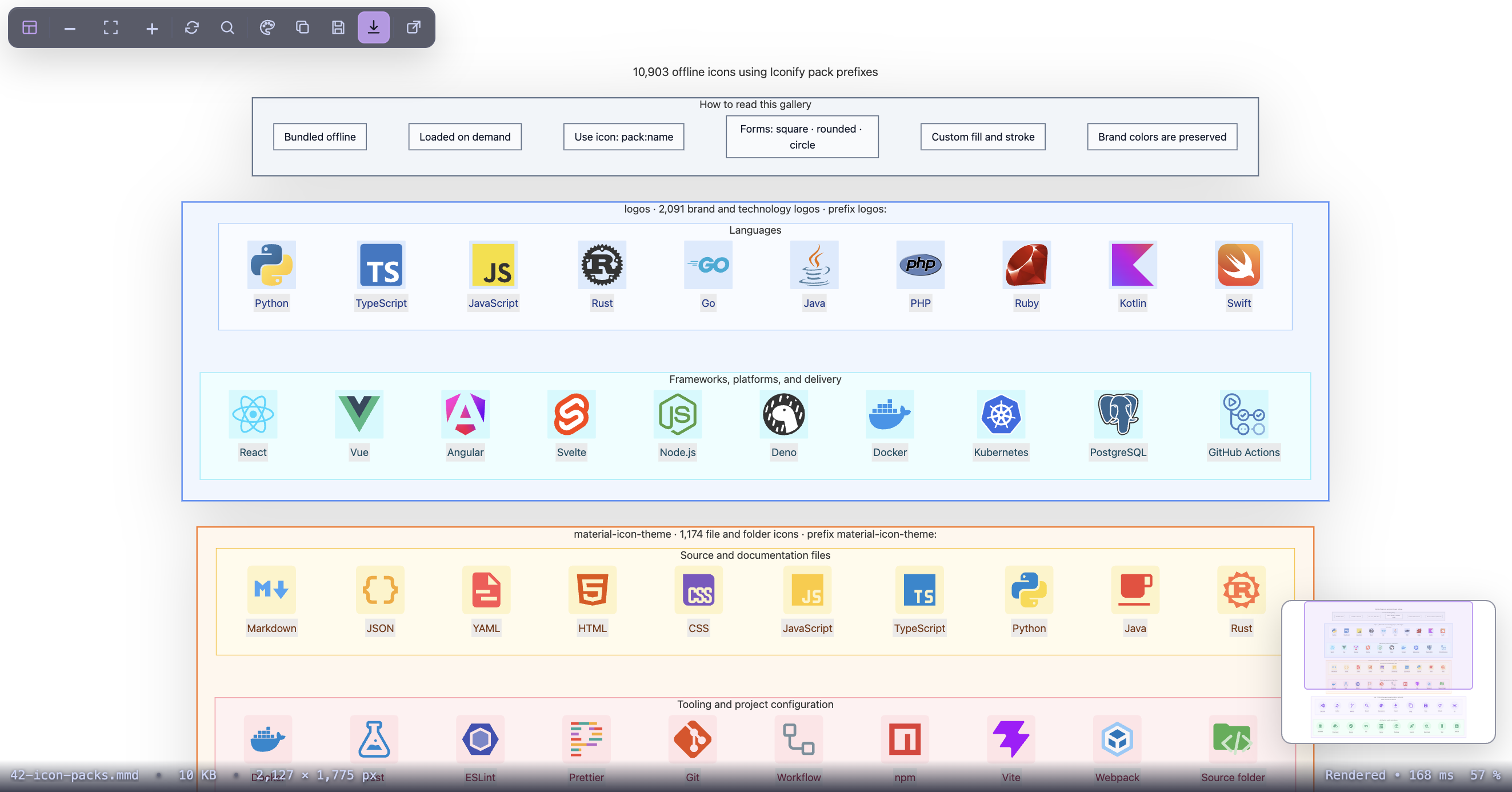
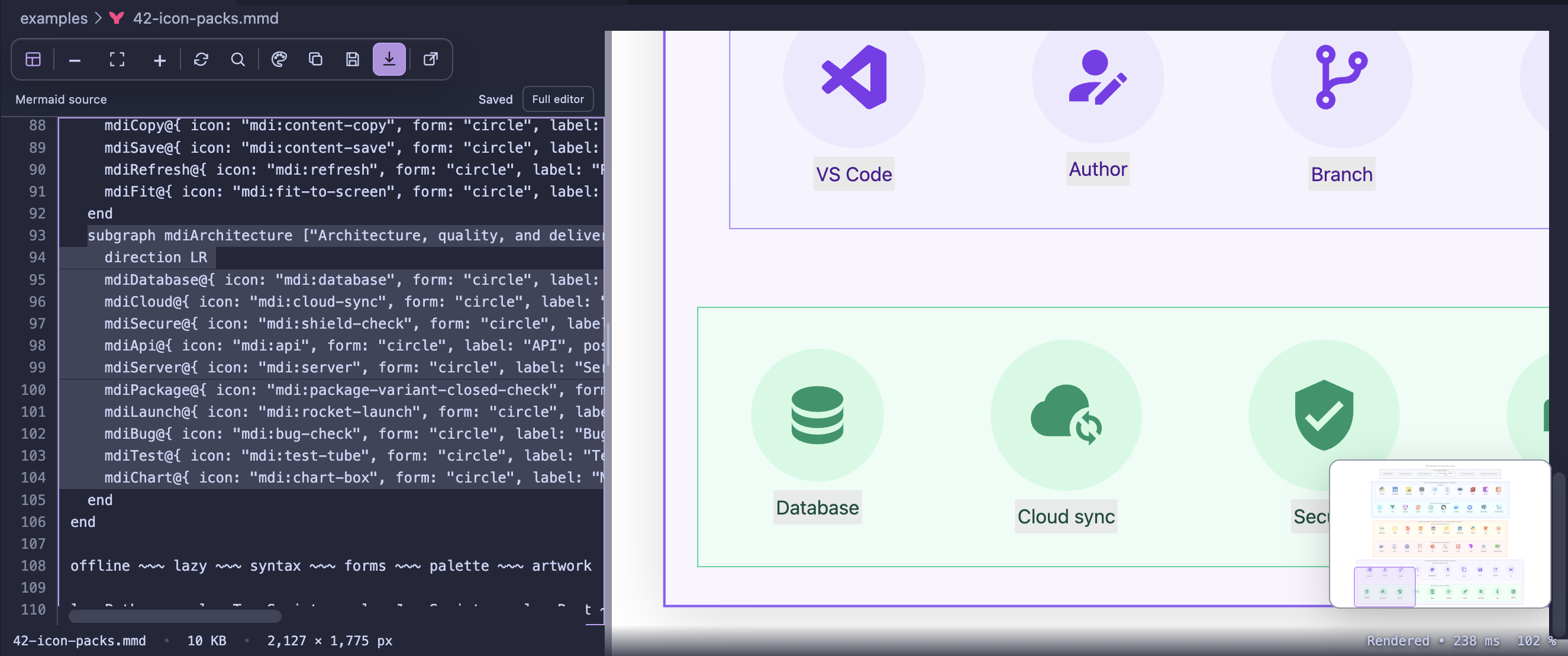
Explore the complete gallery, then edit its Mermaid source beside the synchronized offline preview.
Relative images inside the workspace are converted to data: URIs, so exported
SVGs stay portable and do not depend on local file paths.
In 1.3.0, trusted workspaces can opt into absolute paths under configured local
roots and raster images below exact HTTPS base URLs. These resources use the
same data: embedding path; the Mermaid renderer never receives filesystem or
network authority.
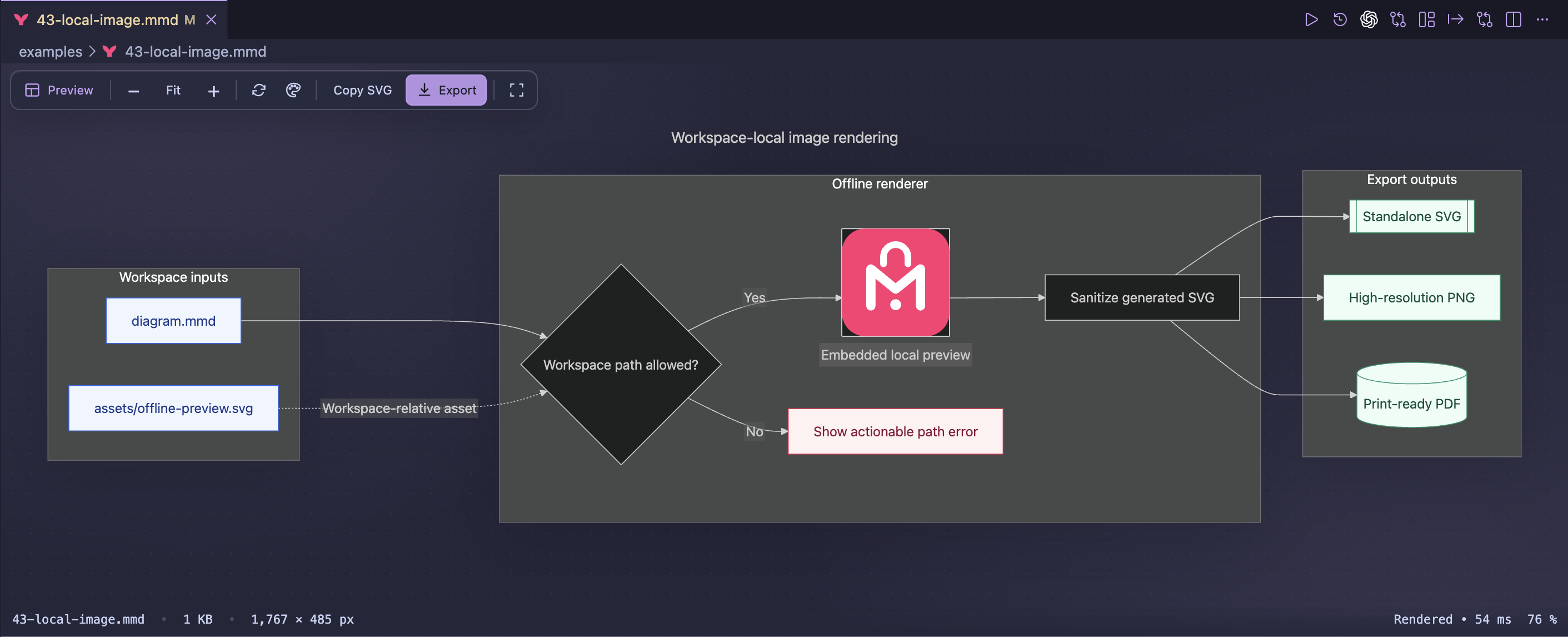
Bundled Iconify packs and workspace-relative images render without a network request.
Classic and modern diagram themes
Choose Adaptive, Default, Dark, Forest, Neutral, Base,
Neo, Neo Dark, Vibrant, Vibrant Dark, or Sketch from the
visual appearance gallery. Adaptive and Sketch choose their light or dark
palette from the canvas itself. Select Compact, Comfortable, or Spacious
density, then pick a VS Code, light, dark, or custom background with no pattern,
dots, or a grid. The canvas choice is independent from the VS Code color theme.
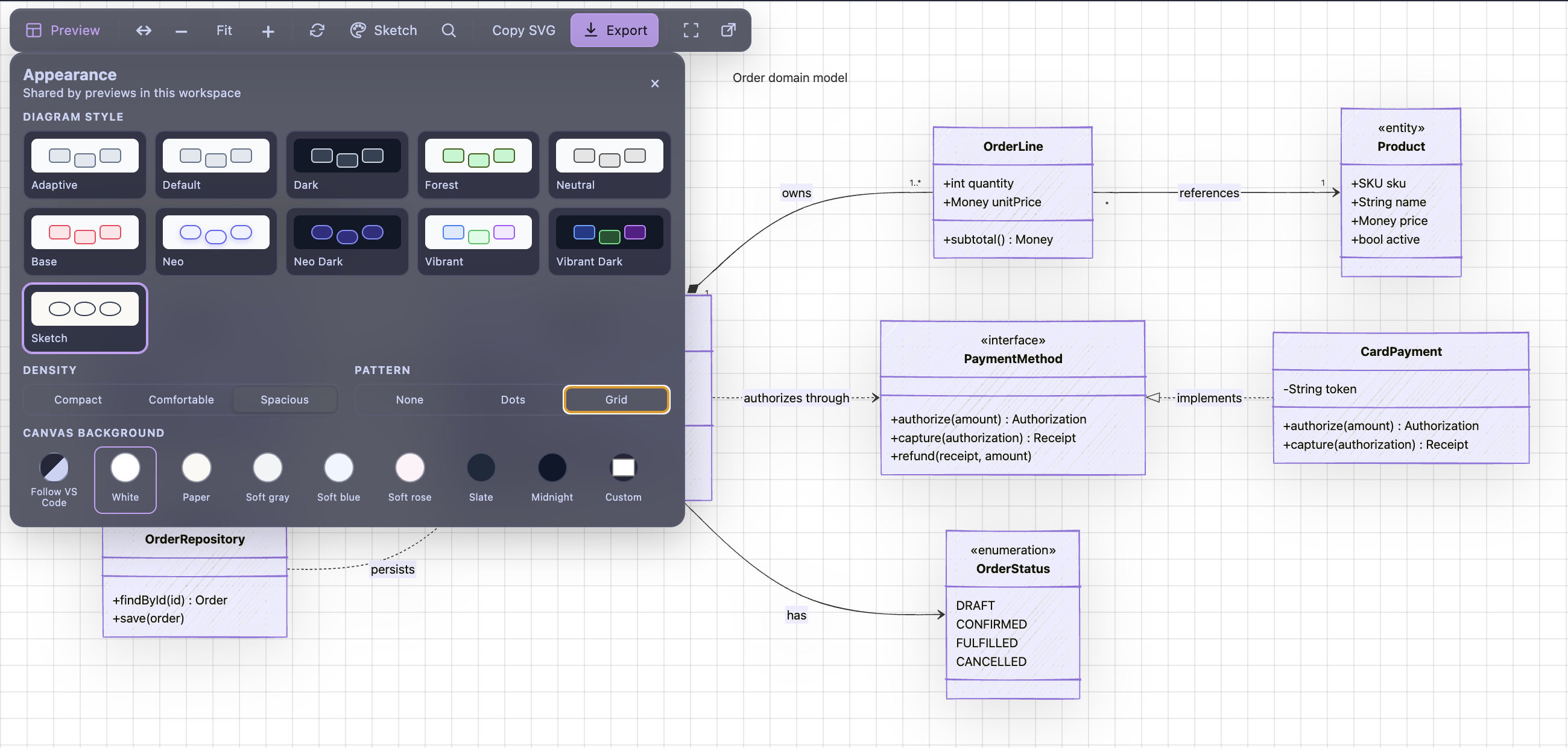
Diagram typography
Diagram text follows VS Code's interface font by default, using
--vscode-font-family in previews and a matching system UI fallback where that
variable is unavailable. Set mermaidPreviewOffline.diagramFontFamily to
noto-sans or inter when you want identical Latin and Latin Extended glyphs
and metrics across platforms. Both optional fonts are bundled locally; no font
is fetched at runtime.
The VS Code choice keeps diagrams visually consistent with the current editor,
but its exact typeface can vary between machines. Noto Sans and Inter are the
portable choices for optimized SVG, PNG, WebP, and PDF exports because their
font data ships with the output rendering path. Original SVG remains Mermaid's
unchanged output and does not receive export-time font embedding.
Get started
- Install Mermaid Preview — 100% Offline from the
VS Code Marketplace.
- Open a
.mmd or .mermaid file from the Explorer.
- Choose Beside or Above to edit in the split preview, or Source
only to open VS Code's full Mermaid editor.
- Use Export to preview the final result, tune its output profile, and save
PNG, WebP, PDF, or SVG.
No configuration is required. To temporarily open a Mermaid file as plain text,
use Reopen Editor With... → Text Editor.
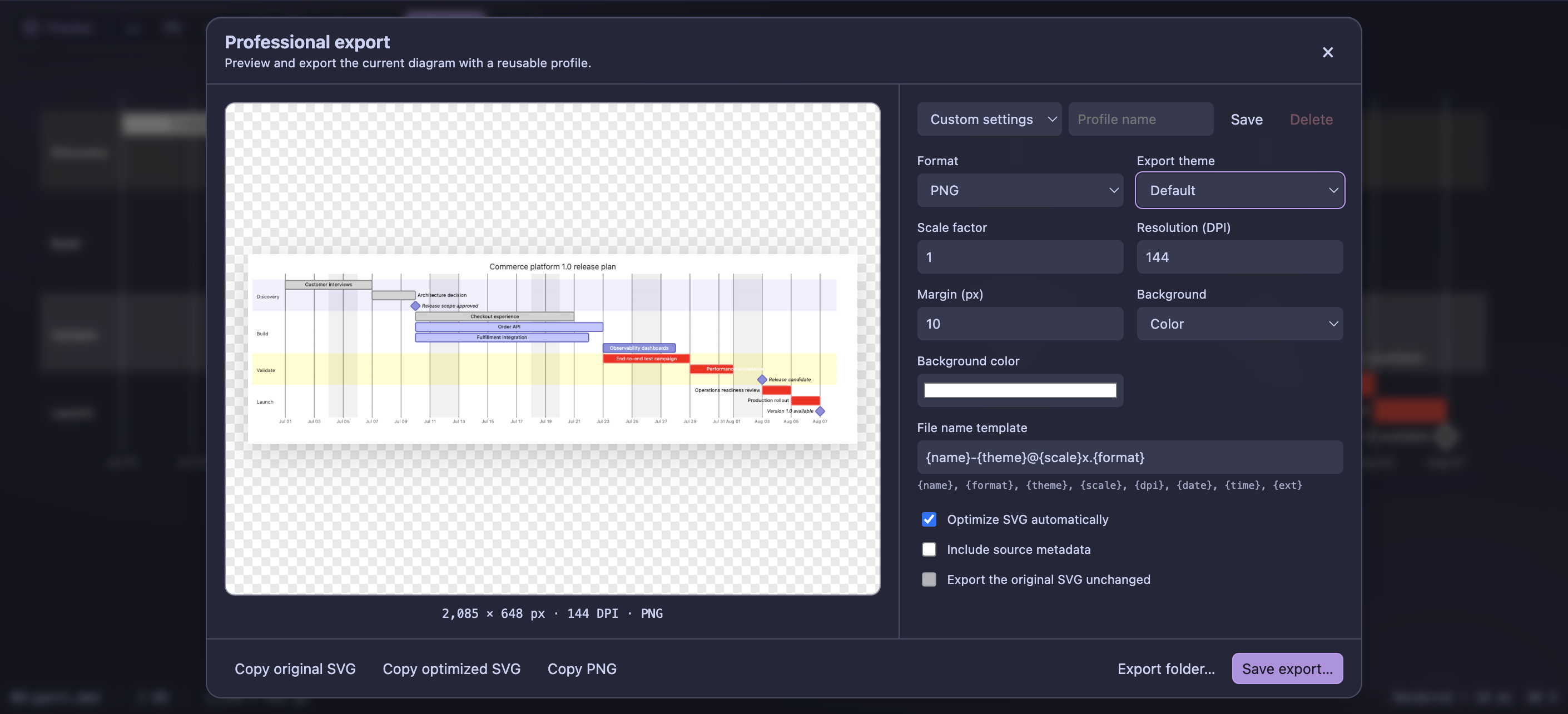
Professional export
Inspect the exact output before saving it, then configure format, export theme,
scale, DPI, margin, background, metadata, optimization, and file-name tokens.
Reusable profiles keep documentation and release exports consistent across
workspaces.
The toolbar's Copy SVG action places the current original vector diagram on
the clipboard. Save SVG opens a native save dialog for that same original
SVG. Neither action opens the professional export dialog.
Features
- Live rendering whenever the document changes.
- Automatic or manual refresh, with a configurable render delay.
- Readable syntax errors with a direct path back to the source.
- Error locations with line, column, source excerpt, and a Retry action.
- Native Problems diagnostics and editor underlines powered by bundled Mermaid.
- Quick fixes for common declaration typos, Unicode arrows, missing block ends,
and missing node identifiers.
- Keyword completion, contextual hover help, and 43 diagram-family snippets.
- Formatting, node/link insertion, missing-ID generation, and rename support.
- One workspace-wide Preview/Beside/Above selection plus a Source-only handoff
to VS Code's full text editor.
- Per-file draggable split ratios without VS Code editor-group mutations.
- Versioned, conflict-safe source editing with local coloring, indentation,
completion, and render-error navigation inside Beside and Above.
- Fit-to-window, incremental zoom, drag-to-pan, and an optional minimap.
- Exact UTF-8 file size and natural rendered diagram dimensions in the footer.
- Eleven workspace-wide classic and modern appearances in a visual gallery.
- Independent canvas colors, custom backgrounds, dots/grid patterns, and three
diagram densities shared by preview, Studio, diffs, documentation, and export.
- In-diagram search and click-to-source navigation for rendered elements.
- Header-free documentation previews with grouped Zoom, Fit, and source actions,
plus a presentation mode with shared themes and compact pagination.
- VS Code-native diagram typography by default, with offline Noto Sans and
Inter presets for portable exports and complete Latin accents.
- A modern glass interface that remains native to VS Code themes.
- Live export preview with reusable profiles.
- PNG, WebP, PDF, optimized SVG, and original SVG export.
- Direct PNG clipboard copy, recursive folder export, and an offline CLI with
incremental exports and watch mode.
- Configurable DPI, scale, margin, transparent or colored background, export
theme, metadata, and file name templates.
- Diagram Studio with eight customizable templates, reusable personal and
project templates, favorites, and all 44 bundled examples.
- Local SQL-schema generation of Mermaid entity-relationship diagrams.
- Local
package.json dependency-graph generation.
- Rendered Git comparisons with side-by-side and color-coded overlay views,
plus clickable node/link changes for supported flowcharts.
- Preview the Mermaid block under the cursor in Markdown, MDX, or AsciiDoc.
- Render Mermaid blocks as they approach the document viewport, with independent
pan, pointer-centered zoom, trackpad pinch, source navigation, and restored state.
- Resize documentation diagrams vertically and cap their height through settings.
- Recognize fenced and
::: mermaid Markdown/MDX blocks, with configurable
Mermaid language identifiers.
- Export documentation copies that replace Mermaid blocks with local SVG or PNG images.
- Dark, light, and high-contrast VS Code theme support.
- Mermaid syntax highlighting for
.mmd and .mermaid files.
- Mermaid
11.16.0 bundled and pinned for reproducible rendering.
- Official
@mermaid-js/mermaid-zenuml plug-in bundled locally.
- Iconify
logos, mdi, and material-icon-theme packs bundled locally.
- Tidy-tree mindmap layout bundled locally.
- Relative SVG, PNG, JPEG, GIF, WebP, AVIF, BMP, and ICO images embedded as
data URIs.
- No telemetry, analytics, remote fonts, account, or required runtime download.
- Offline-by-default external image permissions with machine-scoped local-root
and HTTPS allowlists.
- Standard or bounded custom memory guardrails for very large sources, image
sets, and raster exports, with actionable messages instead of unbounded work.
- A single, optional Marketplace review prompt only after five successful
preview sessions—never after every edit or render.
- Adaptive handling for large files and cancellation of obsolete renders.
- Workspace-aware local assets in multi-root and remote workspaces.
Mermaid-aware editing
Beside and Above support Tab/Shift+Tab indentation, indentation on
Enter, and local keyword/identifier suggestions as you type or press
Ctrl+Space. Use arrow keys to select a suggestion, Enter or Tab to
accept it, and Escape to dismiss it. F8 reveals a render error in the
source. Coloring and suggestions switch off above 150,000 characters; editing
remains available.
The native text editor provides declaration completion, contextual help,
snippets, diagnostics, quick fixes, formatting, node insertion, missing-ID
generation, and safe identifier rename without replacing VS Code's editor.
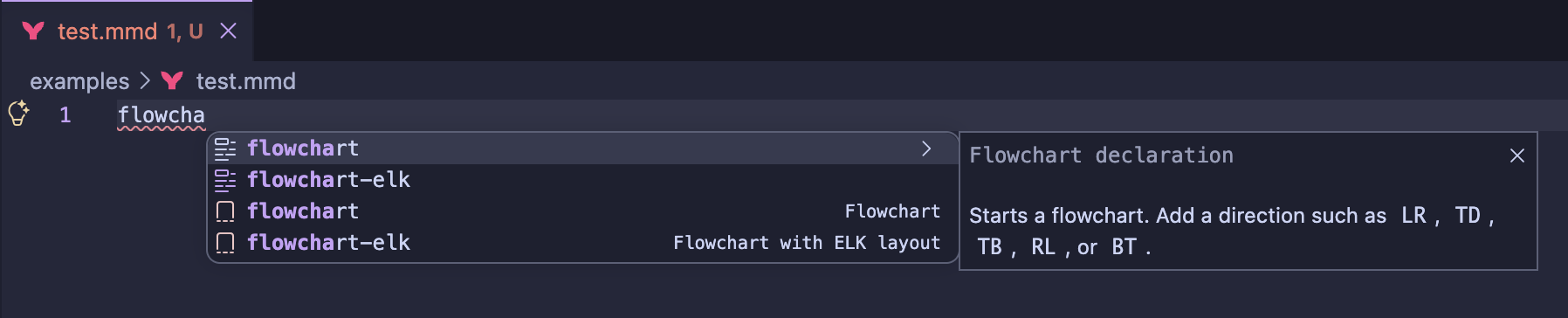
Diagram coverage
The extension includes validated examples for more than 40 Mermaid diagram
families and capabilities, including:
| General |
Software design |
Planning and data |
Experimental |
| Flowchart |
Sequence |
Gantt |
Architecture |
| Mindmap |
Class |
Git graph |
Kanban |
| Timeline |
State |
Journey |
Sankey |
| Pie and donut |
Entity relationship |
Requirement |
XY and radar charts |
| Quadrant |
C4 |
Packet |
Treemap and Wardley Map |
| Venn |
ZenUML |
Event Modeling |
Railroad and swimlanes |
See the complete example catalogue and the
compatibility matrix for exact keywords, stability,
and current limitations.
Controls
| Control |
Action |
E |
Switch to Source-only mode |
| Editor layout |
Choose Preview, Source, Beside, or Above |
| Explorer context menu |
Open the selected Mermaid file in any of the four layouts |
| Drag the internal separator |
Resize source and preview without changing VS Code editor groups |
| Open in new window |
Copy the live preview into a separate VS Code window while keeping the original visible |
| Minimap |
Click or drag to navigate an overflowing diagram |
R |
Refresh the diagram |
Ctrl/Cmd + 0 |
Fit the diagram to the viewport |
+ / - |
Zoom in or out |
Ctrl/Cmd or Alt/Option + mouse wheel |
Pointer-centered zoom and trackpad pinch |
Alt/Option + click; add Shift |
Zoom in; zoom out with Shift |
| Drag |
Pan according to the configured mouse policy |
| Copy SVG |
Copy the current original rendered SVG to the clipboard |
| Save SVG |
Save the current original rendered SVG directly |
| Export |
Preview and save PNG, WebP, PDF, optimized SVG, or original SVG |
| Export dialog |
Copy PNG/original SVG/optimized SVG, save profiles, or export a folder |
| Explorer folder context menu |
Export every Mermaid file in the selected folder recursively |
Settings
| Setting |
Default |
Purpose |
mermaidPreviewOffline.resources.allowAdditionalLocalRoots |
false |
Enable absolute paths and paths outside the workspace only below explicitly configured roots. |
mermaidPreviewOffline.resources.additionalLocalRoots |
[] |
Machine-local absolute directories or VS Code filesystem URIs allowed for images. |
mermaidPreviewOffline.resources.allowRemoteImages |
false |
Download, validate, and embed images below the configured HTTPS bases. |
mermaidPreviewOffline.resources.allowedRemoteBases |
[] |
Exact HTTPS base URLs; wildcards and credential-bearing URLs are rejected. |
mermaidPreviewOffline.resources.allowPrivateNetwork |
false |
Permit allowlisted hosts that resolve to loopback, link-local, or private addresses. |
mermaidPreviewOffline.resourceLimits.useCustom |
false |
Use the bounded custom resource values below. |
mermaidPreviewOffline.resourceLimits.maxSourceMiB |
10 |
Source budget, capped at 64 MiB. |
mermaidPreviewOffline.resourceLimits.maxImages |
64 |
Unique resolved-image budget, capped at 256. |
mermaidPreviewOffline.resourceLimits.maxImageMiB |
8 |
Per-image budget, capped at 32 MiB. |
mermaidPreviewOffline.resourceLimits.maxTotalImageMiB |
24 |
Aggregate image budget, capped at 128 MiB. |
mermaidPreviewOffline.resourceLimits.maxRasterMegapixels |
32 |
Raster and remote-image decode budget, capped at 64 megapixels. |
mermaidPreviewOffline.refreshMode |
automatic |
Switch between live and manual rendering. |
mermaidPreviewOffline.refreshDelay |
140 |
Set the automatic refresh delay in milliseconds. |
mermaidPreviewOffline.largeFileThresholdKb |
512 |
Apply the large-file render policy above this size. |
mermaidPreviewOffline.minimap.enabled |
true |
Show the minimap when the diagram exceeds the viewport. |
mermaidPreviewOffline.navigation.mouse |
always |
Pan directly with always, require Alt/Option with alt, or disable direct panning with never. |
mermaidPreviewOffline.navigation.controls |
always |
Show controls always, onHoverOrFocus, or never. |
mermaidPreviewOffline.toolbar.visible |
true |
Show or completely hide the preview toolbar. |
mermaidPreviewOffline.toolbar.labelMode |
icons |
Keep the compact default, use responsive labels, or always show supported labels. Fit and zoom remain icon-only. |
mermaidPreviewOffline.toolbar.controls |
all controls |
Select the exact toolbar actions to show; canonical ordering is preserved. |
mermaidPreviewOffline.documentation.languages |
["mermaid"] |
Recognize additional exact Markdown/MDX block language identifiers. |
mermaidPreviewOffline.documentation.resizable |
true |
Allow vertical resizing of documentation diagram cards. |
mermaidPreviewOffline.documentation.maxHeight |
empty |
Cap documentation cards with a validated CSS length such as 720px or 80vh. |
mermaidPreviewOffline.markdown.rememberResizedHeight |
true |
Restore each native Markdown Mermaid block height after navigating away and back. Disabling it clears saved heights. |
mermaidPreviewOffline.diagramTheme |
adaptive |
Choose a theme shared by every preview in the workspace. |
mermaidPreviewOffline.diagramFontFamily |
vscode |
Follow VS Code's font, or use bundled Noto Sans/Inter for portable output. |
mermaidPreviewOffline.export.format |
png |
Choose the default professional export format. |
mermaidPreviewOffline.export.theme |
default |
Render exports with a theme independent from the preview. |
mermaidPreviewOffline.export.scale |
1 |
Set the default export scale factor. |
mermaidPreviewOffline.export.dpi |
144 |
Set raster and PDF resolution. |
mermaidPreviewOffline.export.margin |
24 |
Add space around the exported diagram. |
mermaidPreviewOffline.export.background |
transparent |
Choose a transparent or colored background. |
mermaidPreviewOffline.export.backgroundColor |
#ffffff |
Set the color used when the export background is color. |
mermaidPreviewOffline.export.fileNameTemplate |
{name}-{theme}@{scale}x.{format} |
Build output names from export tokens. |
mermaidPreviewOffline.export.optimizeSvg |
true |
Optimize SVG before saving or rasterizing it. |
mermaidPreviewOffline.export.includeMetadata |
false |
Opt in to source and export metadata; keep it off for reproducible optimized SVG. |
The Mermaid file context menu exposes all four layouts. Mermaid Preview:
Configure Default Editor switches .mmd and .mermaid files between the
offline preview and VS Code's text editor.
In a Mermaid text editor, use Mermaid: Insert Node or Link, Mermaid:
Generate Missing Identifiers, Mermaid: Rename Identifier, or Mermaid:
Format Document from the Command Palette or editor context menu.
Resource safeguards
| Resource |
Limit |
What happens at the limit |
| Mermaid source |
10 MiB of UTF-8 source |
Preview rendering pauses with the measured size and limit; CLI and batch rendering reject that file. The source remains editable. |
| Resolved images in one diagram |
64 unique images, 8 MiB each, 24 MiB combined |
Rendering stops with a message identifying the image-count, per-image, or aggregate limit. |
| PNG, WebP, and PDF rasterization |
32,000,000 pixels |
Export stops before allocating the oversized canvas and asks you to reduce scale or DPI. SVG remains available. |
These standard limits keep memory use predictable. Trusted users can enable the
bounded custom profile in machine settings, up to 64 MiB of source, 256 images,
32 MiB per image, 128 MiB combined, and 64 megapixels. Transport, concurrency,
dimension, timeout, and serialized-message ceilings remain internal safeguards.
Command reference
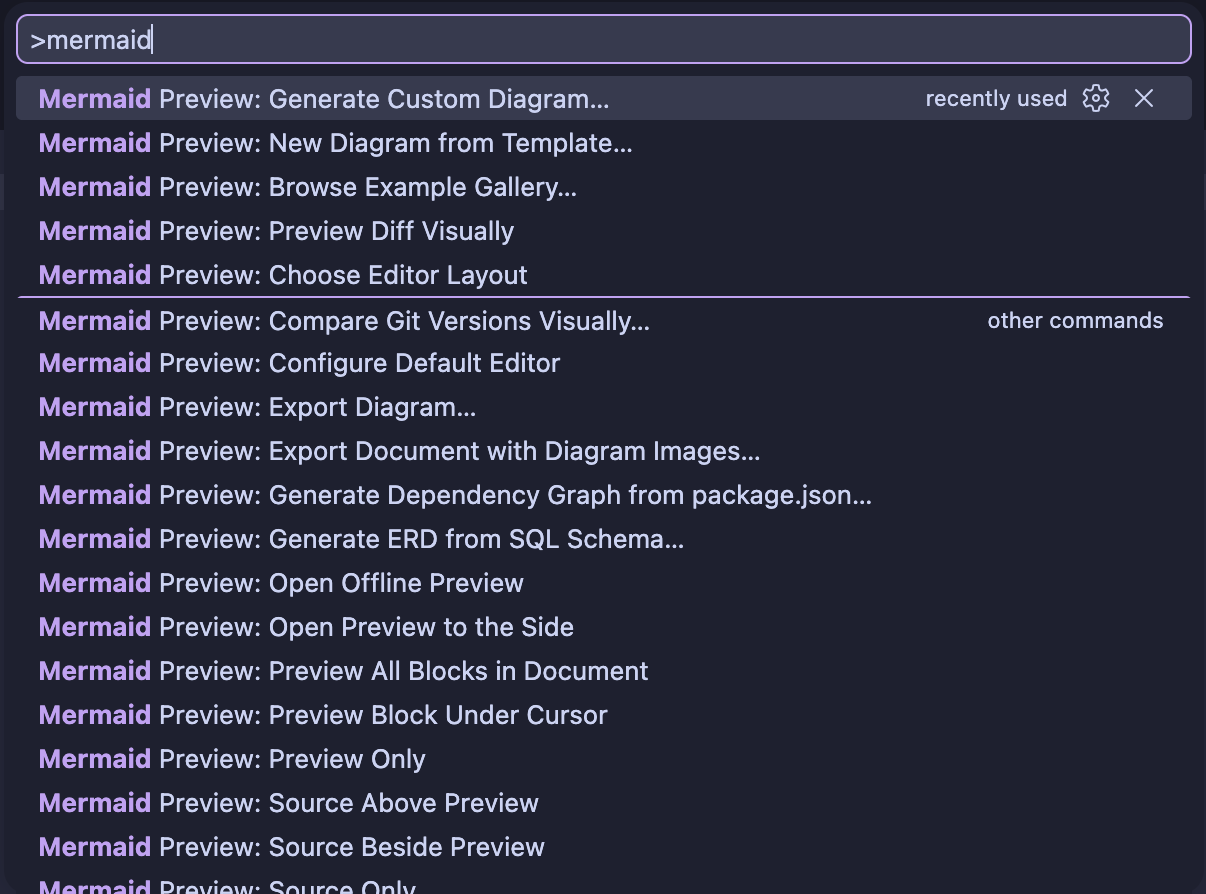
| Command Palette title |
Purpose |
| Mermaid Preview: Open Offline Preview |
Open the current Mermaid file in the offline custom editor. |
| Mermaid Preview: Open Preview to the Side |
Keep the current editor visible and open its preview beside it. |
| Mermaid Preview: Choose Editor Layout |
Select Preview only, Source only, Beside, or Above. |
| Mermaid Preview: Preview Only |
Show only the rendered diagram. |
| Mermaid Preview: Source Only |
Open VS Code's full Mermaid text editor in the current preview column. |
| Mermaid Preview: Source Beside Preview |
Arrange the internal source and preview surfaces horizontally. |
| Mermaid Preview: Source Above Preview |
Arrange the internal source and preview surfaces vertically. |
| Mermaid Preview: Configure Default Editor |
Associate Mermaid files with the offline preview or text editor. |
| Mermaid: Format Document |
Format indentation and supported Mermaid block structure. |
| Mermaid: Insert Node or Link |
Insert a flowchart node or a link between identifiers. |
| Mermaid: Generate Missing Identifiers |
Add stable identifiers to anonymous flowchart nodes. |
| Mermaid: Rename Identifier |
Rename the identifier under the cursor throughout the file. |
| Mermaid Preview: Export Diagram… |
Open the export preview and settings. |
| Mermaid Preview: Export Folder… |
Recursively export a selected folder from the Explorer or Command Palette. |
| Mermaid Preview: New Diagram from Template… |
Open Diagram Studio for templates and custom generation. |
| Mermaid Preview: Save Current Diagram as Template… |
Save the current Mermaid source to a personal or project library. |
| Mermaid Preview: Browse Example Gallery… |
Search and inspect the 44 bundled examples. |
| Mermaid Preview: Generate ERD from SQL Schema… |
Generate an ER diagram from a local SQL schema. |
| Mermaid Preview: Generate Dependency Graph from package.json… |
Generate a dependency graph from a local package manifest. |
| Mermaid Preview: Compare Git Versions Visually… |
Select two local Git revisions and compare their rendered diagrams. |
| Mermaid Preview: Preview Diff Visually |
Render the two sides of the active VS Code text diff. |
| Mermaid Preview: Preview Block Under Cursor |
Preview the current Mermaid block in Markdown, MDX, or AsciiDoc. |
| Mermaid Preview: Preview All Blocks in Document |
Open a live view containing every Mermaid block in the document. |
| Mermaid Preview: Export Document with Diagram Images… |
Copy a document and replace its Mermaid blocks with local images. |
The two local generators are part of the 1.0 feature set. Their generated source
opens as normal Mermaid content, so it can be edited, previewed, and exported
with the same tools as a hand-written diagram.
Diagram Studio and visual Git diffs
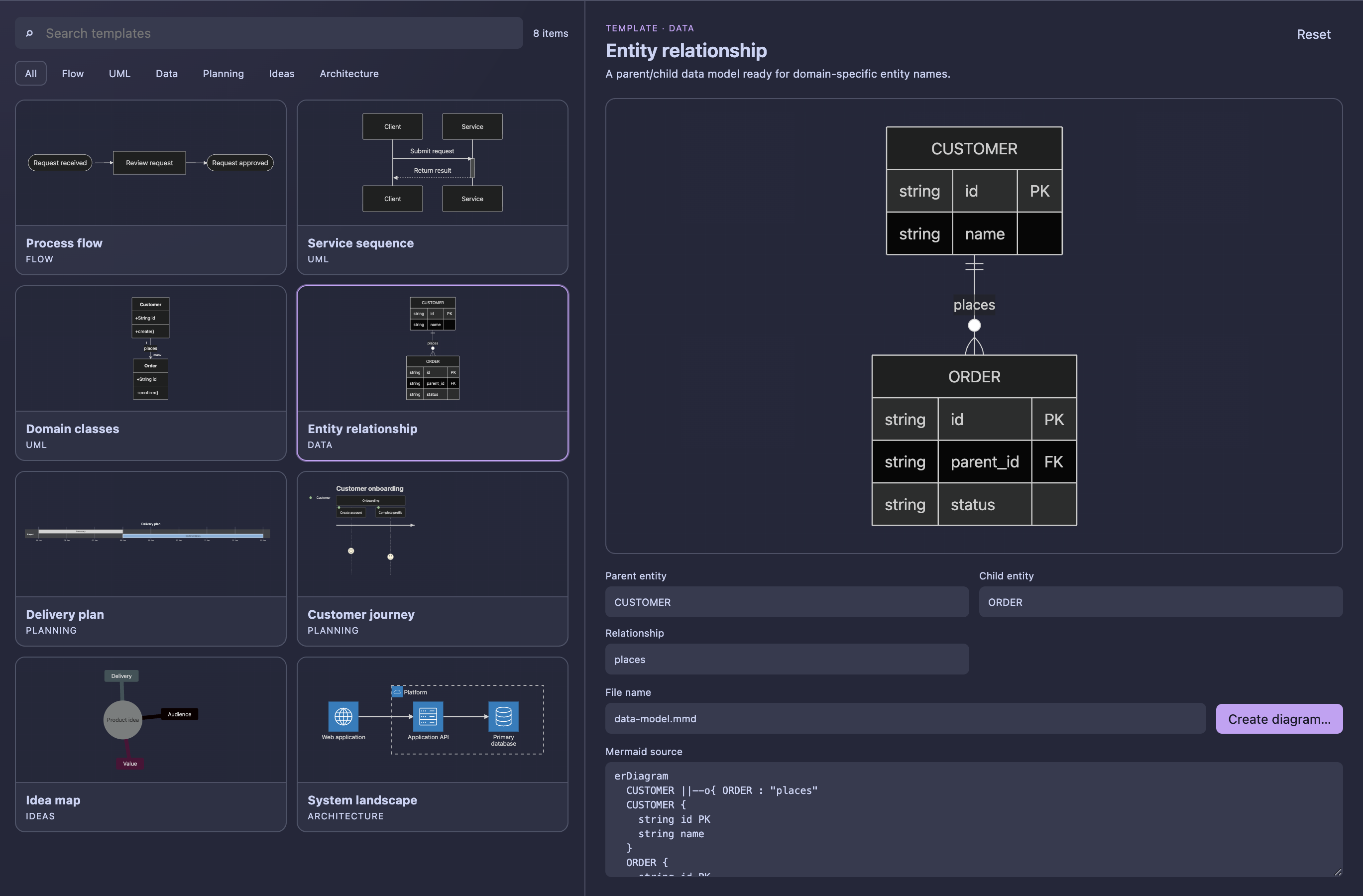
Run Mermaid Preview: New Diagram from Template… to open Diagram Studio.
Choose one of eight templates, customize its fields, inspect the live rendered
result, optionally edit the generated Mermaid source, and create the file in the
workspace. Mermaid Preview: Browse Example Gallery… switches directly to a
searchable visual catalog of all 44 examples shipped with the extension.
Use Mermaid Preview: Save Current Diagram as Template… to reuse the current
source, including unsaved edits, or Save as template… inside Studio. Choose
Personal library for local reuse across workspaces, or Project to save
JSON files under .mermaid-templates/ for sharing through Git. Project templates
require a trusted workspace. Filter by origin or Favorites, mark cards with
the star button, and use Refresh after editing or pulling template files.
Supported local Mermaid images are embedded when saving from a known source
file; unresolved or external image references must be embedded or removed first.
For an existing .mmd or .mermaid file, run Mermaid Preview: Compare Git
Versions Visually… from the Command Palette or Explorer context menu. Select
the before and after revisions, including the current working tree, then compare
their rendered diagrams side by side or as a color-coded overlay. The view also
shows added, changed, and removed source-line counts and provides synchronized
zoom.
For supported flowcharts, Diagram changes also lists node and link additions,
modifications, and removals. Select an entry to locate it in the rendered
diagrams. Nodes are matched by identifier, so relabeling a node is a modification
while renaming its identifier is a removal and an addition. Styling and layout
changes remain visible in the rendered comparison but are excluded from these
structural counts. Unsupported or ambiguous syntax shows an explicit fallback
message and keeps the existing visual comparison.
When a Mermaid file is already open in VS Code's text diff editor, select
Mermaid Preview: Preview Diff Visually from the editor title bar to render
the existing before and after sides without choosing the revisions again.
Markdown, MDX, and AsciiDoc
In VS Code 1.121 and newer, normal Markdown previews render mermaid fences
through the built-in Mermaid Markdown Features extension. Mermaid Preview
Offline does not render those blocks a second time. It keeps the native vertical
resize handle and changes the fourth navigation control to Fit Diagram:
clicking it preserves the current block height and fits and centers the diagram
inside the resized viewport. The extension remembers that height per Markdown
document and Mermaid block when navigating away and back; disable
mermaidPreviewOffline.markdown.rememberResizedHeight to clear and stop this
restoration. Native resizing follows the built-in
markdown-mermaid.resizable and markdown-mermaid.maxHeight settings.
Place the cursor inside a Mermaid block and run Mermaid Preview: Preview Block
Under Cursor. To browse every diagram in the active document, use Mermaid
Preview: Preview All Blocks in Document. Both commands are available from the
editor title and context menus. These focused views show only the diagram
canvases in source order. Each top-right toolbar groups Zoom out, Fit, Zoom in,
and the compact </> Source only action. The icon-labelled Present button stays
fixed at bottom right.
Visible diagrams render first, followed by nearby blocks as you scroll. Already
rendered diagrams keep their SVG and viewport state; they are not discarded when
scrolled out of view. Presentation renders its active slide on demand, and
document export still includes every block, including blocks never displayed.
Presentation inherits the complete workspace appearance. Use the palette button
at bottom left to change the shared theme, density, pattern, or canvas
background. The arrow buttons and counter at bottom right navigate, while
Esc leaves presentation. The top and bottom control bars share the same
right viewport margin and translucent surface.
Markdown and MDX support backtick or tilde fences, including attribute-style
MDX fences, and Azure DevOps-style containers:
```mermaid
flowchart LR
  Docs --> Preview
```

~~~{.mermaid}
sequenceDiagram
  Editor->>Preview: Update
~~~

::: mermaid
mindmap
  root((Documentation))
    Preview
    Export
:::
Add exact language identifiers such as mermaid-example through
mermaidPreviewOffline.documentation.languages. Every diagram card has its own
zoom and restored viewport; drag its lower handle to resize it.
AsciiDoc supports both diagram and source block forms:
[mermaid]
....
flowchart LR
  Docs --> Preview
....

[source,mermaid]
----
sequenceDiagram
  Editor->>Preview: Update
----
Use Mermaid Preview: Export Document with Diagram Images… to create a copy
of the document in which every Mermaid block is replaced by a local image
reference. Choose optimized SVG or PNG; PNG honors the configured export DPI,
scale, margin, background, and theme. Images are written to a dedicated
<document>.assets directory beside the exported file. The source document is
never overwritten.
Offline CLI and VS Code tasks
The repository includes a Node.js 22 CLI that uses Chrome, Chromium, or Edge
120 or newer as its local rendering engine. It requires no remote service. It
contacts an image host only when --allow-remote-base is supplied explicitly.
npm ci
npm run build
npm link

mpo examples/01-flowchart.mmd \
  --format png --dpi 300 --scale 2 --font noto-sans \
  --background transparent

mpo examples \
  --output exported --format pdf --theme neutral

mpo examples --output exported --format svg --incremental
mpo examples --output exported --format svg --watch
npm link exposes the local executable as the short mpo command.
--profile profile.json loads saved settings, --font selects vscode,
noto-sans, or inter, --name-template controls output names, --browser
handles a non-standard browser location, and --json emits machine-readable
output. --help lists every option. In CLI mode, vscode resolves to the
system UI font stack because VS Code's CSS variable is unavailable.
--incremental skips intact outputs when their source, embedded images,
settings, and rendering environment match the local cache. --watch implies
incremental mode and follows source files, local images, and the JSON profile;
stop it with Ctrl+C. Deleted sources leave their existing exports in place.
--watch --json emits one JSON event per line. See the
CLI guide
for cache behavior, remote-image refresh, and time-dependent exports.
Use repeatable --allow-local-root <path> and --allow-remote-base <https-url>
flags for external images. --allow-private-network separately enables private
destinations. The --max-source-mib, --max-images, --max-image-mib,
--max-total-image-mib, and --max-raster-megapixels flags select the same
bounded custom budgets as VS Code settings.
The extension also contributes a mermaid-export task type:
{
  "version": "2.0.0",
  "tasks": [
    {
      "label": "Export Mermaid documentation",
      "type": "mermaid-export",
      "source": "${workspaceFolder}/docs/diagrams",
      "output": "${workspaceFolder}/build/diagrams",
      "format": "png",
      "theme": "neutral",
      "font": "noto-sans",
      "dpi": 300,
      "scale": 2,
      "background": "#ffffff"
    }
  ]
}
The task's font property accepts the same three values. Omit it to inherit
mermaidPreviewOffline.diagramFontFamily from the active workspace.
Privacy and security
Rendering happens inside a restricted VS Code webview. The extension:
- blocks network connections with
connect-src 'none';
- loads executable resources only from the installed VSIX;
- runs Mermaid with
securityLevel: strict;
- contains no telemetry or analytics;
- reads Git revisions only through the built-in local VS Code Git extension;
- rejects absolute, outside-workspace, and network images by default;
- resolves enabled external images only through machine-scoped allowlists in a
trusted workspace, then embeds their validated bytes before rendering;
- blocks private and local network destinations unless separately enabled;
- writes outside the current document only after an explicit save, folder export,
task, or CLI invocation.
One-time Marketplace review prompt
After five separate preview sessions have each produced a successful render, the
extension can show one information message with Leave a review and No
thanks. Only Leave a review opens the Marketplace review page; nothing is
opened automatically. The prompt is recorded as shown regardless of the choice,
so it does not appear after every edit, render, or later preview session. The
counter is stored locally in VS Code and does not add telemetry.
Install from a VSIX
- Download the latest package from
GitHub Releases.
- In VS Code, open Extensions.
- Choose
... → Install from VSIX... and select the downloaded file.
Development
Requires Node.js 22 and npm.
npm ci
npm run verify
npm run test:visual
npm run package:vsix
The visual suite renders all 44 examples in light, dark, and high-contrast
themes and checks the editor, semantic diffs, template library, documentation
views, and CLI workflows. Run npm run test:cli to build and check incremental
exports and watch mode separately. The VSIX is generated in artifacts/. To
debug the extension, open the repository in VS Code and launch Run Mermaid
Preview Offline with F5.
Support
Read the complete user guide or the
French guide for workflows, configuration,
compatibility, and troubleshooting. Maintainers preparing a release can use the
performance and resource notes.
Found a bug or have an idea? Open a
GitHub issue.
License and attribution
This extension is released under the MIT License. Mermaid and the
Mermaid logo are used from the
mermaid-js/mermaid project under its MIT
license. See third-party notices for ZenUML and icon
pack attribution.
This is an independent community extension and is not affiliated with or
endorsed by Mermaid Chart.

