
Stop rewriting tests every time AI runs.
SilentSpec generates only the tests you're missing — and never touches the ones you wrote.


✔ Save a file → tests appear beside it
✔ Add a function → only that function gets tested
✔ Your hand-written tests are never touched
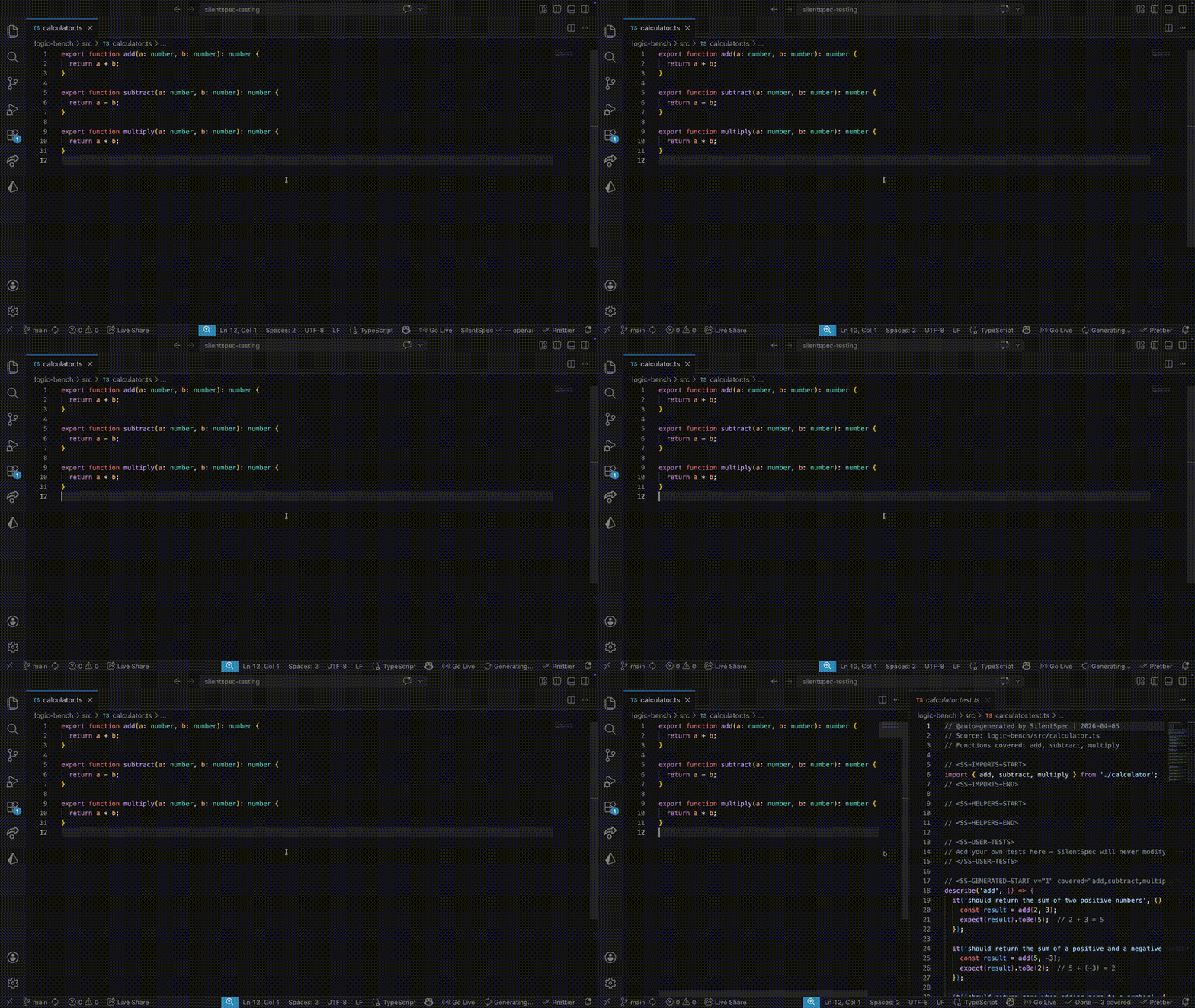
Before / After
Three exported functions, no tests:
// src/math.ts
export function add(a: number, b: number): number {
  return a + b;
}
export function multiply(a: number, b: number): number {
  return a * b;
}
export function clamp(n: number, min: number, max: number): number {
  return Math.min(Math.max(n, min), max);
}
After first save — spec file created automatically:
// src/math.spec.ts  (created beside source)
// @auto-generated by SilentSpec | 2026-04-05
// Functions covered: add, multiply, clamp
// <SS-IMPORTS-START>
import { add, multiply, clamp } from "./math";
// <SS-IMPORTS-END>
// <SS-HELPERS-START>
// <SS-HELPERS-END>
// <SS-USER-TESTS>
// Add your own tests here — SilentSpec will never modify this section
// </SS-USER-TESTS>
// <SS-GENERATED-START v="1" covered="add,multiply,clamp" pending="">
describe("add", () => {
  it("should add two positive numbers", () => {
    expect(add(2, 3)).toBe(5);
  });
  it("should handle negative numbers", () => {
    expect(add(-1, 1)).toBe(0);
  });
});
describe("multiply", () => {
  it("should multiply two numbers", () => {
    expect(multiply(3, 4)).toBe(12);
  });
  it("should return 0 when either operand is 0", () => {
    expect(multiply(5, 0)).toBe(0);
  });
});
describe("clamp", () => {
  it("should clamp value above max", () => {
    expect(clamp(10, 0, 5)).toBe(5);
  });
  it("should clamp value below min", () => {
    expect(clamp(-5, 0, 10)).toBe(0);
  });
  it("should return value when within range", () => {
    expect(clamp(3, 0, 10)).toBe(3);
  });
});
// <SS-GENERATED-END>
You add a 4th function and save again. Only divide gets a new test — everything else is untouched.
// SS-GENERATED-START marker after second save:
// <SS-GENERATED-START v="1" covered="add,multiply,clamp,divide" pending="">
//
// ↑ divide added to covered list
// ↑ new describe("divide", ...) appended below existing tests
// ↑ existing describe blocks for add, multiply, clamp — unchanged
Why SilentSpec
Most AI test tools regenerate entire files on every run. They overwrite the tests you wrote by hand, and the output often doesn't compile on the first try. You end up maintaining generated tests instead of writing features.
SilentSpec is different:
- Only generates what's missing. It tracks which exported functions already have tests and only calls the AI for uncovered ones.
- Your tests are protected. Hand-written tests live in the
SS-USER-TESTS zone — a section that is never modified after creation. This is enforced at write time, not in the prompt.
- Tests are compiler-checked before writing. After generation, SilentSpec runs a TypeScript compiler pass. When compile errors are detected, broken tests are removed before writing. On first generation of a new spec file, the healer verifies against the existing project — full diagnostic repair activates on subsequent saves. Semantic correctness still requires human review.
How It Works
Save file
   │
   ▼
Pre-debounce checks (untitled / non-file / no workspace / disabled / paused /
                      test file / unsupported ext / too large)
   │
   ▼
2-second debounce
   │
   ▼
Post-debounce checks (formatter re-save / unmanaged spec)
   │
   ▼
AST analysis — extract exported functions only
   │
   ▼
Compare covered list against current exports → compute gaps
   │
   ▼
AI call → validate response → fix imports
   │
   ▼
Healer — TypeScript compiler analysis → remove broken tests
   │
   ▼
Write spec file — 4-zone structure, SS-USER-TESTS never touched
Generation is batched: up to 5 functions per AI call. GitHub Models is additionally capped at 2–3 functions to stay within the free tier's output token limit. The SSMarker comment in the spec file tracks which functions are covered across saves, so each run only calls the AI for what's actually missing.
Zone Architecture
Four zones keep system-managed content separate from your tests:
// @auto-generated by SilentSpec | 2026-04-05
// Source: src/utils/formatting.ts
// Functions covered: formatCurrency, formatDate, truncate

// <SS-IMPORTS-START>                         ← SYSTEM: replaced every run
import { formatCurrency, formatDate, truncate } from "../utils/formatting";
jest.mock("date-fns", () => ({ format: jest.fn(() => "2026-01-01") }));
// <SS-IMPORTS-END>

// <SS-HELPERS-START>                         ← SYSTEM: replaced every run
const fakeCurrency = (amount: number, code: string) =>
  ({ amount, code }) as unknown as CurrencyInput;
// <SS-HELPERS-END>

// <SS-USER-TESTS>                            ← YOUR TESTS: never modified
// Write integration tests, complex mocks, edge cases the AI misses.
// SilentSpec will never modify this section — it's yours.
describe("formatCurrency — edge cases I care about", () => {
  it("should use parentheses for negative values in accounting mode", () => {
    expect(formatCurrency(-100, "USD", { style: "accounting" })).toBe(
      "(100.00)",
    );
  });
});
// </SS-USER-TESTS>

// <SS-GENERATED-START v="1" covered="formatCurrency,formatDate,truncate" pending="">
// ← SYSTEM: AI-generated tests, replaced when coverage changes
describe("formatCurrency", () => {
  /* ... */
});
describe("formatDate", () => {
  /* ... */
});
describe("truncate", () => {
  /* ... */
});
// <SS-GENERATED-END>
System zones (SS-IMPORTS, SS-HELPERS, SS-GENERATED) are fully replaced on each run. The SS-USER-TESTS zone is written once and never touched again.
Quick Start
1. Install
Search for SilentSpec in the VS Code Extensions panel, or install from the Marketplace.
2. Open a project
Open any TypeScript or JavaScript project folder. SilentSpec activates automatically.
3. Save a file
Save any .ts, .tsx, .js, or .jsx file that exports functions. A spec file appears in your existing __tests__ directory if one is present, or beside the source file otherwise.
Provider Setup
| Provider |
Setting value |
Credential |
Notes |
| GitHub Models (default) |
github |
GitHub Personal Access Token |
Free, ~50 requests/day. No credit card. |
| Ollama (local) |
ollama |
None |
Auto-detected on activation. No internet required. |
| Claude |
claude |
Anthropic API key |
~$0.003/generation. Best output quality. |
| OpenAI |
openai |
OpenAI API key |
~$0.003/generation. |
| Azure OpenAI |
azure |
Azure OpenAI API key |
Uses your Azure endpoint + deployment name. |
| OpenAI-compatible |
compat |
Provider API key |
Works with Groq, Together, Fireworks, DeepSeek. |
| vLLM (local) |
vllm |
None |
Self-hosted OpenAI-compatible server. |
| AWS Bedrock |
bedrock |
AWS credentials |
Claude models on Bedrock via IAM, profile, or static credentials. |
| Google Vertex AI |
vertex |
ADC or service account file |
Supports Gemini and Claude on Vertex. |
Set your provider: VS Code Settings → search silentspec.provider.
Set your API key: Command Palette (Cmd/Ctrl+Shift+P) → SilentSpec: Set API Key.
Ollama users: install Ollama from ollama.com, run ollama pull deepseek-coder:6.7b, then start Ollama before launching VS Code. SilentSpec detects it on activation and uses it automatically when no provider is explicitly set.
Supported Languages & Frameworks
Languages




Frameworks (auto-detected from package.json)




Framework is detected by walking up from the saved file to the nearest package.json that declares a known test framework. Monorepo sub-packages are detected independently.
Works best today for exported JavaScript/TypeScript functions, utilities, and Node.js service code.
Provider Comparison
| Provider |
Default Model |
Free? |
Credential |
Rate Limit |
Approx Cost |
| GitHub Models |
gpt-4o |
Yes |
GitHub PAT |
~50 req/day |
Free |
| Ollama |
auto (deepseek-coder:6.7b preferred) |
Yes |
None |
None (local) |
Free |
| Claude |
claude-sonnet-4-6 |
No |
Anthropic API key |
Per plan |
~$0.003/generation |
| OpenAI |
gpt-4o |
No |
OpenAI API key |
Per plan |
~$0.003/generation |
| Azure OpenAI |
deployment-configured |
No |
Azure API key |
Per plan |
Azure pricing |
| Compat |
provider-configured |
Usually |
Provider API key |
Per provider |
Provider pricing |
| vLLM |
user-configured |
Yes |
None |
None (local) |
Local compute |
| AWS Bedrock |
anthropic.claude-3-5-sonnet-20241022-v2:0 |
No |
AWS credentials |
Per plan |
AWS pricing |
| Vertex AI |
gemini-2.0-flash |
No |
ADC / key file |
Per plan |
GCP pricing |
Ollama model selection: SilentSpec prefers deepseek-coder:6.7b → deepseek-coder → codellama → llama3.2 in order of preference, picking the first installed model. Override with silentspec.model.
silentspec.model is a legacy override for Ollama, Claude, OpenAI, and GitHub Models. Azure, Bedrock, Vertex, OpenAI-compatible providers, and vLLM use their provider-specific model or deployment settings instead.
OpenAI-compatible examples:
| Provider |
silentspec.compat.baseUrl |
Example model |
| Groq |
https://api.groq.com/openai/v1 |
llama-3.3-70b-versatile |
| Together AI |
https://api.together.xyz/v1 |
meta-llama/Llama-3-70b-chat-hf |
| Fireworks AI |
https://api.fireworks.ai/inference/v1 |
accounts/fireworks/models/llama-v3p3-70b-instruct |
| DeepSeek |
https://api.deepseek.com/v1 |
deepseek-chat |
Bedrock V1.1 supports Claude models on Bedrock only. Enable the selected model in AWS Console > Bedrock > Model Access before using it. Other Bedrock model families such as Llama, Mistral, Titan, and Cohere require additional request/response dispatch logic and are not supported by this provider yet.
Azure OpenAI uses deployment names, not raw model IDs. Set silentspec.azure.deploymentName to the exact deployment name from the Azure AI Foundry portal.
Configuration
| Setting |
Type |
Default |
Description |
silentspec.enabled |
boolean |
true |
Enable or disable all automatic test generation. |
silentspec.provider |
string enum |
"github" |
AI provider: github, claude, openai, ollama, azure, compat, vllm, bedrock, or vertex. |
silentspec.model |
string |
"" |
Legacy model override for Ollama, Claude, OpenAI, and GitHub Models. Provider-specific backends use their own model/deployment settings. |
silentspec.supportedExtensions |
string[] |
[".ts",".tsx",".js",".jsx"] |
File extensions that trigger generation. |
silentspec.openSpecOnCreate |
boolean |
true |
Open the spec file in a split panel when first created. |
silentspec.aiTimeoutSeconds |
number |
60 |
Timeout for AI provider calls in seconds. Increase for slow connections or large files. |
silentspec.maxFunctionsPerRun |
number |
5 |
Max functions per AI call. GitHub Models is additionally capped at 2–3 functions to stay within the free tier's output token limit. Recommended: 3–5 for free-tier providers, up to 8 for paid. |
silentspec.azure.* |
string |
varies |
Azure OpenAI endpoint, deployment name, and API version. |
silentspec.compat.* |
string |
varies |
Base URL, model, and label for an OpenAI-compatible provider. |
silentspec.vllm.* |
string/bool |
varies |
vLLM base URL, served model, and auto-detect toggle. |
silentspec.bedrock.* |
string |
varies |
Bedrock region, model ID, profile, and auth mode. Static credentials are stored via the command palette. |
silentspec.vertex.* |
string/bool |
varies |
Vertex project, location, model, service account key path, and ADC toggle. |
Commands
All commands are available via the Command Palette (Cmd/Ctrl+Shift+P):
| Command |
Title |
Description |
silentspec.togglePause |
SilentSpec: Toggle Pause |
Pause or resume automatic generation. Status bar reflects current state. |
silentspec.setApiKey |
SilentSpec: Set API Key |
Store your API key or GitHub token in encrypted SecretStorage. |
silentspec.generateNow |
SilentSpec: Generate Tests for Current File |
Saves the active file, which enters the normal generation pipeline including the 2-second debounce. |
silentspec.findGaps |
SilentSpec: Find Gaps in Current File |
Scan for uncovered exported functions and generate missing tests. |
silentspec.showStats |
SilentSpec: Show Impact Report |
Display local generation statistics. |
silentspec.openLog |
SilentSpec: Open Output Log |
Open the SilentSpec output channel with detailed generation logs. |
silentspec.rebuildMarker |
SilentSpec: Rebuild Marker |
Recompute the SSMarker from existing spec content. Use if the marker gets out of sync. |
silentspec.explainFailure |
SilentSpec: Explain Failure |
Show a human-readable explanation of the last generation failure. |
File System Impact
Files Created
- Spec files —
.spec.ts (or .tsx / .js / .jsx) placed using a 5-pass algorithm: existing spec in adjacent __tests__ or test subfolder → existing spec in same directory as source → existing spec in root test directory (lookup only — never creates here) → new file in established adjacent test directory → new file beside the source as fallback. Collision detection uses the // Source: header to verify ownership before claiming an existing spec file.
globalStorageUri/stats.json — local telemetry, in a VS Code-managed directory.
Files Modified
- Existing SilentSpec-managed spec files — system zones (
SS-IMPORTS, SS-HELPERS, SS-GENERATED) are updated on each run; SS-USER-TESTS is never modified.
tsconfig.json — only if you explicitly click "Fix tsconfig automatically" in the preflight warning notification. This adds the detected framework to compilerOptions.types.
SilentSpec never modifies source files or any file that does not have SilentSpec zone markers. It never modifies unmanaged test files.
Preflight dependency install: when @types/jest (or equivalent) is missing, SilentSpec asks before running the package-manager install command. If you click "Install Now", the package manager may update node_modules, lockfiles, and package metadata such as package.json. If you choose not to install, SilentSpec continues in safe mode and offers the manual command instead.
On Uninstall
Generated spec files remain on disk — they are yours. VS Code cleans up globalStorageUri automatically. No orphaned processes, no background tasks.
Offline & Air-Gapped Use
The Ollama provider works fully offline. Framework detection, AST analysis, zone parsing, and the healer all run locally using the TypeScript compiler API — no network required for these steps. Only the AI generation step requires a provider connection.
Cloud providers (GitHub Models, Claude, OpenAI, Azure OpenAI, OpenAI-compatible providers, AWS Bedrock, and Google Vertex AI) require internet access for every generation call.
Known Limitations
- Ollama must be running before VS Code starts. The health check runs once on activation. If Ollama starts later in the session, set
silentspec.provider: "ollama" explicitly or restart VS Code.
- Files over 1,500 lines or 200,000 characters are skipped. This is a deliberate gate to avoid excessive token usage and slow healer runs on very large files.
- Only exported functions and classes are detected. Non-exported functions,
export default object literals, and TypeScript namespace exports are not currently analyzed by the AST gate.
- Remote SSH, Dev Containers, and WSL have limited support. SilentSpec uses Node
fs and child_process directly. A warning is shown on activation in remote environments.
silentspec.findGaps runs in full healer mode regardless of preflight result. If @types are missing, some healer diagnostics may be incomplete.- Generated tests require review for semantic correctness. The healer removes tests that don't compile, but cannot verify that a test correctly describes your function's intended behavior.
- First-generation healer limitation. On the very first save for a new spec file, the healer's pre-check runs against the existing (clean) project and may short-circuit. Full diagnostic repair activates on subsequent saves once the spec file exists on disk.
testsHealedSuccessfully is always 0 in the impact report. The healer tracks test removal but not repair — this counter is reserved for a future healer repair feature.- GitHub Models free tier is limited to approximately 50 requests per day. Each save that triggers generation uses one request per batch call.
Privacy, Data & Security
Source Code Transmission
SilentSpec sends your source code to the configured AI provider on every save that triggers generation. This is fundamental to how it works — there is no way to generate tests without sending code.
Content transmitted includes: source file content (up to 8,000 characters, with function signatures provided for code beyond that window), exported function signatures, import statements, local dependency signatures for files imported by the source, a sample from the nearest existing test file in your project (up to the first 30 lines, used to match your project’s test style), and the filename (not path) of the generated spec file. SilentSpec does not store, cache, or log transmitted code.
For Ollama and vLLM pointed at a local server, generation can remain local. SilentSpec blocks remote vLLM URLs and only allows localhost-style vLLM endpoints (localhost, 127.0.0.1, or [::1]). For cloud providers or externally hosted OpenAI-compatible endpoints, data is subject to that provider's privacy policies:
By using a cloud provider, you accept their data processing terms. Review your provider's policy before using SilentSpec on proprietary or sensitive code.
OpenAI-compatible URLs are restricted to documented HTTPS providers: Groq, Together AI, Fireworks AI, and DeepSeek. Azure OpenAI endpoints are restricted to HTTPS Azure resource domains ending in openai.azure.com or cognitiveservices.azure.com. Vertex locations are validated as GCP region strings before a Vertex hostname is constructed.
API Key Storage
API keys and tokens are stored using VS Code's SecretStorage API (context.secrets), which VS Code encrypts using the OS keychain — Keychain on macOS, Credential Manager on Windows, libsecret on Linux.
Keys are stored under these identifiers: silentspec.githubToken, silentspec.claudeApiKey, silentspec.openaiApiKey, silentspec.azureApiKey, silentspec.compatApiKey, silentspec.bedrockAccessKeyId, and silentspec.bedrockSecretAccessKey. Vertex AI uses Application Default Credentials or a service account key file path configured in settings. The Vertex key path is normal VS Code settings data and may be synced or exposed through Settings Sync or workspace settings; do not store the key file itself in your workspace. SecretStorage-backed keys never appear in settings.json, and provider error logs use best-effort secret redaction before writing to the output channel.
Network Requests — Complete Disclosure
SilentSpec makes the following network requests depending on the configured provider:
| Request |
When |
Endpoint |
| Ollama health check |
Once on VS Code activation |
http://localhost:11434/api/tags |
| Ollama generation |
On save (Ollama provider) |
http://localhost:11434/api/generate |
| GitHub Models generation |
On save (GitHub Models provider) |
https://models.inference.ai.azure.com/chat/completions |
| Claude generation |
On save (Claude provider) |
https://api.anthropic.com/v1/messages |
| OpenAI generation |
On save (OpenAI provider) |
https://api.openai.com/v1/chat/completions |
| Azure OpenAI generation |
On save (Azure provider) |
Your configured Azure OpenAI endpoint |
| Compat generation |
On save (compat provider) |
Your configured allowlisted HTTPS OpenAI-compatible base URL |
| vLLM health check |
Once on VS Code activation |
Your configured local vLLM /v1/models endpoint |
| vLLM generation |
On save (vLLM provider) |
Your configured local vLLM /chat/completions endpoint |
| AWS Bedrock generation |
On save (Bedrock provider) |
AWS Bedrock Runtime in your configured region |
| Vertex AI generation |
On save (Vertex provider) |
Google Vertex AI endpoint for your project/location |
There is no analytics, telemetry transmission, update check, crash reporting, or external service beyond the configured AI provider calls listed above.
Local Telemetry
SilentSpec records generation statistics locally in globalStorageUri/stats.json (a VS Code-managed directory). These stats are never transmitted anywhere.
Fields stored: totalGenerations, successfulGenerations, failedGenerations, functionsCovered (count), estimatedHoursSaved (computed from counts), testsHealed, testsHealedSuccessfully, lastProvider (name string), lastGeneratedAt (ISO timestamp), failureBreakdown (counts per category), functionAttempts (per-function attempt and success counts — function names as identifiers only, no source code).
There are no fetch, HTTP, or WebSocket imports in src/telemetry.ts. The only I/O is fs.promises.writeFile to the local stats file. View your stats with SilentSpec: Show Impact Report.
What SilentSpec Never Stores or Transmits
- No file paths in telemetry
- No prompt text stored after generation
- No generated test content in telemetry
- SecretStorage-backed API keys are redacted from provider error logs on a best-effort basis
- Function names stored as identifiers only — no code bodies in telemetry
- No cookies, browser fingerprinting, or user identification of any kind
Enterprise & Sensitive Code Guidance
- Use Ollama for fully local, air-gapped generation — no code leaves your machine
- Review your organization's policy on third-party AI API usage before enabling cloud providers
- All cloud provider calls use HTTPS transport
- There is no dry-run or preview mode — generation always sends source code to the configured provider
- Disable SilentSpec for specific repositories by setting
silentspec.enabled: false in workspace settings (.vscode/settings.json)
Troubleshooting
Nothing happened when I saved.
Open SilentSpec: Open Output Log — every save records its exact skip reason. Common causes: silentspec.enabled is false, the file exceeds 1,500 lines, the file has no exported functions, or no API key is set.
Tests don't compile.
The healer removes obviously broken tests but cannot catch all semantic errors. Check the output log for Healer: lines. If healer is in safe mode (logged explicitly), install the missing @types package and re-save to enable full healing. Safe mode performs import fixes only and skips deep type-matching to avoid false positives. On the very first generation for a new file, the healer may short-circuit if the project was already compiling cleanly — re-save to trigger full diagnostic repair.
Status bar stuck on "Generating…".
The AI provider call may have timed out or stalled. Check the log for timeout or network error messages. Try increasing silentspec.aiTimeoutSeconds or switching providers.
Wrong provider showing in the status bar.
If Ollama was running when VS Code started and silentspec.provider is not explicitly set, SilentSpec uses Ollama automatically. Set silentspec.provider: "github" (or your preferred provider) in settings to override this.
How do I reset my stats?
Delete stats.json from VS Code's global storage directory. On macOS the path is typically ~/Library/Application Support/Code/User/globalStorage/bharadwajmadduri.silent-spec/stats.json. The exact path appears in the output log on first activation.
Spec file has duplicate zone markers.
This can happen if a generation was interrupted mid-write. Delete the spec file and re-save the source file to regenerate it from scratch.
Contributing
npm install
npm run compile   # type-check + lint + build
npm test          # run the test suite
Report bugs and feature requests at github.com/BHARADWAJ-MADDURI/silent-spec/issues.
License
Apache License 2.0 — Copyright 2026 Bharadwaj Madduri.

