Bevy Lens
Bevy Lens is a VS Code semantic navigation and visualization extension for Bevy 0.19 projects. It statically indexes Rust, WGSL, and WESL source files to expose Bevy-specific types, systems, schedules, observers, shaders, and relationships without replacing VS Code's native file management experience.
Official website: BevyCN
Install: VS Code Marketplace | Open VSX
Features
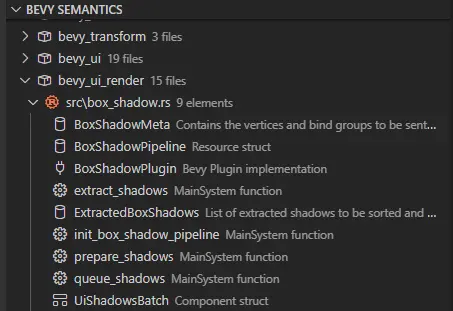
Bevy Semantics in the native Explorer
The BEVY SEMANTICS view lives inside VS Code's Explorer container and presents only indexed semantic data:
- Preserves the hierarchy as
Cargo crate → source directories → source file → Bevy elements across all workspace folders.
- Shows only the file basename at the file level; paths such as
src/ui/menu.rs are represented by nested src → ui → menu.rs nodes instead of one long label.
- Includes only files that contain recognized Bevy elements; it does not duplicate the physical directory tree.
- Uses VS Code Theme Icons and the active file icon theme for native alignment and appearance.
- Expanding the view or switching the active editor reveals the corresponding indexed source file.
- Displays Rust Analyzer error and warning counts on file nodes.
- Opens source definitions directly from file and element nodes.
- Exposes WGSL/WESL bindings and vertex, fragment, and compute entry points.
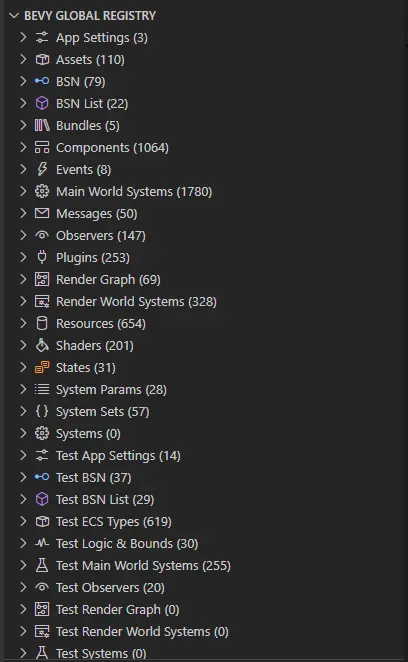
Bevy Global Registry
The dedicated Bevy Lens Activity Bar remains available for project-wide lookup:
- Categorizes components, resources, App Settings, events, messages, states, bundles, assets, plugins, systems, system sets, system parameters, observers, shaders, BSN scenes, and render systems.
- Groups results by Cargo crate and separates library, binary, example, and test targets.
- Supports alphabetical or source-position sorting.
- Supports positive and negative search filters such as
Player and !Test.
- Opens each result at its source definition.
Bevy 0.19 semantic indexing
The parser recognizes commonly used Bevy 0.19 patterns, including:
#[derive(Component)], Resource, Event, Message, States, Bundle, Asset, SystemParam, and SystemSet.Plugin implementations and functions registered through add_systems.- Systems using
Query, Res, ResMut, Commands, Local, NonSend, Single, Populated, message/event readers and writers, exclusive &mut World, and render contexts.
- Zero-parameter systems explicitly registered through
add_systems.
On<T> observers, legacy Trigger<T> signatures, add_observer, ordering modifiers, and observer run conditions.bsn! and bsn_list! scene definitions.- App Settings types marked with
SettingsGroup.
- Bevy 0.19 resources-as-components access when evaluating query conflicts.
- Main-world and render-world schedules,
.chain(), .after(), .before(), .in_set(), and .run_if() metadata.
Bevy Lens uses lightweight static analysis rather than compiling Rust syntax. Macro-generated types, unusual aliases, or deeply dynamic registration code may require Rust Analyzer navigation as a fallback.
Diagnostics and documentation
- Shows the first line of Rust
/// documentation beside registry elements.
- Displays full documentation and relevant diagnostics in hover tooltips.
- Optionally reports unordered systems in the same crate, Cargo target, and schedule when their component or resource access conflicts.
- Keeps diagnostic refreshes incremental so unrelated tree nodes are not rebuilt.
Conflict diagnostics are heuristic and disabled by default. Bevy itself remains the source of truth for schedule compatibility.
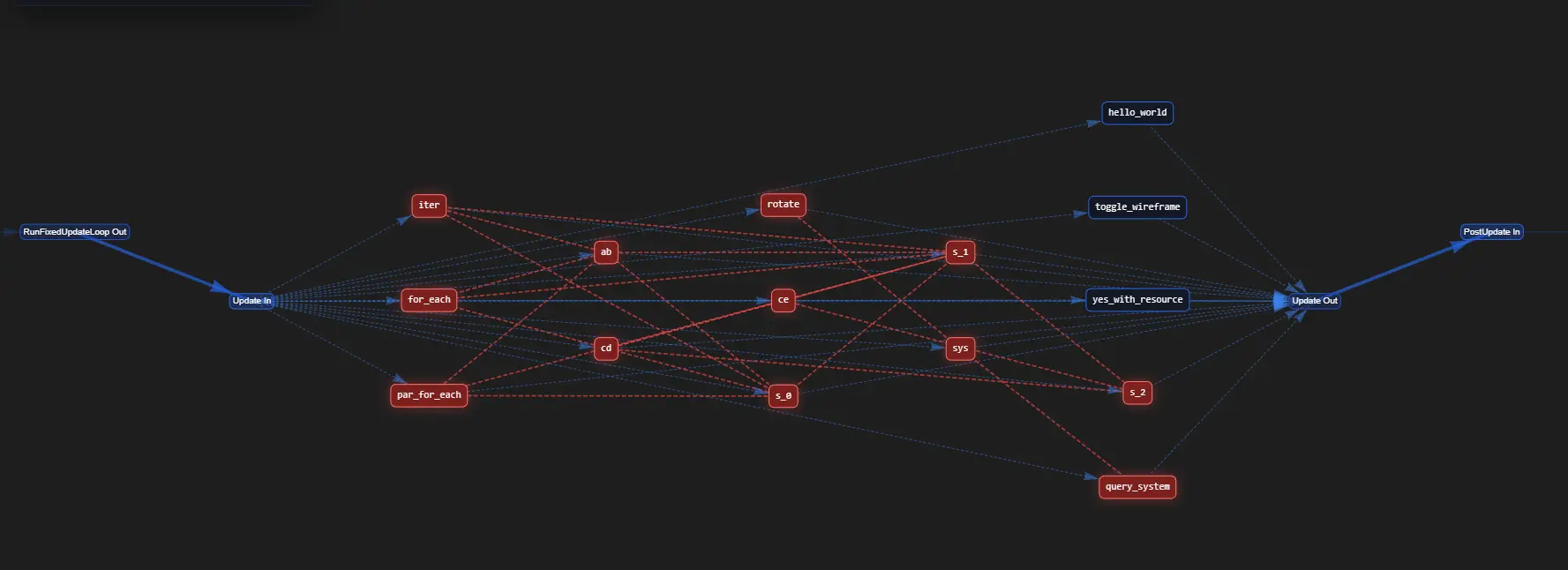
Schedule visualizer
The schedule visualizer builds an interactive graph from indexed system metadata:
- Separates
lib, bin, and example targets.
- Displays schedule phases and system ordering.
- Visualizes
.chain(), .after(), and .before() dependencies.
- Highlights potential unordered read/write conflicts.
- Navigates from graph nodes to source definitions.
Bevy reference graph
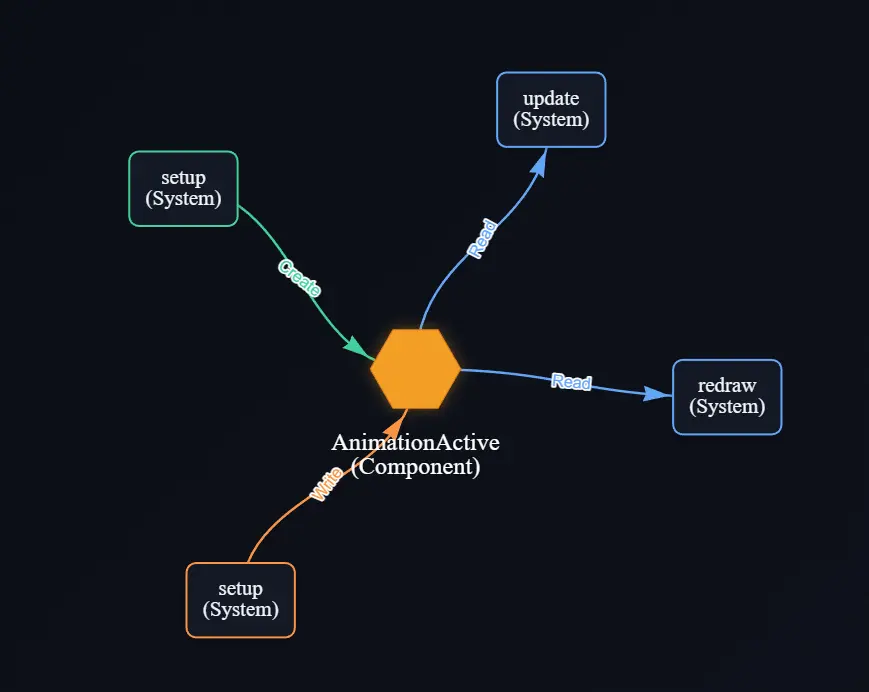
Run Find Bevy References from the editor, Global Registry, or Bevy Semantics view:
- Uses the active Rust language server reference provider when available.
- Falls back to workspace static analysis when language-server results are unavailable.
- Classifies definitions, initialization, creation, reads, writes, sends, and receives.
- Navigates from graph nodes to the corresponding source location.
Requirements
- A Rust workspace using Bevy 0.19 or Bevy subcrates.
- Rust Analyzer is recommended for diagnostics and precise reference-provider results.
Settings
bevyLens.excludePaths: Glob patterns excluded from full and incremental indexing. Defaults to **/target/**, **/.git/**, and **/node_modules/**.bevyLens.enableConflictDiagnostics: Enables heuristic system access-conflict diagnostics. Defaults to false.bevyLens.sortBy: Sorts registry and per-file semantic elements by alphabetical or source position.bevyLens.customRenderGraphSchedules: Additional schedule names that should be classified as render-graph schedules.
Commands
- Refresh Bevy Lens
- Search Bevy Elements...
- Clear Search Filter
- Change Sort Order...
- Open Schedule Visualizer
- Find Bevy References
- Reveal in Bevy Semantic Explorer
Release notes
See CHANGELOG.md for release history. Version 0.2.1 refines the Explorer-hosted semantic view with directory hierarchy, active-file synchronization, and richer hover details.
License
Licensed under the MIT License.
| |

