Mtlx Viewer for MaterialX
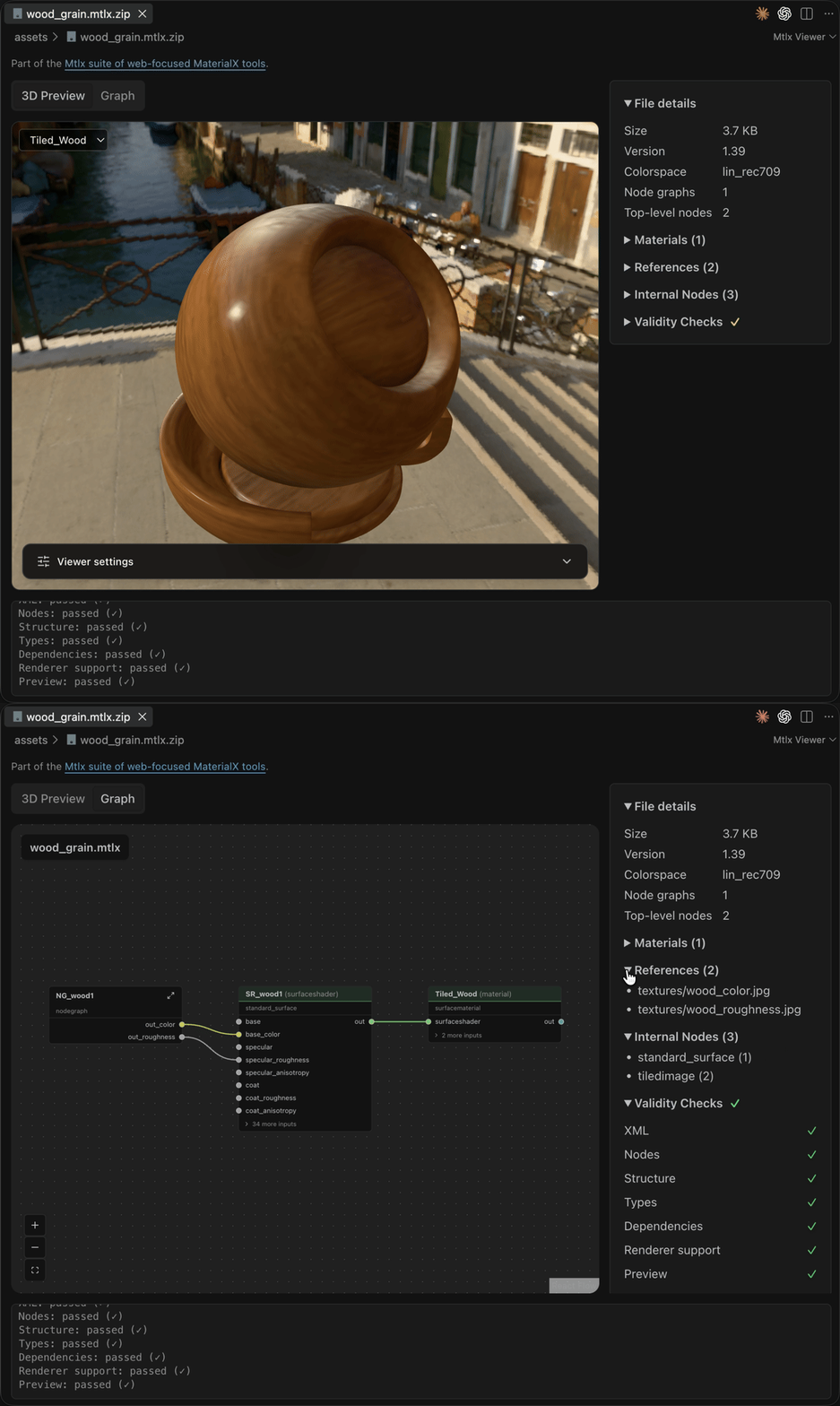
See your MaterialX materials without leaving VS Code. Open any .mtlx or
.mtlx.zip file and get a live, physically based 3D preview, an interactive node graph, and a full
validation report, all in one tab.
Part of the Mtlx suite of web-focused MaterialX tools. Join the
Discord for questions, feedback, and updates.
Features
- Real-time 3D preview. Materials render on a totem, sphere, cube, plane, or your own glTF model,
lit by HDR environments with bloom, ambient occlusion and a choice of tone mappers.
- Node graph view. Switch to the Graph tab to pan, zoom, and click through nodes and nested
node graphs to inspect every parameter.
- Validation at a glance. Structure, types, dependencies, textures and renderer support are
checked as the file opens, including archive contents and included documents.
- Live reload. Save the material or any texture it uses and the preview updates.
- One-click packaging. Right-click files in Explorer to bundle a
.mtlx and its textures into a
portable .mtlx.zip, or unpack one back out.
- Bring your own lighting and models. Add HDR/EXR environments and glTF/GLB geometry from disk
or a URL.
- Bug-report ready. Copy or download diagnostics with validation issues, resource failures and
renderer logs.
Get started
- Install Mtlx Viewer for MaterialX from the
VS Code Marketplace
or Open VSX.
- Open a
.mtlx or .mtlx.zip file. It opens in the viewer automatically.
- Drag to orbit, scroll to zoom, and use Viewer settings to change geometry, lighting, bloom,
AO and tone mapping.
To edit the XML, use Reopen Editor With → Text Editor. Run Open with Mtlx Viewer from the
Command Palette to switch back.
Convert materials
Right-click one or more .mtlx / .mtlx.zip files in Explorer and choose Convert to .mtlx.zip
or Convert to .mtlx. Textures travel with the material, and existing files are never
overwritten: packing wood.mtlx next to an existing wood.mtlx.zip creates wood-2.mtlx.zip.
Settings
Set preview defaults under Settings → Mtlx Viewer, or in settings.json:
{
  "mtlx.preview.ibls": [{ "name": "courtyard", "source": "~/IBLs/courtyard.hdr" }],
  "mtlx.preview.defaultIbl": "courtyard",
  "mtlx.preview.geometries": [{ "name": "bust", "source": "models/bust.glb" }],
  "mtlx.preview.defaultGeometry": "bust",
  "mtlx.preview.toneMapping": "agx"
}
| Setting |
Default |
Values |
mtlx.preview.ibls |
[] |
Extra named .hdr, .exr, .png or .jpg environments (path or URL) |
mtlx.preview.defaultIbl |
"bridge" |
bridge, studio, or one of your environments |
mtlx.preview.geometries |
[] |
Extra named .gltf / .glb models (path or URL) |
mtlx.preview.defaultGeometry |
"totem" |
totem, sphere, cube, plane, or one of your models |
mtlx.preview.autoRotate |
true |
Rotate the model; reduced-motion preferences turn it off |
mtlx.preview.bloom |
true |
HDR bloom |
mtlx.preview.ao |
true |
Ambient occlusion (GTAO) |
mtlx.preview.toneMapping |
"neutral" |
neutral, aces, agx, reinhard, cineon, linear, none |
mtlx.preview.background |
"environment" |
environment shows the IBL behind the model; none is transparent |
Relative paths resolve from the workspace folder. See the
full settings reference for naming rules and limits.
Requirements
Desktop VS Code 1.85+ (or a compatible editor such as Cursor or VSCodium) with GPU acceleration.
Rendering uses three.js's MaterialX support, so a valid document can still use nodes the renderer
cannot display yet. For loose .mtlx files, keep textures at their relative paths; .mtlx.zip is
the most portable format.
Found a material that doesn't render? Open an issue with
the downloaded diagnostics and, if you can, the material.
Author
Ben Houston, sponsored by Land of Assets.

