YAML Path Copy
One keystroke to copy the full dotted key path from any YAML file to your clipboard.






What it does
Place your cursor on any YAML key and press Cmd+Alt+Y (Mac) / Ctrl+Alt+Y (Win/Linux). The full dotted path is copied to clipboard instantly — no config, no setup.
en:
  api:
    problems:
      server_error: 'Oops, something went wrong'  # ← cursor here
Clipboard: en.api.problems.server_error
Demo
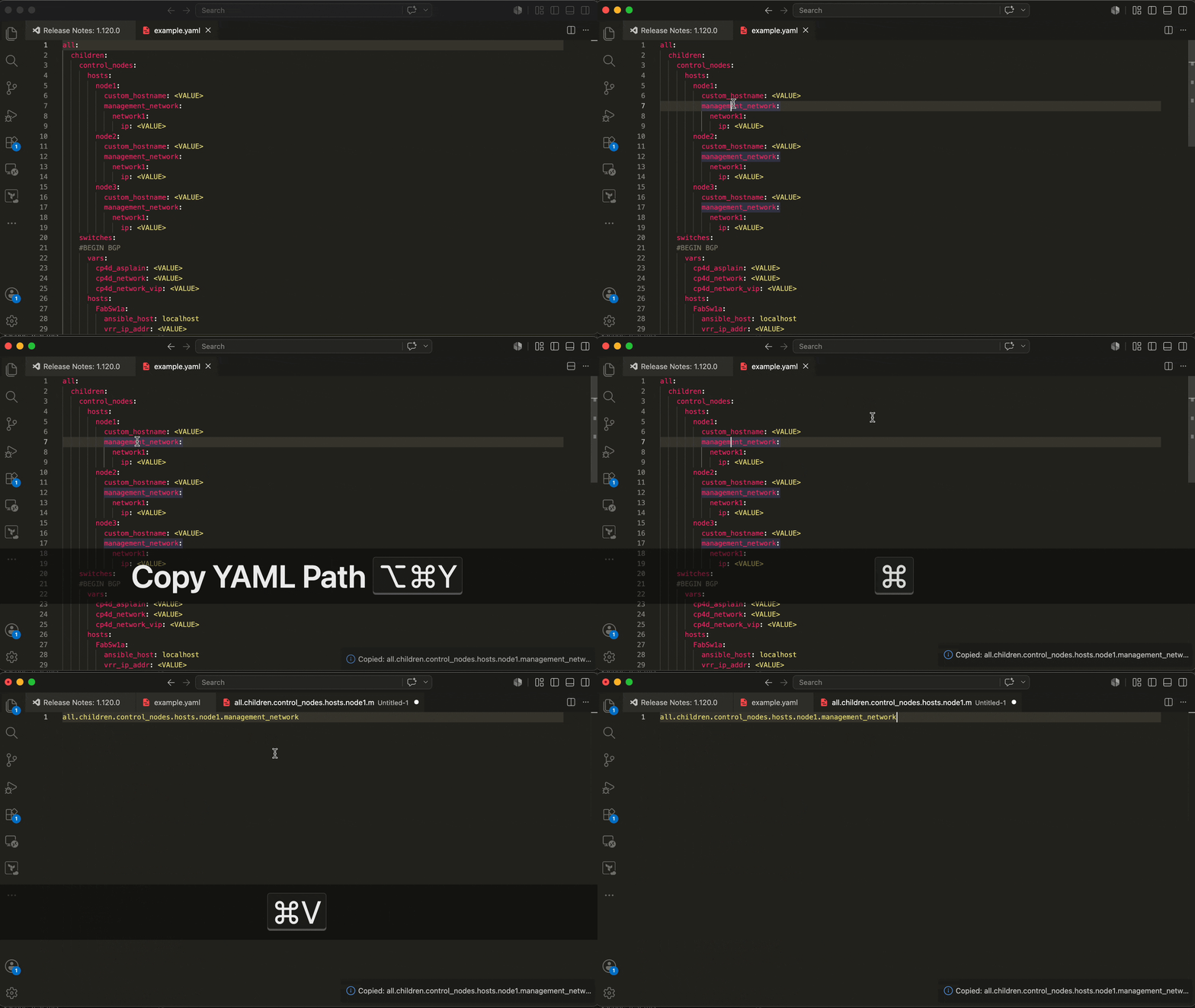
Features
- Instant — resolves full dotted path at any nesting depth
- Three triggers — keybinding, Command Palette, right-click context menu
- Smart — skips blank lines, comments, array items when resolving parents
- Colon-safe — handles values with colons (URLs, timestamps)
- Zero config — works on all
.yml / .yaml files out of the box
- Tiny — 1 KB bundled, activates only when a YAML file is open
Usage
Keybinding
| Platform |
Shortcut |
| macOS |
Cmd + Alt + Y |
| Windows / Linux |
Ctrl + Alt + Y |
Command Palette
Cmd+Shift+P → type Copy YAML Path → Enter
Right-click in any YAML file → Copy YAML Path
Examples
Rails i18n locales
en:
  activerecord:
    errors:
      models:
        user:
          attributes:
            email:
              taken: 'has already been taken'
              # → en.activerecord.errors.models.user.attributes.email.taken
Kubernetes / Docker Compose
services:
  web:
    environment:
      DATABASE_URL: postgres://...  # → services.web.environment.DATABASE_URL
GitHub Actions
jobs:
  build:
    runs-on: ubuntu-latest  # → jobs.build.runs-on
Any nested config
feature_flags:
  payments:
    stripe:
      webhook_secret: sk_live_...  # → feature_flags.payments.stripe.webhook_secret
Configuration
Exclude prefixes
In i18n workflows the locale key is often implicit — your code calls t('base.action'), not t('en.base.action'). Configure yaml-path-copy.excludePrefixes to strip those leading segments automatically.
settings.json:
{
  "yaml-path-copy.excludePrefixes": ["en"]
}
With this set, placing your cursor on server_error below:
en:
  api:
    problems:
      server_error: 'Oops, something went wrong'
…copies api.problems.server_error instead of en.api.problems.server_error.
Multiple prefixes are supported (e.g. ["en", "ar"]). The first matching prefix is stripped.
Rebinding the shortcut
Cmd+K Cmd+S → search yaml-path-copy.copyPath, or add to keybindings.json:
{
  "key": "cmd+shift+c",
  "command": "yaml-path-copy.copyPath",
  "when": "editorLangId == yaml"
}
Requirements
- VS Code
1.63.0 or newer
- No runtime dependencies
Known Limitations
- Flow-style YAML (
{key: value} inline) — path resolves to null
- Multi-document YAML (
--- separator) — each document treated independently
- Anchors / aliases (
&anchor, *alias) — alias key name copied, not anchor's path
Release Notes
See full CHANGELOG.
0.3.0
excludePrefixes setting for stripping locale/namespace prefixes before copying
0.2.1
- CI fixes: Node.js 24, publish from vsix, GitHub release permissions
- Version bump automation with CHANGELOG guard
0.2.0
- Initial stable marketplace release
Contributing
git clone https://github.com/ldrner/yaml-path-copy
npm install
npm run watch      # rebuild on save
# Press F5 in VS Code → Extension Development Host opens
npm run test:unit  # unit tests
npm run lint       # ESLint
Open an issue before large changes.
License
MIT © Ilia Kriachkov

