VSCode Omni Viewer
A comprehensive audio, image, PSD, video, CSV, DBC, ARXML, A2L, ASC, BLF, MF4, Avro, ROS bag, PCAP, PCAPNG, STEP, DB3, ReqIF, Excel, Word, PowerPoint, PDF, Parquet, HDF5, JSONL, Mermaid, PlantUML, and HWP viewer extension for VSCode and Cursor.

🎵 Audio Viewer Features
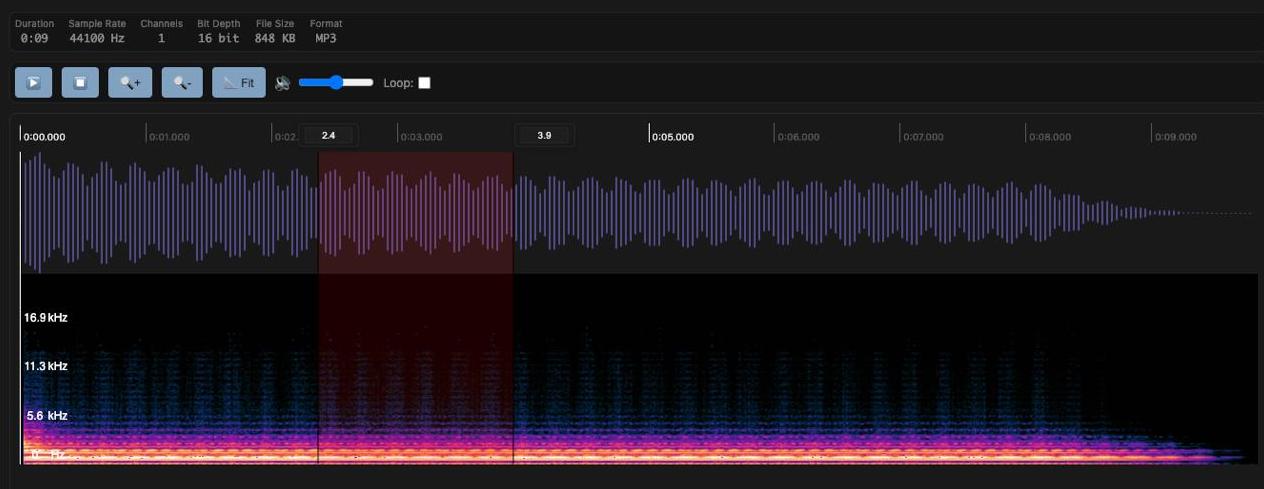
Advanced Audio Player with WaveSurfer.js
- Waveform Visualization: Real-time audio waveform display
- Spectrogram: Frequency analysis with spectrogram view
- Region Selection: Set start/end times for specific regions
- Loop Playback: Repeat playback of selected regions
- Volume Control: Real-time volume adjustment
- Playback Speed: Multiple playback speed options
- Audio Information: Duration, sample rate, channels, bit depth, file size, format display
- MP3, WAV, PCM (raw s16le mono 16kHz), AIFF/AIF/AIFC, AMR/AWB, OGG, FLAC, AC3, AAC, M4A
Note: playback still depends on the VS Code webview browser engine supporting the underlying codec.
🖼️ Image Viewer Features
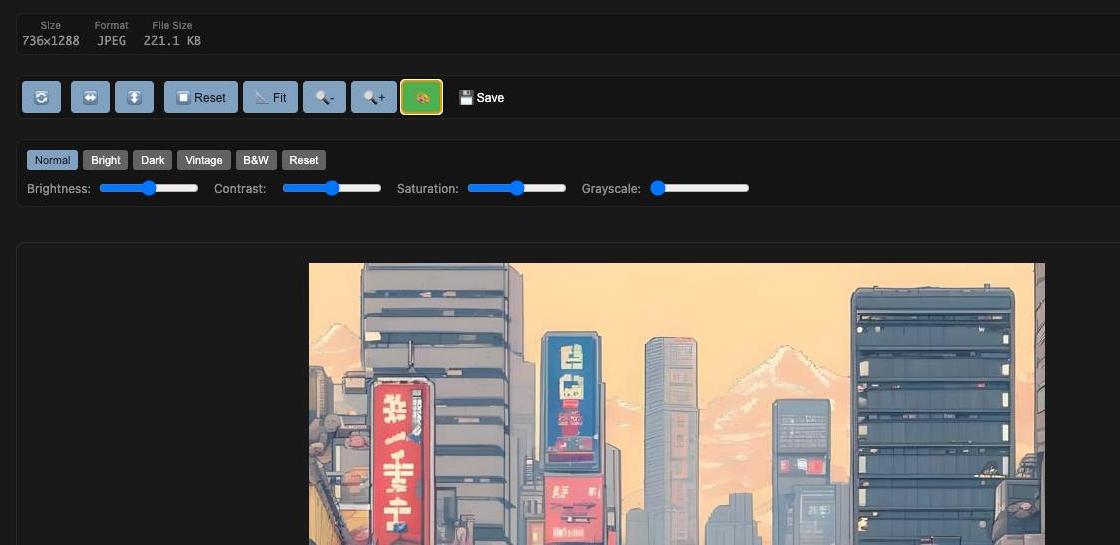
Advanced Image Viewer
- Zoom Controls: 10% ~ 500% zoom in/out
- Rotation: 90-degree left/right rotation
- Flip: Horizontal/vertical flip
- Fit to Screen: Automatic screen size fitting
- Image Filters: Brightness, contrast, saturation, grayscale adjustments
- Filter Presets: Normal, Bright, Dark, Vintage, B&W presets
- Save Functionality: Save filtered images to workspace
- Keyboard Shortcuts: Quick operation shortcuts
- Image Information: Resolution, format, and file size information display
- JPG, JPEG, PNG, GIF, BMP, WebP, SVG
🖼️ PSD Viewer Features
Adobe Photoshop (PSD) Viewer
- Layer Panel: Tree view of layers and groups (folders) with indent by depth
- Per-Layer Visibility: Eye button to show/hide each layer independently
- View Button: Open a single layer in a modal for closer inspection
- Composite vs Layer-by-Layer: When all layers are visible, the full composite is shown; when any layer is hidden, the canvas is redrawn from visible layers only (leaf layers; group merged canvases are skipped to keep visibility correct)
- Transparency: Checkerboard background for transparent areas
- File Information: File name, file size, and document dimensions (width × height px)
- Powered by: ag-psd for PSD parsing and canvas output
- PSD (Adobe Photoshop Document)
🎬 Video Viewer Features
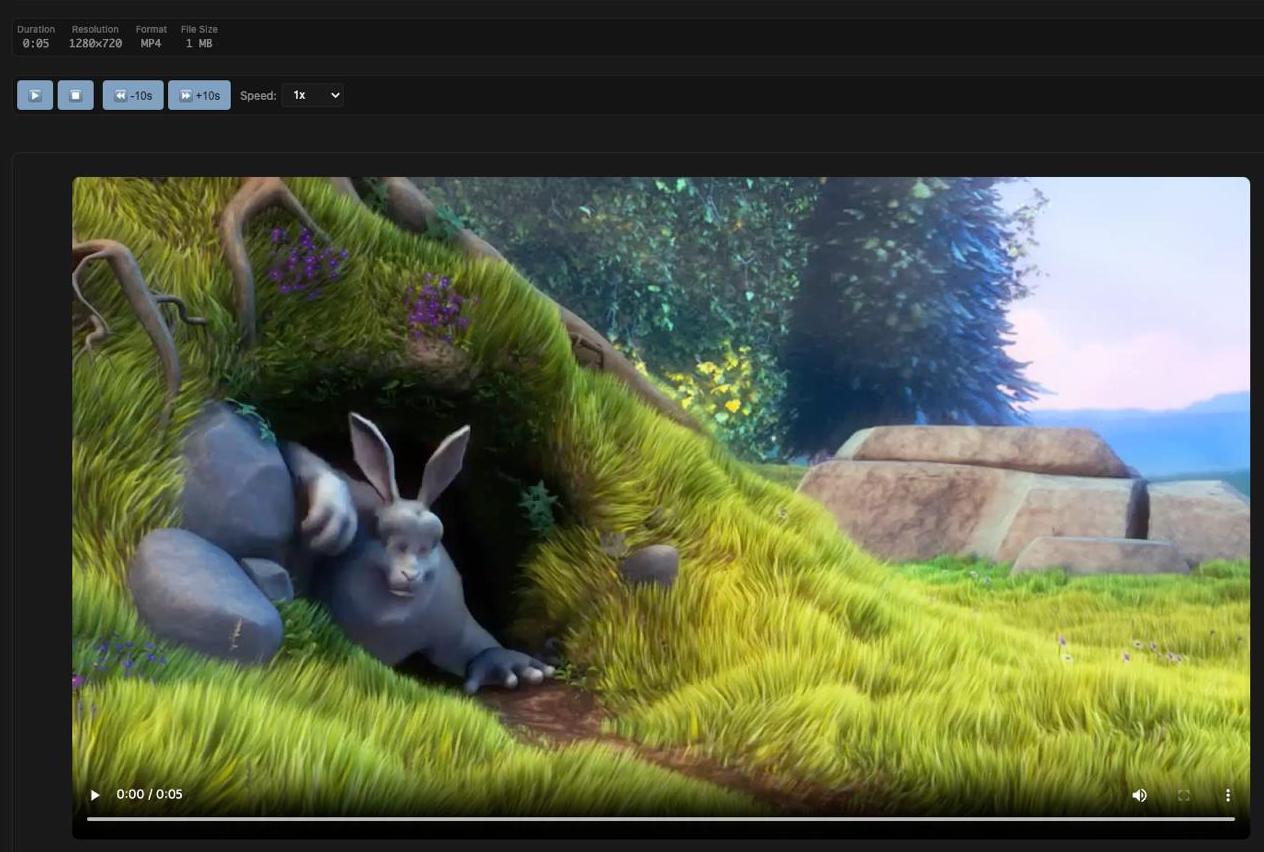
Advanced Video Player
- Playback Controls: Play/pause/stop
- Loop Regions: Set start/end times and loop playback
- Playback Speed: 0.25x ~ 4x playback speed control
- Skip Controls: 10-second forward/backward skip
- Volume Control: Real-time volume adjustment
- Keyboard Shortcuts: Spacebar, arrow keys, etc.
- Video Information: Resolution, duration, and file size display
- MP4, MPEG-TS (TS/MTS/M2TS), AVI, MOV, WMV, FLV, WebM, MKV
Note: .ts files share an extension with TypeScript source files, so automatic viewer association may require using Open With instead of a default file binding.
📊 CSV Viewer Features
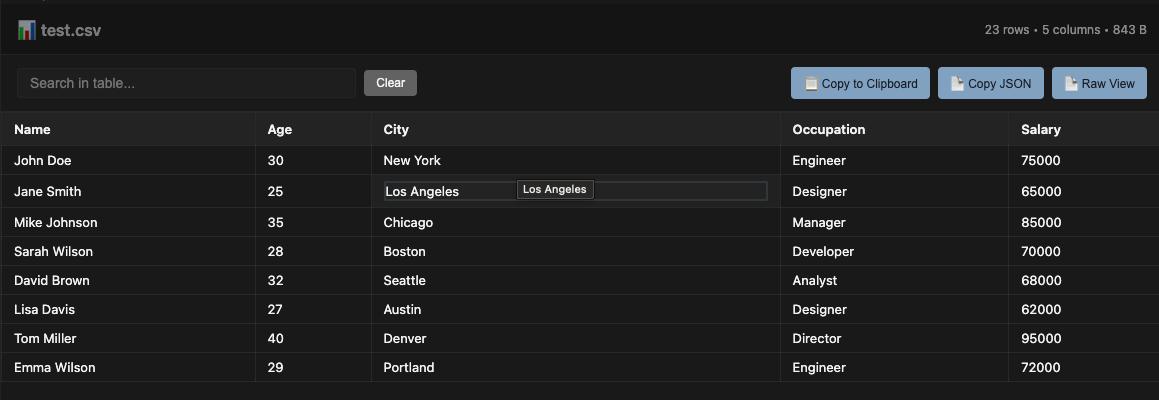
Advanced CSV Viewer
- Table Display: Clean, sortable table view of CSV data
- Search & Filter: Real-time search across all columns
- Column Sorting: Click headers to sort by any column (numeric/text aware)
- Pagination: Handle large datasets with page navigation
- Copy to Clipboard: Copy filtered data to clipboard (tab-separated format)
- Statistics View: Display detailed file and data statistics
- Keyboard Shortcuts: Ctrl+F for search, Ctrl+C for copy
- File Information: Row count, column count, and file size display
- Responsive Design: Works on different screen sizes
- Delimiter Detection: Automatically detects comma, semicolon, tab, and pipe-delimited text formats
- CSV (Comma-Separated Values)
- TSV (Tab-Separated Values)
🚗 DBC Viewer Features
CAN Database Explorer
- Message Overview: Browse CAN messages with ID, hexadecimal ID, DLC, transmitter, and signal count
- Signal Table: Inspect start bit, bit length, byte order, signedness, scale, offset, range, unit, and receivers
- Search & Filter: Search across messages/signals/comments and filter by CAN node
- Comments & Value Tables: Shows
CM_ comments and VAL_ enumerations when present
- Raw Source View: Keep the original DBC text available beside the structured view
🚘 Data Explorer Viewer Features
ARXML, A2L, ASC, BLF, MF4, Avro, BAG, PCAP, PCAPNG, STEP, DB3, and ReqIF Explorer
- ARXML Structure View: Summarizes AUTOSAR packages, named CAN-related elements, and references
- A2L Block View: Lists ASAP2 blocks and counts key sections such as
MEASUREMENT, CHARACTERISTIC, and IF_DATA
- ASC Log Preview: Parses Vector ASCII CAN/CAN FD events into a searchable table
- BLF Header Preview: Detects Vector BLF
LOGG files and shows binary header/hex preview
- MF4 Header Preview: Detects ASAM MDF 4 files and summarizes known MDF block markers
- Avro Metadata Preview: Reads Avro object container metadata, codec, schema preview, and header bytes
- ROS Bag Preview: Detects ROS bag v2 files and summarizes record operation hints with a binary preview
- PCAP Preview: Detects classic PCAP files and summarizes global headers, link type, timestamp resolution, and packet records
- PCAPNG Preview: Detects PCAPNG section headers and summarizes sections, interfaces, packet blocks, and block sizes
- STEP Model Summary: Extracts ISO 10303 header fields and top entity counts from
.stp/.step CAD exchange files
- DB3 SQLite Preview: Detects SQLite 3 databases, reads
sqlite_master, lists schema entries, and previews rows from table b-tree pages
- ReqIF Summary: Extracts ReqIF header metadata, specifications, spec objects, relations, datatypes, and spec types
- Search & Raw Preview: Search across extracted tables and inspect the original text preview for text-based formats
- ARXML (AUTOSAR XML)
- A2L (ASAM MCD-2 MC / ASAP2)
- ASC (Vector ASCII CAN log)
- BLF (Vector Binary Logging Format header preview)
- MF4 (ASAM MDF 4 header and block marker preview)
- AVRO (Apache Avro object container metadata preview)
- BAG (ROS bag v2 header and record hint preview)
- PCAP (classic packet capture global header and packet record preview)
- PCAPNG (packet capture next-generation section and block preview)
- STP/STEP (ISO 10303 STEP model summary)
- DB3 (SQLite 3 database schema and row preview)
- REQIF (Requirements Interchange Format summary)
📊 Excel Viewer Features
Advanced Excel Viewer
- Multi-Sheet Support: Switch between sheets via dropdown
- Table Display: Clean table view of sheet data
- Search & Filter: Real-time search across all columns
- Pagination: Handle large datasets with page navigation
- Copy to Clipboard: Copy filtered data (tab-separated)
- Copy as JSON: Export current sheet data as JSON
- Raw View: Toggle between table and raw JSON view
- File Information: Sheet name, row count, column count, file size
- Keyboard Shortcuts: Ctrl+F search, Ctrl+C copy
- XLSX (Excel Workbook)
- XLS (Excel 97-2003)
📄 Word Viewer Features
Microsoft Word (DOCX) Viewer
- Document View: Renders
.docx with docx-preview for improved layout fidelity
- DOC Support: Opens
.doc via standalone legacy HTML fallback, with LibreOffice conversion fallback only when needed
- Native Legacy Rendering: Preserves more
.doc paragraph styling, table structure, and readable legacy text decoding
- Embedded Workbook Preview: Shows extracted worksheet tables and simple SVG chart previews when legacy
.doc files contain embedded workbook data
- Zoom Controls: Zoom in/out and reset (Ctrl+/-, Ctrl+0)
- Print: Print document (Ctrl+P)
- File Information: File name and file size
- Powered by: docx-preview for DOCX rendering
- DOCX (Microsoft Word Document)
- DOC (Microsoft Word 97-2003)
📽️ PowerPoint Viewer Features
Microsoft PowerPoint (PPTX/PPT) Viewer
- Slide View: Reads
.pptx and legacy .ppt files and renders slide content in order
- Title + Bullet Extraction: Displays slide title and bullet text content
- Legacy PPT Layout Recovery: Preserves more title/body/subtitle placement, slide sizing, and discovered shape/image positioning for
.ppt
- Packaged PDF.js Rendering: Uses bundled
pdf.js assets for environments where external CDN access is blocked
- Slide Jump: Jump to any slide from a dropdown
- Zoom Controls: Zoom in/out and reset (Ctrl+/-, Ctrl+0)
- File Information: File name, file size, and slide count
- Powered by: JSZip for PPTX archive parsing
- PPT (Microsoft PowerPoint 97-2003)
- PPTX (Microsoft PowerPoint Presentation)
📑 PDF Editor Features
PDF View & Edit
- Page View: Page-by-page rendering with thumbnail sidebar
- Zoom Controls: Zoom in/out and reset
- Annotations: Add text/signature, select, move, and delete annotations
- Password-Protected PDFs: Open encrypted PDFs with an in-viewer password prompt
- Text Size Control: Choose annotation font size when inserting text
- Page Editing: Reorder pages (drag & drop) and delete pages
- Merge PDF: Merge another PDF into the current document
- Save Flows: Save and Save As with state synchronization after save
🇰🇷 HWP Viewer Features
Hangul Word Processor (HWP) Viewer
- Document View: Opens
.hwp and .hwpx files directly inside Omni Viewer
- Integrated Routing: Works with the same signature-based viewer detection flow used across the extension
- Powered by: rhwp (
@rhwp/core) for upstream parsing and rendering
- Upstream-Friendly Integration: Runtime assets are synced from
node_modules/@rhwp/core via npm run sync:rhwp, so future rhwp updates can be adopted without forking its renderer
🧩 PlantUML Viewer Features
Browser-Based PlantUML Preview
- Serverless Rendering: Renders PlantUML diagrams in the VS Code webview without a PlantUML server
- Diagram / Split / Source Views: Switch between rendered preview, side-by-side source, and read-only source
- Zoom Controls: Zoom in/out and reset
- Light / Dark Render Modes: Toggle PlantUML output mode
- Copy Source: Copy the original diagram text to clipboard
- File Information: File name, file size, and line count
- Powered by: puml-canvas-js for native JavaScript SVG rendering
📄 JSONL Viewer Features
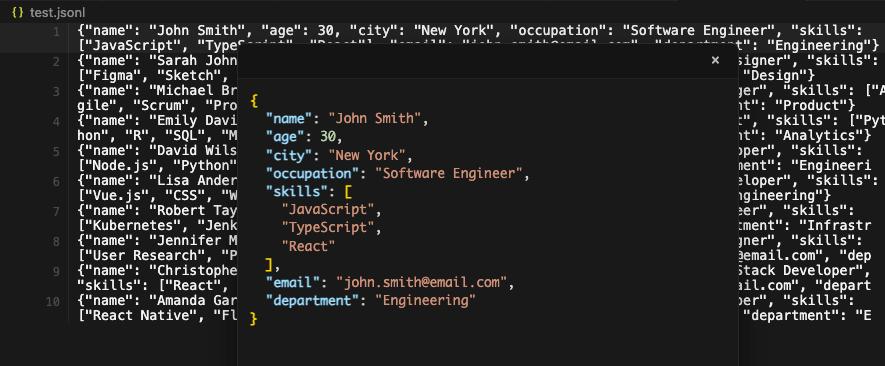
Interactive JSONL Editor
- Line-by-Line Editing: Direct inline editing of JSON lines with syntax validation
- Hover Popup: JSON popup display on line hover with formatted syntax highlighting
- Click-to-Edit Popup: Click popup content to edit JSON directly in formatted view
- Real-time Validation: Instant JSON validation with visual feedback (valid/invalid indicators)
- Data Synchronization: Seamless sync between popup edits and original lines
- Syntax Highlighting: Color-coded JSON syntax for better readability
- Error Handling: Clear error messages for invalid JSON format
- JSONL (JSON Lines) - Each line contains a valid JSON object
📊 Parquet Viewer Features

Advanced Parquet Viewer
- Table Display: Clean, table view of Parquet data
- Search & Filter: Real-time search across all columns
- Column Sorting: Click headers to sort by any column (numeric/text aware)
- Pagination: Handle large datasets with page navigation
- Copy to Clipboard: Copy filtered data to clipboard (tab-separated format)
- Keyboard Shortcuts: Ctrl+F for search, Ctrl+C for copy
- File Information: Row count, column count, and file size display
- Responsive Design: Works on different screen sizes
🧬 HDF5 Viewer Features
- Structure Tree: Walks the file hierarchy and lists every group and dataset path
- Dataset Details: Shows each dataset's shape (dimensions) and datatype (e.g. Float64, Integer32)
- Superblock Summary: Reports superblock version, offset/length sizes, and root group address
- Format Coverage: Reads superblock versions 0–3, including classic symbol-table groups and version-2 object headers with compact links
- Header Preview: Hex/ASCII dump of the file header for inspection
🧭 Smart File Detection
- Signature-Based Routing: Detects common file signatures before opening and can reroute mislabeled files to the matching Omni Viewer
- Broader Format Sniffing: Recognizes common PDF, image, audio, video, Parquet, Office, CSV-style, and JSONL content beyond filename extensions
🚀 Installation and Usage
Install from Marketplace
Marketplaces:
If you are using jetbrains ide, check out this repository
Omni Viewer is also available on web and mobile platforms:
Development Setup
Install Dependencies
npm install
Compile TypeScript
npm run compile
Package Extension
npm run vscode:prepublish
Privacy & Data Use (Planned Share Feature)
Omni Viewer does not currently enable this share upload flow in the released extension.
The following policy describes the planned behavior for a future share feature release.
Open VSX listing privacy details: open-vsx-listing-privacy.md
- What data will be uploaded
- The file selected by the user for sharing (single file)
- File metadata such as filename, content type, file size, file type, and optional viewer metadata (for example selected region/range)
- Request source platform (for example
vscode)
- Purpose
- Create a temporary share link and allow limited-time download/view access
- Planned storage location
- Temporary server-side processing
- Cloud storage for shared files
- Database storage for share metadata
- Planned retention / expiration
- Default share link lifetime: 5 minutes
- After expiration, share access will be denied (
410)
- Expired objects/metadata may be removed by backend lifecycle jobs
- Planned access model
- Upload endpoint will require authenticated client request (API key-based)
- Download endpoint will be link-based with non-guessable share IDs
- Optional maximum access-count policy may be applied per share
Privacy Policy: https://omni-viewer-web.web.app/privacy
📝 License
MIT License
📞 Support
If you encounter any issues or have feature requests, please contact us through GitHub Issues.
Known Issues
- Large file handling optimization needed
File Size Limitations
Parquet File Specific Limitations
- File Size Restrictions:
- Files ≥ 150MB: Cannot be opened. Clear error message will be displayed.
- Files 50MB - 150MB: Only the first 10,000 rows are displayed with a warning message showing total row count.
- Files < 50MB: All rows are displayed without any limitations.
- Row Limit: For files between 50MB and 150MB, only the first 10,000 rows are loaded for display to prevent memory issues
- Memory Considerations:
- Parquet files are converted to JSON format for display, which can significantly increase memory usage
- Large files may take time to load initially
- For best performance, keep files under 50MB for full data access
General Notes
- Large files may take time to load initially
- Memory usage scales with file size
- For best performance, keep files under recommended sizes
| |



