Nix Inline Code Highlighting
Highlights embedded languages inside Nix strings using a comment marker — analogous to @injection.language from nvim-treesitter, but for VSCode
Works alongside jnoortheen.nix-ide
Example
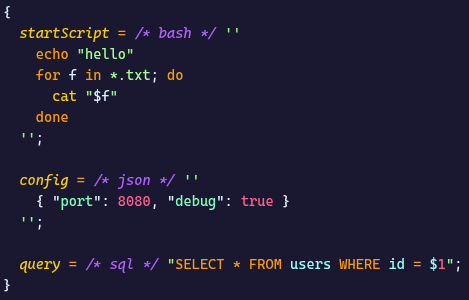
The /* lang */ marker goes immediately before the opening '' or ". Highlighting applies to both multi-line (''...'') and single-line ("...") Nix strings
Automatic triggers
Some strings highlight with no marker:
From nvim-treesitter queries
Mirrors the nvim-treesitter injection queries:
- attributes
pre*/post*/*Phase/script → shell
writeShellScript*/writeBash*/writeDash* → shell, writeFish* → fish, writeHaskell* → haskell, writeJS* → javascript, writePerl* → perl, writePy* → python, writeRust* → rust (the "name" argument must precede the string, an optional flat { } argument may sit in between, as in pkgs.writers)builtins.match "pat" str and any function whose name ends in match → regex for the first argumentnixosTest/runTest with a testScript attribute → python, writeShellApplication with a text attribute → shell- a
config attribute placed after type = "lua" in the same attribute set → lua (home-manager Neovim plugins)
Custom extensions
- shell configs and hooks:
*Extra (initExtra, envExtra, profileExtra), *ShellInit (interactiveShellInit, loginShellInit), *Commands? (buildCommand, resumeCommands, extraInstallCommands), *Hook (Disko), *Scripts? (darkman) → shell (multiline only)
overrideAttrs concatenations: (previousAttrs.postPatch or "") + '' → shellrunCommand* → shell (runCommand, runCommandLocal, runCommandCC with "name" and optional flat { })
The one-line triggers above need the opening quote on the same line as the trigger. Strings after a multi-line attribute set still need the comment marker.
Supported languages
bash/sh/shell/shellscript, python/py, javascript/js, typescript/ts, json, yaml/yml, toml, html, css, scss/sass, lua, ruby/rb, go/golang, rust/rs, cpp/c++/cxx, c, java, kotlin/kt, sql/postgresql/mysql, xml, markdown/md, dockerfile, nix, haskell/hs, php, perl/pl, powershell/ps1/pwsh, fish, zsh, regex/regexp, diff/patch, makefile/make, ini/conf/cfg, kdl
For highlighting to work, the corresponding language must be known to VSCode — usually either built-in or installed via a third-party extension (e.g. kdl-org.kdl for KDL)
Installation
- Marketplace:
ext install barsikus007.nix-injection
- Open VSX (VSCodium / Cursor / Code-OSS): search for
nix-injection in Extensions
- From .vsix: download the release from GitHub and
code --install-extension nix-injection-<version>.vsix
Development
bun install
bun run generate  # regenerate syntaxes/nix-inline-injection.tmLanguage.json from scripts/generate.js
bun run test      # tokenize test.nix via vscode-textmate

code --install-extension $(nix build .#vsix --no-link --print-out-paths)/*.vsix
To add a new language — one entry in languages.json (single source of truth for the generator and the nix flake), then bun run generate. Issues or PRs are welcomed!

