Claude Usage Status Bar


Your Claude Code rate limits, always visible, without leaving the editor.

The Claude Code extension's chat panel does not render the statusLine setting. If you
configured a status line for the terminal, it is simply invisible in the panel — there is
no rendering code for it there at all. This extension closes that gap using VS Code's own
status bar, so you can see how much headroom you have while you work.
✨ Features
📊 Status bar — always visible
Both rate-limit windows. The parenthesised figure is how long until the 5-hour window
resets; it counts down every minute, while Anthropic is asked for new numbers every five.
| Situation |
What you see |
| Normal |
✻ 5h 12% (4h51m) · 7d 36% |
| Approaching the limit (≥ 80%) |
Same text on an amber background |
| At the limit (≥ 95%) |
Same text on a red background |
| Starting up |
✻ … |
| No 7-day figure reported |
✻ 5h 12% (4h51m) |
| A refresh failed, earlier numbers known |
Last known numbers stay; the tooltip explains |
| Rate limited by Anthropic |
Last known numbers stay; the tooltip says when it will retry |
| A refresh failed, nothing known yet |
✻ ⚠ |
| No Claude Code login on this machine |
✻ ⚠ not signed in, with instructions in the tooltip |
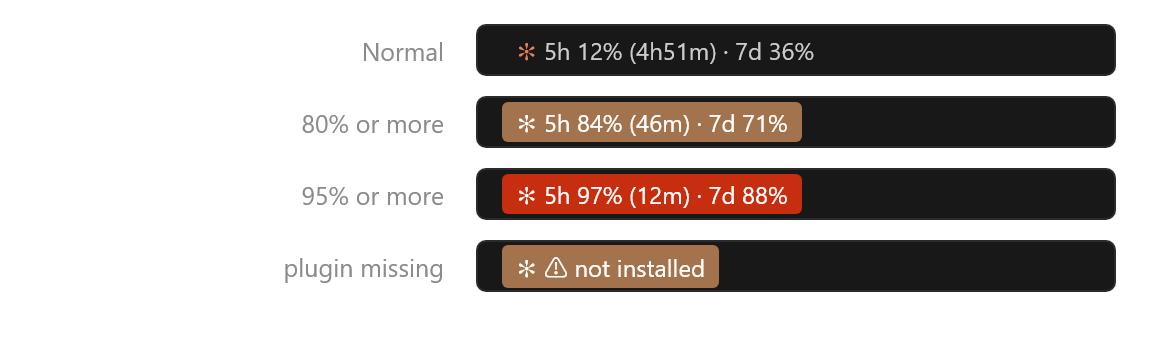
Severity follows whichever window is higher, so a quiet 5-hour window will not hide a
nearly-exhausted 7-day one.
🔍 Details on hover
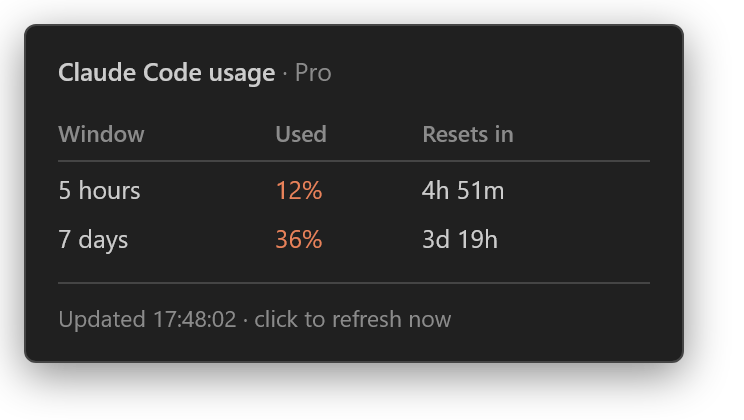
Your plan appears next to the title. It is detected from your local Claude Code account
files; if that fails you are asked once and the answer is remembered.
🖱 Click to refresh
No waiting for the next poll. Clicking reuses an in-flight request rather than starting a
second one, and asks Anthropic at most once a minute, so impatient clicking cannot get you
rate-limited.
🛟 Calm under failure
When a refresh fails, the last known numbers stay on screen instead of blanking out,
and the severity colour is not escalated. A brief network blip should not make the
status bar flicker or cry wolf. The failure is reported in the tooltip along with the time
of the last successful update, so you can still tell when the numbers went stale.
📋 Requirements
|
|
| VS Code |
1.94.0 or newer |
| Claude Code |
Signed in with a Pro or Max subscription |
Nothing else — no plugin, no CLI tool, no runtime dependencies. The extension reuses the
login Claude Code already stores, so if you use Claude Code on this machine, it works as
soon as it is installed.
Without a login, the status bar says ✻ ⚠ not signed in and the tooltip tells you how to
sign in — it fails visibly rather than silently.
📦 Installation
From the Marketplace — search for Claude Usage Status Bar in the Extensions view, or:
code --install-extension barahana10.claude-code-usage-statusbar
From a VSIX — download a release and:
code --install-extension claude-code-usage-statusbar-0.2.0.vsix
From source:
git clone https://github.com/barahana25/Claude-Usage-Statusbar
cd Claude-Usage-Statusbar
npm install && npm test
npx vsce package
🖱 Usage
| Action |
Result |
| Hover the status bar item |
Both windows, reset times, your plan, last update |
| Click the status bar item |
Refresh immediately |
| Claude Usage: Refresh in the Command Palette |
The same refresh, without aiming at the bar |
⚙️ Configuration
| Setting |
Type |
Default |
Description |
claudeUsageStatusBar.refreshSeconds |
number |
300 |
How often to ask Anthropic for new numbers, in seconds. Minimum 60. |
claudeUsageStatusBar.plan |
auto | pro | max |
auto |
Which Claude subscription you have. |
{
  // Anthropic's usage endpoint rate-limits aggressively, and polling every
  // 30-60 seconds is known to trip it. 60 is the enforced minimum.
  "claudeUsageStatusBar.refreshSeconds": 600,

  // "auto" reads your local Claude Code account files and asks once if it
  // cannot tell. The plan only labels the tooltip — it never changes which
  // limits are displayed.
  "claudeUsageStatusBar.plan": "auto"
}
🔍 How it works
every 60s ──▶ read Claude Code's login (keychain on macOS, .credentials.json elsewhere)
                        │
                        ▼
              shared cache fresh? ──yes──▶ use it
                        │ no
                        ▼
              GET api.anthropic.com/api/oauth/usage
                        │
                        ▼
              save to shared cache → fold into view state → render
The login is read on every tick rather than cached at startup, because Claude Code
rotates the token when it renews the login; the next tick simply picks up the new one.
Every open window shares one cache, so three windows make one request between them,
not three. The endpoint answers 429s with retry-after: 0, which is no help, so on a 429
the extension works out its own wait — 2 minutes, doubling up to 30 — and records it in
the shared cache so every window honours it. Meanwhile the last known numbers stay on
screen, including across a window reload.
Every failure mode — a missing login, an expired token, a network error, a timeout, an HTTP
error, an unexpected body — is normalized into one result type, so rendering the status bar
can never be interrupted by an exception. The in-flight request is cancelled when the
extension shuts down.
🔒 Privacy
- The extension makes one kind of network request:
GET https://api.anthropic.com/api/oauth/usage, authenticated with the OAuth token Claude
Code already stores. It talks to nothing else.
- The token is read, sent to Anthropic, and never written anywhere. The shared cache (in
VS Code's storage for this extension) holds only the usage numbers and a truncated SHA-256
hash of the token, used to notice when you sign in as someone else.
- It never renews or modifies your login. When the token expires, it waits for Claude Code
to renew it.
- It reads your Claude Code config files only to determine your plan, and only the fields
that name it.
❓ Known limitations
Context-window usage for the current session (42K/200K) is not shown. Those numbers
reach the terminal status line through a payload that Claude Code hands it on stdin, and
nothing outside the CLI can tell which session a given editor window belongs to. Guessing
would produce a number that looks authoritative and is quietly wrong, so it is left out.
Anthropic's usage endpoint rate-limits aggressively, and once a token is limited it can
stay that way for half an hour or more. Other tools that poll the same endpoint with your
login (a status line plugin, say) count against the same limit. The extension backs off
and keeps the last numbers on screen, but it cannot make the endpoint answer sooner.
An expired login is not renewed. Claude Code renews its token whenever you use it; if
you have not used it for a while, the tooltip says the login expired until you next do.
🛠 Development
npm install
npm test        # compiles, then runs the suite
npx vsce package
Zero runtime dependencies — Node built-ins and the vscode API only. Seven of the eight
source modules never import vscode, which is why almost all of the logic is covered by
fast Node tests with no VS Code harness.
📄 License
MIT © barahana25
An unofficial, community-built extension. Not affiliated with, endorsed by, or supported by
Anthropic.

