Cdoing Agent — AI Coding Assistant for VS Code
Open-source, multi-provider AI coding assistant that lives right inside VS Code. Chat with AI, edit code inline, get autocomplete suggestions, and run 20+ tools — all without leaving your editor.
Use your own API key with Anthropic (Claude), OpenAI (GPT), Google (Gemini), Ollama, or any OpenAI-compatible provider.
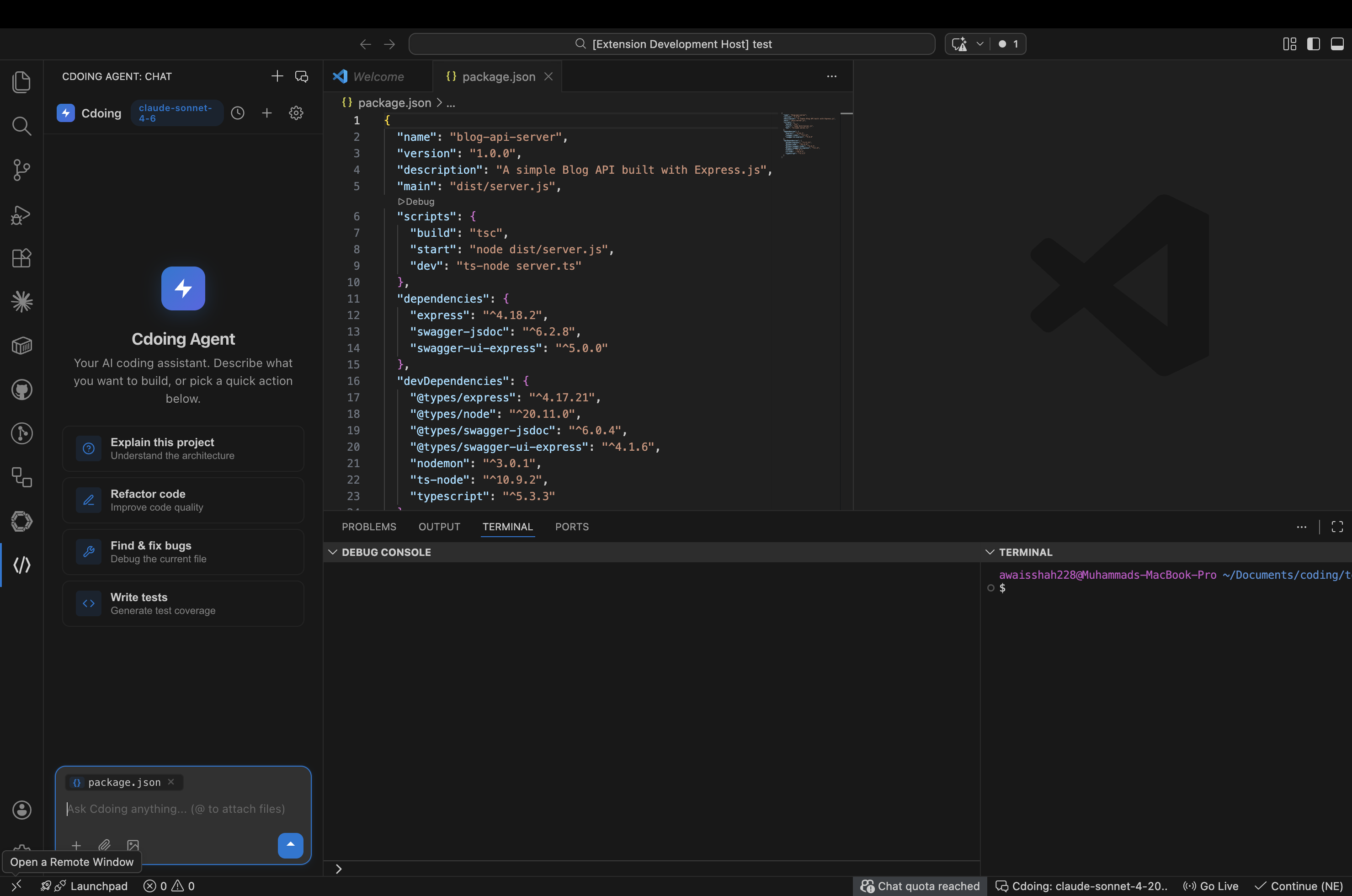
Features
Chat Panel
- Sidebar chat or editor panel (beside your code)
- Real-time streaming responses
- Multi-tab conversations with independent state
- Conversation history — resume past chats
- Markdown rendering with syntax-highlighted code blocks
- Copy button on code blocks
- Clickable file paths in responses
Inline Edit (Cmd+I)
- Select code, press
Cmd+I / Ctrl+I, type your instruction
- See inline diff preview before accepting changes
- Works without opening the chat panel
Inline Autocomplete
- Ghost text suggestions as you type
- Tab to accept, Esc to dismiss
- Configurable model (use a faster model for autocomplete)
Code Actions
- Right-click any selected code for quick actions:
- Explain — get a detailed explanation
- Refactor — improve code structure
- Fix — find and fix issues
- Add to Chat — send code as context
- Send to Chat — ask about selected code
The AI agent can autonomously:
- Read, write, and edit files with multi-strategy matching
- Search your codebase (glob patterns, regex, FTS5 indexed search)
- Run shell commands (with background mode for servers)
- Fetch web pages and search the web
- Spawn sub-agents for parallel tasks
- Track tasks with built-in todo system
Context Providers
Attach rich context using @ mentions in chat:
| Trigger |
Description |
@file <path> |
Include a specific file |
@codebase <query> |
Search your entire codebase |
@terminal |
Last terminal output |
@tree |
Workspace file tree |
@url <url> |
Fetch a web page |
@git |
Branch, status, commits |
@diff |
Current working changes |
@open |
All open editor files |
@problems |
Current file diagnostics |
@clipboard |
Clipboard contents |
Permission System
Control what the AI can do:
- Ask — prompts before every tool that requires permission
- Auto-Edit — auto-approves file edits, asks for shell commands
- Auto — auto-approves everything (for trusted environments)
Multi-Provider Support
| Provider |
Models |
Auth |
| Anthropic (default) |
Claude Sonnet 4.6, Opus 4.6, Haiku 4.5 |
API key or OAuth |
| OpenAI |
GPT-4o, GPT-4o mini, o3-mini |
API key |
| Google |
Gemini 2.0 Flash, 1.5 Pro, 1.5 Flash |
API key |
| Ollama |
LLaMA, Mistral, CodeLlama |
Not required |
| Custom |
Any OpenAI-compatible API |
Configurable |
Getting Started
1. Install the extension
Search for "Cdoing Agent" in the VS Code Extensions panel, or install from the Marketplace.
2. Set your API key
Open VS Code Settings → search "Cdoing" → enter your API key. Or set an environment variable:
# Anthropic
export ANTHROPIC_API_KEY=sk-ant-...

# OpenAI
export OPENAI_API_KEY=sk-...

# Google
export GOOGLE_API_KEY=AI...
3. Start chatting
Click the Cdoing icon in the Activity Bar (left sidebar) and start typing.
Keyboard Shortcuts
| Shortcut |
Action |
Cmd+Shift+L |
Open chat as editor panel (beside code) |
Cmd+I / Ctrl+I |
Inline edit selected code |
Cmd+Shift+Enter |
Send selected code to chat |
Settings
| Setting |
Default |
Description |
cdoing.provider |
anthropic |
AI provider |
cdoing.model |
(auto) |
Model name (empty = provider default) |
cdoing.apiKey |
(empty) |
API key (overrides env var) |
cdoing.authMethod |
apiKey |
Auth method: apiKey or oauth |
cdoing.customBaseURL |
(empty) |
Base URL for custom providers |
cdoing.temperature |
0 |
Model temperature (0 = deterministic) |
cdoing.maxTokens |
8096 |
Max tokens in response |
cdoing.permissionMode |
ask |
Permission mode: ask, auto-edit, auto |
Using Ollama or Local Models
- Set
cdoing.provider to custom
- Set
cdoing.customBaseURL to http://localhost:11434/v1
- Set
cdoing.model to llama3 (or your model)
- Leave
cdoing.apiKey empty
Slash Commands
| Command |
Description |
/help |
Show available commands |
/clear |
Clear conversation |
/new |
Start a new conversation |
/compact |
Compress context |
/plan |
Enter planning mode (read-only) |
/history |
Browse past conversations |
/effort |
Set response depth |
Open Source
Cdoing Agent is fully open source. The extension is part of the cdoing-agent monorepo which also includes a CLI (@cdoing/cli) and core library (@cdoing/core).
Built with: TypeScript, React, esbuild, LangChain
Packages:
Feedback & Issues
License
MIT

