Skip to content
| Marketplace
Sign in
Visual Studio Code>Testing>Auric Artisan LiveNew to Visual Studio Code? Get it now.
Auric Artisan Live

Auric Artisan Live

Auric Artisan

| (0) | Free
Advanced Go Live for VS Code: live reload, in-page performance/cache/storage dashboard, custom cursor, private session records, API proxy, mock REST, PHP/CGI, HTTPS, inspector and phone testing.
Installation
Launch VS Code Quick Open (Ctrl+P), paste the following command, and press enter.
Copied to clipboard
More Info

Auric Artisan Live

Go live with the whole site—not only the front end.

Watch the complete Auric Artisan Live walkthrough

Every product frame in this guide comes from the real control-panel and preview bundles running against a disposable demonstration site. No product screenshot or video frame is AI-generated.

Watch the full walkthrough · Follow the full guide · Read the transcript · Download captions

Install and go live

  1. Install Auric Artisan Live from the Marketplace, or install auric-artisan-live-0.1.0.vsix with Extensions: Install from VSIX....
  2. Open a website folder and trust it if you intend to run project commands, PHP, or CGI handlers.
  3. Press Ctrl+Alt+L on Windows/Linux or Cmd+Alt+L on macOS.
  4. Open the local URL, edit HTML or CSS, and save. The connected page updates once and then stays still while you test it.
  5. Open Auric Live: Open Control Panel for run targets, phone testing, throttling, routes, traffic, requests, and project configuration.

Real-use gallery

View What it demonstrates
Served website A real responsive site with the live-reload client connected
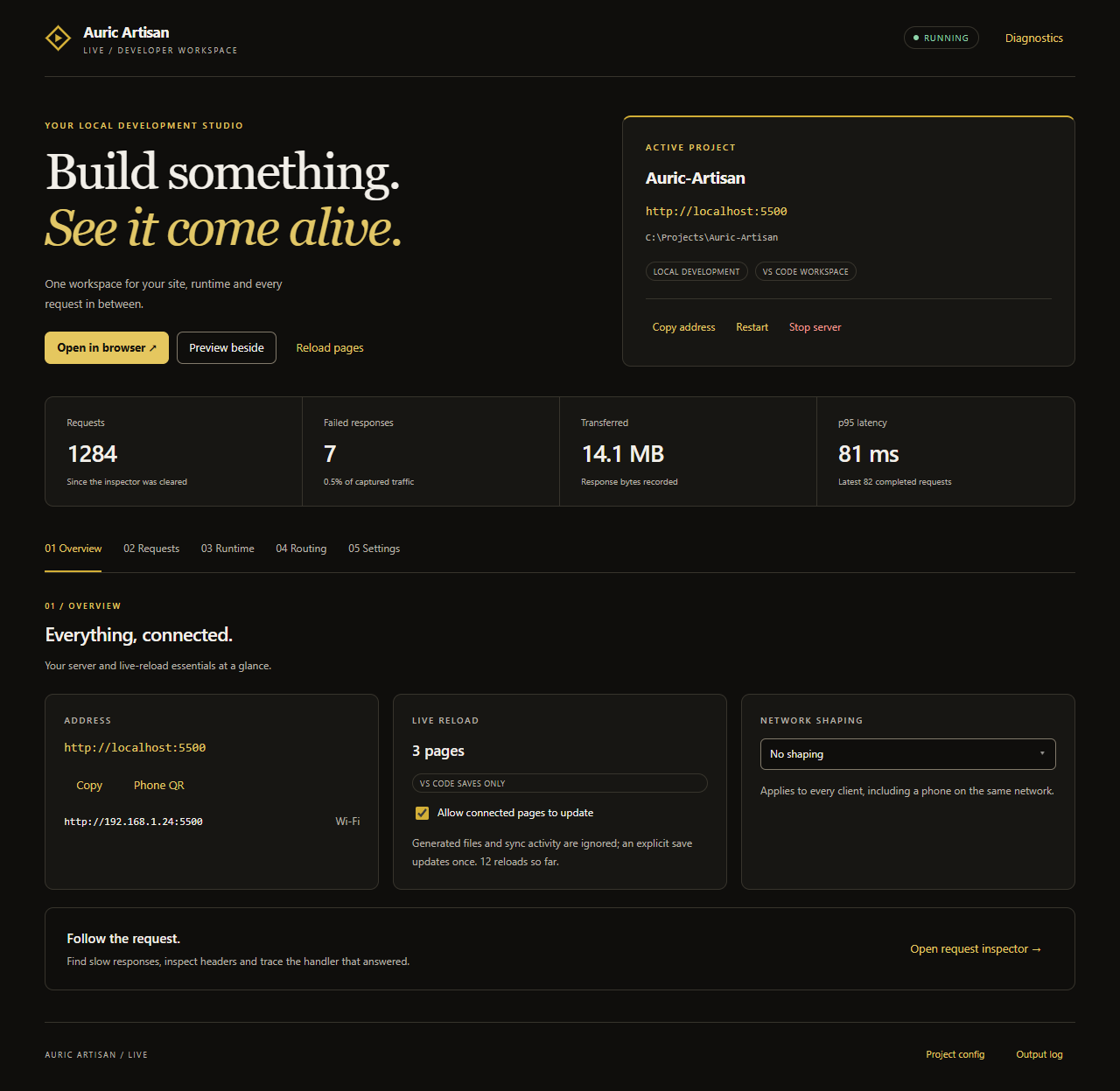
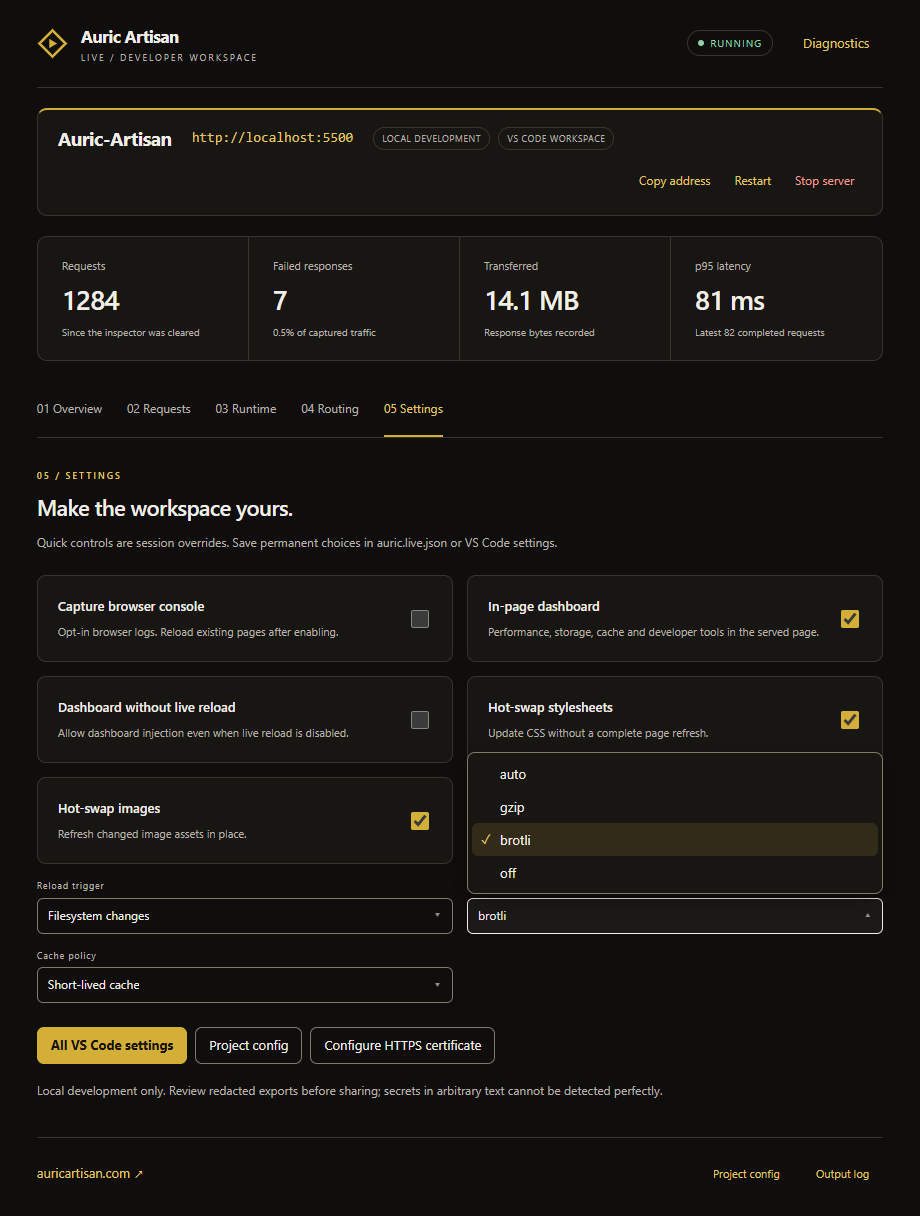
Control panel Server address, run target, connected pages, network profile, backend, and traffic
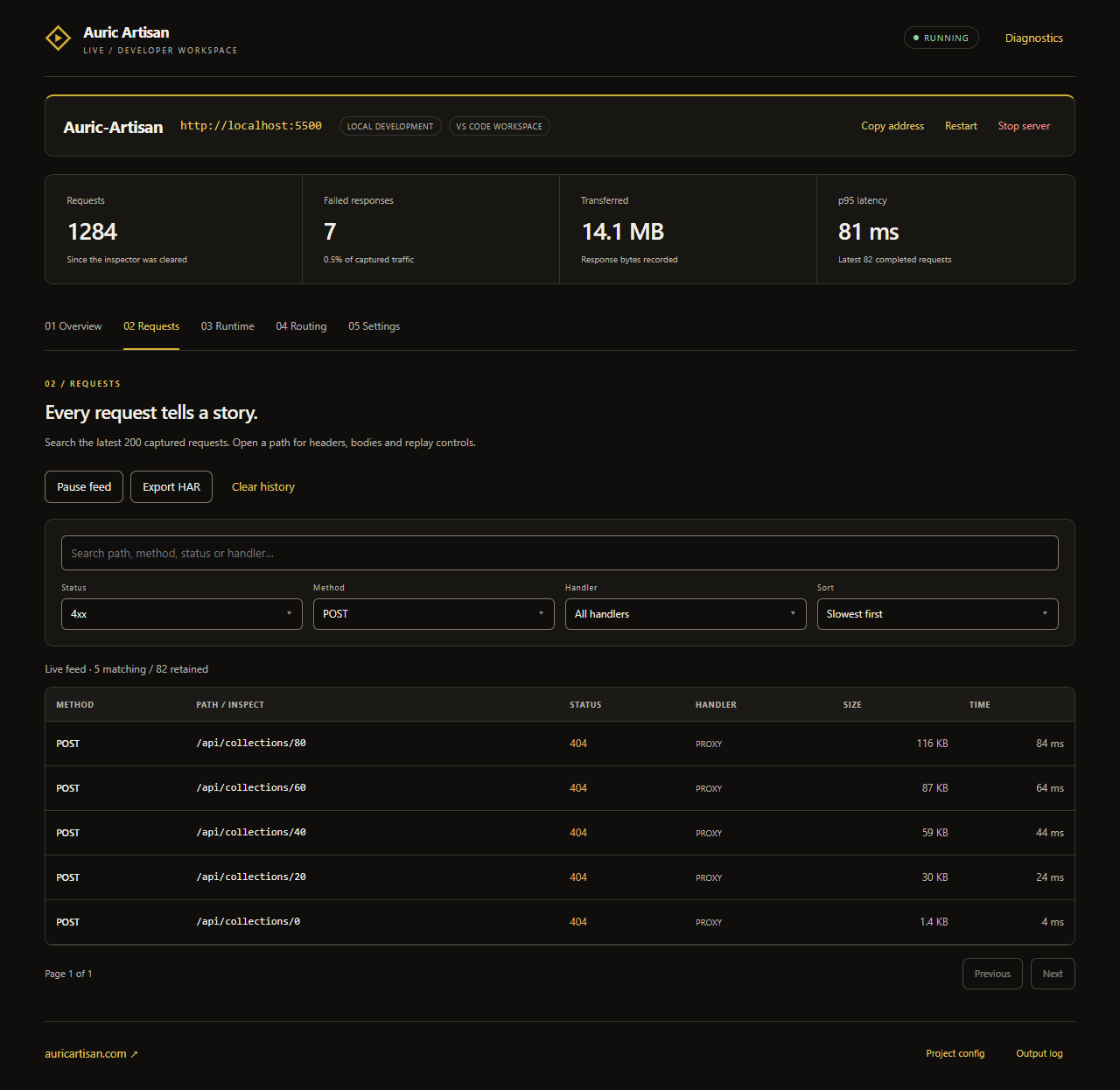
Request inspector Static, REST, mock, proxy, and error requests with size and timing
Responsive preview In-editor preview with address, device, rotation, reload, and browser handoff
Phone preview Exact phone dimensions scaled inside VS Code without leaving the editor
Phone browser The same real responsive site at a narrow mobile viewport
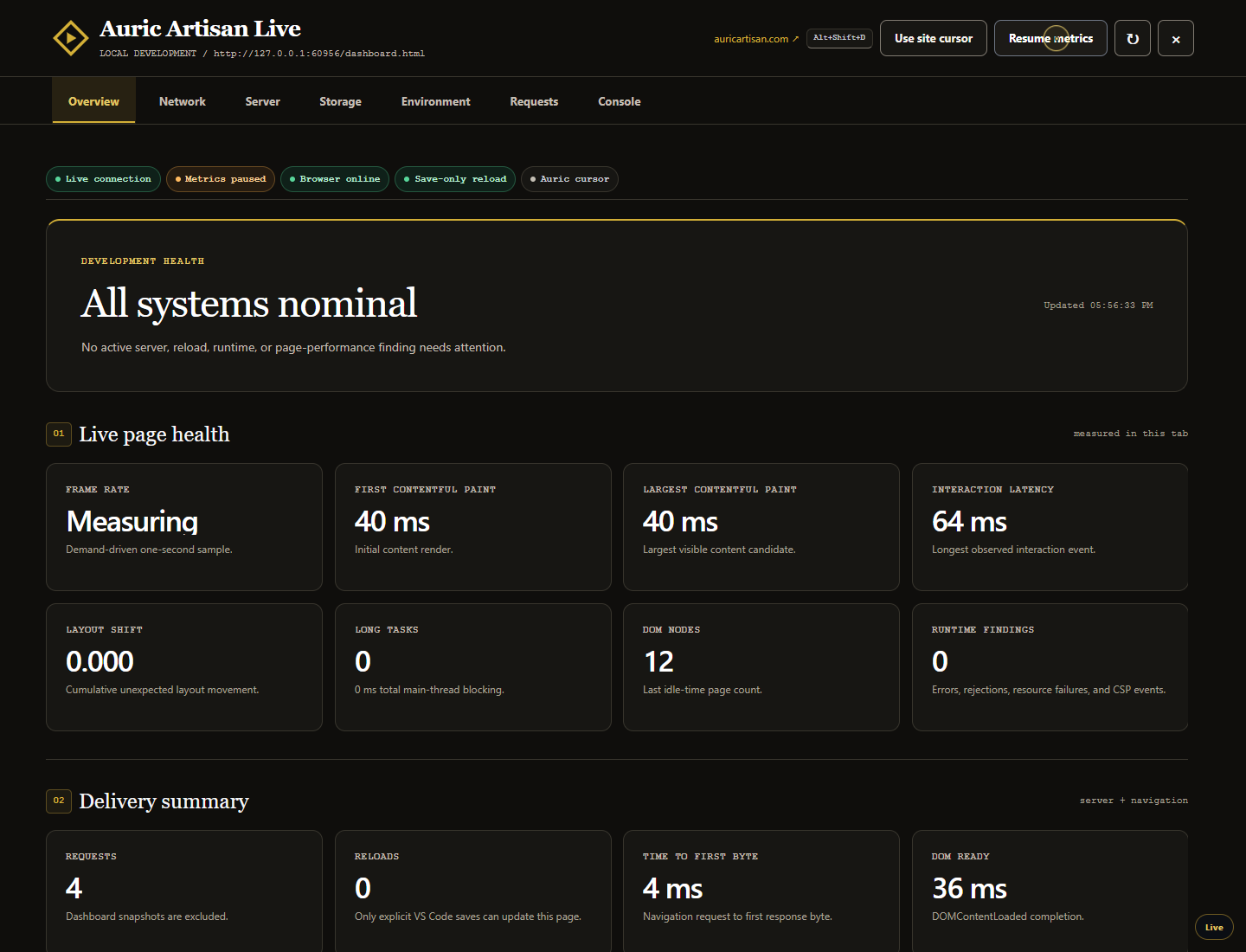
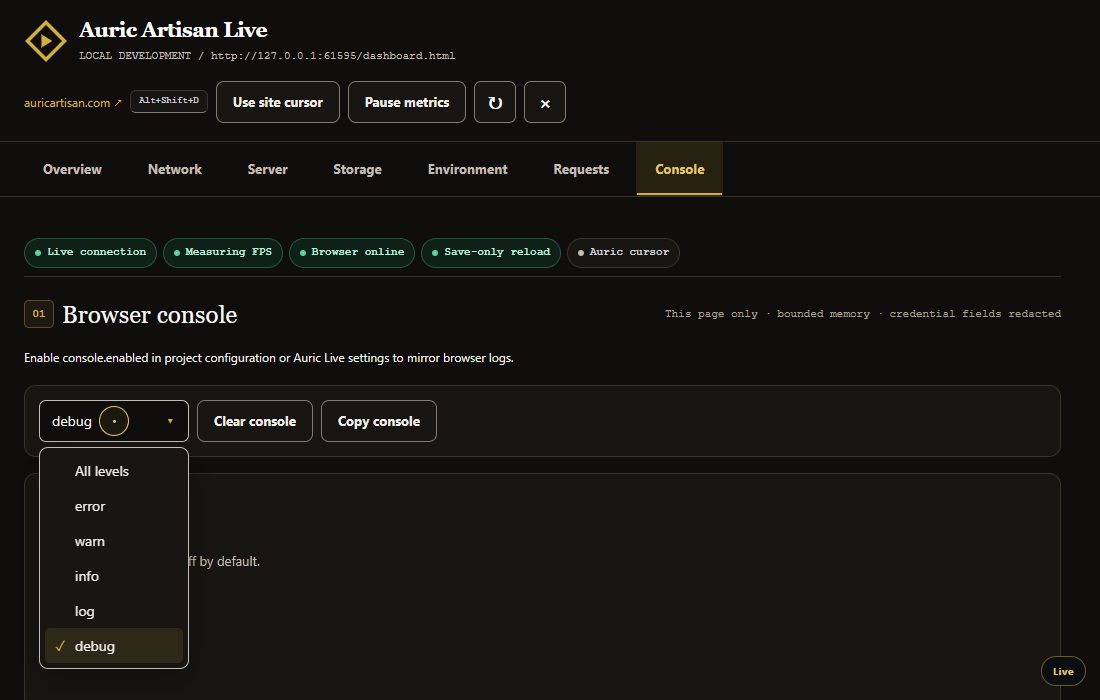
In-page developer dashboard A focused Overview with live health, Save-only reload status, delivery timing, tab navigation, cursor control, and pauseable metrics
Storage and custom cursor Browser-provided storage totals and key counts without reading storage values
5,050-node performance verification The demand-driven Overview rendered in real Chrome over a 5,050-node stress page

The public Live media kit also includes the MP4, poster, full-resolution screenshots, captions, timed transcript, build-along guide, music provenance, and integrity manifest.

Auric Live serves your workspace over a real local HTTP server with live reload, and then keeps going where a static server stops: it forwards /api to the backend you already run, answers endpoints that do not exist yet, serves a complete REST backend from one JSON file, executes PHP through CGI, serves over HTTPS with a certificate it generates itself, simulates a slow network, and shows you every request with the rule that answered it.

No runtime dependencies, no external analytics, no account. One extension, one port, with an optional bounded diagnostic record that stays inside the project.


The developer dashboard inside your website

Press Alt+Shift+D while viewing any page served by Auric Live. A full-screen, keyboard-accessible dashboard opens over the real website and sorts information from most urgent to least urgent:

The compact tab rail keeps only one panel mounted at a time: Overview, Network, Server, Storage, Environment, or Requests. Arrow keys move between tabs. Pause metrics freezes local sampling immediately; Refresh performs one explicit update.

  1. Needs attention — disconnected live reload, a paused reload storm, server or upstream failures, runtime errors, rejected promises, failed resources, CSP violations, and serious frame-rate drops.
  2. Live page health — rolling FPS, FCP, LCP, interaction latency, layout shift, long tasks, DOM size, and the number of active runtime findings.
  3. Network and cache — resource count, transferred and decoded bytes, slowest and largest resources, initiator types, network loads, likely browser cache hits, and server-confirmed cached/304 responses.
  4. Auric server — requests, errors, bytes, reloads, clients, uptime, cache policy, compression, throttling, proxy/mock/REST/CGI routing, watcher health, recording state, and project exclusions.
  5. Storage — browser-provided origin usage and quota, local/session storage key counts, Cache Storage count, IndexedDB count, persistence, and cookie count. Storage values are never read, shown, transmitted, or recorded.
  6. Page and environment — viewport, DPR, load timing, service worker, visibility, processor count, approximate device memory, connection estimate, JS heap where supported, language, and reduced-motion preference.
  7. Recent requests — a query-free, body-free table showing status, method, path, source, bytes, duration, and confirmed cache state.

Every measurement says whether it is measured, estimated, or unavailable. In particular, a zero browser transfer size is labelled likely cached rather than treated as proof; only the server's cached flag or 304 is shown as confirmed. Unsupported browser APIs leave an honest “Unavailable” instead of a made-up zero.

The shortcut is configurable with auricLive.dashboard.shortcut. Escape and the same shortcut close the dashboard, Tab stays inside while it is open, and focus returns to the element you were using. The dashboard is isolated in a Shadow DOM, built with text nodes rather than HTML strings, and uses packaged same-origin styles so it does not inherit or overwrite the website's CSS.

The diagnostics are demand-driven. With the dashboard closed there is no FPS animation loop, no storage scan, and telemetry reuses its last safe snapshot. While open, cursor events and dashboard updates are coalesced into animation frames, page-wide measurements run during browser idle time, hidden tabs stop sampling, and unchanged server snapshots do not rebuild the UI. Only the selected panel is rendered, which keeps large pages responsive.

Auric custom cursor

The served page can replace the website's CSS cursor—including image cursors— with a small gold dot and context-aware ring. Links and buttons expand the ring; text fields use a narrow text shape. It never captures clicks and does not use Pointer Lock. Open the dashboard and choose Use site cursor to turn it off immediately; the choice is remembered for that origin.

The replacement activates only after its stylesheet loads successfully. Touch and coarse-pointer devices, forced-colour mode, and printing keep the native cursor automatically. Browser chrome outside the page is owned by the browser and cannot be replaced. Set auricLive.dashboard.customCursor to false to start every site with its own cursor.


The run target dropdown

One control decides what is actually serving your site, and it is the same list everywhere it opens:

  • Static files — Auric Live serves the folder itself, with live reload.
  • Anything it detected — PHP, Python, Ruby, Node, Deno, Bun, Go, Java, C#, Rust, Elixir and the site generators, each with the command its own documentation gives and the port it will land on.
  • Your own command — pasted exactly as you type it in a shell.
$env:AA_PAYMENTS_MOCK=1; node js/server.js      ← PowerShell
AA_PAYMENTS_MOCK=1 node js/server.js            ← bash and zsh
set AA_PAYMENTS_MOCK=1 && node js/server.js     ← cmd.exe

All three are the same intention written for three different shells, and all three are accepted. The environment assignments are lifted out and applied to the process, so a line copied from a PowerShell prompt still works when the editor is running under bash. $env:AA_PAYMENTS_MOCK=1; on its own is valid too — that adds the variable to whichever target is already selected and offers to restart it.

Whatever you pick is then supervised: its port is adopted from its own output, it is restarted if it dies, and your pages reload when it comes back.

Where the dropdown is

Surface How to open it
Status bar Click the port, then Change the run target…
Editor title bar The ▶ Run control → Auric Live
Activity bar Auric Live → Servers, the ▶ button in the view title
Servers view The Run target row
Explorer Right-click a folder → Auric Live
Control panel The Run target card
Keyboard Ctrl+Alt+J (Cmd+Alt+J)
Command Palette Auric Live: Select Run Target…

The control panel and preview use the suite's shared OneDrop dropdown — the same component, markup and keyboard contract as the rest of Auric Artisan: arrow keys move, Home and End jump, letters type-ahead, Enter picks, Escape closes and returns focus to the button.

60 seconds

  1. Open a folder.
  2. Press Ctrl+Alt+L (Cmd+Alt+L on macOS), or click Go Live in the status bar.
  3. Edit a file. The page updates — stylesheets and images swap in place, so the page keeps its scroll position, its open dialogs and whatever you had typed into a form.

That is the whole first run. Everything below is there when you need it.


What makes it more than a static server

Your API, on the same origin

// auric.live.json
{
  "proxy": [{ "path": "/api", "target": "http://localhost:3000", "ws": true }]
}

The page and the API now share an origin. No CORS shim, no http://localhost:3000 hard-coded in the client that has to come out before a deploy, and cookies that actually stick — Set-Cookie loses the Domain the browser could never match, redirects come back to the dev origin instead of walking you onto the backend, and WebSocket upgrades are forwarded too.

It waits for the backend instead of failing at it

A refused connection in development almost never means the backend is broken. It means it has not finished compiling, or it restarted two seconds ago. So a request to a backend that is not answering is held, not failed: Auric Live polls for it and forwards the request the moment it is up. If it takes longer than the budget, the page becomes a waiting screen that refreshes itself and names the port it is waiting on — never a dead-end 502.

When a backend that was up goes away and comes back, every connected page reloads, because whatever it is holding came from the version that just disappeared. That covers the normal rhythm of backend work: save, restart, look at the page.

Started your API by hand on a port nothing knows about? Find a Running Backend scans the ports these tools actually use and offers to forward to whichever answers.

An API that does not exist yet

{
  "mock": {
    "enabled": true,
    "routes": [
      { "method": "GET", "path": "/api/users/:id", "body": { "id": "{{params.id}}", "name": "Ada" } },
      { "method": "POST", "path": "/api/session", "status": 201, "delayMs": 400,
        "body": { "token": "{{uuid}}", "issued": "{{now}}" } }
    ]
  }
}

Mock routes are matched before the proxy, so you can override one endpoint of an otherwise real API — the login that is not built yet, or the failure case you cannot reproduce on demand. Bodies substitute {{params.x}}, {{query.x}}, {{body.x}}, {{headers.x}}, {{uuid}}, {{now}}, {{timestamp}}, {{counter}} and {{random}}. delayMs gives an endpoint the latency the real one will have, so your spinner gets tested.

A real REST backend from one JSON file

{ "mock": { "rest": { "enabled": true, "base": "/api", "database": "db.json" } } }
{ "users": [{ "id": 1, "name": "Ada" }], "posts": [{ "id": 1, "userId": 1, "title": "First" }] }

Every collection gets the full set of routes — list, read, create, replace, merge, delete — with filtering, sorting, pagination and relationship expansion:

GET  /api/users?role=editor&_sort=name&_order=desc&_page=2&_limit=20
GET  /api/users?views_gte=100&name_like=^A&_q=ada
GET  /api/users/1?_embed=posts        GET /api/posts/1?_expand=user
POST /api/users                       DELETE /api/users/3

Forms submit, lists paginate, a delete removes a row and it stays gone. Pagination sends X-Total-Count and Link. Writes stay in memory unless you turn persist on, so a restart returns to a known fixture.

PHP and CGI

{ "cgi": { "enabled": true, "handlers": { ".php": "php-cgi" } }, "index": ["index.php", "index.html"] }

With php-cgi installed, a .php file stops being a download and starts being a page: $_GET, $_POST, headers, cookies, sessions and header() all work, including path info after the script (/index.php/users/7). Any CGI program works the same way — point another extension at perl, python or a compiled binary.

HTTPS, without openssl and without committing a certificate

{ "https": { "enabled": true } }

Service workers, navigator.clipboard, camera, microphone and geolocation simply do not exist over plain HTTP anywhere but localhost — which is exactly where you need them when testing on a phone. Auric Live generates a self-signed certificate itself, covering localhost and your current network addresses, and caches it so the browser exception you granted survives a restart. Point https.certPath at a mkcert certificate if you want no warning at all.

The phone in your pocket

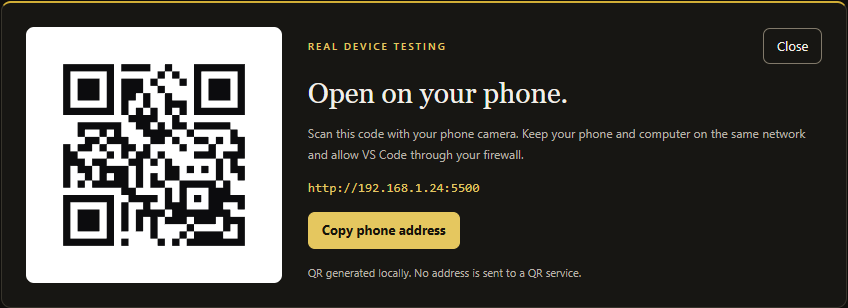
Bound to 0.0.0.0 by default, the server also answers other devices on your network. Show Phone QR Code puts the LAN URL on screen as a code your camera can read, so nobody types http://192.168.1.47:5500 into a phone keyboard. The code is generated locally — the address of your machine is never sent anywhere.

A request inspector that answers the real question

The browser's network tab shows you the response. It cannot tell you which rule produced it — and when /api/users returns 404, that is the only question that matters. The Requests view records every request with the stage that answered it: static file, directory listing, mock route, REST database, proxy, CGI, or a redirect. Any request can be replayed, copied as curl or fetch, or exported with the whole session as HAR.

A slow network, on every device

{ "throttle": "3g" }

Latency and bandwidth shaping applied at the server, so it reaches the phone on your LAN too — where devtools throttling is not available. off, slow-3g, 3g, 4g, cable, or a custom latency and ceiling.

Preview inside the editor

Open Preview Beside puts the page next to the code, with device presets (iPhone SE, iPhone 15, Pixel 8, iPad, laptop, desktop), a rotate button and automatic scaling so a 1600px desktop preview still fits a split editor. Live reload works there exactly as it does in a real browser.


Live reload, in detail

  • Save-only is the safe default. Auric Live updates after an explicit VS Code save. Generated output, background formatters, OneDrive activity and cache writers cannot continuously refresh the page. Set auricLive.liveReload.reloadOnSave to change only when an external compiler must drive updates, or off for a page that changes only when you manually run Reload Connected Pages.
  • Stylesheets swap in place. The new sheet is loaded first and the old one removed only once it has applied, so the page never flashes unstyled and never loses the state you were styling.
  • Images swap in place, including CSS background images.
  • Everything else reloads, restoring scroll position and open <details>.
  • A preprocessor source is ignored — the browser never loaded your .scss, and its compiled output arrives as its own event a moment later.
  • A burst is one bounded update. In filesystem-change mode, a build writing four hundred files is path-deduplicated, bounded in memory, and held for a 350 ms quiet period before one refresh. node_modules and hidden cache trees are filtered before the debouncer ever sees them.
  • Machine-written files never reload the page. The watcher ignores what the server refuses to serve, so every dot-path — .next/, .vite/, .svelte-kit/, .turbo/, .cache/, .git/ — is invisible to it, along with target/, obj/, vendor/, __pycache__/ and the artefacts editors, operating systems and synchronising folders leave behind. Without that rule a dev server rewrites its cache on every request it serves, and the page reloads forever.
  • There is a brake. Past three reloads in a few seconds, Auric Live stops, shows the page an overlay explaining why, logs the exact paths responsible, and offers to add the worst offender to the ignore list in one click. The page keeps a count of its own too, so a runaway can always be stopped from the browser with Resume live reload. Nothing can leave you unable to use your own site.
  • Failures surface in the page. A proxy or CGI error shows an overlay in the browser instead of sitting in a log you were not reading.
  • A real restart refreshes once. The client compares the server start generation after reconnecting. An ordinary WebSocket interruption reconnects with backoff but never refreshes the page.
  • Auric-owned writes are suppressed. Persisting the mock REST database and updating .auric-live/ cannot feed back into the watcher. Repeated telemetry jitter is also discarded before it reaches disk.

The client is injected as a same-origin <script src> — never inline — so a page with a strict Content-Security-Policy keeps working. If the policy would block it, the log says so rather than leaving you wondering why nothing refreshes.

Project-wide exclusions: .auricignore-live

Use Auric Live: Open .auricignore-live or create the file beside the served root. It uses a familiar gitignore-style subset: one /-separated glob per line, # comments, blank lines, and ordered ! negation.

# Nothing below these paths is live or recorded.
private/**
generated/**
*.secret.json

# Re-include the one generated preview the browser needs.
!generated/preview/**

A match is stronger than auricLive.liveReload.ignore: it is not served, not shown in directory listings, not watched, not hot-swapped or reloaded, and not written into the diagnostic record. liveReload.ignore remains the right tool for a file that should still be served but should not trigger reload. Rules are re-read as soon as the file is saved. .auric-live/** and .auricignore-live themselves are permanently protected, even if a later negation tries to include them and even when dotfiles is set to allow.

Local session records: .auric-live/

With auricLive.records.enabled on, every server session creates a bounded, atomic snapshot inside the workspace:

.auric-live/
  .gitignore
  latest.json
  sessions/
    2026-07-31T...-process-random.json

The snapshot contains session timing, extension version, sanitized server totals, recent request summaries, reload/file events, and aggregated browser performance/storage totals. It never contains request or response bodies, headers, query strings, URL fragments, cookies, storage values, IP addresses, or user agents. Files are rotated, request history is capped, writes are debounced and atomic, and the folder contains its own .gitignore. Use Auric Live: Open Recorded Live Session to inspect latest.json.

The defaults keep 200 request summaries, 12 sessions, and approximately 5 MB per session. auricLive.records.* exposes each limit, flush interval, and page telemetry interval. “Telemetry” here means a same-origin summary sent from the served page to the local Auric server and written only to this workspace; no data is sent to Auric Artisan or any third party.


Every web language, run the way it is deployed

A live server that only serves files is right about a folder of HTML and wrong about everything else. Auric Live detects the stack and offers the command its own documentation gives, then treats the result exactly like a deployed site — one origin, live reload, the request inspector, throttling and the phone URL:

Language Detected Started with
PHP artisan, composer.json, symfony.lock, any .php php artisan serve, symfony server:start, php -S, or CGI per request
Python manage.py, requirements.txt, main.py python manage.py runserver, flask run, uvicorn, python -m http.server
Ruby bin/rails, Gemfile, _config.yml bin/rails server, ruby app.rb, bundle exec jekyll serve
JavaScript package.json, server.js, deno.json, bun.lockb the project's own script, node <entry>, deno task start, bun run dev
Go go.mod, hugo.toml go run ., hugo server
Java pom.xml, build.gradle mvnw spring-boot:run, gradlew bootRun
C# *.csproj, *.sln dotnet watch run
Rust Cargo.toml cargo run
Elixir mix.exs mix phx.server
HTML always Auric Live's own static server

Each entry shows why it matched before anything runs — manage.py is present, composer.json is present — because starting a process on a guess nobody can see is not something an editor extension should do. Auric Live: Show Detected Run Targets prints the whole list with its reasons.

Framework projects, supervised

Serving a Vite, Next, Nuxt, Astro, SvelteKit, Angular or CRA project as plain files produces an unbuilt page and a wall of module errors. Auric Live detects the project on the first Go Live and offers the right thing instead: start the framework's own dev server and forward to it, so its hot module replacement stays in charge and you still get one origin, the request inspector, throttling and the phone URL.

The dev server is supervised, not just launched, which is the difference between a proxy that works and one that 502s:

  • It adopts the port the framework actually chose. Vite moves to 5174 when 5173 is taken and says so in one line of output. Auric Live reads that line and repoints the proxy — no guessing, no editing configuration.
  • It restarts the process when it dies, with a growing delay and a ceiling, and it says why in its own output channel. A dev server that keeps failing is reported once rather than retried forever.
  • It reloads your pages when it comes back, so a crash-and-restart ends with the page you were looking at, updated.
  • Stopping it removes the forwarding it added, so you are never left with a proxy rule pointing at something that no longer exists.

Set auricLive.devServer.autoStart to skip the question entirely, or useTerminal to run it in a normal terminal when the command needs typed input.

Django, Rails, Laravel and Flask are detected as backends and offered an /api proxy. A folder of HTML is served directly, which is the point.

Changes apply themselves

Editing settings or auric.live.json takes effect immediately. Only a change to the port, host, root, mount point or TLS settings rebinds the listener; everything else — proxy rules, mock routes, headers, throttling — is applied to the running server without dropping a single connection, and your pages reload once it is done.


Everything else it does

  • Directory listings that sort by name, size or date, and escape every file name they print.
  • Range requests, so <video> and <audio> are seekable.
  • Brotli and gzip, negotiated properly, including identity;q=0.
  • ETags and If-None-Match / If-Modified-Since, with a cache policy that defaults to never caching, because a stale asset that survives a reload is the single most confusing thing a live server can do.
  • Clean URLs (/about serves about.html), a single-page fallback that does not swallow /assets/app.js, a custom 404 page, and a mount point for serving under a sub-path.
  • CORS, cross-origin isolation headers for SharedArrayBuffer, per-glob custom headers, and basic authentication for when the server is on a shared network.
  • Multi-root workspaces: one server per folder, each with its own port and configuration.
  • A port that walks upward when yours is busy — or refuses to move, for a project whose port is part of an OAuth callback.

Configuration

Everything is a VS Code setting under auricLive.*. A project can also carry an auric.live.json beside its package.json, which overrides those settings and travels with the repository — comments and trailing commas allowed. Create Project Config File writes a commented starting point.

Order of precedence: built-in defaults → your settings → the project file → anything you changed from a command this session.

The complete reference is in the Settings UI (search Auric Live); the frequently used ones are:

Setting Default What it does
auricLive.root workspace folder Folder to serve, e.g. dist
auricLive.port 5500 0 picks a free port
auricLive.host 0.0.0.0 127.0.0.1 keeps it off the network
auricLive.spa.enabled false Client-side router fallback
auricLive.cleanUrls false /about → about.html
auricLive.liveReload.reloadOnSave save save is stable; change watches the tree; off is manual-only
auricLive.liveReload.cssHotSwap true Swap stylesheets instead of reloading
auricLive.liveReload.debounceMs 350 Quiet period used by filesystem-change mode
auricLive.dashboard.enabled true Inject the website developer dashboard
auricLive.dashboard.shortcut Alt+Shift+D Open/close the dashboard inside the page
auricLive.dashboard.customCursor true Use the accessible Auric page cursor
auricLive.dashboard.sampleIntervalMs 1000 Open-dashboard server refresh cadence; local heavy measurements run during idle time
auricLive.records.enabled true Save bounded local session diagnostics
auricLive.records.maxRequests 200 Sanitized requests retained per session
auricLive.records.maxSessions 12 Rotated sessions retained in .auric-live/
auricLive.proxy [] Forward paths to a backend
auricLive.mock.enabled false Answer declared endpoints
auricLive.cgi.enabled false Run PHP and other CGI handlers
auricLive.https.enabled false Serve over TLS
auricLive.throttle.profile off Simulate a slower network
auricLive.cache no-store Caching policy for served files
auricLive.upstream.wait true Hold requests while a backend starts
auricLive.upstream.reloadOnRecover true Reload pages when a backend returns
auricLive.devServer.autoStart false Start the detected dev server on Go Live
auricLive.devServer.autoRestart true Restart it when it dies

Keyboard

Shortcut Action
Ctrl+Alt+L Go Live
Ctrl+Alt+Shift+L Stop all servers
Ctrl+Alt+J Open the run target dropdown
Ctrl+Alt+K Open preview beside
Ctrl+Alt+Shift+K Open the Auric Live menu
Ctrl+Alt+U Reload every connected page
Ctrl+Alt+Shift+I Open the control panel
Alt+Shift+D in a served page Open/close the in-page developer dashboard

Use Cmd instead of Ctrl on macOS. Every action is also in the Command Palette under Auric Live, and the status bar item opens the full menu.


Troubleshooting

The port is already in use. Auric Live walks to the next free port by default. Set auricLive.portStrategy to fail if your port must not move.

The phone cannot reach it. Check that auricLive.host is 0.0.0.0, allow the firewall prompt for Code, and make sure the phone is on the same network — a guest network usually cannot see your machine. The Servers view lists every address and marks the virtual adapters that will not work.

The page says it is waiting for a backend. Something has / or /api proxied to a server that is not answering. The waiting page names the port. Use Find a Running Backend if you started it yourself on a different one, Start Framework Dev Server if it is not running at all, or Stop Framework Dev Server to remove the forwarding altogether. The page reloads itself as soon as the backend answers, so you can leave it open.

The page keeps refreshing. The default Save mode does not watch raw filesystem activity, socket reconnects do not refresh, and the brake stops automatic recovery loops. Check that auricLive.liveReload.reloadOnSave is save (or select off for manual-only testing). If you deliberately selected change, the output log names the file behind every reload; add only generated paths to auricLive.liveReload.ignore, then run Auric Live: Resume Live Reload. Turning live reload off entirely is Ctrl+Alt+Shift+K → Toggle live reload.

Nothing reloads. Look at the log (Auric Live: Show Log). The usual causes are a path matched by .auricignore-live or auricLive.liveReload.ignore, a page whose own Content-Security-Policy blocks the client — the log says so explicitly — or a network file system where recursive watching is unavailable, in which case set auricLive.watch.pollIntervalMs.

The browser warns about the certificate. It is self-signed, which is unavoidable without a local trust store entry. Accept it once for the address, or install mkcert and point auricLive.https.certPath and keyPath at what it produces.

PHP does not run. cgi.enabled must be on, php-cgi — not php — must be on your PATH, and the workspace must be trusted. A full path works too, and does not need quoting even if it contains spaces.

The dashboard shortcut does nothing. Confirm auricLive.dashboard.enabled is on and that the page's script-src, connect-src, and style-src CSP rules allow same-origin resources. Auric Live reports CSP blocks as runtime findings. The shortcut intentionally does not take over while you are typing in an input, textarea, select, or editable region.

The native cursor is still visible. Touch/coarse-pointer devices, forced-colour mode, a blocked same-origin stylesheet, or the remembered Use site cursor choice all keep it. Toggle Use Auric cursor in the dashboard, or clear the auric-live:custom-cursor local-storage preference.


Privacy and safety

  • No external telemetry, analytics endpoint, account, or Auric cloud call. Dashboard summaries travel only over the page's same-origin WebSocket to the local server, and local recording can be disabled completely.
  • The QR code is generated locally; your LAN address is never sent anywhere.
  • Authorization, cookie and set-cookie headers are masked before a request is ever stored, and again before anything is exported.
  • Dot-files are hidden by default, so .env and .git stay out of a server that may be reachable from your network.
  • .auricignore-live excludes sensitive or generated project paths from serving, listings, watching, reloading, and records. .auric-live/ is never served, even when ordinary dot-files are allowed.
  • Running a framework dev server and executing CGI handlers require a trusted workspace, because both run a program named by workspace configuration.
  • No runtime dependencies. The HTTP server, the WebSocket implementation, the certificate generator and the QR encoder are all part of this extension.

Part of the Auric Artisan suite

Auric Live shares its design language — and nothing else, by construction — with Auric Artisan Terminal, File System, Icons, Theme and Studio. Each extension is self-contained: no shared state, no cross-extension imports, no coordination required.

Licensed under the Auric Artisan Free Use Licence. Free for everyone, for anything; not for redistribution or resale.

  • Contact us
  • Jobs
  • Privacy
  • Manage cookies
  • Terms of use
  • Trademarks
© 2026 Microsoft