Clay Terminal




VS Code color themes inspired by a coral terminal aesthetic — dark and light variants, built from real warm-gray/coral design tokens. Coral accent (#D97757), semantic highlighting, bracket-pair colors, diff/merge colors, consistent error/warning/info marks across the squiggle, gutter (error/warning), scrollbar, quick-fix lightbulb, inlay hints, inline-suggestion ("ghost text") color, symbol icon colors (Outline view, breadcrumbs, suggest widget), a themed breadcrumb bar (background, text, focus/active selection, and its path picker dropdown), a themed autocomplete/suggest widget (background, border, selection, and matched-text highlight), a themed Quick Open/Command Palette (background, title bar, focused row, section-header text), a themed integrated terminal panel border and text-selection color, themed Markdown preview/walkthrough text (links, inline code, block quotes, code fences, horizontal rules), and themed Source Control badges for merge conflicts, staged changes, and submodules.
- Clay Terminal — dark, near-black warm background
- Clay Terminal Light — light, warm off-white background
- Clay Terminal High Contrast / Clay Terminal Light High Contrast — accessibility-focused variants with stronger borders and higher-contrast text
- Clay Terminal Icons — a matching file icon theme (90+ languages/file types) plus a scoped product icon theme (chevrons, folders, git glyphs), included in this same extension (no separate install)
Pairs well with a clean monospace font like JetBrains Mono or Berkeley Mono, though that's a personal editor setting, not something this extension can install for you.
Screenshots
| Dark |
Light |
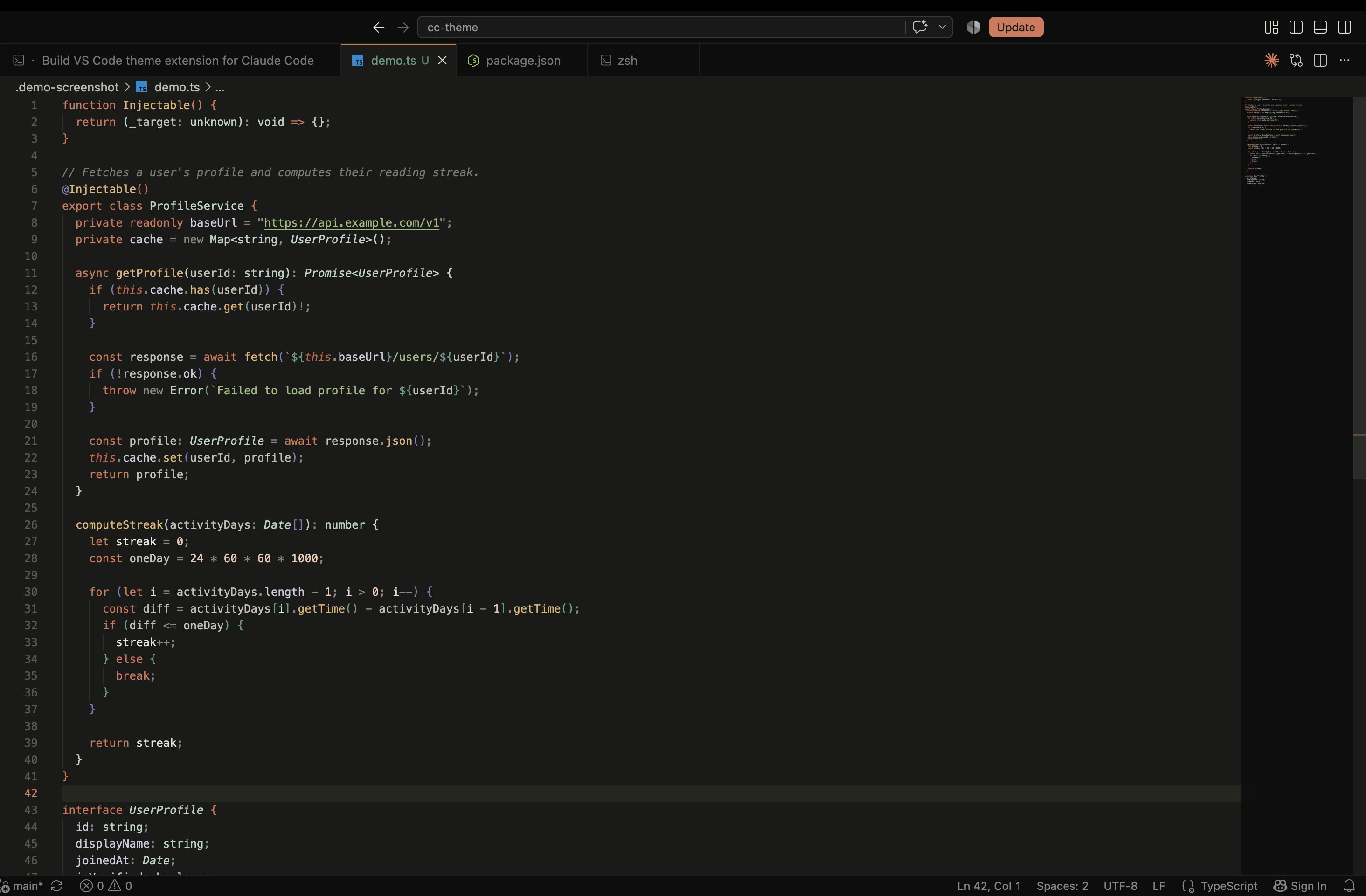 |
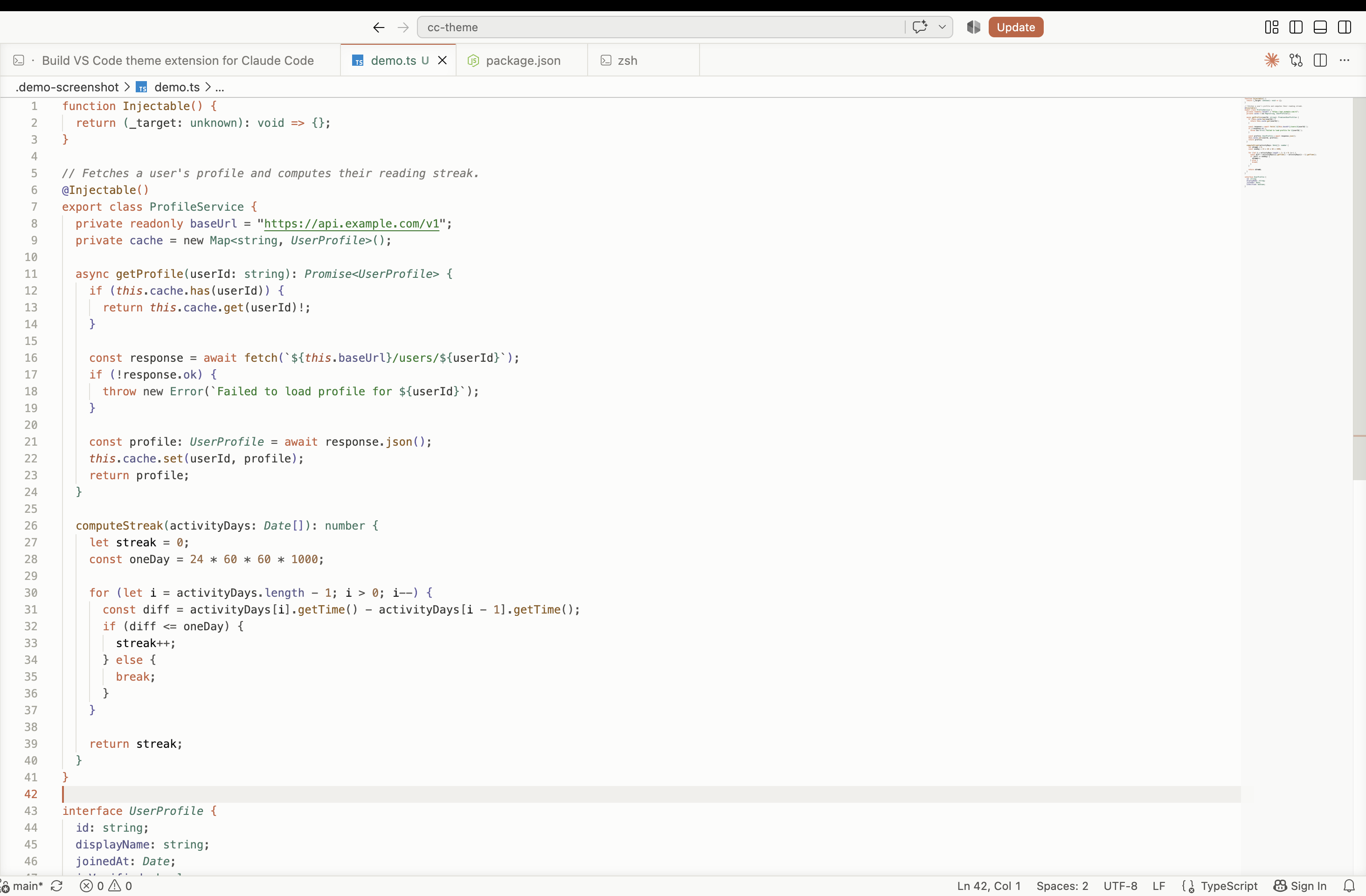 |
Install (local dev)
Package and install the .vsix rather than symlinking — VS Code doesn't reliably resolve an icon theme's image assets through a symlinked dev extension.
npx @vscode/vsce package
Command Palette → Extensions: Install from VSIX... → select the generated file, reload VS Code, then Command Palette → Preferences: Color Theme to pick a color theme, Preferences: File Icon Theme → Clay Terminal Icons for the file icons, and Preferences: Product Icon Theme → Clay Terminal Icons for the UI glyphs. (None of these pickers have a default keybinding.)
A Get Started with Clay Terminal walkthrough (Command Palette → Welcome: Open Walkthrough...) also walks through all three pickers — it's the fastest way to make sure both icon themes are actually turned on, since installing the extension only applies the color theme automatically.
Recommended settings
Optional settings.json tweaks that pair well with the coral accent and warm-gray palette:
{
  "editor.fontFamily": "'JetBrains Mono', 'Berkeley Mono', Menlo, monospace",
  "editor.fontLigatures": true,
  "editor.cursorStyle": "line",
  "editor.cursorBlinking": "solid",
  "editor.minimap.enabled": false,
  "editor.bracketPairColorization.enabled": true,
  "editor.guides.bracketPairs": true,
  "workbench.iconTheme": "clay-terminal-icons",
  "workbench.productIconTheme": "clay-terminal-product-icons"
}
None of this is required — the themes and icon themes work with default settings. editor.fontLigatures is worth turning on specifically with JetBrains Mono or Berkeley Mono, since both ship arrow/comparison ligatures (=>, !=, >=) — it's a no-op with fonts that don't include ligature glyphs.
Recommended extensions
Not part of this theme, but pairs well with it — established per-language formatters/linters plus one extension that makes the theme's error/warning colors more visible:
// .vscode/extensions.json
{
  "recommendations": [
    "esbenp.prettier-vscode",   // Prettier — JS/TS/CSS/JSON
    "charliermarsh.ruff",       // Ruff — Python lint + format
    "golang.go",                // gofmt — Go
    "rust-lang.rust-analyzer",  // rustfmt — Rust
    "usernamehw.errorlens"      // inline error/warning highlighting
  ]
}
// settings.json
{
  "editor.formatOnSave": true,
  "[javascript][typescript][css][json]": {
    "editor.defaultFormatter": "esbenp.prettier-vscode"
  },
  "[python]": {
    "editor.defaultFormatter": "charliermarsh.ruff"
  },
  "[go]": {
    "editor.defaultFormatter": "golang.go"
  }
}
Error Lens reads the same editorError/editorWarning colors this theme already sets, so its full-line highlight, gutter mark, and scrollbar mark inherit the theme's red/amber split automatically — no extra configuration needed.
Shell prompt theme
Not a VS Code setting — a Starship prompt preset for your actual terminal (integrated or standalone), using the same coral accent and warm-gray neutrals: terminal/starship.toml.
curl -o ~/.config/starship.toml https://raw.githubusercontent.com/MadhuS-1605/clay-terminal/main/terminal/starship.toml
(Merge it by hand instead if you already have a starship.toml you want to keep.) Not bundled in the .vsix — a VS Code extension can't install a shell config for you.
An Oh My Posh theme using the same palette is also available: terminal/ohmyposh.json.
curl -o ~/.config/ohmyposh/clay-terminal.json https://raw.githubusercontent.com/MadhuS-1605/clay-terminal/main/terminal/ohmyposh.json
oh-my-posh init pwsh --config ~/.config/ohmyposh/clay-terminal.json | Invoke-Expression  # PowerShell
# oh-my-posh init bash --config ~/.config/ohmyposh/clay-terminal.json  # bash — add to ~/.bashrc
# oh-my-posh init zsh --config ~/.config/ohmyposh/clay-terminal.json   # zsh — add to ~/.zshrc
Also not bundled in the .vsix for the same reason as the Starship preset.
A Powerlevel10k color override is also available: terminal/p10k-clay-terminal.zsh. Unlike the Starship/Oh My Posh presets, this doesn't replace your ~/.p10k.zsh (a large file generated by the p10k configure wizard) — it's a small snippet you source after it to override just the directory/git/prompt-character colors:
curl -o ~/.p10k-clay-terminal.zsh https://raw.githubusercontent.com/MadhuS-1605/clay-terminal/main/terminal/p10k-clay-terminal.zsh
echo 'source ~/.p10k-clay-terminal.zsh' >> ~/.zshrc  # add *after* the `source ~/.p10k.zsh` line
Also not bundled in the .vsix for the same reason as the other prompt presets.
Terminal emulator color scheme
A Windows Terminal color scheme using the same palette, generated from the dark theme's own ANSI colors: terminal/windows-terminal.json.
Paste its contents into the schemes array of Windows Terminal's settings.json (Command Palette in Windows Terminal → Open JSON file), then set "colorScheme": "Clay Terminal" on the profile you want it applied to. Not bundled in the .vsix for the same reason as the shell prompt presets above.
An iTerm2 color preset generated the same way is also available: terminal/clay-terminal.itermcolors.
curl -o ~/Downloads/clay-terminal.itermcolors https://raw.githubusercontent.com/MadhuS-1605/clay-terminal/main/terminal/clay-terminal.itermcolors
Then in iTerm2: Preferences → Profiles → Colors → Color Presets... → Import..., select the downloaded file, then choose Clay Terminal from the same Color Presets menu to apply it. Also not bundled in the .vsix.
An Alacritty color scheme generated the same way is also available: terminal/alacritty.toml.
curl -o ~/.config/alacritty/clay-terminal.toml https://raw.githubusercontent.com/MadhuS-1605/clay-terminal/main/terminal/alacritty.toml
Then add general.import = ["~/.config/alacritty/clay-terminal.toml"] to your alacritty.toml (or merge the [colors.*] tables by hand if you already import other files). Also not bundled in the .vsix.
A Kitty color scheme generated the same way is also available: terminal/kitty.conf.
curl -o ~/.config/kitty/clay-terminal.conf https://raw.githubusercontent.com/MadhuS-1605/clay-terminal/main/terminal/kitty.conf
Then add include clay-terminal.conf to your kitty.conf. Also not bundled in the .vsix.

