Prompt Preflight VS Code Extension
Check AI prompts directly inside VS Code before sending them to Codex, Claude, Kiro, Copilot, or another AI agent.
Prompt Preflight can be added to coding-agent tools as a preflight plugin/hook, and it can also be installed as this VS Code extension. The extension is for people and teams who draft prompts in Markdown/XML/TOML files and want feedback before the prompt reaches an AI tool.
Prompt Preflight for VS Code uses the same local Python analyzer as the CLI and coding-agent hooks in the main project. It makes no model calls, uses no API key, and does not send prompt text to a network service.
Author: Arunkumar Ganesan
This extension is available on the VS Code Marketplace.
Install from Marketplace
Install Prompt Preflight for VS Code
Or install from the command line:
code --install-extension arunkumar-ganesan.prompt-preflight-vscode
After installation, open a Markdown prompt file and click:
🟢 ▶ Run Prompt Preflight Check
The Marketplace package bundles the Python analyzer, so normal users do not need to clone the repo or configure promptPreflight.repoPath.
Demo
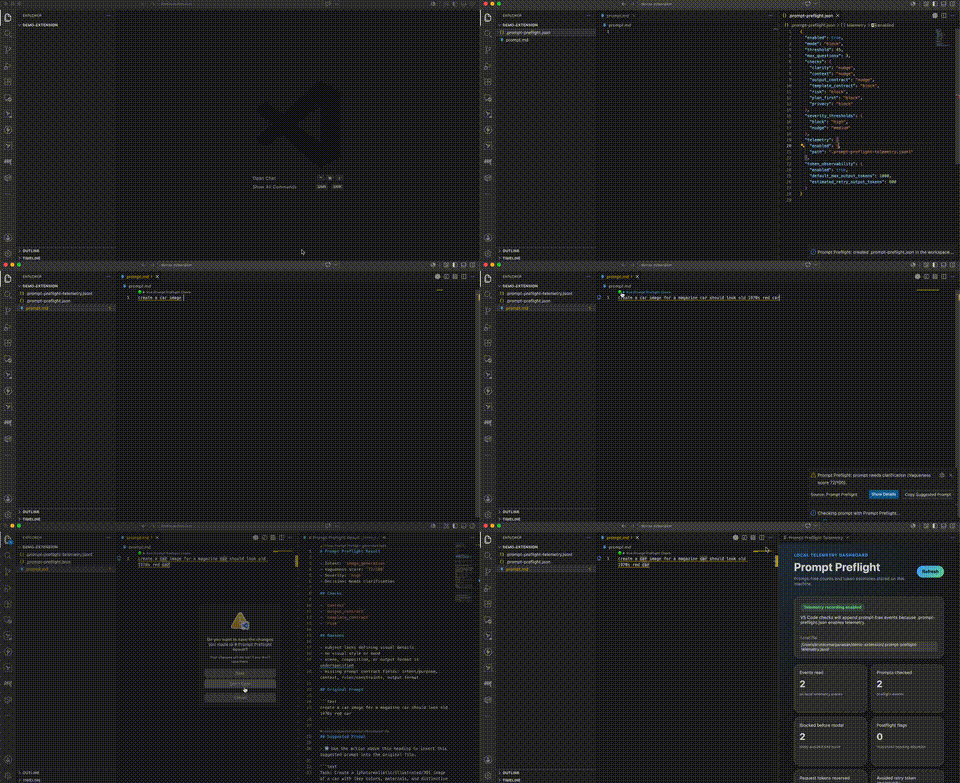
Why use it?
AI-agent prompts often live in Markdown notes, team prompt libraries, docs, tickets, or scratch files before they are pasted into a model. This extension helps catch vague or risky prompts earlier, while the prompt is still being written.
It can flag issues such as:
- vague filler like
some task, something, or blah blah
- missing context, source material, or target files
- missing output format
- missing success criteria
- risky broad-scope work
- production, migration, destructive, or security-sensitive changes
- likely pasted secrets
- structured prompt templates with required fields left empty or placeholder-only
Features
Green CodeLens action above Markdown prompts:
🟢 ▶ Run Prompt Preflight Check
Command Palette checks for selected text or the current Markdown document.
Prompt Preflight: New Prompt Template asks whether the user wants Markdown, TOML, or XML before opening the template.
Spec-driven development templates for feature specs, requirements specs, technical designs, implementation plans, agent execution prompts, and spec review checklists.
First-run welcome page with quick-start steps and privacy notes.
Prompt Preflight: Share Feedback opens the public GitHub feedback issue.
Markdown result reports with intent, Vagueness score, severity, reasons, questions, and suggested prompt.
Result feedback actions: Helpful, False positive, Missed vagueness, and Open GitHub issue with this example.
One-click suggested prompt insertion back into the original file or selected range.
Prompt Composer webview for users who prefer filling a form instead of writing template syntax.
Markdown, XML, and TOML prompt-template creation commands.
Automatic diagnostics in Markdown, XML, and TOML prompt files, with folder profile routing from .prompt-preflight.json.
Workspace prompt lint for team prompt libraries.
Team policy template via .prompt-preflight.json, including profile routing for spec, research, data, and presentation prompt folders.
Local telemetry dashboard with graph-style summaries for prompt checks, block reasons, postflight findings, user feedback signals, hosts, daily activity, and token-savings estimates.
Quick Fix to open the example prompt library.
Cleanup command for generated result/template/composer tabs.
Requirements
- VS Code
1.84.0 or newer
- Python
3.10 or newer
For normal VSIX/Marketplace usage, the Python analyzer is bundled inside the extension. Users do not need to clone this repository or set promptPreflight.repoPath.
The extension auto-detects Python from common commands and install paths, including python3, python, Windows py -3, Homebrew Python, and system Python paths.
For source development or VSIX packaging, you also need:
- Node.js and npm
- Node.js
20 or newer for VSIX packaging with @vscode/vsce
The extension calls the bundled CLI:
bundled-analyzer/scripts/prompt_preflight.py --json
During source development, it can also use the main repo checkout.
Setup from source
From this folder:
npm install
npm run compile
npm test
Open the extension folder in VS Code:
code "/Users/arunkumarganesan/Documents/Prompt Optimizer/prompt-preflight/vscode-extension"
Press F5, then choose:
Run Prompt Preflight Extension
This launches a VS Code Extension Development Host with Prompt Preflight loaded.
If the Command Palette does not show Prompt Preflight commands, make sure the original VS Code window opened the vscode-extension folder itself, not only the repo root.
Build and install a local VSIX
The VSIX package installs the VS Code extension UI, commands, examples, prompt-template catalog, and Python analyzer.
The extension can find the Python analyzer automatically from:
- a developer override set with
promptPreflight.repoPath
- the open VS Code workspace if it is the main
prompt-preflight repo
- a
prompt-preflight/ child folder under the open workspace
- the bundled analyzer inside the installed VSIX
From this folder:
npm install
npm run package:list
npm run package:vsix
Expected:
npm run package:list prints the files that will go into the package.
npm run package:vsix creates a file like:
prompt-preflight-vscode-1.0.0.vsix
Install the generated package:
code --install-extension prompt-preflight-vscode-1.0.0.vsix --force
If you already installed it with code --install-extension and saw a DEP0169
url.parse() deprecation warning after was successfully installed, the
extension still installed correctly. That warning comes from the VS Code CLI
installer process, not from Prompt Preflight.
After installation, run:
Prompt Preflight: Check Selected Prompt
or open a Markdown file and click:
🟢 ▶ Run Prompt Preflight Check
If you see Could not find Prompt Preflight CLI, the VSIX installed but the analyzer could not be resolved. For Marketplace/VSIX users, that usually means the bundled analyzer was not packaged correctly; reinstall the extension and run:
Prompt Preflight: Run Setup Doctor
Optional developer repo path
During development inside this repo, the extension automatically resolves the main repo path as the parent folder of vscode-extension. Installed VSIX users normally do not need repoPath because the analyzer is bundled.
If you are developing analyzer changes from another checkout and want the extension to use that checkout instead of the bundled analyzer, set:
{
  "promptPreflight.repoPath": "/path/to/prompt-preflight"
}
Optional settings:
{
  "promptPreflight.pythonPath": "",
  "promptPreflight.threshold": 45,
  "promptPreflight.maxQuestions": 3,
  "promptPreflight.diagnostics.enabled": true,
  "promptPreflight.diagnostics.debounceMs": 900
}
Leave promptPreflight.pythonPath empty for auto-detection. Set it only when your Python executable is installed in a custom location or not available on PATH.
Local telemetry dashboard
Telemetry stays on the user machine. The VS Code extension reads the same local
JSONL file used by the CLI, Codex hook, Claude Code hook, and Kiro hook. It does
not send telemetry to a server and does not store prompt text or response text.
Enable telemetry with:
Prompt Preflight: Enable Local Telemetry
That command creates or updates .prompt-preflight.json with:
{
  "telemetry": {
    "enabled": true,
    "path": ".prompt-preflight-telemetry.jsonl"
  },
  "token_observability": {
    "enabled": true,
    "default_max_output_tokens": 1000,
    "estimated_retry_output_tokens": 800
  }
}
After that:
Run normal prompt checks from VS Code, Codex, Claude Code, Kiro, or the CLI.
Open the Command Palette.
Run:
Prompt Preflight: Open Telemetry Dashboard
The dashboard shows:
- prompt checks, blocks, nudges, bypasses, and allowed prompts
- top checks causing blocked prompts
- postflight response checks when postflight telemetry exists
- host breakdown across VS Code, Codex, Claude Code, Kiro, and CLI
- daily local activity
- estimated request tokens, response tokens, token-risk buckets, and avoided retry token opportunity
The graph uses local estimates. It is useful for spotting cost-risk trends, but
it is not a replacement for provider billing dashboards.
Quick start
Open or create a Markdown file.
Type a vague prompt:
Create a car image
Click:
🟢 ▶ Run Prompt Preflight Check
Expected result:
- A warning notification says the prompt needs clarification.
- A Markdown result opens beside the editor.
- The result shows a Vagueness score, reasons, questions, and a suggested prompt.
- The suggested prompt can be inserted back into the original file when the result is linked to a file or selection.
Try a clearer prompt:
Create a photorealistic 16:9 image of a red 1967 Ford Mustang parked on a rainy Tokyo street at night, with neon reflections, low camera angle, cinematic lighting, and no people.
Expected result:
- Prompt Preflight reports
Clear to send.
Commands
Open the Command Palette with Cmd+Shift+P on macOS or Ctrl+Shift+P on Windows/Linux.
| Command |
What it does |
Prompt Preflight: Check Selected Prompt |
Checks selected editor text, or asks for pasted text if nothing is selected. |
Prompt Preflight: Check Current Markdown Prompt |
Checks the current Markdown document. |
Prompt Preflight: Insert Suggested Prompt into Original File |
Applies a result document’s suggested prompt back to the source file or selected range. |
Prompt Preflight: Close Generated Tabs |
Closes generated Prompt Preflight result, template, policy, and composer prompt tabs. |
Prompt Preflight: New Markdown Prompt Template |
Opens a new Markdown prompt-template document. |
Prompt Preflight: New XML Prompt Template |
Opens a new XML prompt-template document. |
Prompt Preflight: New TOML Prompt Template |
Opens a new TOML prompt-template document. |
Prompt Preflight: Open Prompt Examples |
Opens the shared vague-prompt examples file. |
Prompt Preflight: Lint Workspace Prompt Files |
Checks marked prompt files in the workspace. |
Prompt Preflight: Create .prompt-preflight.json |
Creates the workspace policy file from the default template and opens it. |
Prompt Preflight: Enable Local Telemetry |
Creates or updates the workspace policy so telemetry.enabled is true. |
Prompt Preflight: Open Team Policy |
Opens an existing policy file, or opens an untitled policy template when one does not exist. |
Prompt Preflight: Open Prompt Composer |
Opens the form-based prompt composer. |
Prompt Preflight: Open Telemetry Dashboard |
Opens local telemetry graphs and token-estimate summaries. |
Prompt Preflight: Run Setup Doctor |
Opens a setup report for repo path, Python path, duplicate extensions, and telemetry policy. |
Prompt Preflight: Open Release Readiness Checklist |
Opens the public-release gate checklist. |
If you use Cmd+P instead of Cmd+Shift+P, type > first:
>Prompt Preflight: Check Selected Prompt
Without >, VS Code searches files instead of commands.
Prompt Composer
Run:
Prompt Preflight: Open Prompt Composer
The composer lets users fill these fields:
- Profile
- Task
- Context
- Output format
- Success criteria
- Constraints
- Examples
The preview updates live and starts with:
<!-- prompt-preflight: check -->
That marker opts saved prompt files into workspace lint.
Constraints are profile-aware:
General, Image generation, Writing, Research, Data analysis, and Presentation treat constraints as optional.Software / agent work treats constraints as required because agent changes need boundaries like what to preserve and what not to touch.
Empty optional fields are omitted from generated Markdown so placeholder text does not accidentally satisfy the analyzer.
Composer actions:
Create Markdown fileRun Prompt PreflightCopy prompt
Suggested prompt insertion
When a result document is produced from a real file or selected range, the result can show:
➡ Insert suggested prompt into original file
Clicking it replaces the original vague prompt with the suggested prompt or template.
If you checked pasted input from an input box, there is no source file to update. In that case, copy the suggested prompt manually.
Generated tab cleanup
Prompt Preflight can open temporary tabs for result reports, templates, policy files, and composer-created prompt files.
Use either:
Prompt Preflight: Close Generated Tabs
or the CodeLens shown in generated Prompt Preflight tabs:
🧹 Close Prompt Preflight generated tabs
The cleanup command only targets tabs opened by Prompt Preflight during the current extension session. Normal workspace files are left alone.
Structured prompt templates
Template commands open new untitled documents. They intentionally do not insert into the active editor because the active editor might be source code.
Available formats:
Available profiles come from the shared catalog in:
src/prompt_preflight/data/prompt_templates.json
Examples:
Prompt Preflight: New Markdown Prompt Template
Prompt Preflight: New XML Prompt Template
Prompt Preflight: New TOML Prompt Template
Pick a profile such as:
- General prompt contract
- Software / agent work contract
- Image generation contract
- Writing contract
- Research contract
- Data analysis contract
- Presentation contract
Inline diagnostics
Prompt Preflight can show warnings in prompt-like files while you type.
Diagnostics run for:
Diagnostics skip:
- source-code languages such as TypeScript
- generated Prompt Preflight result documents
- documentation files such as
README.md and docs/EXAMPLES.md
- very large documents
Prompt Preflight diagnostics use the source:
Prompt Preflight
If the Problems panel shows cSpell unknown-word entries, those are from the Spell Checker extension, not Prompt Preflight.
Disable diagnostics:
{
  "promptPreflight.diagnostics.enabled": false
}
Change debounce timing:
{
  "promptPreflight.diagnostics.debounceMs": 900
}
Workspace prompt lint
Workspace lint is opt-in. Add this marker near the top of each prompt file that should be checked:
<!-- prompt-preflight: check -->
For TOML:
# prompt-preflight: check
For XML:
<!-- prompt-preflight: check -->
Then run:
Prompt Preflight: Lint Workspace Prompt Files
The linter checks marked *.md, *.xml, and *.toml files, reports failures in the Problems panel, and writes a summary to the Prompt Preflight output channel.
Folder profiles in .prompt-preflight.json make lint and diagnostics domain-aware without adding a profile comment to every prompt file:
{
  "profiles": {
    "docs/prompts/specs/**": "feature_spec",
    "docs/prompts/research/**": "research",
    "docs/prompts/data/**": "data_analysis",
    "docs/prompts/presentations/**": "presentation"
  }
}
Team policy
To create the policy file directly in your workspace root, run:
Prompt Preflight: Create .prompt-preflight.json
If .prompt-preflight.json already exists, the command opens the existing file and does not overwrite it.
To create or update the policy file with local telemetry enabled, run:
Prompt Preflight: Enable Local Telemetry
To open an existing policy or preview the template without writing a file, run:
Prompt Preflight: Open Team Policy
If .prompt-preflight.json exists in the workspace root, it opens. Otherwise, the extension opens a default untitled JSON policy template.
Example policy:
{
  "enabled": true,
  "mode": "block",
  "threshold": 45,
  "max_questions": 3,
  "checks": {
    "clarity": "nudge",
    "context": "nudge",
    "output_contract": "nudge",
    "template_contract": "block",
    "risk": "block",
    "plan_first": "block",
    "privacy": "block"
  },
  "profiles": {
    "docs/prompts/specs/**": "feature_spec",
    "docs/prompts/research/**": "research",
    "docs/prompts/data/**": "data_analysis",
    "docs/prompts/presentations/**": "presentation"
  }
}
The same policy shape is used by the CLI, Codex plugin, Claude Code plugin, and Kiro hook.
Development
Useful commands:
npm run compile
npm run watch
npm run check
npm test
Run the full repo tests from the main repo root:
python3 -m unittest discover -s tests -q
Manual UAT checklist
Use this checklist in the Extension Development Host.
Check a vague Markdown prompt
Create testprompt.md.
Add:
Create a car image
Click 🟢 ▶ Run Prompt Preflight Check.
Expected:
- A result tab opens.
- The result includes a non-zero Vagueness score.
- The Questions section stands out visually.
- The suggested prompt is domain-specific to image generation.
- A cleanup CodeLens appears at the top of the result tab.
Insert a suggested prompt
Run a check from a Markdown file or selected range.
In the result tab, click:
➡ Insert suggested prompt into original file
Expected:
- VS Code returns to the original file.
- The vague prompt is replaced.
- If only a range was selected, only that range is replaced.
Test filler answers in the composer
Open the composer and enter filler values such as:
Task: some task
Context: something
Output format: someth format
Success criteria: some
Expected:
- Prompt Preflight does not treat these as meaningful required fields.
- The result asks for concrete task, context, output format, and success criteria.
Close generated tabs
After opening one or more result/template/composer tabs, run:
Prompt Preflight: Close Generated Tabs
Expected:
- Generated Prompt Preflight tabs close.
- Normal workspace files remain open.
Run setup doctor
Run:
Prompt Preflight: Run Setup Doctor
Expected:
- A Markdown setup report opens.
- The report shows whether the Python analyzer was found.
- The report shows which Python runtime was detected, including the commands it tried.
- The report warns if an installed VSIX copy can collide with Extension Development Host.
- The report shows whether
.prompt-preflight.json exists and whether telemetry is enabled.
Troubleshooting
Command Palette says “No matching results”
Make sure you opened the Command Palette, not Quick Open.
Use:
Cmd+Shift+P
Or type this into Cmd+P:
>Prompt Preflight
If commands still do not appear:
Close the Extension Development Host.
Open this folder in the original VS Code window:
/Users/arunkumarganesan/Documents/Prompt Optimizer/prompt-preflight/vscode-extension
Run:
npm run compile
Press F5.
Choose Run Prompt Preflight Extension.
The green CodeLens does not appear
Check:
- The file language mode is
Markdown.
- The file is not empty.
- VS Code setting
Editor › Code Lens is enabled.
- The Extension Development Host has been reloaded after compiling.
The analyzer CLI cannot be found
Installed VSIX users should not need promptPreflight.repoPath; the analyzer is bundled. First run:
Prompt Preflight: Run Setup Doctor
If you are developing from source or intentionally testing a different checkout, set:
{
  "promptPreflight.repoPath": "/path/to/prompt-preflight"
}
The override path should point to the main repo checkout that contains:
scripts/prompt_preflight.py
It lists every CLI path the extension checked.
Cannot register promptPreflight.threshold
This usually means an installed Prompt Preflight extension is colliding with the
Extension Development Host. Run:
code --uninstall-extension akg268.prompt-preflight-vscode
code --uninstall-extension arunkumar-ganesan.prompt-preflight-vscode
Then close all VS Code windows and launch the Extension Development Host again
from the vscode-extension folder.
Python cannot run
Prompt Preflight needs Python 3.10 or newer to run the local analyzer. The extension tries these automatically:
python3python- Windows
py -3
- common macOS/Linux install paths such as
/opt/homebrew/bin/python3
First run:
Prompt Preflight: Run Setup Doctor
If Python still cannot be found, open VS Code Settings and search for:
promptPreflight.pythonPath
Then set the full executable path.
macOS Homebrew example:
{
  "promptPreflight.pythonPath": "/opt/homebrew/bin/python3"
}
macOS system path example:
{
  "promptPreflight.pythonPath": "/usr/bin/python3"
}
Windows launcher example:
{
  "promptPreflight.pythonPath": "py -3"
}
Windows full-path example:
{
  "promptPreflight.pythonPath": "C:\\Users\\you\\AppData\\Local\\Programs\\Python\\Python312\\python.exe"
}
Packaging status
Local VSIX packaging is supported with:
npm run package:vsix
npm run package:audit
From the repo root, maintainers can run the full automated release gate:
python3 scripts/release_check.py
That command builds a fresh temporary VSIX, audits its contents, installs it into a clean temporary VS Code profile, and verifies the extension ID.
Marketplace publishing is not set up yet. Before publishing to the Marketplace, the project still needs publisher-token setup, Marketplace account verification, release workflow decisions, and final install-from-VSIX/manual UAT on a clean machine.
Before publishing or broadly announcing, run:
Prompt Preflight: Open Release Readiness Checklist
The same checklist is committed at
docs/RELEASE_READINESS.md.

