SessionKeeper
Your AI coding sessions, kept. SessionKeeper takes a versioned local copy of every Claude Code session — transcript, subagent transcripts and spilled tool outputs — so that when retention, an update or a crash takes them, you still have them.
Install: code --install-extension argalla.sessionkeeper · Marketplace · Open VSX
Not affiliated with Anthropic or OpenAI. Works with the files Claude Code writes on your own machine.
Why
Claude Code deletes session transcripts older than cleanupPeriodDays at startup — 30 days by default, with no warning, no trash and no undo. People lose months of work to it: 58 of 69 transcripts gone, ~950 transcripts hard-deleted, months of history destroyed. Updates and crashes take their own toll, and sometimes the data is still on disk while the index says the session is empty.
Those transcripts are not chat logs. They are the decisions, the commands, the failed attempts and the reasoning behind code you shipped.
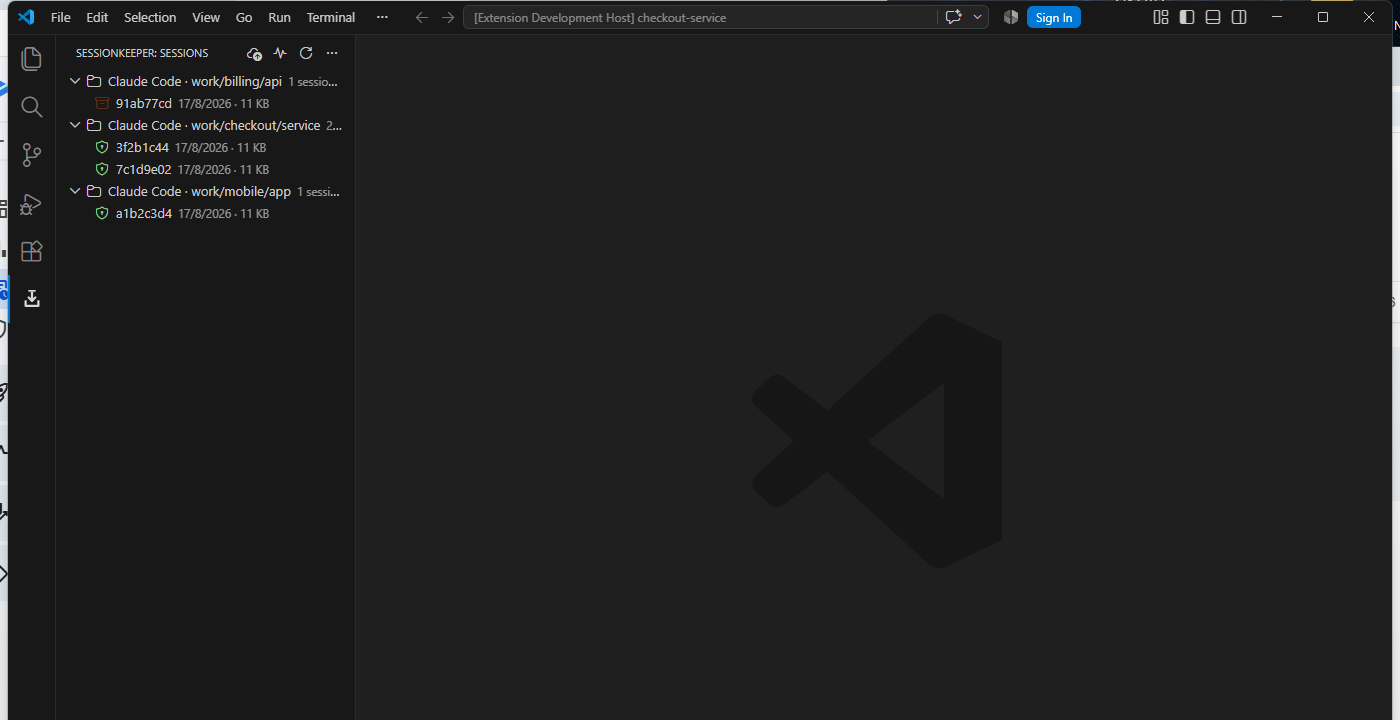
The tree shows each session's state: a green shield means backed up, and the orange archive icon is a session that no longer exists on disk — it lives only in the vault now, and can still be restored and exported.
What it does
- Backs up the whole session, not just the file. A Claude Code session is
<id>.jsonl plus a sibling folder with subagents/ and tool-results/. Copy only the transcript and you keep something that looks complete and isn't. SessionKeeper copies all of it, and your memory/ folder too.
- Incrementally. Transcripts only ever grow, so after the first copy each cycle stores just the new bytes — typically kilobytes, and a fraction of a second. If a file is rewritten or truncated instead of appended to, SessionKeeper notices (it re-checks the start, the end and probes spread through what it already copied) and starts a new version rather than corrupting the old one.
- Restores carefully. It never writes over an existing file without first saving a byte-for-byte copy, it refuses to touch a session that is running right now, and it warns you that a duplicate copy in the wrong folder makes
claude --resume report not found.
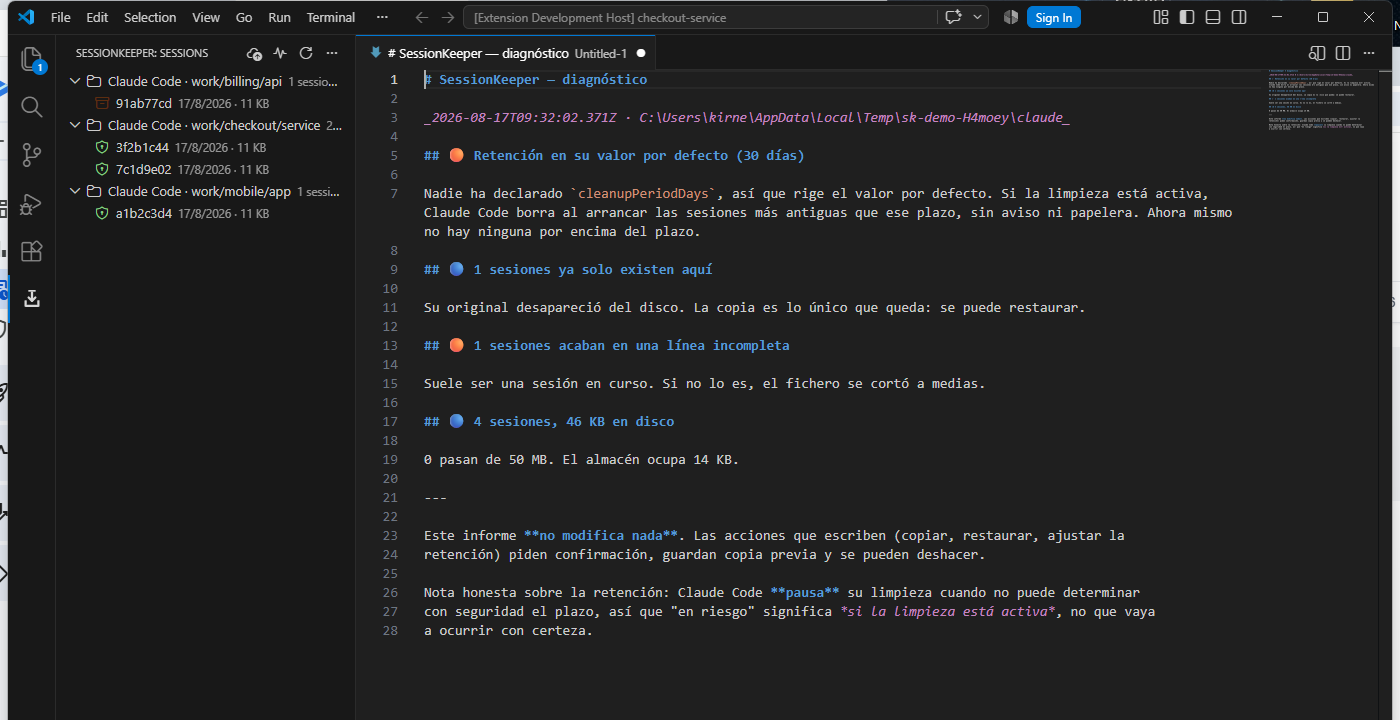
- Tells you what's at risk. The Doctor lists what would fall outside your retention window, which sessions now exist only in the vault, how much space everything takes, and whether your transcripts contain credentials.
- Exports to Markdown, with credentials redacted.
What it does not do
It is not a history viewer. It shows enough to find and rescue a session — no Mermaid, no timelines, no tags. If what you want is to browse your history, Codex History Viewer is free, mature and very good at exactly that; the two work fine side by side.
It does not promise that a restored session will resume. Restoring gives you the bytes back; whether the tool reopens them is the tool's call.
Pro
Everything above is free, for good. Pro adds two things, for a one-time 12 € (7 € with the code LANZAMIENTO until 14 September 2026):
- Continuous watching — sessions get backed up while you work, without pressing anything: every change is copied within 60 seconds at the latest (sooner, 5 s, once the session goes quiet).
- Codex as a second source —
~/.codex/sessions alongside Claude Code.
SessionKeeper Pro: get a licence opens the checkout (Polar is the merchant of record: it invoices you and handles VAT). One key activates three computers, and you can free a slot from your Polar customer portal.
Pro only ever adds. Backing up by hand, restoring, exporting and the Doctor stay free with no licence at all, so a key that expires only turns the watching off — you are never locked out of your own copies.
Our commitment: if we stop developing SessionKeeper, Pro is released for free. The vault is an open format and restore.mjs works without us either way.
Requirements
- VS Code 1.95 or newer.
- Claude Code with its local session files (
~/.claude/projects, or CLAUDE_CONFIG_DIR). Codex support is experimental and off by default.
- Somewhere to keep the vault. Pick a folder you already back up.
Privacy
Everything stays on your machine. No telemetry, no accounts, no network calls. SessionKeeper only ever writes inside the vault folder you choose — plus, if you explicitly ask it to, the file you are restoring. See PRIVACY.md.
Transcripts can contain secrets. Anthropic's own docs say so: if a tool reads a .env or a command prints a credential, the value is written to the transcript. SessionKeeper tells you when it sees credentials, and redacts them on export — but it never edits your files, so treat the vault like the sensitive folder it is, and think twice before pointing it at a cloud-synced drive.
Your copies are yours
The vault is an open format: gzip chunks plus a readable gen.json. Every vault ships with RESTORE.md and a standalone restore.mjs that recover everything without this extension, without a licence, and without us. Backing up, restoring and exporting are free, and will stay free.
Licence
MIT — see LICENSE. Issues and questions: GitHub.

